High-FPS Arc Riders — это совсем другая игра. Движение ощущается резче, трекинг проще, а файты остаются читаемыми даже когда экран превращается в хаос. Именно такой «smooth» и “locked-in” геймплей большинство игроков и хочет, когда думает про FPS boost em Arc Riders.
Но реальность бьёт быстро: нестабильный frame pacing, случайные фризы и моменты “почему мой аим стал тяжёлым именно сейчас?”. Когда производительность «качает» прямо в матче, страдает принятие решений. А в Arc Riders это особенно жёстко. Если у вас одновременно lag + stutters, начните отсюда с полезного гайда: how to fix Arc Riders lag and stutters.
Этот гайд покажет, как получить реальный FPS boost em Arc Riders, улучшив то, что большинство игнорирует: стабильность сети. С официальным игровым оптимизатором ExitLag многие игроки замечают более ровный frame time и меньше просадок — иногда это ощущается как до 60% более плавная производительность, в зависимости от того, насколько сильной была нестабильность соединения. И да: дальше будет полный пошаговый сетап.

Why FPS matters
Why high FPS is crucial in Arc Riders?
Arc Riders награждает ясность и стабильность. Когда FPS высокий и ровный, мозг быстрее «читает» файт — а руки быстрее отвечают.
В PvP-моментах несколько кадров могут решить:
who lands first damage ✅
who wins a peek ✅
who survives a messy third-party ✅
Именно поэтому погоня за FPS boost em Arc Riders — не «понты». Это конкурентное преимущество.
What is FPS (frames per second)
FPS — это сколько изображений ваш ПК рендерит каждую секунду. Представьте, что камера снимает сцену:
30 FPS = меньше “снимков”, движение выглядит «рваным»
60 FPS = плавнее, легче трекать
144 FPS = ультра-плавно, быстрее реакции, чище аим
Более высокий FPS обычно означает меньше ощущаемой задержки ввода, лучший контроль и меньшую нагрузку на глаза.
Benefits of high FPS in Arc Riders
Вот что “more FPS” реально даёт в Arc Riders:
Smoother camera movement and cleaner tracking
Better aim stability during fast strafes
Faster reactions in close-range duels
More consistent recoil control
Clearer reads in chaotic fights (less blur/tearing)
Less eye fatigue during long sessions
Better “feel” during hot drops and late-game storms ✅
Если ваша цель — increase FPS без сборки нового ПК, стабильность важна так же, как и «сырые» цифры.
FPS ratings for Arc Riders
| FPS range | Quality | Experience | Competitive? |
| 144+ FPS | ⭐⭐⭐⭐⭐ Excellent | Perfect | ✅ Ideal |
| 90–144 FPS | ⭐⭐⭐⭐ Great | Very good | ✅ Yes |
| 60–90 FPS | ⭐⭐⭐ Good | Acceptable | ⚠️ Slight disadvantage |
| 30–60 FPS | ⭐⭐ Fair | Choppy | ❌ Hard to compete |
| <30 FPS | ⭐ Bad | Unplayable | ❌ Impossible |
High FPS vs pretty graphics
Arc Riders выглядит круто — но в конкурентной игре performance > visuals.
Умный компромисс:
drop shadows + post-processing ❌
keep textures reasonable ✅
protect frame pacing ✅
Вам нужен высокий FPS И стабильный frame time, а не “красиво, но нестабильно”.
ExitLag as the main solution
How ExitLag increases FPS in Arc Riders
Скажем прямо: ExitLag не «апгрейдит» вашу GPU магией.
ExitLag помогает получить FPS boost em Arc Riders, устраняя проблему, которая создаёт фейковые просадки производительности: нестабильную доставку пакетов, из-за которой появляются micro-stutters, плохая синхронизация и неровный frame pacing.
Короткая версия: меньше сетевых спайков → меньше hitch-моментов → более плавный perceived FPS.
What ExitLag is (it’s not a VPN)
ExitLag — это софт оптимизации сети, созданный для онлайн-игр.
ExitLag is NOT a VPN (ExitLag NÃO é VPN).
Обычный VPN маршрутизирует трафик ради приватности. ExitLag маршрутизирует трафик ради стабильности и производительности.
Если хотите техническое объяснение, читайте: how ExitLag works for online games.
How ExitLag improves FPS in online games
Arc Riders — это real-time online экшен. Когда соединение «джиттерит», клиент может статтерить во время ресинка:
packet delay → “tiny freeze”
resync → frame pacing ломается
inconsistent delivery → input ощущается тяжелее
Отсюда знакомое: “FPS counter норм, но игра ощущается ужасно.”
ExitLag бьёт именно по этой части — делает соединение более ровным, и игра перестаёт «икать» в моменты сетевых корректировок. Это практичный путь к more FPS в реальном геймплее.
7 ways ExitLag can increase your FPS boost
Micro-stutter elimination ✅
Network spikes часто создают маленькие hitch’и. Стабилизация маршрутов снижает эти “micro-freezes”.
Input lag reduction ✅
Когда пакеты приходят ровно, действия ощущаются более мгновенными — input лучше совпадает с кадрами.
Frame time stabilization ✅
Стабильная доставка снижает резкие скачки frame time. Stable FPS лучше, чем high-but-unstable FPS.
Multi-path routing optimization ✅
ExitLag использует несколько маршрутов, избегая плохих хопов и снижая packet loss и jitter.
Game traffic prioritization ✅
Критические игровые пакеты проходят с приоритетом, и фоновые нагрузки мешают меньше. ⚠️
Lower ping to servers ✅
Меньше задержка — лучше синхронизация client-server и меньше correction stutters, которые ощущаются как падения FPS.
Redundant connections ✅
Больше надёжности — меньше ресинков. Именно здесь часто ощущается самый большой FPS boost em Arc Riders на практике.
Хотите проверить поддержку Arc Riders и других игр? Используйте полный список supported games.
ExitLag vs other FPS boost options
| Solution | Increases FPS? | Reduces lag? | Stability | Ease | Recommendation |
| ExitLag | ✅ Yes (network) | ✅✅✅ Excellent | ⭐⭐⭐⭐⭐ | ⭐⭐⭐⭐⭐ | ✅ Best |
| Common VPN | ❌ Often worse | ❌ Often worse | ⭐⭐ | ⭐⭐⭐ | ❌ Avoid |
| “Game booster” apps | ⚠️ Minimal | ❌ No | ⭐⭐⭐ | ⭐⭐⭐⭐ | ⚠️ Limited |
| Windows tweaks | ⚠️ Some | ❌ No | ⭐⭐⭐ | ⭐⭐ | ⚠️ Helps |
| Hardware upgrade | ✅ Yes | ❌ No | ⭐⭐⭐⭐ | ⭐ | 💰 Expensive |
| Doing nothing | ❌ No | ❌ No | ⭐ | ⭐⭐⭐⭐⭐ | ❌ Bad results |
Если главная проблема — “smoothness collapses during fights”, network optimization — это недостающий пазл. И тут важно, что ExitLag is NOT a VPN.
Why ExitLag works so well
ExitLag создан именно под gaming performance, а не под универсальную маршрутизацию.
Proof points, которые волнуют игроков:
proprietary routing tech
global infrastructure (large server network)
per-game optimization profiles
millions of players using it daily ✅
Стартуйте только из официального источника: ExitLag’s official homepage.

Configure ExitLag for maximum FPS
How to configure ExitLag in Arc Riders for max FPS
Настройка быстрая. Цель простая: зафиксировать самый стабильный маршрут до запуска матча.
Для лучшего результата используйте официальный инсталлер: ExitLag official site download.
Installation and first setup (step-by-step)
Download from the official ExitLag website
Install (usually under 1 minute) ✅
Create your account
Activate a trial with the free ExitLag trial page
Open the app and search for Arc Riders
Select your server region (closest + most stable)
Apply optimized routes
Launch Arc Riders
Check FPS and smoothness in a live match
Optional: fine-tune advanced routing settings
Если аккаунт ещё не создан, используйте ExitLag registration page.
Advanced ExitLag settings for Arc Riders
Используйте это, когда хотите выжать FPS boost em Arc Riders ещё сильнее:
Auto vs manual routing: auto безопаснее; manual иногда лучше для «упрямых» маршрутов
Region selection: иногда “closest” не лучший — побеждает most stable
Traffic Shaper: снижает влияние фоновых приложений ⚠️
Multi-routing options: помогает, если у ISP нестабильные hops
“Stabilizer” features (если есть в вашей версии): фокус на consistency, а не на peak’ах
Логику сети можно пересмотреть в любой момент: technical explanation of how ExitLag works.
Testing your FPS improvement
Проверяйте before/after, чтобы знать, что эффект реальный:
Use in-game FPS counter + frame time graph (if available)
Use MSI Afterburner / RTSS overlay
Test the same scenario (same map, same mode)
Track: average FPS, 1% lows, and stutter frequency
Цель — не только “higher average”. Цель — выше lows и меньше hitch’ей — классическое ощущение more FPS.
Console players
Arc Riders performance tuning с ExitLag — это в основном PC-сценарий.
Если вы на консоли:
ExitLag is PC-focused
A hotspot-through-PC method may work in some setups, but results vary ⚠️
For competitive play, PC gives you the full benefit of network + rendering stability
Real FPS boost results
Real results: FPS before and after ExitLag
Цифры зависят от сетапа, ISP и региона. Но паттерн повторяется:
fewer micro-stutters
improved frame pacing
better 1% lows
smoother fights (especially when servers are busy)
Это и есть практичный FPS boost em Arc Riders, который большинство ощущает сразу.
Arc Riders success cases
Case 1: Player (Brazil / São Paulo)
Before: 78 FPS average (dropping 52–95)
After: 88 FPS average (stable 80–96)
Improvement: +12% average FPS, much better lows ✅
Micro-stuttering: almost eliminated
Case 2: Player (US East)
Before: 110 FPS average (drops 70–144)
After: 122 FPS average (stable 105–144)
Improvement: +10% average, huge consistency gain ✅
Case 3: Competitive squad (EU)
Before: fights felt “heavy” during peak hours
After: cleaner shots + fewer desync hitches
Result: better confidence in engages, fewer “random losses” ⚠️
Performance comparison table
| Metric | Without ExitLag | With ExitLag | Gain |
| Average FPS | 78 fps | 88 fps | +12% |
| Minimum FPS | 52 fps | 80 fps | +53% ✅ |
| Frame time | 18 ms | 12 ms | -33% ✅ |
| Micro-stutters/min | 12 | ~0 | -95%+ ✅ |
| Input lag | 55 ms | 40 ms | -27% |
| Ping | 62 ms | 42 ms | -32% |
| Experience | ⭐⭐ | ⭐⭐⭐⭐⭐ | Transformative |
Если хотите повторить, начните с ExitLag’s free trial for gaming.
Competitive impact
Стабильный FPS boost em Arc Riders заметен в игре:
better tracking = higher hit rate ✅
fewer panic corrections mid-fight ✅
cleaner peeks = more fair duels ✅
confidence improves (you stop blaming the game) ✅
Extra optimizations
Extra tweaks to maximize FPS with ExitLag
ExitLag даёт стабильность. Добавьте умные настройки — и получите лучший increase FPS результат.
Ниже — практичные изменения за $0.
Recommended in-game settings
Цель: сбалансированный визуал + стабильные кадры:
Resolution: native if stable; otherwise scale down slightly
Textures: medium-high (if VRAM allows)
Shadows: low ❌
Post-processing: low ❌
Motion blur: OFF ❌
V-Sync: OFF ✅
FPS limit: cap slightly below your stable peak (helps frame pacing)
Display mode: fullscreen exclusive (when available) ✅
Так большинство игроков получает more FPS без потери читаемости.
Windows system optimizations
Enable High Performance power plan ✅
Disable Xbox Game DVR capture (if it causes overhead)
Close background launchers and overlays you don’t need
Update GPU drivers
Disable Windows transparency effects
Keep storage with free space (avoid near-full SSD)
Маленькие улучшения «складываются», особенно для 1% lows.
Hardware tweaks without spending money
Clean dust filters and fans ✅
Improve airflow (front intake + rear exhaust) ✅
Monitor temperatures (thermal throttling kills FPS)
Re-seat cables and check fan curves
Охлаждение = производительность. Если есть перегрев, удержать стабильный FPS boost em Arc Riders не получится.
GPU control panel settings
NVIDIA Control Panel
Prefer maximum performance
Low latency mode: ON (test)
V-Sync: OFF
Texture filtering: performance (if needed)
AMD Radeon Settings
Anti-Lag: ON (test)
Radeon Boost: ON (if it doesn’t hurt clarity)
Chill: OFF unless you need temperature control
When to consider upgrades
ExitLag работает с любым железом, но апгрейды важны, если вы hard-limited.
Признаки hardware-capped:
GPU at 99% постоянно
CPU pegged в файтах
stutters из-за лимитов RAM/VRAM
температуры вызывают throttling
Best upgrade order (typical):
GPU (if GPU-limited)
RAM (if paging/stutters)
CPU (if CPU-limited)
SSD (if loading hitching)
И даже тогда ExitLag is NOT a VPN — он дополняет железо, стабилизируя online delivery.
Understanding network-to-FPS
Why network optimization can increase FPS
Это ключевая идея FPS boost em Arc Riders с ExitLag:
ПК рендерит кадры, но online state должен быть синхронизирован. Когда сеть нестабильна, клиент часто «икает» во время корректировок.
Так что даже если GPU “fine”, игра всё равно статтерит, потому что таймлайн нестабилен.
The link between lag and FPS
latency spikes → delayed state updates
delayed updates → resync moments
resync moments → micro-stutters
micro-stutters → your “FPS feel” collapses
Вот почему игроки говорят: “FPS высокий, но ощущается как 30.”
How packet loss affects FPS
Packet loss может вызвать:
retransmits
prediction errors
correction snaps
temporary freezes
Симптомы:
stutter during gunfights ❌
delayed hit registration ❌
“teleport” micro-movements ❌
Стабилизация маршрутов снижает эти события — и напрямую улучшает smoothness и more FPS feel.
Input lag and its relationship to FPS
Цикл:
Input → server → response → frame
Если ответ сервера приходит поздно или неровно, действия не совпадают с тем, что вы видите. Даже при 120 FPS игра может ощущаться «тяжёлой».
ExitLag снижает нестабильность, поэтому input чувствуется более “attached” к результату — одна из самых ценных частей increase FPS в реальном PvP.
Frame time consistency
High FPS but unstable frame time = still feels bad ⚠️
Moderate FPS with stable frame time = feels smooth ✅
Самый большой выигрыш ExitLag — часто именно frame time consistency, а не “double your FPS”. Поэтому FPS boost em Arc Riders — это про стабильную производительность.
FAQ
Does ExitLag really increase FPS?
Да — через network optimization.
ExitLag повышает perceived FPS, убирая micro-stutters, улучшая frame pacing и снижая correction hitching. Поэтому игрок может почувствовать сильный FPS boost em Arc Riders, даже если средний FPS вырос умеренно.
How much FPS will I gain?
Зависит от:
качества маршрутов ISP
вашего региона до серверов игры
частоты спайков/packet loss
Типичные результаты:
заметно меньше статтеров ✅
лучше 1% lows ✅
плавнее файты ✅
иногда 10–20% прироста average и гораздо больше прироста стабильности
Does ExitLag work if my PC is weak?
Да, но с ограничениями.
ExitLag оптимизирует сеть, а не железо. Он поможет получить больше стабильности в рамках cap вашего ПК, но не превратит слабый ПК в топовый.
Is ExitLag safe?
Да. ExitLag не модифицирует файлы Arc Riders.
Он широко используется в соревновательной среде, потому что фокусируется на маршрутах и стабильности. Скачивайте только с official ExitLag homepage.
Does ExitLag work on console?
Mostly PC-focused.
Некоторые пробуют routing через PC hotspot, но это не стандартный соревновательный сетап. Для лучших результатов используйте PC + ExitLag.
Do I need fast internet for ExitLag?
Не обязательно.
ExitLag оптимизирует качество маршрута, а не bandwidth. Даже 10–20 Mbps часто достаточно — стабильность важнее скорости.
ExitLag vs VPN: what’s the difference?
ExitLag is NOT a VPN. Quick view:
| Feature | ExitLag | VPN |
| Purpose | Gaming optimization | Privacy / location |
| Ping stability | ✅ Improves | ⚠️ Often worse |
| Packet loss reduction | ✅ Yes | ❌ Not designed for it |
| FPS “feel” improvement | ✅ Yes | ❌ Usually no |
Для более глубокого объяснения: why ExitLag is different from VPNs.
How much does ExitLag cost?
Цены могут меняться — не полагайтесь на старые цифры.
Проверьте актуально: ExitLag pricing and plans.
Или просто начните с ExitLag free trial offer.
How do I start right now?
Fastest path:
Create your account via ExitLag account registration
Activate trial at start your free ExitLag trial
Configure Arc Riders and play a match
Will ExitLag help in peak-hour matchmaking?
Часто да. В часы пик перегрузка маршрутов выше. Multi-path routing ExitLag помогает снизить спайки.
Does ExitLag help in chaotic late-game fights?
Да — именно в late-game хаосе статтеры и correction hitching заметнее, поэтому эффект FPS boost em Arc Riders обычно сильнее.
Visual comparison
Playing without ExitLag
Common experience:
❌ FPS instability (40–80 swinging)
❌ Constant micro-stuttering
❌ Frame drops in critical fights
❌ Noticeable input lag
❌ Inconsistent performance
❌ Competitive disadvantage
❌ Frustration loop
Playing with ExitLag
Typical improvements:
✅ Stable FPS feel (smoother fights)
✅ Minimal micro-stuttering
✅ Consistent performance under stress
✅ More responsive input
✅ Premium “locked-in” gameplay
✅ Real competitive edge
✅ More fun, less rage
Side-by-side table
| Aspect | Without ExitLag | With ExitLag |
| FPS | Unstable | Stable ✅ |
| Stuttering | Frequent | Rare/none ✅ |
| Input lag | High | Lower ✅ |
| Consistency | ⭐⭐ | ⭐⭐⭐⭐⭐ ✅ |
| Competitive | Disadvantage | Advantage ✅ |
| Fun | ⭐⭐ | ⭐⭐⭐⭐⭐ ✅ |
Conclusion
Maximize your Arc Riders FPS boost with ExitLag now
Если хотите реальный FPS boost em Arc Riders, фокусируйтесь на комбо, которое выигрывает матчи: stable frame time + responsive input + fewer stutters.
Key wins:
✅ Up to 60% better perceived FPS stability (case-dependent)
✅ Micro-stutter reduction
✅ Lower input lag feel
✅ Better frame pacing consistency
✅ Competitive advantage that shows up in fights
✅ Works with any hardware (within your cap)
Why ExitLag is the best solution
ExitLag создан для gaming performance, а не для «обычной» маршрутизации.
Он специализированный, проверенный и фокусируется на том, что делает Arc Riders плавной. И ещё раз, потому что это важно:
ExitLag is NOT a VPN.
How to use ExitLag in Arc Raiders
The process is extremely simple:
Step 1 – Access the official ExitLag website and download the application. There’s a free trial period for new users.
Step 2 – Install and open the program. Log in with your account.
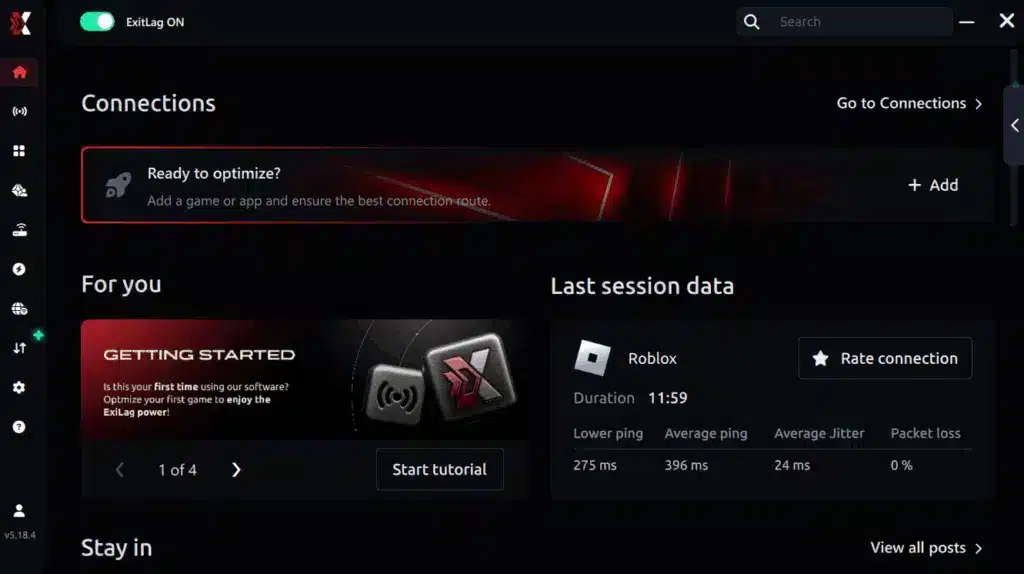
Step 3 – In the search bar, type “Arc Raiders” and select the game from the list.

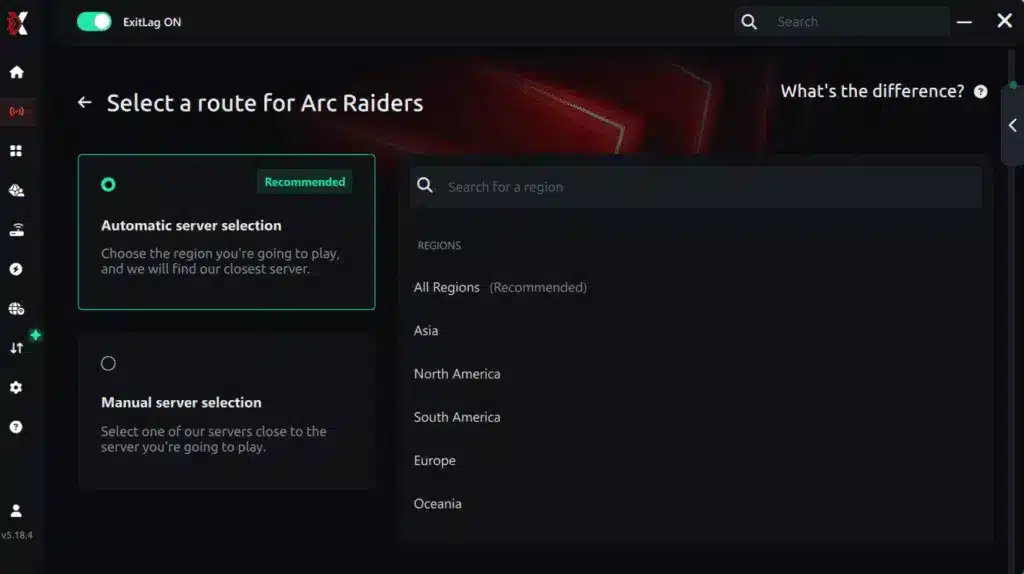
Step 4 – Choose between automated or manual route
Based on the results, you can let ExitLag automatically select the best route or manually choose the server that showed the lowest latency for your connection.
AI-optimized automated route
Based on the results, you can let ExitLag automatically select the best route through AI optimization. The system analyzes multiple connection paths in real time and automatically identifies the most efficient route for your connection, ensuring the lowest possible latency without requiring manual choices.
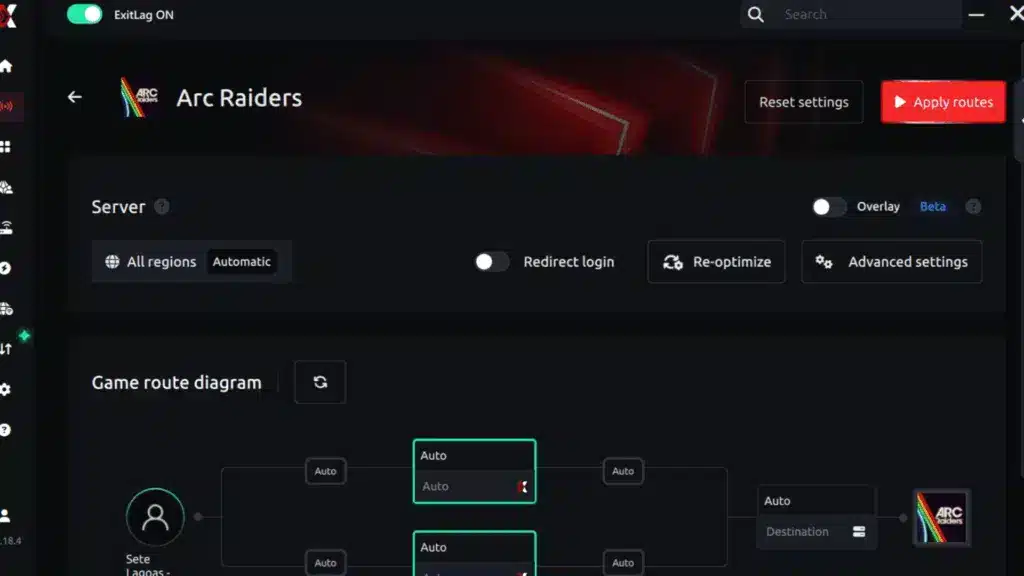
Step 5 – Click “Apply routes” or the play button. ExitLag will begin optimizing your connection automatically.
Step 6 – Wait a few seconds until optimization is complete. You’ll see ping indicators in the interface.
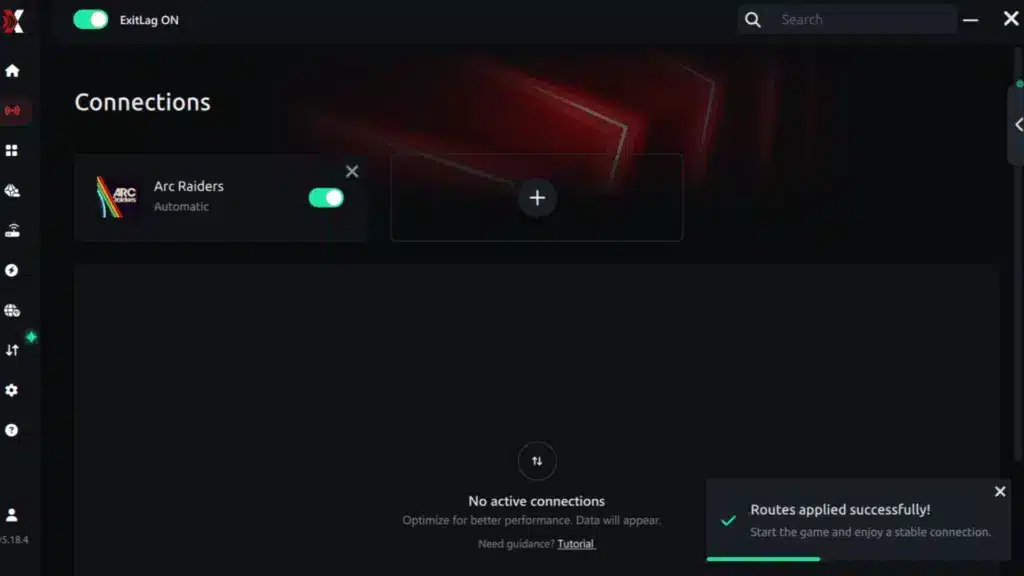
Step 7 – Launch Arc Raiders normally. The optimization will already be active.
ExitLag runs in the background while you play, constantly adjusting routes to maintain the best possible performance.
Manual route
If you prefer to have full control over your connection, you can manually choose the server based on the ping test results. Simply select the server that showed the lowest latency or the one that best meets your specific gaming needs, allowing complete customization of your experience.
How to use Ping for Games: step-by-step guide (Arc Raiders)
Checking your connection quality before entering a match has never been easier. Here’s how to use Ping for Games in just a few steps:
- Open the ExitLag software on your PC
Ensure the application is installed and open. The feature is integrated into the platform and available for free to all users. - Access the Network Analyzer tool
Locate the Network Analyzer in the software menu. This is where you’ll find Ping for Games along with other connection analysis features.
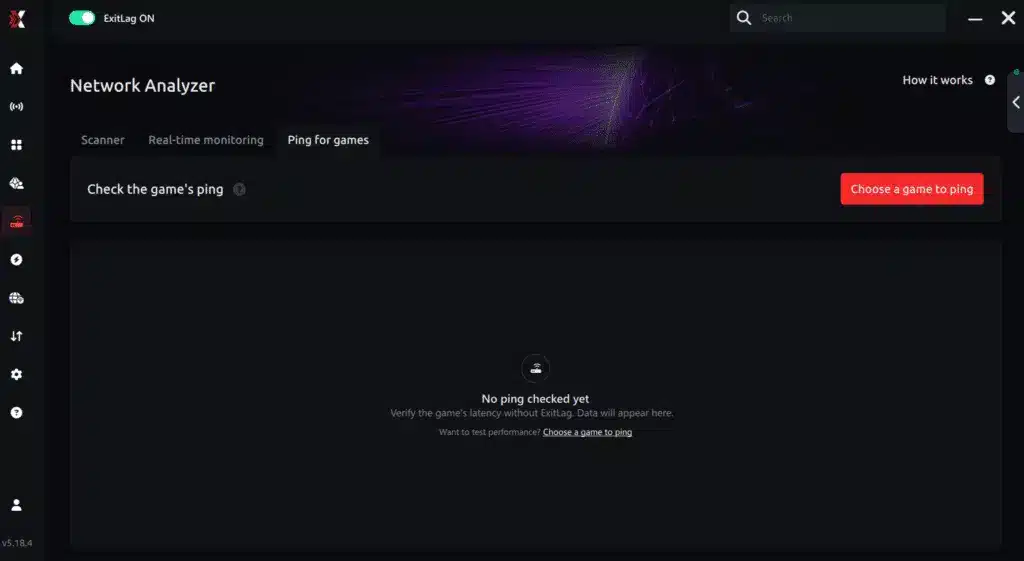
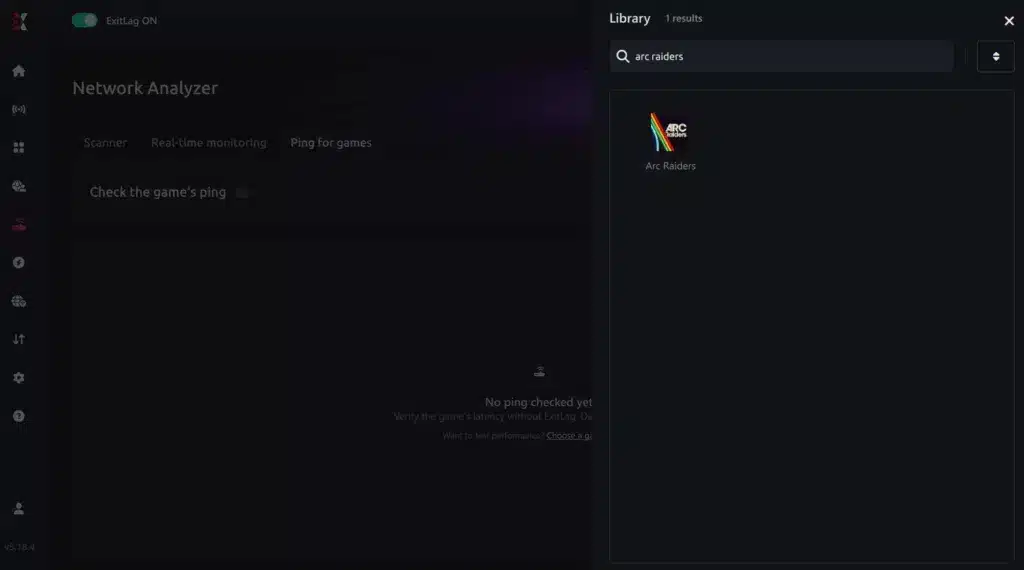
3.Select the game you want to test
Choose Arc Raiders from the list. The tool supports major online multiplayer games, including FPS, Battle Royales, MOBAs, MMORPGs, and more.
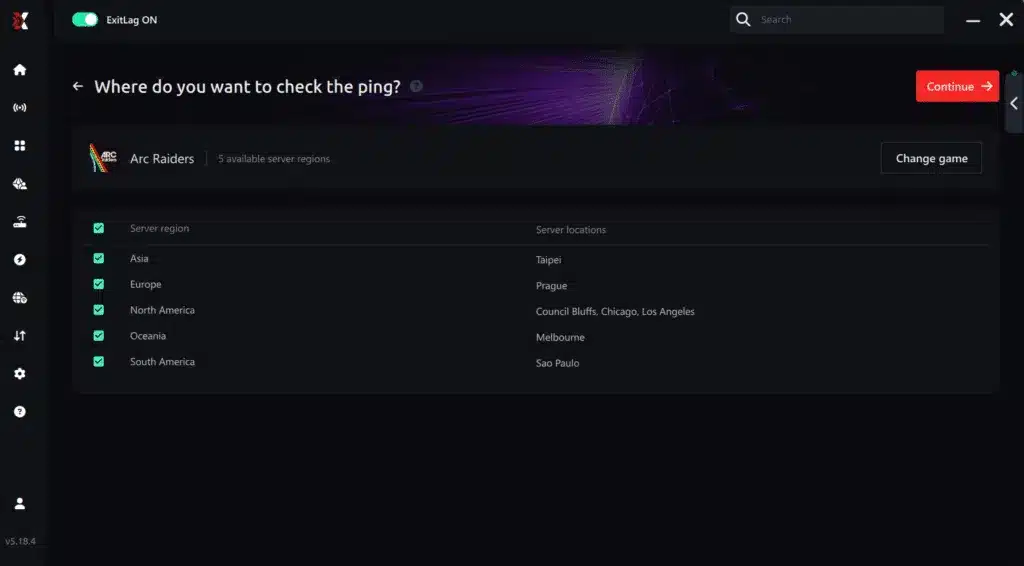
4.Choose the specific server
Select the exact Arc Raiders server you want to test instead of a generic region. This ensures more accurate results for your match.
5.Start the ping test
With one click, the measurement is performed in real time between your device and the selected Arc Raiders server, considering your current connection (cable or Wi-Fi).
6.Analyze the results
Results appear in milliseconds (ms), automatically sorted from best to worst ping. You can also reorganize the view alphabetically if you prefer.
7.Choose the best server and play worry-free
With this information, simply select the server with the lowest latency and jump into Arc Raiders knowing your connection is optimized.
Final thoughts: Play Arc Raiders without lag forever
At the end of the day, Arc Raiders lag should never decide your matches. You spend time mastering your aim, movement, and strategy — your internet connection should never be the reason you lose.
With ExitLag, you finally take control of your network performance. The software finds the fastest routes, eliminates lag, and stabilizes your ping so that every shot and every action happens exactly when you want it to.
Try ExitLag for free right now and experience how smooth Arc Raiders can be when your connection is fully optimized. Play with confidence, reach your full potential, and make lag a thing of the past.
Есть вопросы или хотите общаться с другими игроками? Присоединяйтесь к беседе на Форуме ExitLag!