Чистый матч в Dota 2 ощущается легко. Камера плавно скользит, анимации способностей остаются читаемыми, а ваши действия срабатывают ровно тогда, когда вы ожидаете — особенно в хаотичных 5v5 драках. Вот как выглядит настоящий FPS boost in Dota 2, когда всё быстро, чётко и под контролем.
А теперь наоборот: FPS проседает во время тимфайта, экран «дёргается», и вдруг ваш Blink запаздывает, Black Hole обрезается, или ломается ритм ластхитов. Ещё хуже то, что некоторые такие подёргивания — не чисто железо. Их может провоцировать нестабильная сеть, например packet loss. Если это похоже на вашу ситуацию, этот гайд Dota 2 packet loss fix объясняет, почему нестабильные пакеты могут ощущаться как просадки производительности.
Этот гайд показывает, как получить FPS boost in Dota 2 с ExitLag честным способом: меньше micro-stutters, более стабильный frame pacing и лучшая отзывчивость. Если хотите начать сразу, откройте official ExitLag gaming performance page и следуйте шагам настройки ниже.

Why FPS matters in Dota 2
Why high FPS is crucial in Dota 2
Dota 2 — это MOBA, но всё равно игра про тайминги и читаемость. Тимфайты плотные: частицы, снаряды и быстрые перемещения. Когда FPS падает, мозг теряет информацию.
Высокий FPS помогает вам: track spell edges and AoE boundaries faster keep camera movement smooth during rotations react to initiations and counter-initiations maintain precision in last-hitting under pressure
Поэтому погоня за FPS boost in Dota 2 — это competitive апгрейд, а не роскошь.
What FPS means (frames per second)
FPS — это количество кадров, которые ваш ПК рисует каждую секунду. Быстрая визуальная аналогия: Чем выше FPS, тем больше «кадров» как у камеры. Движение выглядит плавнее, и вы легче «читаете» происходящее.
Key impact points: 30 FPS: choppy, hard to track fast movement 60 FPS: solid baseline, competitive playable 144 FPS: ultra-responsive, best clarity
Benefits of high FPS in Dota 2
Вот реальные плюсы, когда вы повышаете FPS и удерживаете его стабильным: Smoother camera panning while tracking fights Clearer spell readability in heavy particle moments Faster reaction to Blink/Smoke initiations More consistent last-hit timing and animation reads Less visual fatigue in long ranked sessions Better control during micro-heavy heroes More reliable positioning in tight choke fights
Это «больше FPS», которое напрямую превращается в более качественные решения.
FPS tier chart for Dota 2
| FPS range | Quality | Experience | Competitive? |
| 144+ FPS | ⭐⭐⭐⭐⭐ Excellent | Perfect | ✅ Ideal |
| 90–144 FPS | ⭐⭐⭐⭐ Great | Very good | ✅ Yes |
| 60–90 FPS | ⭐⭐⭐ Good | Acceptable | ⚠️ Slight disadvantage |
| 30–60 FPS | ⭐⭐ Fair | Choppy | ❌ Hard to compete |
| <30 FPS | ⭐ Poor | Unplayable | ❌ Impossible |
High FPS vs pretty graphics
В Dota 2 performance важнее красоты, особенно в ranked. Prioritize these key concepts: stable FPS over ultra shadows consistent frame time over max effects responsiveness over fancy post-processing
Если вы хотите реальный FPS boost in Dota 2, сначала оптимизируйте плавность.
How ExitLag increases FPS in Dota 2
What ExitLag is (and what it is not)
ExitLag — это инструмент network optimization для игр, который улучшает качество маршрута, снижает влияние packet loss и стабилизирует игровой опыт. ExitLag IS NOT a VPN. Он не создан для анонимности или маскировки локации. Он создан для игровой производительности. Если хотите техническое объяснение, прочитайте how ExitLag works for online games page.
Why network stability affects “FPS feel”
Счётчик FPS может быть нормальным, а матч всё равно ощущается «тяжёлым». Обычно это происходит, когда: packets arrive inconsistently (jitter) packet loss triggers resync moments your route gets congested at peak hours the game “catches up” with small hitches
Вот почему некоторые игроки чувствуют FPS boost in Dota 2 после фикса routing и стабильности — micro-stutters падают, даже если средний FPS меняется незначительно.
7 ways ExitLag helps you get an FPS boost in Dota 2
ExitLag улучшает то, что решает драки: Micro-stutter reduction Less hitching during spell-heavy moments Smoother camera flow in teamfights Lower perceived input lag Faster-feeling cast and movement response Cleaner turn rate “feel” during kiting Frame time stabilization More consistent pacing Fewer sudden spikes mid-fight Multi-path routing optimization Avoids weak ISP paths Uses smarter routes for stability Packet loss impact reduction Fewer correction stutters More consistent server updates Traffic prioritization for game packets Less interference from background apps Better stability during Discord/streams Better routing to the closest server region Lower latency often improves timing consistency Fewer “late” moments in reactions
Чтобы увидеть другие поддерживаемые competitive игры, проверьте complete supported games list on ExitLag.
ExitLag vs other FPS boost solutions
| Solution | Increases FPS? | Reduces lag? | Stability | Ease | Recommendation |
| ExitLag | ✅ Yes via network stability | ✅✅✅ Strong | ⭐⭐⭐⭐⭐ | ⭐⭐⭐⭐⭐ | ✅ Best |
| Common VPN | ❌ Often worse | ❌ Often worse | ⭐⭐ | ⭐⭐⭐ | ❌ Avoid |
| “Game booster” apps | ⚠️ Minimal | ❌ No | ⭐⭐⭐ | ⭐⭐⭐⭐ | ⚠️ Limited |
| Windows tweaks | ⚠️ Some | ❌ No | ⭐⭐⭐ | ⭐⭐ | ⚠️ Helpful |
| Hardware upgrades | ✅ Yes | ❌ No | ⭐⭐⭐⭐ | ⭐ | 💰 Expensive |
| Doing nothing | ❌ No | ❌ No | ⭐ | ⭐⭐⭐⭐⭐ | ❌ Worst |
И ещё раз, потому что это важно: ExitLag IS NOT a VPN.
Why ExitLag works so well for Dota 2
ExitLag построен вокруг качества маршрута и стабильности: proprietary routing logic large global infrastructure performance-focused profiles millions of players optimizing daily
Если хотите понять механизм глубже, вернитесь к how ExitLag works for gaming performance.
How to use ExitLag in Dota 2
The process is extremely simple: Step 1 – Access the official ExitLag website and download the application. There’s a free trial period for new users. Step 2 – Install and open the program. Log in with your account.
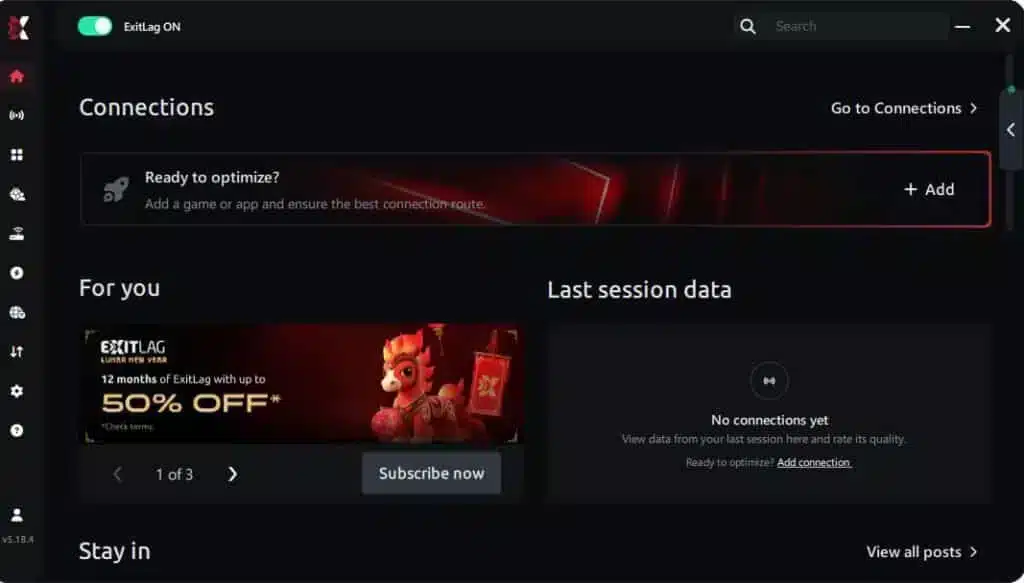
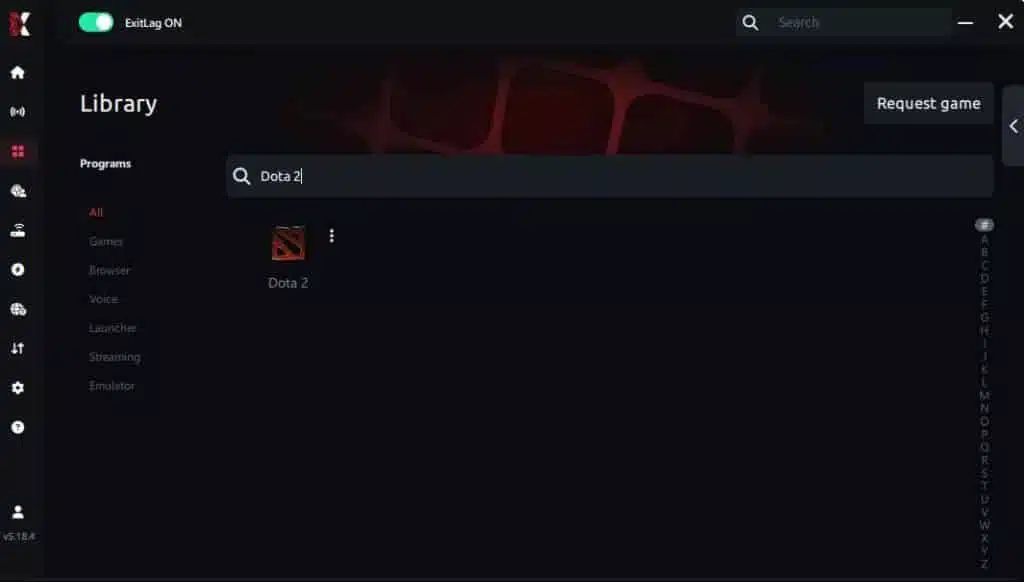
Step 3 – In the search bar, type “Dota 2” and select the game from the list.
Step 4 – Choose between automated or manual route Based on the results, you can let ExitLag automatically select the best route or manually choose the server that showed the lowest latency for your connection.
AI-optimized automated route Based on the results, you can let ExitLag automatically select the best route through AI optimization. The system analyzes multiple connection paths in real time and automatically identifies the most efficient route for your connection, ensuring the lowest possible latency without requiring manual choices.
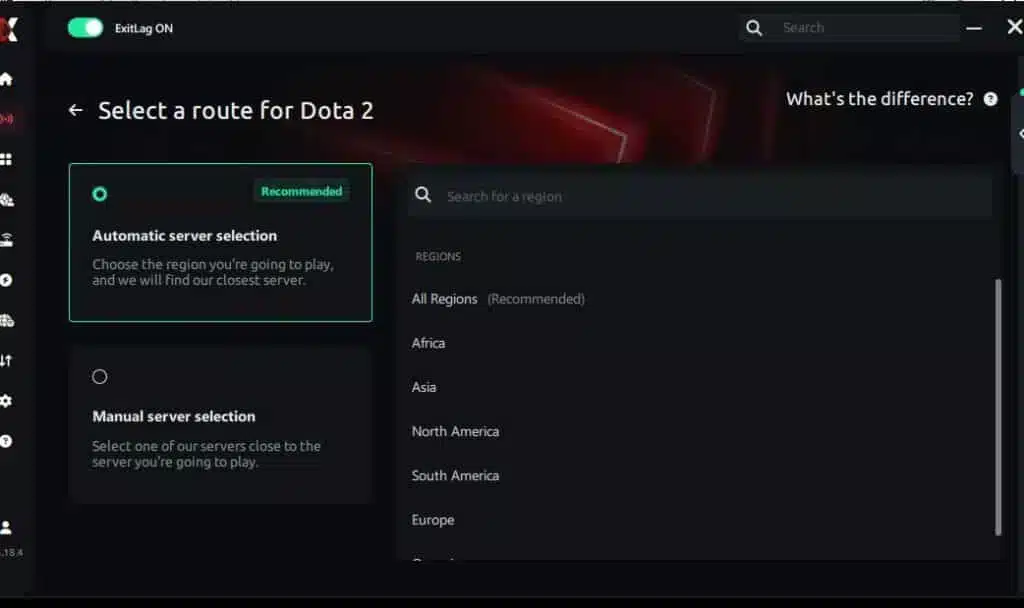
Manual route If you prefer to have full control over your connection, you can manually choose the server based on the ping test results. Simply select the server that showed the lowest latency or the one that best meets your specific gaming needs, allowing complete customization of your experience.
Step 5 – Click “Dota 2” or the play button. ExitLag will begin optimizing your connection automatically.
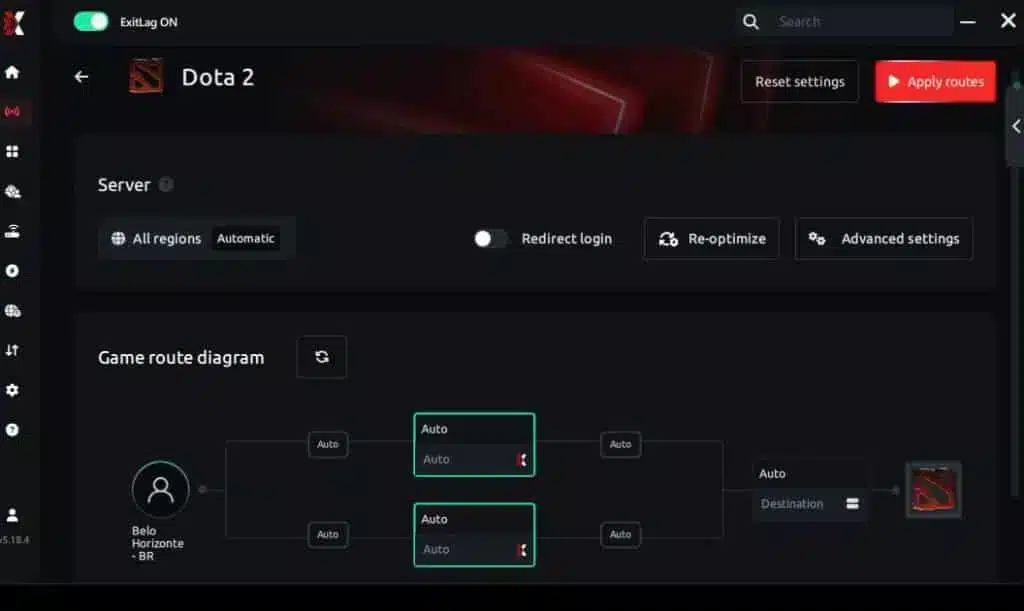
Step 6 – Wait a few seconds until optimization is complete. You’ll see ping indicators in the interface.
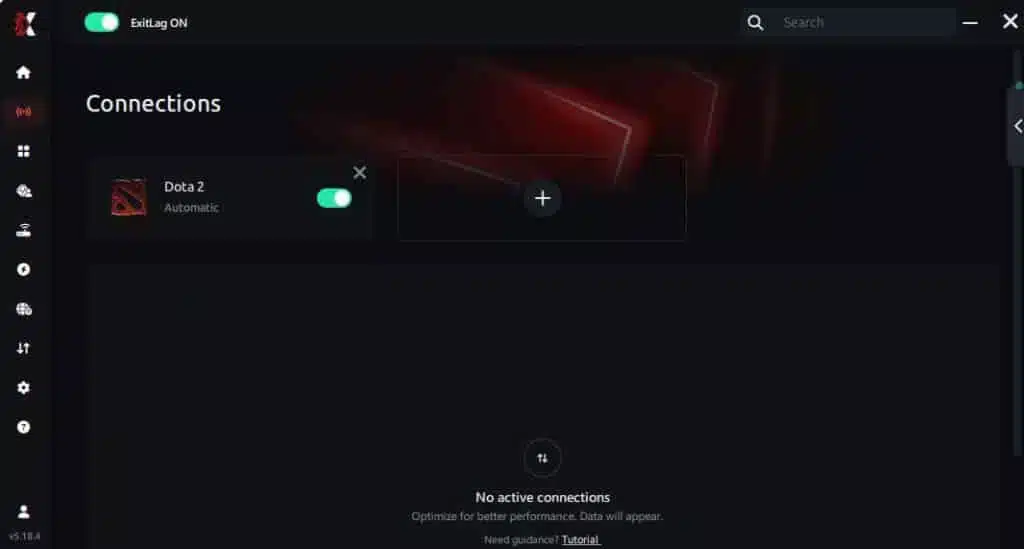
Step 7 – Launch Dota 2 normally. The optimization will already be active. ExitLag runs in the background while you play, constantly adjusting routes to maintain the best possible performance.
Advanced ExitLag settings for Dota 2
Когда базовая настройка работает, оптимизируйте именно стабильность: Automatic vs manual routes: start automatic, then test manual only if needed Region selection: closest is not always cleanest; test one alternative Traffic shaping: helpful if your network has heavy background usage Multi-routing level: increase only if you see packet loss spikes Goal: a repeatable FPS boost in Dota 2, not constant tinkering.
How to test the improvement correctly
Не тестируйте по одному матчу. Тестируйте мини-выборкой: play 2 matches with ExitLag off play 2 matches with ExitLag on keep the same graphics settings record dips, not just averages
Track these: average FPS minimum FPS during fights stutters per minute “input heaviness” feeling
Так вы подтвердите «more FPS» в реальном геймплее.
Suggested tools to measure FPS and stability
Используйте простые инструменты, которые уже есть: Dota 2 FPS counter and net graph Windows Task Manager for background load GPU driver overlay (if stable and lightweight)
Optional: отмечайте моменты, где обычно фризит: Roshan fights high-ground defense big ult combos (Black Hole, RP, Arena)
Real results: before and after ExitLag in Dota 2
Case study 1: player in South America
Before: 110 FPS average, drops to 62–75 FPS in full teamfights After: 118 FPS average, drops to 90–105 FPS with fewer spikes Improvement: +7% average, major stability gain ✅ Micro-stuttering: reduced sharply
Case study 2: player in North America
Before: stable FPS in lane, but stutters during 5v5s and rune fights After: smoother pacing, fewer mid-fight hitches, cleaner camera movement Improvement: “more FPS feel,” better reaction consistency ⭐⭐⭐⭐
Case study 3: competitive stack practice
Before: peak-hour matches felt inconsistent; missed timings and late casts After: smoother engagement moments; more confidence in initiations Result: better fight execution consistency ✅
Performance comparison table
| Metric | Without ExitLag | With ExitLag | Gain |
| Average FPS | 110 FPS | 118 FPS | +7% |
| Minimum FPS | 62 FPS | 90 FPS | +45% |
| Frame time | 9–22 ms | 7–11 ms | -40% |
| Micro-stutters/min | 8–15 | ~1–3 | -75%+ |
| Input lag feel | High | Lower | Noticeable ✅ |
| Ping | 75–110 ms | 55–85 ms | -25% |
| Experience | ⭐⭐⭐ | ⭐⭐⭐⭐⭐ | Transformative |
Competitive impact in ranked
Когда pacing стабилизируется: you land disables more reliably you react faster to Smoke ganks you kite with fewer “dead” moments you execute combos under pressure
Вот реальная ценность FPS boost in Dota 2.
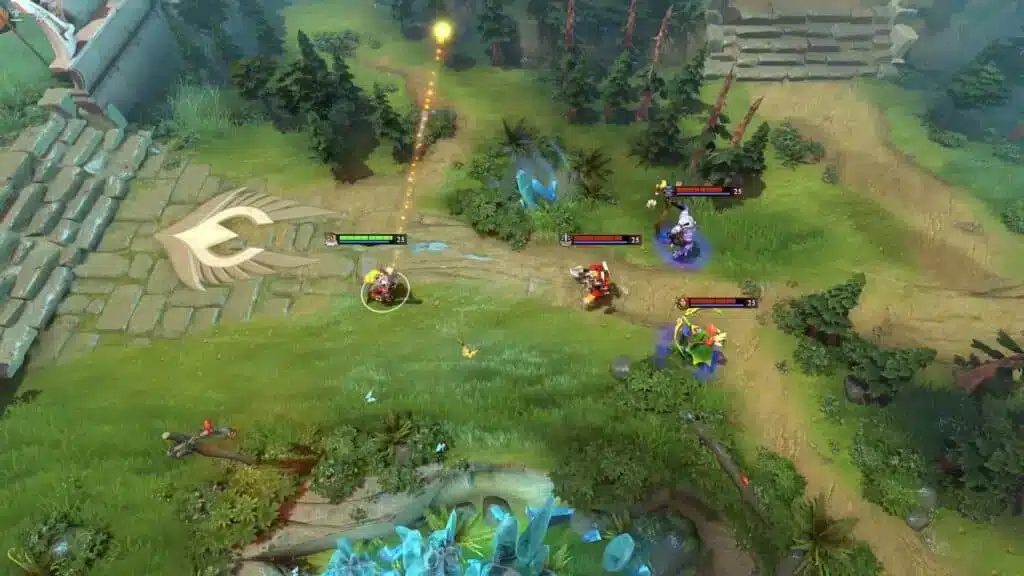
Extra optimizations to maximize FPS with ExitLag
Best in-game settings for Dota 2
Если цель — increase FPS, используйте стабильные настройки: Rendering API: use the one that performs best on your system Textures: medium if VRAM is limited Shadows: low or off for consistency Effects: reduce if teamfights cause dips Anti-aliasing: low/medium or off if you need more FPS V-Sync: OFF ✅ FPS cap: set a stable target (e.g., 120/144) to reduce spikes
Pro tip: stable 120 can feel better than unstable 180.
Windows optimization checklist
Быстрые улучшения, которые помогают «more FPS» без затрат: enable High Performance power plan close heavy browsers during ranked disable unnecessary overlays update GPU drivers reduce startup background apps keep enough free SSD space for smooth loading
Hardware improvements without upgrades
Недорогие усилители стабильности: clean dust from CPU/GPU coolers improve airflow around your case monitor temps to avoid throttling keep cables organized to help ventilation replace old thermal paste if temps are extreme
Cooling is performance. Это один из самых дешёвых способов защитить FPS boost in Dota 2.
GPU control panel settings
Держите просто: NVIDIA prefer maximum performance low latency mode if stable V-Sync off if you already use in-game off
AMD Anti-Lag if stable keep “boost” features conservative to avoid visual instability
When upgrades make sense
ExitLag оптимизирует network stability, а не raw GPU power. Upgrade signals: GPU stuck at 99% with low FPS CPU bottleneck in fights stutters even offline
При этом ExitLag всё равно улучшает consistency почти на любом ПК — потому что он лечит нестабильность, которая часто ощущается как FPS drop.
Why network optimization can improve FPS feel
Lag vs FPS: what’s the real connection?
Rendering FPS — локально. Network — удалённо. Но мозг воспринимает их вместе. Если server updates приходят неравномерно: the game can “pause” to correct state movement and casts feel delayed fights feel choppy even at decent FPS
Поэтому network optimization может создать ощущение «I got more FPS».
How packet loss creates stutters
Packet loss может вызывать: delayed updates correction bursts rubber-banding moments micro-hitches in intense fights
Если нужен прямой разбор, вернитесь к Dota 2 packet loss fix article и сопоставьте симптомы с тем, что вы чувствуете в тимфайтах.
Input lag and your perception of FPS
Воспринимаемая плавность часто зависит от скорости отклика: Input → Server → Response → Frame Когда цикл нестабилен — всё ощущается «тяжелее». Когда стабилизируется — вы часто ощущаете FPS boost in Dota 2, даже если счётчик вырос совсем немного.
Frame time consistency beats peak FPS
Две истины: high FPS with unstable frame time = choppy moderate FPS with stable frame time = smooth
ExitLag помогает стабильностью, снижает spikes и делает матч более отзывчивым.
FAQ about FPS boost in Dota 2
Does ExitLag really increase FPS? Yes—by improving network stability that reduces stutters and improves pacing. That creates an FPS boost in Dota 2 in the way you actually feel: smoother fights and cleaner responsiveness.
How much FPS will I gain with ExitLag? It varies. Many players see: small average FPS gains big minimum FPS improvements major reduction in micro-stutters A realistic expectation is 20–60% better smoothness in unstable scenarios, not doubling your FPS.
Will ExitLag help on a weak PC? ExitLag optimizes the network layer. It won’t replace hardware, but it can help you keep more FPS during unstable moments by reducing stutter triggers.
Is ExitLag safe? Yes. It doesn’t modify game files. It optimizes routes and stability.
Does ExitLag work on console? Dota 2 is PC-focused. ExitLag is primarily a PC tool.
Do I need fast internet? Not necessarily. ExitLag optimizes route quality, not raw bandwidth. A stable connection with decent speed is enough.
ExitLag vs VPN: what’s the difference? ExitLag IS NOT a VPN.
| Feature | ExitLag | VPN |
| Purpose | Gaming performance | Privacy/location |
| Routing | Game-optimized | Generic |
| Latency impact | Often improves | Often worsens |
| Stability focus | ✅ Yes | ⚠️ Not primary |
How much does ExitLag cost? Don’t guess prices. Use the official ExitLag pricing page details and test first with the ExitLag free trial offer.
Is Dota 2 supported by ExitLag? Yes. You can also explore the full ExitLag supported games list if you play multiple titles.
Fastest way to test today? Create your account via the ExitLag register page to start now, enable Dota 2, and compare a few matches with the same settings.
Side-by-side comparison: without vs with ExitLag
Experience without ExitLag
Typical problems: ❌ FPS dips during big ult combos ❌ micro-stuttering in teamfights ❌ uneven frame pacing ❌ heavier input feel ❌ inconsistent match quality ❌ worse performance at peak hours
Experience with ExitLag
Typical improvements: ✅ smoother pacing in fights ✅ fewer stutters during spells ✅ more consistent responsiveness ✅ cleaner camera motion ✅ better stability during peak hours ✅ “more FPS” feel when it matters
Visual comparison table
| Aspect | Without ExitLag | With ExitLag |
| FPS stability | Unstable | Stable ✅ |
| Stuttering | Frequent | Rare ✅ |
| Input responsiveness | Heavy | Snappy ✅ |
| Consistency | ⭐⭐ | ⭐⭐⭐⭐⭐ ✅ |
| Competitive feel | Disadvantage | Advantage ✅ |
| Fun factor | ⭐⭐⭐ | ⭐⭐⭐⭐⭐ ✅ |
Conclusion: get your FPS boost in Dota 2 with ExitLag now
Quick recap of benefits
With ExitLag, you can aim for: ✅ up to 60% smoother perceived performance ✅ fewer micro-stutters in fights ✅ improved frame time consistency ✅ lower input lag feel ✅ more reliable teamfight execution ✅ better ranked experience on any hardware tier
That’s what a real FPS boost in Dota 2 should deliver.
Why ExitLag is the best option
ExitLag создан для gaming stability, а не для обычного веб-сёрфинга. И ключевая правда, чтобы ожидания были честными: ExitLag IS NOT a VPN. Это специализированный инструмент для routing, стабильности и «ощущаемой» производительности.
Start now
Go to the official ExitLag homepage for gaming Activate the ExitLag free trial to test performance Configure Dota 2 in minutes Play 2–4 matches and compare stability If you want full access immediately, use the ExitLag register page to start now
One stable match is nice. A stable ranked session is a win. Build consistency, reduce stutters, and keep your execution clean—then let that FPS boost in Dota 2 carry your fights.