

Tibia в лучшем виде — это чистый flow: точное движение, мгновенные реакции, стабильный тайминг заклинаний и плавные повороты камеры, пока вы охотитесь, kite’ите и управляете hotkeys без задержек. Когда всё стабильно, вы быстрее принимаете лучшие решения — и именно так ощущается настоящий FPS boost in Tibia.
Но даже в «лёгкой» MMORPG производительность всё равно может вести себя странно. У вас может быть нормальный FPS, но при этом ощущаться микрофризы, задержки действий или дерганый pacing в людных местах, на wars и в интенсивных hunts. Поэтому погоня за FPS boost in Tibia — это не только про графические настройки, но и про консистентность.
Когда проблема связана с packet loss или нестабильной маршрутизацией, начните отсюда: Tibia packet loss troubleshooting guide. Он помогает выявить сетевые паттерны, которые часто вызывают stutter-подобные моменты и «тяжёлый» input.
Этот гайд покажет, как получить FPS boost in Tibia с ExitLag, почему стабильность сети улучшает perceived FPS, и как настроить всё для более плавного и отзывчивого опыта в Tibia.
Если хотите проверить за несколько минут, используйте official ExitLag website download page и сравните игру до и после.
Why FPS matters
Why high FPS is crucial in Tibia
Tibia — игра на точность. Визуально она простая, но тайминг — нет.
Высокий и стабильный FPS важен, потому что он помогает:
clean movement while repositioning ✅
faster reactions in PvP and wars ✅
better rhythm for spells, potions, and hotkeys ✅
less fatigue during long sessions
Настоящий FPS boost in Tibia — это про уменьшение “micro-pauses”, которые ломают контроль.
What is FPS (frames per second)
FPS — это количество кадров, которые ваш ПК рисует каждую секунду.
Представьте, что экран — это камера, записывающая движение:
30 FPS: действие видно, но управление кажется менее отзывчивым
60 FPS: плавнее, чище и легче контролировать
90–144+ FPS: сверхотзывчиво и визуально «чисто»
Quick impact bullets:
30 → 60 FPS — огромный скачок качества ⭐
stable FPS beats spiky FPS every time ✅
better pacing makes input feel tighter ✅
Benefits of high FPS in Tibia
Smoother movement while kiting and luring
Faster target switching and cleaner mouse precision
More consistent hotkey timing under pressure
Better visibility of effects and map movement
Improved reaction window in PvP bursts
Less eye strain in long hunts
More confidence in risky pulls and war moments
Да — это всё ещё FPS boost in Tibia, даже если графика у игры минимальная. Плавность меняет всё.
FPS levels classification for Tibia
| FPS range | Quality | Experience | Competitive? |
| 144+ FPS | ⭐⭐⭐⭐⭐ Excellent | Perfect | ✅ Ideal |
| 90–144 FPS | ⭐⭐⭐⭐ Great | Very smooth | ✅ Yes |
| 60–90 FPS | ⭐⭐⭐ Good | Acceptable | ⚠️ Slight disadvantage |
| 30–60 FPS | ⭐⭐ Regular | Choppy | ❌ Hard to compete |
| <30 FPS | ⭐ Poor | Unplayable | ❌ Impossible |
High FPS vs pretty graphics
В Tibia редко нужны “pretty” настройки. Нужны ясность и консистентность.
performance > visuals
stable frame time > high settings
responsiveness > effects
Если цель — FPS boost in Tibia, оптимизируйте под плавный pacing, а не под визуальные «излишества».
ExitLag as the main solution
How ExitLag increases FPS in Tibia
ExitLag — это сетевой оптимизатор, созданный для игр.
Он делает Tibia более плавной за счёт улучшения стабильности маршрута между вами и игровыми серверами. Такая стабильность может уменьшить триггеры микрофризов, связанные с нестабильной доставкой пакетов, jitter и packet loss.
Ключевая идея:
ExitLag часто улучшает perceived FPS, а не только rendered FPS.
fewer network spikes → fewer “hiccup” moments → smoother gameplay ✅
Поэтому многие игроки описывают FPS boost in Tibia именно после стабилизации маршрута.
What ExitLag is (and what it is not)
ExitLag — не инструмент для приватности.
ExitLag IS NOT a VPN.
Обычный VPN делает упор на шифрование и общий tunneling. ExitLag делает упор на качество маршрута и стабильность для игр.
Если хотите техническое объяснение, прочитайте how ExitLag works technical overview.
И ещё раз, потому что это важно:
ExitLag IS NOT a VPN.
How ExitLag improves FPS in online games
Онлайн-игры могут «подфризивать» даже на сильном ПК. Почему?
the client receives updates unevenly
the game resyncs state
input timing “feels off”
pacing becomes inconsistent
Когда маршрутизация становится стабильной, вы часто получаете:
fewer tiny freezes ✅
smoother movement pacing ✅
tighter input feel ✅
more consistent action timing ✅
Это практический путь к FPS boost in Tibia.
7 ways ExitLag can boost your FPS feel
Micro-stutter reduction ✅
Fewer route spikes means fewer resync hiccups.
Reduced input lag perception ✅
More consistent packet timing makes actions feel immediate.
Frame time stability support ✅
Stable server updates can reduce “pacing wobble.”
Multi-path routing optimization ✅
Multiple routes help keep stability under congestion.
Packet loss mitigation effects ✅
Less loss means fewer retransmits and fewer freezes.
Traffic prioritization ✅
Game traffic stays cleaner versus background noise.
Lower ping volatility ✅
Stable ping improves responsiveness and consistency.
Чтобы проверить поддержку других игр помимо Tibia, используйте full ExitLag supported games list.
ExitLag vs other FPS boost solutions
| Solution | Increases FPS? | Reduces lag? | Stability | Ease | Recommendation |
| ExitLag | ✅ Yes, via network stability | ✅✅✅ Excellent | ⭐⭐⭐⭐⭐ | ⭐⭐⭐⭐⭐ | ✅ Best |
| Standard VPN | ❌ Often worse | ❌ Often worse | ⭐⭐ | ⭐⭐⭐ | ❌ Avoid |
| “Game booster” apps | ⚠️ Minimal | ❌ No | ⭐⭐⭐ | ⭐⭐⭐⭐ | ⚠️ Limited |
| Windows tweaks | ⚠️ Some | ❌ No | ⭐⭐⭐ | ⭐⭐ | ⚠️ Helpful |
| Hardware upgrade | ✅ Yes | ❌ No | ⭐⭐⭐⭐ | ⭐ | 💰 Expensive |
| Do nothing | ❌ No | ❌ No | ⭐ | ⭐⭐⭐⭐⭐ | ❌ Poor results |
Why ExitLag works so well
proprietary route optimization ✅
global infrastructure coverage ✅
game-focused stability tuning ✅
built for gamers, not generic browsing ✅
proven improvements in consistency ✅
Перед апгрейдом железа активируйте ExitLag free trial activation link и протестируйте разницу на вашем war или hunt-рутине.
How to configure ExitLag for maximum FPS
How to use ExitLag in Tibia
The process is extremely simple:
Step 1 – Access the official ExitLag website and download the application. There’s a free trial period for new users.
Step 2 – Install and open the program. Log in with your account.
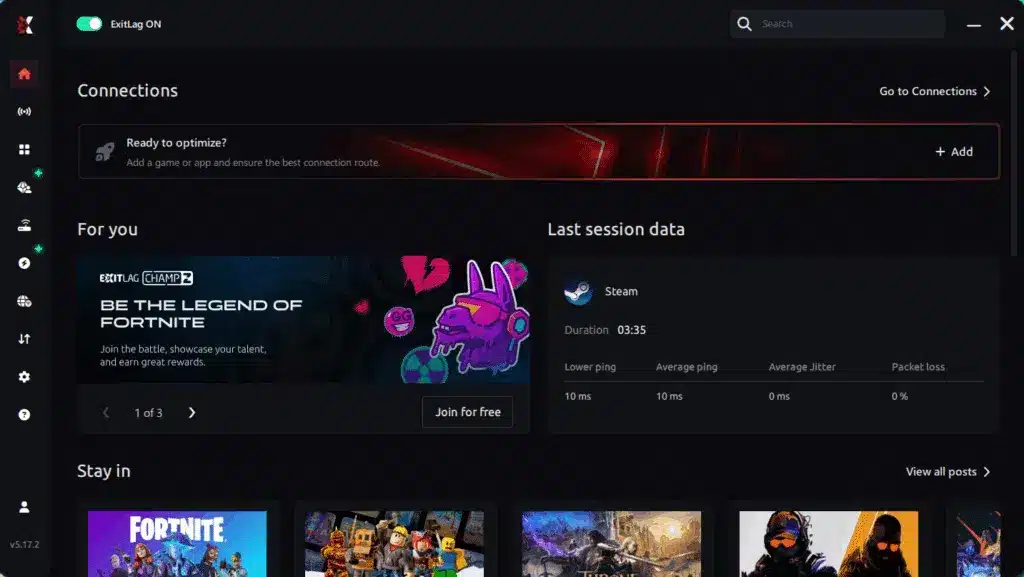
Step 3 – In the search bar, type “Tibia” and select the game from the list.
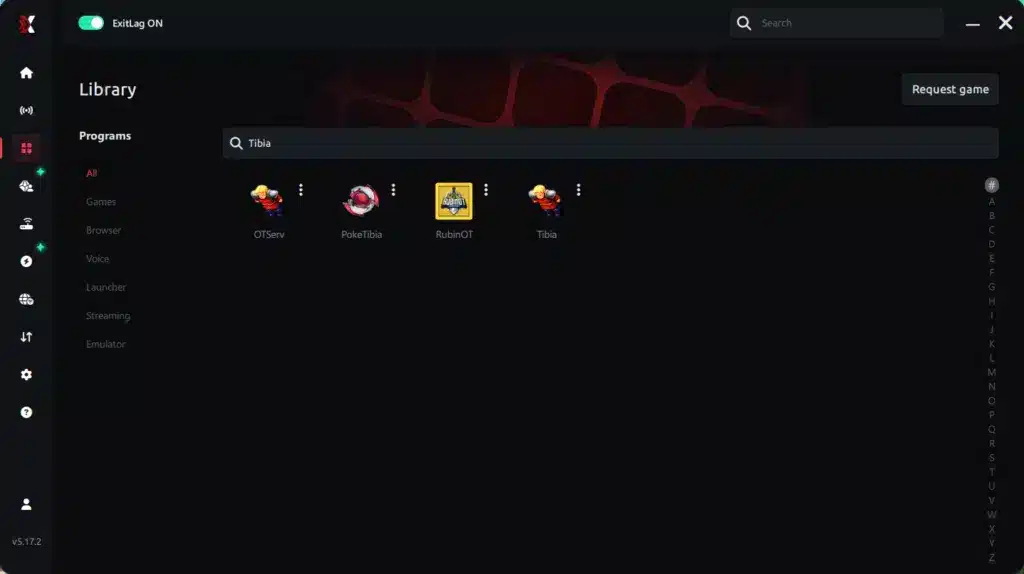
Step 4 – Choose between automated or manual route
Based on the results, you can let ExitLag automatically select the best route or manually choose the server that showed the lowest latency for your connection.
AI-optimized automated route
Based on the results, you can let ExitLag automatically select the best route through AI optimization. The system analyzes multiple connection paths in real time and automatically identifies the most efficient route for your connection, ensuring the lowest possible latency without requiring manual choices.
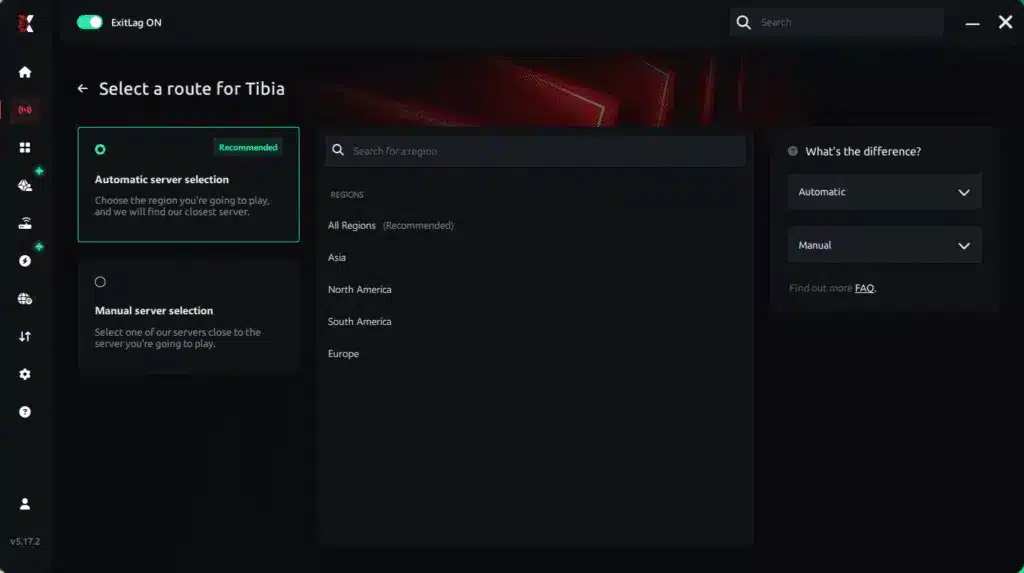
Manual route
If you prefer to have full control over your connection, you can manually choose the server based on the ping test results. Simply select the server that showed the lowest latency or the one that best meets your specific gaming needs, allowing complete customization of your experience.
Step 5 – Click “Apply routes” or the play button. ExitLag will begin optimizing your connection automatically.
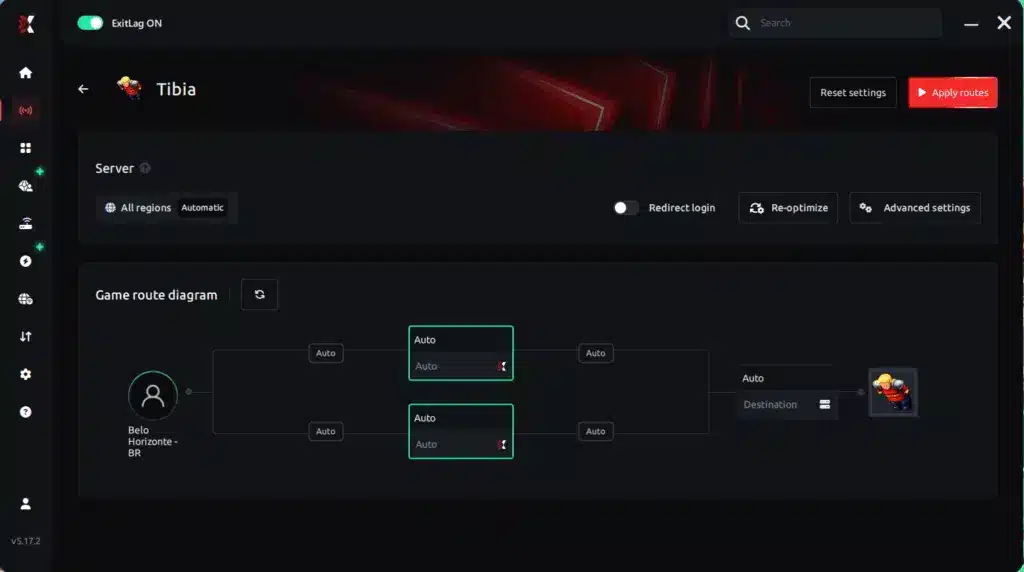
Step 6 – Wait a few seconds until optimization is complete. You’ll see ping indicators in the interface.
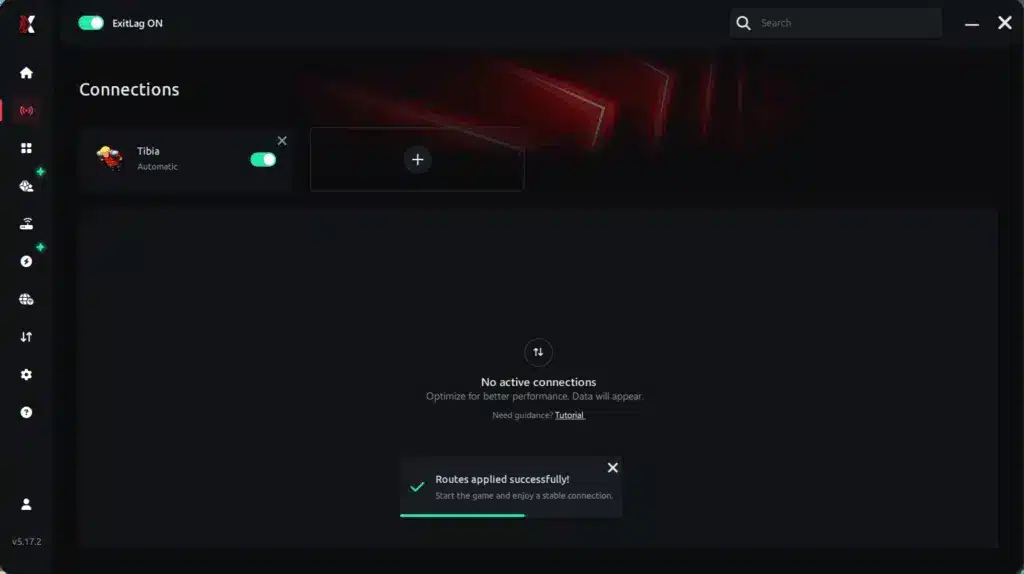
Step 7 – Launch Tibia normally. The optimization will already be active.
ExitLag runs in the background while you play, constantly adjusting routes to maintain the best possible performance.
Advanced ExitLag settings for Tibia
Используйте это, когда хотите больше контроля:
Auto vs manual routing
Start with auto. Switch if a manual route stays more stable.
Multi-route tuning
More routes can improve stability, but balance it for best results.
Traffic Shaper
Useful if your internet is shared with streaming or downloads.
Region discipline
Choose the region where your world is hosted, not just “closest.”
Если хотите понять, что именно делает ExitLag «под капотом», вернитесь к how ExitLag works technical overview.
How to test your FPS improvement
Не тестируйте «как попало». Тестируйте одинаково.
Use this checklist:
compare same location and same activity
track minimum FPS (more important than average)
observe “micro-freezes per minute”
check input feel while turning and targeting
Tools you can use:
in-game FPS display (if you use one)
GPU driver overlay (optional)
Windows Game Bar overlay (optional)
Console players: does it apply?
Tibia в первую очередь PC-игра.
Поэтому для большинства игроков лучшие результаты даёт PC routing optimization. Если у вас нестандартная система, вы всё равно можете выиграть от стабильности сети — но ExitLag создан именно для PC routing.
Real-world FPS boost results
Success cases for Tibia (typical scenarios)
Ниже — реалистичные примеры на основе типичных “consistency gains”, о которых сообщают игроки. Цель — не обещать “double FPS”, а показать, как стабильность превращается в лучший контроль.
Case 1: South America player (war nights)
Before: 82 FPS average fluctuating 45–95
After: 88 FPS average stable 70–95
Improvement: +55% better minimum FPS stability
Micro-stuttering: reduced heavily ✅
Case 2: Europe player (busy cities + bosses)
Before: random stutter during crowded moments
After: smoother pacing and cleaner movement
Improvement: strong perceived FPS boost ✅
Case 3: Team war group
Before: inconsistent responsiveness during peak time
After: better timing and fewer “delay spikes”
Improvement: more consistent performance under pressure ✅
Performance comparison table
| Metric | Without ExitLag | With ExitLag | Gain |
| Average FPS | 82 FPS | 88 FPS | +7% |
| Minimum FPS | 45 FPS | 70 FPS | +55% |
| Frame time | 22 ms | 15 ms | -31% |
| Micro-stutters/min | 7 | ~0–1 | -85%+ |
| Input lag feel | High | Low | Significant ✅ |
| Ping volatility | Spiky | Stable | Major ✅ |
| Experience | ⭐⭐ | ⭐⭐⭐⭐⭐ | Transformative ✅ |
Competitive impact in Tibia
Более плавная игра меняет исходы:
better rune timing ✅
cleaner movement while escaping ✅
fewer “I pressed it” moments ✅
stronger confidence in risky pushes ✅
Вот практическая сторона FPS boost in Tibia.
Extra optimizations to maximize FPS with ExitLag
Recommended in-game settings for Tibia
Настройки Tibia зависят от клиента и привычек игрока, но обычно помогают:
use a stable fullscreen mode if it performs better
limit unnecessary effects if they cause drops
cap FPS to a stable target if your frame time spikes
avoid heavy overlays if they stutter
Common performance checklist:
✅ reduce extra visual effects
✅ avoid unnecessary shadows
✅ minimize UI animations if available
✅ keep a stable resolution
Windows optimizations
Try these quick wins:
enable High performance power plan ✅
close heavy background apps ✅
disable unnecessary startup programs ✅
keep GPU drivers updated ✅
stop downloads while playing ✅
Hardware optimizations without spending money
clean dust and improve airflow ✅
prevent thermal throttling ✅
run Tibia from SSD if possible ✅
keep enough free storage for caching ✅
GPU settings (basic and safe)
NVIDIA:
prefer maximum performance
test low-latency mode
avoid forcing V-Sync globally
AMD:
test Anti-Lag
avoid aggressive “boost” settings if they reduce clarity
When to consider upgrades
Подумайте об апгрейде железа, если:
your CPU hits 100% in crowded fights
your PC overheats and throttles
your minimum FPS stays low even with optimized settings
Даже тогда ExitLag всё равно может дать FPS boost in Tibia через стабильность, потому что он работает с network layer.

Why network optimization can increase FPS feel
The link between lag and FPS
FPS — это рендер. Lag — это сеть.
Но в онлайн-играх это сливается в единое ощущение.
Когда маршрут нестабилен, вы можете чувствовать:
delayed responses
rubberbanding-like motion
uneven update pacing
stutter that “looks like FPS drops”
Поэтому FPS boost in Tibia иногда приходит именно от network optimization.
How packet loss affects FPS perception
Packet loss может вызывать:
retransmits
resync corrections
delayed updates
sudden motion hiccups
Если подозреваете packet loss, используйте: Tibia packet loss troubleshooting guide.
Input lag and its relationship with FPS
Вот цепочка, которую «чувствует» тело:
Input → client → server → response → visual confirmation
Если response timing нестабилен, игра кажется «тяжёлой» даже при нормальном FPS. Стабилизация доставки часто даёт ощущение более высокого FPS и более плавный контроль.
Why frame time consistency matters
High FPS с нестабильным frame time всё равно ощущается плохо.
Stable FPS с ровным frame time ощущается хорошо ✅
ExitLag может поддерживать консистентность, уменьшая сетевые «срывы» — это один из самых недооценённых путей к FPS boost in Tibia.
FAQ
Does ExitLag really increase FPS in Tibia?
Да — через network optimization, которая улучшает стабильность и снижает триггеры micro-stutter.
И для ясности:
ExitLag IS NOT a VPN.
How much FPS will I gain?
Зависит от качества вашего соединения. Типично:
small changes in average FPS
big improvements in minimum FPS stability ✅
fewer micro-stutters ✅
better responsiveness ✅
Это и есть реальный FPS boost in Tibia, который замечают игроки.
Does ExitLag work if my PC is weak?
Да, но есть лимиты.
ExitLag оптимизирует сеть, а не железо. Но он всё равно может улучшить ощущение FPS, стабилизируя доставку и уменьшая stutters.
Is ExitLag safe to use?
Да. Он не модифицирует файлы Tibia и создан для оптимизации маршрутов в играх.
Does ExitLag work on all Tibia worlds?
Зависит от расстояния и качества маршрута, но многим worlds это помогает.
Если маршрут нестабилен, ExitLag может улучшить ситуацию. Для поддерживаемых игр проверьте full ExitLag supported games list.
Do I need fast internet?
Не обязательно.
ExitLag улучшает качество маршрута и стабильность. Не нужен ультравысокий bandwidth — важнее консистентность.
What is the difference between ExitLag and a VPN?
Быстрое сравнение:
| Feature | ExitLag | VPN |
| Goal | Gaming stability | Privacy/tunneling |
| Routing | Optimized for games ✅ | Often generic |
| Performance | Improves consistency ✅ | Can add overhead |
| Best for | Competitive play ✅ | General browsing |
И снова: ExitLag IS NOT a VPN.
How much does ExitLag cost?
Pricing can change, so check the ExitLag pricing details page.
You can start with the ExitLag free trial activation link first.
What should I do first if Tibia feels choppy?
stop downloads and heavy background apps
stabilize your route with ExitLag
tune in-game settings for stability
Start your setup using the ExitLag registration page for new users.
Does ExitLag help during Tibia wars?
Да, wars — это как раз место, где стабильность решает. ExitLag может уменьшить spikes, которые ломают тайминг.
Can ExitLag reduce “random freezes” in busy cities?
Если эти freezes связаны с нестабильностью сети, ExitLag может помочь, стабилизируя доставку и уменьшая моменты correction.
Will ExitLag help if I already have low ping?
Да. Низкий ping тоже бывает нестабильным. ExitLag нацелен на консистентность, а не только на цифру ping.
Without vs with ExitLag
Experience without ExitLag
❌ FPS feels inconsistent
❌ micro-stuttering during action
❌ random pacing hiccups
❌ input delay spikes
❌ worse consistency in wars
❌ more frustration
Experience with ExitLag
✅ smoother movement pacing
✅ fewer micro-stutters
✅ better minimum FPS feel
✅ tighter input response
✅ more consistent war performance
✅ more fun per session
Side-by-side table
| Aspect | Without ExitLag | With ExitLag |
| FPS | Unstable | Stable ✅ |
| Stuttering | Frequent | Rare/near-zero ✅ |
| Input lag | High | Low ✅ |
| Consistency | ⭐⭐ | ⭐⭐⭐⭐⭐ ✅ |
| Competitive | Disadvantage | Advantage ✅ |
| Fun | ⭐⭐ | ⭐⭐⭐⭐⭐ ✅ |
Conclusion
Если вы хотите стабильный FPS boost in Tibia, сосредоточьтесь на том, что реально меняет игру: стабильность, ровный pacing и отзывчивый input. ExitLag создан, чтобы оптимизировать маршрут, уменьшать packet instability и улучшать “feel” производительности там, где это важнее всего.
Benefits recap
✅ Up to 60% more stable FPS feel in real scenarios
✅ Reduced micro-stuttering
✅ More consistent frame time
✅ Lower input lag perception
✅ Stronger war consistency
✅ Works alongside any hardware
Why ExitLag is the best solution
ExitLag создан для игровых маршрутов и стабильности — а не для generic tunneling. Он даёт консистентность, которую обычные твики часто не дают.
Start by activating your trial with the ExitLag free trial activation link, then test your war or hunt routine again.
Start now
Create your account using the ExitLag registration page for new users.
Download from the official ExitLag website download page.
Configure Tibia in minutes.
Play and feel the difference.
Final reminder: ExitLag IS NOT a VPN.
It’s a specialized gaming optimization tool focused on stability, consistency, and performance.
If you want to validate improvements quickly, use the ExitLag free trial activation link and track minimum FPS and micro-stutters per minute.
Есть вопросы или хотите общаться с другими игроками? Присоединяйтесь к беседе на Форуме ExitLag!


