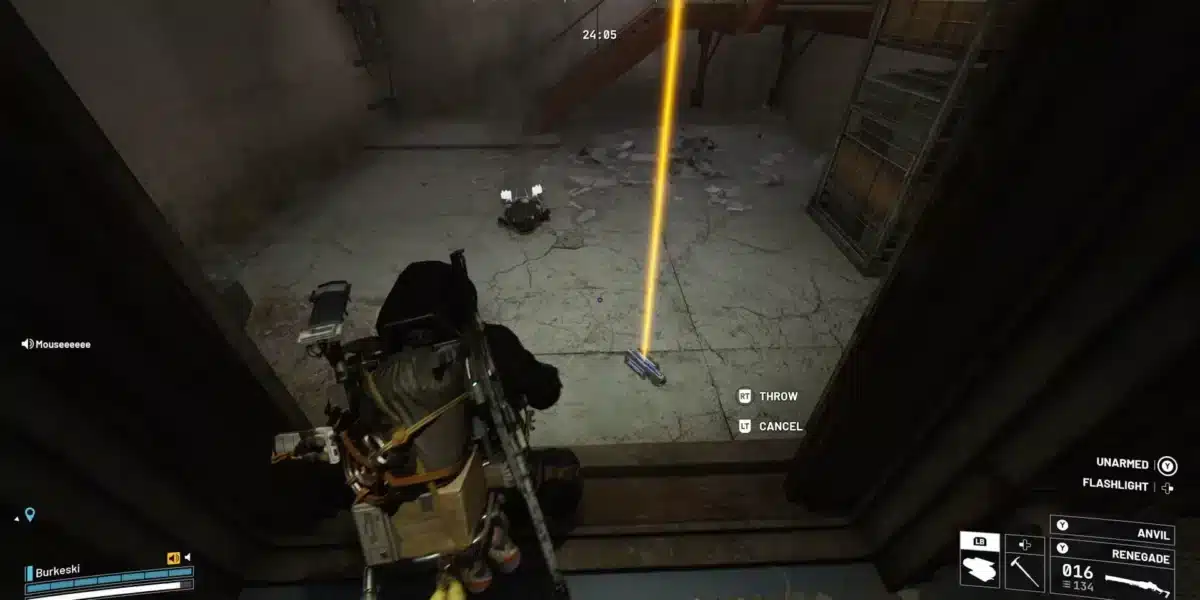
Arc Raiders Greasing Her Palms is an early-to-mid game quest assigned by Celeste that sends you across three separate maps in a single quest chain. Unlike many Arc Raiders missions, this one does not require you to carry items through to extraction. Instead, you need to reach and inspect specific areas across Dam Battlegrounds, Spaceport, and Buried City.
Greasing Her Palms Arc Raiders unlocks after you complete the quest “A Better Use” from Celeste. Once the dialogue opens, she sends you to three separate locations to conduct reconnaissance, and each completion step must be done in its own raid session. You also receive a special key item, the Dam Surveillance Key, required for the first objective.
The multi-map structure is what makes this quest feel substantial. None of the individual objectives are mechanically complex, but navigating each location correctly and knowing exactly where to stand or what to interact with saves you from wasted raids.

Greasing Her Palms Arc Raiders: Quest Setup
Who Gives This Quest?
Celeste in Speranza assigns the Arc Raiders Greasing Her Palms quest after you complete the prerequisite mission “A Better Use.” Accept the quest from her dialogue option and you will receive the Dam Surveillance Key automatically. This key is required for the Dam Battlegrounds portion and should not be discarded.
Quest Objectives Overview
The quest sends you to three separate locations in a specific order:
- Dam Battlegrounds: Use the Dam Surveillance Key to access a locked room
- Spaceport: Locate the rocket thruster in the central area and stay near it
- Buried City: Find the barricaded area in the Space Travel Building
Each objective must be completed in its own raid. You do not need to finish all three in a single run.
Greasing Her Palms Arc Raiders: All Three Locations
Objective 1: Dam Battlegrounds
The Dam Battlegrounds objective requires the Dam Surveillance Key that Celeste gives you when you accept the quest. Without this key, you cannot access the room and the objective cannot be completed.
Navigate to the dam area in Dam Battlegrounds and locate the specific door that requires the key. Use the Dam Surveillance Key on the door to unlock the room, enter, and the objective completes upon entering or interacting with the interior.
Key tips for this objective:
- Keep the Dam Surveillance Key in your inventory before deploying, do not leave it in storage
- Clear the area around the door before using the key to avoid being interrupted during the interaction
- The dam is a contested area, so expect ARC patrols and potentially other players
Objective 2: Spaceport Rocket Thruster
The Greasing Her Palms Spaceport objective is one of the more unusual in Arc Raiders because it requires no interaction. You simply need to reach the correct position and wait.
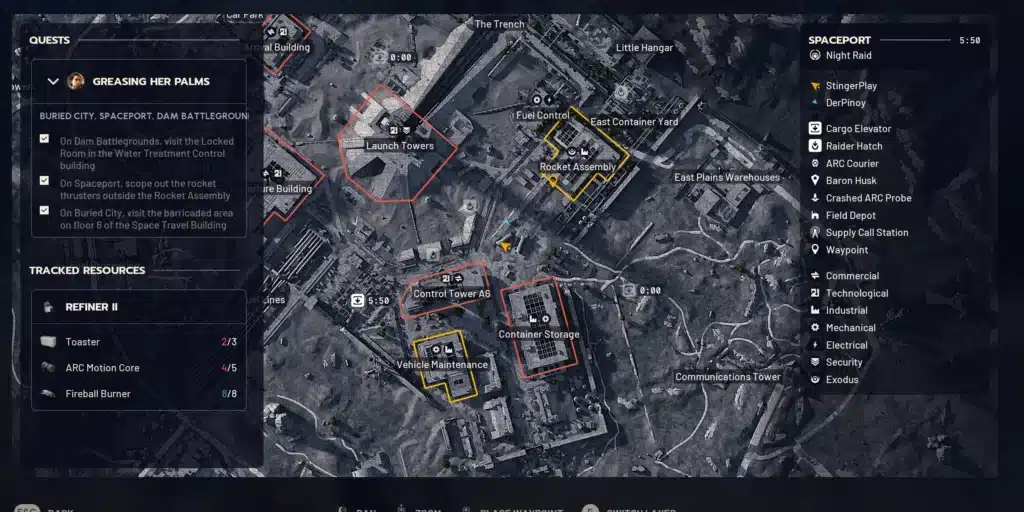
Navigate to the central part of Spaceport. Your target is the rocket thruster on the southwestern side of the central area, located south of the Rocket Assembly location. Rocket Assembly sits east of the Launch Towers and just north of Control Tower A6.
Here is the exact sequence:
- Deploy into Spaceport
- Navigate to Rocket Assembly (east of Launch Towers, north of Control Tower A6)
- Find the rocket thruster on the southwestern side of the area
- Move to the south side of the thruster specifically
- Stay still in that position for three to five seconds
- The “objective complete” notification appears on screen automatically
There is nothing to interact with. The objective completes through proximity and waiting. If the notification does not appear, verify you are on the south side of the thruster specifically, not the east or north face.
Objective 3: Buried City Space Travel Building
The final Arc Raiders Greasing Her Palms objective sends you to the Space Travel Building in Buried City. This building sits adjacent to the Research Building and has a distinct interior structure with elevator shafts containing ziplines.
Navigate to the Space Travel Building and use the ziplines inside the elevator shafts to reach the sixth floor. On the sixth floor, head down the main hallway until you find a barricaded door. Locating and reaching this barricade completes the objective.
Step-by-step for this objective:
- Deploy into Buried City
- Navigate to the Space Travel Building (next to the Research Building)
- Enter the building and locate the elevator shafts with ziplines
- Take ziplines to reach the sixth floor
- Walk down the main hallway
- Locate the barricaded door and approach it
- Objective completes on reaching the barricaded area
| Objective | Map | Key Item | Mechanic |
|---|---|---|---|
| 1: Locked Room | Dam Battlegrounds | Dam Surveillance Key | Key + Door |
| 2: Rocket Thruster | Spaceport | None | Proximity wait (3-5 sec) |
| 3: Barricaded Door | Buried City | None | Navigation to location |
Rewards for Completing Greasing Her Palms
Completing all three objectives and returning to Celeste rewards you with:
- Lure Grenade Blueprint: A crafting blueprint for the Lure Grenade utility item
- Speaker Component: A crafting material used in equipment upgrades
- Electrical Components: General crafting materials with broad use across workshop upgrades
The Lure Grenade Blueprint is the most valuable reward for combat-focused players, as Lure Grenades are a useful utility for controlling enemy AI movement during raids.
Pro Tips: Greasing Her Palms Arc Raiders
- Deploy with the Dam Surveillance Key equipped before the Dam objective: The key must be in your active inventory during the raid. Check your inventory before deploying to confirm it is there rather than sitting in base storage.
- Memorize the Spaceport layout before attempting the thruster objective: The Rocket Assembly area can be confusing to navigate without prior familiarity. Running a free Spaceport raid to learn the layout before the quest saves you from a wasted deployment.
- Take the ziplines in Buried City’s Space Travel Building from the ground floor: The building’s internal ziplines are the fastest way to reach the sixth floor. Trying to climb stairs to the sixth floor is slower and more exposed to ARC patrols inside the building.
- Run each objective during lower-traffic lobby times: Since none of the objectives require combat kills, completing them in quieter lobbies reduces the risk of player interference at each location.
- Carry a Safe Pocket augment even though no items need extraction: Other players know this quest chain and may try to kill you specifically to deny your objective completion or simply for the loot you carry. Safe Pocket protects your inventory if you go down unexpectedly.
Common Mistakes Arc Raiders Greasing Her Palms Players Make
- Leaving the Dam Surveillance Key in base storage: The key cannot be used if it is in storage instead of your inventory during the raid. This is the single most common reason players fail the first objective. Fix: always check your inventory for the Dam Surveillance Key before deploying for the Dam Battlegrounds objective.
- Standing on the wrong side of the rocket thruster: The Spaceport objective specifically requires the south side of the thruster. Standing on the east, west, or north face while waiting produces no notification. Fix: position yourself specifically on the south face and wait the full three to five seconds before assuming the objective is bugged.
- Trying to complete all three objectives in one raid: The quest is designed for separate raid sessions across three different maps. Attempting to sequence all three in one session is not possible. Fix: plan three separate deployments, one to Dam Battlegrounds, one to Spaceport, and one to Buried City.
How Does ExitLag Improve Arc Raiders Quest Runs?
Arc Raiders is an online extraction game where connection stability directly affects your objective completion. Lag spikes during the Spaceport proximity wait can cause the server to not register your position correctly, and desync during the Buried City zipline sequences can put your character in unintended locations.
ExitLag routes your Arc Raiders traffic through optimized network paths, reducing ping and eliminating packet loss that causes desync. Multipath Technology maintains your connection through multiple simultaneous routes so that if one path degrades, the others keep your session clean. Multi-Internet support adds an additional layer of redundancy, automatically switching to a backup connection if your primary drops.
Download ExitLag for PC and complete the Arc Raiders Greasing Her Palms quest without connection interference slowing you down.
All game images used in this blog post belong to Embark Studios. They are used for informational and educational purposes only and do not imply endorsement or affiliation with the rights holders.
Got questions or want to connect with other players? Join the conversation at the ExitLag Forum!