First of all, dealing with Battlefield 6 high ping is one of the most frustrating situations any FPS player can face. In games built around large-scale warfare, fast engagements, and real‑time reactions, even a small delay can ruin your performance.That’s why understanding high ping and how it behaves inside Battlefield 6 is the first step to fixing it.
Now, high ping happens when there is a delay between your action and the server’s response. In the second paragraph, Battlefield 6 high ping often results in unpredictable hit registration and delayed movement — two issues that directly impact your performance.
What is Battlefield 6 high ping?
To understand Battlefield 6 high ping, we need to look at how latency works. Ping represents the time it takes for your device to send data to the servers and receive a response. In a large-scale FPS, the server processes constant movement, ballistics, destruction physics, and network updates. When the delay increases, you see outdated information compared to what is actually happening.
In other words, low ping means fast response and accurate combat. High ping means sluggish movement, bad hit registration, and delayed interactions. As well as that, Battlefield 6’s fast pacing makes small delays more noticeable than in slower shooters.
Below are general latency categories that apply to most large-scale FPS titles:
- 0–40 ms: Excellent performance
- 40–80 ms: Playable with small delays
- 80–120 ms: Noticeable impact
- 120–200 ms: High ping with heavy desync
- 200+ ms: Difficult to play
These values vary by region, but the behavior remains similar.
How high ping affects gameplay in Battlefield 6
When Battlefield 6 high ping becomes frequent, the effects are severe. Because the game relies on precise synchronization between massive numbers of players, even slight instability becomes visible.
Some of the most common issues include:
- Delayed character movement: Your soldier takes too long to react.
- Hit registration failure: Bullets land late or not at all.
- Rubberbanding: Your character jumps between past and present positions.
- Deaths behind cover: The server registers you in the open when you’re already behind cover.
- Vehicle desync: Cars, jets, and tanks move unpredictably.
- Competitive disadvantage: Opponents see you before you see them.
- Lost progress or ranked penalties: Poor latency reduces match reliability.
Combat desync
High ping causes your position to appear incorrectly on the server, leading to unfair firefights.
Input delay stacking
Every action takes longer to process, making aiming and movement feel heavy.
Main causes of high ping in Battlefield 6 Now, let’s break down what causes Battlefield 6 high ping. Each of the factors below contributes differently to latency, but all can affect your matches.
If you want to check more ExitLag guides, click here!
Server distance
If you connect to a region far from your physical location, data travels longer distances. This increases ping naturally.
ISP issues
Sometimes the problem is your provider. Routing flaws, overloaded lines, or unstable networks can raise ping even with good download speeds.
Inefficient routing
Your connection might be taking a longer path than necessary. This happens when the ISP uses low‑quality routes.
Network congestion
Multiple devices streaming, downloading, or gaming at the same time can saturate your connection.
Outdated equipment
Old routers, weak Wi‑Fi, or poor cables can add delay to your connection.
Game-specific factors
Battlefield servers may face temporary overload, maintenance, or instability depending on time and region.
How to identify and test Battlefield 6 high ping
Learning how to detect your ping and diagnose issues helps you solve them faster.
Check your ping in-game
Battlefield 6 displays ping on the scoreboard or HUD. Watch for sudden spikes.
Use command prompt tests
Commands like ping or tracert show if delays happen on the route to the server.
Understand good vs bad ping
Below 80 ms is ideal for Battlefield. Between 80–120 ms is playable with delay. Above 120 ms becomes difficult in intense firefights.
Battlefield 6 ping table
| Ping (ms) | Quality | Experience |
| 0–40 | Excellent | Smooth performance |
| 40–80 | Good | Minor delay |
| 80–120 | Playable | Noticeable lag |
| 120–200 | High ping | Strong impact |
| 200+ | Critical | Nearly unplayable |
Basic solutions to reduce Battlefield 6 high ping
Even more, basic connection optimizations can reduce ping before using advanced tools.
Optimize your local connection
- Use a wired ethernet cable.
- Close background applications.
- Update your network drivers.
- Configure QoS on your router.
- Select the closest Battlefield server.
- Apply Battlefield‑specific settings to reduce data load.
Contact your ISP
If your routing is unstable, ask your provider to check for packet loss or jitter. Sometimes only your ISP can fix regional routing issues.
ExitLag: a practical way to reduce Battlefield 6 high ping
Battlefield 6 launched on October 10, 2025, for PC, PlayStation 5, and Xbox Series X|S. When Battlefield 6 high ping becomes a constant problem, most players try every basic fix—switching Wi-Fi channels, restarting routers, closing background apps, or changing DNS settings. While these actions may help occasionally, Battlefield 6 uses large-scale 128-player servers and fast-paced netcode that rely heavily on stable routing. Because of that, simple home-network tweaks often fail to solve deeper routing issues.
At first, it helps to understand why Battlefield 6 connections vary so much. Factors like server distance, ISP congestion, unstable routing paths, and overloaded nodes can cause sudden spikes and delays. Even more, these conditions can change throughout the day, meaning your connection may shift from stable to unstable at any moment. This is exactly when Battlefield 6 high ping becomes noticeable during firefights, vehicle combat, and objective pushes.
In other words, players dealing with inconsistent latency often need a tool designed specifically to improve routing for online games. This is where ExitLag can help — especially for PC players who face unstable network paths.
What is ExitLag and how can it help with Battlefield 6 high ping?
Above all, ExitLag is a connection optimization software made for online gaming. It is designed to improve routing stability, reduce latency in some situations, and help avoid unstable nodes that commonly cause spikes in Battlefield 6.
However, it’s important to clarify:
- ExitLag works only on PC and Mobile.
- It does not work on consoles (PS5 / Xbox Series X|S).
- It does not improve offline modes.
- Players should always check Battlefield’s Terms of Service and their platform’s policies to ensure they understand how third-party routing tools are handled.
ExitLag analyzes your route to Battlefield 6 servers and attempts to select a more stable path using:
- Real-time route scanning
- Simultaneous multi-route execution
- Intelligent failover mechanisms
- Traffic Shaper for gaming data
These systems are designed to reduce unnecessary detours and avoid unstable network nodes.
ExitLag’s core technologies
ExitLag includes several systems that can help players reduce Battlefield 6 high ping and improve stability depending on their network conditions.
Multipath connection system
ExitLag sends your traffic through multiple routes at the same time, allowing the client to prioritize whichever path performs better. This helps reduce sudden spikes in latency for some users.
Multi-Internet support
Players with two internet connections can combine them as a redundancy layer. If one line becomes unstable, the other can keep the game connected.
Traffic Shaper
This feature prioritizes Battlefield 6 data packets so they don’t compete with downloads, streaming, or cloud-sync traffic on your machine.
AI route optimization
ExitLag analyzes server paths dynamically and adapts routes when it detects instability.
FPS Boost
ExitLag includes optional system tweaks that may improve performance on certain hardware configurations.
Global server coverage
ExitLag maintains servers across multiple continents, which can help players in remote regions find a more stable path.
Cross-platform account
A single account works on ExitLag Desktop and ExitLag Mobile, offering flexibility across supported devices (again: consoles not supported).
How ExitLag works
Here’s how the optimization works in practice.
Real-time routing intelligence
ExitLag constantly monitors your connection and may help you avoid overloaded routes, providing more consistent latency depending on network conditions.
Multi-route execution
Your data packets are sent across parallel routes. Whichever route performs best becomes the primary path.
Hop reduction and stabilization
Some Battlefield 6 servers perform better with cleaner, shorter routes. ExitLag may reduce unnecessary hops or unstable nodes to help mitigate Battlefield 6 high ping.
Improved synchronization
When routing becomes more consistent, actions such as shooting, aiming, and movement can feel more responsive.
Fewer drops and rubberbanding
Some users report fewer disconnections or less rubberbanding when ExitLag helps stabilize unstable ISP routes.
(Results vary depending on region, ISP quality, and global server load.)
Is ExitLag for Battlefield 6 high ping worth it?
Yes, defnitely. Below are benefits that some players experience when using ExitLag:
Reduced latency in some scenarios
ExitLag may find shorter or more efficient routes, helping lower ping values during peak congestion.
Reduced packet loss
Because routing can avoid unstable nodes, ExitLag may help reduce packet loss for certain connections.
More stable connection
Players often experience fewer spikes and more predictable performance.
Beginner-friendly interface
Just search for the game, select a route, and activate it.
Dedicated support
ExitLag offers assistance to help users fine-tune routing settings when needed.
Worldwide coverage
ExitLag’s global routing infrastructure can assist players with long-distance server connections.
How to configure ExitLag for Battlefield 6
How to use ExitLag in Battlefield 6
The process is extremely simple:
Step 1 – Access the official ExitLag website and download the application. There’s a free trial period for new users.
Step 2 – Install and open the program. Log in with your account.
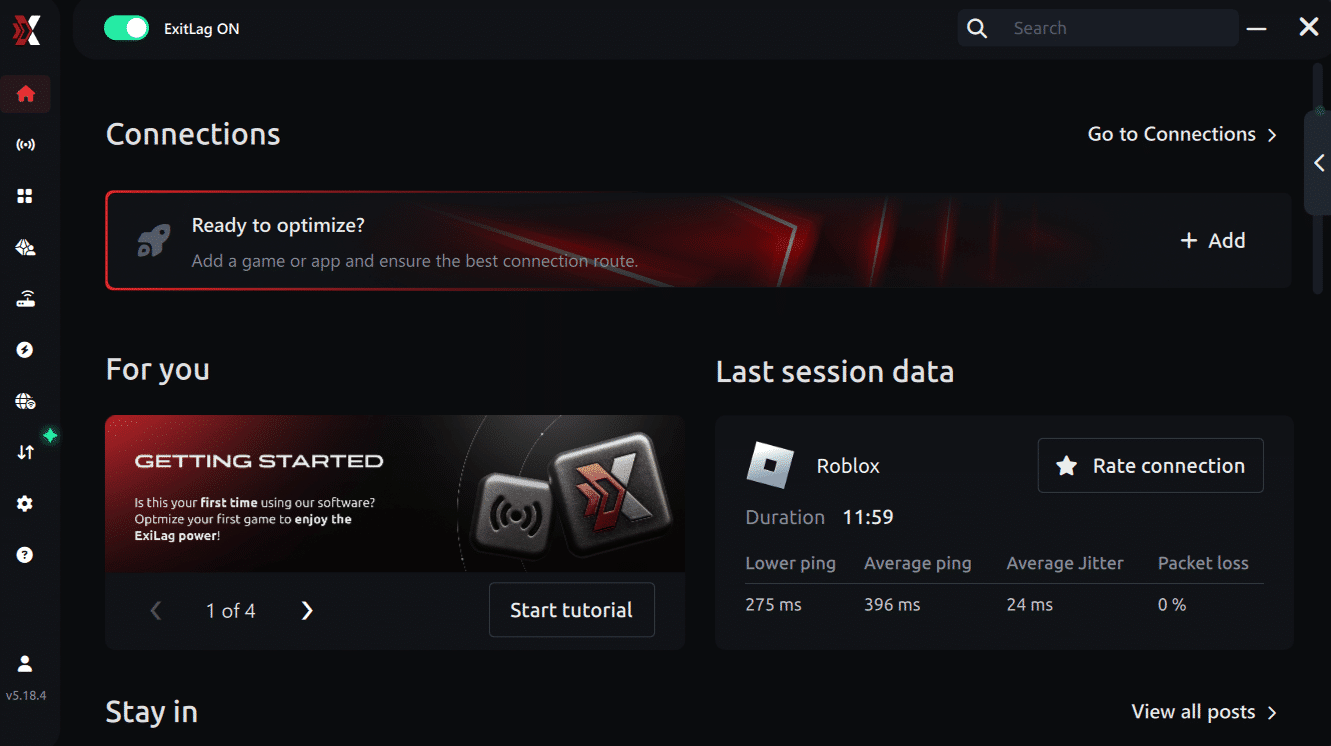
Step 3 – In the search bar, type “Battlefield 6” and select the game from the list.
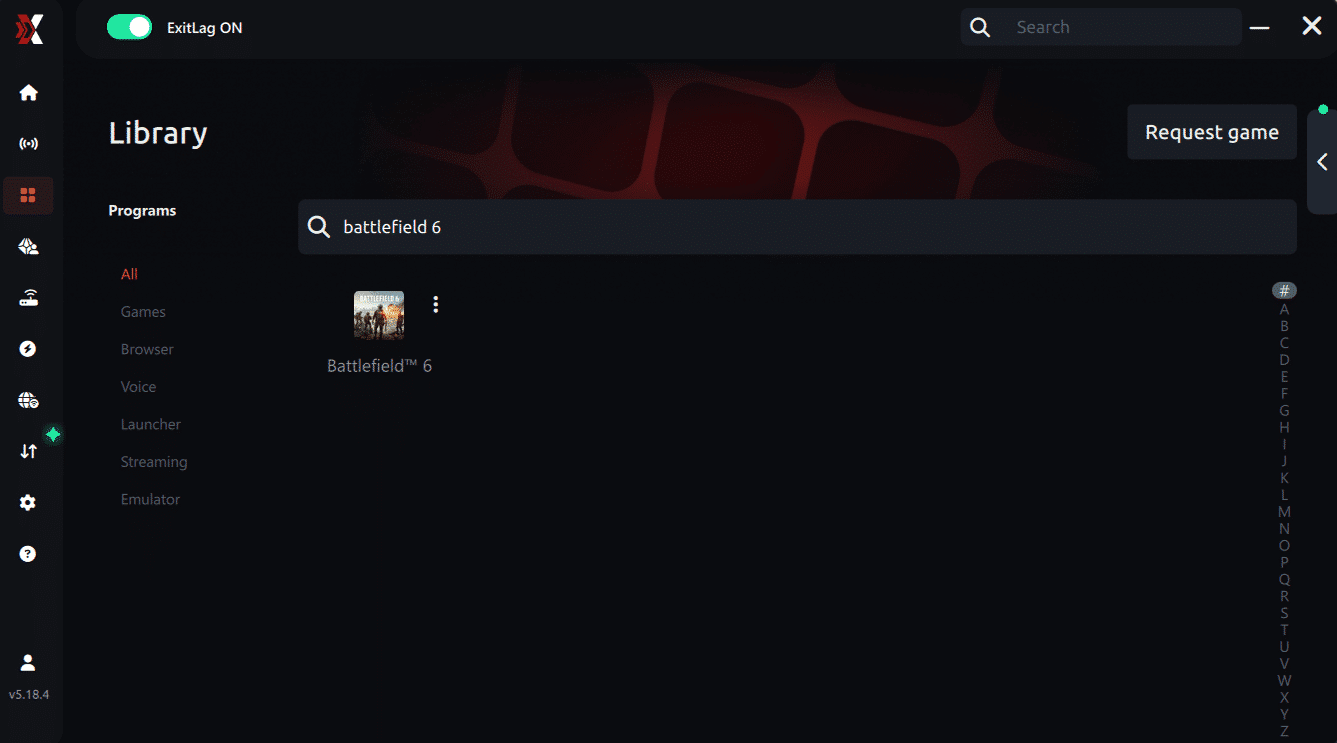
Step 4 – Choose between automated or manual route
Based on the results, you can let ExitLag automatically select the best route or manually choose the server that showed the lowest latency for your connection.
AI-optimized automated route
Based on the results, you can let ExitLag automatically select the best route through AI optimization. The system analyzes multiple connection paths in real time and automatically identifies the most efficient route for your connection, ensuring the lowest possible latency without requiring manual choices.
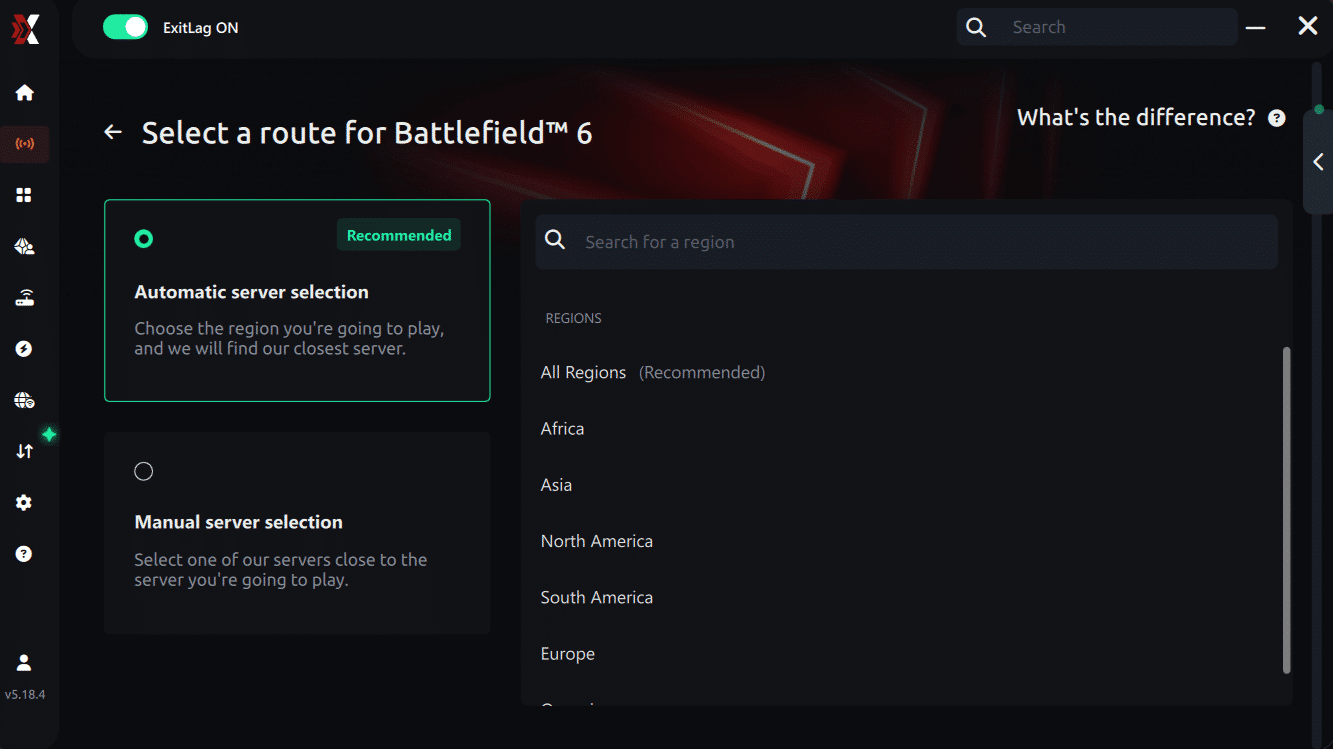
Manual route
If you prefer to have full control over your connection, you can manually choose the server based on the ping test results. Simply select the server that showed the lowest latency or the one that best meets your specific gaming needs, allowing complete customization of your experience.
Step 5 – Click “Apply routes” or the play button. ExitLag will begin optimizing your connection automatically.
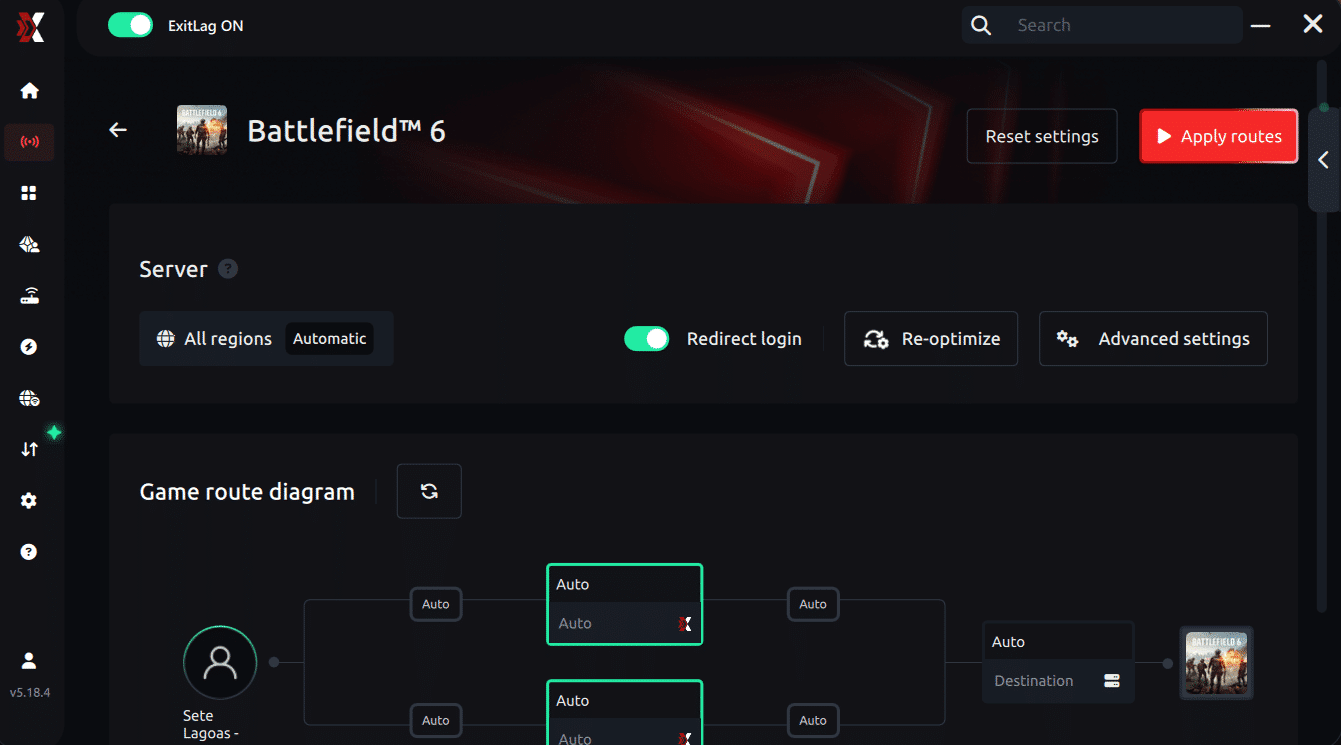
Step 6 – Wait a few seconds until optimization is complete. You’ll see ping indicators in the interface.
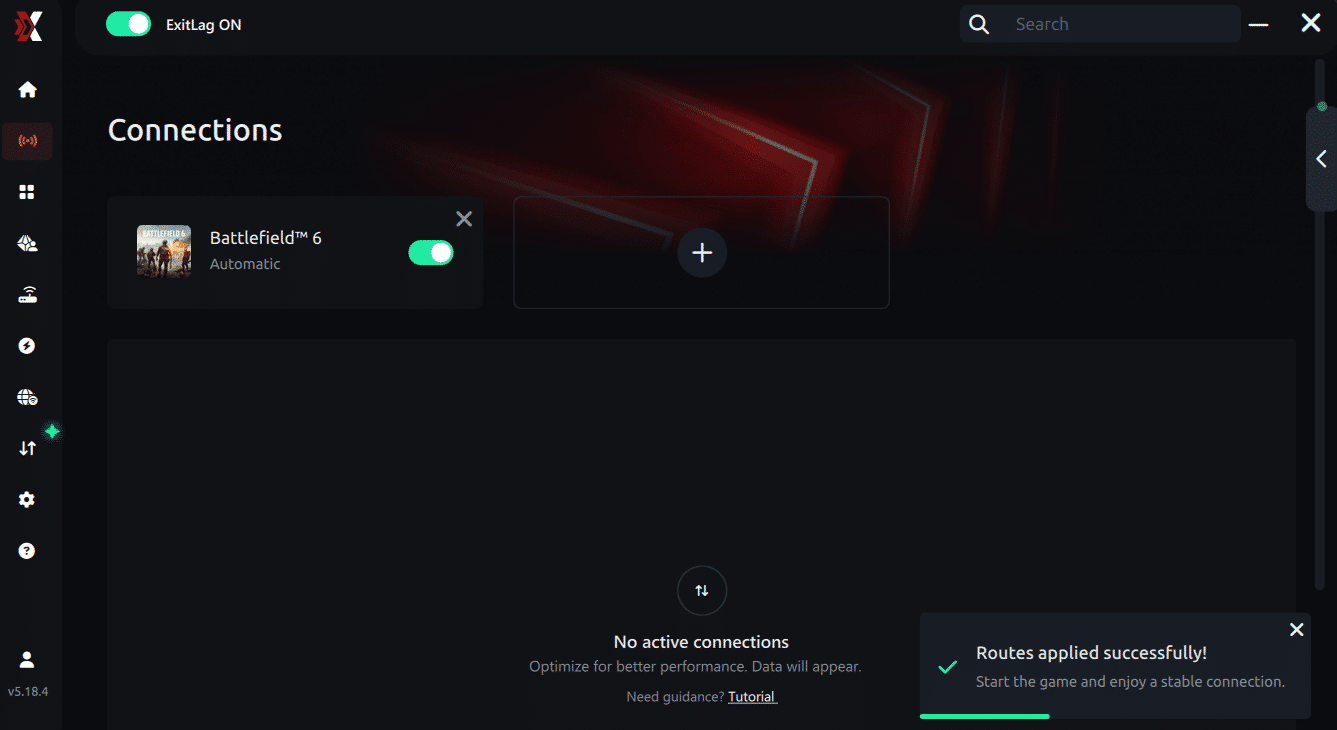
Step 7 – Launch Battlefield 6 normally. The optimization will already be active.
ExitLag runs in the background while you play, constantly adjusting routes to maintain the best possible performance.
How to use Ping for Games: step-by-step guide (Battlefield 6)
Checking your connection quality before entering a match has never been easier. Here’s how to use Ping for Games in just a few steps:
1. Open the ExitLag software on your PC Ensure the application is installed and open. The feature is integrated into the platform and available for free to all users.
2. Access the Network Analyzer tool Locate the Network Analyzer in the software menu. This is where you’ll find Ping for Games along with other connection analysis features.
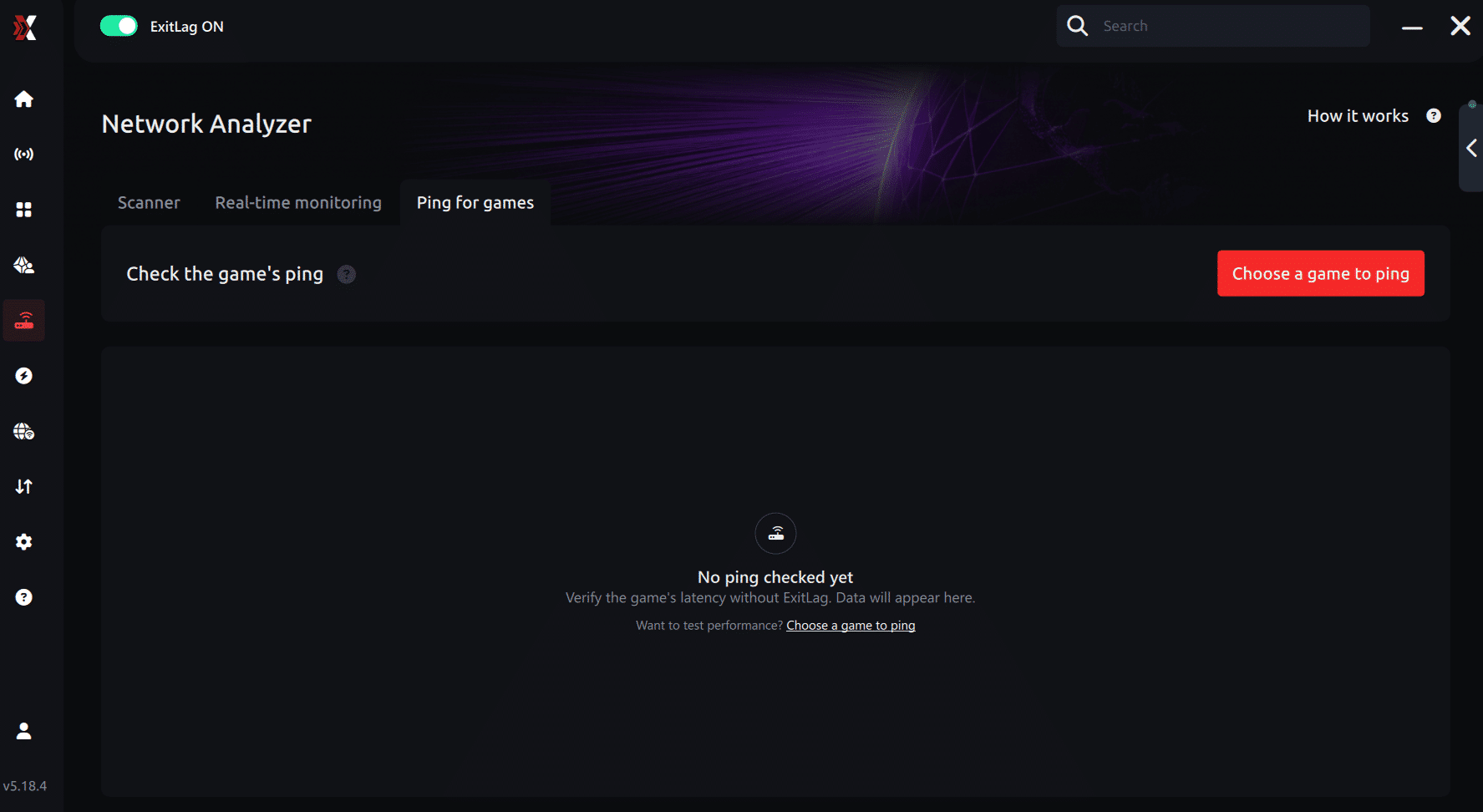
3. Select the game you want to test Choose Battlefield 6 from the list. The tool supports major online multiplayer games, including FPS, Battle Royales, MOBAs, MMORPGs, and more.
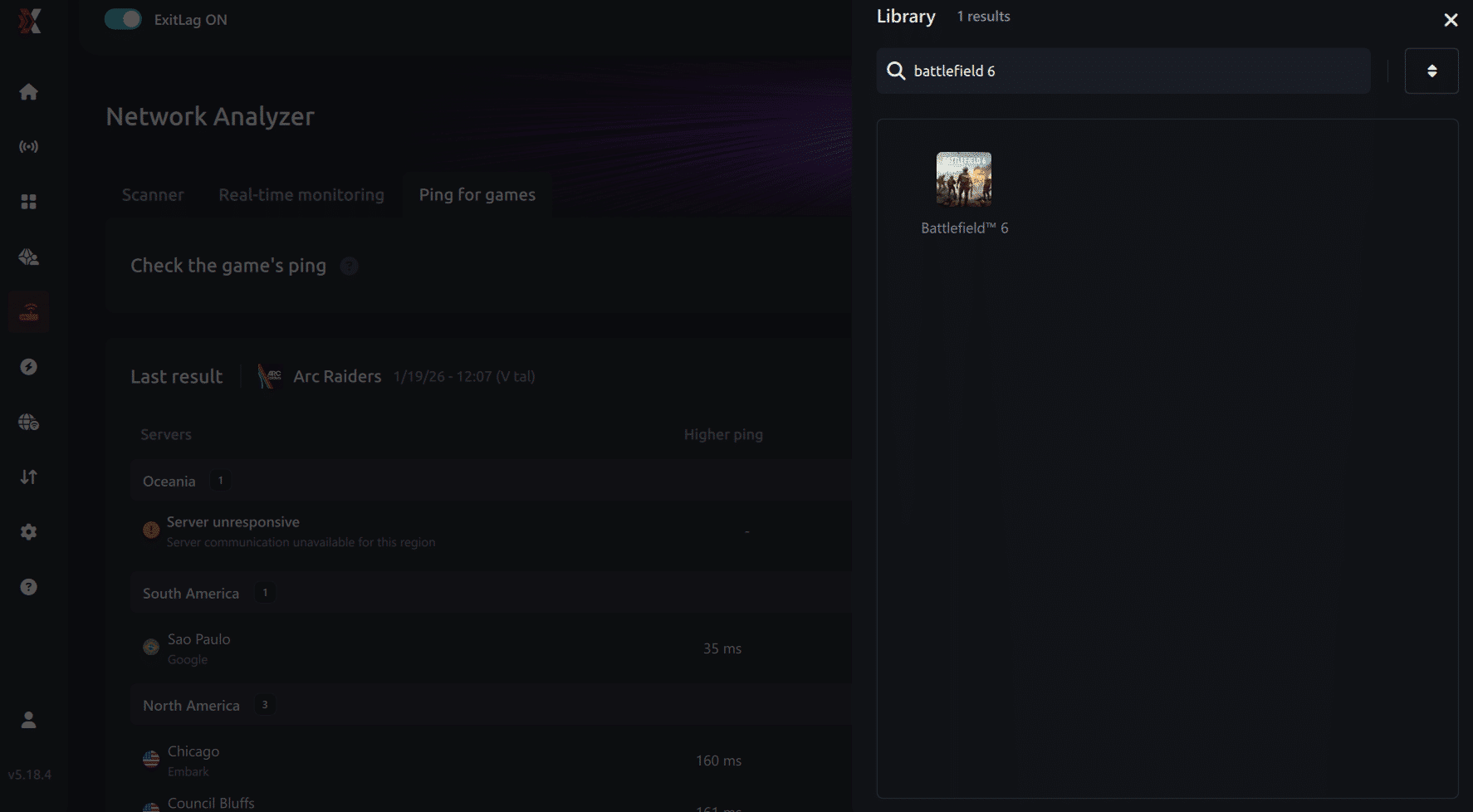
4. Choose the specific server Select the exact Battlefield 6 server you want to test instead of a generic region. This ensures more accurate results for your match.

5. Start the ping test With one click, the measurement is performed in real time between your device and the selected Battlefield 6 server, considering your current connection (cable or Wi-Fi).
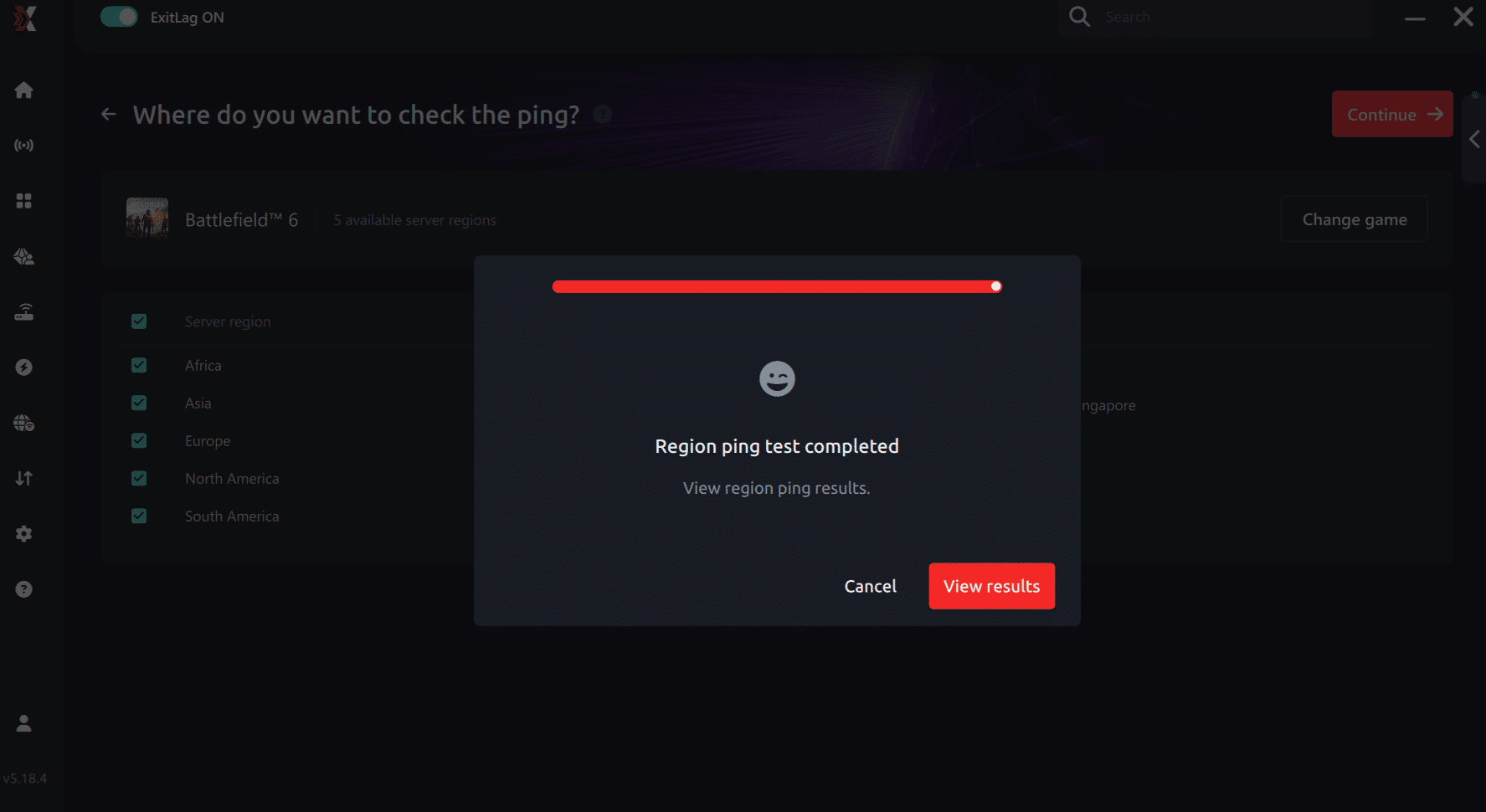
6. Analyze the results Results appear in milliseconds (ms), automatically sorted from best to worst ping. You can also reorganize the view alphabetically if you prefer.
7. Choose the best server and play worry-free With this information, simply select the server with the lowest latency and jump into Battlefield 6 knowing your connection is optimized.
Final thoughts: Play Battlefield 6 without lag forever
At the end of the day, Battlefield 6 lag should never decide your matches. You spend time mastering your aim, movement, and strategy your internet connection should never be the reason you lose.
With ExitLag, you finally take control of your network performance. The software finds the fastest routes, eliminates lag, and stabilizes your ping so that every shot and every action happens exactly when you want it to.
Try ExitLag for free right now and experience how smooth Battlefield 6 can be when your connection is fully optimized. Play with confidence, reach your full potential, and make lag a thing of the past.
FAQ
Here are quick answers to the most common questions about fixing Battlefield 6 high ping:
What causes high ping in Battlefield 6?
High ping in Battlefield 6 usually comes from server distance, unstable ISP routing, or network congestion.
How do I check my ping in Battlefield 6?
You can view your ping directly in the in-game network settings or during matches through the performance overlay.
What is considered good ping for Battlefield 6?
Anything under 70–80 ms is ideal for smooth competitive gameplay.
Can high ping get you banned?
No. High ping doesn’t cause bans, but it may cause disconnects if your connection becomes too unstable.
Does ExitLag work for Battlefield 6?
ExitLag may help reduce latency and stabilize routing for Battlefield 6 on PC, depending on your region and ISP conditions.
Why does Battlefield 6 spike during large fights?
Heavy data synchronization and temporary server load can cause brief latency spikes during massive battles.
Conclusion
Battlefield 6 delivers massive battles, high-speed combat, and intense synchronized action — which means a stable connection is essential. When Battlefield 6 high ping becomes frequent, your gameplay suffers: delayed shots, rubberbanding, and lost duels quickly ruin the experience. We can also inform you about all the relevant content about gaming, you just have to check our blog.
ExitLag offers a practical way to help stabilize routing, reduce latency in many cases, and improve consistency for PC players facing unstable paths or packet loss. While results vary depending on region and ISP conditions, many players report smoother gameplay after optimizing their routes.
To stay competitive, keep testing, keep monitoring, and ensure your connection is using the most stable route possible to avoid Battlefield 6 high ping. Know our free trial. Download ExitLag now!