Upgrading defensive buildings, leveling up key heroes, and researching lab troops takes substantial time and strategic planning. When village chiefs want to accelerate their base progression, visiting the in-game market becomes an essential daily routine. Therefore, navigating the Clash Of Clans Shop effectively ensures that every single gem or real-world purchase yields maximum strategic efficiency.
Moreover, knowing which magic bundles or passes actually justify their price point protects your hard-earned resources from poor value trades. Veteran strategists carefully distinguish between standard mobile marketplace listings and web-based rewards to double their return on investment. Consequently, understanding the economic mechanics behind the Clash Of Clans Shop lets you maximize your builders and dominate Clan Wars.
The Clash Of Clans Shop functions as the central in-game marketplace where chiefs acquire building upgrades, magical books, potions, resource packs, and cosmetic sceneries. Players access these items using farmed resources, earned gems, or direct monetary transactions. Choosing high-value bundles containing Books Of Heroes or Builder Potions provides the fastest path to advancing your Town Hall.

Understanding The Clash Of Clans Shop Versus Web Store
Mobile village commanders often confuse the in-game client market with the external web storefront run directly by the developer. While both interfaces access your central Supercell ID profile, their bonus reward systems and loyalty perks differ substantially.
Furthermore, external platforms bypass mobile platform storefront processing cuts, allowing developers to pass extra items back to active players.
- In-game client offers instant one-tap purchases linked straight to your mobile platform billing profile.
- Web marketplace features dedicated monthly Bonus Tracks that grant free magic items with every purchase.
- Web platforms include loyalty Stamp Cards that grant free passes after completing regular purchase milestones.
- Both platforms instantly deliver purchased gems, shields, and magic resources directly to your village profile.
Consequently, smart village chiefs regularly check both storefronts to ensure they never miss valuable bonus perks.
How Does The In-Game Marketplace Operate?
Opening your mobile game client brings you directly into the main village market interface situated at the bottom screen corner. This catalog categorizes available purchases across dedicated tabs covering army expansions, village defenses, shield boosts, and limited-time special promotions.
In addition, the in-game interface provides immediate convenience when you need to finish an urgent hero upgrade before War ends.
- Launch your mobile game client and tap the Shop icon located in the bottom-right corner.
- Browse through the categorized tabs including Defenses, Army, Resources, Shields, and Special Offers.
- Review limited-time bundles featuring tailored magic books, potions, and concentrated resource piles.
- Complete your transaction using your linked mobile app store balance or saved payment card.
Thus, the client market remains the quickest way to pick up emergency shields or start sudden defense upgrades.
The Power Of External Bonus Reward Tracks
Purchasing your passes and packs outside the mobile client provides access to a dedicated monthly reward milestone track. Every purchase made through the official web portal accumulates Store Bonus Points that unlock free tier rewards like Research Potions.
Moreover, these points advance your account along an escalating reward ladder that resets seamlessly with each competitive season.
- Collect Store Bonus Points automatically on every transaction to unlock free Books and Runes.
- Complete web-exclusive event challenges to earn extra progression points without spending money.
- Unclaimed milestone items carry over into the subsequent season, giving you ample time to collect rewards.
- Digital vouchers and Creator Codes can be redeemed seamlessly during your web checkout flow.
Therefore, making routine purchases through the web ecosystem delivers superior overall value compared to standard client transactions.
Best Value Purchases Inside Clash Of Clans
Deciding where to allocate your premium gems and gaming budget dictates how swiftly your base overcomes builder bottlenecks. Many tempting market packages look appealing on the surface but offer poor returns compared to standard farming efficiency.
In contrast, focusing your investments on builder capacity and laboratory time reduction produces immediate, lasting village power.
- Fifth and Sixth Builder unlocks represent the absolute highest priority for any developing village account.
- Monthly Gold Pass options deliver unmatched progression speed reductions, massive season banks, and hero skins.
- Books Of Heroes eliminate long recovery downtimes, allowing your heroes to stay available for Clan Wars.
- Builder Potions compress forty-five collective builder hours into a single hour across five active builders.
Consequently, prioritizing time skips over raw resources ensures your account progresses at the fastest possible rate.
Maximizing The Value Of The Gold Pass
The monthly Gold Pass represents the single most cost-effective investment available across the entire mobile strategy landscape. For a modest monthly fee, players unlock substantial builder time reductions, research cost discounts, and massive end-of-season resource payouts.
Furthermore, purchasing your seasonal pass through the web portal provides progressive stamps toward entirely free future passes.
- Review your current season active playtime to guarantee you complete all required reward milestones.
- Acquire your monthly pass early in the calendar cycle to maximize building and research discount boosts.
- Utilize the integrated one-gem troop donation perk to supply your clanmates with high-tier war reinforcements.
- Store the earned Book Of Everything and Book Of Heroes until top-level upgrades require maximum days.
Thus, regular pass holders progress their defenses and offensive troops up to three times faster than free accounts.
Evaluating Magic Items And Special Bundles
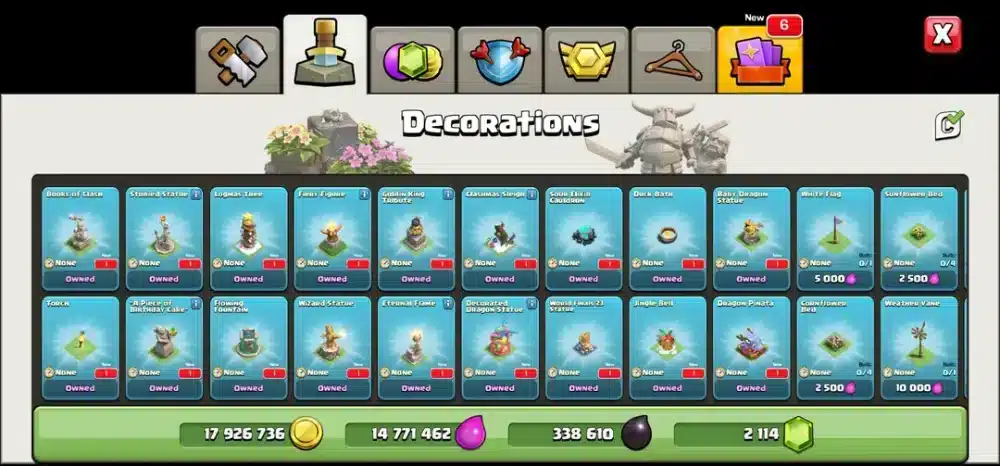
The Daily Deals section inside the Trader tent and special market bundles feature a wide array of magical consumables. Knowing the exact mathematical conversion of gems to hours saved helps you avoid wasting valuable premium currency.
Additionally, prioritizing items that bypass massive late-game upgrade timers yields the greatest strategic advantage.
- Book Of Heroes: Instantly finishes any hero level, providing massive value on fifteen-day upgrade tiers.
- Book Of Building: Instantly completes defensive structures, ideal for crucial upgrades like the Eagle Artillery.
- Book Of Spells And Fighting: Bypasses lengthy laboratory timers to keep your offensive armies fully maxed.
- Rune Of Dark Elixir: Completely fills empty hero fluid reservoirs, saving hours of intensive multiplayer farming.
Therefore, calculating the time savings behind each magical item ensures you extract peak efficiency from every deal.
How Do You Choose Between Bundles And Raw Gems?
A frequent dilemma faced by village commanders is whether to purchase flat gem packs or wait for curated promotional bundles. Raw gems offer unmatched flexibility, allowing you to finish emergency upgrades, buy Trader items, or acquire vintage hero skins.
However, promotional event packs often bundle millions of resources alongside multiple magic books at massive promotional discounts.
- Event bundles routinely provide multiple times the baseline value of equivalent raw gem purchases.
- Promotional packs frequently contain exclusive seasonal sceneries and commemorative hero cosmetic gear.
- Raw gems remain essential for purchasing Goblin Builder services during major village upgrade sprints.
- Special anniversary deals often combine Runes, Books, and thousands of bonus gems in a single package.
Consequently, waiting for major seasonal holiday bundles almost always outperforms buying standard gem chests.
When To Spend Gems In The Trader Tent
The traveling Trader tent appears alongside your village boundaries, offering rotating selections of magic potions, ores, and books. Evaluating which weekly Trader offers justify your saved gems prevents running empty when high-value books appear.
In addition, the Trader offers completely free training potions and minor consumables at weekly reset intervals.
- Inspect the Trader inventory weekly to grab any free potions or discounted resource boosts immediately.
- Spend your saved gems primarily on Books Of Heroes when upgrading key offensive combat units.
- Acquire Glowy Ore or Starry Ore packs if your Hero Equipment levels lag behind your Town Hall level.
- Avoid spending premium gems on standard wall rings or basic gold and elixir storage fills.
Taking a disciplined approach to the Trader ensures your gem cache fuels essential offensive upgrades rather than wasteful filler.
| Purchase Type | Primary Resource | Best Target Use Case | Strategic Progression Value |
| Extra Builders | Gems | Permanent Village Infrastructure | Essential Priority |
| Monthly Gold Pass | Direct Purchase | Builder & Lab Time Reductions | Highest Game Value |
| Book Of Heroes | Gems / Bundles | Late-Stage Hero Upgrade Skips | High Competitive Impact |
| Starry & Glowy Ore | Gems / Medals | Epic Hero Equipment Leveling | Critical Combat Power |
| Raw Gold / Elixir | Gems | Storage Fill Emergencies | Low Value (Avoid) |
Safety Tips For In-Game And Online Transactions
Protecting your village account from unauthorized access, payment fraud, and permanent developer bans requires constant vigilance. Dishonest third-party websites frequently advertise unrealistically cheap gem packs or pre-loaded account sales to deceive unsuspecting players.
Furthermore, acquiring premium currency through unauthorized third-party services violates developer fair-play policies and triggers permanent suspensions.
- Transact exclusively through the official mobile game client or verified developer web storefronts.
- Activate Supercell ID two-factor authentication with SMS or authenticator codes on your master email.
- Never share your village account credentials or login verification codes with external services.
- Ignore online generator tools promising unlimited free gems, passes, or free builder unlocks.
Consequently, practicing sound account hygiene ensures your accumulated village progress remains completely safe and secure.
How To Resolve Storefront Delivery Issues
Occasionally, a mobile connection drop or processing delay during checkout can prevent purchased items from appearing immediately. While most transactions process in seconds, network desync can sometimes cause temporary visual delivery delays.
Moreover, following a clear verification sequence quickly confirms whether your order completed successfully.
- Close the mobile game client completely and restart your mobile device to clear active cache memory.
- Relaunch the application and check your Town Hall inventory and storage capacities carefully.
- Review your email inbox for official purchase receipts sent by your mobile platform or web provider.
- Contact customer support through the in-game Settings menu if items fail to appear after twenty-four hours.
Taking these systematic steps resolves common transaction delays without causing duplicate charges on your payment card.
How Do You Gift Passes To Supercell ID Friends?
One of the most powerful features of the modern web storefront ecosystem is the ability to donate passes to clanmates. Gifting seasonal passes directly strengthens your clan roster, ensuring your top war attackers enjoy maximum offensive perks.
In addition, managing pass donations through your Supercell ID friends list is remarkably simple and fully automated.
- Add trusted clanmates and real-world friends directly to your connected Supercell ID social roster.
- Purchase passes in bundle quantities through the web store to take advantage of multi-pack discounts.
- Navigate to your web inventory and select the Donate option next to your stored seasonal pass.
- Confirm the recipient name carefully before sending to prevent misdirected pass activations.
Thus, sharing passes with your clan fosters strong teamwork and boosts collective Clan War performance.
Pro Tips: Clash Of Clans Shop
- Hold magic items for Town Hall upgrades: Save your purchased Books and Runes for the exact moment your Town Hall finishes upgrading so you can instantly max your Spell Factory and Laboratory.
- Sync purchases with Bonus Track resets: Time your web store transactions near the beginning of each monthly season to immediately unlock early reward tiers on the Bonus Track.
- Support creators at zero extra cost: Enter an active Creator Code in your shop settings before finalizing purchases to allocate a portion of your transaction directly to community contributors.
- Stack Builder Potions during events: Combine purchased Builder Potions with special village discount events like Hammer Jam to multiply the effective value of every hour saved.
Common Mistakes Clash Of Clans Shop Users Make
- Buying raw resources with premium gems: Many eager players spend hundreds of gems directly filling gold or elixir storages to start a defense upgrade. Fix: avoid buying raw resources with gems entirely, and instead farm loot through multiplayer raids while saving gems for builders or books.
- Purchasing the Gold Pass on the final days: Novice players often buy the seasonal pass during the final week of a season, missing weeks of valuable twenty percent builder and lab discounts. Fix: purchase your seasonal pass during the initial week of the month to enjoy the full duration of passive perks.
- Letting reward track items expire: Casual buyers frequently forget to claim completed tier rewards on the web Bonus Track before the redemption window closes permanently. Fix: set a monthly calendar alert to log into your web store dashboard and claim all pending magic potions and books.
Maximize Your Clash Of Clans Shop Experience With ExitLag
Managing village upgrades, deploying precise war attacks, and claiming deals in the Clash Of Clans Shop requires a completely stable online connection. Nothing frustrates a clan leader more than experiencing an unexpected network drop during a high-stakes Clan War attack or live tournament raid.
ExitLag provides a dedicated performance optimization solution engineered to maintain flawless connection stability across demanding mobile gaming sessions. By utilizing proprietary Multipath Technology, it analyzes multiple network routes in real time and routes your data packets across the most efficient server paths simultaneously. Consequently, if your mobile cellular connection or local wireless network suffers sudden packet loss, secondary pathways maintain your session without connection disconnects or desync.
Furthermore, ExitLag supports thousands of mobile and PC titles across an expansive global network of over 1,500 servers. Its specialized Traffic Shaper prioritizes active game data ahead of background app updates, while real-time routing eliminates erratic ping spikes during competitive play. Experience seamless tactical attacks today by securing ExitLag for Android on the Google Play Store or downloading ExitLag for iOS from the App Store. For cross-platform players running emulation setups or desktop gaming titles, optimize your complete battlestation using the ExitLag Download for PC.
Indeed, upgrading your network route protects your competitive attacks while you expand your village defenses through the Clash Of Clans Shop.
All game images used in this blog post belong to Supercell. They are used for informational and educational purposes only and do not imply endorsement or affiliation with the rights holders.