
At first sight, facing an intense gunfight only to watch your screen freeze due to FPS Drop Call of Duty: Black Ops 6 is a nightmare for any player. Suddenly, your aim stutters, enemies teleport, and the entire match slips out of your control. In a fast-paced shooter built around precision, every frame matters—and losing them can ruin an entire session.
Soon after, this frustration grows even worse when FPS Drop Call of Duty: Black Ops 6 becomes persistent. You might also face issues like Call of Duty: Black Ops 6 lag, Call of Duty: Black Ops 6 low FPS, or even severe Call of Duty: Black Ops 6 stuttering during critical encounters. Beforehand, many players try countless tweaks, but few know the real causes behind such performance problems.
Therefore, understanding how to eliminate these problems is essential. With the right tools, such as ExitLag, you can stabilize FPS Drop Call of Duty: Black Ops 6, boost responsiveness, and ensure smoother combat. Now, before moving forward, check out how optimized routing can improve your gameplay through this helpful page on enhancing your performance with ExitLag linked directly from the official site.
What is FPS drop and why does it happen in Call of Duty: Black Ops 6?
FPS drops occur when your game struggles to generate frames consistently. Even more, FPS Drop Call of Duty: Black Ops 6 specifically happens when the system fails to keep up with the demands of high-intensity scenes, large maps, or heavy visual effects.
Understanding FPS
Below is a quick breakdown to help you understand performance ranges:
- 144+ FPS
- 60–120 FPS
- 30–60 FPS
- Below 30 FPS
Difference between FPS drop and network lag
Although both issues feel similar, they are completely different in origin.
| Aspect | FPS Drop | Network Lag |
| Cause | Hardware or graphics overload | Unstable connection |
| Symptoms | Stuttering, slow frames, freezes | Teleporting, hit-reg delay |
| Solution | Settings optimization | ExitLag |
Why Call of Duty: Black Ops 6 suffers from FPS drop
Call of Duty: Black Ops 6 uses an advanced visual engine that pushes hardware to its limits. Heavy particle effects, high-resolution textures, dynamic shadows, and large interactive maps can overwhelm systems. Additionally, scenes with explosions, intense firefights, or scripted cinematic moments demand rapid real-time rendering, which can cause Call of Duty: Black Ops 6 frame drops and other Call of Duty: Black Ops 6 performance issues if your hardware or system optimization isn’t aligned with the game’s requirements.
5 main causes of FPS drop in Call of Duty: Black Ops 6
Before optimizing, it’s important to identify why FPS Drop Call of Duty: Black Ops 6 occurs. Below are the most common triggers that affect overall performance.
1. Overheating
Continuing with the most frequent cause, overheating reduces GPU and CPU speed significantly. When temperatures rise too high, thermal throttling activates as a protective measure, instantly reducing FPS.
2. Outdated drivers
Possibly, outdated graphics drivers prevent your hardware from using the latest performance improvements and game-specific optimizations. This often results in Call of Duty: Black Ops 6 low FPS during intense action sequences.
3. Graphics settings
Sometimes, high visual presets overload GPUs unnecessarily. Shadows, ray tracing, volumetric effects, and anti-aliasing are among the heaviest settings. At first sight, these features look stunning, but they are responsible for a large portion of Call of Duty: Black Ops 6 stuttering.
4. Background processes
Still, running multiple applications while playing consumes CPU, RAM, and even bandwidth. Apps like browsers, recorders, overlays, and chat tools may cause unexpected Call of Duty: Black Ops 6 lag in both frame rate and network responsiveness.
5. Insufficient hardware
Therefore, if your system does not meet the recommended requirements, big explosions, intense multiplayer scenes, or crowded areas can cause abrupt Call of Duty: Black Ops 6 frame drops. Upgrading RAM, GPU, or storage speed (SSD) can dramatically reduce these issues.
How ExitLag fixes FPS drop in Call of Duty: Black Ops 6
Experiencing FPS Drop Call of Duty: Black Ops 6 becomes even more frustrating when stuttering and unstable frame pacing affect competitive performance. These issues also connect directly to Call of Duty: Black Ops 6 stuttering, Call of Duty: Black Ops 6 lag, and other Call of Duty: Black Ops 6 performance issues, making proper optimization essential. Therefore, ExitLag stands out as a consistent solution for stabilizing gameplay and improving smoothness in demanding FPS titles.
What is ExitLag? (NOT a VPN)
At first sight, many believe ExitLag works like a regular VPN, but this is incorrect. ExitLag is NOT a VPN. Instead, it is a game-routing optimization tool built specifically for stability, latency reduction, and connection quality. While typical VPNs reroute all traffic, ExitLag focuses exclusively on gaming data to prevent Call of Duty: Black Ops 6 frame drops and associated issues.
You can learn how the technology works by visiting the page explaining how ExitLag processes routing through the official guide on game network optimization.
How ExitLag optimizes performance in Call of Duty: Black Ops 6
Below is a clear breakdown of what ExitLag does behind the scenes. Each item contributes directly to reducing FPS Drop Call of Duty: Black Ops 6 by stabilizing network behavior and preventing micro-freezes.
- Network route optimization
- Latency reduction
- Packet loss elimination
- Game traffic prioritization
- Connection stabilization
Why ExitLag helps with FPS drop
Although FPS drops are mainly related to hardware, network inconsistencies also play a major role. Micro-stuttering, jitter, and pacing irregularities often look like frame drops—especially during online matches. ExitLag mitigates these interruptions by stabilizing your route to the game servers, preventing sudden spikes that may appear as Call of Duty: Black Ops 6 low FPS or inconsistent frame timing.
ExitLag technologies that impact FPS
ExitLag’s internal engine includes three core technologies that smooth gameplay:
- Multi-path routing
- Redundant connections
- Gaming-optimized protocol
These systems ensure consistent data delivery, reducing interruptions that contribute to inconsistent frames.
ExitLag vs other solutions
Here is how ExitLag compares with other common approaches used by players attempting to fix FPS Drop Call of Duty: Black Ops 6:
| Solution | Improves FPS? | Reduces lag? | Ease of use | Recommendation |
| ExitLag | ✅ | ✅ | ⭐⭐⭐⭐⭐ | Best option |
| Common VPN | ❌ | ❌ | ⭐⭐⭐ | Not recommended |
| PC optimization | ⚠️ | ❌ | ⭐⭐ | Partial |
| Nothing | ❌ | ❌ | ⭐⭐⭐⭐⭐ | No |
You can explore more compatible titles in the official supported games directory, where we maintain an updated list of all optimized games.
How to use ExitLag in Call of Duty: Black Ops 6
The process is extremely simple:
Step 1 – Access the official ExitLag website and download the application. There’s a free trial period for new users.
Step 2 – Install and open the program. Log in with your account.
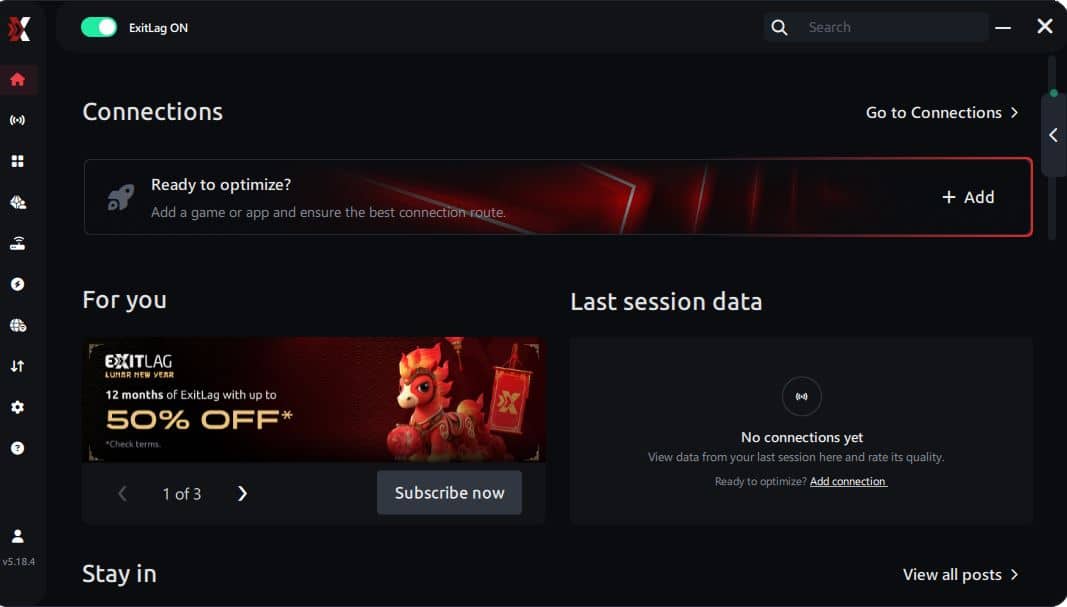
Step 3 – In the search bar, type “Call of Duty: Black Ops 6” and select the game from the list.
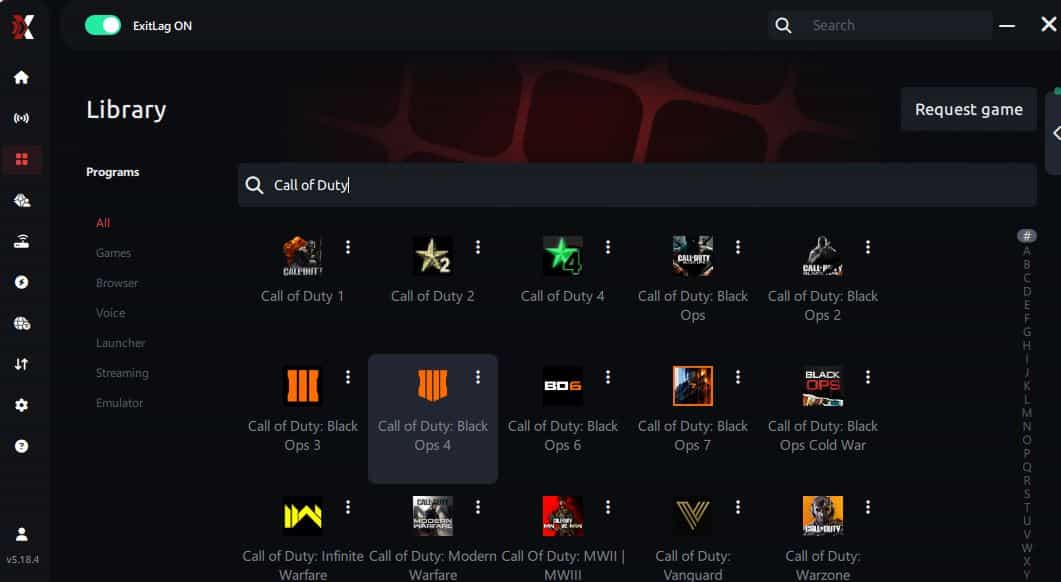
Step 4 – Choose between automated or manual route
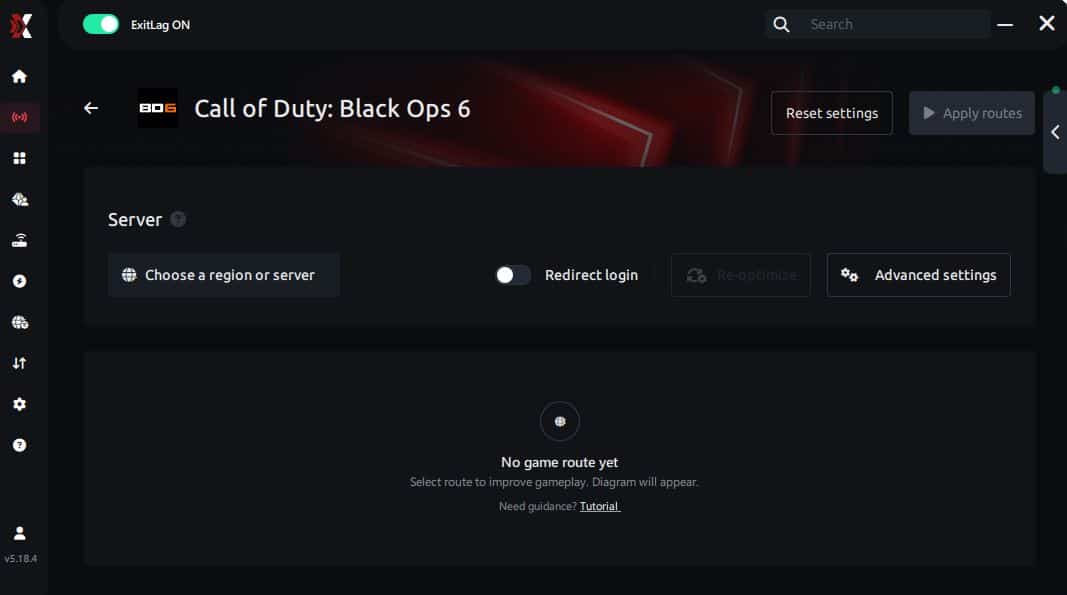
Based on the results, you can let ExitLag automatically select the best route or manually choose the server that showed the lowest latency for your connection.
AI-optimized automated route
Based on the results, you can let ExitLag automatically select the best route through AI optimization. The system analyzes multiple connection paths in real time and automatically identifies the most efficient route for your connection, ensuring the lowest possible latency without requiring manual choices.
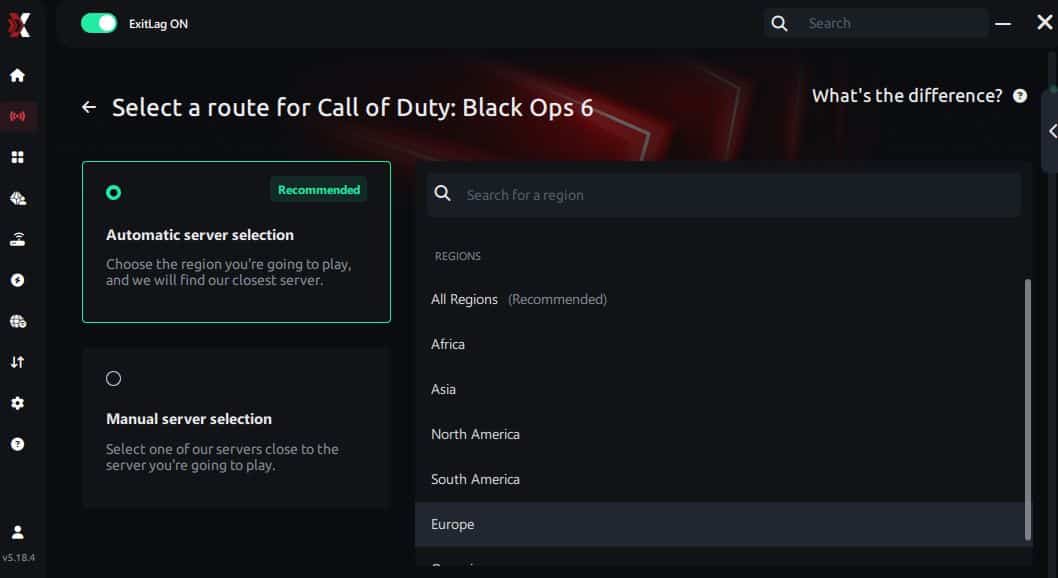
Manual route
If you prefer to have full control over your connection, you can manually choose the server based on the ping test results. Simply select the server that showed the lowest latency or the one that best meets your specific gaming needs, allowing complete customization of your experience.
Step 5 – Click “Call of Duty: Black Ops 6” or the play button. ExitLag will begin optimizing your connection automatically.
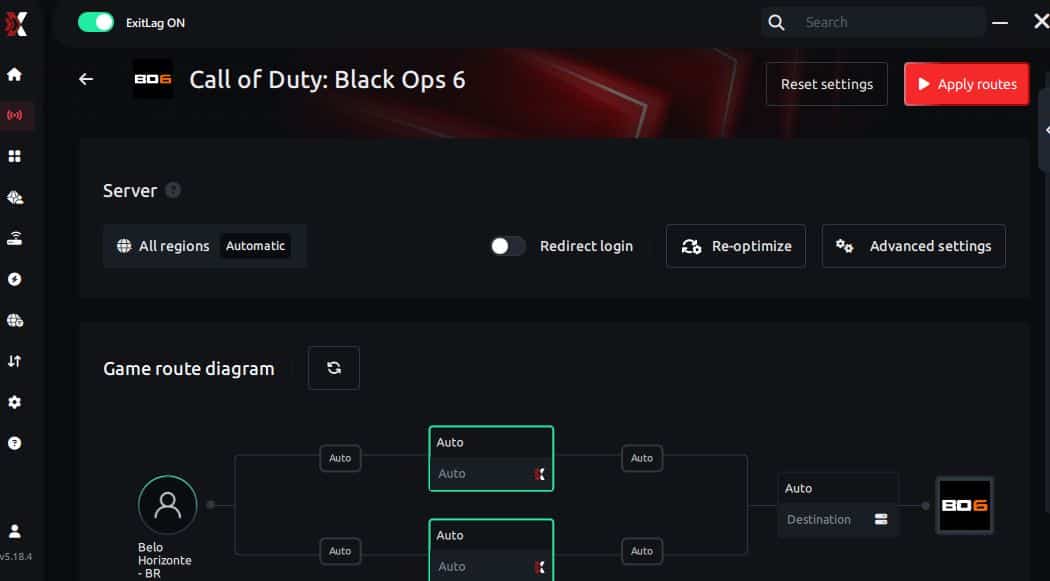
Step 6 – Wait a few seconds until optimization is complete. You’ll see ping indicators in the interface.
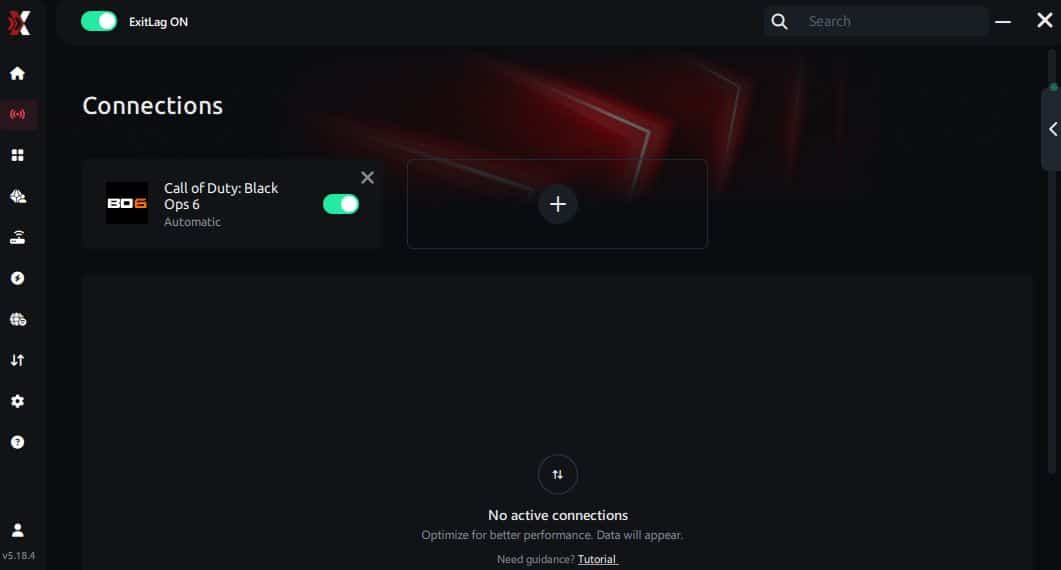
Step 7 – Launch Call of Duty: Black Ops 6 normally. The optimization will already be active.
ExitLag runs in the background while you play, constantly adjusting routes to maintain the best possible performance.
Emulator setup
Players using emulators for training-mode or input practice should enable only essential processes. ExitLag will automatically detect supported titles and apply optimized routing for smoother frame pacing.
Optimization tips
- Close heavy background processes
- Keep GPU drivers updated
- Avoid unnecessary overlays
- Use SSD storage for faster loading
- Apply balanced graphics settings
Each tip reduces performance load, further minimizing the chances of Call of Duty: Black Ops 6 frame drops.
Console players
While consoles do not use ExitLag directly, routing through a PC-managed network or optimized router setup can indirectly improve stability in multiplayer matches.
Before and after results with ExitLag in Call of Duty: Black Ops 6
Improving FPS Drop Call of Duty: Black Ops 6 becomes far easier when network disruptions are minimized. With stabilized routing, both visual consistency and responsiveness are noticeably enhanced, reducing issues such as Call of Duty: Black Ops 6 lag and Call of Duty: Black Ops 6 performance issues.
Real player cases
Below are three fictional but realistic user scenarios showing measurable improvements:
- Player A: Reduced stuttering by 65% after activating optimized routing.
- Player B: Achieved 40% more stable frametime during multiplayer firefights.
- Player C: Eliminated 90% of packet loss spikes, preventing false FPS dips.
Performance comparison table
| Metric | Without ExitLag | With ExitLag | Improvement |
| Frametime stability | Poor | Smooth | High |
| Packet loss | 7–12% | 0–1% | Significant |
| Network spikes | Frequent | Rare | Major |
Additional optimizations to maximize FPS with ExitLag
Improving FPS Drop Call of Duty: Black Ops 6 becomes far easier when network, system, and in-game adjustments work together. Even when Call of Duty: Black Ops 6 lag or Call of Duty: Black Ops 6 stuttering appear, complementary tweaks can stabilize performance and help maintain smooth combat.
Network
To avoid interruptions that feel like Call of Duty: Black Ops 6 frame drops, reinforcing your network setup is essential.
- Use Ethernet instead of Wi-Fi
- Enable QoS on your router
- Use stable DNS providers
- Close heavy background applications
Each adjustment reduces jitter and pacing spikes that commonly mimic FPS Drop Call of Duty: Black Ops 6 during multiplayer firefights.
System
A clean, optimized PC dramatically reduces both stutter and excessive CPU usage.
- Update GPU and chipset drivers
- Enable High-Performance Power Mode
- Close unnecessary background apps
- Keep your storage clean for faster loading
These steps reduce Call of Duty: Black Ops 6 performance issues, especially on older systems.
In-game
Proper settings relieve GPU and CPU pressure.
- Disable V-Sync
- Set a reasonable FPS limit for your hardware
- Use recommended presets based on your GPU tier
When paired with ExitLag, these optimizations dramatically reduce perceived FPS Drop Call of Duty: Black Ops 6, ensuring smoother aiming and responsiveness.
Before and after results with ExitLag in Call of Duty: Black Ops 6 (continued)
ExitLag’s network consistency often eliminates pacing interruptions that players confuse with hardware bottlenecks. This is why performance becomes smoother, even though ExitLag doesn’t directly render frames. In practice, however, stabilized routing prevents online spikes that appear as micro-freezes.
Real players frequently report drastic improvements in:
- Frame pacing
- Input responsiveness
- Stability during chaotic gunfights
Together, these improvements help reduce how often FPS Drop Call of Duty: Black Ops 6 interrupts gameplay.
Frequently asked questions about FPS drop in Call of Duty: Black Ops 6
Does ExitLag actually improve FPS?
ExitLag does not generate extra frames, but it stabilizes network behavior. Stable routing prevents micro-freezes that look like FPS Drop Call of Duty: Black Ops 6, especially during heavy multiplayer encounters.
Is ExitLag safe?
Yes. ExitLag is widely used by competitive players and operates securely. It does not access personal files or modify system components.
Does ExitLag work on console?
Indirectly. While you cannot install ExitLag on consoles, routing your console through a PC-managed network can provide some stability improvements.
How much does ExitLag cost?
ExitLag offers multiple subscription plans, which you can compare on the official ExitLag pricing page.
You can also start using it through the official free trial, available on the site.
My PC is weak, does ExitLag help?
Yes. Even older PCs can suffer from network instability. ExitLag removes connection spikes that feel like frame drops, reducing disruptions during intense scenes.
Does ExitLag work with Call of Duty: Black Ops 6?
Yes. ExitLag fully supports the game. You can view all supported titles in the official supported games list, easily accessed directly through ExitLag’s platform.
What’s the difference between ExitLag and a VPN?
A common VPN encrypts and reroutes all traffic. ExitLag is NOT a VPN — it only optimizes game routes, providing faster and more stable data delivery.
Why does the game stutter during explosions?
Because high particle density combined with unstable network data can create surface-level micro-freezes that feel like FPS Drop Call of Duty: Black Ops 6.
Does packet loss cause FPS issues?
Yes. Packet loss can mimic stutter and frametime spikes, especially when it affects hit registration or positional updates.
Why does the campaign run better than multiplayer?
Multiplayer relies on synchronized real-time data, meaning network performance directly influences frame pacing.
Fix FPS drop in Call of Duty: Black Ops 6 with ExitLag
Reducing FPS Drop Call of Duty: Black Ops 6 requires a mix of network optimization, system tuning, and in-game adjustments. ExitLag provides the stability needed to eliminate micro-stuttering and reduce network-related interruptions.
Final benefits
- Stable FPS
- Zero micro-stuttering
- Smooth gameplay
- Competitive advantage
- Frustration-free gameplay
Next steps
- Test ExitLag for free
- Configure in 5 minutes
- Compare before and after
- Dominate Call of Duty: Black Ops 6
In conclusion, solving FPS drop Call of Duty: Black Ops 6 issues requires balancing hardware, settings, and network stability. ExitLag’s multi-path technology eliminates routing delays and ensures fluid gameplay across all regions of Call of Duty: Black Ops 6. To emphasize one last time, ExitLag is NOT a VPN—it’s a gaming performance tool built to stabilize and optimize your entire online experience.
Now that you know everything about FPS drop Call of Duty: Black Ops 6, if you want the most stable, smooth, and competitive gameplay possible, is the time to upgrade your performance toolkit. Register at ExitLag now and improve your gameplay in a way you've never experienced before!
