You load into your base, the Scorned Wilderness raid is about to start, and your swing lands half a second late. That is a server problem more often than a skill problem.
Since Jagex ended Early Access on September 15, RuneScape Dragonwilds Servers are how most groups play. Dedicated hosting is no longer a niche option, and the crossplay switch made it the default for mixed PC and console friend groups.
So what is the short answer? A RuneScape Dragon Wilds Server is a world that runs 24/7 on a host's machine, so the world keeps going while you're offline. You join it from the in-game world browser or with an invite code, and your connection route to that machine decides how smooth it feels.
How Do RuneScape Dragonwilds Servers Work Right Now?
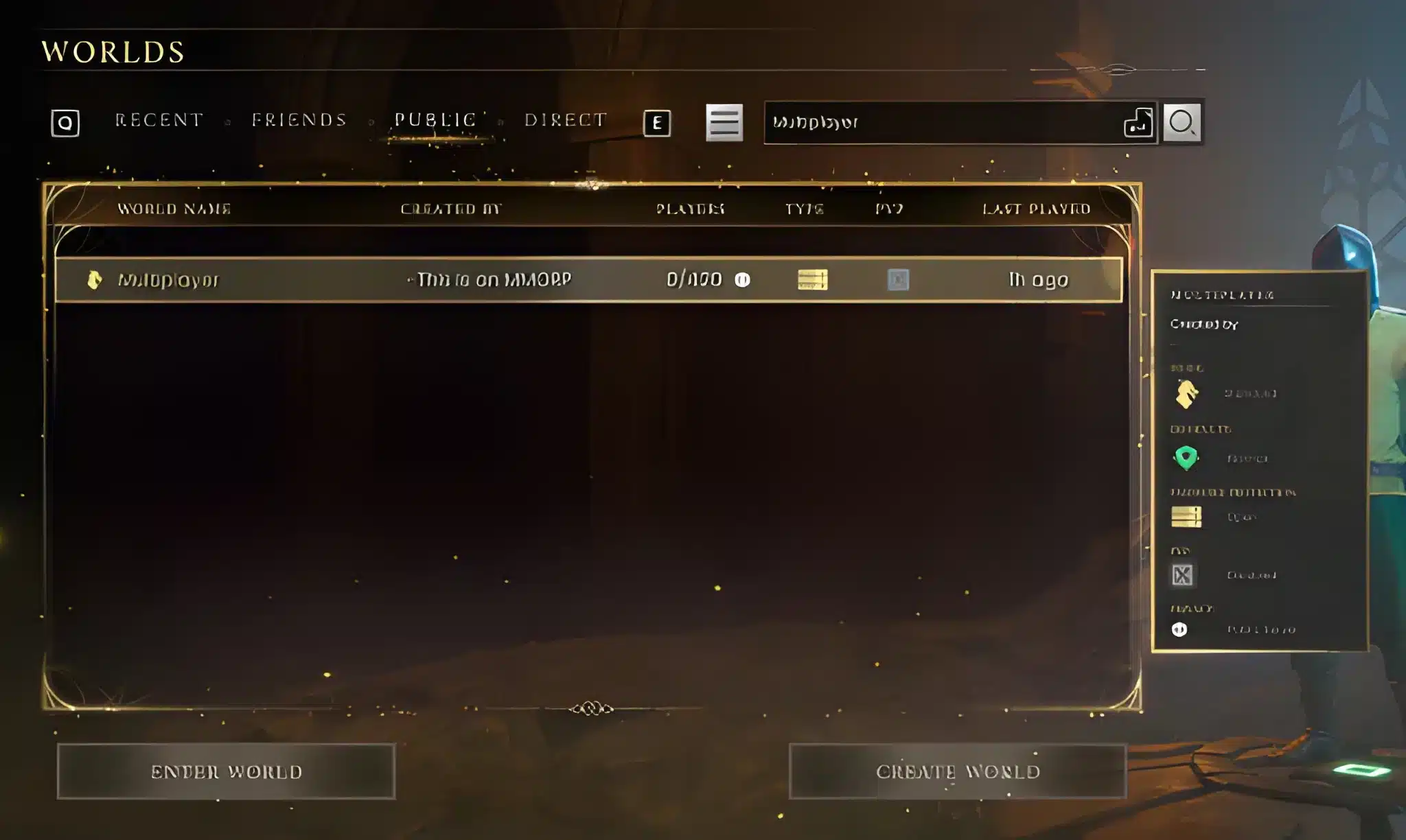
The way RuneScape Dragonwilds Servers work changed a lot in a few months. Jagex added dedicated server support in the March Major Update, and the 1.0 release added a crossplay option on top of it. The official 1.0 release post lists the details. Here is what the host and the players each handle:- Hosts pick a name, a password if wanted, and whether crossplay is on
- Joiners find the world in the browser or paste an invite code
- Your world keeps running when nobody is logged in
- Every action still goes to that one machine, so distance matters
Player-Hosted Worlds Versus Dedicated Servers
A player-hosted world lives on one person's PC or console. When that host closes the game, the world closes with it. A dedicated server is a separate machine, usually rented. Consoles can't host one, so a rented server is the only way to get an always-on crossplay world. We'd pick it for any group of three or more, because the host's home upload speed stops being everyone's problem.What Changed In 1.0 For Crossplay
Crossplay now covers PC, PlayStation 5, Xbox Series X|S and Nintendo Switch 2. The host chooses it per world when the world loads, and crossplay worlds show up in the browser. Invite codes are shown in the pause menu. Epic Games Store crossplay broke for a while and Jagex restored it in patch 1.0.0.6.How Do You Join A RuneScape Dragon Wilds Server?
Joining RuneScape Dragonwilds Servers is quick. The slow part is usually picking the wrong server for where you live.- Open the world browser from the main menu.
- Search by name, or paste the invite code the host sent you.
- Check the listed ping before you click join.
- Enter the password if the host set one.
- Wait for your character to load and test movement before you start a big build.
Using The In-Game Browser
The browser lists public RuneScape Dragonwilds Servers. Since the 1.0.1 update on October 14, sorting servers gives consistent results and Epic Games Store players can view dedicated servers again, including ones they joined before. Sort by ping first. A server that sits in the browser with 40 players on it is not a good sign if its ping is 180 ms from you.Using An Invite Code
Invite codes skip the browser. Fast. The host reads the code from the pause menu and sends it over Discord. That is the cleanest route for private groups. It also means you can't judge the ping until you're already inside.What Does The 1.0.1 Update Fix For Dedicated Servers?
The Eye on Ashenfall update from October 14 is mostly about saves and quality of life. It also has a solid list of server and multiplayer fixes.| Area | What changed in 1.0.1 |
|---|---|
| Saves | Fix for disappearing world saves, plus a catch-up system for corrupted character saves |
| Inventory | Slots go from 32 to 40 |
| Dedicated servers | Epic Games Store users can see servers again, server sorting is consistent |
| Building | Foundations and floors can be placed where one was destroyed |
| Crossplay | PC players with emojis in their name can join PS5 and Xbox hosted worlds |
Save Problems Are Not Lag
World saves disappearing was a real bug. Patch 1.0.0.8 on October 8 fixed one cause, and 1.0.1 went further. Jagex says a very small number of players may still hit other save issues. Don't blame your connection for that. Check the patch notes first. If your world vanishes, it is a save issue, and rubber-banding is a different thing.Player Count And Host Limits
Hosting providers publish different caps and RAM tiers, and I couldn't confirm one official number from Jagex. Check your host's panel before you invite a whole clan. That is a trade-off worth knowing: more players on the same machine means more load on the host and more chances for a bad frame during a raid.Why Does A RuneScape Dragonwilds Server Lag?
Most lag on RuneScape Dragonwilds Servers comes from three places: the host machine, the route between you and the host, and your own network at home. You can only fix the second and third. For a sense of what matters, the symptoms differ:- Rubber-banding on movement means to packet loss or an unstable route
- Steady delay on every swing is high ping
- If everything freezes for a second and then catches up, suspect an overloaded host
- Loading-screen disconnects come from a bad route or a Wi-Fi drop
Ping Versus Packet Loss
Ping is how long a packet takes to reach the server. Packet loss is when some never arrive. A 60 ms server with 3% packet loss feels worse than a 100 ms server with none. Remember the 180 ms server from the browser example: you'd feel it on every dodge during Kuldra, the God-Eater, who is the new end-game boss in the Scorned Wilderness.Why Peak Hours Hurt
On RuneScape Dragonwilds Servers, evenings and weekends are when your ISP's route to the host gets crowded. That is when the same server that was fine at noon starts spiking. If your world is only bad at night, the host isn't the cause. The route is. Simple.Pro Tips: RuneScape Dragonwilds Servers
- Pick the host region by the majority: Put the server near the player with the worst connection, not the best. Everyone else will still be fine, and the worst-off player stops being the weak link.
- Use wired internet: Wi-Fi drops cause packet loss spikes that look like server lag. A cable removes that variable in one step.
- Pause launcher updates and downloads: Steam, Epic and cloud sync can eat your upload while you raid, and that adds delay to every action.
- Try it at your usual play time: Join the server at 9 PM, not at 10 AM. A server that only works off-peak will let you down on raid night.
- Back up your world: Given the save bugs fixed in the last two patches, copy your world file before big events like a boss fight.
Common Mistakes RuneScape Dragonwilds Servers Players Make
- Choosing a server by name instead of ping: A friend says "join my server" and you do, from the other side of the planet. Fix: check the listed ping and ask the host which region it runs in.
- Blaming lag for a save problem: Players restart their router when the real issue is a bug. Fix: read the latest patch notes before troubleshooting your network.
- Running a VPN while playing: It adds a hop and can raise ping. Fix: turn it off for the game session.
- Hosting on a home PC for a big group: Your upload speed becomes everyone's ceiling. Fix: rent a dedicated server once the group grows.
How Can ExitLag Improve Your RuneScape Dragonwilds Servers Connection?
ExitLag is not a VPN. It's a connection optimizer that tests multiple network paths in real time and picks the fastest, most stable route between you and the game server. It doesn't encrypt your traffic or hide your IP. For RuneScape Dragonwilds Servers, the benefit is stability during long raid sessions and boss fights. Multipath sends packets over several routes at once, so if one route drops packets, the others keep your connection going. Here is what we'd turn on first:- Real-time Optimization to cut delay and packet loss on your route
- For raid nights, Multipath, when your ISP gets crowded
- If you have a backup like a phone hotspot, Multi-Internet
Final Checklist For RuneScape Dragonwilds Servers
Use this list before every raid night on RuneScape Dragonwilds Servers:- Confirm the server region and ping.
- Update the game to the latest patch.
- Switch to a wired connection.
- Close background downloads.
- Start ExitLag and pick the route.