

Every Competitive player asks the same thing once the season clock starts ticking down. When Does Overwatch Drives End is the question that decides whether you push for one more checkpoint or log off for the night.
Drives are Blizzard's way of rewarding grinders who stay active through Competitive Play during the final stretch of a season. When Does Overwatch Drives End matters because once the window closes, unclaimed Drive Score and pending checkpoint rewards disappear with it.
The short answer: Overwatch Drives typically run through the last one to two weeks of a Competitive Season, closing out right before the next chapter begins. For the current cycle, Season 3: Into The Tiger's Den runs from June 16 to August 11, 2026, which puts the Drives window in the final weeks leading up to that August 11 cutoff, so always confirm the exact countdown timer in your client since Blizzard can shift hours slightly by region.
This guide breaks down the full timeline, how the Drive Score system works, and how to squeeze every last reward out of the season before the timer hits zero.
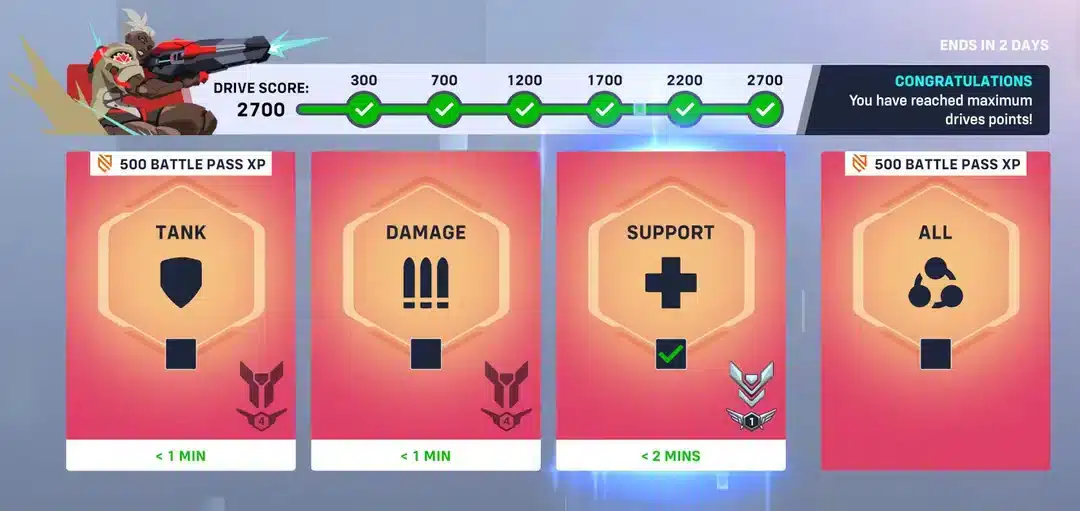
When Does Overwatch Drives End? Understanding The Current Cycle
Drives are not a permanent feature that runs all season long. They activate as a limited window layered on top of ranked play, and they exist specifically to reward players who keep queuing during the season's closing weeks.
Because Drives are tied directly to the Competitive Season calendar, the safest way to know exactly when yours ends is to check the in-game countdown banner. However, understanding the pattern helps you plan your grind instead of getting caught off guard.
The Overwatch Drives Timeline For This Season
Season 3: Into The Tiger's Den launched on June 16, 2026, and is scheduled to end on August 11, 2026. Based on how Blizzard has structured previous cycles, the Drives event opens in the back half of that window, not from day one.
That means players searching When Do Overwatch Drives End this cycle should expect the event to be live through the final stretch of July into the first days of August, wrapping up shortly before the season itself closes on August 11.
Why Drives Always Wrap Up Before Season End
Blizzard closes Drives slightly ahead of the full season finale so the reward tracking system has time to process everyone's final tier before the new season's ranks and rewards roll out. This buffer avoids overlap issues between two ranked systems running at once.
A few practical takeaways from this pattern:
- Drives almost never extend past the official season end date.
- The event usually opens once the mid-season patch or balance update lands.
- Regional time zones shift the exact hour, so check your local client time.
- Blizzard occasionally posts a specific countdown on the in-game news tab.
When Does The New Overwatch Season Start?
Since Overwatch moved to the Reign of Talon story arc, seasons follow a tighter, more predictable cadence than earlier years of the game. This structure makes it much easier to plan around When Does The New Overwatch Season Start without guessing.
There is typically no downtime between seasons. As soon as one Competitive Season closes, the next one begins the same day, meaning your Drives grind and the new season's fresh rank reset happen almost back to back.
How Blizzard Times Season Transitions
Overwatch now runs six seasons per year under the Reign of Talon arc, with each season lasting roughly nine weeks, or about sixty-three days. That consistent cadence is why community trackers can predict season boundaries months in advance.
Since Season 3 ends August 11, 2026, the next Overwatch season is expected to launch that same day, continuing the yearly story arc without a gap for players to sit idle between competitive cycles.
What Carries Over Into The New Season
Not everything resets when a new season begins. Knowing what survives the transition helps you decide what to prioritize before the current Drives window closes.
- Cosmetic rewards and signatures earned through Drives checkpoints stay in your account permanently.
- Competitive Points earned from tiers roll over and can be spent anytime.
- Your Skill Rank soft-resets, requiring placement matches in the new season.
- Battle Pass progress does not carry over once a new pass launches.
How The Overwatch Drives System Actually Works
Understanding the mechanics behind Drives is the real differentiator between players who finish every tier and players who fall short right as the timer runs out. It is not simply about playing more matches, it is about playing efficiently.
Drives track a separate meter called Drive Score, which only moves through ranked Role Queue matches. Casual games, arcade modes, and custom lobbies do not contribute at all.
Earning Drive Score From Wins And Losses
Every win awards Drive Score equal to ten times the total Skill Rank percentage you gained in that match. A loss reduces your Drive Score by five times the percentage lost, which is half the impact of a win.
This asymmetry rewards consistency over volume. Consider this simple breakdown:
- Win a match gaining 20% toward your next rank tier: you gain roughly 200 Drive Score.
- Lose a match losing 20% of rank progress: you only lose about 100 Drive Score.
- Once you cross a checkpoint threshold, your score cannot drop below it again, even after a losing streak.
Checkpoint Tiers And Rewards
Drive Score accumulates toward fixed checkpoints, and each checkpoint you cross locks in a reward permanently. This checkpoint locking is the single most important detail for anyone trying to finish before the window closes.
| Tier | Drive Score Needed | Reward |
|---|---|---|
| Tier 1 | 300 | 500 Competitive Points |
| Tier 2 | 700 | Signature item |
| Tier 3 | 1200 | 1000 Competitive Points |
| Tier 4 | 1700 | Advanced Signature item |
| Tier 5 | 2200 | 1500 Competitive Points |
| Tier 6 | 2700 | Elite Signature item |
Overwatch Countdown: How To Track Time Left Before Drives End
Guessing at dates is risky when rewards are on the line. The safest approach is to build the habit of checking your Overwatch Countdown timer every time you log in during the final weeks of a season.
Blizzard displays this information directly in the client, and third-party community trackers mirror the same data for quick reference on your phone.
In-Game Ways To Check The Countdown
- Open the main menu and look at the Competitive Play tile, which shows days remaining in the current Drives event.
- Check the News tab for official season transition announcements.
- Hover over your Drive Score progress bar to see the exact checkpoint and time remaining.
Community Tools And Trackers
Several community-run countdown sites track the official season calendar and update automatically once Blizzard confirms new dates. These are useful backups, but the in-game timer is always the most accurate source since it reflects your exact regional server time.
When Does Overwatch Season End? Full Season Timeline
Knowing the broader season calendar puts the Drives window into context. When Does Overwatch Season End is really the anchor question, since Drives are simply a countdown inside that larger countdown.
The table below lays out the current cycle so you can plan your remaining matches accordingly.
| Milestone | Date | Notes |
|---|---|---|
| Season 3 start | June 16, 2026 | Into The Tiger's Den begins, new hero Shion added |
| Mid-season patch | Late July 2026 | Balance changes typically arrive here |
| Drives event opens | Final weeks of the season | Confirm exact date in-game |
| Season 3 end | August 11, 2026 | Confirmed by Blizzard |
| Next season start | August 11, 2026 | No gap expected between seasons |
When Does Overwatch Season 3 Start was answered back on June 16, 2026, when Into The Tiger's Den launched alongside a new Hybrid map. That start date is exactly why the current Drives window now sits in the final weeks before August 11.
Pro Tips: Finishing Overwatch Drives
- Queue in short, focused sessions instead of long grinding blocks. Fatigue increases losses late in a session, which quietly erases Drive Score gains from earlier wins.
- Prioritize your best role first. Playing your strongest role increases your win rate, and since wins are worth double the impact of losses, this compounds quickly.
- Track checkpoints, not just total score. Once you lock a tier, that reward is safe, so aim your play sessions around crossing the next threshold rather than an arbitrary number.
- Check patch notes before the final week. Mid-season balance changes can shift which heroes carry games, and adapting early protects your win rate heading into the Drives close.
Common Mistakes Overwatch Drives Players Make
- Waiting until the last two days to grind. Fix: start tracking your Drive Score as soon as the event goes live so a bad losing streak near the deadline does not cost you a tier.
- Playing off-role for faster queue times. Fix: queue your main role even if it takes longer, since a higher win rate protects your Drive Score far more than shorter wait times.
- Assuming Drives share the exact season end date. Fix: always check the specific countdown banner in the client instead of assuming the event and season close at the same hour.
- Ignoring connection issues during high-stakes matches. Fix: a stable connection prevents disconnects that cost full losses right when you are close to a checkpoint.
Play Overwatch Without Connection Issues Slowing Your Drives Grind
Grinding Competitive Play during a tight Drives window means every match counts, and a bad connection can turn a winnable game into a frustrating loss. This is where ExitLag becomes a genuinely useful tool for competitive players.
ExitLag is not a VPN. It is a game connection optimizer that analyzes multiple network routes in real time and automatically picks the fastest, most stable path between your PC and Overwatch's servers, without encrypting traffic or masking your IP.
It supports over 4,000 titles across PC and Mobile, with more than 1,500 servers spread across 190+ countries, and it is trusted by over 30 million users processing 18 million optimizations every week.
What Makes ExitLag Different
- Real-time Optimization constantly re-checks available routes so your connection adapts as network conditions change mid-match.
- Multipath Technology can combine routes to reduce packet loss during critical team fights.
- Traffic Shaper prioritizes game traffic over background downloads or updates running on your PC.
- AI-powered routing learns from ongoing data to keep picking the best path automatically.
Safety And Compatibility
ExitLag does not modify game files, does not inject code into Overwatch, and does not interact with anti-cheat systems, which keeps it safe to use with supported titles. It should not be run alongside a VPN, since the two tools solve different problems and running both at once can cause conflicts.
For anyone grinding ranked matches during a tight Drives deadline, lower ping and fewer dropped packets can be the difference between locking in a checkpoint or falling just short. You can grab the ExitLag Download and test it during your next ranked session before the timer runs out.
When Does Overwatch Drives End: Key Takeaways For Season 3
Season 3: Into The Tiger's Den runs through August 11, 2026, and Drives close in the final weeks leading up to that date, so the clock is already running if you are reading this in late July. When Does Overwatch Drives End ultimately comes down to your in-game countdown timer, which is the only fully reliable source once Blizzard locks in the exact hour.
If you are still chasing checkpoints, prioritize your strongest role, watch the countdown daily, and keep your connection stable so no match slips away to lag instead of skill. Once When Do Drives End Overwatch hits zero for this cycle, the next season begins immediately, giving you a fresh Battle Pass and a new rank climb to look forward to.
All game images used in this blog post belong to Blizzard Entertainment. They are used for informational and educational purposes only and do not imply endorsement or affiliation with the rights holders.