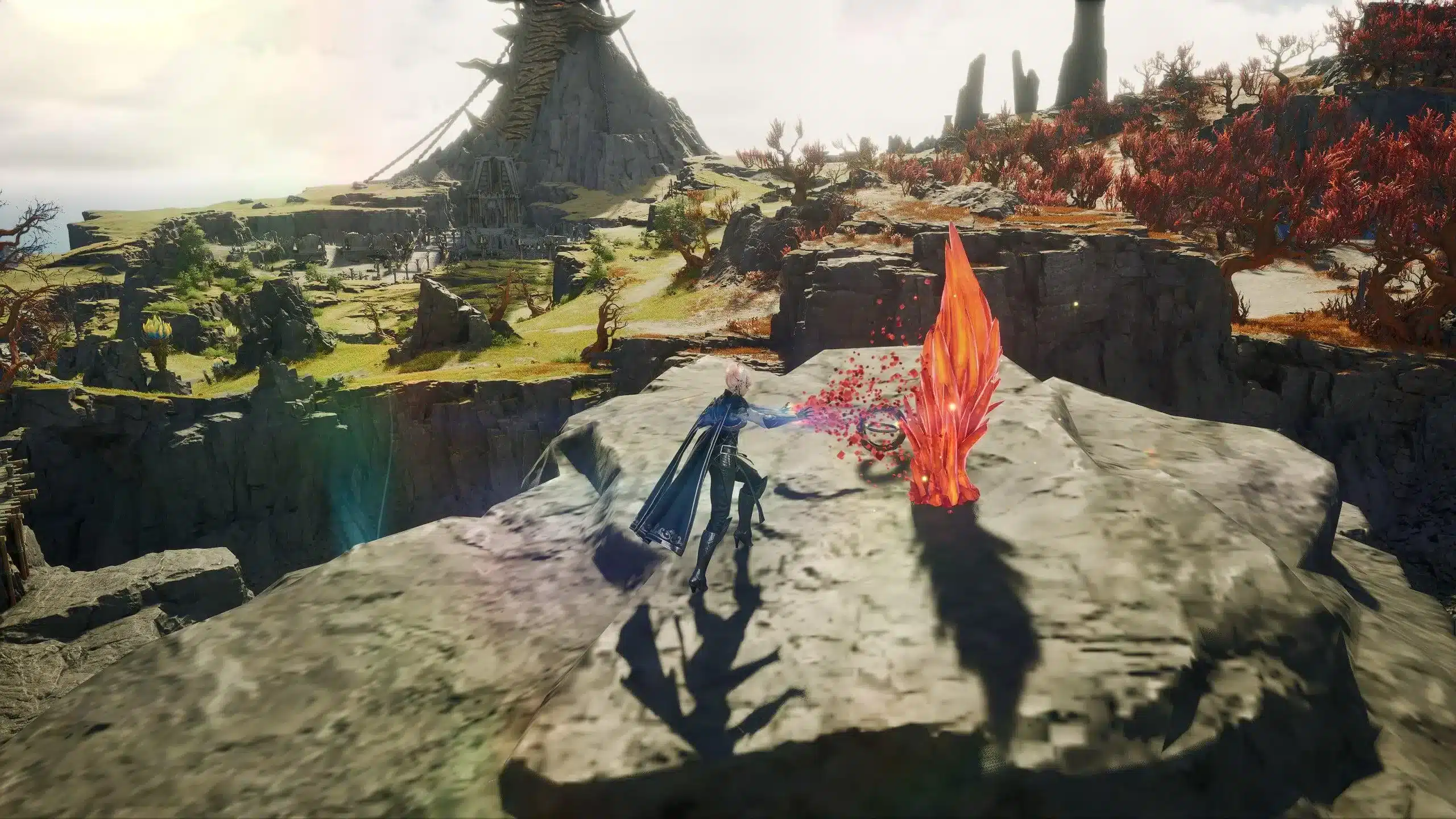
Aion 2 Global has been live! And the servers look different from launch day. There was a long maintenance on October 14, character transfers are rolling out, and a Halloween event runs until November 4.
If you're starting now,
Aion 2 Global is free to play on PC through Steam and NC's PURPLE launcher, with four server regions. Here is what changed since launch and how to start without losing days to queues or a bad server pick.
So, is Aion 2 Global live right now? Yes. It launched on October 5 at 13:00 UTC after Early Access (September 30 to October 4), it costs nothing to play, and new players can start fresh on any open server in their region.

Is Aion 2 Global Live Right Now?
What Is the Launch Status Today?
Aion 2 Global Servers are up and the game is open to everyone. Here is the snapshot:
- Aion 2 Free To Play access is open to everyone, with optional paid cosmetics.
- The game is PC only, through Steam and PURPLE.
- Servers run in North America, South America, Europe and Asia.
- Text is available in English, French, German, Spanish, Brazilian Portuguese, Japanese, Russian and Korean.
- Eight classes are playable at launch.
Steam and PURPLE players share the same global servers, so your launcher doesn't split you from friends, and nothing ties a guild to one store. You can check the current listing on the
official Aion 2 Steam page.
How Big Was the Aion 2 Global Launch?
Early Access, open only to Founder's Pack owners, peaked at 171,530 concurrent players on Steam. Launch day pushed the Steam peak to 397,905 according to SteamDB, and that count leaves out everyone on PURPLE.
NC itself announced a milestone of 400,000 active players a few hours after the gates opened, and since the Steam chart skips PURPLE, the real crowd in Atreia that day was bigger than any single number shows. We broke down those numbers in our
Aion 2 launch day record report.
At every MMORPG launch we've watched, the evening rush is where lag complaints start. Aion 2 is no exception.
Aion 2 Global Release Date and Timeline
The
Aion 2 Global Release Date was October 5 at 13:00 UTC. That's 6:00 AM PDT, 9:00 AM EDT, 10:00 AM in Brazil, 3:00 PM in Central Europe and 10:00 PM in Japan.
When Did Aion 2 Global Release Compared to Korea and Taiwan?
Korea and Taiwan have run the game for almost a year. The global build arrived with months of Asian balance work behind it, which is a real advantage for anyone starting today.
Korean guides, though, can mislead you. We cover why in the section on global differences.
Key Dates at a Glance
| Date |
What happened |
| September 30 to October 4 |
Early Access for Founder's Pack owners |
| October 5, 13:00 UTC |
Free-to-play launch on Steam and PURPLE |
| October 14 |
Maintenance, a 30.2 GB patch, the Halloween event and the first transfer window |
| After the October 20 maintenance |
Transfers open for Launch servers |
| November 4 |
Halloween event ends |
NC can move these windows. Treat the table as the plan, and check the in-game Shop and NC's Steam announcements for the final word.
Aion 2 Global Maintenance and Patch Changes
What Happened in the October 14 Maintenance?
Servers went offline at 8:30 AM CEST and came back at 12:30 PM CEST. Steam had listed 3 hours 30 minutes for Europe, so the real downtime ran about 30 minutes over.
Here is what the day brought:
- A patch download of about 30.2 GB
- The Halloween event, with new quests and rewards
- First server transfers, limited to Early Access servers
- About 9,422 accounts suspended by NC for suspected policy violations
NC expected small queues right after the servers returned. If you were stuck at login that morning, the bottleneck was server capacity, and no route could fix it.
Plan around four hours for any big
Aion 2 Maintenance. Not the number on the announcement.
What Is in the Halloween Event?
The event runs from October 14 to November 4. Short window. Logging in over 14 days earns up to 620 Halloween Pumpkin Coins, and ten weekly quests add up to 235 coins per week.
Some of the weekly quests:
- Hunt 10 monsters in the Abyss (25 coins)
- Clear a Conquest dungeon in Expedition (25 coins)
- Join a Dimensional Invasion (20 coins)
- Play one Shugofesta mini-game (20 coins)
Event merchants stand at Dawn Legion Base or Zumion Village for Elyos, and at Safe Haven or Nornir Assembly for Asmodians. The 250-coin chest holds a skeleton skin and 10,000 pet soul crystals.
Halloween skins in the shop cost real money and only apply to one character. We'd grind the coins if you log in daily anyway.
Aion 2 Server Transfer: Rules, Windows and Costs
Aion 2 Server Transfer is the biggest change since launch, and it comes with strict rules. Early Access servers got the first window, and Launch servers follow after the October 20 maintenance until the October 27 maintenance.
If you're reading this on October 21 or later, the Launch window should already be open. Our
Aion 2 server transfer rules guide has the original announcement details.
How Do You Request a Server Transfer?
Follow these steps in order:
- Make sure the character is level 10 or higher and standing in a town.
- Leave your Legion, cancel pending applications and finish or drop active Duty Missions.
- Clear the Market, Shop Storage and mail of anything unclaimed.
- Move valuables from Server Storage into your inventory or Character Storage, because Server Storage doesn't travel.
- Open the Server Transfer tab in the in-game Shop and pick a destination in the same region and faction.
- Confirm, log in and choose a new name, since transferred characters arrive as @TemporaryName.
There is no undo. Check the destination twice. If you want an extra read on the connection side after a move, our guide on
Aion 2 North America covers routing from that region.
What Does a Server Transfer Cost and Who Can Use It?
- The base cost is 0 Quna, with no fee per character.
- Each extra character slot on the destination server costs 1,000 Quna.
- One transfer per account is allowed during the whole period.
- All characters on the account move together, from one source server to one destination.
- Early Access characters can only go to other Early Access servers.
- A full source or destination server blocks the request even if you qualify.
South American players can request transfers daily from 1 PM to 5 PM and from 7 PM to 11 PM Brasília time. A free move still costs you your Legion spot, so we'd only transfer if your guild is going with you.
What's Different in the Global Version?
Stigma Slots and the Missing Brawler
NC made several changes for the Western launch of Aion 2 Global:
- Global launched with four Stigma slots, while the Korean build uses six.
- The Brawler, a class live in Korea and Taiwan, isn't playable on global servers yet.
- Eight classes are available at launch.
A rotation built around six Stigmas doesn't translate to a four-slot setup. That's why we skip Korean tier lists for global ranked decisions.
Our
Aion 2 Brawler guide explains the class and where it stands.
Which Classes Are Available in Aion 2 Global?
- Templar is the main tank.
- Gladiator is a durable melee fighter with strong area damage.
- Assassin is fast melee burst built on positioning.
- Ranger deals physical ranged damage.
- Sorcerer casts ranged magic and crowd control.
- Spiritmaster summons and controls with damage over time.
- Cleric is the dedicated healer.
- Chanter mixes melee, buffs and healing.
Flight is part of combat in Aion 2, and the Abyss is where Elyos and Asmodians fight for control. Altitude gives you better angles in PvP.

How to Pick the Best Aion 2 Global Servers
Which Region Should You Choose?
Your region choice in Aion 2 Global sets your ping for the life of the character. Since transfers are limited by region and faction, pick well the first time.
- Choose the region physically closest to you, not the one your favorite streamer uses.
- Prefer a medium-population server to skip the longest queues.
- Agree on a server and faction with your guild before anyone creates a character.
- Expect a longer route if you live in Oceania, because NC lists no server there.
The Early Access servers are a good example of the trade-off: they exist separately from Launch servers, and moving between the two isn't possible.
Steam or PURPLE: Which Launcher Should You Use?
Both launchers reach the same Aion 2 Global servers, so pick the one you already have installed. If you bought a Founder's Pack on one platform, keep launching from that platform until NC says otherwise.
What PC Specs Do You Need?
| Component |
Minimum |
Recommended |
| OS |
Windows 10/11 (64-bit) |
Windows 10/11 (64-bit) |
| Processor |
Ryzen 5 2600 / Core i5-10500 |
Ryzen 7 3700X / Core i7-11700 |
| Memory |
8 GB RAM |
16 GB RAM |
| Graphics |
GTX 1050 Ti (4 GB) |
RTX 2070 (8 GB) |
| Storage |
100 GB |
100 GB (SSD) |
Keep spare room for Aion 2 Global beyond the base install, because the October 14 patch alone was 30.2 GB. An SSD isn't mandatory, but it cuts loading times in crowded cities.
How ExitLag Helps in Aion 2 Global
Why Does Launch Week Lag So Much?
Thousands of Aion 2 Global players hit the same data centers, and your provider may send your traffic through a congested route you can't control. ExitLag is not a VPN. It's a game connection optimizer that tests several network paths in real time and picks the fastest, most stable one to the Aion 2 servers.
It can't shorten a queue or bring servers back from maintenance sooner. Where it works is lag in the route, like rubber-banding in a faction fight or a skill that fires late.
Here is what ExitLag adds:
- Multipath sends packets through several routes, so one bad path doesn't drop you.
- Multi-Internet combines up to 4 connections and switches if one fails.
- Traffic Shaper puts game traffic ahead of downloads and background apps.
- PC Boost frees RAM and trims background processes for steadier FPS in crowded hubs.
- AI routing picks a route in one click, with manual control if you want it.
How to Use ExitLag in Aion 2
The process is very simple:
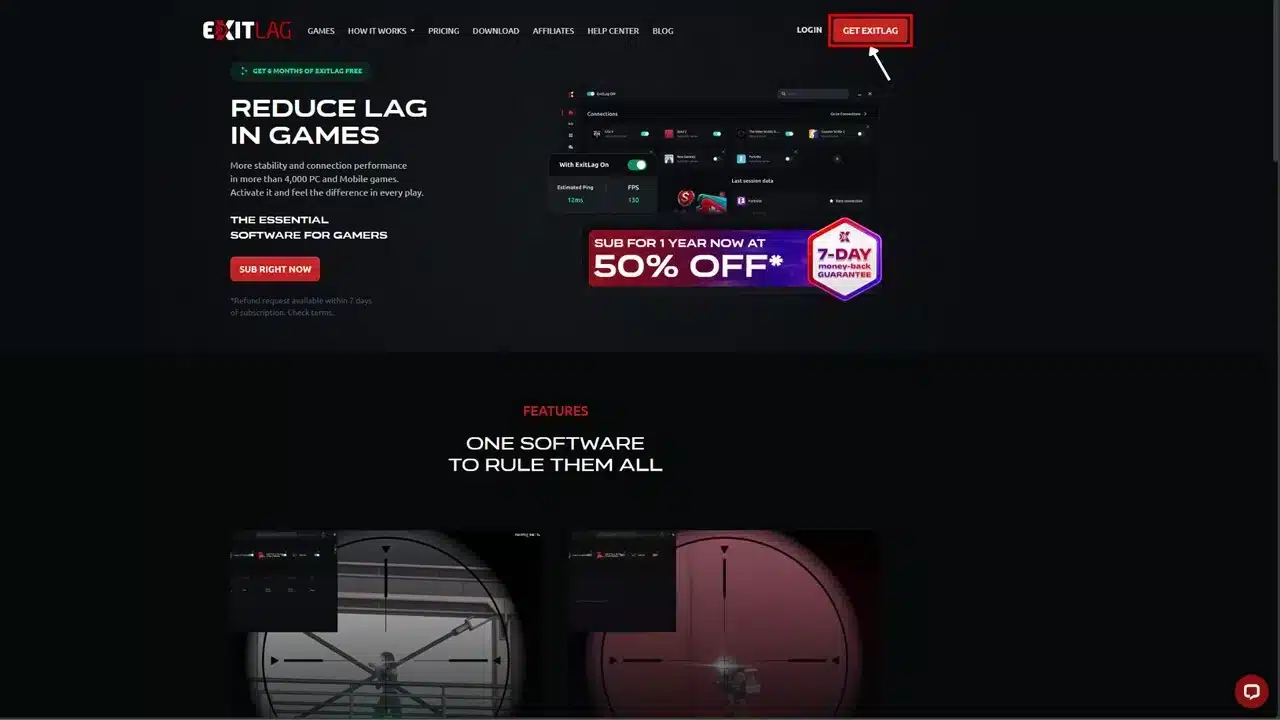
Step 1: Go to the official ExitLag website and download the app. New users can start with a free trial.
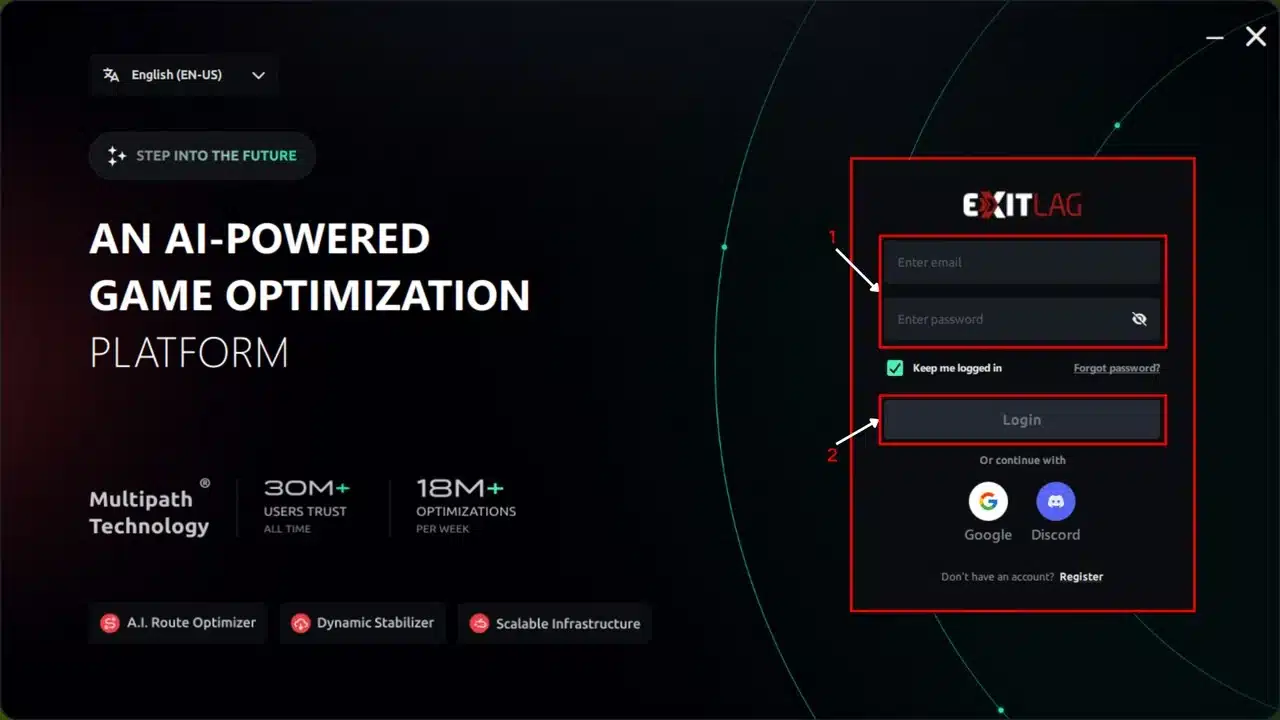
 Step 2: Install and open the program. Log in to your account.
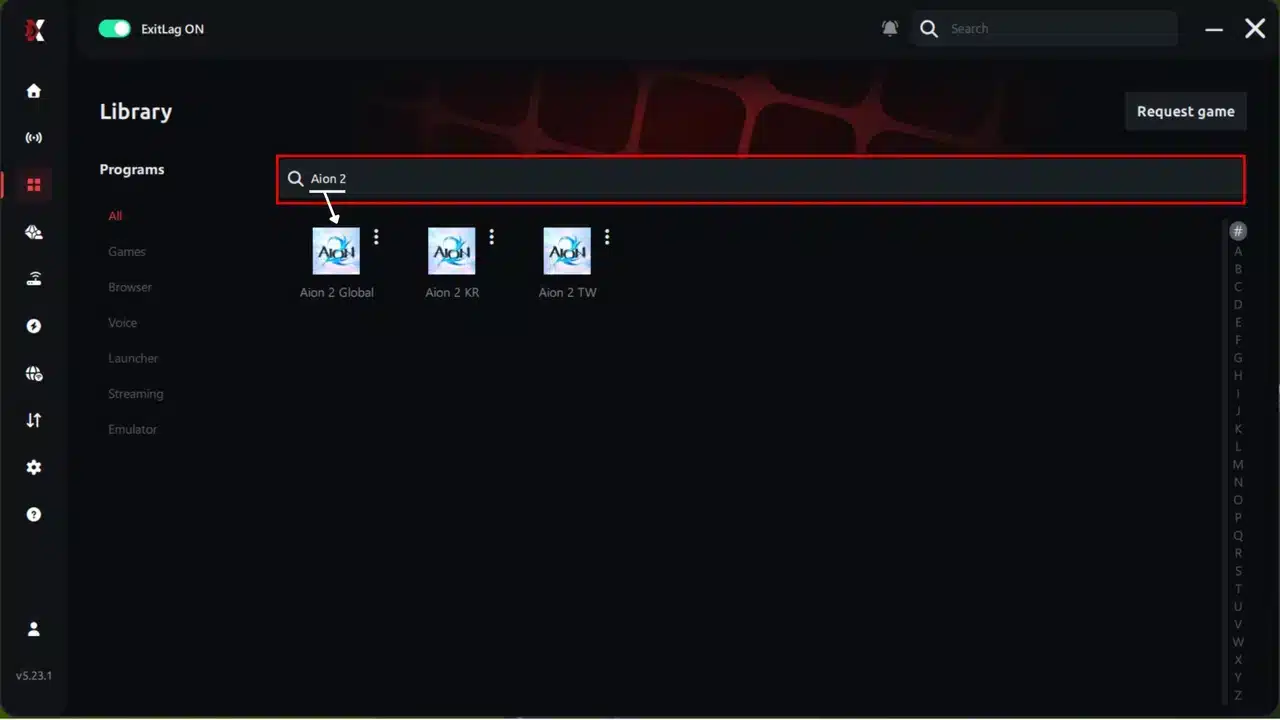
 Step 3: In the search bar, type “Aion 2” and select the game.
 Step 4: Choose between an automatic or manual route.
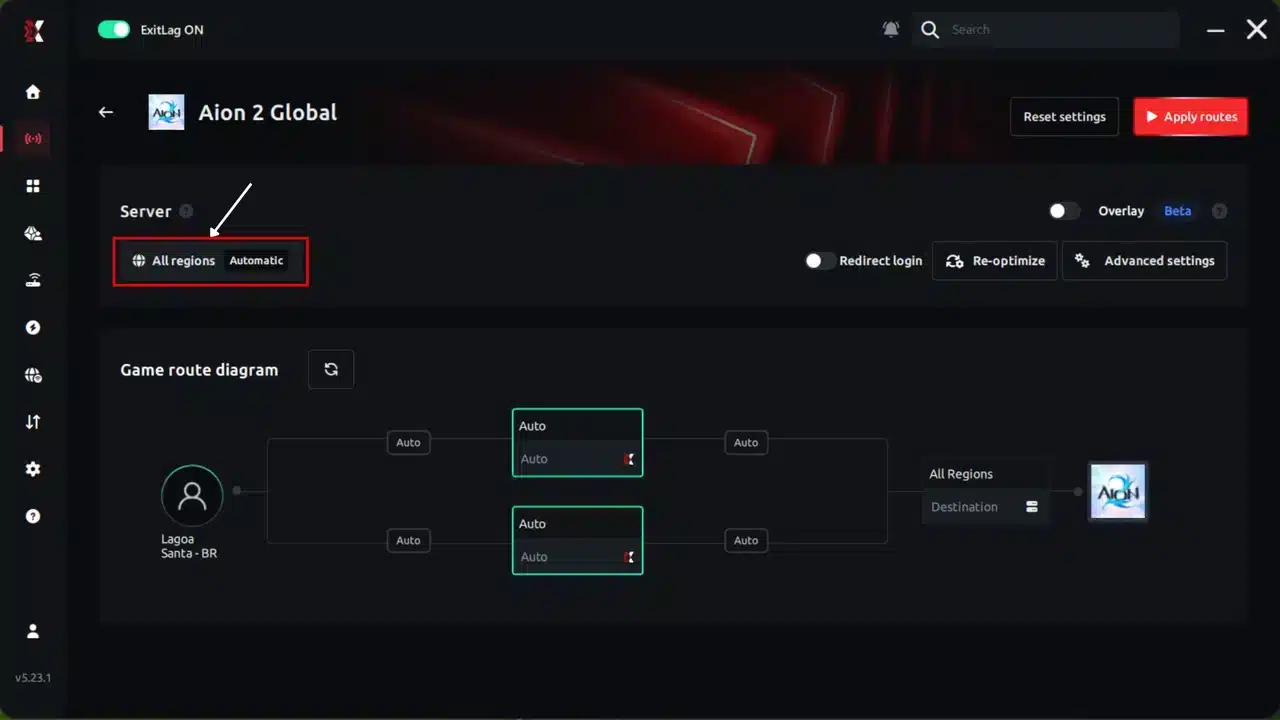
AI-optimized automated route:
The system analyzes multiple routes in real time and automatically selects the most efficient one.
Manual route:
If you prefer full control, manually select the server with the lowest latency.
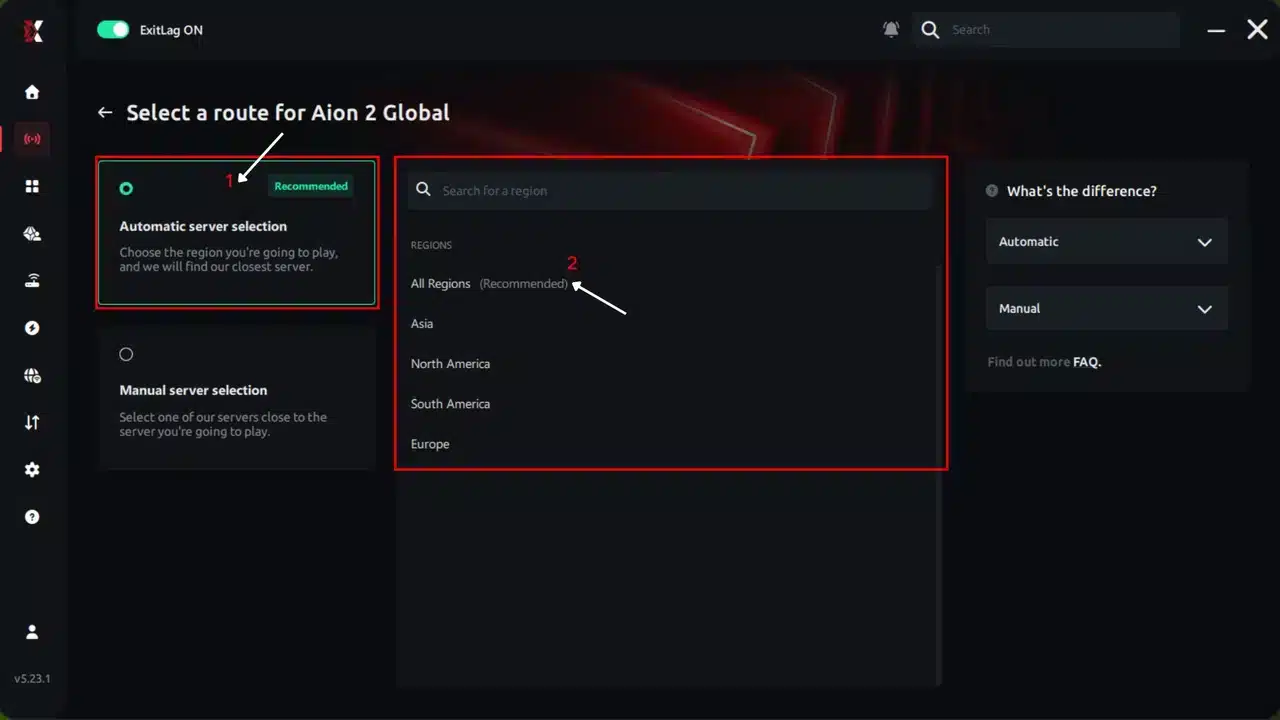 Step 5: Click Apply routes or the play button. ExitLag will automatically start optimizing your connection.
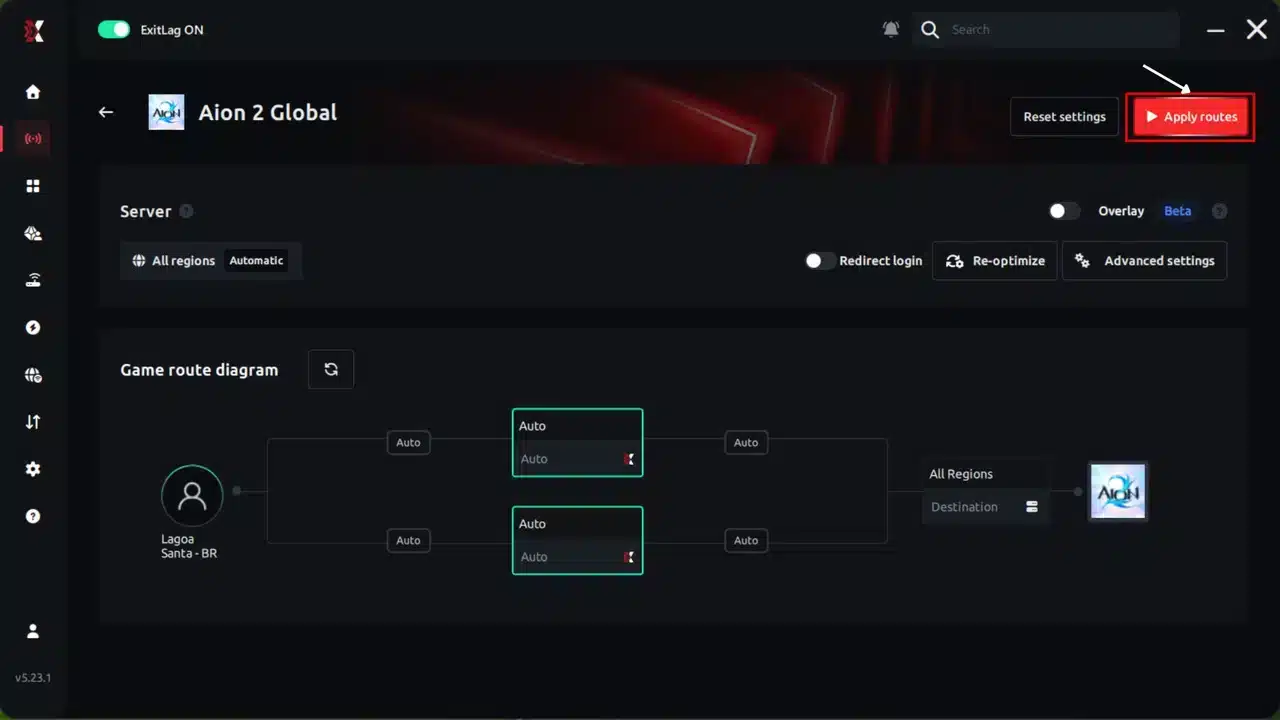 Step 6: Wait a few seconds while the optimization is completed. You will see ping indicators in the interface.
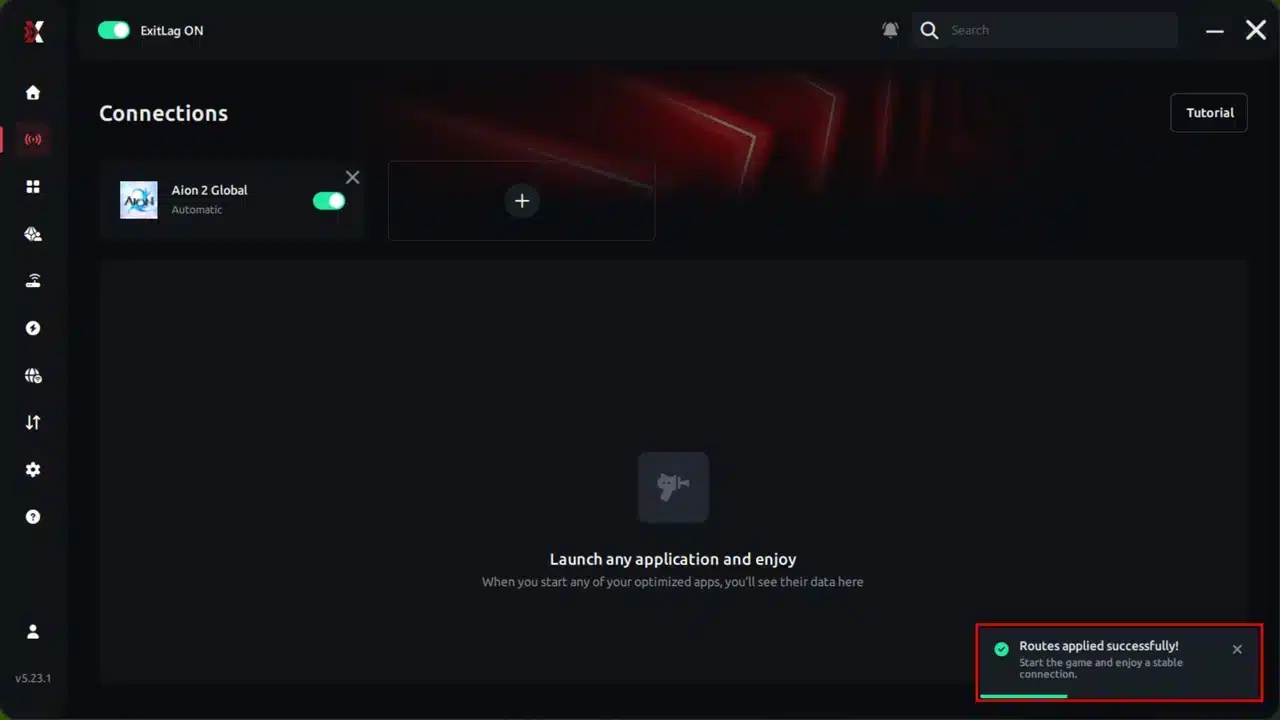 Step 7: Launch Aion 2 normally. The optimization will remain active in the background.
ExitLag automatically adjusts your connection while you play, helping maintain the best available routes.
ExitLag supports 4,000+ games with 1,500+ servers in 190+ countries, trusted by more than 30 million players.
It does not modify game files, inject code or interact with anti-cheat systems, so it is safe to use with Aion 2. Just avoid running it alongside a VPN.
Ready for the launch rush? Grab the ExitLag Download and start your journey in Atreia with a stable connection from the very first login.
Step 7: Launch Aion 2 normally. The optimization will remain active in the background.
ExitLag automatically adjusts your connection while you play, helping maintain the best available routes.
ExitLag supports 4,000+ games with 1,500+ servers in 190+ countries, trusted by more than 30 million players.
It does not modify game files, inject code or interact with anti-cheat systems, so it is safe to use with Aion 2. Just avoid running it alongside a VPN.
Ready for the launch rush? Grab the ExitLag Download and start your journey in Atreia with a stable connection from the very first login.
Pro Tips and Common Mistakes in Aion 2 Global
Pro Tips: Aion 2 Global
- Log in off-peak: Queues build in the evening of each region, so early mornings keep waits short.
- Build around four Stigmas: Pick the Stigmas that cover your biggest weakness. Korean rotations with six slots fall apart here.
- Do the weekly Halloween quests first: They give 235 coins a week, which is the fastest path to the 250-coin chest before November 4.
- Test your route before group content: A quick ping check prevents wipes caused by your connection. Remember that four-hour October 14 downtime? Don't add your own to it.
Common Mistakes Aion 2 Global Players Make
- Copying Korean builds blindly: Korean guides assume six Stigma slots and a ninth class. Fix: adapt to four slots and the eight-class roster.
- Forgetting Server Storage before a transfer: Items there don't move with your characters. Fix: empty it into your inventory first.
- Expecting Early Access characters to join Launch servers: The transfer service doesn't allow that. Fix: pick another Early Access server, or restart on a Launch server.
- Blaming the route for every queue: Login queues come from server capacity. Fix: use ExitLag for lag in play, and watch NC's announcements for queue news.
Is Aion 2 Global Worth Playing Now?
Who Should Start Today?
- You want a free MMORPG with flight combat and faction war.
- You're fine starting on a Launch server with a medium population.
- Your PC handles the 100 GB install and keeps room for patches.
Who Should Wait?
- Brawler fans should hold off, since the class is still missing from global.
- Transferring is on your mind, but your guild's landing spot is still unclear.
For everyone else,
Aion 2 Global is a good time to start: the launch-week chaos has settled into a clear routine of maintenance, transfers and events. Pick your faction, choose your server with care and get a stable route before the next rush.
All game images used in this blog post belong to NC (NCSOFT). They are used for informational and educational purposes only and do not imply endorsement or affiliation with the rights holders.