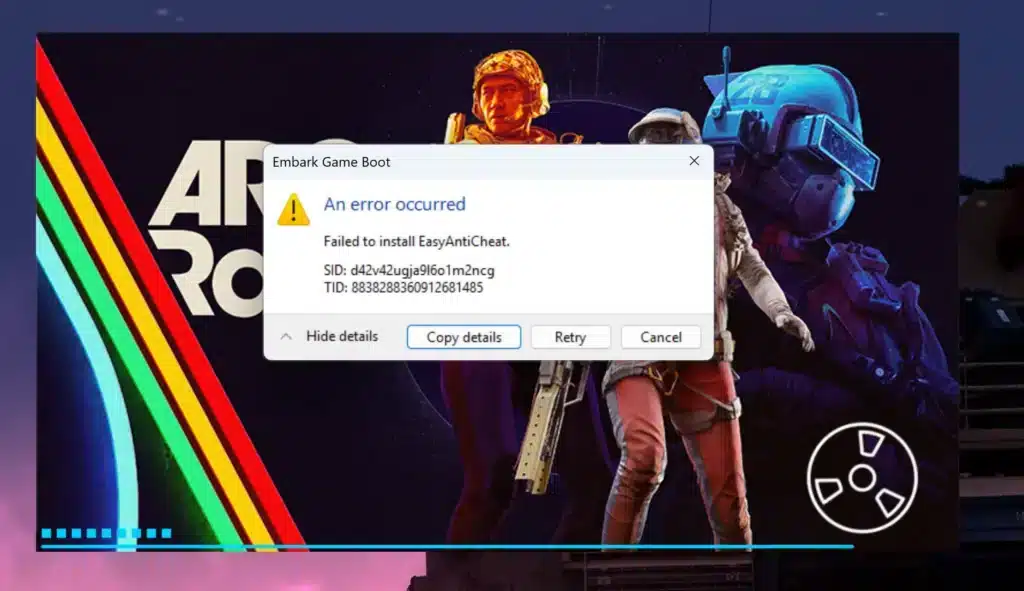
The Arc Raiders Anti Cheat Error is one of the most frustrating launch problems players face when trying to jump into ARC Raiders. Instead of loading into the battlefield, you’re blocked by an Easy Anti-Cheat installation failure that completely prevents the game from starting.
If you’re seeing the Arc Raiders Anti Cheat Error, you’re likely dealing with a system-level issue where Easy Anti-Cheat (EAC) fails to install, initialize, or verify correctly. This can appear as the arc raiders easy anti cheat error or the well-known arc raiders failed to install anti cheat message during startup.
So what is the Arc Raiders Anti Cheat Error, where does it come from, and why does it stop you from playing? This issue happens when Easy Anti-Cheat cannot properly install or run its service on your PC, which is required before ARC Raiders connects you to online servers. Without it, the game simply won’t launch.
ARC Raiders is a competitive online extraction shooter, which means anti-cheat protection is mandatory. The system runs before the game fully opens, scanning for unauthorized software, memory manipulation, or injection tools that could compromise fair play.
Because of that, even small system conflicts can block the installation process.
Why the Arc Raiders Anti Cheat Error Happens
Understanding why the Arc Raiders Anti Cheat Error appears is the first step toward fixing it permanently.
Corrupted or Missing Easy Anti-Cheat Files
Sometimes the Easy Anti-Cheat installer doesn’t complete correctly during game installation. This can happen due to:
- Interrupted downloads
- Steam verification failures
- Power outages during install
- Antivirus blocking the setup
When that happens, ARC Raiders cannot detect a valid EAC installation and throws the arc raiders easy anti cheat error immediately.
Permission or Administrator Conflicts
Easy Anti-Cheat requires administrative permissions to install system-level drivers. If:
- Steam is not running as administrator
- Windows security blocks driver installation
- UAC settings restrict system changes
You may see the arc raiders failed to install anti cheat error repeatedly.
Software Interference and Overlays
Certain programs hook into game memory and conflict with anti-cheat systems. These include:
- RGB control software
- GPU overlays
- Screen recording tools
- VPN software
- Third-party firewall tools
Even legitimate applications can trigger installation failures.
How to Fix arc raiders easy anti cheat error Step-by-Step
If you’re stuck on the Arc Raiders Anti Cheat Error screen, follow this complete recovery sequence.
1. Verify Game Files in Steam
Before doing anything advanced, verify your installation:
- Open Steam
- Right-click ARC Raiders
- Click Properties
- Go to Local Files
- Select “Verify integrity of game files”
This replaces missing or corrupted files automatically.
2. Manually Reinstall Easy Anti-Cheat
If verification doesn’t work, reinstall EAC manually:
- Navigate to your ARC Raiders installation folder
- Open the EasyAntiCheat folder
- Right-click EasyAntiCheat_EOS_Setup.exe
- Select “Run as Administrator”
- Choose Repair or Install
This forces a clean anti-cheat setup and resolves many cases of the arc raiders failed to install anti cheat issue.
3. Delete Old Easy Anti-Cheat Folders
Sometimes leftover files block reinstallation.
Steps:
- Close Steam completely
- Go to C:\Program Files (x86)\EasyAntiCheat_EOS
- Delete the folder
- Relaunch Steam as Administrator
- Start ARC Raiders again
This triggers a fresh installation attempt.
4. Disable Conflicting Software
Temporarily disable:
- Discord overlay
- GeForce Experience overlay
- MSI Afterburner
- RGB software (iCue, Razer Synapse)
- VPN tools
- Antivirus real-time protection
After disabling, try launching the game again.
Advanced Fix for arc raiders failed to install anti cheat
If the error persists, you may need deeper troubleshooting.
Use Command Prompt to Force Install
- Open Command Prompt as Administrator
- Navigate to your EasyAntiCheat folder
- Run the installer executable directly
This forces Windows to process the service installation without Steam interference.
Make Sure Game and EAC Are on the Same Drive
If ARC Raiders is installed on one drive and Windows is on another with restricted permissions, installation conflicts can occur.
For best stability:
- Install ARC Raiders on the same drive as Windows
- Avoid external drives
- Avoid network drives
Update Windows and Drivers
Outdated Windows builds sometimes block driver signing or service execution.
Update:
- Windows to latest stable version
- GPU drivers
- Chipset drivers
Then retry launching.
Preventing Arc Raiders Anti Cheat Error in the Future
Once fixed, follow these best practices to avoid seeing the Arc Raiders Anti Cheat Error again.
Keep Your System Clean
- Avoid installing suspicious software
- Keep overlays minimal
- Don’t stack multiple system monitors
Always Launch Steam as Administrator
This prevents permission conflicts during updates.
Avoid Force-Shutdown During Updates
Interrupting installations increases the risk of file corruption.
Performance Matters: Why Connection Stability Still Counts
Even after fixing the Arc Raiders Anti Cheat Error, performance problems can still affect your experience. ARC Raiders is an online multiplayer extraction shooter, meaning stable routing and low latency are critical.
Lag spikes, packet loss, and unstable routing can cause:
- Delayed hit registration
- Rubberbanding during combat
- Desync during extractions
- Server disconnects
That’s where ExitLag makes a difference.
ExitLag uses real-time routing optimization and Multipath Connection technology to send your game data through multiple simultaneous routes, reducing packet loss and stabilizing your connection. It’s built specifically for competitive online games and supports thousands of titles worldwide.
Even if your system is fully fixed, poor routing can still ruin matches. With optimized traffic shaping and automatic route selection, ExitLag ensures smoother sessions inside ARC Raiders.
Final Checklist Before Relaunching
Before you retry ARC Raiders, confirm:
- Game files verified
- Easy Anti-Cheat manually reinstalled
- Old EAC folders removed
- Overlays disabled
- Windows updated
- Steam running as Administrator
If everything above is completed, the Arc Raiders Anti Cheat Error should be resolved.
Fixing the Arc Raiders Anti Cheat Error is usually straightforward once you understand the root cause. Whether you encountered the arc raiders easy anti cheat error or the recurring arc raiders failed to install anti cheat message, following the correct troubleshooting sequence restores access quickly and safely.
Arc Raiders Anti Cheat Error Still Not Fixed? Advanced Solutions and Stability Guide
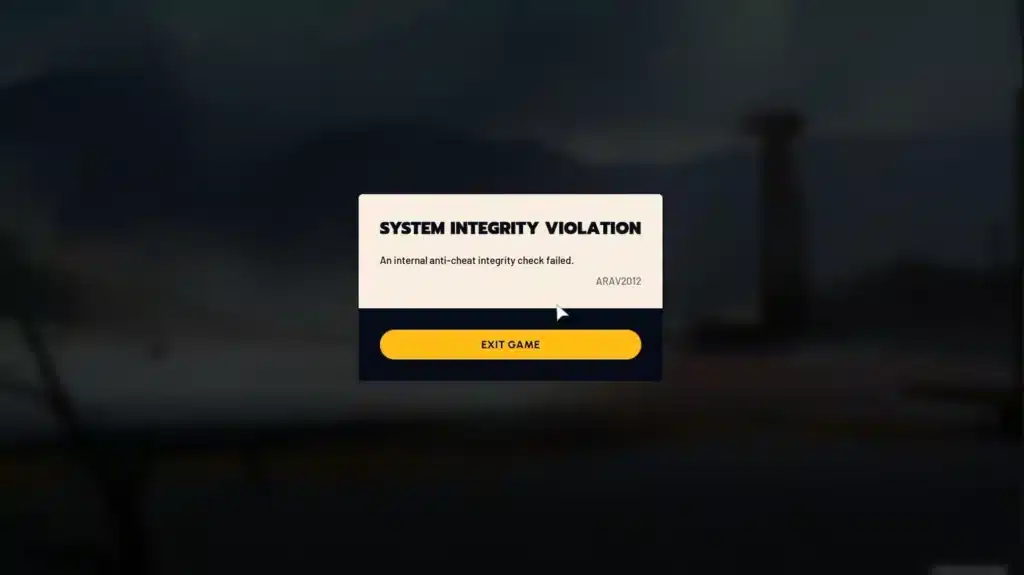
If the Arc Raiders Anti Cheat Error continues even after basic troubleshooting, the issue may be deeper than a simple reinstall. In many cases, system-level conflicts, driver validation failures, or unstable network routing can trigger recurring launch problems.
This section focuses on advanced fixes for the arc raiders easy anti cheat error and persistent arc raiders failed to install anti cheat messages.
Windows Security and Driver Conflicts
Easy Anti-Cheat installs a low-level service that requires properly signed drivers and Windows security approval. If Windows blocks that installation, the anti-cheat system will fail before the game launches.
Common System-Level Causes
- Driver Signature Enforcement blocking unsigned drivers
- Windows Secure Boot conflicts
- Corrupted system files
- Incomplete Windows updates
If you suspect a Windows-level issue:
- Run Windows Update and install all pending updates.
- Open Command Prompt as Administrator.
- Run: sfc /scannow
- Restart your PC.
This checks for corrupted system files that may prevent Easy Anti-Cheat from installing correctly.
If Secure Boot or BIOS settings were recently modified, restore them to default settings before relaunching ARC Raiders.
Corrupted Install Detected vs Failed to Install Anti Cheat
It is important to understand the difference between installation errors and corruption errors.
Failed to Install Anti Cheat
This usually means:
- EAC service was never installed
- Installation was blocked by permissions
- Antivirus interrupted the setup
Corrupted Install Detected
This usually means:
- Game files do not match expected file hashes
- Patch update was interrupted
- Storage drive errors occurred
If you see repeated corruption warnings:
- Verify files in Steam
- Move the game to the same drive as Windows
- Avoid external or removable drives
If the problem continues, proceed with a full clean reinstall.
Clean Reinstall Protocol (Complete Reset Method)
If basic fixes fail, perform a full system-level reset of ARC Raiders and Easy Anti-Cheat.
Step-by-Step Clean Removal
- Uninstall ARC Raiders from Steam.
- Manually delete the installation folder.
- Navigate to:
C:\Program Files (x86)\EasyAntiCheat_EOS
Delete this folder if it exists. - Clear Steam download cache (Steam → Settings → Downloads → Clear Cache).
- Restart your PC.
- Reinstall ARC Raiders.
- Launch Steam as Administrator.
This removes leftover registry entries and corrupted EAC files that can trigger the Arc Raiders Anti Cheat Error repeatedly.
Network Instability Can Trigger Anti-Cheat Failures
Many players assume the arc raiders easy anti cheat error is purely a local installation problem. However, unstable internet routing can interrupt the anti-cheat handshake during launch.
When ARC Raiders starts, Easy Anti-Cheat performs authentication checks before allowing server access. If packet loss, high latency, or unstable routing interrupts this process, the game may fail to initialize anti-cheat properly.
Symptoms of Network-Triggered Errors
- Error appears inconsistently
- Game sometimes launches after multiple attempts
- Disconnects immediately after startup
- VPN usage causes repeated failures
To test if routing is the issue:
- Disable VPN software
- Restart modem/router
- Use wired Ethernet instead of Wi-Fi
- Close background downloads
If your ISP has unstable routing paths to ARC Raiders servers, you may experience repeated anti-cheat validation interruptions.
Common Arc Raiders Anti Cheat Error Messages and Fixes
| Error Message | Likely Cause | Recommended Fix |
| Easy Anti-Cheat Not Installed | Missing service | Manual reinstall |
| Failed to Install Anti Cheat | Permission blocked | Run as Administrator |
| Corrupted Install Detected | File mismatch | Verify files or reinstall |
| EAC Initialization Timeout | Network instability | Check routing / disable VPN |
| Anti-Cheat Service Not Running | Service crash | Restart PC & reinstall |
How ExitLag Helps Prevent Launch and Stability Issues
Even after resolving the arc raiders failed to install anti cheat issue locally, unstable routing can still cause session drops and validation timeouts.
ARC Raiders is an online multiplayer extraction shooter. Stable routing during authentication and match sessions is critical.
ExitLag improves stability by:
- Using Multipath Connection to send packets through multiple optimized routes
- Reducing packet loss during server authentication
- Stabilizing ping during high-load ISP congestion
- Preventing routing spikes that interrupt launch validation
ExitLag works automatically: sign up, download, select ARC Raiders, apply routes, and launch the game.
For competitive players, stable routing means fewer disconnects, smoother extraction matches, and more reliable anti-cheat validation.
Advanced FAQ
Does reinstalling Windows fix Arc Raiders Anti Cheat Error?
Only if the issue is caused by deep system corruption. In most cases, a clean game reinstall is enough.
Can BIOS settings cause Easy Anti-Cheat errors?
Yes. Secure Boot misconfiguration can block driver installation.
Does ARC Raiders require Easy Anti-Cheat to run?
Yes. Without successful anti-cheat validation, multiplayer access is blocked.
Competitive Stability Checklist Before Ranked Play
- Steam running as Administrator
- Easy Anti-Cheat installed correctly
- Windows fully updated
- Drivers updated
- No conflicting overlays active
- Stable wired connection
- ExitLag enabled for optimized routing
Resolving the Arc Raiders Anti Cheat Error requires a combination of correct installation, system stability, and network reliability. Once all three areas are optimized, ARC Raiders should launch smoothly and remain stable during online sessions.
All game images used in this blog belong to Embark Studios. They are used for informational/educational purposes only and do not imply endorsement or affiliation with the rights holders.
Got questions or want to connect with other players? Join the conversation at the ExitLag Forum!