
Crusader Kings 3 constant desync is one of the most frustrating problems players can encounter during multiplayer campaigns. Whether you're managing a medieval dynasty with friends or participating in long-term roleplaying sessions, repeated synchronization errors can interrupt gameplay and sometimes force entire sessions to restart.
Experiencing Crusader Kings 3 constant desync doesn't always mean your save is corrupted. In many cases, desynchronization results from mismatched game files, incompatible mods, unstable network connections, or differences between players' installations. Identifying the underlying cause is the first step toward restoring a stable multiplayer experience.
So, what is Crusader Kings 3 constant desync? A desync occurs when one or more players' game states no longer match the host's simulation. Since Crusader Kings III relies on every participant processing identical events simultaneously, even small inconsistencies can trigger synchronization errors, pause the game, or disconnect players from the session.
Unlike fast-paced online games, Crusader Kings III continuously simulates thousands of characters, AI decisions, diplomatic interactions, economic calculations, and scripted events. Every player must remain perfectly synchronized for the campaign to continue normally.
Because campaigns often last dozens of hours, recurring desyncs become increasingly disruptive as the save file grows larger and more complex.
Fortunately, many desync issues can be resolved through careful troubleshooting and proper multiplayer setup.
What is Crusader Kings 3 constant desync?
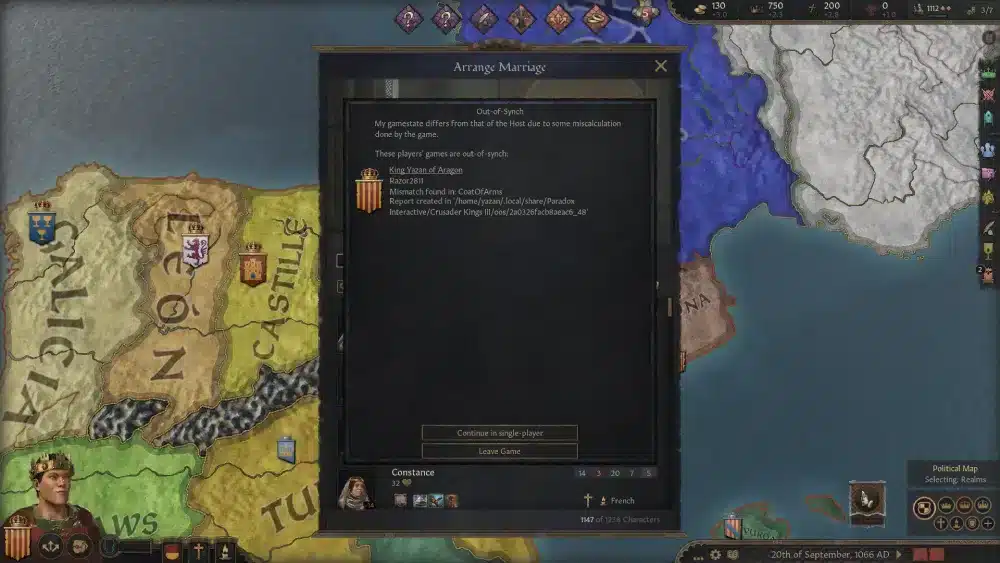
A multiplayer desync happens when one computer begins calculating game events differently from another.
Since every player shares the same world simulation, even a tiny difference eventually causes the games to diverge.
What happens during a desync
When synchronization fails, players may notice:
- The game pauses unexpectedly.
- One player disconnects.
- The host receives a desync notification.
- Events occur differently for different players.
- The session requires reloading.
Reloading the latest save often restores synchronization temporarily, although recurring issues usually indicate a deeper problem.
Why synchronization matters
Crusader Kings III is heavily simulation-driven.
Every second, the game calculates:
- Character AI
- Diplomacy
- Succession
- Warfare
- Economy
- Religion
- Culture
- Events
If even one player's game processes different information, synchronization breaks.
This explains why multiplayer campaigns are significantly more sensitive than single-player sessions.
Common causes of Crusader Kings 3 constant desync
Several independent factors can produce synchronization problems.
Understanding each one makes troubleshooting much easier.
Different game versions
Every participant must run exactly the same game version.
Even a minor patch difference can generate checksum mismatches and prevent proper synchronization.
Before starting a campaign, verify:
- Game version
- Installed hotfixes
- Launcher version
Keeping everyone fully updated reduces compatibility problems.
Mod conflicts
Mods remain one of the most common causes of multiplayer desync.
Problems arise when:
- Players install different mod versions.
- Mods update automatically.
- Load orders differ.
- One player forgets to enable or disable a mod.
Even cosmetic modifications can sometimes alter checksums.
For the most stable multiplayer experience, every player should use an identical mod list in the same order.
Checksum mismatches
The checksum displayed on the game's main menu verifies that every installation is identical.
If two players have different checksums, multiplayer synchronization cannot be guaranteed.
Checksum mismatches may result from:
- Modified files
- Outdated mods
- Failed updates
- Corrupted installations
Comparing checksums before launching a campaign saves considerable troubleshooting time later.
Corrupted save files
Long campaigns occasionally develop save inconsistencies.
Although relatively uncommon, corrupted saves may repeatedly trigger desync errors after loading.
Possible symptoms include:
- Desync occurring immediately after loading.
- Crashes at the same in-game date.
- One player consistently disconnecting.
Keeping rotating backup saves provides valuable recovery options.
Network instability
While Crusader Kings III synchronizes simulation data rather than fast action, network quality still matters.
High latency, packet loss, or unstable routing may interrupt synchronization between host and clients.
Although network issues don't cause every desync, they can certainly increase their frequency.
How to fix Crusader Kings 3 constant desync
Most multiplayer problems can be resolved through systematic troubleshooting.
Instead of changing multiple settings simultaneously, test one solution at a time.
Verify game files
Steam users should first verify the integrity of their installation.
Missing or modified files frequently cause checksum differences.
Verification restores damaged files automatically.
Disable incompatible mods
If desync persists, temporarily disable every mod.
Start a vanilla multiplayer session to determine whether modifications are responsible.
If stability returns, re-enable mods gradually until the problematic one is identified.
Match DLC and game versions
Every player should confirm:
- Same DLC ownership (when required)
- Same game version
- Same launcher version
- Same mod configuration
Consistency is essential for synchronization.
Improve network stability
Although game files are often responsible, network quality should not be ignored.
Useful troubleshooting steps include:
- Restart your router.
- Use a wired Ethernet connection.
- Close background downloads.
- Pause cloud synchronization software.
- Avoid heavy streaming during multiplayer sessions.
Reducing network interruptions minimizes synchronization risks.
Multiplayer troubleshooting checklist
Before launching your next campaign, verify the following:
- All players are running the same game version.
- Every participant has identical DLC enabled.
- Mod lists and load order match exactly.
- Checksums are identical.
- The host has restarted the game recently.
- Background downloads are closed.
- Everyone is using the latest save.
Completing this checklist prevents many common synchronization problems before they occur.
Multiplayer best practices
Experienced Crusader Kings III communities often follow specific habits that improve long-term campaign stability.
Host recommendations
Whenever possible, designate one reliable player as the permanent campaign host.
Changing hosts frequently introduces unnecessary variables.
Hosts should ideally have:
- Stable internet
- Reliable hardware
- Updated installation
- Minimal background applications
Consistency generally produces better multiplayer sessions.
Save management
Frequent manual saves reduce the impact of unexpected desyncs.
Many multiplayer groups create backup saves every 10–20 in-game years.
This approach minimizes progress lost if synchronization problems eventually require rolling back to an earlier save.
Multiplayer best practices
Keeping a Crusader Kings III multiplayer campaign stable requires more than matching game versions. Good habits during gameplay can significantly reduce the likelihood of recurring desyncs.
Host recommendations
The host plays an important role in maintaining synchronization throughout the campaign.
For the best results, the host should:
- Use a stable wired internet connection.
- Close unnecessary background applications.
- Avoid downloading files while hosting.
- Keep the game installed on a fast SSD.
- Restart the game before long multiplayer sessions.
Choosing one consistent host for an entire campaign also minimizes unexpected variables.
Save management
Large Crusader Kings III campaigns can last dozens of hours, making regular saves essential.
Many experienced multiplayer groups:
- Create manual saves every 10–20 in-game years.
- Keep multiple backup saves instead of overwriting one file.
- Reload the latest save immediately after a desync occurs.
- Avoid continuing after repeated synchronization warnings.
Maintaining several backup saves makes recovering from unexpected issues much easier.
Lower the game speed
Running the simulation at maximum speed isn't always ideal.
Higher game speeds increase the amount of information every client must process simultaneously.
If your group experiences frequent synchronization problems, reducing the speed can improve stability, particularly during:
- Large-scale wars
- Major succession events
- Crusades
- Late-game campaigns
- Heavy AI calculations
Although the campaign progresses more slowly, overall gameplay often becomes much more reliable.
Can network quality cause Crusader Kings 3 constant desync?

Not every desync originates from network problems.
However, poor connection quality can contribute to synchronization issues, especially during lengthy multiplayer sessions.
Packet loss
Packet loss occurs when information sent across the network never reaches its destination.
In multiplayer strategy games, missing synchronization data may cause players to temporarily fall out of sync.
Symptoms may include:
- Delayed updates
- Sudden pauses
- Unexpected disconnects
- Repeated desync notifications
Reducing packet loss improves overall multiplayer consistency.
High latency
High ping doesn't always trigger desyncs directly, but unstable latency can make multiplayer communication less reliable.
Players located in different regions may experience:
- Delayed synchronization
- Longer loading times
- Increased reconnect attempts
Whenever possible, the host should choose a server location that provides balanced latency for everyone participating.
Unstable routing
Sometimes the internet chooses inefficient paths between players and game services.
Congested or inconsistent routes can introduce intermittent delays that negatively affect multiplayer stability.
Improving routing quality helps reduce unexpected interruptions during extended sessions.
Troubleshooting checklist
If Crusader Kings 3 constant desync continues to appear, work through these steps systematically:
- Confirm every player is running the same game version.
- Verify that all DLC configurations match.
- Compare game checksums before joining.
- Disable all mods and test a vanilla session.
- Verify the integrity of game files through Steam.
- Reload the latest multiplayer save.
- Reduce the game speed if desyncs occur repeatedly.
- Restart the multiplayer lobby if synchronization errors persist.
Testing one change at a time makes it easier to identify the true source of the problem.
Common misconceptions about multiplayer desync
Several myths surround Crusader Kings III synchronization problems.
Understanding the facts can save hours of unnecessary troubleshooting.
| Myth | Reality |
| Desync always means a corrupted save | Many desyncs result from mods, version mismatches, or network instability. |
| Reinstalling always fixes desync | Reinstallation only helps if game files are damaged or incomplete. |
| Faster internet guarantees stable multiplayer | Connection quality, packet loss, and routing are often more important than bandwidth. |
| Mods are always safe if everyone installs them | Different versions or load orders can still create synchronization issues. |
Knowing these distinctions helps players focus on effective solutions instead of unnecessary ones.
How ExitLag helps Crusader Kings III multiplayer
While many desync issues stem from mismatched game files or mods, network stability remains an important factor for smooth multiplayer sessions.
ExitLag helps optimize the connection between your PC and online game services by improving routing efficiency and reducing network instability.
More stable routing
ExitLag continuously analyzes available network paths and selects efficient routes using its Real-Time Optimization technology.
This helps minimize routing fluctuations that can contribute to inconsistent multiplayer performance.
Reduced packet loss
Packet loss can interrupt the steady exchange of synchronization data between players.
ExitLag's Multipath Connection technology sends traffic through multiple simultaneous routes, helping improve connection stability during long gaming sessions.
Lower latency
Although Crusader Kings III is not a fast-paced action game, maintaining consistent latency helps multiplayer communication remain smooth throughout extended campaigns.
Combined with Traffic Shaper and FPS Boost, ExitLag offers an optimized environment for players who regularly enjoy online strategy games with friends.
Supporting more than 3,000 games, ExitLag provides an easy setup process for PC gamers looking to reduce lag, improve route stability, and enjoy more reliable online experiences.
Frequently Asked Questions
What causes Crusader Kings 3 constant desync?
The most common causes include mismatched game versions, incompatible mods, checksum differences, corrupted save files, and unstable network conditions.
Can mods create desync errors?
Yes. Even when every player uses the same mods, differences in version numbers or load order can produce synchronization issues.
Does reinstalling the game fix desync?
Sometimes. Reinstalling or verifying game files can resolve problems caused by damaged installations, but it won't fix issues related to mods or network quality.
Can internet quality affect synchronization?
Yes. High packet loss, unstable routing, and inconsistent latency can contribute to multiplayer synchronization problems, especially during long campaigns.
Can ExitLag reduce multiplayer connection issues?
ExitLag cannot fix desyncs caused by incompatible game files, corrupted saves, or mismatched mods. However, it can improve network stability by optimizing routing, reducing packet loss, and helping maintain a more consistent online connection during multiplayer sessions.
Successfully resolving Crusader Kings 3 constant desync often requires identifying the exact source of the problem rather than relying on a single universal fix. By ensuring all players use matching game versions, identical DLC and mod configurations, verified game files, and stable network connections, most multiplayer campaigns can run far more reliably.
For players looking to improve the network side of the experience, ExitLag complements these best practices with Real-Time Optimization, Multipath Connection, Traffic Shaper, and FPS Boost. While it cannot resolve desyncs caused by incompatible files or mods, it helps create a more stable connection, reducing packet loss and improving overall multiplayer consistency.
Disclaimer: All game images used in this blog belong to Paradox Interactive. They are used for informational and educational purposes only and do not imply endorsement or affiliation with the rights holders.



