Playing your favorite football match only to be interrupted by EA Sports fc 26 Lag is one of the most frustrating experiences any player can face. The smooth passing turns into stuttering movement, shots delay for crucial milliseconds, and online matches feel completely unpredictable. This type of instability happens even if you use a fast connection, creating a sense of helplessness especially when dealing with high ping EA Sports fc 26.
However, before solving the issue, it is essential to understand why lag affects EA Sports FC 26 in the first place. The game depends on real-time communication with the server, and any interruption in this path causes delays, rubberbanding, or unstable gameplay. Like this, the experience shifts from strategic and competitive to chaotic and unreliable.
Finally, by the end of this article, you will not only understand the causes behind the instability but also learn how a connection optimizer can transform your gameplay. If you are tired of seeing EA Sports fc 26 Lag ruining your matches, you will discover a clear path to high performance and consistent responsiveness.

What is lag in EA sports fc 26?
Lag in EA Sports FC 26 refers to the delay between your action (passing, shooting, switching players) and the response displayed on screen. Although many players blame their internet speed, lag is rarely about bandwidth. Instead, it is usually caused by:
- poor routing chosen by the ISP
- packet loss between your device and the server
- unstable server paths
- high network congestion
- long physical distance to the game server
Therefore, even if your connection is fast for downloads or streaming, you may still suffer gameplay delays.
Key causes of lag
To build trust and clarity, here are the most common causes influencing the stability of EA Sports FC 26:
Routing problems
ISPs choose automatic routes that are not optimized for gaming. Sometimes these paths include overloaded nodes, slow links, or congested networks.
Packet loss
When data fails to reach the server, you see teleporting players, delayed commands, and irregular gameplay.
Distance from servers
If the server hosting your match is geographically distant, latency naturally increases.
Unstable providers
Some providers throttle connections, especially during peak hours, resulting in unstable ping and inconsistent performance.
Below is a simplified comparison of how these issues affect gameplay:
| Issue | Effect on EA Sports FC 26 | Player Experience |
| Packet Loss | Commands not registered | Delayed passes, broken plays |
| High Ping | Slow server response | Heavy gameplay, command delay |
| Congested Route | Instability during matches | Rubberbanding, freezes |
| Bad Hit Registration | Server delays action processing | Missed tackles and slow reactions |
Lag, ping, and fps explained
Many players confuse these terms, which leads to fixing the wrong thing. Therefore, understanding the difference is essential:
- Lag: delay between your input and the game output.
- Ping: the time data takes to travel from you to the server and back.
- FPS: visual performance of your device (number of frames displayed per second).
However, lag in EA Sports FC 26 is almost always tied to network routing rather than FPS or device power. Like this, even high-end PCs or consoles can lag if the server path is inefficient.

Why lag happens even with fast internet
You may wonder why EA Sports fc 26 Lag still happens despite high-speed internet. The reason is simple: your ISP does not optimize the route for real-time gaming. Instead, it picks a path based on cost, not speed.
Imagine your data traveling through a “digital highway.” If the road is congested, unstable, or long, your commands will take longer to reach the server, creating noticeable delay.
Therefore, the real solution must fix the route not your download speed.
The solution: Exitlag
And this is where ExitLag enters. What if you could manually choose a faster, more stable route to EA Sports FC 26 servers? What if your connection no longer depended on automatic ISP decisions? ExitLag makes exactly that possible.
ExitLag is a connection-optimization software built specifically for gamers. It uses intelligent multi-routing and tunneling technology to send your data through the fastest paths available.
What exitlag does for players
- Optimizes the route between you and the server
- Reduces ping and stabilizes gameplay
- Decreases packet loss
- Prevents rubberbanding and desync
- Improves reaction time during matches
Benefits for EAsports fc 26 players
Here are practical improvements ExitLag brings to your gameplay:
Stable ping and faster commands
Your passes, shots, and tackles react instantly, even in peak hours.
Reduced packet loss
Your gameplay becomes smoother, especially in competitive modes like Rivals or FUT Champions.
Improved hit registration
Server-side actions such as tackling, intercepting, or pressing become more consistent.
No rubberbanding
Movements remain fluid, allowing precise dribbling and defending.
Quick and easy setup
Everything is user-friendly, even if you’re not a technical expert.
How to use ExitLag in EA Sports FC 26
The process is extremely simple:
Step 1 – Access the official ExitLag website and download the application. There’s a free trial period for new users.
Step 2 – Install and open the program. Log in with your account.
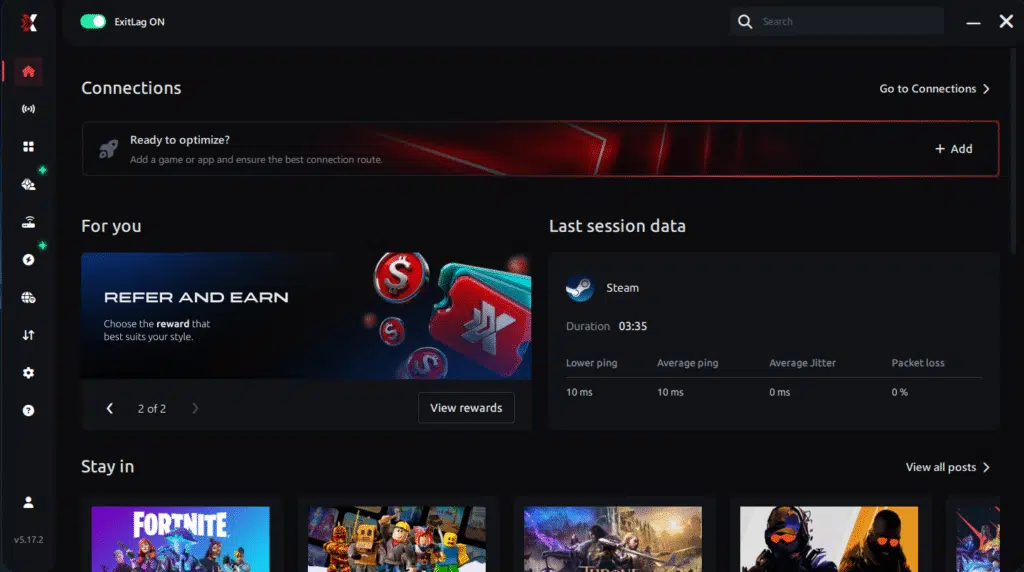
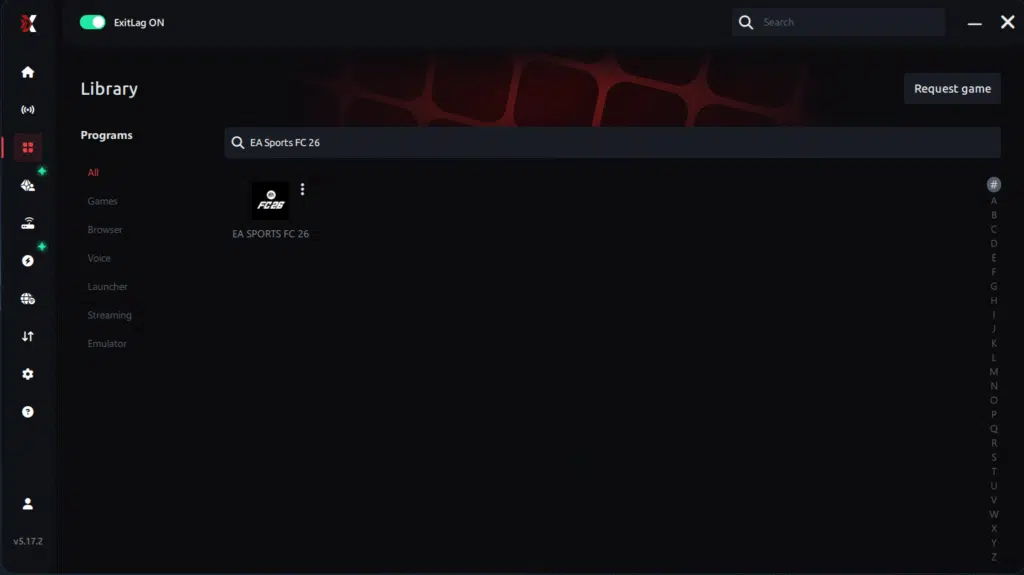
Step 3 – In the search bar, type “EA Sports FC 26” and select the game from the list.
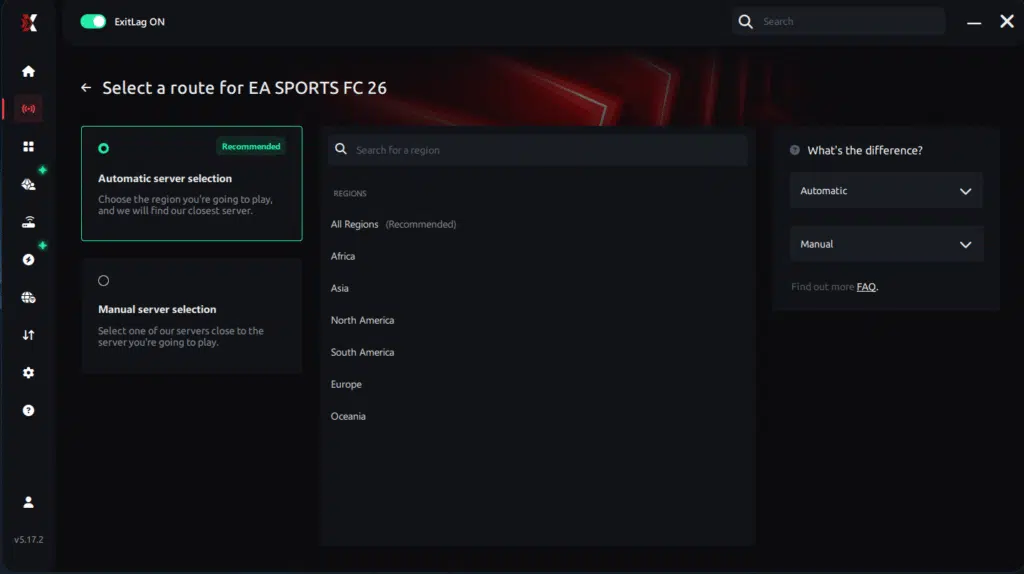
Step 4 – Choose between automated or manual route
Based on the results, you can let ExitLag automatically select the best route or manually choose the server that showed the lowest latency for your connection.
AI-optimized automated route
Based on the results, you can let ExitLag automatically select the best route through AI optimization. The system analyzes multiple connection paths in real time and automatically identifies the most efficient route for your connection, ensuring the lowest possible latency without requiring manual choices.
Manual route
If you prefer to have full control over your connection, you can manually choose the server based on the ping test results. Simply select the server that showed the lowest latency or the one that best meets your specific gaming needs, allowing complete customization of your experience.
Step 5 – Click “Apply routes” or the play button. ExitLag will begin optimizing your connection automatically.
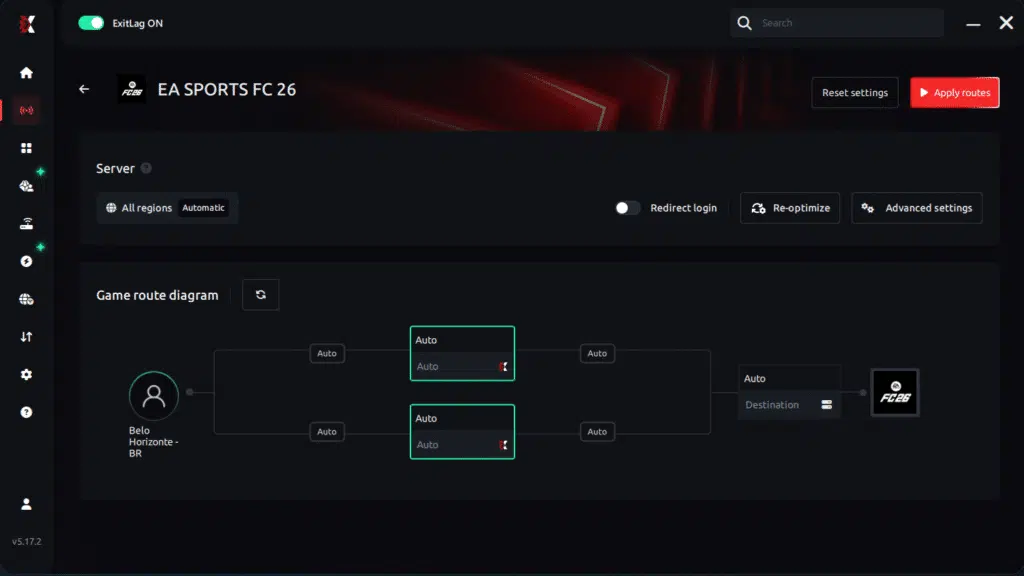
Step 6 – Wait a few seconds until optimization is complete. You’ll see ping indicators in the interface.
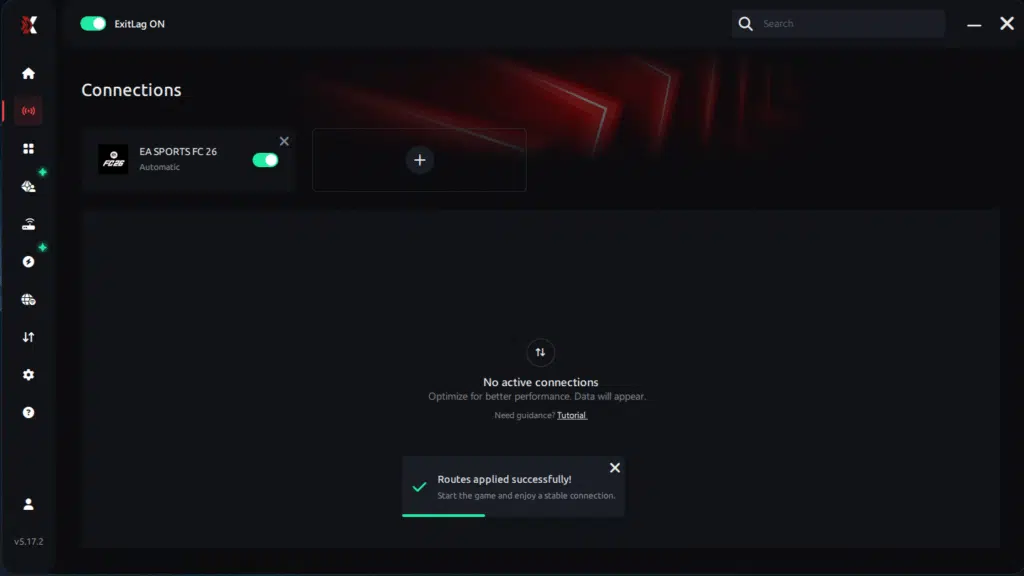
Step 7 – Launch EA Sports FC 26 normally. The optimization will already be active.
ExitLag runs in the background while you play, constantly adjusting routes to maintain the best possible performance.
Final thoughts: Play EA Sports FC 26 without lag forever
At the end of the day, EA Sports FC 26 lag should never decide your matches. Whether you’re grinding Ultimate Team, playing Pro Clubs, Seasons, or online friendlies, your internet connection should never be the reason for delayed passes or missed chances.
With ExitLag, you finally take control of your network performance. The software finds the fastest routes, eliminates lag, and stabilizes your ping so that every pass, every shot, and every defensive action happens exactly when you want it to.
Try ExitLag for free right now and experience how smooth EA Sports FC 26 can be when your connection is fully optimized. Play with confidence, dominate the pitch, and make lag a thing of the past.
How to use Ping for Games: step-by-step guide
Checking your connection quality before entering a match has never been easier. Here’s how to use Ping for Games in just a few steps:
1. Open the ExitLag software on your PC
Ensure the application is installed and open. The feature is integrated into the platform and available for free to all users.
2. Access the Network Analyzer tool
Locate the Network Analyzer in the software menu. This is where you’ll find Ping for Games along with other connection analysis features.
3. Select the game you want to test
Choose from the list the title you plan to play. The tool supports major online multiplayer games, including MOBAs, FPS, Battle Royales, MMORPGs, and more.
4. Choose the specific server
Now you select directly the server you want to test, instead of just a generic region. This ensures much more accurate results for your choice.
5. Start the ping test
With one click, the measurement is performed in real-time between your device and the chosen server, considering your current connection (cable or Wi-Fi).
6. Analyze the results
Results appear in milliseconds (ms), automatically sorted from best to worst ping. You can also reorganize the view alphabetically, if you prefer.
7. Choose the best server and play worry-free
With the information in hand, just select the server with the lowest latency and enter the match knowing your connection is optimized.
Should you try Exitlag?
If your gameplay feels heavy, delayed, or inconsistent, ExitLag is the most direct and effective solution. Unlike generic fixes, it targets the real cause: your connection route.
- No complicated setup
- Immediate results
- Works regardless of your ISP
- Designed specifically for gamers
Finally, if you are tired of losing matches due to EA Sports fc 26 Lag, ExitLag gives you the stability and responsiveness you need to play competitively.
Conclusion
Finally, you don’t need to accept unstable matches, delayed commands, or unpredictable gameplay as part of your routine. The truth is simple: EA Sports fc 26 Lag happens because your connection isn’t taking the best possible route, and no amount of restarting the router or changing settings can fix that permanently.
Therefore, if you’re serious about improving your matches whether in FUT Champions, Rivals, or online friendlies ExitLag offers the stability and precision your gameplay deserves. Its optimized multi-routing technology ensures reduced ping, zero packet loss, and consistent responsiveness, transforming your overall performance.
Don’t let EA Sports fc 26 Lag define your results anymore. Test ExitLag for free today and feel the difference from the very first match. Your connection becomes faster, your gameplay becomes smoother, and your competitiveness finally matches your skill.
Got questions or want to connect with other players? Join the conversation at the ExitLag Forum!