

Playing Final Fantasy XIV should feel smooth, responsive, and predictable. However, when jitter hits, even a low average ping cannot save your experience. Skills fire late, movement feels inconsistent, and mechanics become harder than intended. If you want to understand why this happens and how to fix it, especially across the many regions supported by online titles listed on the ExitLag supported games page, you are in the right place.

What is jitter in Final Fantasy XIV?
Jitter is the irregular variation of latency over time. While ping measures how long it takes for data to travel between your PC or console and the game servers, jitter measures how consistent that travel time is. In Final Fantasy XIV, consistency matters far more than raw speed because combat, movement, and server checks happen continuously.
For example, imagine your ping jumping between 45 ms, 110 ms, 70 ms, and 140 ms every few seconds. Even if the average looks acceptable, the constant latency variation creates unpredictable behavior. Your character may appear to slide, abilities can resolve late, and boss mechanics feel out of sync.
Ideally, your ping in Final Fantasy XIV should fluctuate no more than 5–10 ms. Anything beyond that introduces instability in the response time between your inputs and the game servers, which directly affects gameplay precision.
How jitter affects your gameplay in Final Fantasy XIV
- Skill execution timing becomes unreliable, causing rotations to desync during raids
- GCD clipping occurs even with proper weaving due to unpredictable latency
- Movement registration feels delayed, leading to failed dodges on AoEs
- Mechanic resolution becomes inconsistent, especially during tight Savage checks
- PvP responsiveness suffers, making reactions in Crystalline Conflict unreliable
- Server-side validation causes phantom hits or late damage application
- Input buffering feels broken when ping suddenly spikes mid-fight
Each of these problems comes from unpredictability, not speed. That is why jitter is so disruptive in Final Fantasy XIV.
Main causes of jitter in Final Fantasy XIV
Network congestion
When multiple devices or applications compete for bandwidth, packet priority shifts constantly. This creates uneven delivery times and visible jitter during gameplay.
Unstable routing
If your data packets take different routes to reach the servers, their travel time changes every second. This routing inconsistency is a major source of jitter.
Wi-Fi instability
Wireless connections are vulnerable to interference, signal loss, and micro drops. Even strong Wi-Fi can introduce sudden latency variation.
ISP infrastructure issues
Overloaded or poorly optimized ISP networks often deliver unstable connections during peak hours, increasing jitter dramatically.
Distance to servers
The farther you are from Final Fantasy XIV data centers, the more network hops your data must cross, increasing the chance of variation.
Game-specific server load
Large-scale events, expansions, or high player density in hubs can amplify server-side delays, exposing existing network instability.
Jitter level classification in Final Fantasy XIV
| Jitter level | Ping variation | Gameplay impact |
| Excellent | 0–5 ms | Smooth combat and perfect timing |
| Acceptable | 6–15 ms | Minor inconsistency, mostly playable |
| Unstable | 16–30 ms | Noticeable delays and desync |
| Severe | 30+ ms | Frequent freezes and unpredictable input |
What is ExitLag?
ExitLag is a specialized software designed exclusively for online gaming. Instead of focusing on raw speed alone, it delivers advanced connection optimization to stabilize data flow between you and the game servers. Think of it as an intelligent stabilizer that constantly works to keep your ping consistent.
Unlike generic network tools, ExitLag was built by gamers who understand how critical timing and responsiveness are in games like Final Fantasy XIV. Its technology analyzes routes in real time and prioritizes stable paths, ensuring your data reaches the servers with minimal variation. You can learn more about how this connection optimization system works through the official ExitLag technology page.
How to identify and measure jitter in Final Fantasy XIV
Identifying jitter in Final Fantasy XIV goes far beyond checking the ping number shown on your screen. Many players assume that if the value looks low, the connection is stable. In reality, jitter is about inconsistency over time, not raw speed.
One of the most reliable ways to detect jitter is by running extended ping tests outside the game. This means continuously pinging a server for several minutes instead of sending just a few requests. If the results fluctuate heavily rather than staying within a narrow range, this indicates latency variation. Stable connections show small, predictable changes. Unstable ones jump erratically.
Inside Final Fantasy XIV, the symptoms are usually felt during gameplay. Abilities sometimes trigger instantly and other times feel delayed. Movement can appear smooth one moment and unresponsive the next. Boss mechanics may suddenly feel mistimed, even though your displayed ping remains low. This is the clearest proof that low ping does not equal a stable connection.
Basic solutions to reduce jitter in Final Fantasy XIV
Prioritize your connection
- Use an ethernet cable instead of Wi-Fi to eliminate signal interference
- Close background applications such as downloads, cloud sync, or streaming
- Limit the number of devices using the network at the same time
- Disable automatic system updates that consume bandwidth unpredictably
- Update network drivers to avoid instability caused by outdated software
- Avoid peak-hour congestion when possible, especially in large in-game hubs
These steps help reduce local sources of jitter, but they cannot solve problems caused by routing or ISP infrastructure.
Configure QoS on your router
Quality of Service, commonly known as QoS, allows your router to prioritize specific types of traffic. When gaming packets are prioritized, they are processed before less time-sensitive data such as downloads or video streams.
In practice, QoS helps maintain connection stability during congestion. While it does not lower ping, it significantly reduces latency variation, which is exactly what causes jitter in Final Fantasy XIV during busy network conditions.
Check with your ISP
If jitter continues despite local optimization, the issue may lie with your internet service provider. Request a full line quality check and ask whether there are known routing issues affecting your area. In many cases, outdated modems or routers provided by the ISP can introduce instability and should be replaced.
How does ExitLag eliminate jitter in Final Fantasy XIV?
ExitLag eliminates jitter by addressing its root cause: unstable routing. Instead of relying on a single path, its Multi-Internet technology dynamically manages traffic across multiple routes. A full breakdown is available on the page that explains how ExitLag routing technology works.
- Multiple routes simultaneously send game data across different network paths
- Intelligent packet selection keeps only the fastest and most consistent packets
- Real-time route optimization adapts instantly to network changes
- Reduced network hops lower the number of points where instability can occur
- Smart buffering delivers a steady flow of data to the game client
This system transforms inconsistent connections into predictable ones, which is critical for timing-based combat, weaving, and precise movement in Final Fantasy XIV.
Is ExitLag worth using in Final Fantasy XIV?
For many players, yes. Especially if you match any of the profiles below. You can review options and plans on the page with ExitLag subscription pricing information.
- Competitive players running Savage, Ultimate, or ranked PvP
- Players connecting to international Final Fantasy XIV servers
- Gamers who play during internet peak usage hours
- Wi-Fi users who cannot switch to wired connections
- Players dealing with unstable internet service providers
- Anyone who has lost clears, wipes, or matches due to jitter
For players who value consistency, predictability, and precise timing, ExitLag directly addresses the instability that standard fixes cannot solve.
ow to use ExitLag in Final Fantasy
The process is extremely simple:
Step 1 – Access the official ExitLag website and download the application. There’s a free trial period for new users.
Step 2 – Install and open the program. Log in with your account.
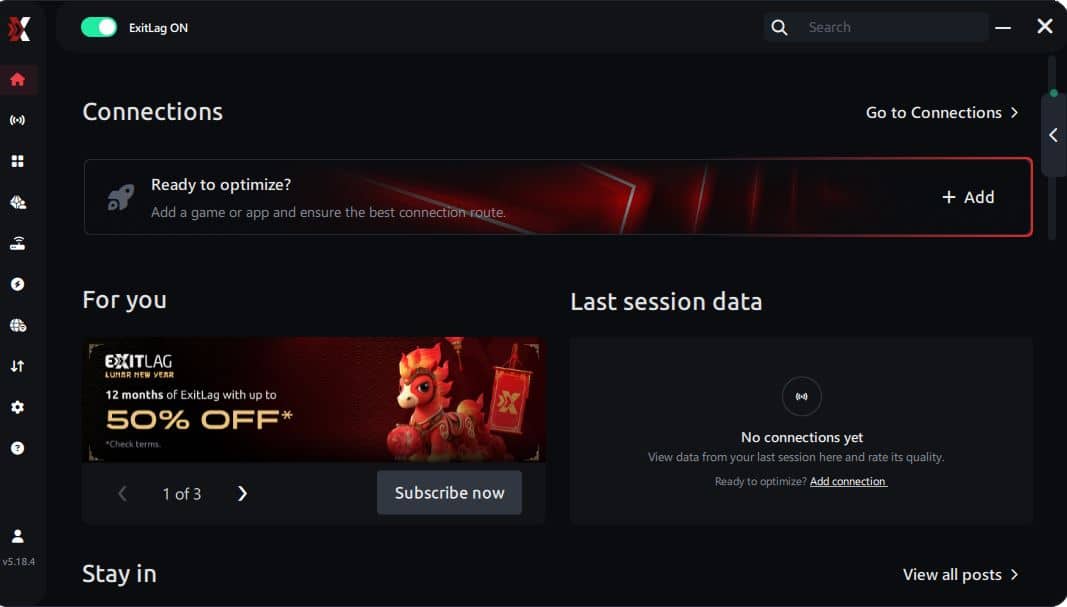
Step 3 – In the search bar, type “Final Fantasy” and select the game from the list.
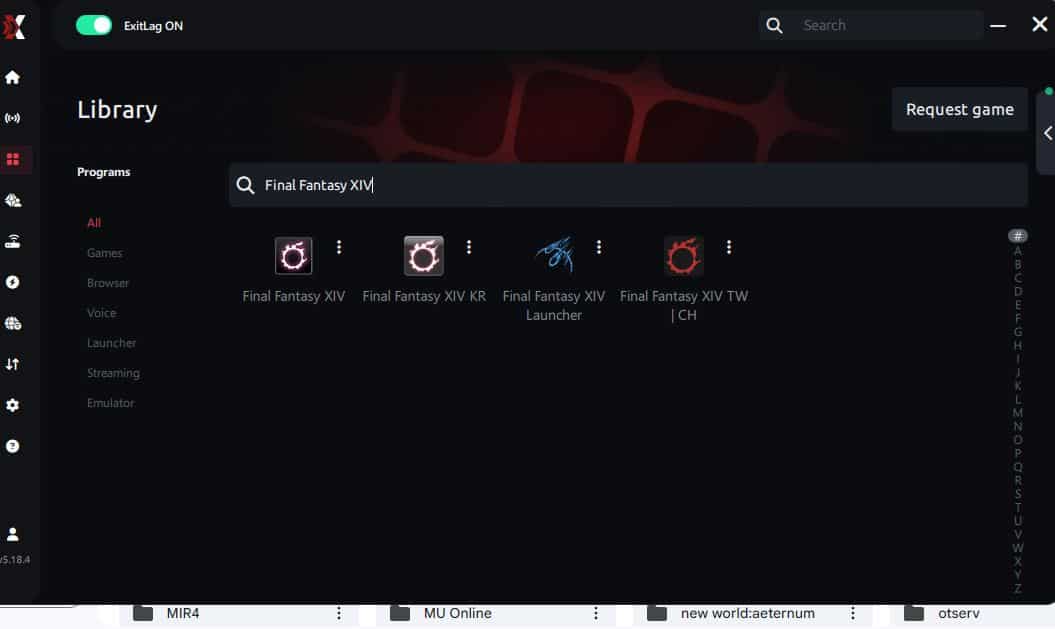
Step 4 – Choose between automated or manual route
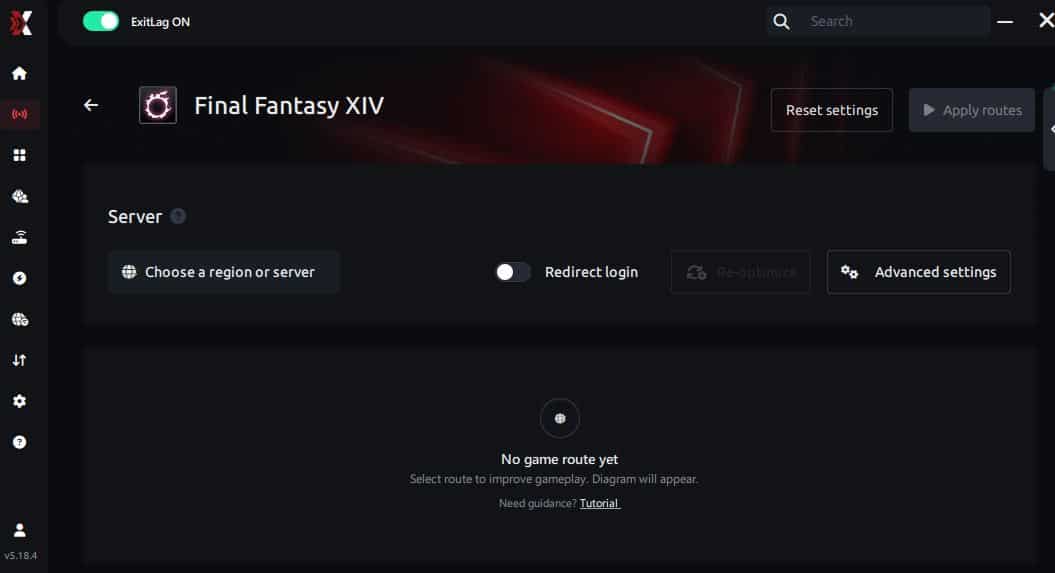
Based on the results, you can let ExitLag automatically select the best route or manually choose the server that showed the lowest latency for your connection.
AI-optimized automated route
Based on the results, you can let ExitLag automatically select the best route through AI optimization. The system analyzes multiple connection paths in real time and automatically identifies the most efficient route for your connection, ensuring the lowest possible latency without requiring manual choices.
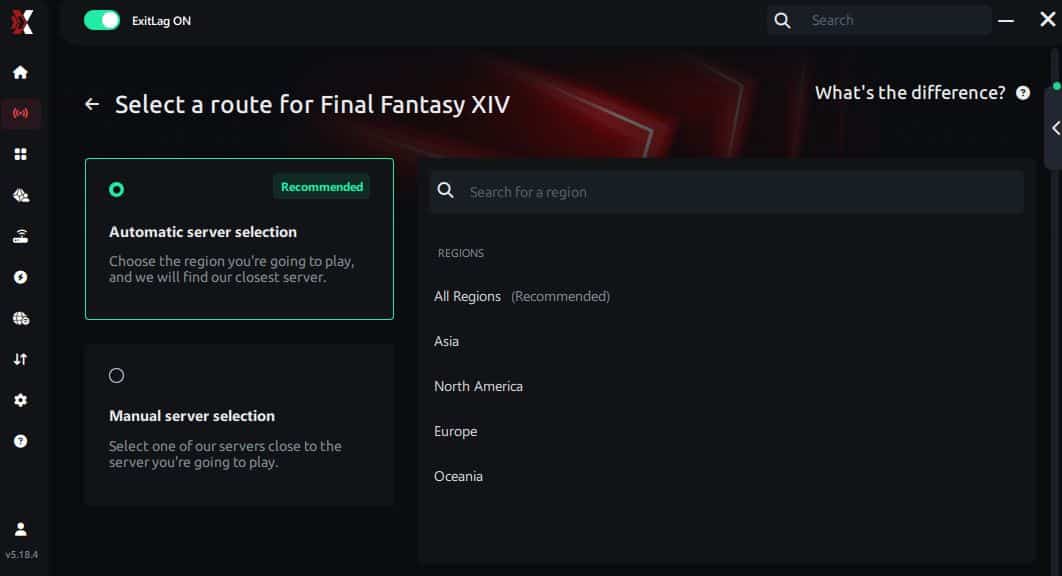
Manual route
If you prefer to have full control over your connection, you can manually choose the server based on the ping test results. Simply select the server that showed the lowest latency or the one that best meets your specific gaming needs, allowing complete customization of your experience.
Step 5 – Click “Final Fantasy” or the play button. ExitLag will begin optimizing your connection automatically.
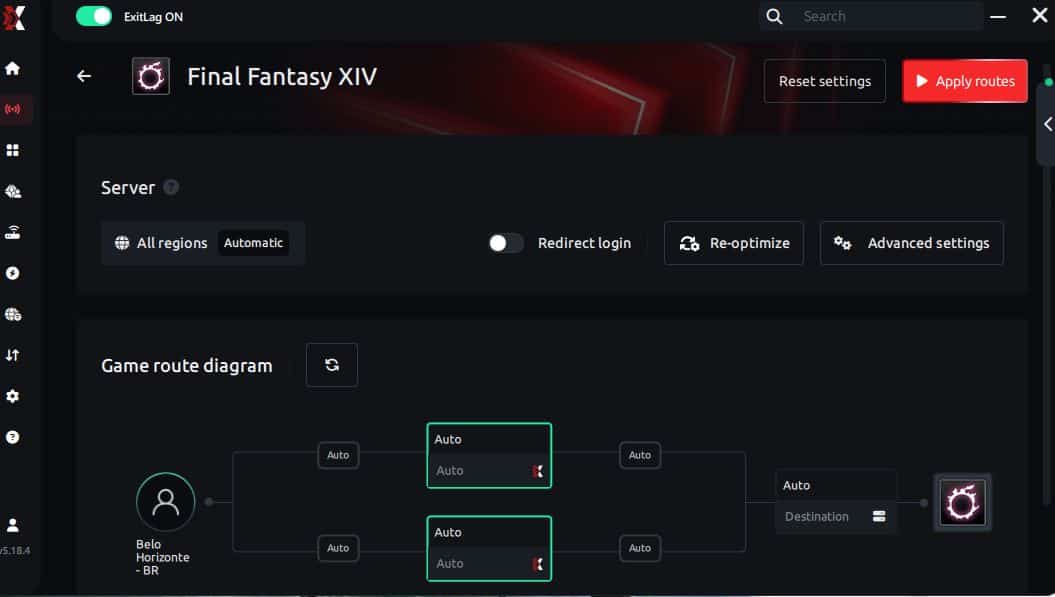
Step 6 – Wait a few seconds until optimization is complete. You’ll see ping indicators in the interface.
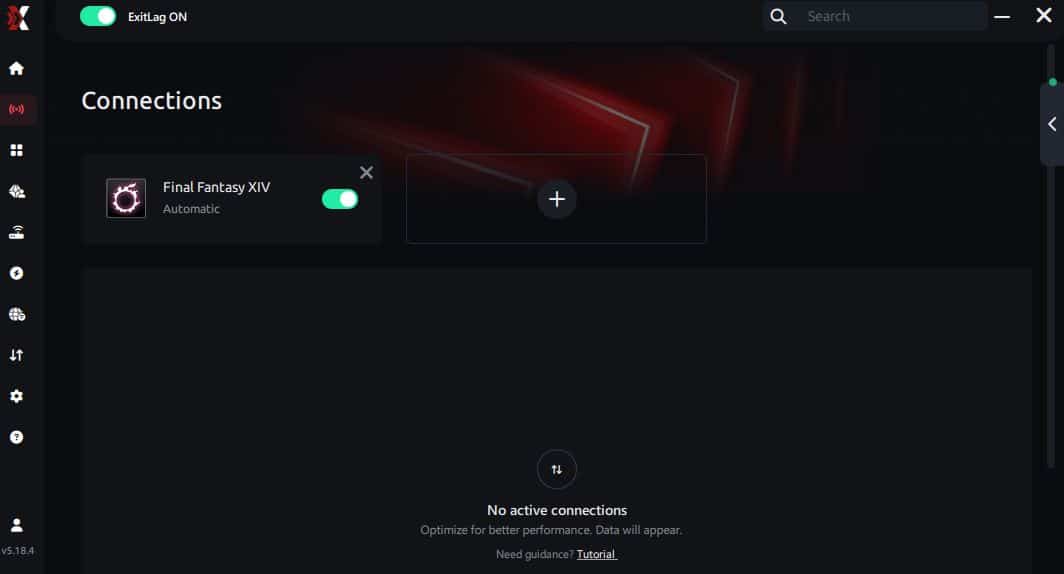
Step 7 – Launch Final Fantasy normally. The optimization will already be active.
ExitLag runs in the background while you play, constantly adjusting routes to maintain the best possible performance.
FAQ: jitter in Final Fantasy XIV
What is the difference between jitter, lag, and packet loss? Jitter refers to variations in latency over time, lag is the overall delay caused by high ping, and packet loss happens when data never reaches the server. You can have low ping but high jitter, which still creates a poor experience.
Why does my ping fluctuate in Final Fantasy XIV? Ping fluctuation usually comes from unstable routing, network congestion, Wi-Fi interference, or ISP infrastructure issues. Distance to data centers can amplify these variations.
Is jitter worse than high ping in Final Fantasy XIV? In many situations, yes. A stable high ping is predictable and playable, while jitter makes timing impossible to anticipate, which is far more disruptive.
How can I identify jitter while playing? If abilities sometimes feel instant and other times delayed, movement feels inconsistent, or mechanics seem mistimed despite low ping, you are likely experiencing jitter.
Does Wi-Fi cause jitter in Final Fantasy XIV? Yes. Wireless connections are more susceptible to interference and signal variation, which makes jitter far more likely than with a wired connection.
Does ExitLag fix issues beyond jitter? Yes. In addition to stabilizing latency, ExitLag can also reduce overall ping, minimize packet loss, and protect against sudden routing instability.
Do I need to keep ExitLag open while playing? Yes. ExitLag must remain active during your entire gaming session to continuously optimize routing and maintain stability.
Does jitter affect raids and PvE as much as PvP? Absolutely. Tight raid mechanics, weaving, and movement checks all depend on consistent latency, making jitter just as damaging in PvE content.

Conclusion
Jitter in Final Fantasy XIV can turn what should be an immersive and rewarding experience into constant frustration. The real problem is not high ping itself, but unpredictability. When you cannot trust when your inputs will register, skill and preparation lose their value.
You do not have to accept instability as normal. While basic network tweaks help, they cannot solve routing issues outside your home. That is why ExitLag stands out as the definitive solution for players who want stable, competitive gameplay. By transforming an inconsistent connection into a predictable one, it allows you to focus entirely on mechanics, timing, and performance.
If you want to stay informed about optimization tips, updates, and performance guides, explore the latest articles on the official ExitLag performance blog.
Test ExitLag and feel the difference
Stop letting unpredictable latency ruin your raids, matches, and progression. Start using ExitLag today and feel immediate stability in every session. Gain a real competitive advantage, protect your performance, and treat your connection as an investment by starting your ExitLag free trial for gamers now.



