When Fortnite high ping starts ruining your matches, every build battle feels delayed, every shotgun fight becomes unpredictable, and every edit takes longer than it should, at every other online games. Generally, your alignment with all Fortnite updates won’t matter if your connection disrupts your gaming experience. Even more, players often face ping spikes and sudden delays even with decent internet.
At first sight, the Fortnite high ping happens because Fortnite relies on fast data travel between your PC and its servers — and when that travel slows down, your gameplay suffers. In this guide, you’ll learn exactly why this happens, what high ping means, and how to fix it step-by-step for more stable performance.
By the end, you’ll know what high ping is in Fortnite, why it occurs, and the best ways to reduce the Fortnite high ping.

What is high ping in Fortnite?
Beforehand, understanding what Fortnite high ping means is essential. Ping represents the time it takes for data packets to travel from your PC to Fortnite servers and back, measured in milliseconds (ms). In other words, the lower the ping, the faster the game responds to your actions.
While ping measures time, latency represents the overall delay you feel in gameplay. When ping rises, latency increases. High latency in Fortnite creates late edits, slow building, delayed hit registration, and overall connection instability.
At first, players confuse high ping with FPS drops — but they are completely different problems. High ping is a network issue, not a hardware issue. For example, if you see your ping jumping from 30ms to 120ms, then back to 60ms, this is high latency caused by network inconsistency.
In summary, high ping = slower communication with servers, which directly affects your competitive performance.
Read this: Fortnite Chapter 2 Season 6: updates and connection issues
How Fortnite high ping affects your gameplay
Constantly facing Fortnite high ping places you at a severe disadvantage. Here are specific ways it impacts your gameplay:
- Delayed commands — Your edits take longer to register.
- Bad hit registration — Shots land late, especially shotguns and ARs.
- Rubberbanding — Your character snaps backward or teleports.
- Late building placement — Walls appear seconds after clicking.
- Desync in fights — Opponents appear a few frames ahead of your view.
- Competitive disadvantage — Ranked points are lost due to slow reactions.
- Unexpected deaths — You die behind cover because server feedback is delayed.
All of these issues ultimately reduce your ability to win battles, react quickly, and keep up with fast-paced build fights
Main causes of high ping in Fortnite
Even so, not all Fortnite connection issues come from your internet speed. Most of the time, the real culprit is the path your packets travel. Below are the main reasons high ping happens.
1. Distance from servers
If you connect to a faraway region, data must cross many routers, increasing latency. More distance = more ms.
2. ISP routing problems
Your provider may choose long or congested routes. This is one of the biggest hidden causes of Fortnite high ping.
3. Inefficient routing during peak hours
During busy periods, your traffic may be pushed through slower paths, increasing delays.
4. Network congestion at home
Multiple devices streaming or downloading can throttle your bandwidth and increase ping significantly.
5. Outdated equipment
Old routers, weak Wi-Fi, or poor cables create unstable connections that produce high ping spikes.
6. Fortnite-specific server congestion
Large events or updates cause temporary Fortnite latency increases.
Check also: Fortnite Chapter 6: unraveling the new storyline
How to identify and test high ping in Fortnite
Firstly, to confirm that you are experiencing Fortnite high ping, you need to monitor your connection.
Fortnite shows your ping in real time. To enable it:
- Open Settings
- Go to Game UI
- Enable Net Debug Stats
Now you’ll see ping, packet loss, and other metrics.
To test your connection outside Fortnite, you can run a continuous ping command:
- Windows: ping -t google.com
- Mac: ping google.com
If the values jump constantly (e.g., 30ms → 150ms → 60ms), you have unstable routing.
Ideal ping ranges for Fortnite:If your ping lives in the poor/bad range, optimization is mandatory.
Even more, to better understand how Fortnite high ping affects performance, here is a simple table showing ping classifications and what they mean inside real matches:
| Ping range | Quality | Real impact in Fortnite |
| 0–30 ms | Excellent | Edits respond instantly, shots register perfectly |
| 30–60 ms | Good | Minor delay, still competitive |
| 60–90 ms | Playable | Noticeable delay in builds and edits |
| 90–150 ms | Poor | Constant delays, hard to win fights |
| 150 ms+ | Bad | Severe Fortnite latency, rubberbanding, input issues |
Understanding this table helps you evaluate whether your Fortnite connection issues need basic fixes or advanced optimization.

Solutions to reduce high ping in Fortnite
Optimize your local connection
Even more, small local tweaks reduce Fortnite high ping quickly.
Try these steps:
- Use Ethernet cable instead of Wi-Fi.
- Close background applications (downloads, streaming, cloud sync).
- Update your network drivers.
- Change your router channel to avoid interference.
- Restart your router to clear congestion.
- Select the closest Fortnite server region.
Each of these actions eliminates sources of instability.
Contact your ISP
If your line shows constant spikes, contact your provider. Ask them to:
- Reset routing
- Check signal levels
- Replace outdated cables
- Improve your plan if necessary
However, many ISPs cannot guarantee optimal routing to Fortnite servers — which is why specialized optimization tools become necessary.
Why advanced optimization matters
While basic fixes help, they don’t solve the real issue: routing. Fortnite requires a direct, stable path to servers, but ISPs rarely provide that by default. So too, your connection may pass through many unnecessary “hops,” adding delay at each point.
This is where advanced tools come in — and why players search for reliable ways to stabilize ping once and for all.
ExitLag: the best solution to reduce high ping in Fortnite
Now that you’ve seen the causes and connection tests, it’s time to address the most important part of this guide. When Fortnite players look for a dependable way to reduce ping Fortnite, ExitLag stands out as one of the most complete optimization solutions available. Its technology focuses specifically on improving game routing, helping players achieve more stable performance.
We can also inform you about all the relevant content about gaming, you just have to check our blog.
What is ExitLag?
Above all, ExitLag is a software developed for advanced connection otimizing in online games. Unlike generic networking tools, ExitLag was built by gamers who know exactly how frustrating delayed edits, slow reactions, or inconsistent hit registration can be.
Furthermore, ExitLag constantly analyzes your connection and works to route your data through more efficient paths, something your ISP doesn’t usually optimize for. This results in improved stability and lower latency during gameplay.
How ExitLag works
ExitLag’s routing improvements are powered by a combination of Conection Multipath and compatibility with Multi-Internet:
- Conexão Multipath: your traffic is sent through multiple routes simultaneously, improving consistency and minimizing spikes.
- Multi-Internet compatibility: if you use multiple internet connections, ExitLag provides automatic failover to maintain stability.
These systems work together using:
- Real-time route analysis
- Multiple simultaneous paths to reduce instability
- Automatic best-route selection
- Hop optimization (reducing inefficient segments of the route)
- Latency smoothing for more predictable performance
Advantages of ExitLag for Fortnite players
Below are the core benefits Fortnite players experience when using ExitLag — all described with accurate, realistic terminology:
1. Significant ping reduction
ExitLag identifies more efficient routes between your system and Fortnite servers, helping reduce latency and providing smoother building and combat.
2. Mitigation of packet loss
Packet loss causes ghost shots, inconsistent hit registration, and delayed edits. ExitLag helps mitigate packet loss by selecting more stable routing paths, reducing its impact on gameplay.
3. Helps maintain stability during peak hours
During busy periods, ISPs may reroute traffic through congested paths. ExitLag helps maintain more consistent performance and reduces lag Fortnite spikes.
4. Reduces instabilities caused by congested routes
While not a security tool, ExitLag can decrease instability created by overloaded or poorly optimized hops, resulting in a more predictable gameplay experience.
5. Easy to use
Simply select your game, apply the routes, and start playing — no networking expertise required.
6. Compatibility with multiple Fortnite regions and servers
ExitLag works with different regions and server options, which is useful for players who compete internationally or change locations.
Is ExitLag worth using for Fortnite?
Yes, especially if you frequently deal with ping spikes, routing inconsistencies, or rubberbanding. Fortnite’s competitive modes demand precise timing, and improved routing can make a clear difference in high-pressure fights.
How to configure ExitLag for Fortnite
Follow this quick setup to start lowering Fortnite high ping immediately:
- Download the app from the official website
- Create your account or log in.
- Search for Fortnite in the list of supported games.
- Enable multiple routes for greater stability.
- Apply the recommended routing settings.
- Launch Fortnite normally.
- Monitor your ping inside the ExitLag dashboard.
- Adjust configurations if necessary (automatic mode works well for most users).
With these steps, improvements often appear within minutes of activation.
FAQ: frequently asked questions about Fortnite high ping
What causes high ping in Fortnite?
Several factors contribute to Fortnite high ping, including server distance, weak Wi-Fi, inefficient routing, peak-hour congestion, or ISP instability. External factors such as Fortnite server load can also influence Fortnite latency.
How do I check my ping in Fortnite?
Enable Net Debug Stats in the game settings to see your ping in real time. You can also run continuous ping tests on your computer to detect hidden Fortnite connection issues.
What is good ping for Fortnite?
Good ping typically stays between 0–60 ms. Values above 90 ms begin to impact edit speed, aiming precision, and build timing.
Can high ping get you banned?
No. High ping does not cause bans. However, extreme instability may lead to disconnections, which can affect your match results.
Does ExitLag work for Fortnite?
Yes. ExitLag is compatible with Fortnite and helps reduce ping, improve routing, and increase overall responsiveness. Many players use it specifically to stabilize Fortnite high ping.
Why do my builds feel delayed even with decent internet?
This usually happens because your ISP routes traffic inefficiently. Even with good download speeds, poor routing causes lag Fortnite, delaying edits and actions.
How to use ExitLag in Fortnite
The process is extremely simple:
Step 1 – Access the official ExitLag website and download the application. There’s a free trial period for new users.
Step 2 – Install and open the program. Log in with your account.
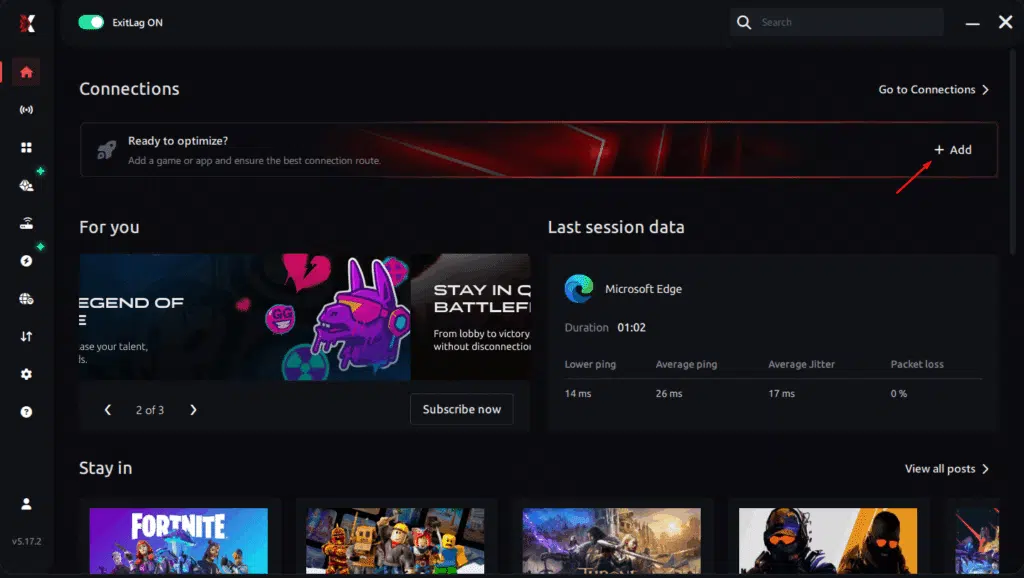
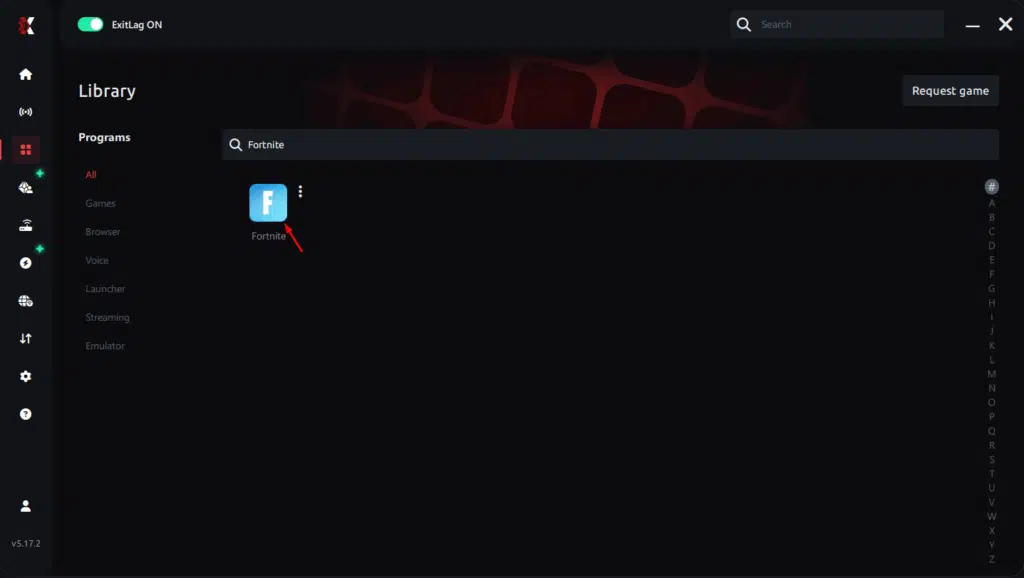
Step 3 – In the search bar, type “Fortnite” and select the game from the list.
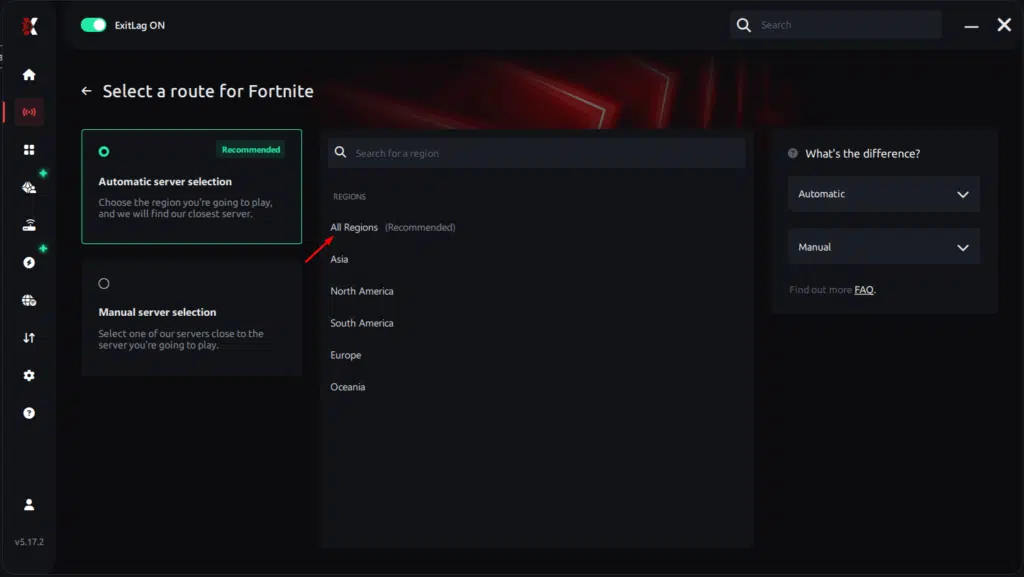
Step 4 – Choose between automated or manual route
Based on the results, you can let ExitLag automatically select the best route or manually choose the server that showed the lowest latency for your connection.
AI-optimized automated route
Based on the results, you can let ExitLag automatically select the best route through AI optimization. The system analyzes multiple connection paths in real time and automatically identifies the most efficient route for your connection, ensuring the lowest possible latency without requiring manual choices.
Manual route
If you prefer to have full control over your connection, you can manually choose the server based on the ping test results. Simply select the server that showed the lowest latency or the one that best meets your specific gaming needs, allowing complete customization of your experience.
Step 5 – Click “Apply routes” or the play button. ExitLag will begin optimizing your connection automatically.
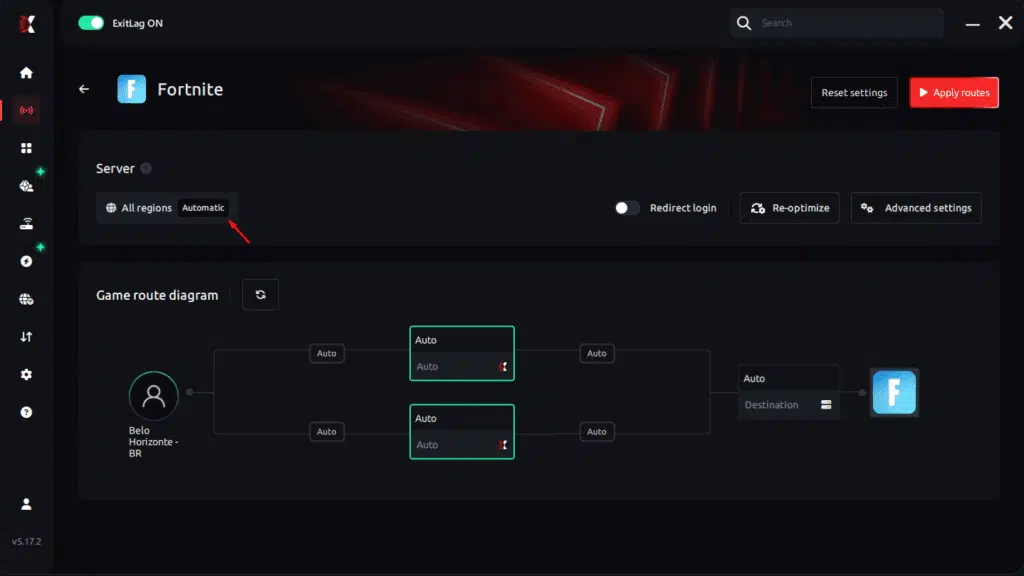
Step 6 – Wait a few seconds until optimization is complete. You’ll see ping indicators in the interface.
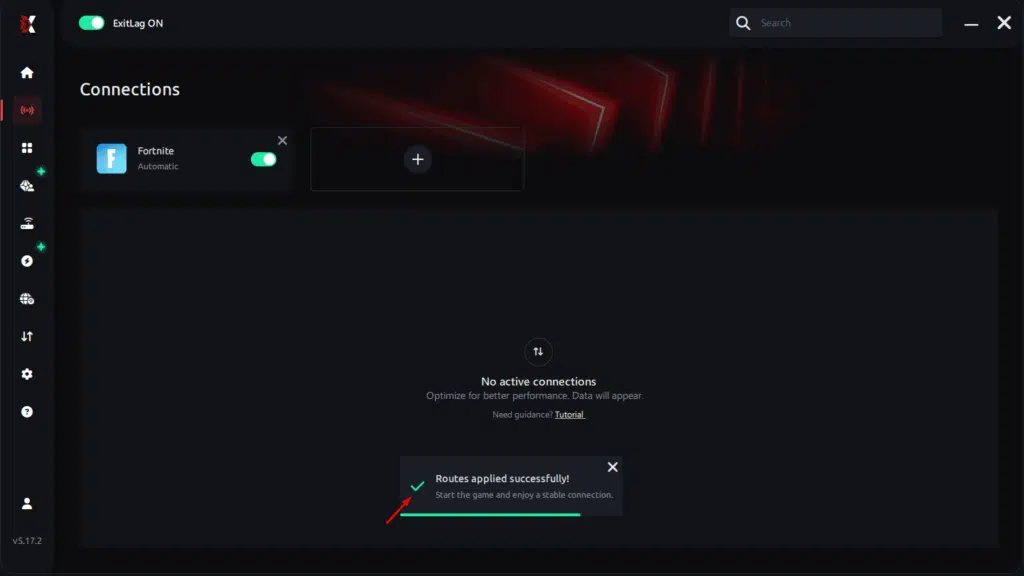
Step 7 – Launch Fortnite normally. The optimization will already be active.
ExitLag runs in the background while you play, constantly adjusting routes to maintain the best possible performance.
How to use Ping for Games: step-by-step guide (Fortnite)
Checking your connection quality before entering a match has never been easier. Here’s how to use Ping for Games in just a few steps:
1. Open the ExitLag software on your PC
Ensure the application is installed and open. The feature is integrated into the platform and available for free to all users.
2. Access the Network Analyzer tool
Locate the Network Analyzer in the software menu. This is where you’ll find Ping for Games along with other connection analysis features.
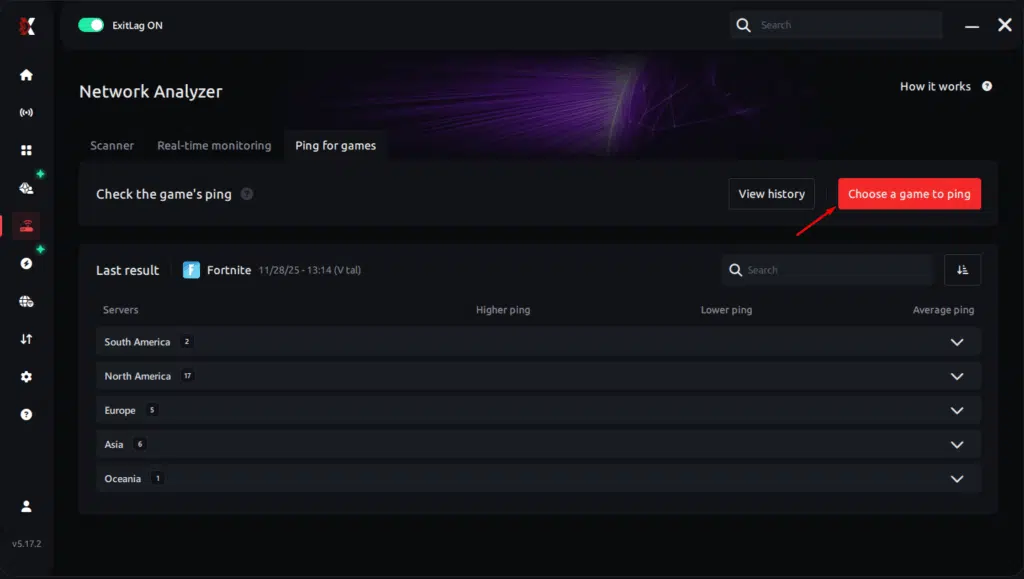
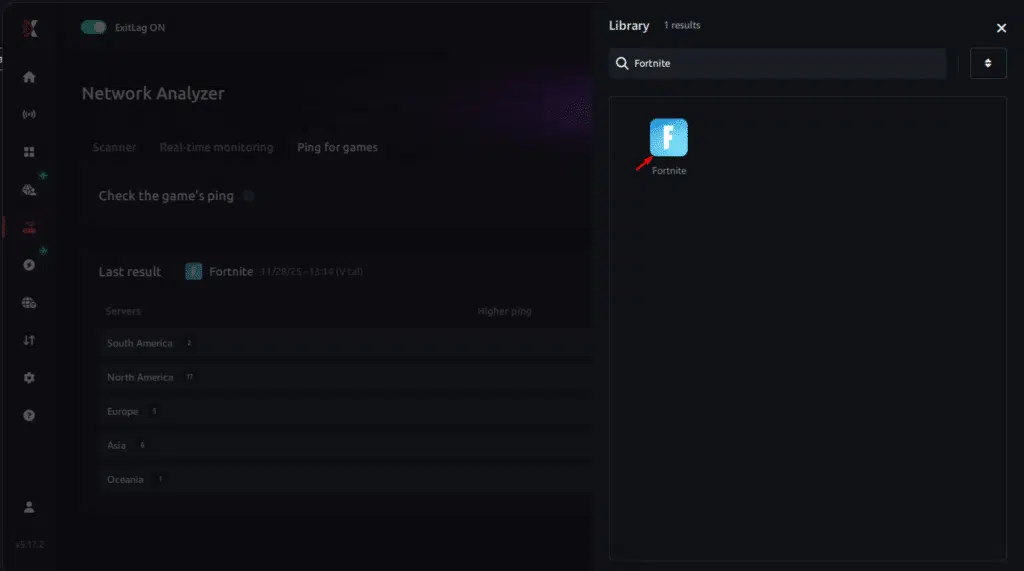
3. Select the game you want to test
Choose Fortnite from the list. The tool supports major online multiplayer games, including FPS, Battle Royales, MOBAs, MMORPGs, and more.
4. Choose the specific server
Select the exact Fortnite server you want to test instead of a generic region. This ensures more accurate results for your match.
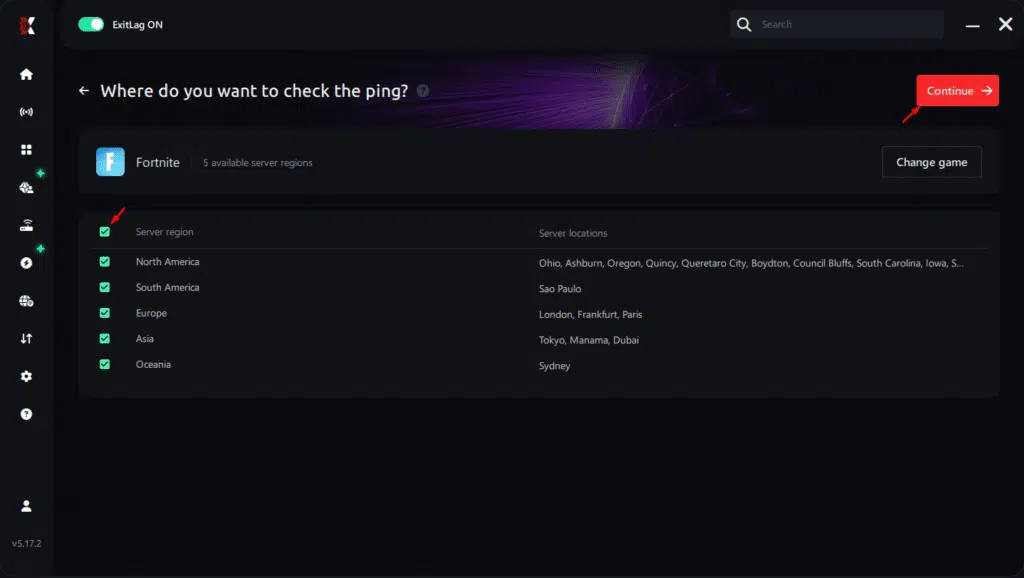
5. Start the ping test
With one click, the measurement is performed in real time between your device and the selected Fortnite server, considering your current connection (cable or Wi-Fi).
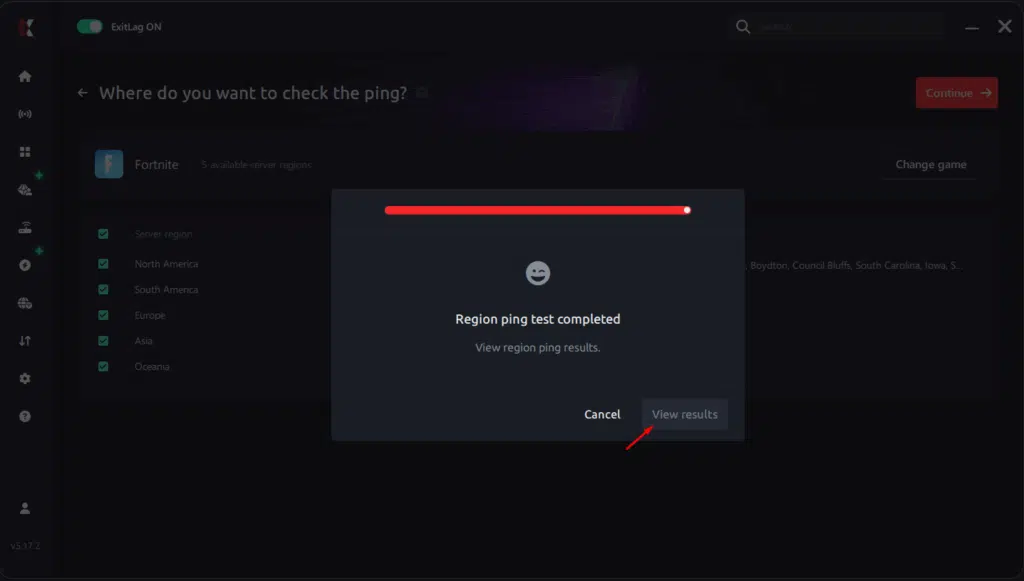
6. Analyze the results
Results appear in milliseconds (ms), automatically sorted from best to worst ping. You can also reorganize the view alphabetically if you prefer.
7. Choose the best server and play worry-free
With this information, simply select the server with the lowest latency and jump into Fortnite knowing your connection is optimized.
Conclusion
In conclusion, Fortnite high ping is a major factor behind delayed edits, lost fights, and unpredictable gameplay. Even with a solid internet connection, routing issues and congestion can degrade performance. For more insights, tutorials, and tips, visit the official ExitLag blog. With advanced optimization — especially through ExitLag — players gain access to more efficient routes, lower latency, and smoother gameplay in every match. It’s time to use our free trial and reduce the Fortnite high ping and smooth your gameplay!
Got questions or want to connect with other players? Join the conversation at the ExitLag Forum!