

A Fortnite V-Bucks card is a prepaid card that gives you a set amount of V-Bucks to use in Fortnite. After redeeming the card through your Epic Games account, you can spend the currency on eligible in-game content such as Outfits, Pickaxes, Emotes, Wraps, and Fortnite Passes.
However, buying a Fortnite V-Bucks card is changing as Epic gradually replaces traditional V-Bucks Cards with the newer Fortnite Gift Cards. The two products are different: a V-Bucks Card provides a fixed amount of V-Bucks, while a Fortnite Gift Card adds funds to your Epic Games account balance that can be spent on a wider range of eligible Epic products.
If you already have a Fortnite V-Bucks card, you can still redeem it while the transition continues. This guide explains how the cards work, where to find the code, how to redeem it on PC and consoles, what to do when your V-Bucks do not appear, and how the new Fortnite Gift Card system differs.
What Is a Fortnite V-Bucks Card?
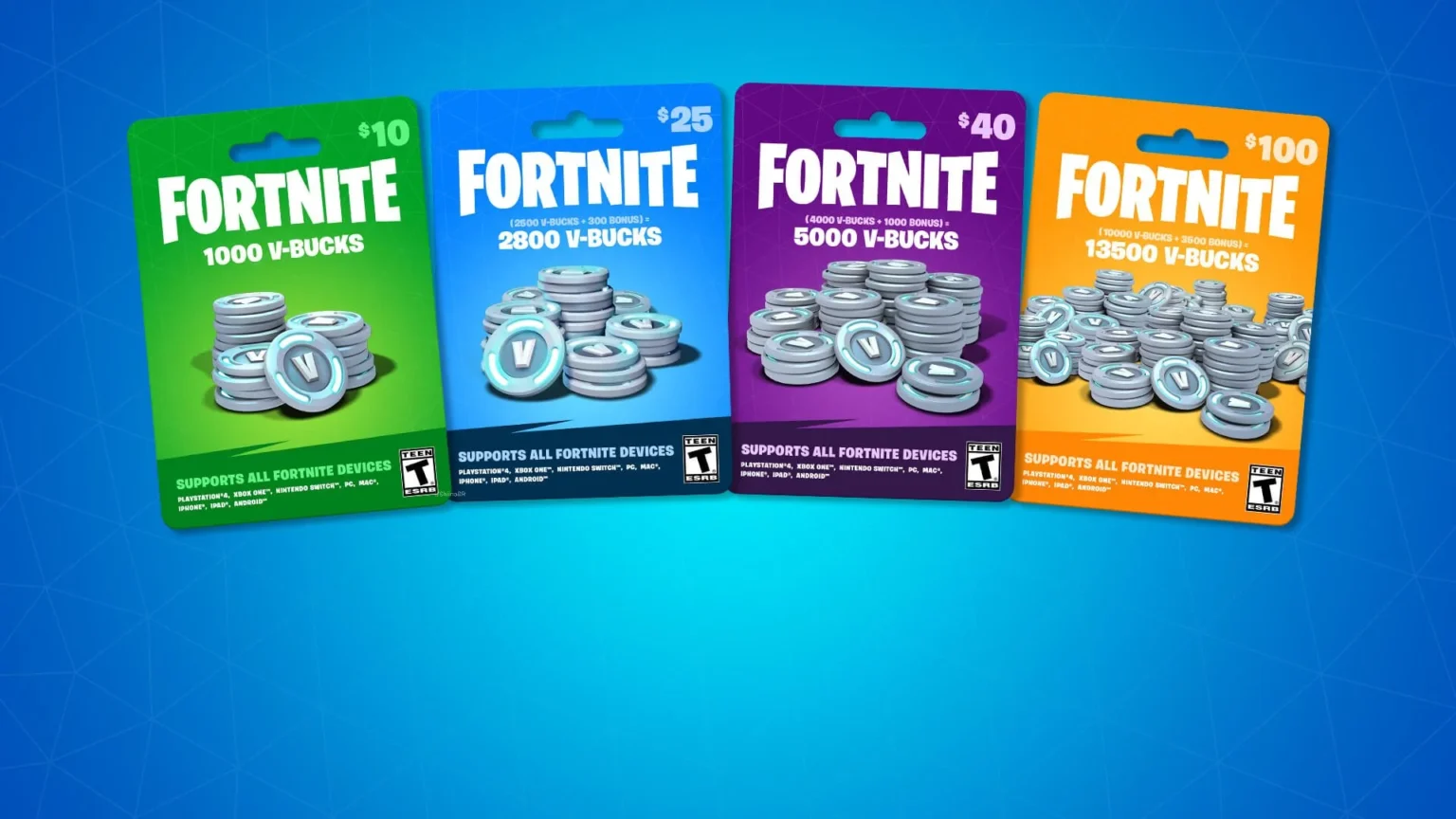
A V-Bucks Card is a prepaid product designed specifically for Fortnite’s in-game currency. Each card contains a code that can be redeemed for the amount of V-Bucks indicated on the card.
Unlike a general store gift card, the traditional V-Bucks Card does not add cash or general-purpose credit to your Epic account. It converts into V-Bucks, and those V-Bucks can then be used for eligible Fortnite purchases.
V-Bucks themselves can be used for cosmetic and other eligible Fortnite content, including Outfits, Emotes, Pickaxes, Wraps, and Fortnite Passes. They cannot be transferred from one Epic account to another, so confirming the account before redeeming a card is extremely important.
The cards have been popular as gifts because the recipient does not need to provide payment information directly inside Fortnite. However, Epic’s newer gift card system is expanding that idea by allowing one card balance to cover more than V-Bucks alone.
Fortnite V-Bucks Card vs. Fortnite Gift Card
This distinction is now one of the most important things to understand before buying or redeeming a card.
Epic is gradually replacing V-Bucks Cards with Fortnite Gift Cards. Existing V-Bucks Cards may still be available through retailers during the rollout, and cards that have already been purchased can continue to be redeemed.
The main differences are:
| Feature | V-Bucks Card | Fortnite Gift Card |
| Adds V-Bucks directly | Yes | Not directly |
| Adds Epic Account balance | No | Yes |
| Can buy V-Bucks | Yes | Yes, using account balance |
| Fortnite Crew and Packs | Limited to V-Bucks use | Eligible |
| Epic Games Store purchases | No | Eligible purchases |
| Epic Games Store DLC/add-ons | No | Eligible purchases |
| Fab content | No | Eligible purchases |
| Redemption process | V-Bucks Card process | Gift Card process |
A Fortnite V-Bucks gift card therefore should not automatically be treated as the same product as the newer Fortnite Gift Card. Check exactly what is printed on the card before following redemption instructions.
Epic states that Fortnite Gift Cards can be used for Fortnite V-Bucks, Fortnite Crew and Packs, Epic Games Store games and add-ons, and Fab content where Epic’s payment system supports the purchase.
How to Redeem Fortnite V-Bucks Card
Knowing how to redeem Fortnite V-Bucks card codes is straightforward, but you should verify your Epic Games account before confirming anything.
Epic recommends keeping your purchase receipt until redemption has been successfully completed. If something goes wrong, Epic Games Support may request the receipt when helping investigate the problem.
For a traditional V-Bucks Card, follow these steps:
- Sign in to the correct Epic Games account.
- Check that your display name matches the account you use in Fortnite.
- Open the V-Bucks Card redemption section.
- Select Get Started.
- Carefully reveal the PIN on the back of the card.
- Enter the PIN without dashes.
- Select the platform where you want to redeem the card.
- Check the account, platform, and amount carefully.
- Confirm the redemption.
The final process depends on your selected platform. PC, Nintendo Switch, and mobile redemptions can proceed directly to Fortnite after confirmation. Xbox and PlayStation require an additional step.
This platform difference is important because entering the original PIN is not necessarily the end of the process for console players.
Where Is the Fortnite V-Bucks Card Code?
For a physical Fortnite V-Bucks card code, the PIN is normally located on the back of the card beneath a protective scratch-off area.
Scratch the covering carefully. Damaging the characters underneath could make the code difficult to read, creating an unnecessary problem during redemption.
The traditional V-Bucks Card PIN should be entered without dashes during the Epic redemption process. Before submitting it, verify that you are signed in to the correct Epic account.
The newer Fortnite Gift Card works differently. Epic says users can scan the QR code on the back and select Redeem or manually enter the PIN. If there is no visible code on a Fortnite Gift Card, Epic recommends checking the retailer’s receipt because the code may have been printed there.
That difference is another reason to identify your card type first rather than following an old V-Bucks tutorial automatically.
How to Redeem a V-Bucks Card on PC
PC redemption is one of the simpler versions of the process.
Sign in to the Epic Games account you actually use for Fortnite, open the V-Bucks Card redemption process, enter your PIN, and select the appropriate PC option when asked to choose a platform.
Before confirming, review the account information and new balance. This step deserves attention because V-Bucks Cards cannot simply be transferred between accounts after you accidentally redeem them to the wrong one.
Once the traditional card has been successfully redeemed for PC, you can launch Fortnite and access the V-Bucks.
If they do not appear immediately, verify that the Fortnite client is logged into the same Epic account used during redemption. Signing into the wrong Epic account is an easy way to make a successful redemption appear unsuccessful.
How to Redeem V-Bucks Cards on PlayStation and Xbox
PlayStation and Xbox add another step to the Fortnite V-Bucks card redeem process.
You begin through Epic just like other players. Enter the card PIN, select the appropriate console, verify the information, and confirm your selection.
After confirmation, Epic generates a secondary code. Depending on the platform, this will be a 12- or 25-character code, which must then be redeemed through the corresponding PlayStation or Microsoft account. Epic also sends this secondary code by email.
Make sure the console account is linked to the same Epic account used for Fortnite. Using multiple PlayStation, Xbox, or Epic accounts makes it especially important to double-check everything before completing redemption.
If you did not receive the secondary code by email, it is not necessarily lost. Epic says you can find previously generated secondary codes under your Epic account’s Transactions section by opening the V-Bucks Card Redemption history.
Can You Redeem a Fortnite V-Bucks Card on Nintendo Switch?
Yes, V-Bucks Cards can be redeemed for Nintendo Switch when the appropriate account and platform are selected during redemption.
However, Nintendo has an important difference regarding Fortnite’s Shared Wallet. Epic states that V-Bucks purchased with Epic Games account balance are available across other supported platforms except Nintendo, which does not support the Fortnite Shared Wallet in the same way.
This can make your displayed V-Bucks balance appear different when switching between Nintendo hardware and another platform.
The important distinction is between the currency balance and the items you purchase. Epic explains that eligible items purchased with V-Bucks remain available in your Locker across platforms connected to your Epic Games account.
Therefore, seeing a different V-Bucks number on Nintendo does not necessarily mean your cosmetics or other eligible Locker content has disappeared.
What Can You Buy With V-Bucks?
V-Bucks are Fortnite’s in-game currency and can be spent on eligible content available within the game.
Epic lists examples including:
- Outfits;
- Pickaxes;
- Emotes;
- Wraps;
- Fortnite Passes.
The available catalog changes over time, particularly through the Item Shop, so a V-Bucks Card gives you currency rather than guaranteeing access to a particular cosmetic.
This distinction is useful when giving a card as a gift. Instead of choosing a specific skin for someone else, the recipient can decide how to spend the V-Bucks themselves.
V-Bucks also do not represent cash that can be withdrawn later. Epic states that V-Bucks are not electronic money and are intended to be used according to Fortnite’s applicable rules.
Where Can You Buy a Fortnite V-Bucks Card?
Traditional V-Bucks Cards have been sold through participating retailers in supported markets, but availability is changing as Epic rolls out Fortnite Gift Cards.
Epic explicitly states that V-Bucks Cards may remain available in certain regions and local retailers while the newer cards are introduced. Previously purchased cards can still be redeemed through the traditional V-Bucks process.
When buying either card type, prioritize established retailers and verify exactly what product you are purchasing.
Look for:
- The correct Fortnite/Epic branding;
- The value or V-Bucks amount;
- Any regional restrictions;
- An intact PIN area on physical cards;
- A valid purchase receipt;
- Clear information about whether it is a V-Bucks Card or Fortnite Gift Card.
Do not buy codes from strangers simply because they are significantly cheaper. A heavily discounted code from an unknown seller could already have been redeemed, obtained improperly, or be associated with other problems.
Keeping the receipt is especially important. Epic specifically recommends retaining it until redemption is complete.
Are Fortnite V-Bucks Cards Being Discontinued?
Traditional V-Bucks Cards are being replaced, but that does not mean every existing card suddenly stopped working.
Epic announced Fortnite Gift Cards as its newer system and states that they are replacing V-Bucks Cards. The rollout has been taking place across regions, which means both types may coexist for some time depending on location and retailer availability.
The new cards are more flexible because they add Epic Account balance rather than immediately converting the entire value into V-Bucks.
For example, the balance can be used for eligible purchases such as:
- Fortnite V-Bucks;
- Fortnite Crew;
- Fortnite Packs;
- Epic Games Store games;
- DLCs and add-ons;
- Fab content.
Therefore, if you’re shopping for a card and see Fortnite Gift Card instead of V-Bucks Card, that does not mean you’ve found the wrong product. It is part of Epic’s newer system.
Just remember that the redemption instructions are different.
How to Redeem a Fortnite Gift Card

Do not use the old V-Bucks Card instructions if your card specifically says Fortnite Gift Card.
Epic’s current process starts with scanning the QR code on the card or manually entering the gift card PIN. You then sign into your Epic Games or connected console account, verify the account, link additional accounts if prompted, and confirm the redemption.
The card value is then added to your Epic Games account balance.
That balance can subsequently be used for eligible purchases through Epic’s payment system. For example, you can use the balance to purchase V-Bucks rather than having the gift card automatically convert into a predetermined V-Bucks package.
This is fundamentally different from the traditional card:
V-Bucks Card → V-Bucks
Fortnite Gift Card → Epic Account balance → eligible purchases
Understanding that distinction prevents many redemption mistakes.
Why Is My Fortnite V-Bucks Card Code Not Working?
A failed code does not automatically mean the Fortnite V-Bucks card is invalid. Several account and redemption issues can cause problems.
First, make sure you are following the instructions for the correct card. Fortnite Gift Cards and V-Bucks Cards have separate redemption processes.
Next, check the basics:
| Problem | What to Check |
| PIN rejected | Re-enter characters carefully |
| Platform missing | Check linked Epic account |
| V-Bucks not appearing | Verify account and selected platform |
| Console redemption incomplete | Redeem secondary code |
| Secondary code missing | Check Epic transaction history |
| Gift Card not working as V-Bucks Card | Use Gift Card redemption process |
If your desired platform does not appear during traditional V-Bucks Card redemption, Epic specifically recommends checking which Epic account you are currently using. Only devices linked to that account appear as options.
Do not repeatedly purchase additional cards because one code is giving you trouble. Identify whether the problem is the card, account, platform selection, or redemption process first.
Why Are My V-Bucks Not Showing After Redemption?
Start by confirming that the redemption was completed successfully and that you’re playing on the correct Epic account.
For PlayStation and Xbox, remember that entering the original V-Bucks Card PIN through Epic is only the first part. You must also redeem the secondary code through the corresponding console account before the process is complete.
Platform wallet differences can also create confusion, especially with Nintendo. The amount displayed on one platform may not always match what you see elsewhere because Nintendo does not support Fortnite Shared Wallet in the same way.
If everything is correct but the balance still appears wrong, avoid attempting to redeem the same code repeatedly.
Keep your receipt and collect relevant information about the redemption. Epic’s support documentation specifically advises keeping proof of purchase because it may be needed to investigate a problem.
Can You Transfer V-Bucks Between Fortnite Accounts?
No. V-Bucks cannot be transferred directly from one account to another.
This makes account verification particularly important when redeeming a card. If several people play Fortnite on the same device, confirm the Epic display name before entering the Fortnite V-Bucks card code.
The inability to transfer V-Bucks also means you should be cautious when buying a card for someone else. Giving them the unused card or code allows them to redeem it on their own account instead of accidentally adding the V-Bucks to yours.
Once a code has been redeemed and associated with an account, you should not assume that Epic can simply move that balance elsewhere.
A few seconds spent checking the account before confirmation can prevent a much more frustrating support problem later.
How to Avoid Fake V-Bucks Codes and Scams
V-Bucks are valuable to Fortnite players, which naturally attracts fake giveaways, fraudulent code generators, phishing pages, and offers that sound much better than legitimate promotions.
Be skeptical of websites claiming to generate unlimited Fortnite V-Bucks card codes. Legitimate physical or digital cards require a valid code issued through authorized systems; a random “generator” cannot legitimately create unlimited prepaid balances.
Never provide your Epic password to a third-party website promising free V-Bucks. Also avoid sharing unused card PINs in screenshots, messages, videos, or public posts.
A few simple rules can reduce risk:
- Buy from trustworthy sellers;
- Never expose an unused PIN;
- Check the website before entering account credentials;
- Keep your purchase receipt;
- Avoid “free V-Bucks generators”;
- Be suspicious of extreme discounts.
If an offer requires you to hand over your Epic credentials in exchange for V-Bucks, that should be an immediate warning sign.
Do V-Bucks Cards Expire?
Epic’s official V-Bucks Card information states that there are no fees or expiration dates associated with using the cards.
That means you do not need to immediately redeem a traditional card simply because you are worried that the V-Bucks value will disappear after a few days.
However, keeping an unused card secure is still important. Epic warns that cards are not replaced if they are lost, stolen, destroyed, or used without permission.
Treat the unused code similarly to other prepaid value. Anyone who obtains the PIN may potentially attempt to redeem it.
For physical cards, keep the PIN covered until you’re ready to redeem it and retain the receipt until the entire process has been successfully completed.
Fortnite V-Bucks Cards and Game Performance
Redeeming a V-Bucks Card does not directly affect Fortnite performance. Your skins, Emotes, Pickaxes, and other cosmetics do not improve ping or make your internet connection faster.
Online performance depends on completely different factors, including your connection quality, server location, network congestion, latency, jitter, packet loss, and the route your internet traffic takes to game infrastructure.
This distinction is important because account, payment, and redemption problems require different solutions from network problems.
If a Fortnite V-Bucks card fails to redeem, troubleshoot the account and code. If Fortnite itself is experiencing high ping or unstable network performance after you start playing, investigate the connection instead.
Keeping these problems separate makes troubleshooting considerably faster.
How ExitLag Can Help With Fortnite Connection Stability
Once your account, V-Bucks, and cosmetics are ready, connection stability becomes much more important during actual Fortnite matches.
Unstable latency, packet loss, jitter, and inefficient network routes can affect responsiveness during fast fights. These issues are unrelated to your V-Bucks balance but can influence how consistent the online experience feels.
ExitLag is designed to optimize network routes for supported online games, searching for more stable paths when internet routing contributes to connection problems.
It cannot fix an invalid Fortnite V-Bucks card code, recover a missing card, or change your Epic account balance. However, when routing is affecting your gameplay connection, network optimization may help provide a more consistent Fortnite experience.
FAQ
Sign in to the correct Epic account, open the V-Bucks Card redemption process, enter the PIN, select your platform, review the information, and confirm. Xbox and PlayStation require a secondary code.
The PIN is normally hidden beneath a scratch-off area on the back of a physical V-Bucks Card. Reveal it carefully to avoid damaging the characters.
V-Bucks Cards support compatible Fortnite platforms, but you must select an eligible platform linked to your Epic account during redemption. Platform wallet behavior can differ.
Check the Epic account and platform used for redemption. Xbox and PlayStation users should also verify that they completed the secondary code step.
A V-Bucks Card redeems for a fixed amount of V-Bucks. A Fortnite Gift Card adds Epic Account balance that can be spent on V-Bucks and other eligible Epic purchases.
Redeem Your Fortnite V-Bucks Card and Get Back in the Game
A Fortnite V-Bucks card remains a straightforward way to add V-Bucks to your account, even as Epic gradually transitions toward the more flexible Fortnite Gift Card system. The key is identifying which card you have, signing into the correct Epic account, and following the appropriate redemption process for your platform.
Once your V-Bucks are ready, you can focus on choosing the content you want and getting back into your next match.
Got questions or want to connect with other players? Join the conversation at the ExitLag Forum!


