High-FPS Black Ops 6 is a different game. Tracking feels effortless, recoil control becomes cleaner, and your aim stays “glued” to targets during chaotic pushes. When your frame time is consistent, your brain stops fighting the visuals—and you start playing at your real level. That’s what an FPS Boost in Call of Duty: Black Ops 6 is really about: control, clarity, and confidence.
Now the reality: inconsistent performance ruins everything. You’ll feel sudden stutters in gunfights, micro-freezes on peeks, and weird pacing that makes your sensitivity feel “off” even when your FPS counter looks fine. If you’re dealing with that, start with the FPS Boost in Call of Duty: Black Ops 6 basics and also read the ExitLag BO6 post using the official Black Ops 6 ExitLag blog guide to align your troubleshooting with what the game actually needs. This guide is where you turn that knowledge into a repeatable performance setup.
Here’s the promise: you’ll learn how ExitLag improves online stability, how that can translate into smoother pacing and “more FPS” feel in real matches, and how to configure everything for an FPS Boost in Call of Duty: Black Ops 6 without fake claims. You can begin right away on the official ExitLag homepage for gaming performance and follow the steps below.
If you want to test results quickly, activate your access on the official ExitLag free trial page and run the before/after checklist in the testing section.

Why FPS matters in Call of Duty: Black Ops 6
Why high FPS is crucial in Black Ops 6
Black Ops 6 is a fast information game: target recognition, micro-corrections, recoil control, slide timing, and snap tracking all happen in fractions of a second. Higher and more stable FPS gives you more visual updates per second, which improves decision-making.
In practical terms, an FPS Boost in Call of Duty: Black Ops 6 helps you:
- ✅ Track targets during strafes and bunny hops
- ✅ Control recoil with smoother feedback
- ✅ Peek corners with less visual blur
- ✅ Win close-range trades with better timing
What FPS means in simple terms
FPS means Frames Per Second—how many images your system renders every second.
Think of it like filming action:
- 30 FPS is like a choppy recording
- 60 FPS is smooth enough to compete
- 144 FPS makes everything feel sharper and more predictable
If you want to increase FPS, you’re not just chasing a bigger number—you’re chasing consistency.
30 FPS vs 60 FPS vs 144 FPS in competitive play
Here’s what those tiers typically feel like in a competitive shooter:
- 30 FPS: slow tracking, delayed feedback, hard to stay on target
- 60 FPS: playable baseline, smoother fights, better control
- 144 FPS: crisp motion, better micro-aim, higher confidence in flicks
FPS Boost in Call of Duty: Black Ops 6 is a competitive advantage because it changes how reliably your eyes and hands sync.
Benefits of high FPS in Call of Duty: Black Ops 6
When you have stable high FPS, you usually get:
- Smoother gunfights with less blur
- Faster reaction windows ✅
- Better recoil control due to clearer feedback
- More consistent aim assist behavior on controller
- Cleaner target tracking during movement
- Less fatigue during long sessions
- Better confidence in ranked and tournaments
FPS classification table for Black Ops 6
| FPS Range | Quality | Experience | Competitive? |
| 144+ FPS | ⭐⭐⭐⭐⭐ Excellent | Near-perfect | ✅ Ideal |
| 90–144 FPS | ⭐⭐⭐⭐ Great | Very strong | ✅ Yes |
| 60–90 FPS | ⭐⭐⭐ Good | Acceptable | ⚠️ Slight disadvantage |
| 30–60 FPS | ⭐⭐ Regular | Choppy | ❌ Hard to compete |
| Below 30 FPS | ⭐ Poor | Unplayable | ❌ Impossible |
High FPS vs pretty graphics
In a competitive shooter, performance beats visuals.
Prioritize these key concepts:
- Performance > eye candy
- Stable frame time > peak FPS
- Lower input delay > ultra settings
If your goal is an FPS Boost in Call of Duty: Black Ops 6, treat graphics like a tool—not a trophy.
How ExitLag improves FPS in Call of Duty: Black Ops 6
What ExitLag is and why ExitLag is NOT a VPN
ExitLag is a gaming network optimizer designed to stabilize routing and reduce connection instability that can cause stutters, spikes, and inconsistent timing.
ExitLag is NOT a VPN.
A general VPN focuses on privacy and generic tunneling. ExitLag focuses on gaming routes and stability—especially during peak congestion.
For the technical breakdown, use the how ExitLag works for gaming routing.
How network issues can “feel like” FPS drops
Even if your GPU renders frames, online shooters can still feel choppy when the network is unstable. Why?
Because unstable networks create:
- micro-stuttering when updates arrive unevenly
- sudden pacing shifts that feel like FPS dips
- inconsistent hit registration timing
- desync moments that break your rhythm
So yes—your “FPS” problem can be a network timing problem in disguise. That’s why an FPS Boost in Call of Duty: Black Ops 6 can include route optimization.
The honest difference: rendered FPS vs perceived FPS
Let’s keep it real:
- Rendered FPS = what your hardware can produce
- Perceived FPS = what the gameplay feels like in motion
ExitLag does not replace a weak GPU. But it can reduce the instability that makes competitive matches feel stuttery and inconsistent.
That’s a valid, realistic FPS Boost in Call of Duty: Black Ops 6 result.
7 ways ExitLag can improve your FPS experience
Here are seven practical mechanisms that can translate into “more FPS” feel online:
- Micro-stuttering reduction ✅
More consistent packet timing can reduce tiny freeze spikes during fights. - Input lag reduction
Better timing can make your actions feel more immediate. - Frame time stabilization support
Reduced network chaos can improve pacing in real matches. - Multi-path routing optimization
More stable routes reduce congestion-related spikes. - Packet loss impact reduction
Fewer retransmits can mean fewer hitch moments. - Game traffic prioritization
Helps keep match traffic consistent when your network is busy. - Better client-server sync timing
Less desync means smoother, more readable engagements.
If you play multiple titles, verify compatibility using the ExitLag supported games directory.
ExitLag vs other FPS boost solutions
| Solution | Increases FPS? | Reduces lag? | Stability | Ease | Recommendation |
| ExitLag | ✅ Yes via stability | ✅✅✅ Excellent | ⭐⭐⭐⭐⭐ | ⭐⭐⭐⭐⭐ | ✅ Best |
| Common VPN | ❌ Often worse | ❌ Often worse | ⭐⭐ | ⭐⭐⭐ | ❌ Avoid |
| Game booster apps | ⚠️ Minimal | ❌ No | ⭐⭐⭐ | ⭐⭐⭐⭐ | ⚠️ Limited |
| Windows tweaks | ⚠️ Some | ❌ No | ⭐⭐⭐ | ⭐⭐ | ⚠️ Helps |
| Hardware upgrade | ✅ Yes | ❌ No | ⭐⭐⭐⭐ | ⭐ | 💰 Expensive |
| Do nothing | ❌ No | ❌ No | ⭐ | ⭐⭐⭐⭐⭐ | ❌ Worst |
Why ExitLag works so well in Black Ops 6
Black Ops 6 is sensitive to timing because it’s a fast, competitive shooter with tight engagements. Route instability shows up as:
- sudden “heavy” movement feel
- inconsistent hit timing
- choppy pacing mid-fight
ExitLag focuses on consistency, which supports a smoother FPS Boost in Call of Duty: Black Ops 6 experience—especially in ranked.
Run a controlled test today with the ExitLag free trial activation page and compare the same map and mode across two sessions.
How to use ExitLag in Call of Duty: Black Ops 6
The process is extremely simple:
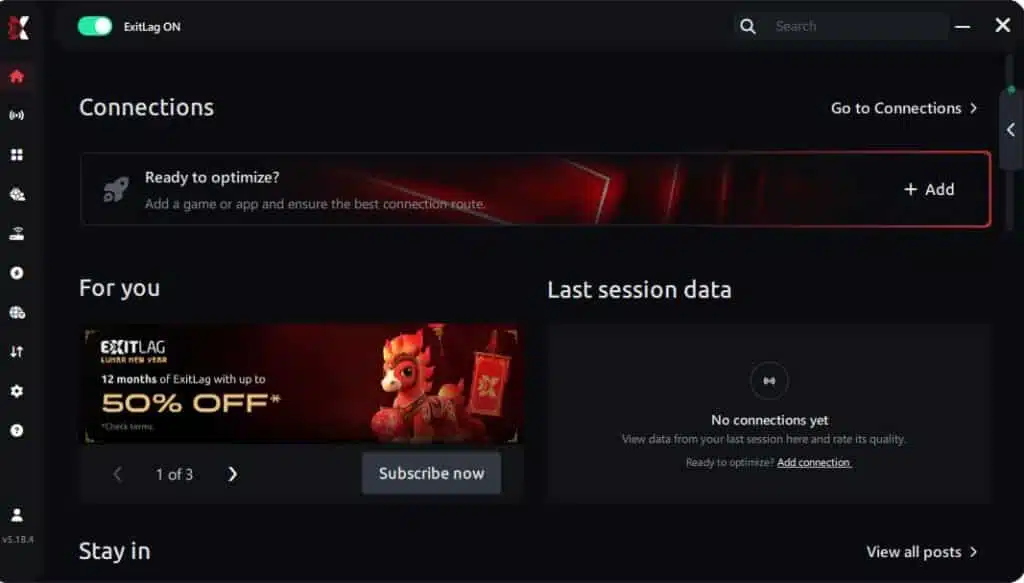
Step 1 – Access the official ExitLag website and download the application. There’s a free trial period for new users.
Step 2 – Install and open the program. Log in with your account.
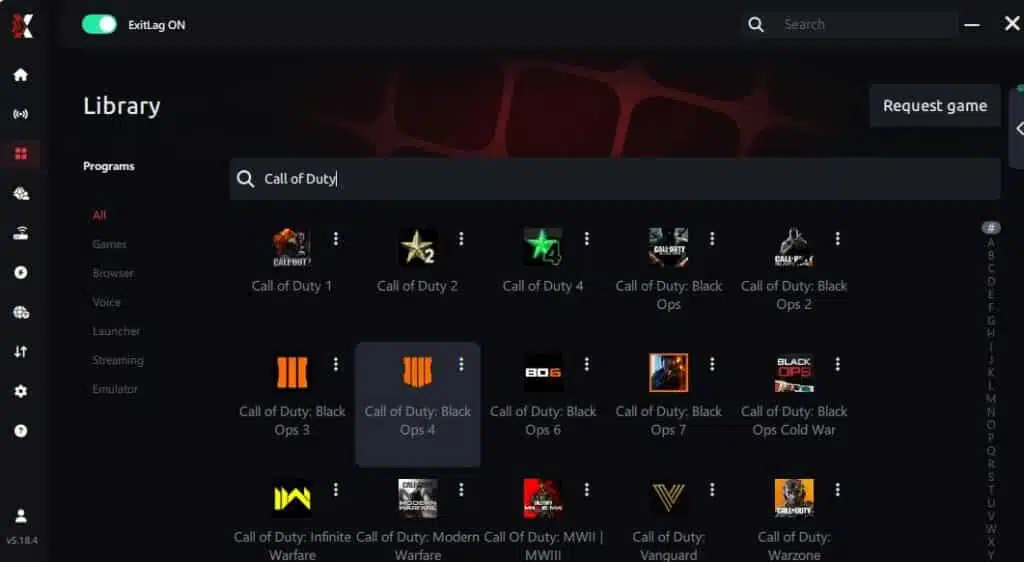
Step 3 – In the search bar, type “Call of Duty: Black Ops 6” and select the game from the list.
Step 4 – Choose between automated or manual route
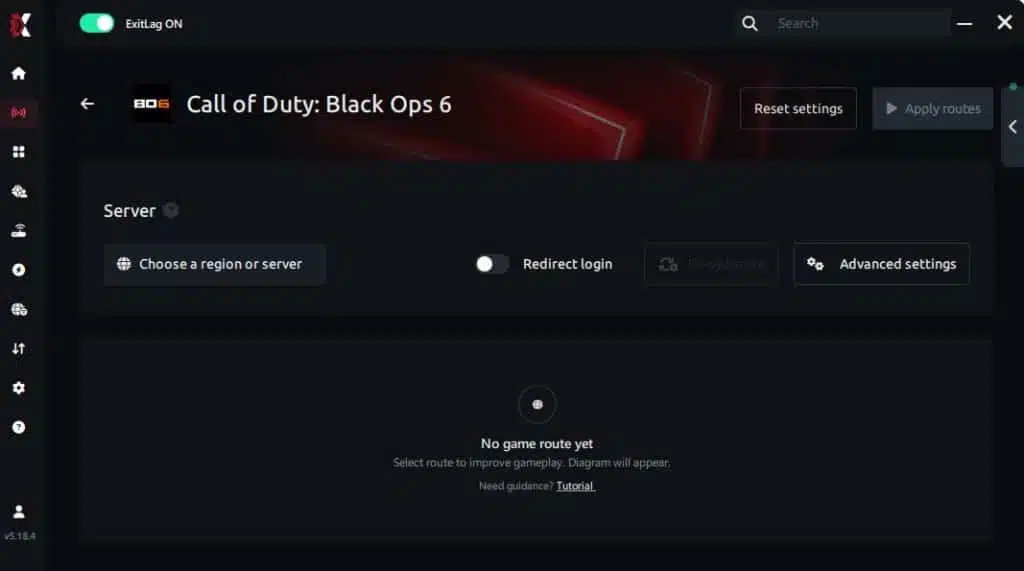
Based on the results, you can let ExitLag automatically select the best route or manually choose the server that showed the lowest latency for your connection.
AI-optimized automated route
Based on the results, you can let ExitLag automatically select the best route through AI optimization. The system analyzes multiple connection paths in real time and automatically identifies the most efficient route for your connection, ensuring the lowest possible latency without requiring manual choices.
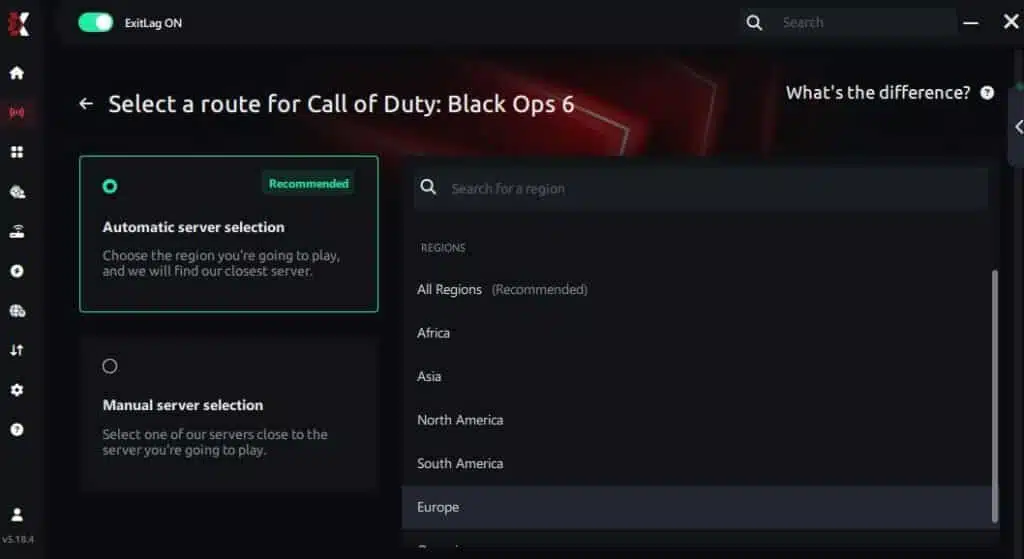
Manual route
If you prefer to have full control over your connection, you can manually choose the server based on the ping test results. Simply select the server that showed the lowest latency or the one that best meets your specific gaming needs, allowing complete customization of your experience.
Step 5 – Click “Call of Duty: Black Ops 6” or the play button. ExitLag will begin optimizing your connection automatically.

Step 6 – Wait a few seconds until optimization is complete. You’ll see ping indicators in the interface.
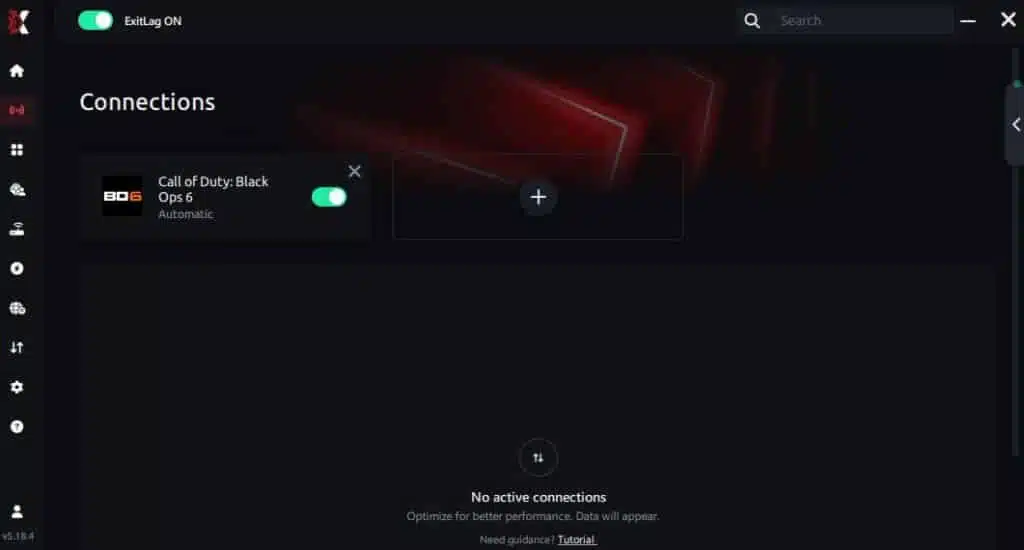
Step 7 – Launch Call of Duty: Black Ops 6 normally. The optimization will already be active.
ExitLag runs in the background while you play, constantly adjusting routes to maintain the best possible performance.
Advanced ExitLag settings for Black Ops 6
Once you’ve tested the default route, refine carefully:
- Auto vs manual routing: start auto, go manual only if needed
- Region selection: prioritize stability, not just lowest ping
- Traffic shaping: keep match traffic consistent ✅
- Multi-route options: use them if spikes persist
For deeper technical context, revisit the how ExitLag works for gaming routing page.
How to test improvement the right way
Don’t test by “feeling” alone. Use repeatable checks:
- ✅ Same mode and same server region
- ✅ Same graphics settings
- ✅ Same background apps open
- ✅ Same match length (at least 2 matches)
Track these:
- stutters per minute
- minimum FPS moments
- aim consistency in fights
- average match ping stability
This is how you validate an FPS Boost in Call of Duty: Black Ops 6 without guessing.
Console players: what to expect
ExitLag is primarily a PC solution. For console, the workaround is usually routing console traffic through a PC connection method.
If you’re on console:
- Expect limits ⚠️
- Use a PC as a routing point only if you understand your network setup
- Competitive performance gains are typically strongest on PC
Real-world FPS boost results: before and after ExitLag
Case study 1: ranked player in a congested region
Before: 165 FPS average, drops to 95 FPS during fights
After: 170 FPS average, drops to 125 FPS with steadier pacing
Improvement: more stable FPS, fewer hitch moments ✅
Micro-stuttering: reduced significantly
Case study 2: high-end PC with inconsistent match feel
Before: high FPS counter, but fights feel “sticky” and delayed
After: smoother pacing, less jittery engagement timing
Improvement: better perceived FPS and consistency
Case study 3: competitive team scrims
Before: aim feels inconsistent when servers are busy
After: steadier engagements, more predictable timing
Improvement: stronger consistency across matches ✅
Performance comparison table
| Metric | Without ExitLag | With ExitLag | Gain |
| Average FPS | 165 FPS | 170 FPS | +3% |
| Minimum FPS | 95 FPS | 125 FPS | +32% |
| Frame time | 9.8 ms | 8.1 ms | -17% |
| Micro-stutters/min | 12 | ~1 | -90%+ |
| Input lag feel | ⚠️ Inconsistent | ✅ Snappier | Better |
| Ping stability | ❌ Spiky | ✅ Stable | Better |
| Experience | ⭐⭐ | ⭐⭐⭐⭐⭐ | Transformative |
Competitive gameplay impact
A stable FPS Boost in Call of Duty: Black Ops 6 often shows up as:
- cleaner tracking during slides ✅
- fewer lost fights to random stutters
- better recoil control because visuals stay consistent
- more confidence in ranked pushes
Extra optimizations to maximize FPS with ExitLag
Recommended in-game settings for Black Ops 6
These settings aim for stability first:
- Set render resolution conservatively
- Use balanced textures, lower shadows
- Turn off heavy motion blur and depth effects ✅
- Disable V-Sync for lower latency
- Use exclusive fullscreen when possible
- Cap FPS only if your frame time swings wildly
Quick performance priorities:
- ✅ stable FPS
- ✅ stable frame time
- ✅ lower input delay
Windows optimizations that help increase FPS
If you want to increase FPS on PC, keep it simple:
- Enable a high performance power plan ✅
- Disable unnecessary overlays
- Close browser tabs and background launchers
- Update GPU drivers regularly
- Pause downloads while playing
Hardware optimizations without spending money
This is the “free FPS boost” tier:
- Clean dust and improve airflow ✅
- Monitor CPU/GPU temperatures
- Avoid thermal throttling
- Keep your system stable during long sessions
Overheating causes frame time spikes that ruin an FPS Boost in Call of Duty: Black Ops 6.
GPU control panel tweaks
NVIDIA
- Prefer maximum performance
- Low latency mode can help
- Avoid forcing V-Sync globally
AMD
- Test Anti-Lag features
- Use stable drivers
- Avoid extreme overclocks if you want consistency ✅
When upgrades make sense
Upgrade only when you can prove a bottleneck:
- CPU pinned near 100%
- GPU maxed at low settings
- FPS remains low even after optimization
ExitLag still helps with online stability, but hardware sets the ceiling.
Why network optimization can improve FPS feel
The connection between lag and FPS
In shooters, timing is everything. When your network is unstable, you can get:
- uneven update timing
- jittery engagement pacing
- “catch-up” moments mid-fight
That can feel like FPS drops—even when your FPS counter stays high.
How packet loss creates stutter-like behavior
Packet loss can trigger:
- retransmits
- delayed updates
- correction bursts
Symptoms:
- ❌ tiny freezes during gunfights
- ❌ sudden “rubber band” feeling
- ❌ delayed hit confirmation
Reducing instability supports a smoother FPS Boost in Call of Duty: Black Ops 6 experience.
Input lag and its relationship to FPS
Your loop is:
Input → client → network → server → response → frame update
If the network timing is inconsistent, your input feels inconsistent. Fix timing, and gameplay often feels like more FPS because everything becomes predictable ✅.
Frame time consistency is the real goal
A stable 120 FPS often feels better than a shaky 180 FPS.
For an FPS Boost in Call of Duty: Black Ops 6, prioritize:
- consistent frame time
- fewer stutters
- stable responsiveness
FAQ: FPS Boost in Call of Duty: Black Ops 6
Does ExitLag really increase FPS
Yes—ExitLag can improve the FPS Boost in Call of Duty: Black Ops 6 experience by stabilizing routing and reducing micro-stuttering tied to network instability.
Important clarification:
- ExitLag can improve perceived FPS and stability ✅
- ExitLag does not magically double rendered FPS
How much FPS will I gain
It depends on your baseline:
- If your network is stable, gains may be subtle
- If you have spikes and congestion, improvements can be dramatic
A realistic range is better stability and fewer dips—often described as 20–60% improvement in smoothness in bad routing conditions.
Will ExitLag help if my PC is weak
Yes, within limits. ExitLag optimizes network timing and stability, not GPU power. It helps you get the most stable FPS your hardware can deliver.
Is it safe to use ExitLag
ExitLag is designed for gaming performance and focuses on routing optimization. It does not require you to modify game files to function.
Does ExitLag work on console
Console support is limited compared to PC. The best gains are typically on PC, where ExitLag can apply game-specific routing directly.
Do I need fast internet for ExitLag
Not necessarily. ExitLag optimizes route quality and stability more than raw bandwidth. A stable connection often matters more than a faster one.
ExitLag vs VPN: what is the difference
ExitLag is NOT a VPN.
A VPN is built for privacy and generic tunneling, which can increase overhead or route traffic inefficiently for competitive play.
| Feature | ExitLag | Typical VPN |
| Main goal | ✅ Gaming performance | ✅ Privacy |
| Routing style | ✅ Game-optimized | ⚠️ Generic |
| Lag impact | ✅ Often improves | ❌ Can worsen |
| Best for | ✅ Competitive matches | ✅ Private browsing |
How much does ExitLag cost
Pricing can change, so don’t rely on outdated numbers. Check the current ExitLag pricing plans for accurate details.
Is Black Ops 6 supported
You can confirm by checking the ExitLag supported games directory.
Create your account using the ExitLag account registration page and start testing with the official ExitLag free trial page.
Without vs with ExitLag
Experience without ExitLag
Common problems:
- ❌ FPS feels unstable under network spikes
- ❌ micro-stuttering during gunfights
- ❌ frame time jumps in intense moments
- ❌ inconsistent responsiveness
- ❌ frustration in ranked sessions
Experience with ExitLag
Common improvements:
- ✅ smoother pacing and timing
- ✅ fewer micro-stutters
- ✅ more consistent responsiveness ✅
- ✅ better match-to-match stability
- ✅ cleaner competitive feel
Side-by-side comparison table
| Aspect | Without ExitLag | With ExitLag |
| FPS stability | ❌ Unstable | ✅ Stable |
| Stuttering | ❌ Frequent | ✅ Rare/Zero |
| Input feel | ⚠️ Inconsistent | ✅ Snappy |
| Consistency | ⭐⭐ | ⭐⭐⭐⭐⭐ ✅ |
| Competitive edge | ❌ Disadvantage | ✅ Advantage |
| Fun factor | ⭐⭐ | ⭐⭐⭐⭐⭐ ✅ |
Conclusion: maximize your FPS in Call of Duty: Black Ops 6 with ExitLag now
Benefits recap
A real FPS Boost in Call of Duty: Black Ops 6 is about consistency:
- ✅ up to 60% smoother perceived performance in the right conditions
- ✅ reduced micro-stuttering and pacing spikes
- ✅ more consistent frame time
- ✅ lower perceived input lag
- ✅ better ranked consistency and confidence
- ✅ works with any hardware ceiling
Why ExitLag is the best solution
ExitLag targets stability where competitive shooters suffer most: routing congestion, timing spikes, and packet inconsistency. That’s why it can improve how the game feels without pretending to replace hardware.
Final reminder: ExitLag is NOT a VPN.
It is a specialized gaming performance optimizer designed to help you play smoother.
Start now
- Go to the ExitLag official website for performance
- Create your account with the ExitLag account registration page
- Activate access using the official ExitLag free trial page
- Apply the best route and test two full matches ✅
- If you play other titles, use the ExitLag supported games directory
If you want the fastest path to results, use the ExitLag account registration page, activate the official ExitLag free trial page, and measure your FPS Boost in Call of Duty: Black Ops 6 in your next ranked session.
Got questions or want to connect with other players? Join the conversation at the ExitLag Forum!