
A Savage raid pull is going perfectly. Cooldowns are aligned, the boss hits the enrage window, and your rotation is clean. Then, right as the mechanic resolves, the FPS drop in Final Fantasy XIV hits. The screen stutters, inputs feel off, and one missed frame turns into a wipe. Moments like these break immersion and cost progress when timing matters most.
The problem gets worse in busy situations. Large city hubs after patches, alliance raids filled with visual effects, or hunts with dozens of players on screen can suddenly trigger FPS drop in Final Fantasy XIV. Even players with solid hardware feel inconsistent performance, especially during peak hours, similar to issues discussed, as said at our blog.
This is where ExitLag comes in as a practical solution. By focusing on connection stability, smoother frame pacing, and less micro-stuttering caused by network issues, ExitLag helps Final Fantasy XIV feel consistent again. You don’t need risky tweaks or hardware upgrades to regain control—just a smarter way to connect through the official ExitLag gaming optimization platform.

What is FPS drop and why it happens in Final Fantasy XIV?
Understanding FPS (frames per second)
FPS, or frames per second, represents how many images your system renders every second. Higher FPS means smoother motion and more responsive gameplay, which is critical in an MMO that relies on precise timing.
Common FPS ranges look like this:
- 144+ FPS – Ultra-smooth, ideal for high-refresh monitors
- 60–120 FPS – Smooth and stable for most players
- 30–60 FPS – Playable but inconsistent under load
- Under 30 FPS – Noticeable stutter and freezing
When FPS suddenly drops from one range to another, the experience feels jarring, especially during mechanics-heavy encounters.
Difference between FPS drop and network lag
Many players confuse rendering problems with connection issues. While they feel similar, they are not the same thing.
| Aspect | FPS drop | Network lag |
| Cause | Hardware or render pipeline overload | High latency, unstable routing, packet loss |
| Symptom | Stutter, frame spikes, freezing | Delay, rubberbanding, delayed actions |
| Best fix | Settings or hardware optimization | ExitLag network optimization |
This distinction matters. In Final Fantasy XIV, unstable connections often create micro-stutters that look like FPS problems, even when your GPU is not maxed out.
Why Final Fantasy XIV suffers from FPS drops
Final Fantasy XIV is an MMO built around large-scale encounters and detailed environments. Several game-specific factors contribute to FPS instability.
First, combat is visually dense. Boss fights stack particle effects, spell animations, and layered mechanics all at once. During alliance raids or hunts, dozens of players trigger effects simultaneously, increasing render load.
Second, the game continuously streams assets. Entering a crowded zone or loading new character models in hubs like Limsa Lominsa can cause brief performance dips, especially on systems with slower storage.
Finally, real-world performance often differs from listed system requirements. Even if your hardware meets recommendations, background processes, driver behavior, and network instability can combine to create inconsistent frame delivery.
This is where understanding the network side becomes essential. ExitLag is NOT a VPN. It is a specialized gaming optimization software designed to stabilize routing and reduce packet loss. By minimizing connection-related micro-stuttering, it helps Final Fantasy XIV maintain consistent frame pacing instead of sudden drops that feel like pure FPS issues.
When players reduce network instability, the game engine no longer waits on delayed data during combat or crowded scenes. The result is smoother gameplay without claiming an artificial FPS increase—just fewer interruptions caused by unstable connections. And to be clear, ExitLag is NOT a VPN, which means it doesn’t reroute traffic randomly or slow down your connection like generic tunneling services often do.
Understanding this distinction is key. FPS drop in Final Fantasy XIV is rarely caused by a single factor. It’s usually a combination of rendering pressure and network instability. Addressing both sides—especially the network layer—is what makes gameplay feel reliable again, even during the most demanding moments Eorzea can throw at you.
7 main causes of FPS drop in Final Fantasy XIV
1. Overheating and thermal throttling
When your CPU or GPU overheats, the system automatically reduces clock speeds to protect the hardware. This process, known as thermal throttling, directly impacts rendering stability.
In Final Fantasy XIV, this often shows up during long raid sessions or extended playtime in crowded zones. FPS starts fine, then gradually degrades as temperatures rise.
You can identify this by monitoring temperatures with hardware tools. If performance drops after 30–60 minutes of gameplay, overheating is a likely cause.
2. Outdated GPU drivers
Old or poorly optimized drivers struggle with newer patches and engine updates. This creates inefficiencies in how frames are rendered.
In Final Fantasy XIV, outdated drivers can cause stutters during spell-heavy encounters or after major updates that introduce new visual effects.
If FPS drops appeared after a patch or expansion, checking and updating GPU drivers is a critical first diagnostic step.
3. Graphics settings too high
Settings like shadows, volumetric effects, and effect density are demanding, especially in large-scale content.
Alliance raids, hunts, and PvP battles can overload the render pipeline when too many effects stack at once. Even strong GPUs can struggle here.
You can identify this cause by lowering effect-related settings and testing the same scenario. If stability improves, graphics load was the trigger.
4. Background processes and overlays
Applications running in the background consume CPU cycles, memory, and sometimes GPU resources. Overlays are particularly problematic.
In Final Fantasy XIV, overlays from streaming software, browsers, or voice apps can cause sudden FPS dips when notifications or updates occur.
Check your task manager while playing. If usage spikes outside the game, background processes are contributing to instability.
5. CPU bottleneck and thread saturation
Final Fantasy XIV relies heavily on single-thread performance. Even with a strong GPU, the CPU can become the limiting factor.
This shows up as FPS drops in busy cities or during mechanics-heavy fights where calculations spike. GPU usage may appear low while FPS still stutters.
Monitoring per-core CPU usage helps identify CPU bottlenecks, especially on older processors.
6. Storage streaming issues
The game constantly streams assets like character models, textures, and effects. On slower drives, this creates brief stalls.
Players using HDDs often notice stutter when entering hubs or loading into instances. SSDs significantly reduce these asset streaming interruptions.
If FPS drops coincide with loading new areas or players, storage speed is a likely contributor.
7. Network instability causing micro-stuttering
Unstable routing, packet loss, or retransmissions don’t lower FPS directly, but they disrupt frame pacing.
In Final Fantasy XIV, this feels like random stutter during combat or delayed responsiveness, even when hardware usage looks fine.
If FPS drops happen mostly in online-heavy moments, network instability is often the hidden cause.
How ExitLag solves FPS drop in Final Fantasy XIV
What is ExitLag? (NOT a VPN)
ExitLag is a gaming network optimization software designed to stabilize your connection to game servers. ExitLag is NOT a VPN, and that distinction matters.
Traditional VPNs route traffic through generic tunnels, often increasing latency and creating unstable paths. ExitLag instead analyzes and selects the most stable routes for gaming traffic only. A clear breakdown of this approach is explained in detail on the official page about how ExitLag routing technology works.
How ExitLag optimizes performance in Final Fantasy XIV
ExitLag focuses on the network layer that directly affects online synchronization. Its core technologies work together to reduce instability:
- Route optimization
- Latency reduction
- Packet loss mitigation
- Connection stabilization
- Game traffic prioritization
These systems constantly adapt in real time, ensuring your connection remains consistent even during peak hours.
Why ExitLag helps with FPS drops (without claiming more FPS)
In online games, unstable connections cause retransmissions and delayed updates. The engine waits for data, which results in micro-stuttering that feels like FPS drop.
By stabilizing the network, ExitLag reduces these interruptions. The result is not higher FPS numbers, but smoother delivery of frames.
Key benefits include:
- Smoother frame pacing during online synchronization
- Less micro-stutter triggered by packet loss or route changes
- More consistent responsiveness in combat and movement
This is why many players feel immediate improvement, even without changing hardware.
ExitLag technologies that impact perceived FPS
Several ExitLag technologies directly influence how smooth the game feels:
Multi-path routing Traffic is sent through multiple routes simultaneously, avoiding congested paths.
Redundant connections If one route degrades, another takes over instantly, preventing sudden instability.
Gaming-optimized protocol Traffic is handled differently from standard data, prioritizing real-time responsiveness.
Together, these systems reduce the network-related disruptions that break frame pacing.
ExitLag vs other solutions
| Solution | Improves FPS? | Reduces lag? | Ease | Recommendation |
| ExitLag | ✅ (network stability) | ✅ | ⭐⭐⭐⭐⭐ | ✅ Best option |
| Common VPN | ❌ | ❌ | ⭐⭐⭐ | ❌ Avoid |
| PC optimization | ⚠️ Limited | ❌ | ⭐⭐ | ⚠️ Partial |
| Nothing | ❌ | ❌ | ⭐⭐⭐⭐⭐ | ❌ Worst |
ExitLag is NOT a VPN, and unlike generic solutions, it targets the exact layer that causes online micro-stuttering.
Final Fantasy XIV is fully compatible with ExitLag, alongside many other online titles listed on the official page of supported online games optimized by ExitLag.
ow to use ExitLag in Final Fantasy
The process is extremely simple:
Step 1 – Access the official ExitLag website and download the application. There’s a free trial period for new users.
Step 2 – Install and open the program. Log in with your account.
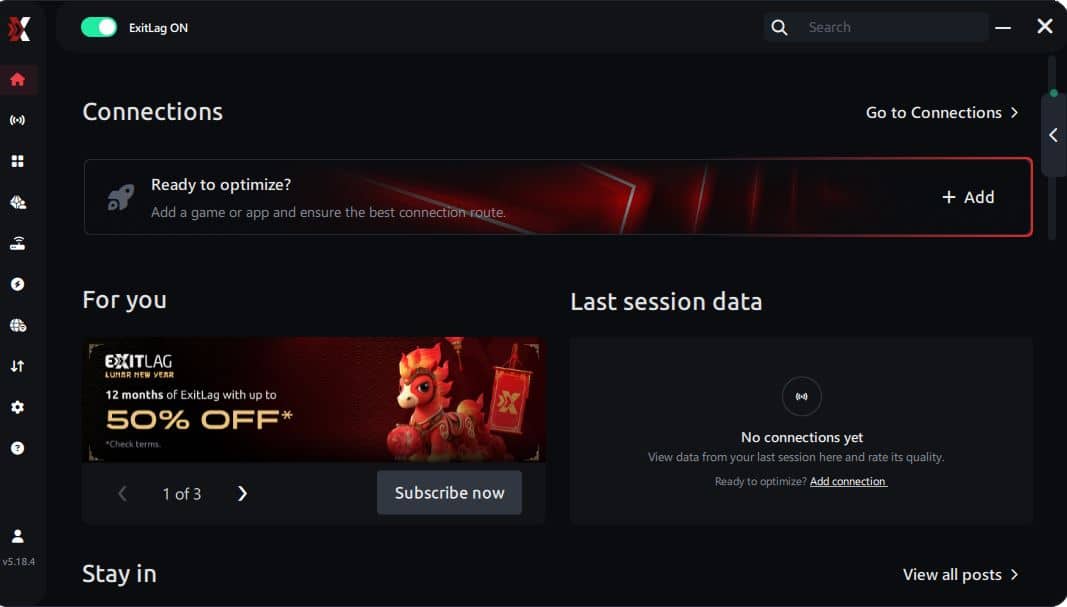
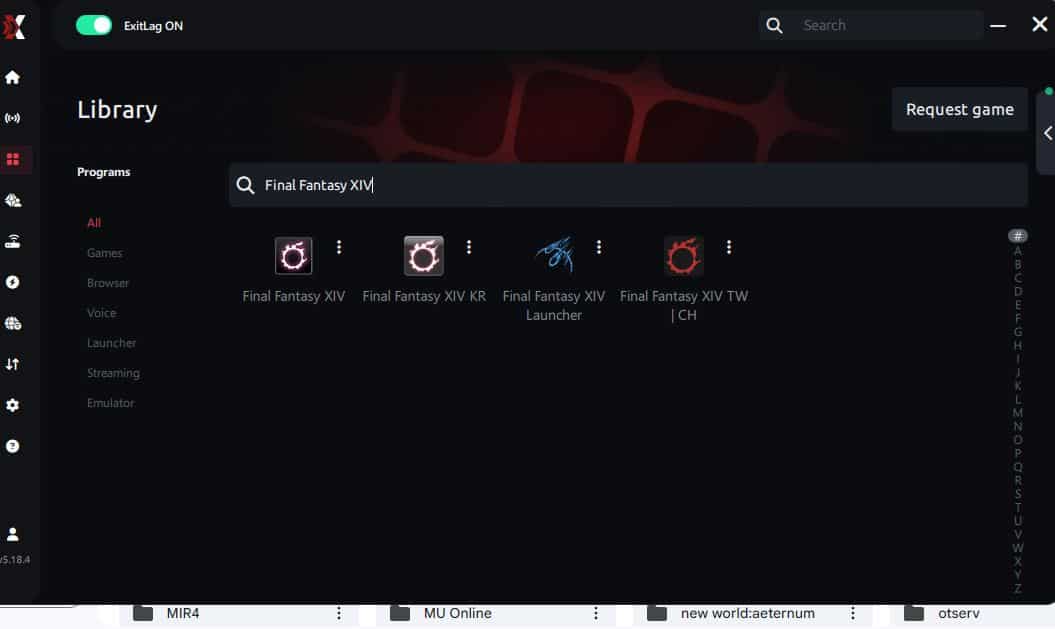
Step 3 – In the search bar, type “Final Fantasy” and select the game from the list.
Step 4 – Choose between automated or manual route
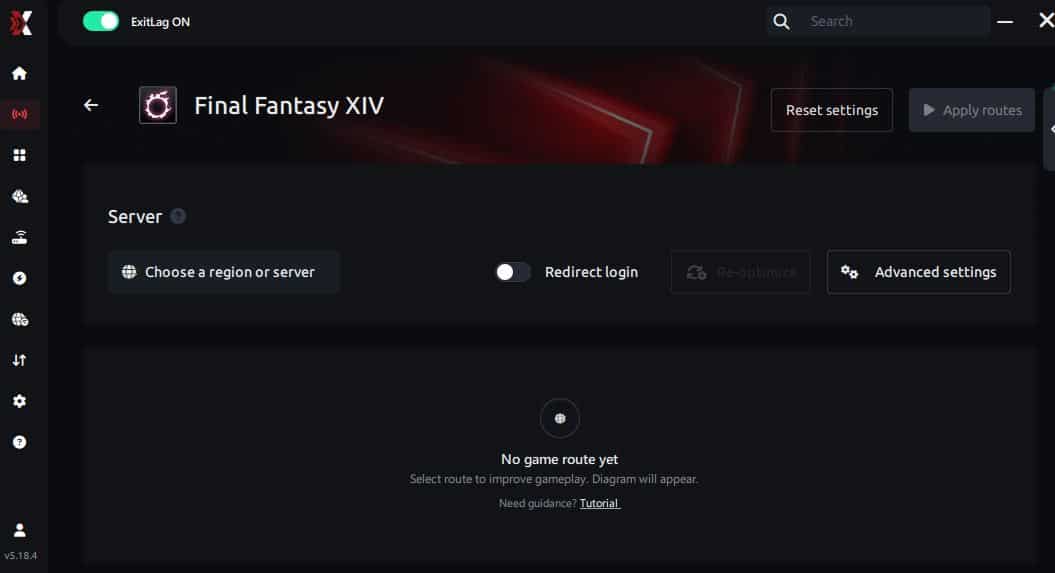
Based on the results, you can let ExitLag automatically select the best route or manually choose the server that showed the lowest latency for your connection.
AI-optimized automated route
Based on the results, you can let ExitLag automatically select the best route through AI optimization. The system analyzes multiple connection paths in real time and automatically identifies the most efficient route for your connection, ensuring the lowest possible latency without requiring manual choices.
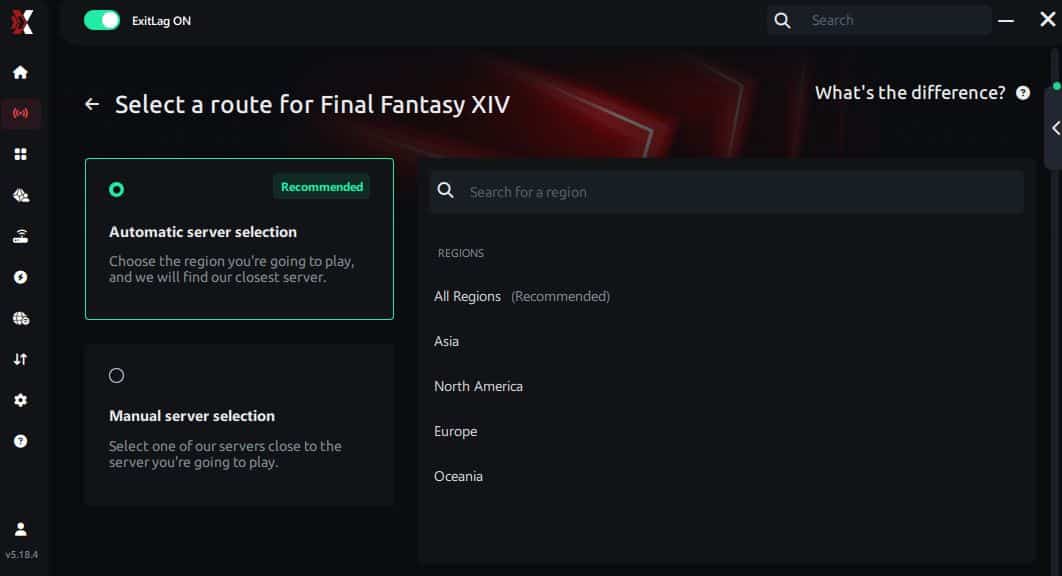
Manual route
If you prefer to have full control over your connection, you can manually choose the server based on the ping test results. Simply select the server that showed the lowest latency or the one that best meets your specific gaming needs, allowing complete customization of your experience.
Step 5 – Click “Final Fantasy” or the play button. ExitLag will begin optimizing your connection automatically.
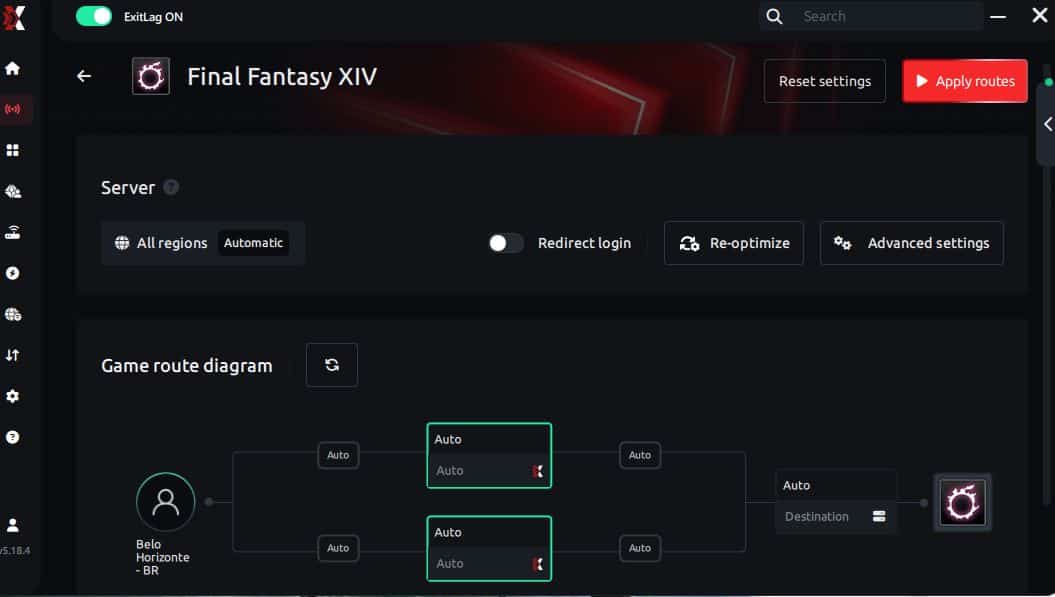
Step 6 – Wait a few seconds until optimization is complete. You’ll see ping indicators in the interface.
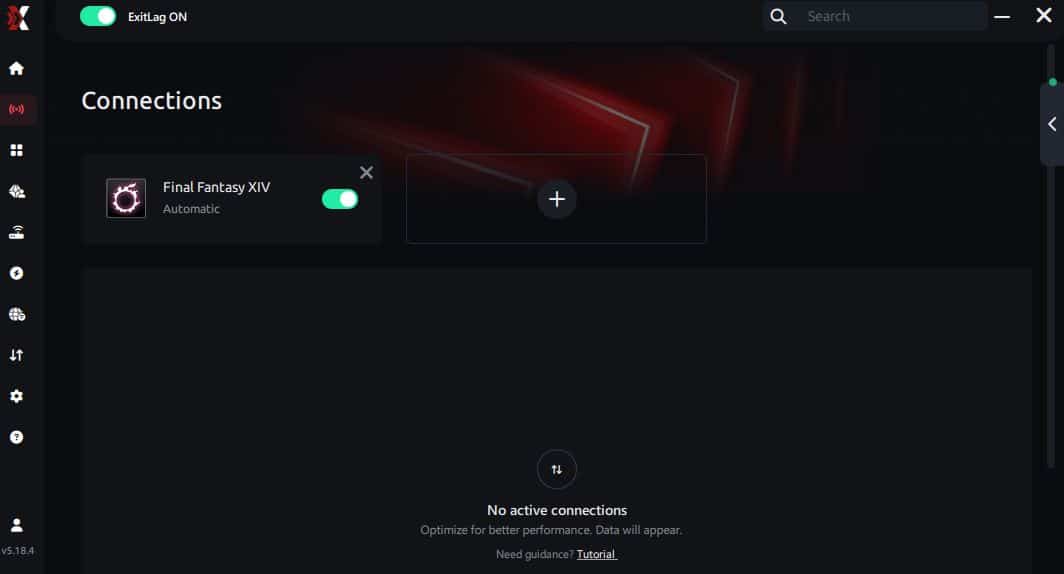
Step 7 – Launch Final Fantasy normally. The optimization will already be active.
ExitLag runs in the background while you play, constantly adjusting routes to maintain the best possible performance.
This setup takes only a few minutes and requires no manual network configuration.
Emulator setup
Final Fantasy XIV is a PC-focused MMORPG and does not rely on Android emulators such as BlueStacks or LDPlayer. Because of this, no emulator configuration is required or recommended. ExitLag is designed to work directly with the PC version of the game.
Optimizing results
To get the best results, test multiple regions if you play on different data centers. Monitor stability over longer sessions, not just short tests. Auto-routing works well for most players, but manual selection can help if you notice instability during peak hours.
Console players
ExitLag operates at the PC network level. Console versions of Final Fantasy XIV do not support direct ExitLag integration. If performance issues are frequent, migrating to the PC version is the most practical option to benefit from network route optimization.

Optimizations to maximize smooth FPS with ExitLag
Network optimizations
- Use a wired Ethernet connection instead of Wi-Fi
- Close bandwidth-heavy apps like downloads or cloud sync tools
- Enable QoS on your router to prioritize gaming traffic
- Test alternative DNS servers carefully without unrealistic expectations
System optimizations
- Enable Windows high-performance power mode
- Keep GPU and chipset drivers updated
- Disable heavy background applications while gaming
- Periodically clean temporary files and startup programs
In-game optimizations
- Reduce effect density in crowded content
- Turn V-Sync OFF to avoid input delay
- Set a stable FPS limit instead of uncapped
- Lower shadow quality in large-scale encounters
These adjustments complement ExitLag by reducing local bottlenecks.
FAQ about FPS drop in Final Fantasy XIV
Does ExitLag really improve FPS?
ExitLag does not increase FPS numbers. It improves perceived FPS by reducing micro-stuttering caused by unstable network routing. Smoother frame pacing makes gameplay feel more fluid.
Is ExitLag safe?
Yes. ExitLag is safe to use and does not modify game files. It operates at the network routing level only.
Does it work on console?
No. ExitLag works on PC only. Console players cannot use it directly.
How much does ExitLag cost?
ExitLag offers flexible subscription plans depending on region and duration. Full details are available on the official ExitLag pricing information page.
My PC is weak—does ExitLag help?
ExitLag cannot overcome hardware limitations. However, it can reduce network-related stuttering that often feels like hardware lag.
Does ExitLag work with Final Fantasy XIV?
Yes. Final Fantasy XIV is fully supported, and many players use ExitLag to stabilize online performance.
What’s the difference between ExitLag and a VPN?
ExitLag is NOT a VPN. VPNs reroute all traffic generically, often increasing latency. ExitLag uses game-specific routing optimized for real-time data.
Does ExitLag help during raids?
Yes. Raids are sensitive to network stability. ExitLag reduces synchronization hiccups that cause micro-stutters during mechanics.
Will ExitLag help in crowded cities?
Yes. Busy hubs stress both rendering and networking. ExitLag helps stabilize the network side, reducing perceived stutter.
Fix FPS drop in Final Fantasy XIV with ExitLag
Final benefits
- ✅ Stable FPS experience
- ✅ Less micro-stuttering
- ✅ Smooth gameplay
- ✅ Competitive advantage
- ✅ Less frustration
Next steps
- Start your ExitLag free trial for Final Fantasy XIV using the official ExitLag free trial program.
- Configure the app in under five minutes.
- Compare gameplay before and after optimization.
- Dominate Final Fantasy XIV with consistent performance.
If you are tired of wipes caused by stutter and unstable responsiveness, it’s time to act. Stable gameplay changes everything in high-end content. ExitLag is NOT a VPN, and it targets the exact network issues that disrupt frame pacing. Get started today by creating your account through the official ExitLag registration page.



