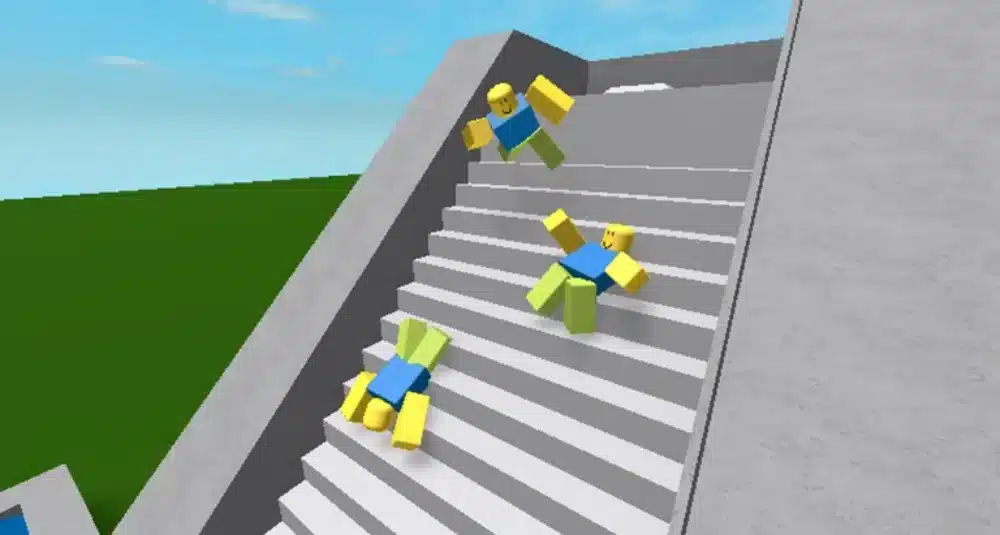
Anyone who plays Roblox knows how frustrating it is to load into a game only to see characters teleport, inputs delay, and worlds take too long to respond because of high ping. From the same point of view, players struggling with Roblox high ping constantly face unstable performance, unpredictable delays, and sudden spikes that ruin immersion.
Even more, when these interruptions combine with lag Roblox, every minigame, obby, shooter, or roleplay experience becomes harder to enjoy. At first sight, understanding why Roblox high ping happens and how to reduce ping Roblox is the first step to smoother gameplay.

What is high ping in Roblox?
Firstly, ping represents the time it takes for your device to send and receive data packets from Roblox servers, measured in milliseconds (ms). Whenever you move your actions must be transmitted to the servers and return to you. In advance, Roblox high ping happens when this round-trip takes longer than expected.
Because Roblox hosts thousands of different experiences on different servers, latency can fluctuate constantly depending on server location, traffic, or your own network conditions.
Above all, stable Roblox latency ensures that actions feel smooth, responsive, and predictable. When ping spikes, animations become inconsistent, gameplay desyncs, and characters behave unpredictably.
How high ping affects gameplay in Roblox
High ping affects every Roblox experience differently, but the symptoms remain similar across genres. Like this, players typically face:
- Delayed movement and interaction.
- Teleporting or rubberbanding characters.
- Slow response to building, mining, or shooting actions.
- Late rendering of objects, NPCs, or players.
- Desynchronization in multiplayer combat.
- Difficulty completing time-based challenges.
- Increased risk of disconnects during peak hours.
Check this: How to Download and Use Roblox via Microsoft
High ping and real-time Roblox games
Real-time games—especially shooters, competitive modes, and obbies—suffer the most. According to gameplay behavior, high ping increases the delay between your input and the server’s update, breaking rhythm and precision. That way, jumps fail, shots register late, and PvP encounters become unfair.
How lag affects large Roblox worlds
In large roleplay or open-world experiences, lag Roblox often manifests as slow loading of environments. Sometimes servers with many simultaneous players produce extra load, making Roblox latency even worse during events or peak times. Eventually, players experience stutters, invisible objects, or delayed hit detection.
Main causes of high ping in Roblox
At first, several factors influence ping in Roblox, especially because experiences are hosted on different servers worldwide. Continuing, the main causes include:
Server distance
If you join a game hosted far from your region, your milliseconds (ms) naturally increase due to physical distance. Often, players join global servers created by users from other continents, causing unavoidable latency.
ISP and routing issues
Your ISP may route your connection through long, congested, or inefficient paths. Beforehand, providers choose routing automatically, and these paths are not always optimized for gaming traffic. This is one of the most common reasons for Roblox connection issues.
Network congestion
When multiple devices share the same network, especially streaming, downloads, or smart devices, your ping worsens. In summary, bandwidth competition creates unpredictable latency spikes and packet delays.
Outdated hardware or Wi-Fi equipment
Aging routers or weak Wi-Fi cause signal interference. Possibly, this leads to unstable connectivity and fluctuating Roblox latency, particularly in busy households or apartments with many overlapping networks.
Game-specific Roblox settings or server load
Sometimes, the experience itself is overloaded. User-hosted Roblox worlds, poorly optimized scripts, or high player traffic cause delays even with a good connection. Additionally, Roblox updates may temporarily impact stability.
You may also like: How to Fix Roblox Lag on a Slow Phone
How to check and test your ping in Roblox
Firstly, Roblox displays your connection stats inside many experiences. Developers often enable network information overlays that show ping, data usage, and incoming packet delay.
In the meantime, you can evaluate your ping more accurately using OS commands. Running a ping test to Roblox endpoints or checking tracert helps identify where instability occurs and whether your routing path includes overloaded hops.
Often, reference values look like this:
- 0–30 ms: ideal for any Roblox game
- 30–60 ms: very good
- 60–100 ms: playable
- 100+ ms: noticeable delays in real-time games
- 150+ ms: severe delays and rubberbanding
Ping levels classification in Roblox
| Ping Range | Classification |
| 0–30 ms | Excellent |
| 30–60 ms | Good |
| 60–90 ms | Playable |
| 90–150 ms | Problematic |
| 150+ ms | High risk of lag |
Basic fixes to reduce high ping in Roblox
Before turning to advanced solutions, it’s important to stabilize your internal network. In advance, these fixes help address the most common Roblox connection issues, reducing unstable Roblox latency and improving responsiveness across all game modes.
Optimize local connection
- Use an Ethernet cable instead of Wi-Fi.
- Close background apps that consume bandwidth.
- Update network drivers, router firmware, and operating system.
- Disable unnecessary overlays and launchers.
- Restart modem and router to refresh network routing.
- Enable router QoS and prioritize Roblox traffic, when available.
You may also like: Understanding Roblox Rivals Script: Basics and Functionality
Extra stability tips:
- Avoid playing while cloud backups, downloads, or streaming services are active.
- Reduce the number of devices connected to the network during gameplay.
Situational tweaks that help:
- Disable automatic Windows updates temporarily.
- Stop unnecessary background software that uses real-time data.
Contact your ISP
Sometimes instability comes directly from your provider. According to connection behavior across different regions, ISP routing can significantly affect ping. Be that as it may, contacting your provider is recommended when Roblox latency spikes occur regularly.
Ask your ISP to check:
- Routing paths to Roblox servers.
- Line quality, coaxial or fiber signal levels.
- Evidence of packet loss or intermittent drops.
- Possible equipment replacement if the modem is outdated.
These steps help identify whether the issue comes from your home network or the provider’s infrastructure.
ExitLag: the best solution to fix high ping in Roblox
When routing, server distance, or network congestion affect your gameplay, optimized traffic paths become essential. ExitLag helps mitigate the main causes of Roblox high ping by optimizing your route and improving overall connection stability, offering smoother gameplay across different Roblox experiences.
What is ExitLag?
ExitLag is a specialized software for connection optimization, created specifically for online games. Above all, it analyzes your traffic and applies smart routing paths to reduce spikes, delays, and instability during gameplay.
In the same way that a stabilizer maintains consistent electrical current, ExitLag works as an intelligent network stabilizer, helping maintain predictable latency even during high network activity.
How ExitLag works
ExitLag uses multiple layers of optimization, constantly adapting as you play:
- Real-time route analysis
- Multiple routes simultaneously
- Automatic best route selection
- Hop optimization to reduce unnecessary jumps
- Connection stabilization to smooth out spikes
Together with these processes, the software identifies congestion points and provides a more efficient path for your data.
Advantages for Roblox players
More stable ping
By routing traffic through optimized paths, ExitLag helps keep your ping steady, reducing disruptive fluctuations that affect timing in Roblox games.
Less packet loss
Even more, ExitLag avoids congested or unstable routes, minimizing packet loss — one of the hidden causes behind lag Roblox.
Fewer spikes during peak hours
During busy times, server paths can overload. ExitLag helps bypass unstable routes and maintain smoother gameplay.
Better responsiveness in real-time games
In shooters, obbies, and competitive Roblox experiences, stable input timing is essential. Route optimization improves reaction accuracy and player movement consistency.
Improved performance across different regions
Some Roblox worlds are hosted far from your area. Using optimized routing helps minimize additional latency created by long-distance paths.
Is ExitLag worth it for Roblox?
Yes. If you frequently experience Roblox connection issues, unstable ping, or problems related to server distance, ExitLag becomes a valuable tool. Players who rely on responsive controls and low latency — especially in competitive or time-sensitive Roblox modes — benefit the most.
How to use ExitLag in Roblox
The process is extremely simple:
Step 1 – Access the official ExitLag website and download the application. There’s a free trial period for new users.
Step 2 – Install and open the program. Log in with your account.
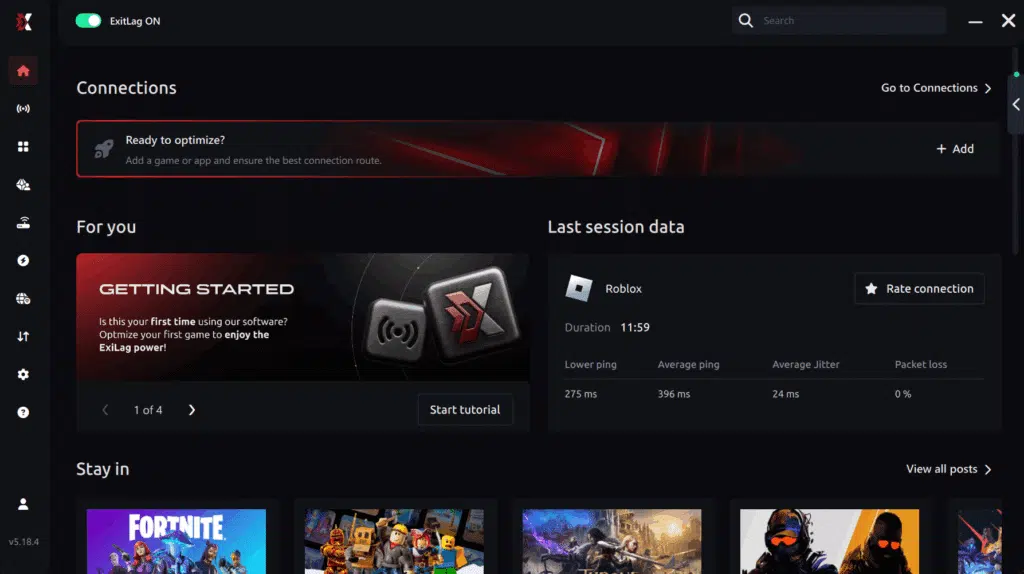
Step 3 – In the search bar, type “Roblox” and select the game from the list.
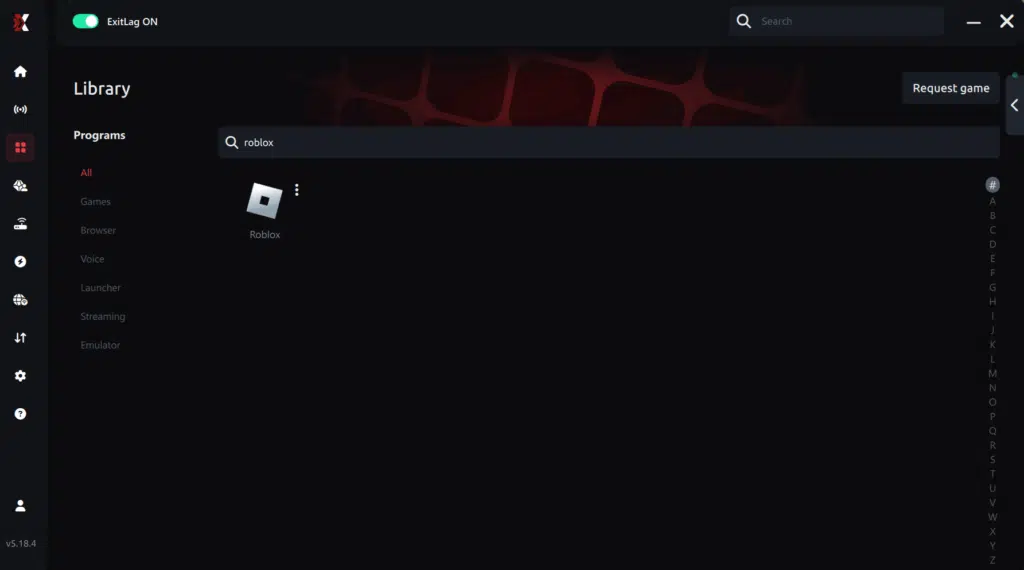
Step 4 – Choose between automated or manual route
Based on the results, you can let ExitLag automatically select the best route or manually choose the server that showed the lowest latency for your connection.
AI-optimized automated route
Based on the results, you can let ExitLag automatically select the best route through AI optimization. The system analyzes multiple connection paths in real time and automatically identifies the most efficient route for your connection, ensuring the lowest possible latency without requiring manual choices.
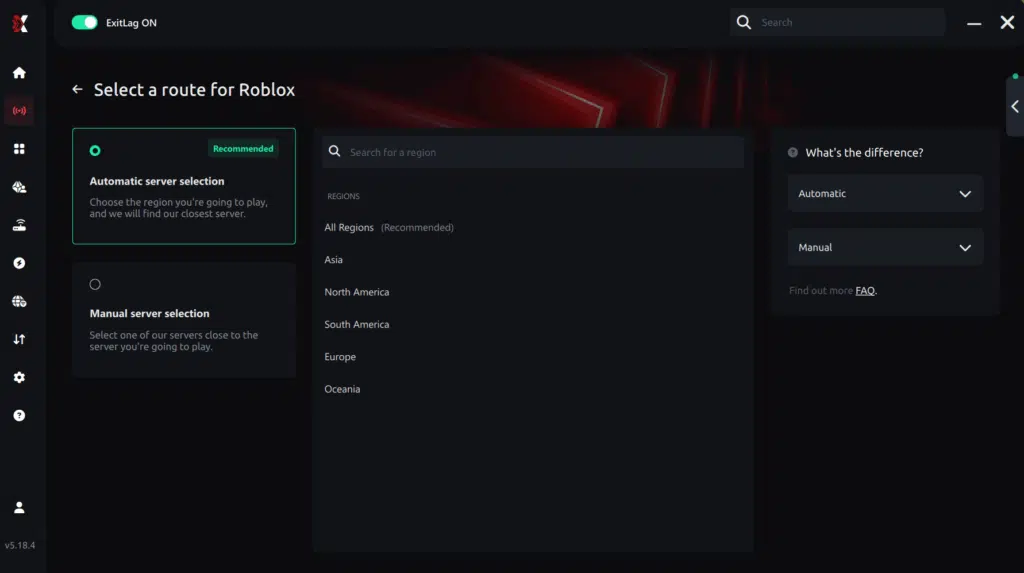
Manual route
If you prefer to have full control over your connection, you can manually choose the server based on the ping test results. Simply select the server that showed the lowest latency or the one that best meets your specific gaming needs, allowing complete customization of your experience.
Step 5 – Click “Apply routes” or the play button. ExitLag will begin optimizing your connection automatically.

Step 6 – Wait a few seconds until optimization is complete. You’ll see ping indicators in the interface.
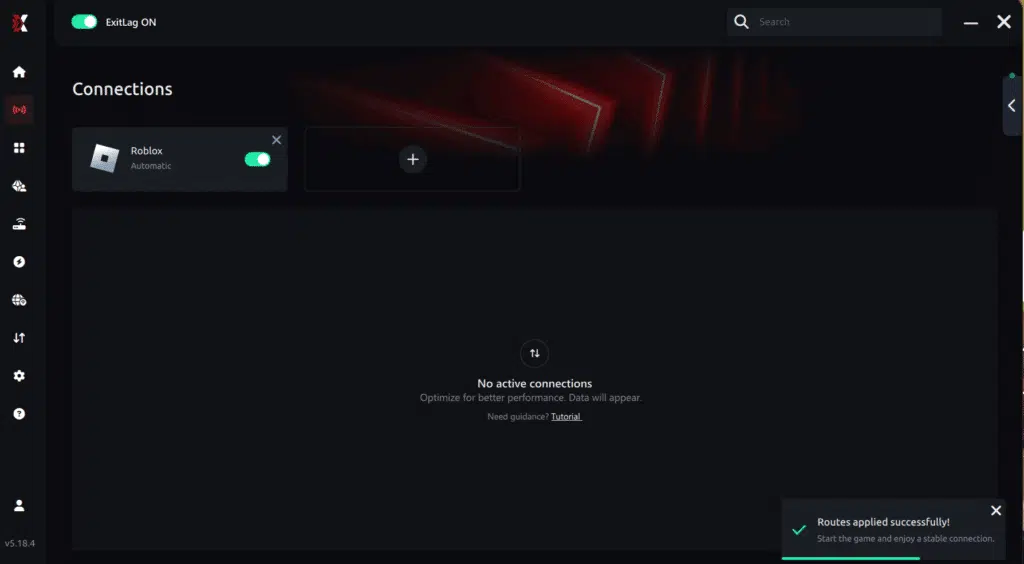
Step 7 – Launch Roblox normally. The optimization will already be active.
ExitLag runs in the background while you play, constantly adjusting routes to maintain the best possible performance.
How to use Ping for Games: step-by-step guide (Roblox)
Checking your connection quality before entering a game has never been easier. Here’s how to use Ping for Games in just a few steps:
1. Open the ExitLag software on your PC
Ensure the application is installed and open. The feature is integrated into the platform and available for free to all users.
2. Access the Network Analyzer tool
Locate the Network Analyzer in the software menu. This is where you’ll find Ping for Games along with other connection analysis features.
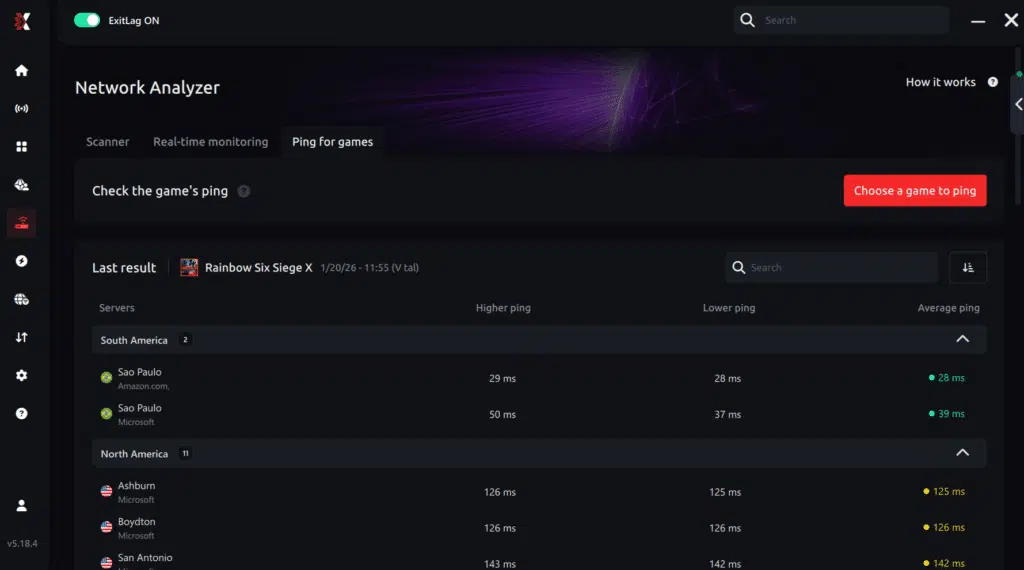
3. Select the game you want to test
Choose Roblox from the list. The tool supports major online multiplayer games, including FPS, Battle Royales, MOBAs, MMORPGs, and more.
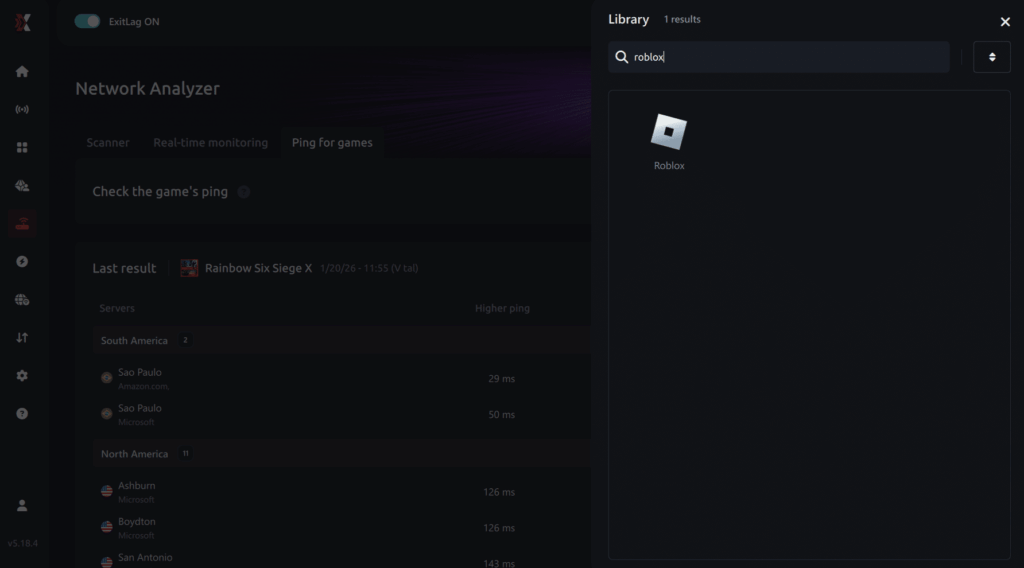
4. Choose the specific server
Select the exact Roblox server you want to test instead of a generic region. This ensures more accurate results for your match or experience.
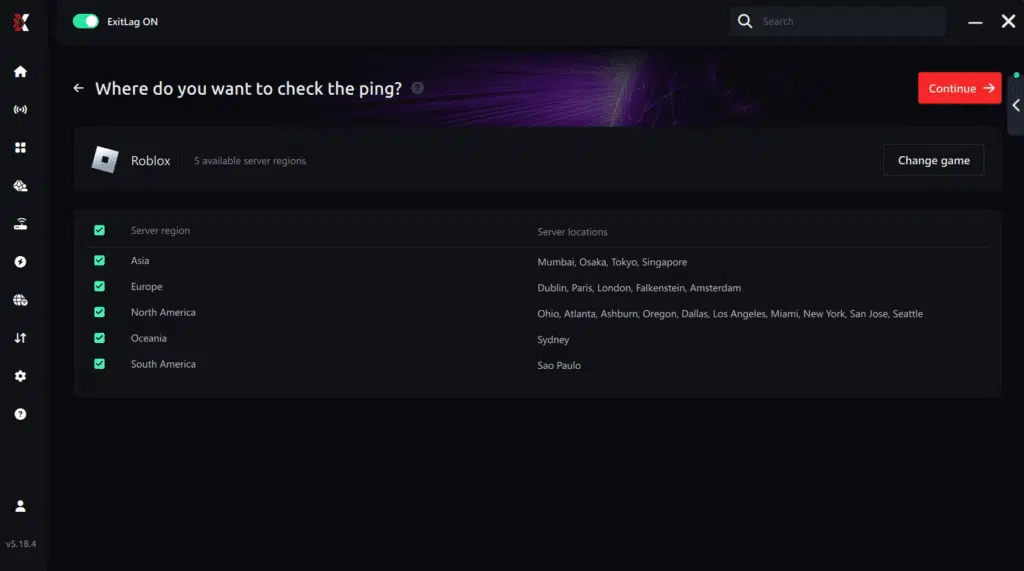
5. Start the ping test
With one click, the measurement is performed in real time between your device and the selected Roblox server, considering your current connection (cable or Wi-Fi).
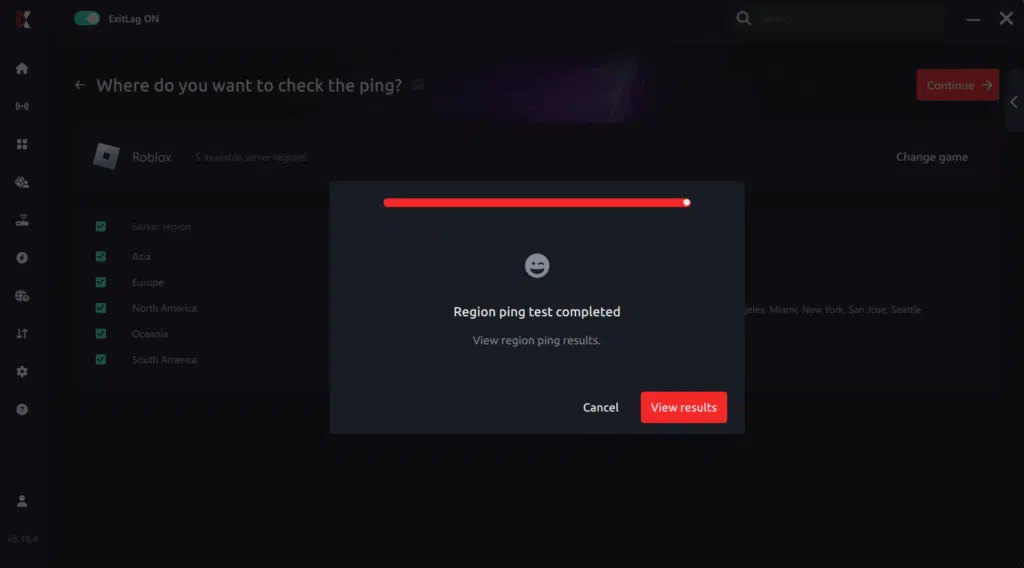
6. Analyze the results
Results appear in milliseconds (ms), automatically sorted from best to worst ping. You can also reorganize the view alphabetically if you prefer.
7. Choose the best server and play worry-free
With this information, simply select the server with the lowest latency and jump into Roblox knowing your connection is optimized.
Final thoughts: Play Roblox without lag forever
At the end of the day, Roblox lag should never ruin your experience. Whether you’re playing competitive games, role-play servers, or just chilling with friends, your internet connection should never be the reason things go wrong.
With ExitLag, you finally take control of your network performance. The software finds the fastest routes, eliminates lag, and stabilizes your ping so that every move, every action, and every interaction happens exactly when you want it to.
Try ExitLag for free right now and experience how smooth Roblox can be when your connection is fully optimized. Play with confidence, have more fun, and make lag a thing of the past.
FAQ: everything about high ping in Roblox
What causes high ping in Roblox?
High ping can come from distant servers, overloaded networks, ISP routing inefficiencies, or Wi-Fi interference. Sometimes the Roblox experience itself may be under heavy load, affecting Roblox latency even when your connection is stable.
How do I check my ping in Roblox?
Many Roblox experiences offer built-in network stats showing ping and packet delay. You can also test using system tools like ping or tracert, which reveal how quickly your device communicates with different hops along the route.
What is good ping for Roblox?
In advance, 0–60 ms is ideal. Between 60–100 ms, games are usually playable with minor delays. Above 100 ms, you may notice rubberbanding or late response. Lastly, anything over 150 ms creates severe delays in real-time Roblox activities.
Can high ping get me kicked from servers?
Sometimes, yes. Although it doesn’t result in bans, servers may auto-kick players with extremely high or unstable ping to protect gameplay quality. That’s why regulating Roblox latency is essential, especially in competitive modes.
Does ExitLag work for Roblox?
Yes. ExitLag supports Roblox and helps optimize routing to lessen spikes, reduce instability, and improve game responsiveness. While it can’t control server-side issues, it offers a more efficient path for your connection.
How can I reduce Roblox latency without upgrading my internet plan?
You can switch to Ethernet, restart your modem, reduce active devices, disable overlays, close background apps, and join servers closer to your region. Even so, routing remains a major factor — and that’s where ExitLag provides a more stable path.
Conclusion
In conclusion, Roblox high ping can ruin immersion, delay actions, and disrupt multiplayer experiences across the platform. Basic fixes like switching to wired internet, closing background apps, and updating hardware help reduce common issues.
However, for players dealing with unpredictable spikes, routing problems, or distant servers, ExitLag offers a powerful way to improve stability and achieve smoother gameplay. For more insights, tutorials, and tips, visit the official ExitLag blog. .
From now on, you no longer need to tolerate Roblox High Ping. With the right adjustments and optimized routing, you can finally enjoy Roblox the way it was meant to be played — responsive, stable, and free from unnecessary interruptions. Experiment your free trial, download ExitLag now!
Got questions or want to connect with other players? Join the conversation at the ExitLag Forum!