If you’ve been jumping into intense PvP firefights in Call of Duty: Black Ops 6 and suddenly feel your shots registering late, your movement freezing for microseconds, or your aiming becoming unpredictable, you’re likely facing jitter — the dreaded enemy of stability in online shooters. Few things are more frustrating than fluctuating latency during competitive matches, where every frame and every millisecond matters.
This kind of instability makes gameplay inconsistent, causes unpredictable micro-lags, and ruins your timing. Unlike high ping, jitter is far worse because you can’t adapt to it — you never know when the game will actually respond to your commands. To understand all supported titles and why jitter affects them, you can check the full list of games at ExitLag supported games list.
What is jitter in Call of Duty: Black Ops 6?
When we talk about jitter, we’re referring to the irregular variation in latency — the time it takes for your device to communicate with the game server. While ping measures speed, jitter measures the consistency of that speed.
If your ping is consistently 50ms, gameplay feels smooth and predictable. But when your latency jumps between 50ms, 120ms, 80ms, and 150ms, that’s inconsistent and introduces serious instability.
This variation in response time typically happens because your connection is not reaching the servers using a stable, direct, or optimized route. Even if your average ping looks “fine,” jitter makes the game feel choppy, delayed, or unreliable.
A stable connection should vary no more than 5–10ms. Anything beyond that creates noticeable disruptions in Black Ops 6 — especially in competitive modes.
How jitter affects your gameplay in Call of Duty: Black Ops 6
Jitter impacts every moment of your experience, from aiming to movement to combat timing. Here are the most common gameplay problems caused by unstable latency:
- Inconsistent input response: Sometimes your action triggers instantly; other times, it’s delayed unpredictably.
- Broken timing for dodges and evades: Dodging gunfire or grenades becomes impossible because timing varies constantly.
- Hit registration issues: Bullets may appear to hit the target on your screen but fail to register on the server.
- Sudden rubberbanding: Your character snaps backward or teleports because the server receives data bursts inconsistently.
- Desynced enemy movement: Opponents appear to jitter or skip across your screen, making tracking and aiming nearly impossible.
- Interrupted combos or actions: Throwing equipment, sliding, reloading, or chaining movements becomes unreliable due to latency swings.
- Lost fights in PvP: Competitive matches become unplayable when you can’t anticipate how the game will respond.
- Unstable aiming: Your crosshair control feels erratic because server responses don’t match your input timing.
Main causes of jitter in Call of Duty: Black Ops 6
Network congestion
If multiple devices are using your network — streaming, downloading, updating — your data packets become deprioritized, introducing irregular timing. Congestion at your ISP or regional traffic spikes can also cause jitter.
Unstable routing
Your data doesn’t always take the same digital path. When routes constantly change, the time it takes for packets to travel varies unpredictably, creating noticeable jitter during matches.
Weak or unstable Wi-Fi
Wi-Fi is subject to interference, signal drops, distance limitations, and competing networks. Wireless connections naturally create uneven packet delivery, causing jitter.
ISP problems
Some internet providers have overloaded infrastructure, outdated routing systems, or poorly optimized networks, especially in peak hours. This produces unstable latency patterns.
Distance from servers
The farther you are from Black Ops 6 servers, the more routers (“hops”) your packets must cross. Each hop increases the chance of latency variation.
Game-specific server load
During peak hours, new content drops, or seasonal events, Call of Duty servers may experience instability, which produces jitter even if your internet is fine.
How to identify and measure jitter in Call of Duty: Black Ops 6
Extended ping test
You can measure jitter by running a long ping test to any stable server:
- On Windows:
ping google.com -n 100 - On Mac:
ping google.com
If results swing wildly instead of staying close together, that’s jitter.
In-game signs
Black Ops 6 gives several obvious signs of jitter:
- Ping value jumps unpredictably from one moment to the next
- Gameplay feels inconsistent — sometimes smooth, sometimes awful
- Rubberbanding appears intermittently
- Hits don’t register even when your aim is perfect
- Movement delays vary each time
- You experience unstable gameplay even with “low ping”
If your performance fluctuates with no pattern, jitter is almost certainly the cause.
Jitter severity levels
| Jitter level | Variation (ms) | Gameplay impact |
| Excellent | 0–5ms | Perfectly smooth |
| Good | 5–15ms | Mostly stable, mild inconsistencies |
| Moderate | 15–30ms | Noticeable issues in PvP |
| High | 30–50ms | Frequent delays and hit-reg problems |
| Severe | 50ms+ | Unplayable competitive experience |
Basic solutions to reduce jitter in Call of Duty: Black Ops 6
Prioritize your connection
- Use an ethernet cable to remove Wi-Fi interference completely.
- Close background applications that might be consuming bandwidth.
- Limit devices on your network — fewer active devices means more stability.
- Disable automatic updates to avoid mid-game data spikes.
- Update your network drivers to ensure maximum compatibility and stability.
- Game-specific tip: Disable in-game streaming assets, which can increase data bursts.
Configure QoS on your router
Quality of Service allows your router to prioritize Black Ops 6 traffic over all other devices. By giving the game the “highest priority,” you drastically reduce the chance of jitter caused by home-network congestion.
Check with your ISP
If you consistently experience jitter, contact your provider to test your line, verify signal quality, check for local congestion, and potentially replace outdated equipment.
ExitLag: the definitive solution to eliminate jitter in Call of Duty: Black Ops 6
What is ExitLag?
ExitLag is a specialized software built specifically for connection optimization in online games. Designed by gamers, it acts like a smart stabilizer that ensures your data reaches servers through the fastest, most reliable, and most consistent routes possible.
ExitLag works on PC and mobile — not consoles — and is engineered to eliminate jitter, stabilize latency, reduce packet loss, and optimize real-time communication between your PC and Call of Duty servers.
Learn more about the underlying technology at ExitLag technology page.
How ExitLag eliminates jitter in Call of Duty: Black Ops 6
ExitLag uses its Multi-Internet routing system to keep your latency stable at all times:
how ExitLag works.
Here’s how it works:
- Multiple simultaneous routes
ExitLag sends your data across several optimized paths at once. If one route becomes unstable, others take over automatically. - Intelligent packet selection
The system picks the fastest-arriving packets and discards delayed ones, eliminating jitter caused by slow packets. - Real-time route optimization
ExitLag constantly analyzes new routes and switches instantly to the most stable one. - Hop reduction
Fewer routers = fewer points of failure and fewer chances for latency variation. - Smart buffering
Data is managed to create a steady, consistent data flow to the Black Ops 6 servers, even when your ISP is unstable.
Advantages of ExitLag for Call of Duty: Black Ops 6 players
Complete ping stabilization
ExitLag eliminates unpredictability by creating a consistent latency pattern. Even unstable ISPs become steady.
Total jitter elimination
With multi-routing and packet optimization, jitter is reduced or completely eliminated.
Improved timing
You can rely on perfect timing for aiming, sliding, reloading, and reacting in high-pressure firefights.
Competitive advantage
In ranked or PvP modes, stable latency makes the difference between winning and losing.
Works on all servers
Whether playing on official or private servers, ExitLag ensures optimized connectivity across regions.
Simple interface
You select your game, apply routes, and play — no technical knowledge required.
Is ExitLag worth using in Call of Duty: Black Ops 6?
Absolutely yes — especially if you:
- Experience recurring jitter
- Play on distant servers
- Participate in ranked, PvP, or tournaments
- Want consistent performance
- Game during peak hours
- Use Wi-Fi
- Have a provider with poor routing
- Lost matches due to unpredictable latency
Check plans and pricing at ExitLag pricing plans.
How to use ExitLag in Call of Duty: Black Ops 6
The process is extremely simple:
Step 1 – Access the official ExitLag website and download the application. There’s a free trial period for new users.
Step 2 – Install and open the program. Log in with your account.
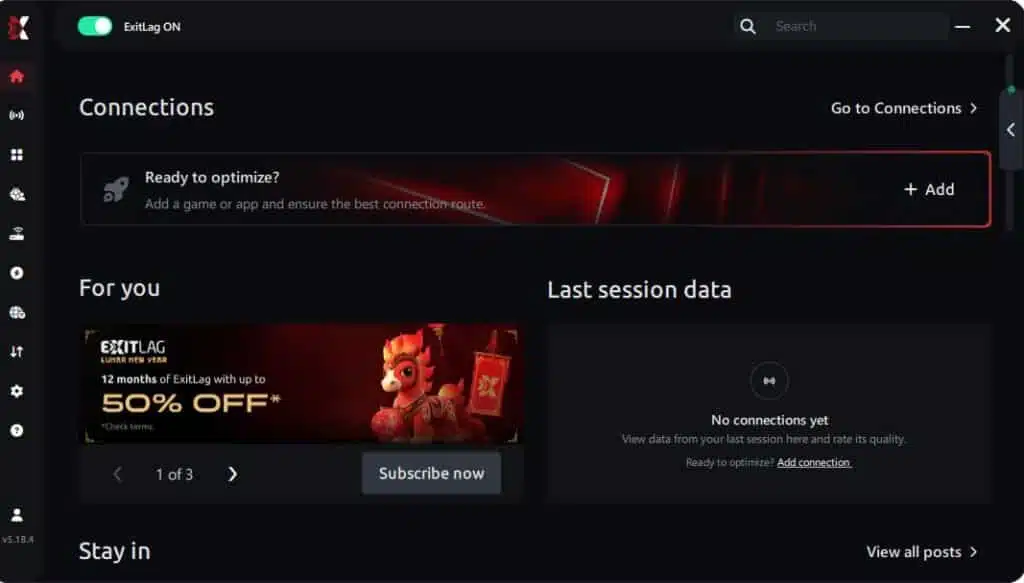
Step 3 – In the search bar, type “Call of Duty: Black Ops 6” and select the game from the list.
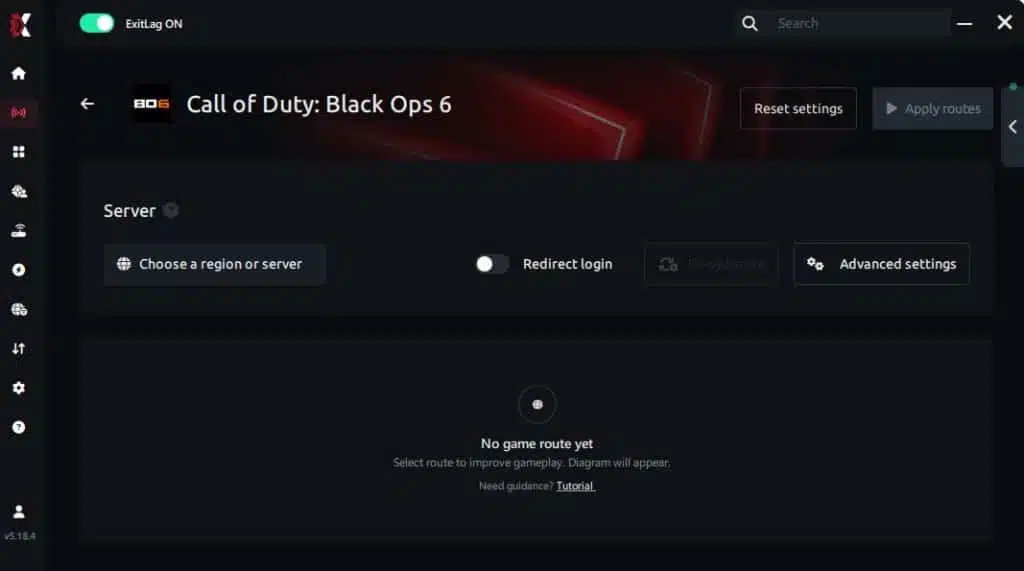
Step 4 – Choose between automated or manual route
Based on the results, you can let ExitLag automatically select the best route or manually choose the server that showed the lowest latency for your connection.
AI-optimized automated route
Based on the results, you can let ExitLag automatically select the best route through AI optimization. The system analyzes multiple connection paths in real time and automatically identifies the most efficient route for your connection, ensuring the lowest possible latency without requiring manual choices.
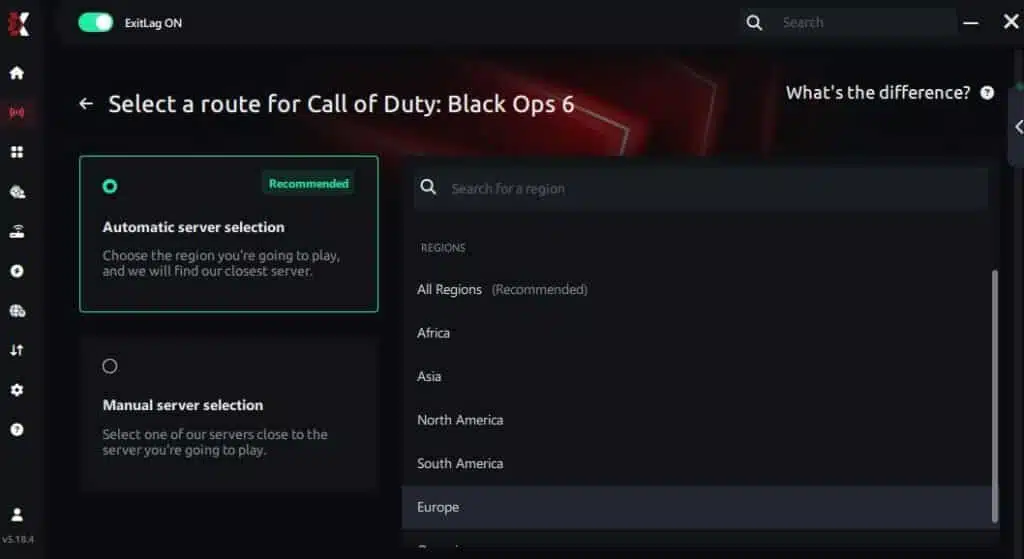
Manual route
If you prefer to have full control over your connection, you can manually choose the server based on the ping test results. Simply select the server that showed the lowest latency or the one that best meets your specific gaming needs, allowing complete customization of your experience.
Step 5 – Click “Call of Duty: Black Ops 6” or the play button. ExitLag will begin optimizing your connection automatically.

Step 6 – Wait a few seconds until optimization is complete. You’ll see ping indicators in the interface.
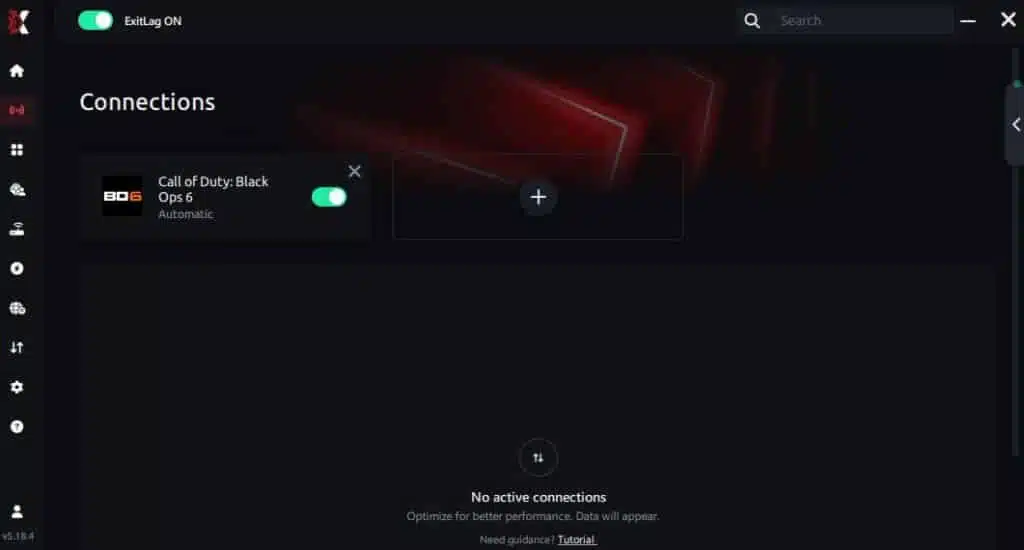
Step 7 – Launch Call of Duty: Black Ops 6 normally. The optimization will already be active.
ExitLag runs in the background while you play, constantly adjusting routes to maintain the best possible performance.
FAQ: frequently asked questions about jitter in Call of Duty: Black Ops 6
What’s the difference between jitter, lag, and packet loss?
Jitter is variation in ping (instability).
Lag is the delay caused by high ping.
Packet loss is when your data never reaches the server.
You can have low ping and still experience Jitter-based lag.
Why is my ping unstable in Call of Duty: Black Ops 6?
Common causes include unstable routing, ISP congestion, Wi-Fi interference, and overloaded servers. Even regional distance from game servers affects stability.
Is jitter worse than high ping?
Often, yes. It’s easier to adapt to a stable high ping than to a constantly changing one. Instability ruins timing and consistency.
How do I know if I have jitter?
Run extended ping tests and check for variations. In game, jitter feels like inconsistent response timing and unpredictable micro-lag.
Does Wi-Fi cause jitter?
Yes. Wireless connections are prone to interference, distance issues, and instability. Ethernet is always superior.
Does ExitLag fix issues other than jitter?
Yes — it reduces ping, prevents packet loss, stabilizes your route, and protects against DDoS attempts.
Do I need to keep ExitLag open while gaming?
Yes. Optimization works in real time and must remain active during your sessions.
Does Call of Duty: Black Ops 6 have server-side jitter?
During high-traffic periods, yes. Seasonal releases and events often create burst instability.
Conclusion
Jitter can completely ruin your Black Ops 6 experience — from broken timing to lost duels, desynced enemies, and delayed gunfights. But you don’t have to accept this instability as normal. With the right tools and optimizations, your connection can become stable, reliable, and fully competitive.
ExitLag is the definitive solution to remove jitter, stabilize your ping, improve hit registration, and ensure consistent performance in every match. Whether you’re grinding ranked, warming up for competitive play, or just enjoying casual sessions, stability should never be the reason you lose.
Learn more and explore more guides at ExitLag blog.
If you want to fix your jitter today, enjoy stable ping, eliminate lag spikes, and unlock your full performance in Black Ops 6, start your free trial now:
start your free ExitLag trial
Got questions or want to connect with other players? Join the conversation at the ExitLag Forum!