In Path of Exile 1, nothing feels worse than watching your character die to a slam you clearly dodged on your screen because jitter made your ping fluctuating all over the place. One moment your Flame Dash, Whirling Blades, or Dash triggers instantly, and the next there is a delay that throws off your timing completely, creating pure instability in both mapping and endgame bosses. In a game where a single hit in hardcore, PvP, or late-league content can end a build, jitter is often more dangerous than just high ping, because you never know when your commands will actually register.
In this guide, you will learn exactly what jitter is in Path of Exile 1, how to detect it, and how to fix it for good using proven optimizations and routing tools available for many Path of Exile players in the ExitLag games catalog.

What is jitter in Path of Exile 1?
In network terms, jitter is the irregular variation in your connection latency over time. While ping shows how many milliseconds it takes for data to travel from your PC to the Path of Exile 1 servers and back, jitter shows how inconsistent that value is from packet to packet. You might see an average of 40 ms, but if packets are bouncing between 40 ms, 120 ms, 70 ms, and 150 ms, your gameplay will feel full of instability.
Think of response time like a metronome. With low jitter, the “ticks” are even and predictable — you can get used to them. With high jitter, the rhythm keeps changing: sometimes fast, sometimes slow, sometimes late. That is exactly what happens when your ping jumps between 50 ms, 120 ms, 80 ms, and 150 ms within seconds. Ideally, your ping should stay within a narrow band of 5–10 ms variation; anything more starts to create visible problems in Path of Exile 1.
Because PoE 1 relies heavily on precise timing for movement skills, flask usage, guard skills, and dodging boss mechanics, jitter hits you where it hurts most. Even if your ping number looks “okay,” the lack of consistency makes the game feel random and unreliable, especially during hectic mapping, League mechanics, or pinnacle boss fights.
How jitter affects your gameplay in Path of Exile 1
Here are some concrete ways jitter can destroy your experience in Path of Exile 1:
- Inconsistent command execution: Sometimes your movement skill, flask, or guard skill activates instantly, and other times it has a noticeable delay.
- Difficulty dodging boss mechanics: Telegraphed slams, beams, and ground effects become extremely hard to avoid when your timing window changes unpredictably.
- Broken skill rotations and trigger setups: Trigger builds, DoT rotations, and cooldown management feel off because your actions do not line up with what you see.
- Sudden deaths you cannot explain: Mobs or bosses appear to teleport or hit you from positions that do not match your client, leading to “I was already out” deaths.
- Frustration in PvP: In duels or arena modes, reactive gameplay becomes almost impossible if your hit registration and movement are out of sync.
- Wasted flasks and cooldowns: Defensive flasks, guard skills like Immortal Call, or mobility skills fire too late, costing you portals and progress.
- Inconsistent hit registration: Your projectiles, attacks, or spells sometimes connect cleanly and other times seem to miss, even when visually on target.
- Unreliable kiting and positioning: Trying to kite dangerous mobs or bosses becomes risky when your character rubberbands or responds at different speeds each time.
Main causes of jitter in Path of Exile 1
Network congestion
When multiple devices and applications share your connection — streaming, large downloads, cloud backups, or other online games — your router juggles all that traffic. As priority changes moment to moment, your game packets may be delayed or reordered, creating jitter even if your overall speed looks fine.
Unstable routing
Your data travels through many intermediate routers and backbone nodes before reaching Path of Exile 1 servers. If your ISP uses unstable or frequently changing routes, your packets might take different paths every few seconds, each with a different travel time. This constant rerouting shows up as jitter and random latency spikes during your maps and boss attempts.
Unstable Wi-Fi
Wi-Fi is convenient but inherently more fragile than a cable. Interference from walls, neighboring networks, and other devices causes packet loss, retransmissions, and fluctuating signal quality. All of this converts directly into timing variation and jitter, which is especially noticeable during rippy content, dense Legion or Delirium maps, and party play.
ISP-related problems
Sometimes the problem is not inside your home, but in your provider’s backbone. Overloaded nodes, poor peering with Path of Exile 1 servers, or misconfigured equipment can create spikes and instability, particularly at peak times. You can have high bandwidth but still suffer severe jitter due to how your ISP routes your traffic.
Distance from Path of Exile 1 servers
The farther you are from the regional gateway you are using (e.g., EU, NA, Brazil, Asia), the more hops your packets must cross. Each hop introduces additional latency and, more importantly, more opportunities for variation. If you play in a different region from where you live or if local servers are unstable, your risk of jitter increases.
Game-specific factors (league load and server stress)
Path of Exile 1 can experience extra server load during new league launches, big patches, or peak hours when entire regions log in simultaneously. Busy instances, very dense content, and heavy calculations can amplify jitter-like effects — especially if your connection is already unstable.
How to identify and measure jitter in Path of Exile 1
Extended ping test
A simple way to see jitter is to run an extended ping test outside the game.
On Windows, open Command Prompt and type:
ping -t 8.8.8.8
Watch the results for at least one to two minutes. If the ping values stay close together (for example, 35–40 ms), your connection is relatively stable. If they jump all over the place — 40 ms, 120 ms, 80 ms, 200 ms — you are clearly dealing with jitter. You can also test your router’s IP or your ISP gateway to isolate where the inconsistency starts.
In-game signs
In Path of Exile 1 itself, jitter reveals itself through several recognizable symptoms:
- The ping displayed in-game constantly rises and falls instead of staying near a stable value.
- Gameplay feels inconsistent: some maps run smoothly, others feel like you are fighting underwater.
- You experience intermittent rubberbanding where your Exile snaps back to previous positions mid-kite.
- Your skills and commands have variable delay — sometimes instant, sometimes heavily delayed, even within the same map.
- The game feels unstable despite the UI sometimes showing “good” ping.
If you see both unstable ping in tests and these in-game signs, jitter is almost certainly affecting your Path of Exile 1 sessions.
Jitter levels and impact in Path of Exile 1
| Jitter level | Ping variation (ms) | Gameplay impact in Path of Exile 1 |
| Excellent | 0–5 ms | Extremely smooth, reliable dodges and flasks |
| Good | 5–15 ms | Mostly stable, minor inconsistencies |
| Moderate | 15–30 ms | Noticeable delays, risky in high-end content |
| High | 30–50 ms | Frequent desync, dangerous for bosses and HC |
| Severe | 50+ ms | Constant rubberbanding, nearly unplayable mapping |
If you are in the high or severe range, reducing jitter needs to become a priority before pushing into hardcore, deep Delve, or pinnacle boss content.
Basic solutions to reduce jitter in Path of Exile 1
Prioritize your connection
- Use an Ethernet cable Switch from Wi-Fi to a wired connection to avoid interference and signal instability that turn into jitter during busy maps and boss phases.
- Close background applications Shut down downloads, streaming services, cloud sync, and other bandwidth-intensive apps that cause your latency to spike randomly mid-map.
- Limit devices on your network Ask others to pause heavy usage (4K streaming, torrents, large uploads) while you run high-risk content or group mapping sessions.
- Disable automatic updates Turn off auto-updates for your OS, game launcher, and other software during gaming sessions to prevent surprise download spikes.
- Update network drivers and router firmware Ensure your network adapter drivers and router firmware are current to avoid bugs and inefficiencies that cause instability.
- Path of Exile 1-specific tip Whenever possible, choose the gateway closest to your location in the Path of Exile 1 login screen to reduce both base ping and jitter.
Configure QoS on your router
Many routers offer Quality of Service (QoS) settings that let you prioritize gaming traffic. By marking your PC or Path of Exile 1 traffic as high priority, your router treats those packets first, even when the network is busy. This keeps timing more consistent and reduces the variation in response time that you feel as jitter during juiced maps, league content, or party play.
Check with your ISP
If jitter persists after home optimizations, contact your ISP and ask them to:
- Test your line for instability or noise
- Review your route to Path of Exile 1 servers
- Replace or test your modem if it is outdated
Sometimes the solution is as simple as a line adjustment, new modem, or routing fix on their side.
ExitLag: the definitive solution to eliminate jitter in Path of Exile 1
What is ExitLag?
ExitLag is a specialized software focused entirely on connection optimization for online games. It acts as an intelligent stabilizer between your PC and the game servers, ensuring your data chooses the most stable and efficient paths possible. Designed by gamers who understand how brutal a single lag spike can be in Path of Exile 1, ExitLag’s purpose is simple: make your connection consistent, predictable, and competitive.
It is built for gaming on PC and mobile, not consoles, so all of its technology is tuned to where routing control has the biggest impact. If you want to dive deeper into the core routing and multi-path logic, you can visit the official technology page at ExitLag’s official technology page.
How ExitLag eliminates jitter in Path of Exile 1
ExitLag uses a Multi-Internet approach that constantly analyzes available routes and selects the best ones to keep your latency steady. To understand this Multi-Internet system in more detail, you can check the official explanation at how ExitLag works.
Here is how it tackles jitter step by step:
- Multiple simultaneous routes Your game data is sent through several optimized routes at the same time. If one path turns unstable, the others keep the flow smooth, avoiding sudden spikes.
- Intelligent packet selection ExitLag automatically prioritizes packets that arrive faster and discards slower ones, effectively flattening the timing variation that creates jitter.
- Real-time route optimization The software monitors performance in real time and instantly reroutes traffic whenever a better path becomes available, keeping your latency stable during long mapping sessions.
- Reduced hops between you and the server By reducing intermediate hops, ExitLag cuts down on potential points of instability, shrinking both your average ping and its fluctuation.
- Smart buffering for consistent delivery ExitLag shapes packet delivery so that Path of Exile 1 receives data in a steady, predictable stream, even if your ISP connection has occasional micro-spikes.
Advantages of ExitLag for Path of Exile 1 players
Complete ping stabilization Instead of constantly watching the latency graph spike during Legion, Delirium, or Breach encounters, you enjoy a consistent line that makes timing far more predictable.
Effective jitter elimination Because ExitLag uses multiple routes and intelligent packet handling, inconsistent response times are smoothed out, letting you play with reliable timing even in heavy content.
Better timing for skills and flasks With stable latency, your instant flasks, guard skills, and movement abilities respond exactly when you expect them to, which is crucial for hardcore and endgame bosses.
Competitive advantage in PvP and high-end content When every death costs portals, XP, or even your character, having a stable connection can be the difference between success and a frustrating rip.
Works with multiple regions and gateways Whether you connect to local servers or play in another region with friends, ExitLag optimizes routing to get the best possible stability from wherever you are.
Simple interface and setup There is no need for advanced networking knowledge. You select Path of Exile 1, apply the routes, and start playing with optimized connection in just a few clicks.
Is it worth using ExitLag in Path of Exile 1?
ExitLag is especially worth considering if you:
- Regularly experience jitter and unstable ping in your sessions
- Play on international or distant gateways due to friends or better markets
- Engage in high-risk content like hardcore, deep Delve, or pinnacle bosses
- Typically play during peak hours when your ISP is more congested
- Rely on Wi-Fi or suffer from poor ISP routing
- Have lost characters, portals, or progress to unpredictable lag spikes
- Want precise control over dodges, flasks, and skill rotations
If that describes your situation, you can check the available plans and options on the official pricing page at ExitLag pricing plans.
How to use ExitLag in Path of Exile
The process is extremely simple:
Step 1 – Access the official ExitLag website and download the application. There’s a free trial period for new users.
Step 2 – Install and open the program. Log in with your account.
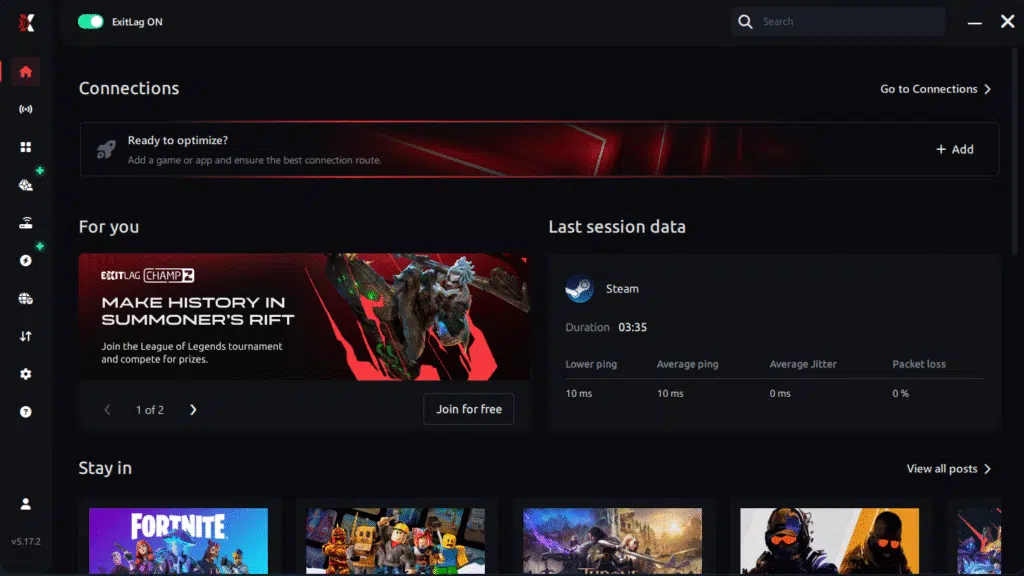
Step 3 – In the search bar, type “Path of Exile” and select the game from the list.

Step 4 – Choose between automated or manual route
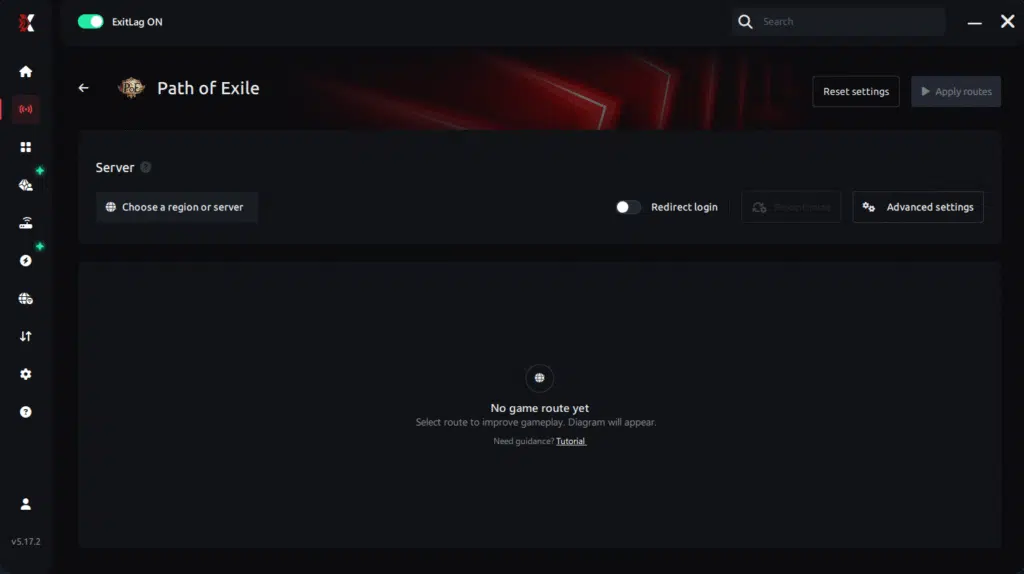
Based on the results, you can let ExitLag automatically select the best route or manually choose the server that showed the lowest latency for your connection.
AI-optimized automated route
Based on the results, you can let ExitLag automatically select the best route through AI optimization. The system analyzes multiple connection paths in real time and automatically identifies the most efficient route for your connection, ensuring the lowest possible latency without requiring manual choices.
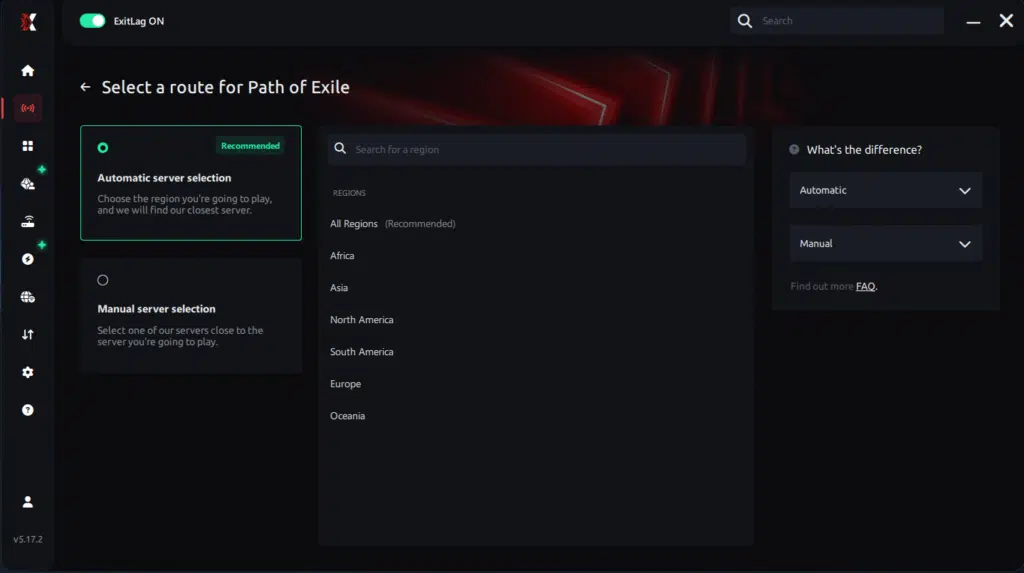
Manual route
If you prefer to have full control over your connection, you can manually choose the server based on the ping test results. Simply select the server that showed the lowest latency or the one that best meets your specific gaming needs, allowing complete customization of your experience.
Step 5 – Click “Path of Exile” or the play button. ExitLag will begin optimizing your connection automatically.
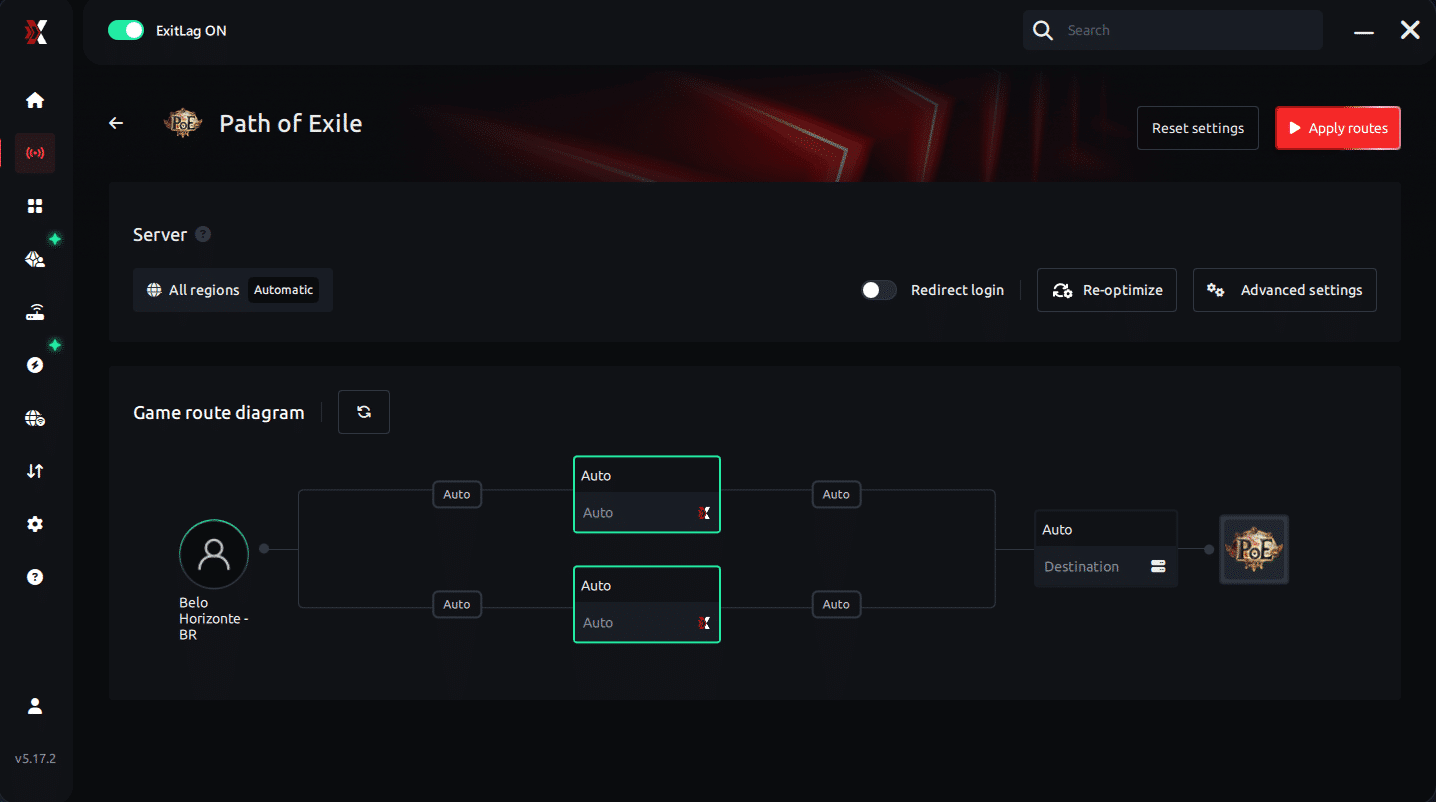
Step 6 – Wait a few seconds until optimization is complete. You’ll see ping indicators in the interface.
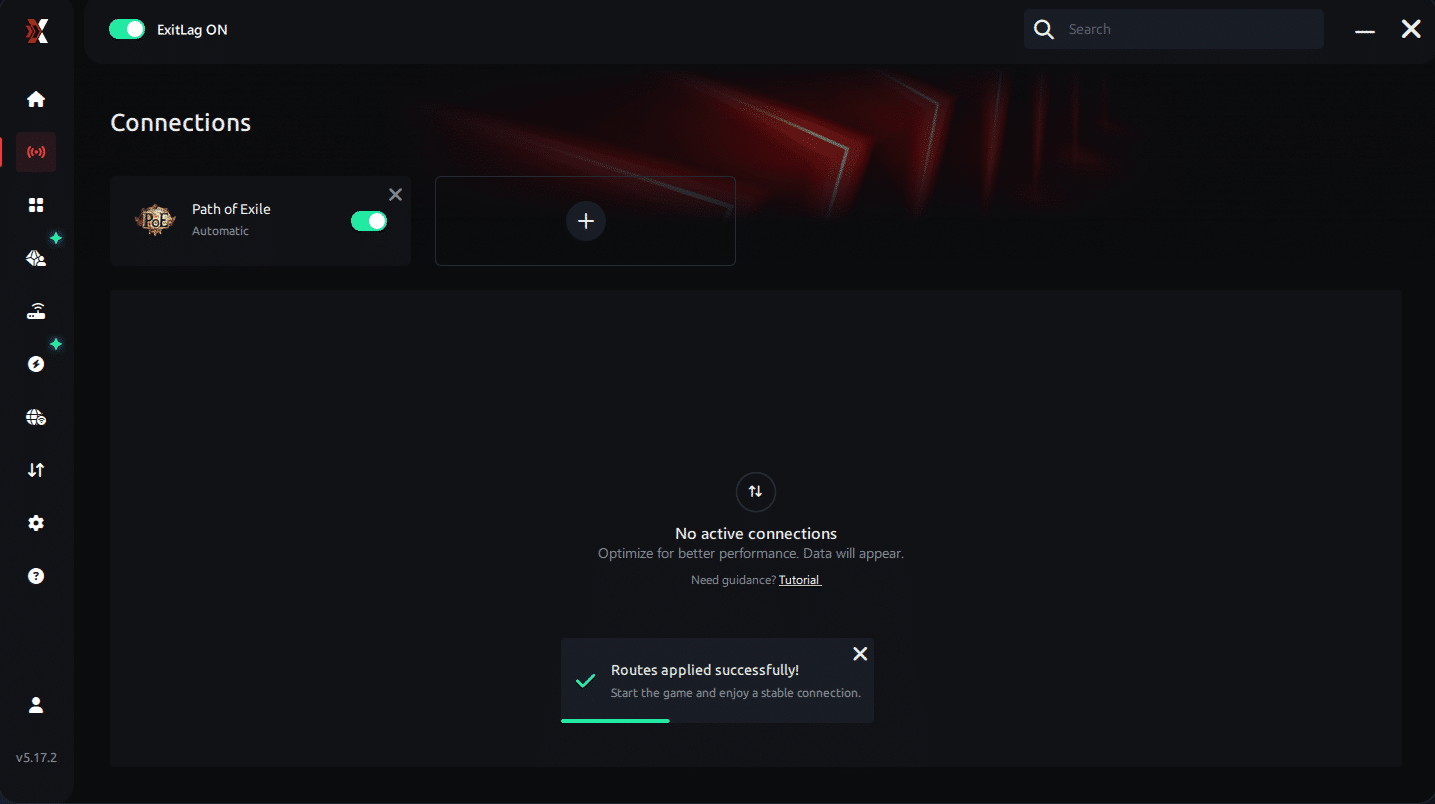
Step 7 – Launch Path of Exile normally. The optimization will already be active.
ExitLag runs in the background while you play, constantly adjusting routes to maintain the best possible performance.
FAQ: common questions about jitter in Path of Exile 1
What is the difference between jitter, lag, and packet loss in Path of Exile 1?
Jitter is the variation of your ping over time — how unstable your latency is. Lag is the general term players use for delays between their actions and what happens on screen, often caused by high or unstable latency. Packet loss occurs when some packets never reach the Path of Exile 1 servers or your PC, causing missing information, rubberbanding, and random desync.
You can have low average ping but high jitter and packet loss, which will still make the game feel terrible. That is why focusing only on ping is not enough when diagnosing connection issues in Path of Exile 1.
Why does my ping keep fluctuating in Path of Exile 1?
Your ping usually fluctuates due to network congestion, unstable routing by your ISP, Wi-Fi interference, multiple devices sharing the connection, or long distance to the game gateway. Peak hours, league launches, and crowded servers can intensify these fluctuations and make your latency graph look like a roller coaster.
Reducing background usage, switching to Ethernet, and using optimized routing tools greatly help in stabilizing your ping and reducing jitter.
Is jitter worse than high ping in Path of Exile 1?
In many cases, yes. A constant 100 ms ping can be playable once you adapt your timing. But if your latency jumps between 20 ms, 80 ms, 150 ms, and back down again, your dodges, flasks, and movements become extremely unreliable. This unpredictability is deadly in Path of Exile 1, especially in hardcore or challenging league content.
Jitter removes your ability to build muscle memory around your delay, which is why it often feels worse than simply having a high but stable ping.
How can I know if I have jitter while playing Path of Exile 1?
You can combine an extended ping test with in-game observation. If your ping values fluctuate heavily over time and you notice inconsistent input response, delayed or “sticky” movement, and unpredictable hit registration, jitter is likely the culprit. Situations where some maps feel smooth and others feel awful, without any changes on your PC, are another strong sign.
If this sounds familiar, implementing connection optimizations and specialized routing may dramatically improve your experience.
Does Wi-Fi cause jitter in Path of Exile 1?
Yes, Wi-Fi is one of the most common sources of jitter. Wireless signals are vulnerable to interference from walls, other networks, and household devices. These disturbances cause timing variation, retransmissions, and spikes, which translate directly into jitter during your gameplay. Whenever possible, using a wired Ethernet connection is strongly recommended for Path of Exile 1.
Does ExitLag fix other network problems besides jitter?
ExitLag does more than just fight jitter. Its connection optimization improves routing to reduce latency, minimizes packet loss, and increases overall stability in hundreds of online games. By ensuring your traffic follows the most efficient paths to the servers, ExitLag enhances nearly every aspect of your online performance in Path of Exile 1 and other titles.
Do I need to keep ExitLag open while playing Path of Exile 1?
Yes. For ExitLag’s optimizations to remain active, the software must stay open while you play. You can minimize it to the tray so it stays out of the way, but if you close it, your traffic reverts to your ISP’s default routing, and jitter or unstable ping may return.
Can Path of Exile 1 league launches and events increase jitter?
They can. During league starts, major patches, or popular events, more players connect to the same Path of Exile 1 servers, increasing load and potentially amplifying latency fluctuations. If your base routing is already weak, these moments can feel especially bad. Using routing optimization and basic connection tweaks helps ensure that, even during busy times, your path to the server is as stable as possible.

Conclusion
Jitter can turn a relaxing Path of Exile 1 mapping session into a stressful experience where every boss attempt and delirium mirror feels like a gamble. But you do not have to accept random deaths, missed dodges, and inconsistent flasks as part of the game. By understanding what jitter is, applying practical home-network optimizations, and using dedicated routing tools, you can transform your gameplay into something stable, responsive, and truly competitive. For more connectivity tips and performance guides, you can explore the ExitLag Blog.
Investing in a stable connection is just as important as min-maxing your build or crafting the perfect gear. When your actions trigger exactly when you expect them to, bosses become fairer, mapping feels smoother, and each league becomes much more enjoyable. Instead of losing progress to invisible hits or delayed movement, your knowledge and skill decide the outcome.
If your Path of Exile 1 experience has been defined by instability and ping variation, now is the ideal time to prioritize your connection and finally play the game the way it was meant to be: immediate responses, precise timing, and zero surprises from your network.
Ready to eliminate jitter and stabilize your Path of Exile 1 connection for good? Start your free trial today at Start your ExitLag free trial and feel the difference from your very next map.