

Nothing disrupts your adventure more than entering Lineage II and immediately facing high ping spikes that ruin every battle or farming rotation. Right away, Lineage II high ping makes skills delay, attacks fail, and enemies teleport during PvP. Even more, this is common across many titles supported in the official games page, proving it’s often caused by unstable routing rather than your setup. Above all, the frustration grows because every second of delay can cost your XP, loot, or even clan dominance.

What is high ping in Lineage II?
Firstly, Lineage II high ping occurs when your device takes too long to exchange data packets with the game’s servers, resulting in delayed responses. This round-trip time is measured in milliseconds (ms), and the higher it is, the slower your actions become. In advance, factors like distance, routing inefficiencies, and overloaded networks can extend packet travel time significantly.
Above all, the problem isn’t just high latency — it’s instability. If your ping constantly fluctuates, predicting skill timings becomes impossible. As well as that, the game’s real-time mechanics depend heavily on consistent latency, meaning even small spikes generate major gameplay interruptions.
Now, understanding the behavior of Lineage II high ping helps identify whether the root cause is local congestion, server distance, or poor ISP routing. This clarity will guide you toward effective fixes.
How high ping affects gameplay in Lineage II
- Delayed skills, breaking core rotations for tanks, healers, and DPS.
- Rubberbanding, making your character snap backward while moving.
- Hit registration issues, especially in PvP where timing is crucial.
- Desync, causing enemies to appear in false positions.
- Failed pickups and slow interactions, affecting farming efficiency.
- Clan war disadvantage, where milliseconds decide who survives.
- Frequent disconnections, blocking participation in raids.
Skill delay in PvE
At first sight, the problem looks like minor stutter. However, in advance, delayed casting ruins coordinated dungeon runs. Healers struggle to land timely heals, while DPS rotations lose efficiency due to latency interruptions.
PvP desync and competitive frustration
In the same way, PvP becomes unpredictable. According to players, high latency causes enemies to teleport or dodge skills that should have hit. As a result, fights feel unfair and inconsistent.
Main causes of high ping in Lineage II
Server distance
Often, servers are hosted far from your region, creating long packet routes. The more hops the connection passes through, the higher the latency. During peak hours, this becomes even worse.
ISP / routing issues
Your ISP chooses default routes that aren’t always the fastest. Like this, packets travel through congested or inefficient paths, creating Lineage II connection issues even when your speed test appears normal.
Network congestion
When many devices use bandwidth simultaneously, your line becomes overloaded. This leads to severe spikes, packet queuing, and increased Lineage II latency, especially during evenings.
Outdated hardware
Old routers, outdated firmware, or weak Wi-Fi signals create instability. Beforehand, updating or upgrading this equipment can significantly improve responsiveness.
Game-specific server load
During global events or major updates, servers may struggle with demand. From the same point of view, all players experience increased delay when regions reach capacity.
How to check and test your ping in Lineage II
Firstly, check your in-game network statistics to monitor live ping during gameplay. The game displays latency values that help identify when spikes occur, especially during crowded areas or PvP.
Soon after, run a command-line test on your operating system. Use continuous ping testing to detect variations, packet loss, or unstable routing. In summary, stable ping under 80ms is excellent, while above 120ms begins to harm gameplay. Anything beyond 180ms significantly impacts combat performance.
Then, compare your results over different times of day. If values change heavily during peak hours, congestion is likely the main issue.
Ping levels classification
| Ping range (ms) | Classification | Gameplay experience in Lineage II |
| 0–40 ms | Excellent | Ultra-responsive skills, perfect PvP timing, smooth farming and raids. |
| 40–80 ms | Very good | Minor delay, fully playable in all situations, stable PvP and PvE. |
| 80–120 ms | Playable | Noticeable delay in skills and movement; acceptable but not ideal for competitive PvP. |
| 120–180 ms | High ping | Skills feel slower, PvP becomes inconsistent, rubberbanding may occur. |
| 180–250 ms | Very high ping | Strong delays, frequent desyncs, unreliable healing and targeting. |
| 250+ ms | Unplayable | Severe lag, failed skills, massive delay, high chance of disconnections. |
Basic fixes to reduce high ping in Lineage II
Optimize local connection
- Use a wired Ethernet cable instead of Wi-Fi.
- Close unnecessary background programs.
- Update network drivers for your adapter.
- Restart your modem/router to refresh routing.
- Disconnect devices not essential for gaming.
- Disable automatic downloads in launchers.
Contact your ISP
On the other hand, if routing remains unstable, contact your provider and request troubleshooting. Sometimes, line noise, poor routing, or outdated configurations cause severe spikes.
- Ask for a full line diagnostic.
- Request routing verification for gaming traffic.
- Confirm if your area is under maintenance.
- Check if your upload stability matches your plan.
ExitLag: the best solution to fix high ping in Lineage II
In the meantime, after trying local fixes and ISP adjustments, many players still struggle with unstable latency. That’s because the real cause behind Lineage II high ping usually lies in inefficient routing rather than raw internet speed. In advance, the connection path your data takes can change every second, creating spikes that ruin PvP and farming. Above all, you need a solution capable of stabilizing routes in real time.
What is ExitLag?
ExitLag is a software focused on connection optimization created specifically to stabilize game traffic. Instead of relying on your ISP’s default routes, it analyzes, enhances, and stabilizes your connection to the server. Even more, it works as an intelligent stabilizer, ensuring your packets travel through the most efficient path.
Simultaneously, the official technology page lists hundreds of online titles that utilize its technology, demonstrating its reliability. As well as that, ExitLag was designed by gamers who understand the pain of unpredictable latency and random skill delays.

How ExitLag works
ExitLag uses a multi-layer route optimization system. At first sight, this may sound complex, but its goal is simple: give you the smoothest and most stable connection possible.
- Real-time route analysis The software scans multiple routes instantly, detecting unstable paths before they affect gameplay.
- Multiple routes simultaneously Your data is sent across parallel lines, avoiding dependence on a single congested path.
- Automatic best route selection ExitLag selects the fastest packets and discards delayed ones, minimizing Lineage II latency.
- Hop optimization By reducing the number of “hops,” data travels faster and more consistently.
- Connection stabilization Constant evaluation keeps your route smooth, minimizing spikes and preventing Lineage II connection issues.
You can explore this route-optimization technology in the official how it works section.
Advantages for Lineage II players
ExitLag delivers game-changing benefits for those suffering from Lineage II high ping, especially during raids, sieges, and open-world PvP.
1. Consistent and stable ping
Above all, stability is the most important factor in Lineage II. ExitLag ensures a predictable connection that keeps your skills, movement, and auto-combat fully responsive.
2. Reduced packet loss
Often, desync and teleporting enemies happen because packets never reach the server. ExitLag’s optimized routing eliminates these issues, improving combat clarity.
3. Better skill timing
In the same way FPS players rely on timing, Lineage II PvE and PvP rotations require precise skill execution. ExitLag reduces delay so your casts land exactly when intended.
4. Competitive advantage in PvP
From the same point of view, faster and more stable routing gives you milliseconds of reaction time. In castle sieges or Olympiad, this advantage is massive.
5. Works on all servers
Whether you play on official regions or international servers, ExitLag stabilizes your route regardless of distance.
6. Simple setup, no expertise required
Just select Lineage II, activate the optimization, and play. Everything else is automatic.
Is ExitLag worth it for Lineage II?
Definitely. If you face spikes, teleporting enemies, delayed heals, or random skill failures, ExitLag is absolutely worth it. Players who experience Lineage II high ping due to distance, ISP routing, or congestion see immediate improvements in responsiveness.
Furthermore, the subscription options inside the pricing page are affordable and flexible. In conclusion, ExitLag delivers measurable stability from the first activation, especially during peak server hours.
How to use ExitLag in Lineage II
The process is extremely simple:
Step 1 – Access the official ExitLag website and download the application. There’s a free trial period for new users.
Step 2 – Install and open the program. Log in with your account.
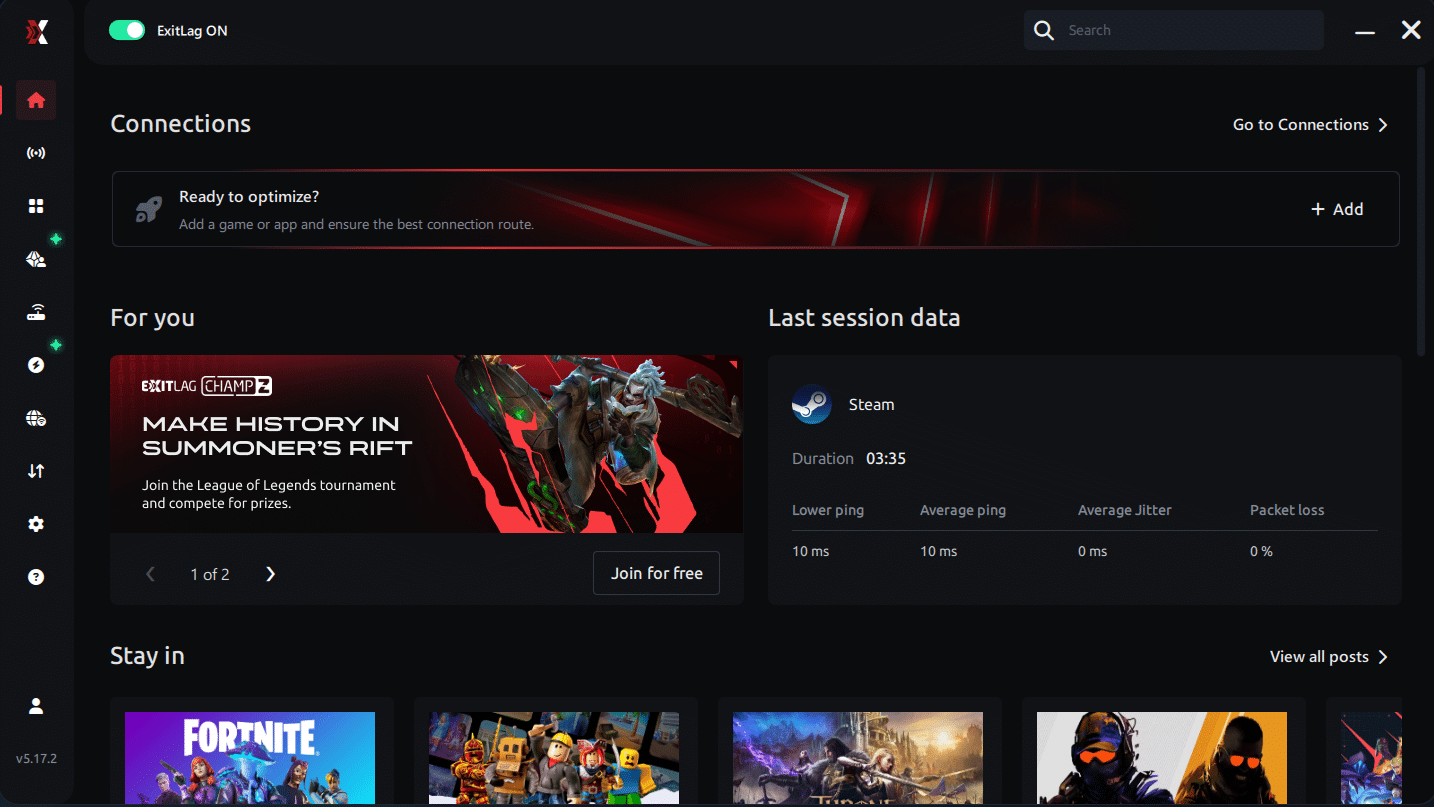
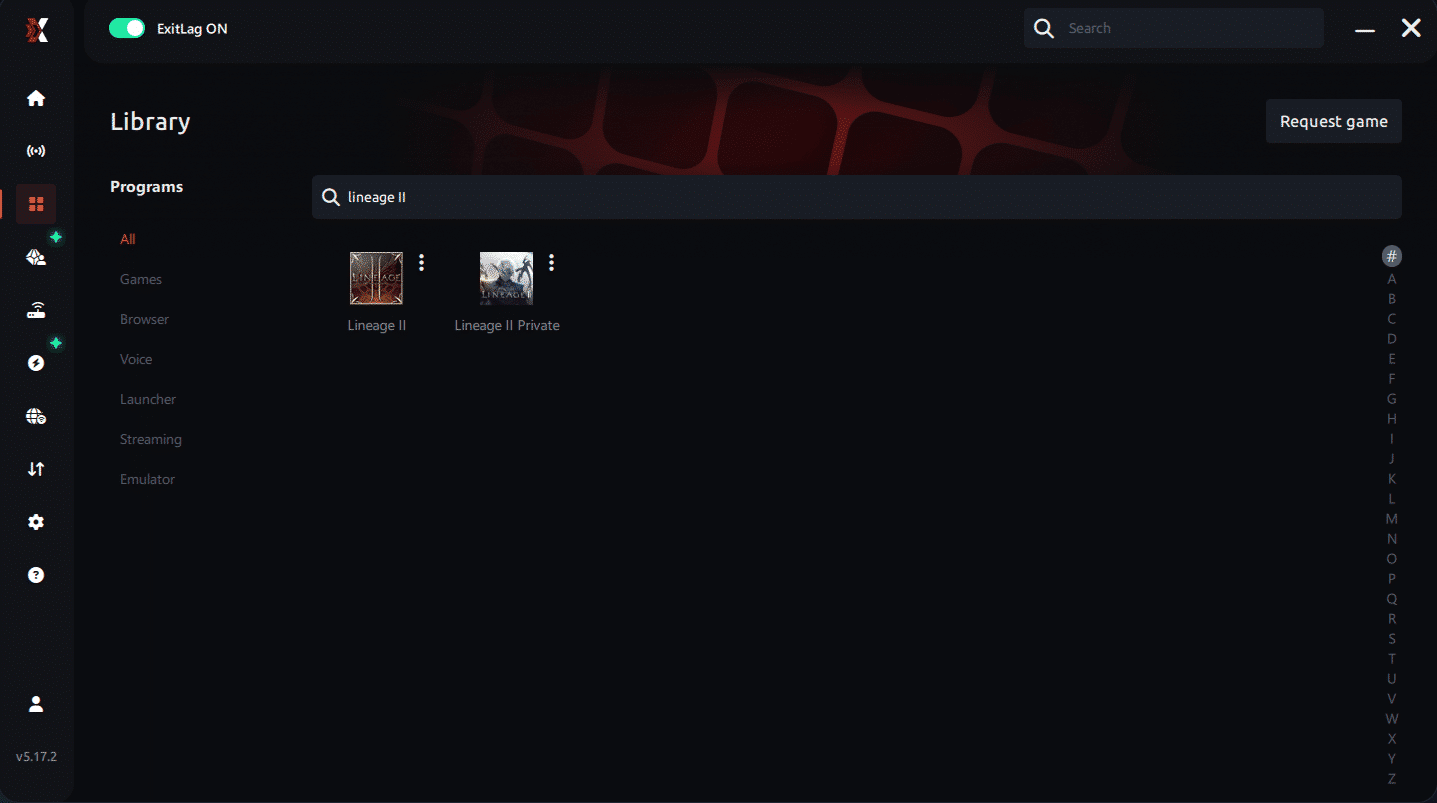
Step 3 – In the search bar, type “Lineage II” and select the game from the list.
Step 4 – Choose between automated or manual route
Based on the results, you can let ExitLag automatically select the best route or manually choose the server that showed the lowest latency for your connection.
AI-optimized automated route
Based on the results, you can let ExitLag automatically select the best route through AI optimization. The system analyzes multiple connection paths in real time and automatically identifies the most efficient route for your connection, ensuring the lowest possible latency without requiring manual choices.
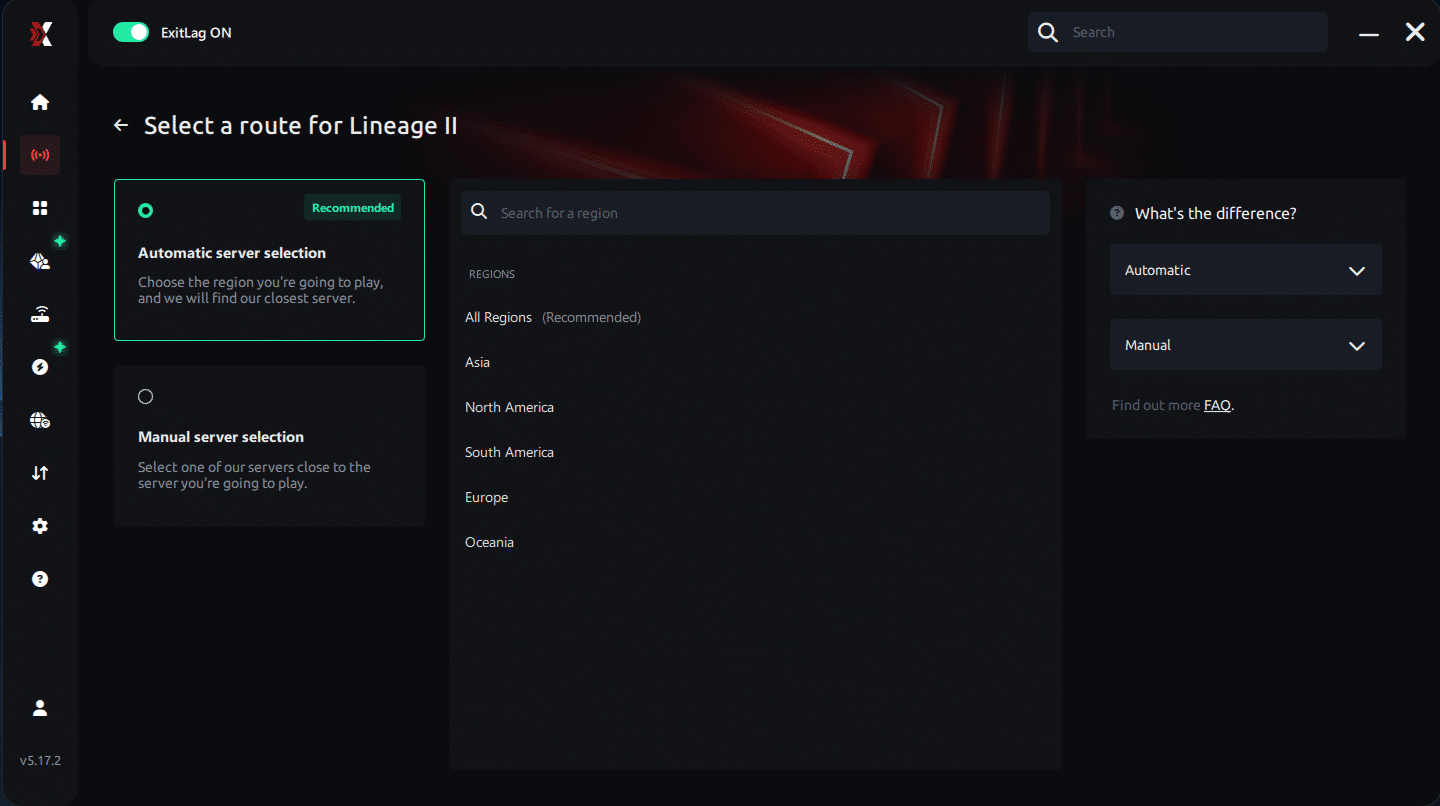
Manual route
If you prefer to have full control over your connection, you can manually choose the server based on the ping test results. Simply select the server that showed the lowest latency or the one that best fits your gameplay needs, whether for PvP, raids, or sieges.
Step 5 – Click “Apply routes” or the play button. ExitLag will begin optimizing your connection automatically.
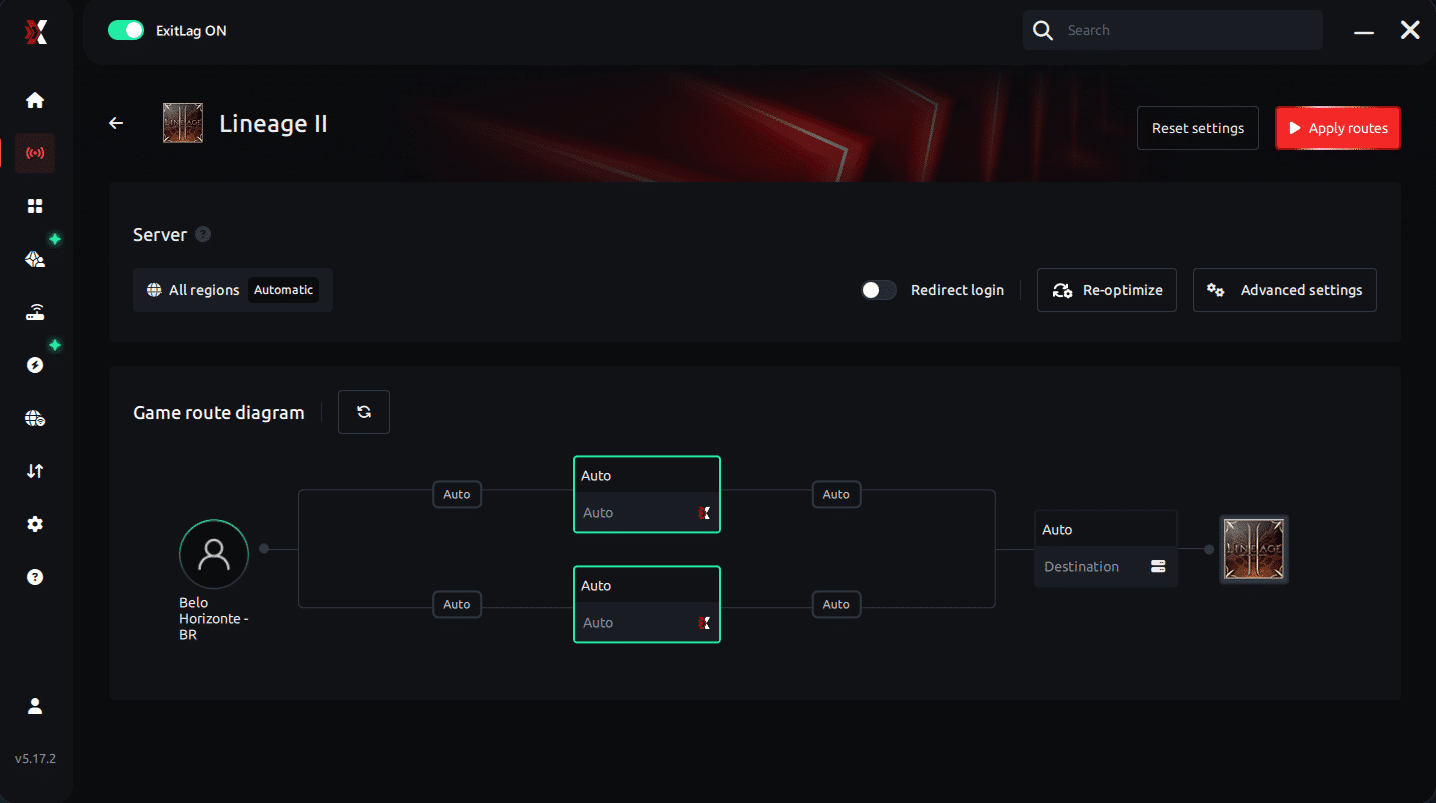
Step 6 – Wait a few seconds until optimization is complete. You’ll see ping indicators in the interface.
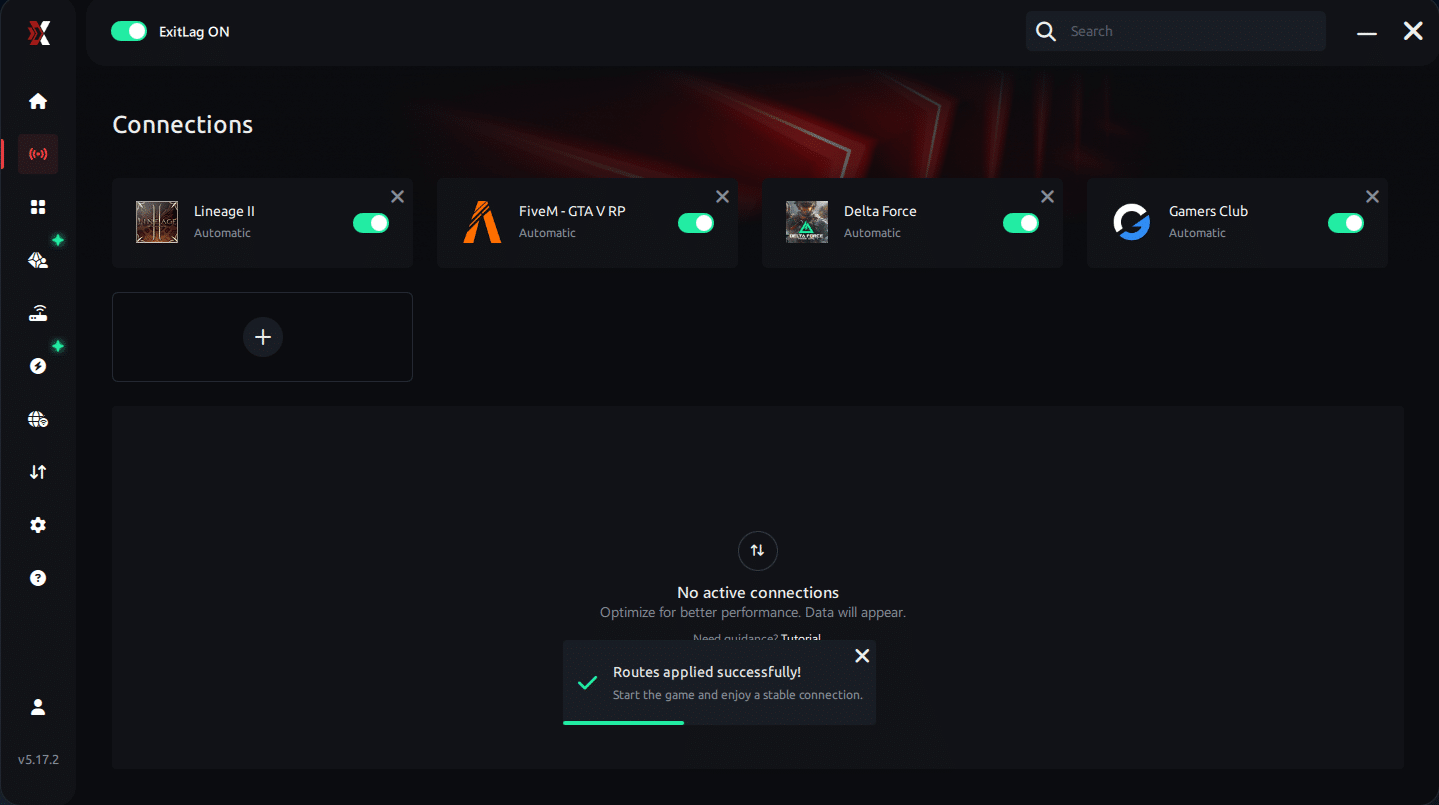
Step 7 – Launch Lineage II normally. The optimization will already be active.
ExitLag runs in the background while you play, constantly adjusting routes to maintain the best possible performance.
Final thoughts: Play Lineage II without lag forever
Lineage II is all about timing — skills, combos, PvP reactions and siege coordination. Lag should never decide the outcome of a duel or a castle siege.
With ExitLag, you take full control of your connection. The software finds the fastest routes, reduces packet loss, and keeps your ping stable so every skill lands exactly when it should.
Try ExitLag for free and experience Lineage II the way it was meant to be played: smooth, stable, and competitive.ust select the server with the lowest latency and enter the match knowing your connection is optimized.
FAQ: everything about high ping in Lineage II
What causes high ping in Lineage II?
High ping usually occurs due to long-distance routing, overloaded ISP paths, or peak-time congestion. Even so, issues like outdated hardware or unstable Wi-Fi can increase delay. In many cases, server distance combined with inefficient routing is the main reason players suffer from lag Lineage II.
How do I check my ping in Lineage II?
You can check your ping using the in-game network indicator, which shows real-time latency values. Soon after, you should perform an extended test using your operating system’s command prompt. In other words, monitor stability instead of just average values to detect hidden Lineage II connection issues.
What is good ping for Lineage II?
Anything below 80ms is ideal for smooth gameplay. Between 80–130ms is playable, but above that you may notice slow skill responses and movement delay. Even more, stability matters more than the number — consistent 100ms is better than oscillating 40–200ms.
Can high ping get you banned in Lineage II?
No. High ping doesn’t result in bans. However, unstable connections may trigger disconnects or desync, which can interrupt raids or Olympiad sessions. At the same time, reducing latency ensures a cleaner and smoother gameplay experience.
Does ExitLag work for Lineage II?
Yes. ExitLag is designed to optimize connection routes for hundreds of online games, including Lineage II. It reduces spikes, packet loss, and instability to deliver more responsive gameplay. Many players use it daily to maintain smooth farming and efficient PvP.
Why does my ping drop in empty zones but spike in crowded areas?
This happens because crowded regions generate server load, causing incoming and outgoing packets to travel slower. Additionally, your ISP may struggle to stabilize routing during peak hours. Like this, players often feel spikes only during sieges, raids, or cities where traffic is intense.
Conclusion
In conclusion, Lineage II high ping can entirely ruin PvP timing, dungeon runs, and farming rotations. However, once you understand its causes and apply proven fixes, your gameplay becomes much more stable. Above all, ExitLag remains the most effective way to secure fast routes and maintain reliable latency across all servers.
For more insights, tutorials, and tips, visit the official ExitLag blog.
Lineage II high ping no longer needs to ruin your free time. Now that you understand the causes and how to stabilize your connection, you can finally enjoy your gaming smoothly. Start your free trial and see the difference for yourself.



