
If you’re experiencing Marathon Packet Loss, you already know how frustrating it feels. You aim, shoot, reposition — and suddenly your character teleports, abilities don’t register, or you get eliminated before your screen even shows the enemy.
These connection disruptions can completely ruin competitive matches and turn intense firefights into unpredictable chaos. If you’re playing one of the supported titles, connection stability becomes even more critical for competitive performance.
In Marathon, packet loss is one of the most damaging network issues you can face. When packet loss happens, your commands don’t fully reach the server, and the server’s responses don’t fully reach you. The result? Delayed reactions, rubberbanding, missed shots, and frustrating deaths that feel completely unfair.
So what is happening behind the scenes when Marathon Packet Loss appears? In simple terms, it occurs when small pieces of game information fail to travel between your PC and the game servers. These pieces — called data packets — carry everything from your movement inputs to hit registration. When they disappear mid-transmission, your gameplay becomes unstable, even if your ping looks normal. You can explore further refinements by visiting the official ExitLag website.
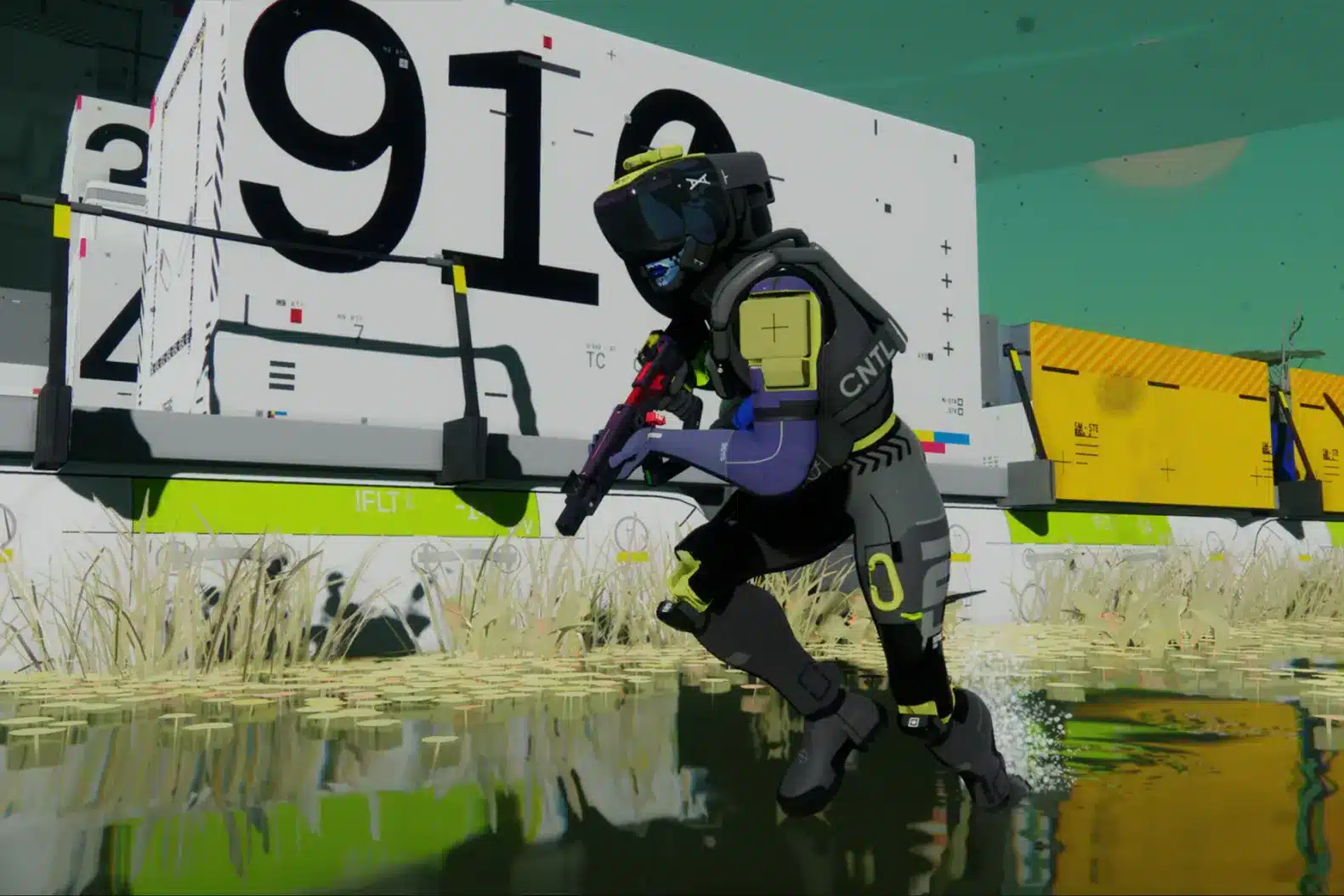
What is packet loss in Marathon?
Packet loss happens when data packets traveling between your device and Marathon’s servers fail to arrive at their destination. In online shooters like Marathon, every action you take — moving, shooting, using abilities — is converted into small chunks of data that travel through the internet in milliseconds.
This process is known as transmission, and it happens constantly while you play. Ideally, every packet sent should arrive intact and in order. However, when perda de pacotes (packet loss) occurs, some of those packets simply vanish along the route.
Think of it like sending 100 messages to a friend, but only 95 arrive. The missing 5 create confusion. In Marathon, that confusion translates into:
- Desynced movement
- Broken hit detection
- Abilities not activating
- Enemies appearing to teleport
Even worse, you can have low ping and still suffer from packet loss, which makes the issue harder to detect if you’re only watching latency numbers.
How Marathon Packet Loss affects your gameplay
When Marathon Packet Loss hits during an intense extraction match or PvP fight, the consequences are immediate. Here’s how it typically impacts your matches:
- Delayed command response: You press a key, but your character reacts late.
- Rubberbanding: Your character snaps back to a previous position.
- Hit registration failure: Shots land visually but deal no damage.
- Teleporting enemies: Opponents appear to blink across the screen.
- Ability desync: Skills activate too late or fail entirely.
- Sudden disconnections: You’re removed from the match unexpectedly.
- Inventory rollback: Items fail to register properly after looting.
In a competitive extraction shooter like Marathon, where every second matters, even 1–2% packet loss can cost you gear, progress, and ranked positioning.
Main causes of Marathon Packet Loss
Understanding the cause is the first step toward solving Marathon Packet Loss. Here are the most common reasons it happens:
1. Inefficient routing
Your connection travels through multiple routers before reaching Marathon’s servers. If one of these routes is unstable or overloaded, packets can be dropped mid-journey.
This often happens outside your home network — meaning you may not even realize it’s happening.
2. Unstable internet connection
Wi-Fi interference, outdated modems, or ISP fluctuations can cause random packet drops. Even small signal instability can result in inconsistent gameplay.
Wired Ethernet connections are significantly more stable for competitive shooters.
3. Distance from servers
The farther you are from Marathon’s official server location, the more “hops” your connection must take. More hops increase the probability of packet loss.
Long-distance routing is especially common if you’re playing on international servers.
4. Network congestion
Peak hours, streaming services, downloads, and multiple devices sharing bandwidth can overload your network. When congestion happens, packets may be discarded.
Even background updates can contribute to packet instability.
5. Faulty hardware
Damaged Ethernet cables, outdated network drivers, overheating routers, or failing network cards can all contribute to Marathon network problems.
Hardware-related packet loss tends to worsen over time if not addressed.
How to identify packet loss in Marathon
Sometimes Marathon lag is obvious. Other times, packet loss hides behind normal ping numbers.
Here’s how to detect it:
- Inconsistent latency spikes
- Lag even with stable ping
- Frequent rubberbanding
- Players moving erratically
- Shots not registering
You can also test your connection via command prompt:
- Open Command Prompt (Windows)
- Type: ping google.com -t
- Observe if you see “Request timed out” messages
If packets fail during this test, your connection is unstable.
For deeper testing, you can use:
- pathping command to identify routing instability
- Third-party network monitoring tools
- In-game network debug overlays (if available)
If you notice packet drops even when your ISP speed is high, routing is likely the issue — not bandwidth.
Packet loss levels and their impact
| Packet Loss % | Gameplay Impact | Competitive Viability |
| 0% | Perfect stability | Ideal for ranked |
| 1% | Minor micro-stutter | Playable casually |
| 2–3% | Noticeable desync | Risky in PvP |
| 4–5% | Frequent hit issues | Not recommended |
| 6%+ | Severe instability | Unplayable |
For competitive Marathon gameplay, the acceptable packet loss is 0%. Even 1% can cause subtle but impactful inconsistencies. You can explore more compatible titles in the official supported games directory, where we maintain an updated list of all optimized games.
Basic solutions to reduce packet loss Marathon
Optimize your local connection
Try these steps to reduce packet loss Marathon issues:
- Use a wired connection: Ethernet is more stable than Wi-Fi.
- Close background applications: Downloads and streaming use bandwidth.
- Update network drivers: Outdated drivers can cause instability.
- Configure QoS on your router: Prioritize gaming traffic.
- Replace damaged cables: Even minor cable damage can drop packets.
- Restart modem and router weekly: Prevent overheating and memory overload.
Small local optimizations can reduce minor instability, but they don’t fix external routing problems.
Contact your ISP
If packet loss persists:
- Request a line stability test
- Ask about routing optimization
- Report consistent packet drops
However, ISPs rarely optimize routes specifically for Marathon’s servers. That’s where specialized gaming routing technology becomes critical.
ExitLag: the definitive solution to eliminate packet loss in Marathon
You can optimize cables, reset your router, and contact your ISP — but if the issue is bad routing between you and the game servers, those fixes won’t fully solve Marathon Packet Loss.
That’s where ExitLag becomes the definitive answer.
Unlike generic network tweaks, ExitLag is a software especializado in gaming otimização de conexão, built specifically to eliminate routing instability in competitive online games. It doesn’t increase your internet speed — it intelligently fixes how your data travels to Marathon’s servers using tecnologia avançada. Learn more about the core routing system at our official technology page.
Instead of sending your connection through a single unstable path, ExitLag dynamically selects the most stable and efficient routes available in real time.
How ExitLag works to reduce packet loss in Marathon
Traditional connections use a single route between you and the server. If that route drops packets, your gameplay suffers.
ExitLag changes that completely. Here’s how it works — and why it’s so effective for Marathon high ping and packet instability. Full technical breakdown available at our how it works page.
1. Real-time analysis
ExitLag constantly monitors route quality between your PC and Marathon servers. It checks latency, stability, and packet integrity in milliseconds.
2. Multiple simultaneous connections
Instead of relying on one path, ExitLag uses Multi-Internet technology to send your data through multiple routes at the same time.
If one path drops packets, others continue delivering your data.
3. Automatic route switching
If a route becomes unstable mid-match, ExitLag automatically switches to a better one — without disconnecting you.
4. Hop optimization
ExitLag reduces unnecessary “hops” between routers, minimizing the number of points where packets could be lost.
5. Connection stabilization
The result is consistent packet delivery, reduced Marathon network problems, and smoother firefights — especially during peak hours.
Advantages of ExitLag for Marathon players
Elimination of packet loss
This is the main advantage. By using multiple optimized routes, ExitLag dramatically reduces or completely eliminates Marathon Packet Loss caused by poor ISP routing.
Instead of hoping your ISP chooses a stable path, ExitLag forces stability.
Reduced ping
ExitLag identifies shorter, cleaner paths to Marathon servers. This often reduces overall latency and improves reaction time.
Stable connection during peak hours
When network congestion increases, most players suffer. ExitLag dynamically adapts, maintaining stable routes even during high-traffic periods.
Protection against routing instability
While not a firewall replacement, ExitLag mitigates many external route disruptions that cause Marathon connection issues.
Easy setup
The interface is simple. You don’t need technical knowledge to activate route optimization.
Works with official and private servers
As long as Marathon servers are online and accessible, ExitLag can optimize the route.
Is it worth using ExitLag in Marathon?
It’s absolutely worth it if you:
- Play on international servers
- Experience packet loss spikes
- Compete in ranked or extraction PvP
- Play during peak ISP congestion hours
- Have already tried local troubleshooting
- Lost gear or matches due to desync
- Want a competitive edge through connection stability
For most competitive players, the cost of unstable matches is higher than the subscription itself. You can review plan options at our pricing page.
In competitive extraction shooters, eliminating unfair deaths caused by connection instability often pays for itself quickly.
How to use ExitLag in Marathon: Step by Step
The process is extremely simple:
Step 1 – Access the official ExitLag website and download the application. There’s a free trial period for new users.
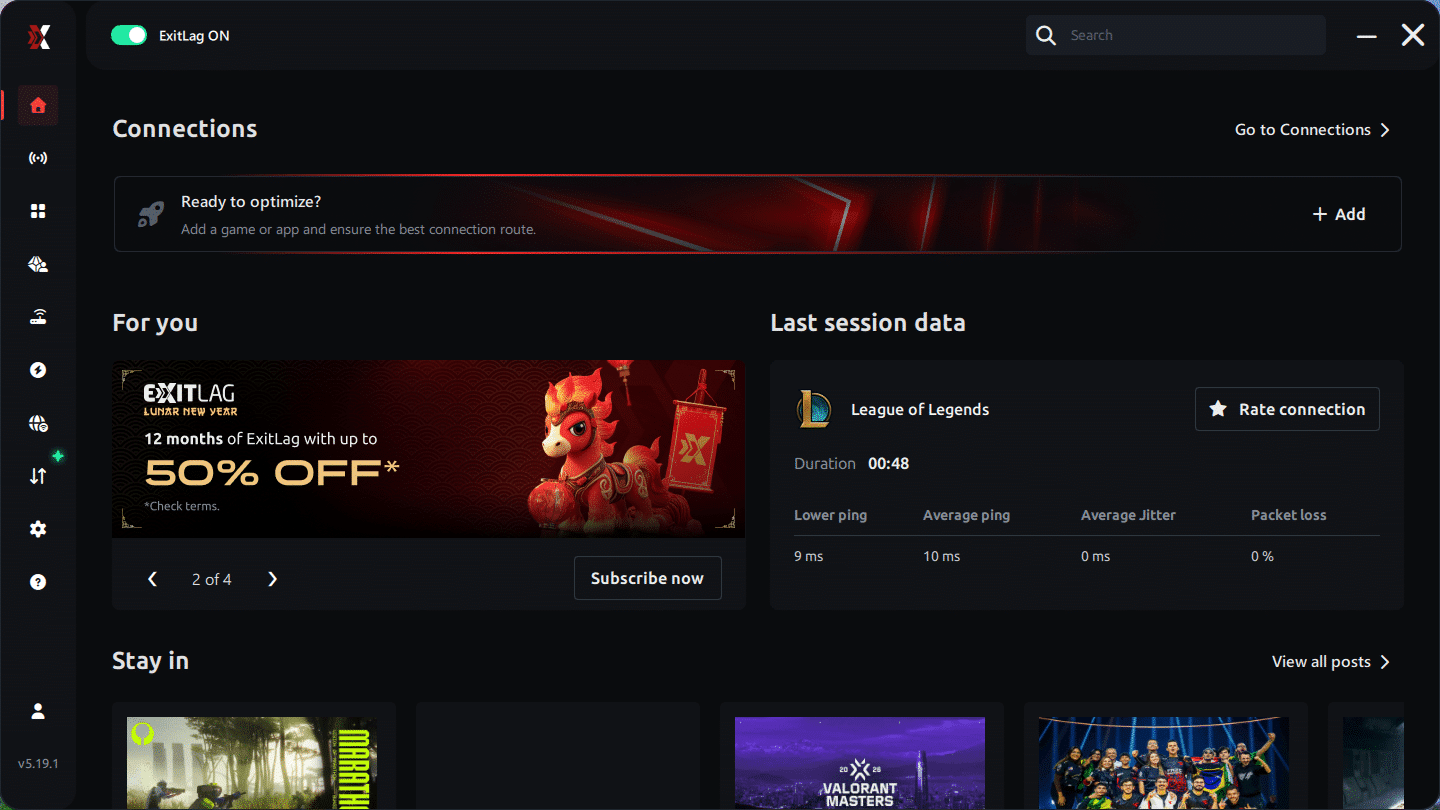
Step 2 – Install and open the program. Log in with your account.
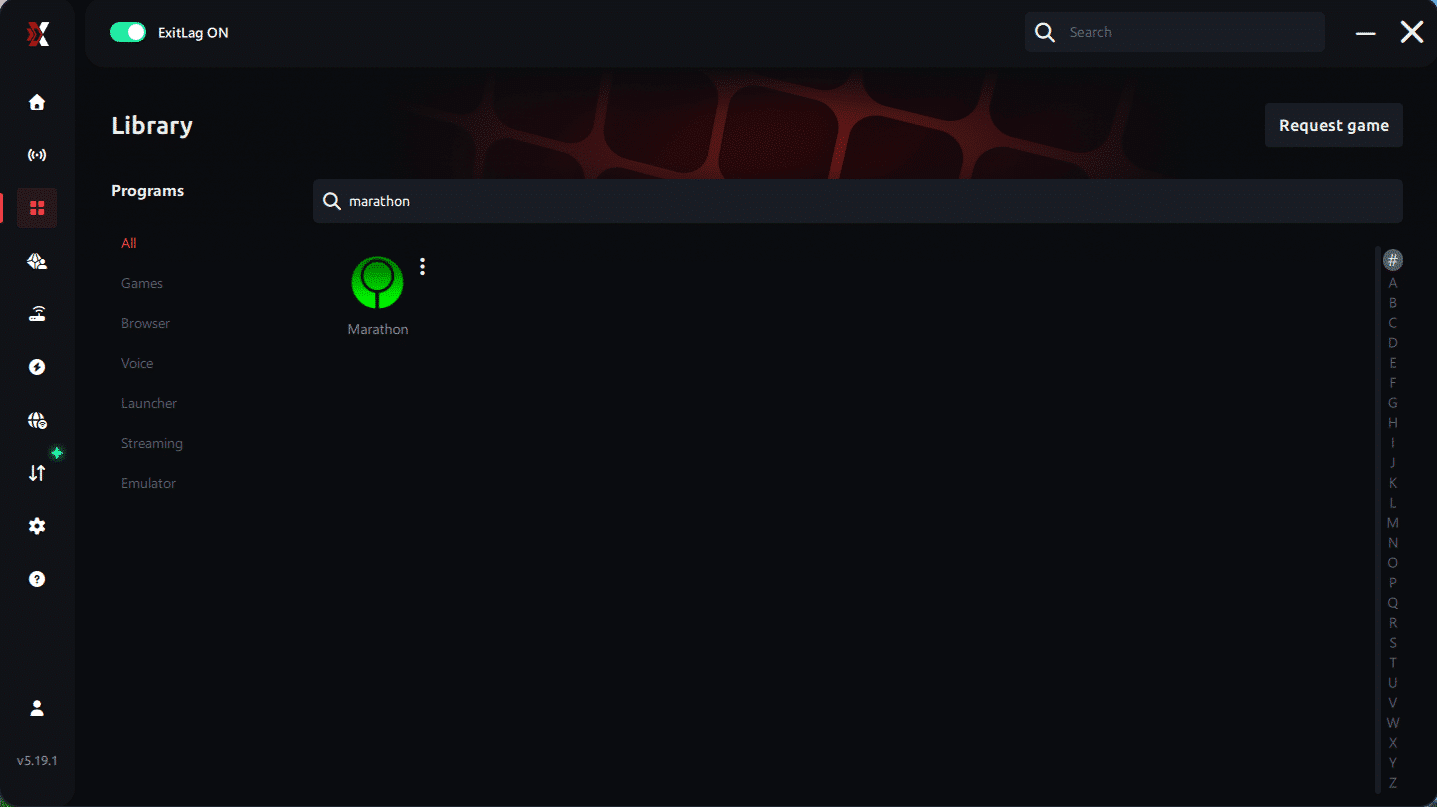
Step 3 – In the search bar, type “Marathon” and select the game from the list.
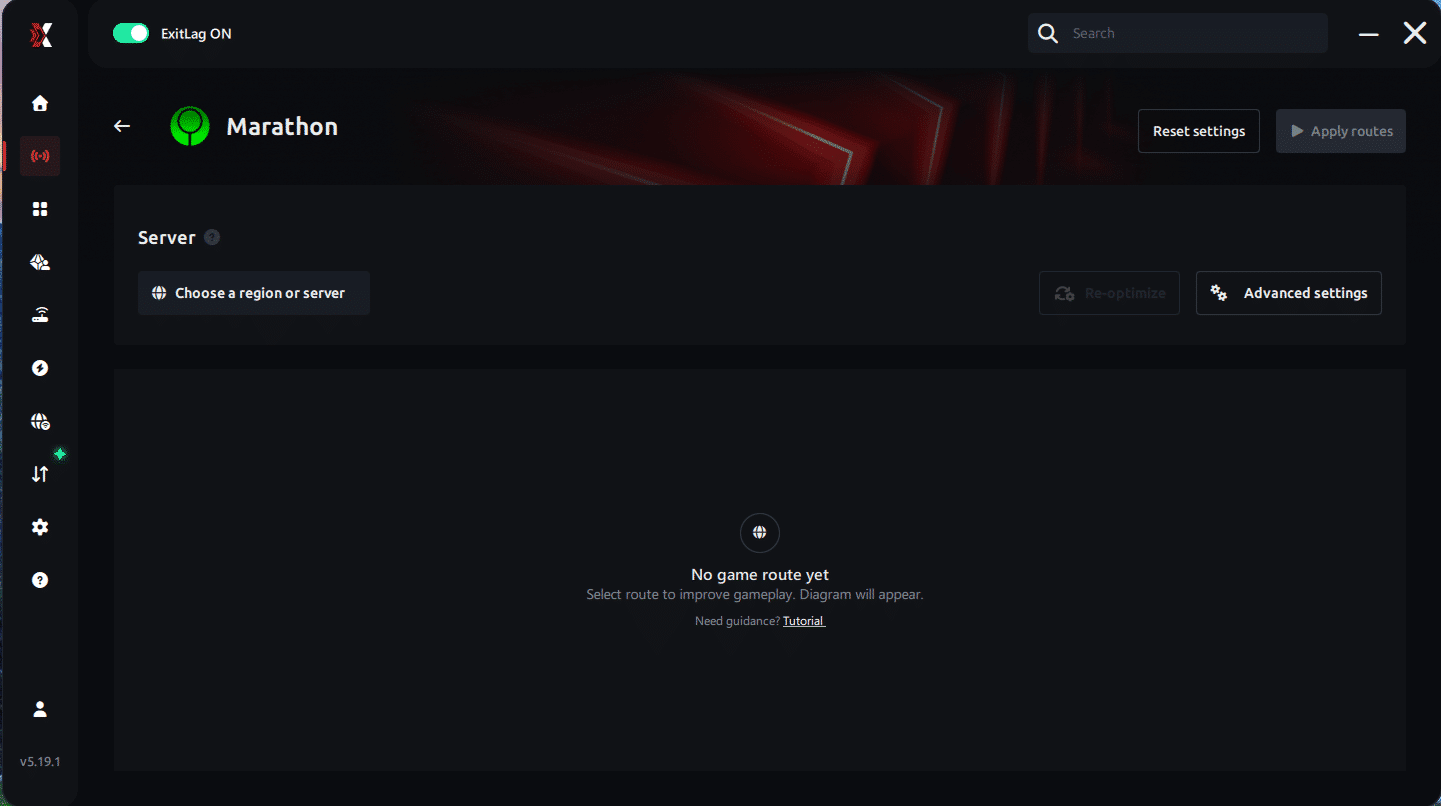
Step 4 – Choose between automated or manual route
Based on the results, you can let ExitLag automatically select the best route or manually choose the server that showed the lowest latency for your connection.
AI-optimized automated route
You can let ExitLag automatically select the best route through AI optimization. The system analyzes multiple connection paths in real time and automatically identifies the most efficient route for your connection, ensuring the lowest possible latency without requiring manual choices.
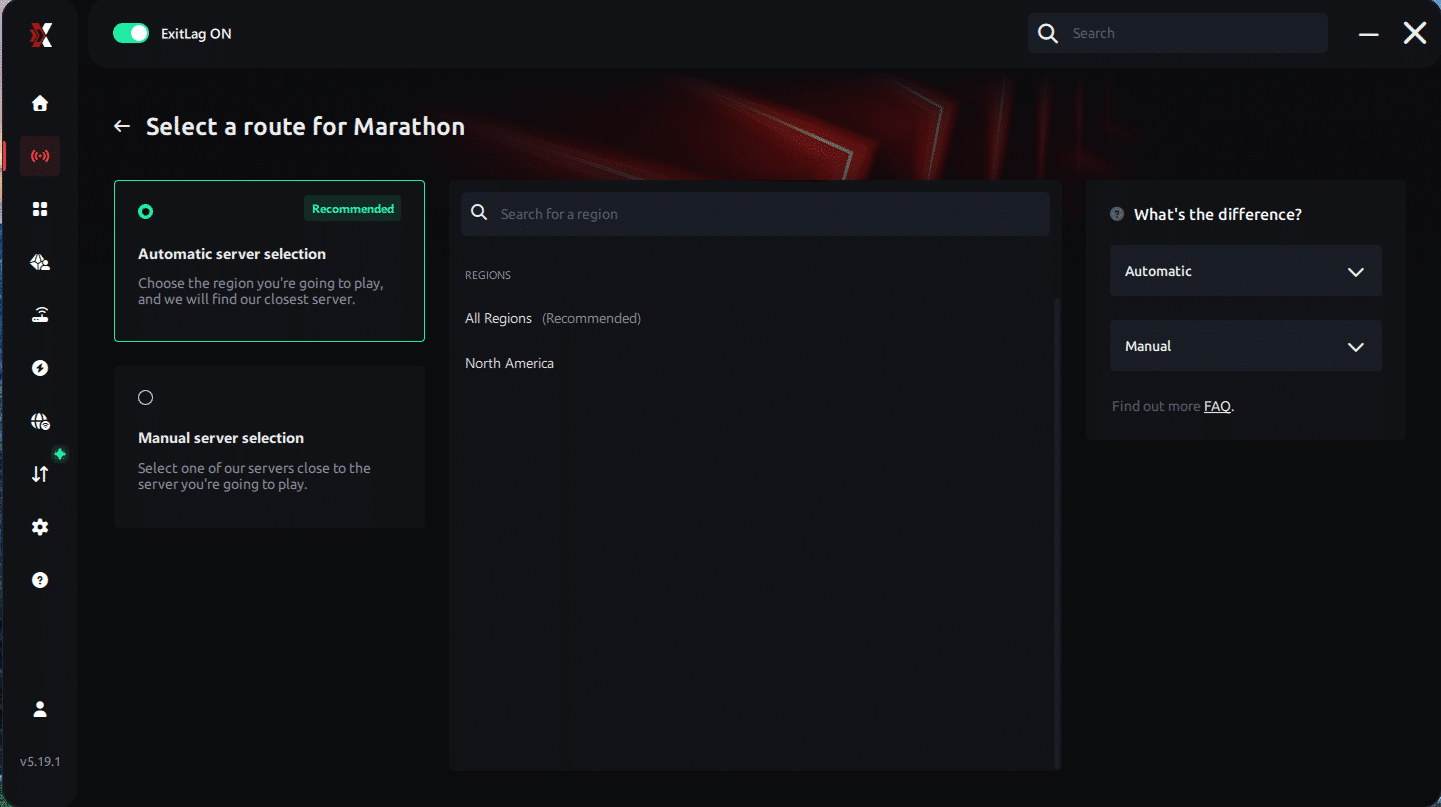
Manual route
If you prefer to have full control over your connection, you can manually choose the server based on the ping test results. Simply select the server that showed the lowest latency or the one that best meets your specific gaming needs, allowing complete customization of your experience.
Step 5 – Click “Apply routes” or the play button. ExitLag will begin optimizing your connection automatically.
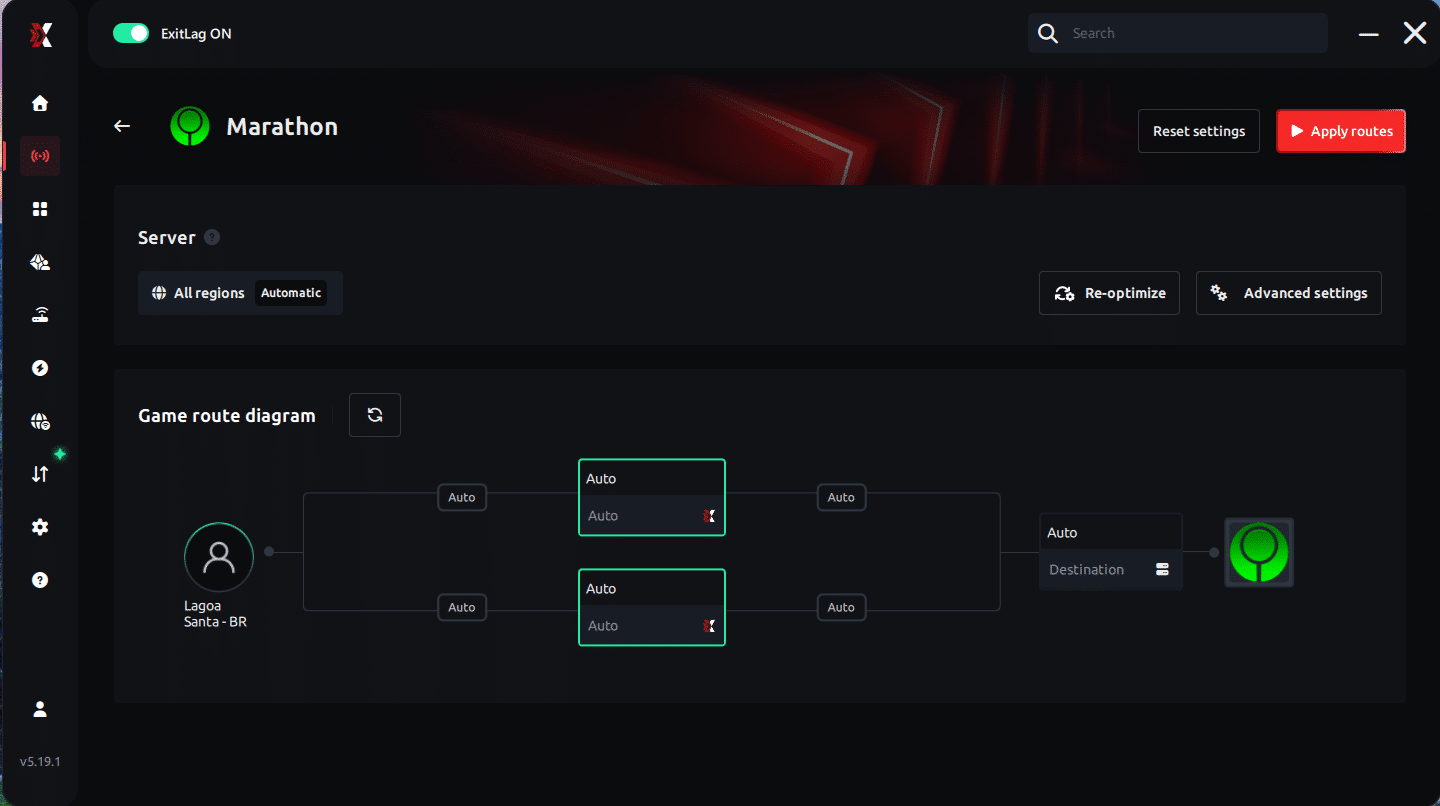
Step 6 – Wait a few seconds until optimization is complete. You’ll see ping indicators in the interface.
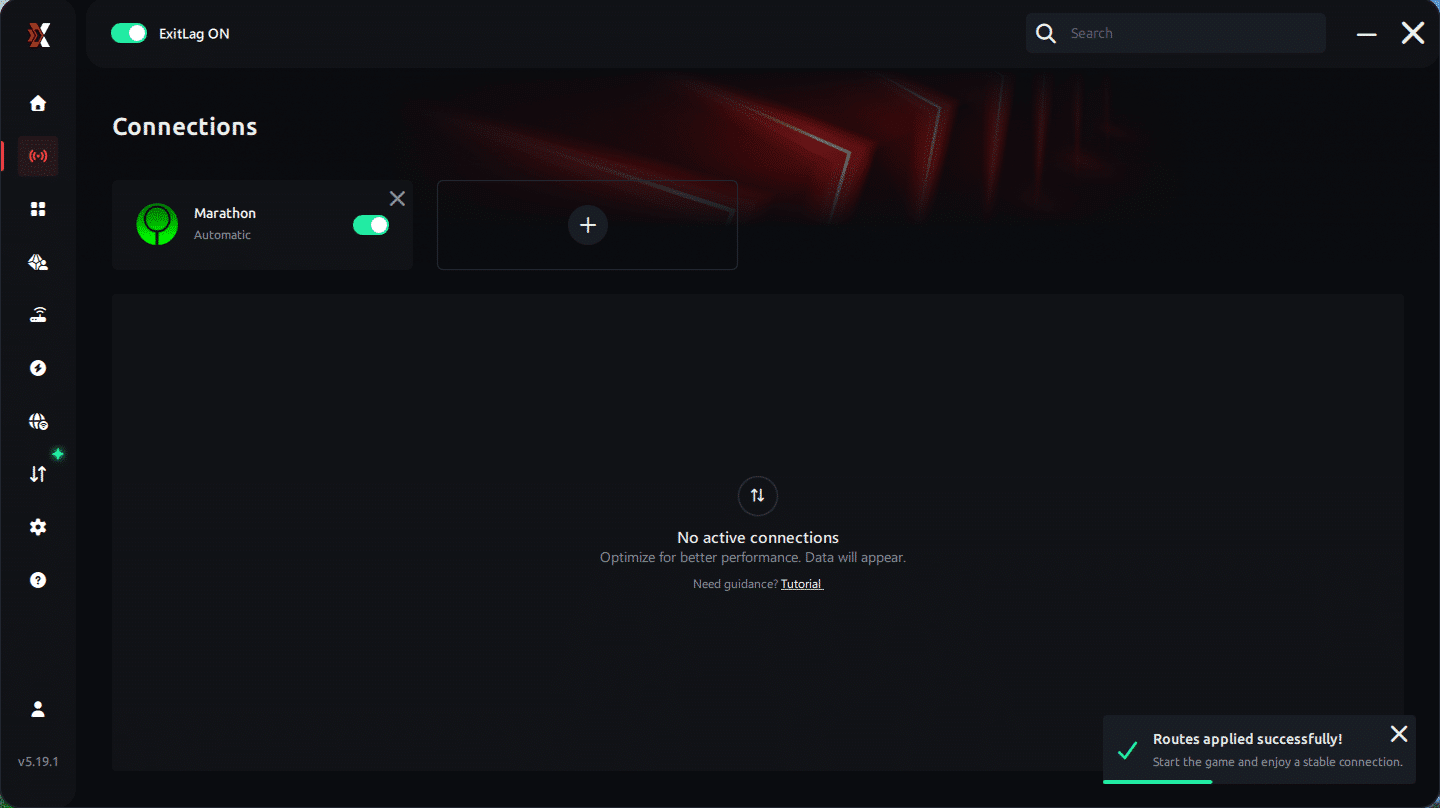
Step 7 – Launch Marathon normally. The optimization will already be active.
ExitLag runs in the background while you play, constantly adjusting routes to maintain the best possible performance.
How to use Ping for Games: Step-by-Step Guide (Marathon)
Checking your connection quality before entering a match has never been easier. Here’s how to use Ping for Games in just a few steps:
1. Open the ExitLag software on your PC – Ensure the application is installed and open. The feature is integrated into the platform and available for free to all users.
2. Access the Network Analyzer tool – Locate the Network Analyzer in the software menu.
his is where you’ll find Ping for Games along with other connection analysis features.
3. Select the game you want to test – Choose Marathon from the list. The tool supports major online multiplayer games, including FPS, Battle Royales, MOBAs, MMORPGs, and more.
4. Choose the specific server – Select the exact Marathon server you want to test instead of a generic region. This ensures more accurate results for your match.
5. Start the ping test – With one click, the measurement is performed in real time between your device and the selected Marathon server, considering your current connection (cable or Wi-Fi).
6. Analyze the results – Results appear in milliseconds (ms), automatically sorted from best to worst ping. You can also reorganize the view alphabetically if you prefer.
7. Choose the best server and play worry-free – With this information, simply select the server with the lowest latency and jump into Marathon knowing your connection is optimized.
Lag doesn’t have to decide your matches in Marathon anymore. Every dropped combo, every Fatality that stuttered, every ranked match that slipped away because of your connection — all of that has a solution.
With ExitLag, you get the fastest route to the server, reduce ping, eliminate packet loss, and play with the stability that competitive gaming demands. Your next Flawless Victory might depend less on reflexes and more on the quality of your connection.
Try ExitLag for free and discover what it’s like to play Marathon with maximum performance and zero lag.
FAQ about Marathon Packet Loss
Is packet loss the same as lag?
No. Lag usually refers to high ping (latency). Packet loss means data is missing during transmission. You can have low ping and still experience packet loss.
Lag = delay. Packet loss = missing data.
Both are harmful, but packet loss often feels more chaotic.
Why do I only have Marathon Packet Loss and not in other games?
Different games use different server locations and routing paths. Your ISP may route Marathon traffic through unstable nodes while other games use cleaner paths.
Routing quality varies per title.
Can packet loss cause bans in Marathon?
Generally, no. Packet loss causes erratic movement and desync, which differs from cheating behavior. However, extreme instability may cause automatic disconnections.
How much packet loss is acceptable for competitive play?
Ideally 0%. Up to 1% might be tolerable for casual play. Anything above 2% can significantly impact PvP performance. In high-stakes extraction matches, even 1% can cost you gear.
Can hardware cause packet loss?
Yes. Damaged Ethernet cables, outdated network drivers, malfunctioning routers, and overheating modems can all cause packet drops. Always rule out hardware before assuming ISP issues.
Does ExitLag work on private servers?
Yes. As long as the server is accessible through the internet, ExitLag can optimize the route.
Do I need to keep ExitLag running all the time?
Only while playing Marathon. Start ExitLag before launching the game for best results.
Can Marathon high ping and packet loss happen at the same time?
Yes. They are different issues but can occur simultaneously. ExitLag helps address routing-related causes of both.
How much does ExitLag cost?
ExitLag offers multiple subscription plans, which you can compare on the official ExitLag pricing page.
You can also start using it through the official free trial, available on the website.
Eliminate packet loss and play Marathon without interruptions
Marathon Packet Loss doesn’t have to define your experience. You don’t have to accept unfair deaths, broken hit registration, or unstable firefights as “normal.” While basic troubleshooting can help, routing instability is often outside your control. That’s why using specialized gaming routing technology makes the real difference.
With ExitLag, you stabilize your connection, reduce packet drops, lower latency, and protect your competitive performance. If you’re serious about improving your online matches, investing in connection optimization is just as important as improving your aim. For more performance insights and optimization guides, visit out blog.
Next steps
- Test ExitLag for free
- Configure in 5 minutes
- Compare before and after
- Dominate Marathon with maximum performance
In conclusion, solving packet loss Marathon issues requires balancing hardware, settings, and network stability. ExitLag’s multi-path technology eliminates routing delays and ensures fluid gameplay across all regions of Marathon . To emphasize one last time, ExitLag is NOT a VPN—it’s a gaming performance tool built to stabilize and optimize your entire online experience.
Now that you know everything about packet loss Marathon , if you want the most stable, smooth, and competitive gameplay possible, is time to upgrade your performance toolkit. Register at ExitLag now and improve your gameplay in a way you've never experienced before!



