Anyone who has played Minecraft during an intense PvP fight or while exploring massive multiplayer servers knows how devastating high ping can be. Blocks break seconds late, mobs freeze then teleport, and your character rubberbands unpredictably. This happens because Minecraft high ping delays every interaction between your device and the server, as happens at every online gaming.
Even more, when this problem mixes with bold issues like lag Minecraft, teleporting players, and Minecraft high ping, the entire experience collapses. To check if your favorite titles are officially supported for routing optimization, you can see the complete list of supported games.

What is high ping in Minecraft?
At first, it’s essential to understand what high ping actually means inside Minecraft. Ping is the measurement of latency, which refers to how long it takes for data packets to travel between your device and the game’s servers, expressed in milliseconds (ms). When Minecraft high ping occurs, those packets take far longer than they should, causing slow responses to in-game actions.
In other words, the higher the latency, the more disconnected you feel from the world around you. Break a block, and the server may take half a second before it updates. Swing your sword, and the hit might register after the enemy has already moved. This happens because the packet round-trip time becomes inconsistent.
In summary, Minecraft relies heavily on synchronization between the player client and the server. Any significant latency spike or unstable connection results in Minecraft latency problems that disrupt building, mining, fighting, and exploring.
How high ping affects gameplay in Minecraft
High ping affects Minecraft in multiple ways, especially when playing on large public servers, PvP arenas, or modded environments. Below are the most common symptoms players notice:
- Rubberbanding movement that pulls you back after walking.
- Delayed block breaking, making mining extremely slow.
- Hit registration issues during PvP battles.
- Server disconnections caused by timeout errors.
- Chunk loading delays, where the world around you appears slowly.
- Mob desync, making enemies teleport or freeze.
- Item pickup delay, especially in busy servers.
Check also: Minecraft error code 1: complete guide to fix exit code issues
PvP instability
Firstly, PvP servers are the most sensitive to latency issues. High ping turns bow aim, critical hits, strafing, and W-tapping into inconsistent mechanics. Every move requires precise timing, and Minecraft high ping makes that impossible.
Building and logistics delay
Similarly, building becomes frustrating when blocks place half a second after you click. Automated systems like redstone circuits or farms also become inconsistent if your connection is unstable, creating gameplay disadvantages.
Main causes of high ping in Minecraft
Server distance
At first sight, the physical distance between your router and the Minecraft server drastically impacts latency. The farther the packets must travel, the higher the ping values become. That’s why playing on servers in other continents almost always results in delay.
ISP / routing issues
Often, ISPs route traffic through inefficient or congested paths, increasing latency. Even with fast internet speed, routing problems can cause bold symptoms, like reduce ping Minecraft, to become difficult without optimization tools.
Network congestion
Beforehand, if multiple devices in your home use the internet simultaneously—streaming, gaming, downloading—your available bandwidth shrinks, resulting in Minecraft connection issues and unstable latency.
Outdated hardware
Older routers, outdated drivers, or weak Wi-Fi receivers can cause signal drops and slower packet transmission. This is common on older laptops or setups far from the router.
Game-specific cause
Sometimes the Minecraft server itself is overloaded, especially during events or when plugins consume too many resources. This causes server-side lag that affects every connected player.
How to check and test your ping in Minecraft
Firstly, Minecraft Java Edition has built-in ping indicators in the server list. You can easily see how fast your connection is before entering the server. More green bars mean lower latency, while red bars mean high delay.
Secondly, for a more accurate test, you can use OS-level commands:
- Windows: open Command Prompt and type ping -t [serverIP]
- macOS/Linux: use Terminal with ping [serverIP]
In the same way, comparing these values helps determine whether your issue comes from routing or from server instability.
Here’s how to interpret ping values:
- 0–40 ms: Excellent
- 40–80 ms: Good
- 80–130 ms: Noticeable delay
- 130–180 ms: Problematic
- 180+ ms: Severe lag, often unplayable
Afterwards, you’ll know exactly how stable your connection is.
Ping levels classification
| Ping (ms) | Quality | Gameplay Impact |
| 0–40 | Excellent | Instant block break, smooth PvP |
| 40–80 | Good | Slight delays, still playable |
| 80–130 | Medium | Noticeable block lag and mob delay |
| 130–180 | Poor | Rubberbanding, chunk issues |
| 180+ | Critical | Unplayable movement and combat |
You may also like: Minecraft House Tutorial: Step-by-Step Guide for Beginners
Basic fixes to reduce high ping in Minecraft
Optimize local connection
- Use Ethernet instead of Wi-Fi whenever possible.
- Close background apps consuming bandwidth.
- Move closer to the router to improve signal stability.
- Update network drivers and OS regularly.
- Restart your router to refresh routing tables.
- Limit the number of connected devices during gameplay.
Contact your ISP
Often, latency is caused by your provider’s routing paths. In advance, prepare the following information before contacting support:
Tell them:
- Your ping is inconsistent on international servers
- You experience routing instability at peak hours
- You need verification of line noise or packet loss
Ask for:
- A full line test
- Replacement of outdated equipment
- Route optimization if available
They might also:
- Update your modem firmware
- Recalibrate your connection settings
These steps help identify whether the issue is internal or routing-related.

ExitLag: the best solution to fix high ping in Minecraft
When standard methods fail, the most reliable way to eliminate Minecraft high ping is to optimize the route your packets take to reach the server. Above all, ExitLag is engineered specifically for gamers who need predictable, stable, and low-latency paths. Instead of relying on your ISP’s default routing—which often causes unpredictable spikes—ExitLag reroutes your data through more efficient, dedicated paths.
What is ExitLag?
ExitLag is a software created for advanced connection optimization, ensuring consistent and stable gameplay across hundreds of online titles. Designed by gamers and networking specialists, it acts as a powerful connection stabilizer, reducing jitter, avoiding delay variations, and fixing Minecraft latency spikes.
If you want to explore the full technical infrastructure behind it, check the official ExitLag technology page.
Most importantly, ExitLag is not “one option”—it is the solution for players struggling with unstable ping, unpredictable delays, or slow response times in online environments, including heavily modded servers and competitive PvP maps.
How ExitLag works
To understand how ExitLag removes instability and helps you reduce ping Minecraft, look at the five core technologies behind it. For visual diagrams and expanded explanations, visit the how ExitLag works page.
- Real-time route analysis
ExitLag constantly analyzes multiple pathways between your device and Minecraft servers, selecting the most efficient in real time. - Multiple routes simultaneously
Instead of using only one path, ExitLag sends data across multiple possible routes at the same time. If one becomes unstable, another maintains performance. - Automatic best route selection
ExitLag evaluates packet arrival speeds and automatically selects the fastest route, eliminating unnecessary delay. - Hop optimization
The software reduces the number of network “hops,” removing slow or overloaded nodes that typically cause lag Minecraft. - Connection stabilization
Through intelligent buffering and route switching, ExitLag keeps your packet flow consistent—ideal for PvP, redstone mechanisms, and multiplayer exploration.
Together, these systems fix the root cause of most Minecraft connection issues, giving players smoother, more predictable gameplay.
Advantages for Minecraft players
ExitLag offers several unique benefits specifically for Minecraft players—especially those playing on distant servers, modded worlds, or large-scale networks.
Stable and consistent ping
Firstly, ExitLag ensures stable latency, which is crucial for PvP timing, block placement, combat accuracy, and redstone synchronization.
Reduced packet loss and desync
By bypassing overloaded routes, ExitLag prevents packet loss—a common cause of mobs teleporting, delayed block breaking, and ghost hits.
Enhanced PvP precision
Competitive players in modes like Bedwars, UHC, or KitPvP gain better hit registration and fewer strange interactions caused by slow network responses.
Faster chunk and entity loading
ExitLag improves routing to reduce chunk delays, especially in large SMP maps or heavy modpacks that demand fast server-client sync.
Better experience on international servers
If you play with friends around the world or join servers outside your region, ExitLag provides optimized routes regardless of geographical distance.
No technical expertise needed
Even so, ExitLag is extremely easy to use. Its clean interface allows any player—beginner or expert—to optimize their routing in seconds.
Is ExitLag worth it for Minecraft?
Definitely. ExitLag is especially worth using if you:
- Experience irregular latency spikes
- Play PvP or competitive mini-games
- Join international servers
- Use heavy modpacks or large SMP servers
- Play far from main hosting regions
- Struggle with Minecraft connection issues during peak hours
- Experience sudden packet delay or rubberbanding
To explore subscription details, check the ExitLag pricing page.
In summary, ExitLag is a highly effective solution for stabilizing your performance and eliminating unpredictable ping behavior.
How to use ExitLag in Minecraft
The process is extremely simple:
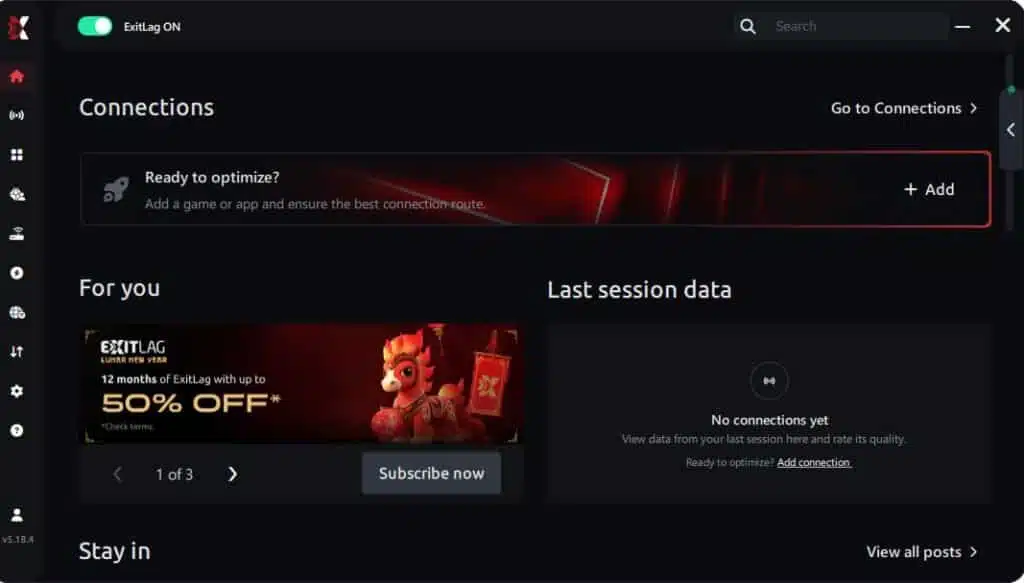
Step 1 – Access the official ExitLag website and download the application. There’s a free trial period for new users.
Step 2 – Install and open the program. Log in with your account.
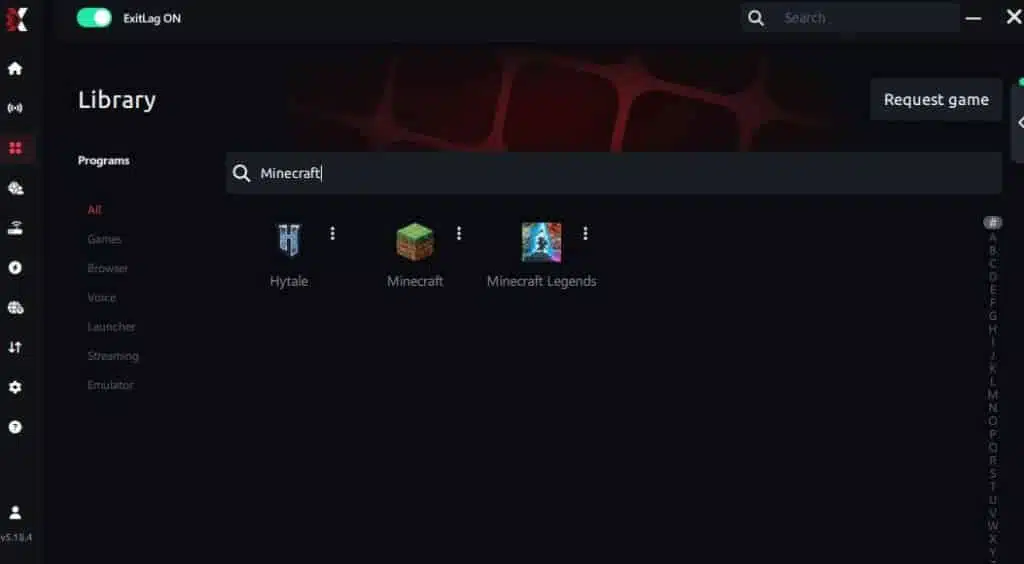
Step 3 – In the search bar, type “Minecraft” and select the game from the list.
Step 4 – Choose between automated or manual route

Based on the results, you can let ExitLag automatically select the best route or manually choose the server that showed the lowest latency for your connection.
AI-optimized automated route
Based on the results, you can let ExitLag automatically select the best route through AI optimization. The system analyzes multiple connection paths in real time and automatically identifies the most efficient route for your connection, ensuring the lowest possible latency without requiring manual choices.
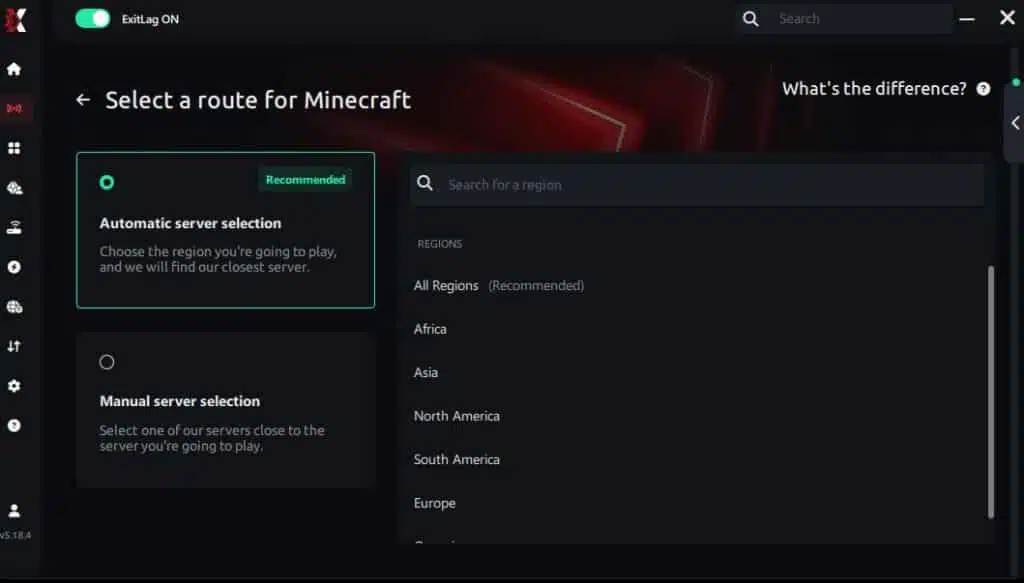
Manual route
If you prefer to have full control over your connection, you can manually choose the server based on the ping test results. Simply select the server that showed the lowest latency or the one that best meets your specific gaming needs, allowing complete customization of your experience.
Step 5 – Click “Minecraft” or the play button. ExitLag will begin optimizing your connection automatically.

Step 6 – Wait a few seconds until optimization is complete. You’ll see ping indicators in the interface.
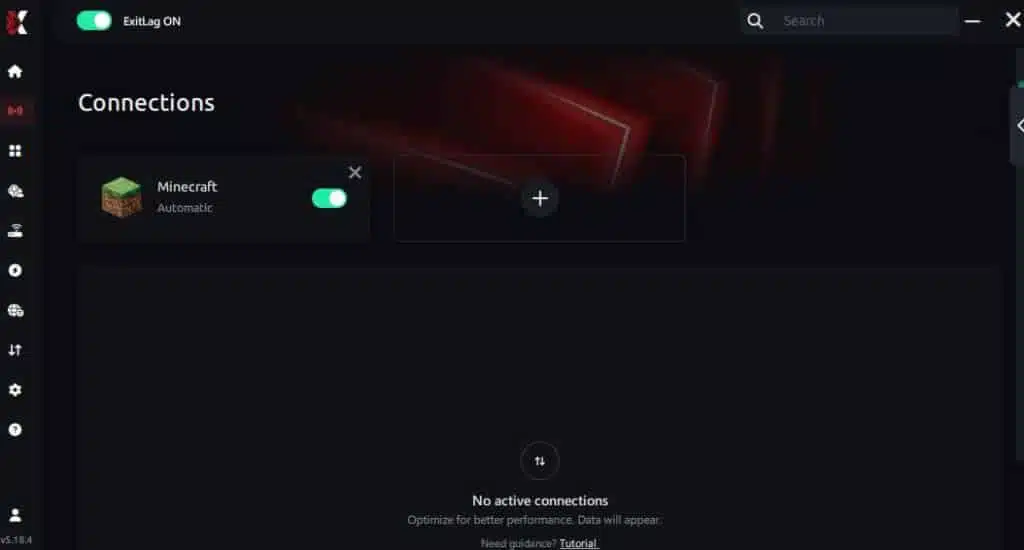
Step 7 – Launch Minecraft normally. The optimization will already be active.
ExitLag runs in the background while you play, constantly adjusting routes to maintain the best possible performance.
FAQ: everything about high ping in Minecraft
What causes high ping in Minecraft?
High ping typically happens due to long server distance, inefficient ISP routing, overloaded networks, outdated hardware, Wi-Fi interference, or server-side instability. In many cases, the root issue is not speed but the pathway your packets travel, which is why Minecraft high ping can occur even with fast internet.
How do I check my ping in Minecraft?
You can check ping directly in the server list (Java Edition) via the connection bars. For more accurate results, use OS commands like ping to the server’s IP to detect spikes, drops, or inconsistent routing. Consistency matters more than low numbers alone.
What is good ping for Minecraft?
Below 40 ms is excellent; 40–80 ms is good; 80–130 ms is playable with slight delay; anything above 130 ms becomes problematic, especially in PvP. Over 180 ms results in teleporting mobs, late block breaking, and severe lag Minecraft symptoms.
Can high ping get you banned in Minecraft?
No. High ping does not lead to bans. However, repeated connection timeouts might trigger temporary kicks from servers using strict anti-cheat protections. Maintaining a stable connection prevents unfair removals.
Does ExitLag work for Minecraft?
Yes. ExitLag is designed to optimize routing to many Minecraft hosting locations, reducing spikes, improving packet stability, and helping players avoid issues like block delay or desync. For further insights, check the ExitLag technology overview.
Custom question: Why does Minecraft lag even with good hardware?
Minecraft’s performance is heavily tied to server communication and Java networking rather than device specs alone. Even on strong hardware, poor routing or unstable packet flow can cause Minecraft latency issues.
Conclusion
In conclusion, dealing with Minecraft high ping can ruin building, fighting, and exploring—but with the right solutions, you can regain full control of your gameplay. While basic fixes help, the method for stable, low-latency performance is ExitLag, thanks to its intelligent routing and real-time optimization. For more insights, tutorials, and tips, visit the official ExitLag blog.
If you want to eliminate spikes and enjoy smoother worlds, activate your ExitLag free trial today and experience optimized gameplay immediately.
Got questions or want to connect with other players? Join the conversation at the ExitLag Forum!