
Nothing is more frustrating than seeing your skills trigger seconds late, your character freeze mid-combat, or mobs teleport unpredictably—all because of MU Online high ping. Above all, when MU Online becomes unresponsive due to high ping, every hunt becomes risky and every PvP engagement feels unfair. In advance, this guide dives deeply into the causes of instability and the best ways to reduce spikes, including how thousands of players use tools designed for supported games to eliminate lag.

What is high ping in MU Online?
At first, understanding MU Online high ping is key to fixing gameplay instability. Ping refers to the time (milliseconds) it takes for data packets to travel from your device to the game servers. The higher the value, the longer you wait for your commands to be processed. When ping rises sharply, MU Online reacts late, causing hits to miss, skills to misfire, and enemy movement to appear erratic.
Even more, latency doesn’t simply depend on internet speed. Often, delays come from inefficient routing, regional congestion, or unstable packet travel paths. Like this, a player with fast broadband can still suffer severe MU Online high ping due to poor route selection by the ISP.
In summary, MU Online high ping is the delay between your command and the server’s reaction. The more this delay varies, the more unstable and inconsistent your gameplay becomes.
How high ping affects gameplay in MU Online
Soon after high ping appears, the whole flow of MU Online breaks. Skills feel delayed, movement becomes unpredictable, and combat becomes unreliable.
Here are the most common consequences:
- Late hit registration breaking combos and rotations
- Rubberbanding that teleports your character backwards
- Frequent disconnections during bosses or arena fights
- Heavy competitive disadvantage in PvP
- Delayed buffs, heals, and mobility skills
- Loss of timing, making high-level content unsafe
Combat timing and skill execution
First of all, MU Online has skill rotations that depend on precision. In the same way, high ping creates delays that make certain combos impossible to perform consistently. As a result, your DPS drops, your defense timing breaks, and your survivability suffers.
Movement, pathing, and positioning
From the same point of view, rubberbanding disrupts precise positioning. Above all, MU Online’s fast-paced maps require fluid movement; instability makes your character “snap” back or misstep, creating dangerous gaps during boss mechanics.
Main causes of high ping in MU Online
Server distance
At first sight, long distances between your location and MU Online servers increase travel time for packets. Definitely, players outside the main hosting regions will suffer more MU Online connection issues.
ISP / routing issues
According to your provider’s automated routing system, your data may take routes that are longer, unstable, or congested. That way, even premium internet plans may suffer spikes and lag MU Online moments.
Network congestion
Often, multiple devices at home or regional internet saturation cause traffic instability. Consequently, ping fluctuates severely, creating unpredictable MU Online latency spikes.
Outdated hardware
While MU Online is light, outdated routers, old Ethernet cables, or weak Wi-Fi signals amplify delays. Beforehand, ensuring your hardware is stable avoids unnecessary interruptions.
Game-specific causes
Some MU Online servers become overloaded during events, updates, or peak times. While temporary, this dramatically increases MU Online high ping until the load stabilizes.
How to check and test your ping in MU Online
Firstly, MU Online provides in-client ping indicators that show real-time latency. If values fluctuate from 50ms to 250ms repeatedly, you’re experiencing unstable latency—not just slow internet. In contrast, stable numbers reflect a healthy route.
On the other hand, you can run OS commands such as ping or tracert to see how many hops your connection takes to reach the server. This identifies routing failures and regional congestion affecting MU Online connection issues.
In conclusion, latency under 50ms is excellent, 50–120ms is acceptable, 120–180ms is noticeable, and anything above that poses a risk of lag MU Online.
(Primary KW #3: MU Online high ping)
Ping levels classification
| Ping level | Gameplay experience |
| 0–50 ms | Excellent, real-time responsiveness |
| 50–120 ms | Playable, minor delay |
| 120–180 ms | Noticeable lag MU Online issues |
| 180–250 ms | Severe delay, risky hunts |
| 250+ ms | Unplayable and unstable |
Basic fixes to reduce high ping in MU Online
Optimize local connection
- Use Ethernet instead of Wi-Fi.
- Close background applications consuming bandwidth.
- Restart your modem and router.
- Update network adapter drivers.
- Limit connected devices.
- Disable automatic updates from launchers or cloud apps.
Contact your ISP
Even so, if high ping persists, contacting your ISP becomes essential. They can diagnose line noise, routing failures, or local congestion.

Bullet list:
- Ask if your region is experiencing instability
- Request verification of packet loss or jitter
Another bullet list:
- Confirm if your router is outdated
- Ask about potential route alternative paths
Required numbered list:
- Request an updated routing profile
- Confirm if international routes are congested
- Ask for connection testing at peak times
ExitLag: the best solution to fix high ping in MU Online
Right away, ExitLag stands out as the most efficient way to stabilize unstable routes, reduce latency spikes, and finally eliminate the MU Online high ping that disrupts hunts and PvP. Unlike basic tweaks, it directly optimizes the path your data takes, guaranteeing smoother gameplay even during peak hours or congested regions.
What is ExitLag?
In advance, ExitLag is a specialized software designed exclusively for connection optimization, created by gamers to ensure stable, predictable latency. It intelligently restructures the way your traffic travels, eliminating the inconsistent routing that causes MU Online latency, skill delays, and rubberbanding. For a deeper look at the engine behind it, you can explore its technology in the technology section.
As well as stabilizing your gameplay, ExitLag ensures consistently lower ping—something no standard ISP fix can guarantee alone. Above all, it delivers the stability MU Online players need for high-risk areas, bosses, events, and PvP.
How ExitLag works
ExitLag uses advanced multi-layer systems to stabilize your connection and reduce MU Online connection issues:
- Real-time route analysis
It constantly evaluates available paths to MU Online servers, choosing the fastest options instantly. - Multiple routes simultaneously
Instead of relying on one unstable path, it sends data through several routes at the same time. - Automatic best route selection
The system picks the route with the lowest latency and highest stability, improving consistency. - Hop optimization
It reduces the number of network “hops”, decreasing delays and unstable nodes. - Connection stabilization
As a result, ping stops spiking randomly, creating a smooth and predictable session. You can learn more in the how it works section.
Advantages for MU Online players
Complete latency stabilization
Firstly, ExitLag dramatically reduces spikes, making all skills, movements, and rotations more responsive.
Elimination of packet loss
Often, rubberbanding happens due to packet loss. ExitLag’s multi-routing eliminates these drops entirely.
Faster and safer hunts
In the same way, better route stability means fewer unexpected freezes during AoE rotations or bosses.
Better PvP performance
As a result, duels, Castle Siege, and arena battles become more accurate and competitive.
Freedom from unstable ISPs
Even if your provider struggles with routing, ExitLag bypasses inefficient paths, delivering stable gameplay.
Works with countless games
You can explore all supported titles on the supported games list.
Is ExitLag worth it for MU Online?
Definitely. If you're tired of dying due to instability, losing DPS rotations, or missing PvP opportunities because of MU Online high ping, ExitLag will make an immediate difference. It is particularly essential for players far from main servers or those playing during busy hours. You can review available plan options in the pricing section.
How to use ExitLag in MU Online
The process is extremely simple:
Step 1 – Access the official ExitLag website and download the application. There’s a free trial period for new users.
Step 2 – Install and open the program. Log in with your account.
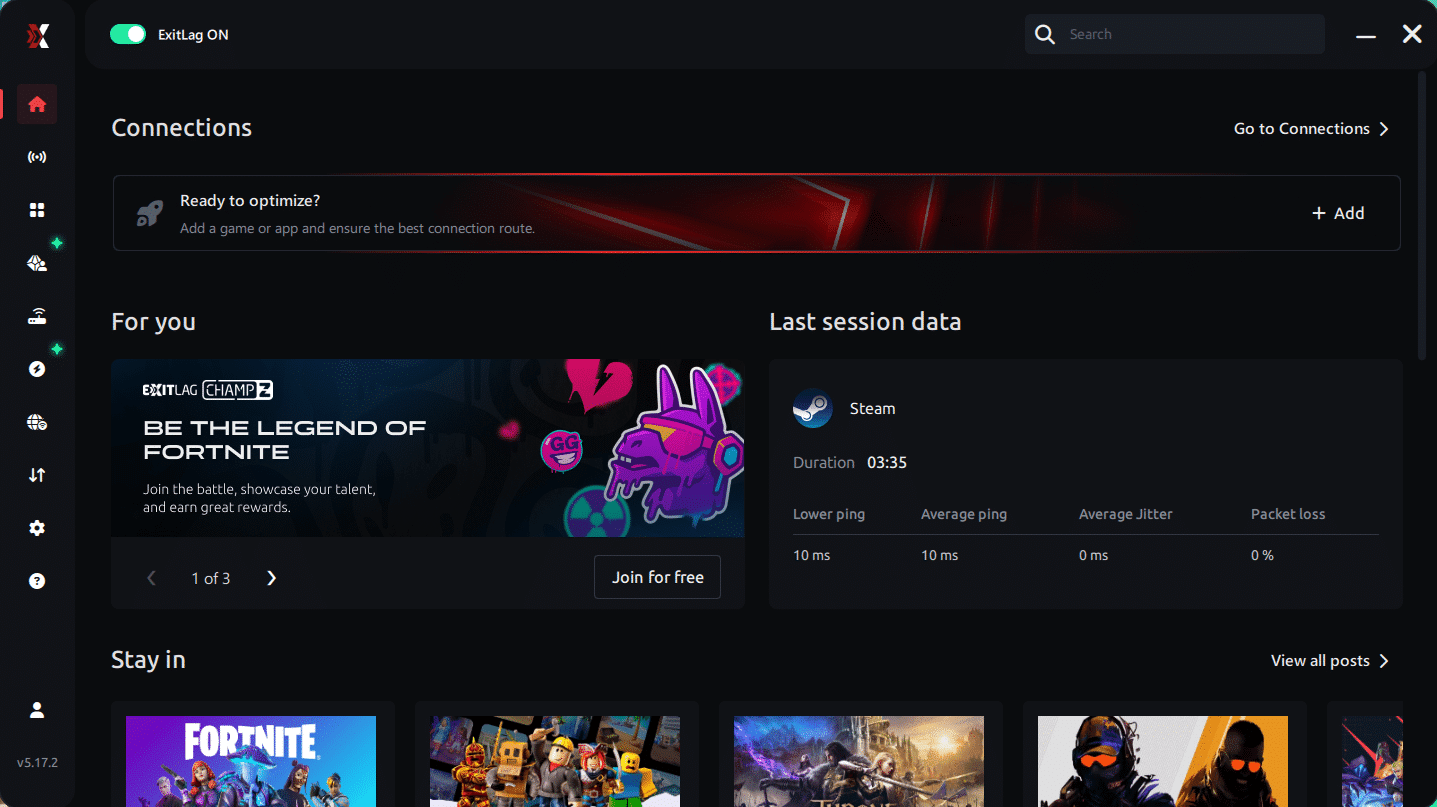
Step 3 – In the search bar, type “MU Online” and select the game from the list.
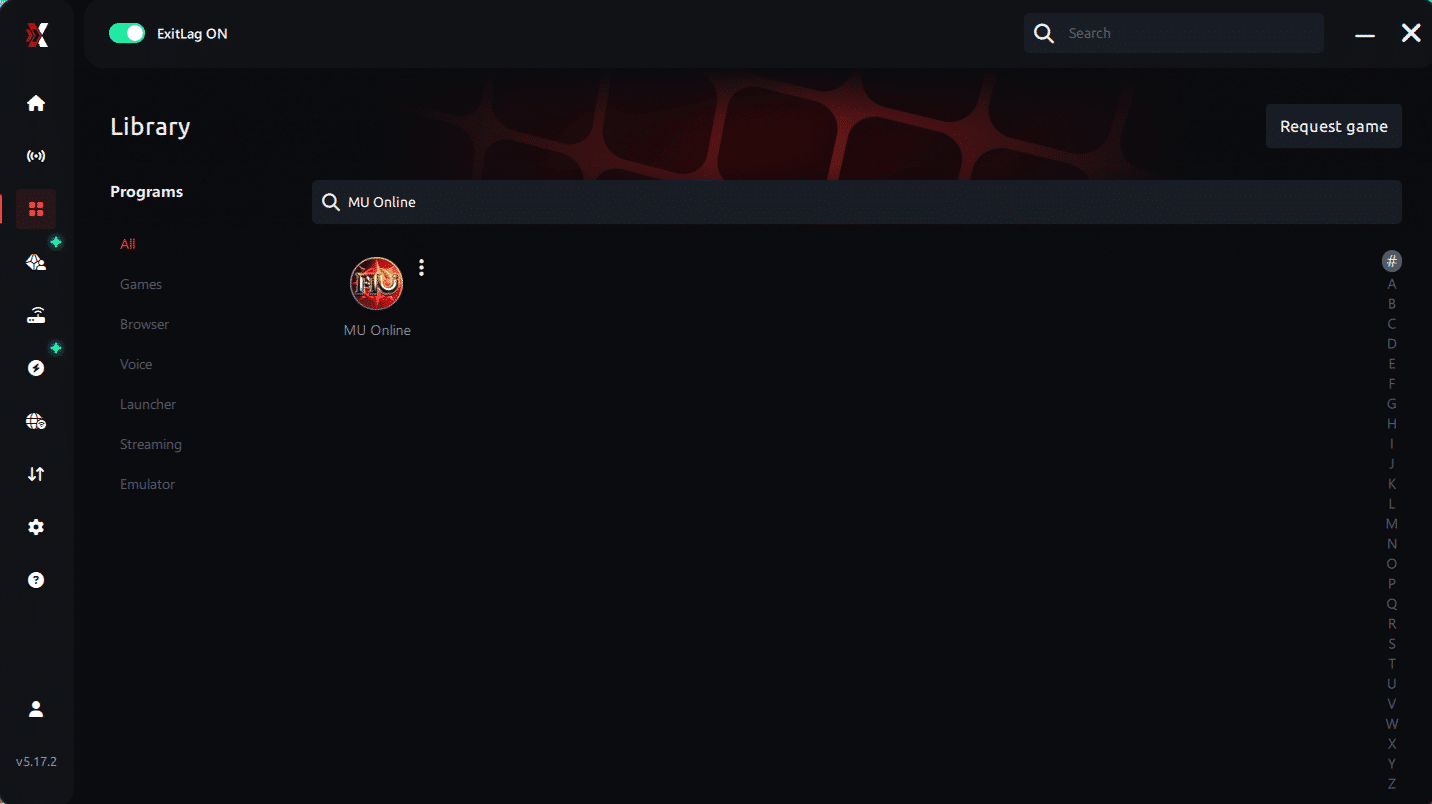
Step 4 – Choose between automated or manual route
Based on the results, you can let ExitLag automatically select the best route or manually choose the server that showed the lowest latency for your connection.
AI-optimized automated route
Based on the results, you can let ExitLag automatically select the best route through AI optimization. The system analyzes multiple connection paths in real time and automatically identifies the most efficient route for your connection, ensuring the lowest possible latency without requiring manual choices.
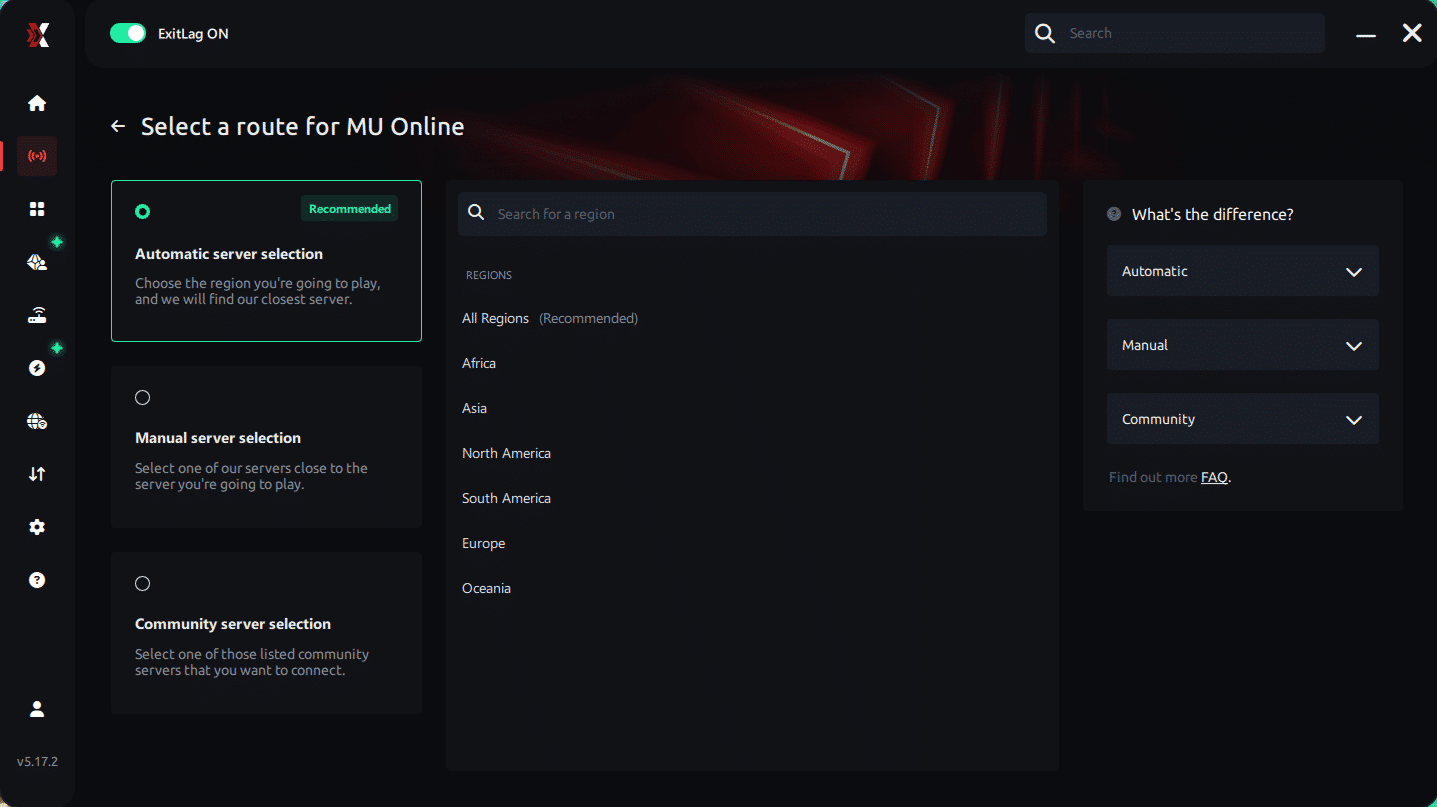
Manual route
If you prefer to have full control over your connection, you can manually choose the server based on the ping test results. Simply select the server that showed the lowest latency or the one that best meets your specific gaming needs, allowing complete customization of your experience.
Step 5 – Click “Apply routes” or the play button. ExitLag will begin optimizing your connection automatically.
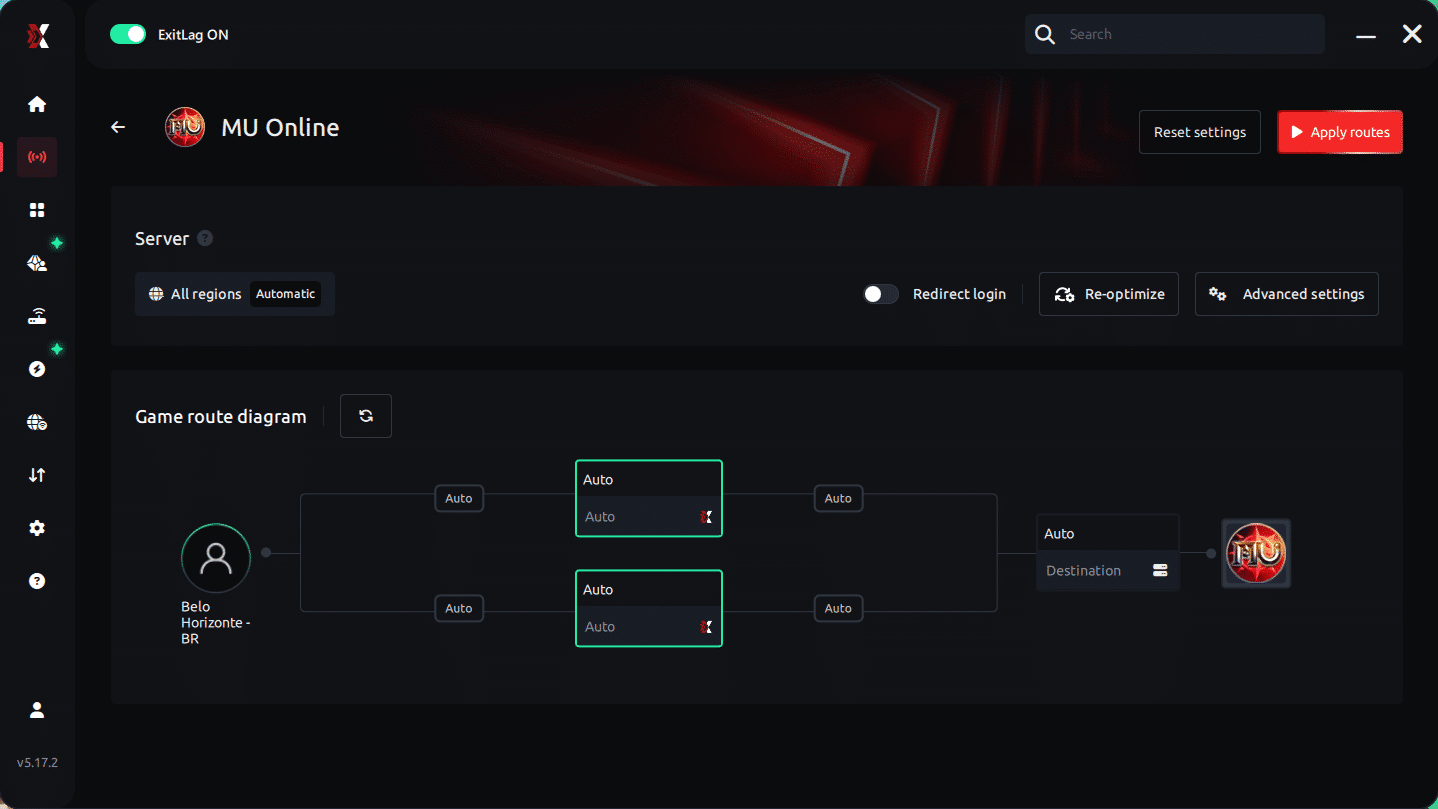
Step 6 – Wait a few seconds until optimization is complete. You’ll see ping indicators in the interface.
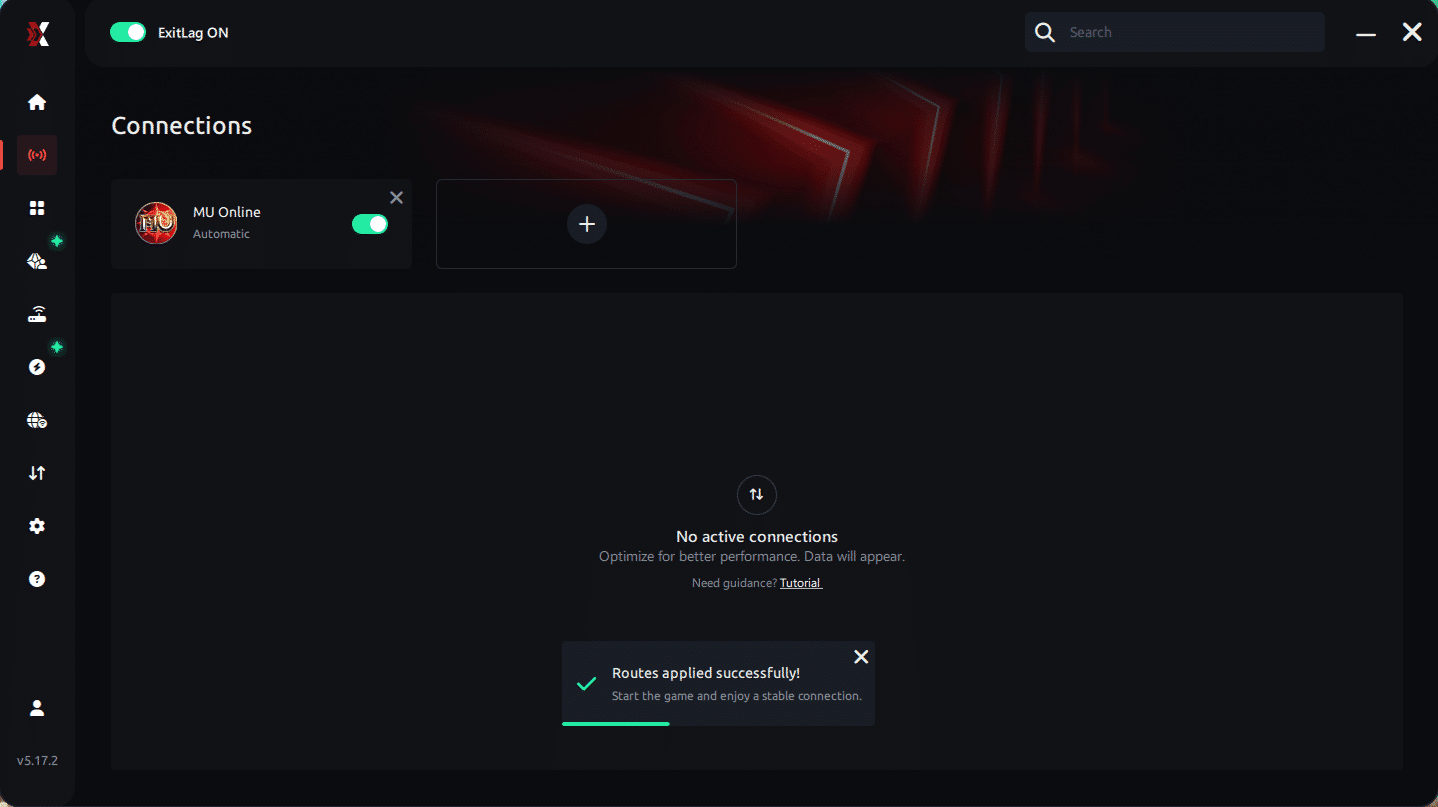
Step 7 – Launch MU Online normally. The optimization will already be active.
ExitLag runs in the background while you play, constantly adjusting routes to maintain the best possible performance.
Final thoughts: Play MU Online without lag forever
At the end of the day, MU Online lag should never ruin your experience. Whether you’re farming, upando level, fazendo PvP ou participando de eventos, your internet connection should never be the reason you disconnect or lose progress.
With ExitLag, you finally take control of your network performance. The software finds the fastest routes, eliminates lag, and stabilizes your ping so that every skill, every movement, and every action happens exactly when you want it to.
Try ExitLag for free right now and experience how smooth MU Online can be when your connection is fully optimized. Play with confidence, evolve faster, and make lag a thing of the past.onsiveness.
FAQ: everything about high ping in MU Online
What causes high ping in MU Online?
At first sight, MU Online high ping is usually caused by inefficient routing, distance from servers, unstable networks, or regional congestion. Even with good internet speeds, routing paths chosen by your ISP often create delays.
Additionally, overloaded servers, outdated equipment, or wireless interference can worsen MU Online connection issues, causing random spikes during battles or events.
How do I check my ping in MU Online?
You can monitor your real-time latency through the game interface. If the numbers jump from 60ms to 300ms instantly, this indicates unstable routes—not slow internet.
On the other hand, OS commands like ping and tracert help reveal where delays occur along your route, providing clarity on the source of MU Online latency.
What is good ping for MU Online?
Good ping is typically under 50ms, ensuring clean, responsive gameplay. Values between 50–120ms remain playable, but beyond that, players begin experiencing lag MU Online, rubberbanding, or delayed skills.
Even more, the game becomes risky above 180ms, especially in high-damage maps.
Can high ping get you banned in MU Online?
No. High ping does not result in bans. MU Online’s detection systems do not flag players for instability or latency issues. In summary, MU Online high ping affects performance but never leads to account penalties.
Does ExitLag work for MU Online?
Yes—ExitLag is widely used to stabilize ping, reduce spikes, eliminate packet loss, and improve route quality. Players experiencing MU Online connection issues often see immediate improvements after activation.
Custom question: Why does MU Online lag more during events?
During big events, server load increases dramatically, causing temporary instability. Combined with regional traffic spikes, this amplifies delays and increases the chances of MU Online high ping. Optimized routing helps reduce the impact, but server load still plays a role.
Conclusion
In conclusion, understanding the causes of instability helps you take control of your gameplay experience. By combining essential fixes with intelligent routing optimization, you can finally overcome MU Online high ping and enjoy stable, predictable gameplay across hunts, bosses, and PvP.
For more insights, tutorials, and tips, visit the official ExitLag blog.
MU Online high ping no longer needs to ruin your free time. Now that you understand the causes and how to stabilize your connection, you can finally enjoy your gaming smoothly. Start your free trial and see the difference for yourself.



