Playing Dead by Daylight should be an intense, adrenaline-filled experience where every chase, stun, and last-second escape matters. However, many players struggle with instability caused by packet loss Dead by Daylight, leading to missed skill checks, teleporting killers, and unresponsive controls. If you’re searching for ways to fix packet loss Dead by Daylight and get your matches running smoothly again, you’re in the right place. Therefore, before diving into deep solutions, it’s essential to understand why these disruptions happen and how they impact your gameplay.
Like this, many users start troubleshooting by switching Wi-Fi networks, restarting their devices, or even reinstalling the game, yet the problem often persists. That’s because the root cause is rarely inside the game itself. Instead, the issue lies in how your connection communicates with the servers.
However, you don’t need to deal with this alone. The complete list of supported titles can help you verify that your game is fully compatible with advanced optimization tools, which you can check here ExitLag Games.

What is packet loss in Dead by Daylight?
To understand how packet loss Dead by Daylight affects your gameplay, you must first know what packet loss actually is. In online games, your actions are sent to the servers through thousands of tiny data packets. These packets carry your movements, hits, and interactions. However, when the transmission between your computer and the servers becomes unstable, some of these packets fail to reach the destination.
This “packet loss” works like sending several small messages, but a few disappear before arriving. Therefore, the server never receives the complete information and cannot fully synchronize your actions with the game world. That’s when you experience delays, stutters, or irregular movement from survivors or killers.
Finally, when enough packets drop during gameplay, Dead by Daylight interprets this as unpredictable behavior. This leads to lag spikes, failed hit registration, or rubberbanding—even if your ping looks normal. That’s why many players confuse packet loss with latency, but they are entirely different problems.
How packet loss affects your gameplay
Here are the most common issues caused by packet loss during a match:
- Delayed actions: You throw pallets or vault windows, but the command triggers late.
- Rubberbanding: Your survivor snaps back to a previous position after sprinting.
- Failed skill checks: Inputs register too late, causing generator explosions.
- Teleporting killers: The killer appears in inconsistent positions.
- Dropped interactions: Healing, repairing, and rescuing stop unexpectedly.
- Hit registration issues: Both killers and survivors see hits not registering correctly.
Main causes of packet loss in Dead by Daylight
Inefficient routing
Your connection travels through multiple routers before reaching Dead by Daylight’s servers. However, if any stop along the way becomes congested or faulty, your pacotes de dados may be discarded. Like this, unstable routing creates gaps in the communication between you and the game servers.
Unstable connection
Faulty modems, outdated routers, and ISP instability can all generate inconsistent transmission. Even small interruptions cause packets to fail, especially during intense moments when your network is under stress.
Distance to servers
The farther you are from Dead by Daylight’s servers, the more “hops” your connection must take. Therefore, long physical distance increases the chance of packet loss Dead by Daylight.
Network congestion
Multiple devices streaming or downloading in your home divide bandwidth, resulting in insufficient stability for competitive matches.
Faulty hardware
Damaged cables, overheated routers, or degraded network cards also contribute to packet loss, especially during long gaming sessions.
How to identify packet loss in Dead by Daylight
First, observe in-game behavior. When survivors teleport, killers swing through survivors without hitting, or your skill checks feel delayed even with low ping, that often signals Dead by Daylight connection issues caused by packet loss.
However, you can confirm packet loss by using ping diagnostics. Running a command such as ping -n 50 <server> (Windows) can reveal if some packets fail to return. If the report shows lost packets, that means your connection isn’t stable.
Finally, consistent spikes, irregular latency, or erratic player movement, even with good hardware, are all signs you’re dealing with Dead by Daylight lag stemming from packet loss.
Packet loss levels
| Packet loss % | Gameplay impact |
| 0% | Ideal and fully stable |
| 1–2% | Minor stutters, still playable |
| 3–5% | Noticeable lag and delayed actions |
| 6–10% | Frequent rubberbanding and instability |
| 10%+ | Unplayable; severe disconnections |
Basic solutions to reduce packet loss in Dead by Daylight
Optimize your local connection
- Use a wired Ethernet connection instead of Wi-Fi.
- Close background apps that use bandwidth.
- Update network drivers regularly.
- Enable QoS on your router to prioritize the game.
- Test different cables to rule out physical damage.
- Restart modem/routers to refresh routing tables.
Contact your ISP
If problems persist, your ISP may be experiencing instability or routing inefficiencies. Ask for a line test or request a route optimization for gaming traffic.
ExitLag: the ultimate solution to eliminate packet loss in Dead by Daylight
What is ExitLag?
ExitLag is a software specialized in advanced connection optimization, designed specifically for online gaming. It ensures that your data travels through the most efficient routes, eliminating the instability that traditional connections cannot solve. However, what sets ExitLag apart is its advanced technology, which constantly evaluates and optimizes the best paths for your game.

How ExitLag works to reduce packet loss
ExitLag’s Multi-Internet system analyzes and stabilizes the best possible route. It works as follows:
- Real-time route monitoring
- Multiple simultaneous connections
- Automatic rerouting when a path loses packets
- Hop optimization to shorten distance
- Continuous stabilization to ensure consistency
Advantages for Dead by Daylight players
Using ExitLag dramatically reduces or fully eliminates packet loss Dead by Daylight, ensuring stable interactions and reliable hit registration. It lowers ping, stabilizes connections, supports private servers, and improves match flow.
Is ExitLag worth using in Dead by Daylight?
Absolutely yes, especially if you face chronic instability, play on distant servers, or experience frequent rubberbanding.
How to use ExitLag in Dead by Daylight
The process is extremely simple:
Step 1 – Access the official ExitLag website and download the application. There’s a free trial period for new users.
Step 2 – Install and open the program. Log in with your account.
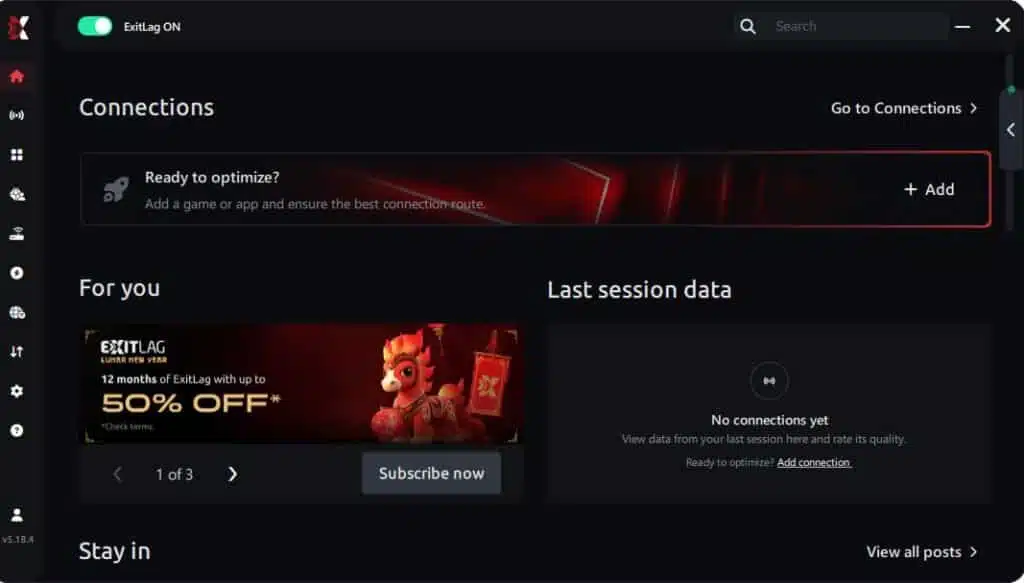
Step 3 – In the search bar, type “Dead by Daylight” and select the game from the list.

Step 4 – Choose between automated or manual route
Based on the results, you can let ExitLag automatically select the best route or manually choose the server that showed the lowest latency for your connection.
AI-optimized automated route
Based on the results, you can let ExitLag automatically select the best route through AI optimization. The system analyzes multiple connection paths in real time and automatically identifies the most efficient route for your connection, ensuring the lowest possible latency without requiring manual choices.
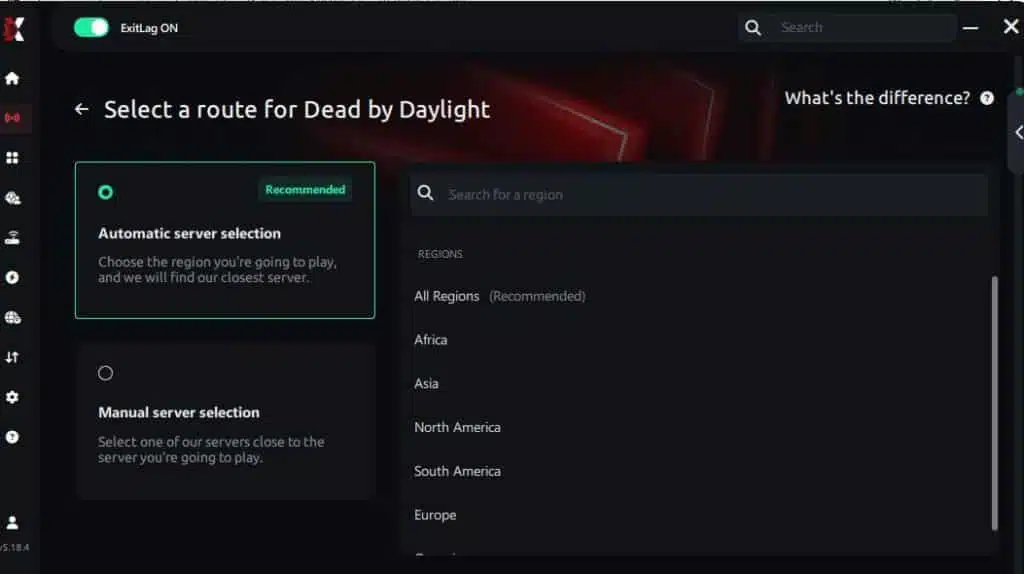
Manual route
If you prefer to have full control over your connection, you can manually choose the server based on the ping test results. Simply select the server that showed the lowest latency or the one that best meets your specific gaming needs, allowing complete customization of your experience.
Step 5 – Click “Dead by Daylight” or the play button. ExitLag will begin optimizing your connection automatically.
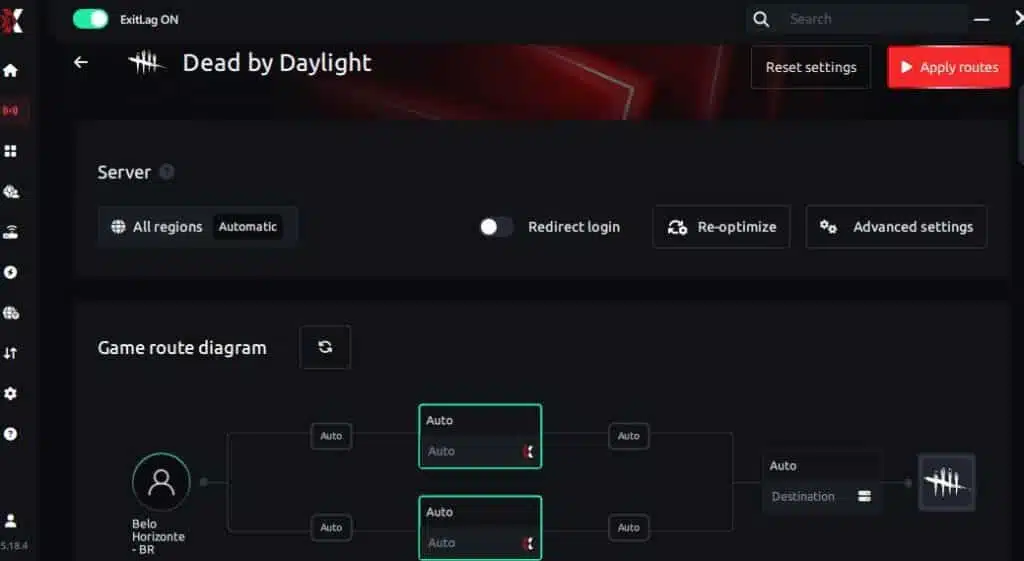
Step 6 – Wait a few seconds until optimization is complete. You’ll see ping indicators in the interface.
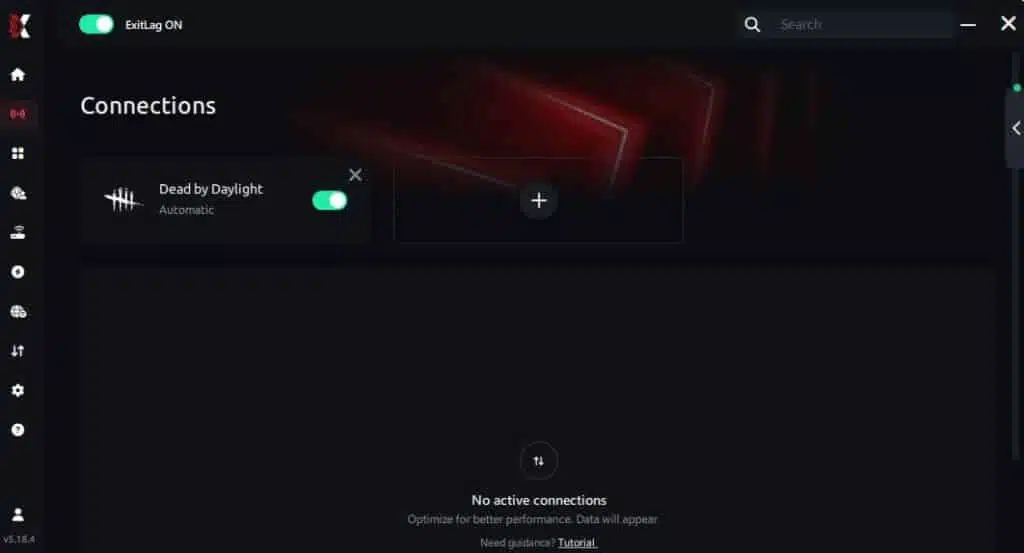
Step 7 – Launch Dead by Daylight normally. The optimization will already be active.
ExitLag runs in the background while you play, constantly adjusting routes to maintain the best possible performance.
FAQ: common questions
Is packet loss the same as lag?
No. Lag refers to high ping, while packet loss is missing data. You can have low ping and still suffer severe disruptions due to missing packets.
Why do I have packet loss only in Dead by Daylight?
Each game uses different servers and routing paths. Therefore, one game may run smoothly while another suffers.
Can packet loss cause a ban?
It’s unlikely. Packet loss creates erratic but non-malicious behavior. However, extreme instability may cause disconnections.
How much packet loss is acceptable for Dead by Daylight?
Ideally 0%. Casual players may tolerate up to 1%, but competitive gameplay requires a stable connection.
Can hardware cause packet loss?
Yes. Damaged cables, overheating routers, or faulty network cards lead to missing packets.
Does ExitLag work on private servers?
Yes, it supports both official and private servers.
Do I need ExitLag enabled all the time?
Only while playing. It’s recommended to activate it before launching Dead by Daylight.
Eliminate packet loss and play Dead by Daylight without interruptions
Therefore, packet loss Dead by Daylight doesn’t have to ruin your matches or your ranking. With the right optimizations and tools, you can return to smooth, stable gameplay without fear of rubberbanding or lost actions.
Like this, ExitLag stands as the definitive solution to stabilize your route and ensure you never lose a match due to connection failures again.
Got questions or want to connect with other players? Join the conversation at the ExitLag Forum!