Path Of Exile 2 Mods covers a broad category of third-party tools, UI enhancements, loot filters, and overlay applications that the PoE community uses to improve the game experience. Unlike mods for single-player games, PoE2 modifications are almost exclusively overlay tools and external software rather than game file modifications, because Grinding Gear Games does not support traditional modding of the game client itself.
Path Of Exile 2 Mods that are permitted by GGG include loot filter customization, third-party trading overlays, DPS calculators, and map overlays that read publicly available game data. Mods that inject code into the game client or modify game files are prohibited and risk account bans.
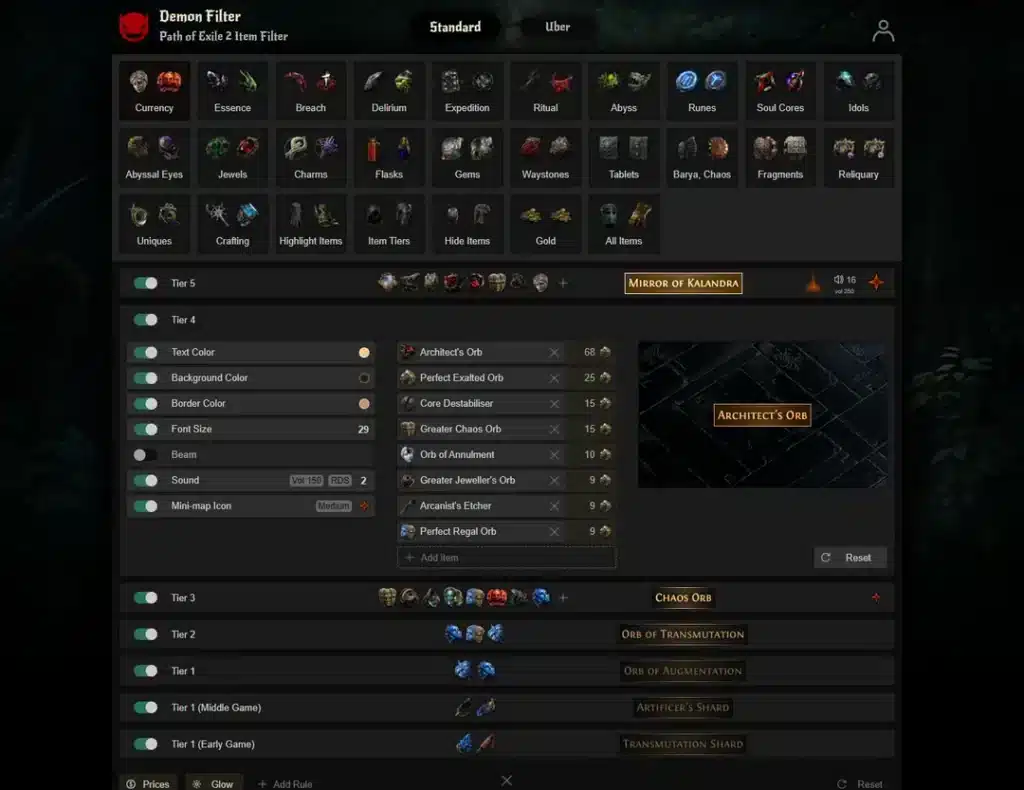
The safest Path of Exiles 2 Mods are those built on filterblade (for loot filters), Awakened PoE Trade (for price checking), and PoE Overlay (for item comparison). These have been community-staples for years and are generally considered safe to use alongside the game.
What Types of Mods Exist for Path of Exile 2?
Path of Exile 2’s modding ecosystem differs significantly from traditional game modding. Here is the breakdown:
| Type | Examples | GGG Permitted? |
|---|---|---|
| Loot Filters | FilterBlade, custom .filter files | Yes |
| Trade Overlays | Awakened PoE Trade | Yes |
| Item Overlay | PoE Overlay | Yes |
| DPS Calculators | Path of Building 2 | Yes |
| Map Overlays | External map apps | Varies |
| Client Modifications | File injection, texture mods | No |
| Bot Software | Auto-flasking, auto-play | No |
Best Permitted Path of Exile 2 Tools
1. FilterBlade (Loot Filter Tool)
FilterBlade is the industry-standard loot filter creator for Path of Exile games. It allows players to customize exactly which items appear on screen when they drop, with highly specific rules based on item type, rarity, size, and value.
How to use:
- Visit the FilterBlade website
- Build your custom filter using the visual editor
- Export the filter as a .filter file
- Place it in your PoE2 filter folder (Documents\My Games\Path of Exile 2)
- Enable the filter in-game under Item Filter settings
A well-configured loot filter is one of the single most impactful quality-of-life improvements for any PoE2 character.
2. Awakened PoE Trade
Awakened PoE Trade is an overlay tool that allows instant price checking of any item in your inventory or on the ground by pressing a keyboard shortcut. It queries the PoE2 trade API and displays current market prices directly on screen.
Key features:
- Instant price checks with a single hotkey
- Bulk item value calculations
- Trade whisper copy with one click
- Filter integration for price evaluation
3. Path of Building 2
Path of Building 2 is the definitive build planner for Path of Exile 2. It allows offline build theorycrafting with accurate DPS calculations, passive skill tree simulation, and gear comparison.
Key features:
- Import current builds directly from the in-game passive tree
- Simulate gear changes without spending items
- Calculate DPS across all skill combinations
- Plan ascendancy point allocation before committing
4. PoE Overlay
PoE Overlay provides additional item information beyond what the game’s base UI shows. It displays historical price trends, league popularity statistics, and detailed stat breakdowns for items.
Is Torchlight 2 Path of Exile Mod Relevant?
The keyword “Torchlight 2 Path of Exile Mod” refers to community-made modifications for Torchlight 2 that added Path of Exile-inspired content, classes, or items to that separate game. This is entirely distinct from Path of Exile 2 itself.
Torchlight 2 has full mod support through its Steam Workshop. Searching “Path of Exile” in the Torchlight 2 Steam Workshop returns community content inspired by PoE’s character classes and item systems.
These are mods for Torchlight 2, not mods for Path of Exile 2. If you are looking for PoE-inspired content in a fully mod-supported game, Torchlight 2 is the correct destination.
What Mods Are NOT Safe for Path of Exile 2?
GGG has clear policies on modifications. These categories are prohibited:
- Auto-flask software that triggers flasks automatically without player input
- Pixel bots or automation software that plays the game automatically
- Client injection tools that modify the running game process
- Texture or asset replacement that modifies game files directly
- Speed hacks or timing manipulation software
Using prohibited tools risks permanent account bans. GGG’s ban policy is account-wide and has no exceptions for “first offense” mitigation.
How To Install PoE2 Loot Filters Safely
Installing a loot filter is the most common and safest form of PoE2 modification:
- Download or create your filter as a .filter text file
- Navigate to Documents\My Games\Path of Exile 2 on Windows
- Place the .filter file in this directory
- Launch Path of Exile 2
- In Settings, navigate to Item Filter
- Select your custom filter from the dropdown
- Apply and begin playing
The filter system is built directly into the game client and is fully supported by GGG.
Pro Tips: Path Of Exile 2 Mods
- Set up a loot filter before starting your first character: The difference between playing with and without a loot filter in the endgame is enormous. Items that matter become clearly visible, and junk items that slow you down disappear from the ground. Start with a community-recommended filter like NeverSink for PoE2.
- Use Path of Building 2 for every major build decision: Spending currency on a gear upgrade without verifying the DPS change in Path of Building first leads to expensive mistakes. PoE2’s stat interactions are complex enough that your intuition will frequently be wrong.
- Keep overlay tools updated after major patches: Awakened PoE Trade and PoE Overlay rely on game API data that changes with each major patch. Running outdated versions gives incorrect price information that can cost you significantly on trade decisions.
- Never use any tool that requires running as Administrator unless it is a trusted, widely-used community tool: Legitimate PoE2 overlays do not require Administrator access. Any tool that requests elevated permissions for a “PoE2 mod” is a strong signal of malicious intent.
Common Mistakes Path Of Exile 2 Mods Players Make
- Using automation software and assuming it is safe because “everyone uses it”: GGG bans automation tools actively and without public warning. The frequency with which other players use something does not protect your account. Fix: use only overlay tools that read game data without injecting code.
- Installing loot filters from untrusted sources: Some sites distribute .filter files with embedded URL calls that contact external servers when loaded. Fix: use only FilterBlade or community-endorsed filter authors from PoE’s official forums.
- Not updating Path of Building 2 after major content patches: Outdated versions of Path of Building produce inaccurate DPS numbers because new skills, modifiers, and mechanics are not reflected. Fix: check for updates on the PoE Community tools GitHub page after every major patch.
Optimize PoE2 Performance While Using Overlay Tools With ExitLag
Running overlay tools alongside Path of Exile 2 increases system resource usage, and on systems with limited RAM or CPU headroom, this can contribute to latency spikes. ExitLag specifically optimizes your game connection independent of other running processes, maintaining stable routing even when your system is managing overlay software simultaneously.
ExitLag is a game connection optimizer for PoE2 that routes your game traffic through the fastest available path to GGG’s servers. Not a VPN, no game file modification.
Download ExitLag for PC at exitlag.com/download.
All game images used in this blog post belong to Grinding Gear Games. They are used for informational and educational purposes only and do not imply endorsement or affiliation with the rights holders.
Got questions or want to connect with other players? Join the conversation at the ExitLag Forum!