Path of Exile 2 packet loss destroys your ARPG experience in the most frustrating ways imaginable. You’re executing a perfect boss rotation with your Sorceress, but suddenly your character freezes mid-cast while the boss one-shots you.
Your dodge roll refuses to activate during crucial mechanics. Rare monsters teleport across the screen unpredictably. These problems cost you valuable loot drops and ruin your endgame progression consistently.
Furthermore, packet loss silently costs you maps through no fault of your own. It transforms smooth farming sessions into humiliating deaths. Meanwhile, your perfectly timed skill rotations never register on the supported game servers.
Moreover, understanding how to eliminate this connection problem is essential for endgame success. Whether you’re farming Tier 15 maps or tackling pinnacle bosses, stable connections determine everything.

What is packet loss in Path of Exile 2?
Packet loss occurs when data packets traveling between your computer and game servers fail to reach their destination. Think of packets as messages in bottles thrown into the ocean.
Each bottle contains crucial information about your in-game action. For instance, a click to activate a skill, a command to dodge roll, or your exact position on the map.
When these “bottles” disappear during transit, the server never receives the information. Consequently, this creates desynchronization between what you see and what’s actually happening in the match.
How data transmission works in Path of Exile 2
During data transmission between your computer and Path of Exile 2 servers, information passes through multiple intermediate points. These points are called “hops” and include routers and switches.
If any of these points becomes congested or experiences technical problems, it can discard data packets. Therefore, your commands aren’t processed correctly by the game server.
The result? Moreover, monsters’ actions appear delayed or in wrong positions. Additionally, you experience that horrible feeling of playing with lag even when ping seems acceptable.
Why packet loss is devastating in ARPG gameplay
Packet loss is particularly devastating in Path of Exile 2 because the game depends on precise timing. Furthermore, exact positioning determines survival in high-tier content consistently.
A single lost packet during a boss fight can cost you the entire map. Meanwhile, hardcore players and endgame farmers demand zero tolerance for connection issues.
Consequently, even 1% packet loss creates unpredictable gameplay that destroys progression. Therefore, eliminating it becomes mandatory for serious players pushing content.
How packet loss affects your gameplay in Path of Exile 2
The impact of packet loss extends far beyond simple lag or stuttering. Understanding Path of Exile 2 classes mechanics becomes impossible when connection issues interfere.
Here are the most common and frustrating packet loss symptoms:
- Delayed skill execution: You press your main attack but the skill only executes 0.5 seconds later, leaving you vulnerable
- Severe rubberbanding: Your character suddenly “travels back in time” and appears directly in monster packs
- Dodge roll failures: Your defensive ability simply doesn’t respond when activated, resulting in instant death
- Missed loot pickups: That unique item you were about to grab doesn’t register, vanishing forever
- Disconnections during boss fights: You lose connection mid-encounter, wasting portal and map investment
- Monster teleportation: Elite enemies disappear and reappear in completely different positions, making mechanics unpredictable
Main causes of Path of Exile 2 packet loss
Identifying what causes your connection problems helps you fix them effectively. Understanding Path of Exile 2 lagissues provides comprehensive troubleshooting context.
Inefficient routing between you and servers
The path your data travels to Path of Exile 2 servers isn’t a straight line whatsoever. Instead, each packet passes through multiple intermediate routers along the way.
Some ISPs use extremely inefficient routes for gaming traffic. For example, they send your data through geographically absurd paths unnecessarily. Consequently, more intermediate routers mean greater probability of packet loss occurring.
Unstable local internet connection
Problems with your local internet infrastructure are extremely common causes of packet loss. Firstly, your modem or router may have outdated firmware or be overheating constantly.
Secondly, Wi-Fi connections are particularly problematic due to interference from multiple sources. For instance, interference from other devices, walls, and microwaves cause signal loss.
Network congestion during peak hours
Even with excellent internet, multiple devices consuming bandwidth simultaneously cause problems. For example, torrent downloads, 4K streaming, and cloud backups compete for bandwidth.
During league launches and major content updates, Grinding Gear Games’ servers can become congested. Therefore, this creates server-side packet loss affecting all players simultaneously.
Hardware problems causing packet loss
Defective or outdated network cards are surprisingly common causes of connection issues. Specifically, a network card with an old driver or damaged components can discard packets randomly.
Damaged ethernet cables are another frequent culprit behind mysterious connection problems. For instance, cables repeatedly bent or exposed to electromagnetic interference cause transmission errors.
How to identify packet loss in Path of Exile 2
Knowing how to diagnose packet loss helps you understand your connection problems. Cooperative gameplay with Path of Exile 2 party size makes connection stability even more critical.
In-game detection methods
Press F1 to display the performance metrics overlay. This shows real-time information including latency and frame time graphs.
Look for ping spikes and irregular patterns in the latency graph. Specifically, sudden jumps from stable 50ms to 200ms indicate packet loss issues.
Additionally, watch for the red connection icon appearing in the upper-right corner. This indicator warns about severe connection problems requiring attention.
Behavioral signs during gameplay
Watch for these warning signs:
- Inconsistent latency with ping varying dramatically without apparent reason
- Noticeable lag even when your displayed ping is low and stable
- Frequent rubberbanding where your character is pulled back to previous positions
- Skills that feel delayed or unresponsive during critical combat moments
Packet loss levels and competitive impact
| Packet Loss % | Connection Quality | Gameplay Impact | Endgame Viability |
| 0% | Perfect | No impact whatsoever | Ideal for hardcore |
| 0-1% | Excellent | Rare microfreezes | Acceptable for softcore |
| 1-3% | Good | Occasional delays | Problematic for bosses |
| 3-5% | Poor | Frequent rubberbanding | High-tier maps risky |
| 5-10% | Very Poor | Severely affected | Progression impossible |
| 10%+ | Unplayable | Constant disconnections | Cannot complete maps |
Basic solutions to reduce Path of Exile 2 packet loss
Before investing in advanced solutions, try these basic fixes first. Understanding Path of Exile Onslaught mechanics requires stable connections.
Optimize your local connection
Follow these steps to optimize your home network for gaming:
- Switch from Wi-Fi to ethernet cable: Wired connections eliminate signal interference
- Close background applications: Shut down Steam downloads, browsers, torrent clients
- Update network drivers: Download the latest drivers from manufacturer’s website
- Configure QoS on router: Prioritize gaming traffic over other network activities
- Restart network equipment: Power cycle your modem and router
- Test with different cables: Replace potentially damaged ethernet cables
Contact your ISP when necessary
If you’ve tried all local optimizations and still experience consistent packet loss, contact your ISP. Mention specifically that you’re experiencing packet loss with exact percentages.
ExitLag: the definitive solution to fix Path of Exile 2 packet loss
Advanced connection optimization requires specialized software designed for ARPG gaming. Collecting Path of Exile extra effect cosmetics becomes more enjoyable without connection interruptions.
What is ExitLag?
ExitLag is the definitive and most advanced solution available to eliminate packet loss. Using proprietary advanced technology, it creates a protection layer between your computer and servers.
Unlike generic solutions that merely mask problems temporarily, ExitLag attacks the root cause. Specifically, it fixes inefficient and unstable public internet routing permanently.
How ExitLag works to reduce packet loss
ExitLag uses a revolutionary approach called Multi-Internet that changes everything. Understanding how it works reveals the sophisticated optimization process.
The technology works through five key mechanisms:
- Real-time analysis: Continuously monitors the quality of multiple different routes
- Simultaneous multiple connections: Sends your data through different routes simultaneously
- Automatic selection: Detects when a specific route starts losing packets
- Hop optimization: Uses proprietary servers strategically positioned worldwide
- Continuous stabilization: Reduces jitter and ensures consistent throughput
Advantages of ExitLag for Path of Exile 2 players
Packet loss elimination is the main and most impactful advantage ExitLag provides. Through Multi-Internet technology, ExitLag drastically reduces or completely eliminates packet loss.
This means an end to frustrating deaths where your dodge rolls simply don’t register. Furthermore, rubberbanding dragging you back into monster packs disappears completely.
Significant ping reduction is another crucial advantage for endgame content consistently. By finding more direct and efficient routes, ExitLag often reduces latency by 30-60%.
Stable and consistent connection is fundamental for hardcore gameplay. You experience a rock-solid connection throughout entire mapping sessions without unpredictable variations.
Is ExitLag worth it for Path of Exile 2?
ExitLag is definitely worth using if you play on distant international servers. Specifically, it transforms unplayable connections into surprisingly smooth experiences.
If you participate in hardcore mode or push high-tier endgame content, ExitLag becomes essentially mandatory. For serious Path of Exile 2 players, ExitLag pays for itself multiple times quickly.
Check current pricing options to find the plan that fits your needs.
How to use ExitLag in Path of Exile
The process is extremely simple:
Step 1 – Access the official ExitLag website and download the application. There’s a free trial period for new users.
Step 2 – Install and open the program. Log in with your account.

Step 3 – In the search bar, type “Path of Exile” and select the game from the list.

Step 4 – Choose between automated or manual route

Based on the results, you can let ExitLag automatically select the best route or manually choose the server that showed the lowest latency for your connection.
AI-optimized automated route
Based on the results, you can let ExitLag automatically select the best route through AI optimization. The system analyzes multiple connection paths in real time and automatically identifies the most efficient route for your connection, ensuring the lowest possible latency without requiring manual choices.
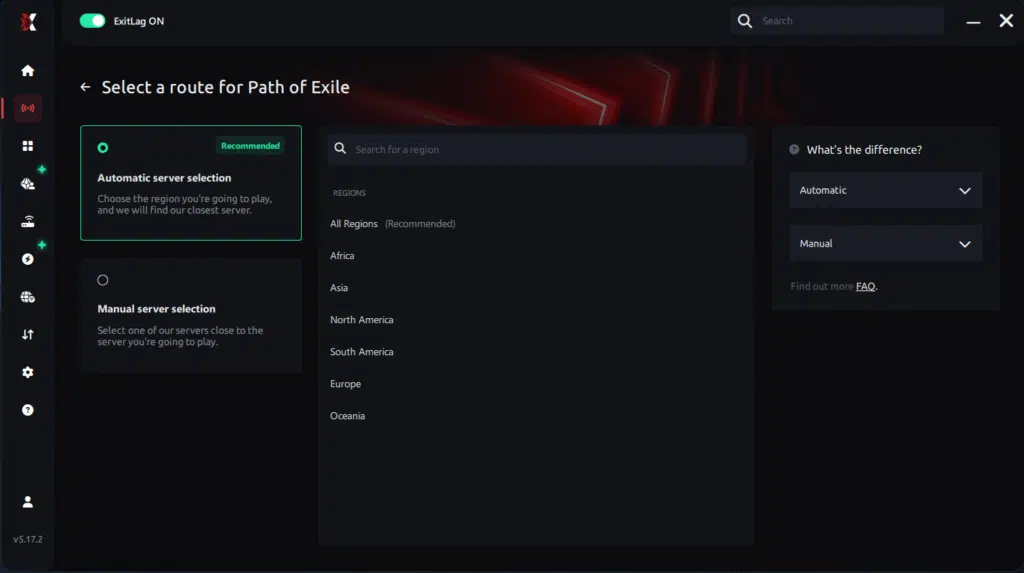
Manual route
If you prefer to have full control over your connection, you can manually choose the server based on the ping test results. Simply select the server that showed the lowest latency or the one that best meets your specific gaming needs, allowing complete customization of your experience.
Step 5 – Click “Path of Exile” or the play button. ExitLag will begin optimizing your connection automatically.

Step 6 – Wait a few seconds until optimization is complete. You’ll see ping indicators in the interface.
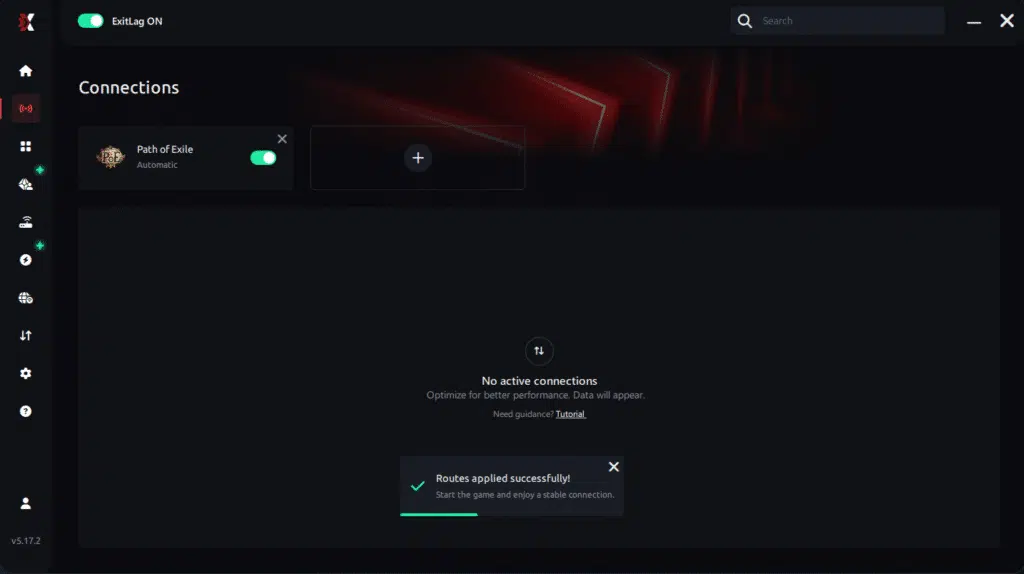
Step 7 – Launch Path of Exile normally. The optimization will already be active.
ExitLag runs in the background while you play, constantly adjusting routes to maintain the best possible performance.
FAQ: Path of Exile 2 packet loss questions answered
Is packet loss the same as lag?
No, they’re fundamentally different. Lag refers to high ping (elevated latency), while packet loss means data packets don’t reach the destination.
You can have low ping with severe packet loss, or high ping with zero packet loss. They’re separate connection problems requiring different solutions entirely.
Why do I have packet loss only in Path of Exile 2?
Different games use servers in different datacenters with completely different routes. The network path to Path of Exile 2 servers might pass through problematic routers that don’t affect other games.
Geographic location of servers and ISP routing policies determine which games experience packet loss. This explains why one game works perfectly while Path of Exile 2 struggles consistently.
How much packet loss is acceptable for hardcore mode?
Ideally 0% for hardcore gameplay. For softcore mapping, up to 1% might be tolerable occasionally.
However, for hardcore characters or pinnacle boss attempts, even 1% can be fatal. One rubberbanding incident can cost you hundreds of hours of character progression permanently.
Can my hardware cause packet loss?
Yes – defective network cards, damaged cables, outdated routers, and overheating modems are common causes. Testing with different hardware helps identify the problem systematically.
However, ExitLag’s multiple-route technology compensates effectively if replacement isn’t immediately possible. Software optimization can overcome hardware limitations significantly.

Does ExitLag work with all Path of Exile 2 servers?
Yes, ExitLag works with both official Grinding Gear Games servers worldwide and any league. The software optimizes the route to whatever Path of Exile 2 server you’re connecting to.
Configuration remains identical whether connecting to trade leagues, SSF modes, or hardcore variants. Route optimization applies universally across all connection types.
Do I need ExitLag running constantly?
No, you only need ExitLag running while playing Path of Exile 2. However, start it before launching the game to ensure optimized routes are established from the beginning.
Closing ExitLag after finishing mapping sessions frees system resources. Activate it again before your next Path of Exile 2 session for continued optimization.
Conclusion: eliminate Path of Exile 2 packet loss permanently
Path of Exile 2 packet loss doesn’t have to end your endgame progression or prevent pushing content successfully. The frustration of losing maps due to connection problems rather than mechanical failures is completely avoidable.
Every failed boss attempt because your dodge roll didn’t activate is preventable with proper optimization. Every death because your character rubberbanded into monster packs can be eliminated completely.
ExitLag stands as the definitive solution for serious players who refuse to accept subpar connections. By attacking packet loss at its root through intelligent multi-route technology, it transforms problematic connections into professional-grade performance.
Whether you’re farming currency daily or attempting pinnacle bosses, eliminating packet loss is fundamental. Explore more gaming optimization tips on the ExitLag blog for additional performance improvements.Ready to eliminate packet loss permanently and dominate Path of Exile 2 with flawless connection? Try ExitLag risk-freeand experience professional-grade connection optimization today.
Got questions or want to connect with other players? Join the conversation at the ExitLag Forum!