Anyone diving into Path of Exile 2 knows how devastating high ping can be—your character freezes mid-combat, skills trigger seconds late, and desync can cause instant deaths in tough encounters, at this and any other game. While it may appear random at first, routing issues, unstable servers, or overloaded networks typically cause Path of Exile 2 high ping.
Additionally, Path of Exile 2 is part of the supported games list, meaning there are proven methods to stabilize your connection. Therefore, understanding the causes and solutions becomes essential for a smooth and reliable ARPG experience. This guide reveals why Path of Exile 2 high ping happens, how to reduce it, and how to eliminate unstable routing permanently.

What is high ping in Path of Exile 2?
Beforehand, understanding Path of Exile 2 high ping requires knowing how latency, data packets, and servers work together. Ping represents the time, in milliseconds (ms), it takes for your device to send a request and receive a response from the game server.
Above all, latency determines how fast actions appear on screen, making it crucial in a game where split-second dodges, flask usage, and precision movement decide survival. Meanwhile, data packets carry player input—skill activations, movement updates, and server synchronization—so any delay affects responsiveness.
Now, when ping increases, your commands reach the server late. In the same way, your character might appear in the wrong position, skills may misfire, or enemies may hit you before your client registers their attack. That’s why stable latency, not just low latency, is essential for Path of Exile 2.
How high ping affects gameplay in Path of Exile 2
High ping breaks the fluidity of Path of Exile 2 because ARPG combat relies on frame-by-frame reaction. Below are common issues caused by unstable routing or ping spikes:
- Rubberbanding while dodging boss attacks
- Delayed skill activation, especially mobility skills
- Inconsistent hit registration on projectiles and melee
- Failed flask activation during emergencies
- Position desync making enemies appear in the wrong place
- Disconnects during heavy encounters
- Severe gameplay disadvantage in competitive modes
Skill delay and survival impact
Firstly, high ping directly affects survival. Flask timing, dodge windows, and skill cooldowns become inconsistent. In summary, bosses that require precise movement become nearly impossible to defeat safely.
Mapping disruptions and clear speed loss
Secondly, Path of Exile 2’s mapping relies on constant movement. When latency spikes, your character stops mid-animation, and enemies suddenly appear around you. That way, clear speed drops dramatically and the game feels unresponsive.
Main causes of high ping in Path of Exile 2
Server distance
Path of Exile 2 uses multiple regional servers, and Sometimes players are matched with servers far from their location. Consequently, long distances increase travel time for data packets, causing natural latency increases.
ISP / routing issues
According to network specialists, ISPs often route traffic through multiple unnecessary hops. In other words, your packets take longer paths because routing prioritizes cost, not performance. This leads to unstable Path of Exile 2 latency and unexpected spikes.
Network congestion
Often, high ping occurs because multiple devices use your network simultaneously. Streaming, downloads, cloud sync, or mobile devices can consume bandwidth, generating Path of Exile 2 connection issues.
Outdated hardware
Old routers, outdated drivers, or weak Wi-Fi setups can introduce instability. Even more, older network cards struggle to maintain consistent communication with servers.
Game-specific cause
Path of Exile 2 servers frequently face congestion near launch periods, league starts, or content updates. Additionally, traffic overload can create temporary latency spikes across regions.
How to check and test your ping in Path of Exile 2
Firstly, Path of Exile 2 provides real-time network data through its in-game performance graph. You can enable this in the settings to monitor stable ping, spikes, and packet loss.
Soon after, for deeper testing, OS command tools help identify unstable routing. On Windows, the “ping -t” command reveals continuous latency patterns. Similarly, “tracert” (or “traceroute” on macOS/Linux) identifies which network hop causes delays.
Reference values for ping:
- 0–50 ms: Excellent
- 50–90 ms: Playable
- 90–130 ms: Delayed reactions
- 130 ms+: Unstable, high chance of desync
In other words, once ping exceeds 100ms, survival-heavy gameplay becomes noticeably harder.
Ping levels classification
| Ping Range | Quality | Gameplay Experience |
| 0–40 ms | Excellent | Smooth, responsive |
| 40–70 ms | Good | Slight delay, barely noticeable |
| 70–120 ms | Playable | Delays in skill checks, timing feels off |
| 120–200 ms | Poor | Rubberbanding and significant delay |
| 200+ ms | Critical | Unplayable interactions |
Basic fixes to reduce high ping in Path of Exile 2
Optimize local connection
- Use a wired Ethernet cable instead of Wi-Fi
- Close background applications consuming bandwidth
- Update your network drivers and router firmware
- Restart modem/router to clear temporary routing issues
- Disable automatic updates (Steam, Windows, cloud services)
- Limit other devices on your network
These simple fixes often resolve immediate lag Path of Exile 2 problems.
Contact your ISP
Before contacting them, list common symptoms:
- Random latency spikes
- Packet loss on specific hops
- Server-specific performance issues
Then ask for:
- Route optimization
- Line quality testing
- Hardware upgrades if needed
Here’s a small checklist to follow.
- Ask whether your region suffers peak-time congestion
- Request a diagnostic on your connection stability
- Check if your plan supports low-latency routing for gaming
In contrast, ISPs rarely optimize routing automatically, so requesting support may resolve many hidden issues.

ExitLag: the best solution to fix high ping in Path of Exile 2
When it comes to stabilizing your connection and eliminating Path of Exile 2 high ping, no solution matches the consistency and precision of ExitLag. Built specifically for gamers, it analyzes and optimizes your routing in real time.
What is ExitLag?
ExitLag is a software built to provide connection optimization for online games through superior routing and traffic management. By analyzing multiple network paths in real time, it ensures that your data packets always follow the fastest and most stable route. You can explore its full capabilities on the technology page to understand why it outperforms standard ISP routing.
Developed specifically for gamers, ExitLag stabilizes your path to Path of Exile 2’s servers, eliminating desync and unpredictable latency.
How ExitLag works
ExitLag uses advanced multi-layer routing technology, including:
- Real-time route analysis
- Multiple routes simultaneously
- Automatic best route selection
- Hop optimization
- Connection stabilization
Together with constant monitoring, these methods eliminate Path of Exile 2 latency and prevent unstable spikes during combat.
Advantages for Path of Exile 2 players
Stable skill activation and precise timing
ExitLag dramatically improves responsiveness for builds that rely on precise timing—like trap builds, movement-focused builds, and melee combos. In advance, stabilized routing ensures that every attack, dodge, or flask press reaches the server instantly. In summary, smoother ping equals fewer sudden deaths and more consistent clear speed.
Better survivability in boss fights
Above all, Path of Exile 2 bosses demand perfect positioning. When ping spikes, telegraphs become unreliable, leading to unavoidable damage. With optimized routes, your client and the server stay perfectly synchronized, allowing you to dodge lethal mechanics at the exact moment.
Faster and smoother mapping
Even more, players who farm fast maps benefit from consistent character movement and instant skill chaining. No more rubberbanding while moving through dense mob packs or delayed triggers on movement skills. Therefore, progression becomes faster and frustration decreases significantly.
Reduced desync in packed zones
Path of Exile 2 is known for visually intense encounters. When hundreds of data packets collide at once, servers can struggle to update positions. ExitLag stabilizes this communication, preventing the character “snapback” effect common in areas overloaded with effects.
Ideal for players connecting to distant regions
Sometimes players join parties hosted in regions far from home. With standard routing, this causes severe Path of Exile 2 latency, but ExitLag minimizes the damage by picking the shortest, cleanest route to any region.
Protection during peak hours
At the same time, regional congestion often increases ping unpredictably. ExitLag avoids unstable hops, ensuring your Path of Exile 2 connection issues don’t worsen when servers or ISPs are overloaded.
Is ExitLag worth it for Path of Exile 2?
Definitely. Path of Exile 2 relies heavily on precise timing, movement accuracy, and real-time response. If you suffer from spikes, delays, or inconsistent routing, ExitLag eliminates nearly all issues by stabilizing your connection. As well as that, its technology consistently outperforms standard ISP paths.
Additionally, checking the available pricing options helps you pick the ideal plan for uninterrupted gameplay. In the end, ExitLag is one of the most powerful tools for ensuring stable, competitive-level gameplay.
How to use ExitLag in Path of Exile
The process is extremely simple:
Step 1 – Access the official ExitLag website and download the application. There’s a free trial period for new users.
Step 2 – Install and open the program. Log in with your account.

Step 3 – In the search bar, type “Path of Exile” and select the game from the list.

Step 4 – Choose between automated or manual route

Based on the results, you can let ExitLag automatically select the best route or manually choose the server that showed the lowest latency for your connection.
AI-optimized automated route
Based on the results, you can let ExitLag automatically select the best route through AI optimization. The system analyzes multiple connection paths in real time and automatically identifies the most efficient route for your connection, ensuring the lowest possible latency without requiring manual choices.
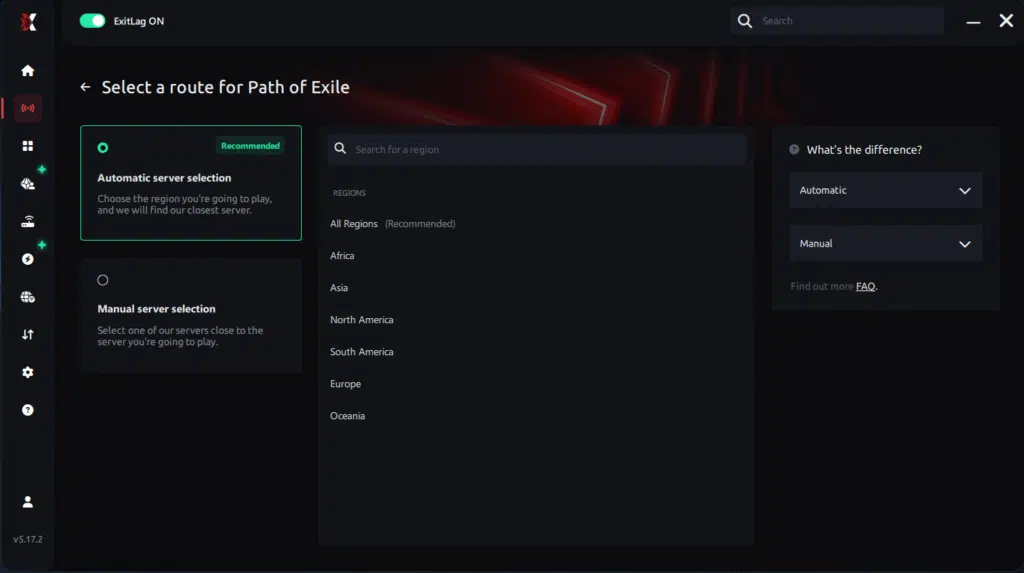
Manual route
If you prefer to have full control over your connection, you can manually choose the server based on the ping test results. Simply select the server that showed the lowest latency or the one that best meets your specific gaming needs, allowing complete customization of your experience.
Step 5 – Click “Path of Exile” or the play button. ExitLag will begin optimizing your connection automatically.

Step 6 – Wait a few seconds until optimization is complete. You’ll see ping indicators in the interface.

Step 7 – Launch Path of Exile normally. The optimization will already be active.
ExitLag runs in the background while you play, constantly adjusting routes to maintain the best possible performance.
FAQ: everything about high ping in Path of Exile 2
What causes high ping in Path of Exile 2?
High ping usually comes from server distance, unstable routing, ISP congestion, Wi-Fi interference, or game server overload. Often, Path of Exile 2 connection issues are caused by long-route hops chosen automatically by your provider. From the same point of view, temporary traffic spikes during league launch also cause unstable latency.
How do I check my ping in Path of Exile 2?
You can enable the performance graph in the in-game settings, which displays ping, packet loss, and frame-time stability. Soon after, use OS commands like “ping” or “traceroute” to identify spikes and problematic routes. In summary, combining both tests gives a complete picture of your connection’s health.
What is good ping for Path of Exile 2?
Anything below 70ms is excellent. Between 70–100ms is playable but slightly delayed. Above 120ms, movements and attacks become noticeably slower. Lastly, exceeding 150ms makes real-time dodging almost impossible, especially in high-tier content.
Can high ping get you banned in Path of Exile 2?
No, having high ping does not lead to bans. However, if latency causes repeated disconnections, it may temporarily interrupt progression or cause map loss. In conclusion, ping doesn’t affect your account status, but it can severely impact your gameplay.
Does ExitLag work for Path of Exile 2?
Yes. ExitLag fully supports Path of Exile 2 and uses multi-route technology to stabilize latency, reduce spikes, and prevent desync. At the same time, players benefit from smoother combat, better mobility, and more accurate skill execution. ExitLag is specifically optimized for real-time online games, making it ideal for PoE2.
Why does my ping spike during boss fights in Path of Exile 2?
This usually happens because boss arenas generate heavy server load. Your client sends and receives more data packets, stressing unstable routes. Additionally, visual effects and multiple simultaneous mechanics can overload weaker networks. In advance, ExitLag fixes this by streamlining your path to the closest, cleanest server route.
Conclusion
In conclusion, dealing with Path of Exile 2 high ping can completely ruin what should be one of the most immersive ARPG experiences ever created. But now you understand the causes, the best diagnostic methods, and the reliable fixes. Above all, you’ve seen how optimizing routing provides real, long-term stability.
For more insights, tutorials, and tips, visit the official ExitLag blog.
Path of Exile 2 high ping no longer needs to ruin your free time. Now that you understand the causes and how to stabilize your connection, you can finally enjoy your gaming smoothly. Start your free trial and see the difference for yourself.
Got questions or want to connect with other players? Join the conversation at the ExitLag Forum!