

Experiencing high ping New World: Aeternum can quickly turn epic PvP battles, precise dodges, and large-scale wars into a frustrating mess of delays and missed actions. Losing a fight because an ability activates late or your character freezes mid-movement is one of the most common complaints among players dealing with connection instability. Understanding why this happens, and how to truly fix it, is essential for anyone facing New World connection issues across supported online games.

What is high ping in New World: Aeternum?
Ping is the time it takes for information to travel from your computer to the game servers and return with a response, measured in milliseconds (ms). In New World: Aeternum, every action, attacking, dodging, gathering resources, or activating skills, depends on this communication.
When latency is low, actions feel immediate and precise. When it is high, data packets take longer or unstable routes, causing visible delays between what you do and what happens on screen. Even small increases in ping can disrupt combat timing and movement flow.
The difference between low and high ping is consistency. Low ping provides stable, predictable gameplay, while high ping introduces spikes, freezes, and desynchronization that severely impact performance.
How high ping affects your gameplay in New World: Aeternum
High ping directly interferes with several core mechanics of the game:
- Delay in commands, making abilities trigger late
- Rubberbanding, pulling your character back during movement
- Bad hit registration, especially noticeable in PvP combat
- Failed dodges, causing damage even after a successful dodge
- Unexpected disconnections during wars or expeditions
- Competitive disadvantage against players with stable connections
These issues make New World: Aeternum feel inconsistent and punishing, particularly in large-scale encounters.
Main causes of high ping in New World: Aeternum
Distance from servers
The physical distance between you and the New World servers directly affects ping. The farther the data has to travel, the higher the latency becomes.
Internet service provider (ISP) issues
ISPs automatically choose data routes based on cost and traffic management, not gaming performance. This often results in unstable connections during peak hours.
Inefficient routing
Poor routing forces your connection through congested or unnecessary nodes, increasing latency and packet loss before data reaches the game servers.
Network congestion
High internet usage in your region can overload shared routes, causing sudden ping spikes and inconsistent gameplay.
Outdated hardware or equipment
Old routers, damaged cables, or outdated firmware can struggle to handle real-time online game traffic efficiently.
Large-scale battles and server load
Mass PvP wars and crowded zones can increase server-side demand, amplifying the effects of unstable connections.
How to identify and test high ping in New World: Aeternum
New World displays ping information within its interface, allowing players to monitor latency in real time. Consistently high values or sudden spikes indicate connection problems.
Players can also run external ping tests using command-line tools to check stability and packet loss between their location and the game servers.
As a general reference, ping below 60 ms is excellent, 60–120 ms is playable, and values above 150 ms often cause noticeable lag during combat and movement.
Monitoring ping at different times of day also helps identify congestion-related issues.
Ping levels and gameplay impact
| Ping (ms) | Connection quality | Gameplay impact |
| 0–60 | Excellent | Smooth and highly responsive gameplay |
| 60–120 | Good | Minor delays, mostly stable |
| 120–180 | Average | Noticeable lag in PvP and dodging |
| 180+ | Poor | Severe delays, freezes, and desync |
Basic solutions to reduce high ping in New World: Aeternum
Optimize your local connection
- Use a wired Ethernet connection instead of Wi‑Fi
- Close background applications consuming bandwidth
- Keep network drivers updated
- Configure QoS settings on your router
- Select the closest available server region
- Avoid heavy downloads while playing
Contact your ISP
If high ping persists after local optimizations, contacting your ISP is recommended. Ask about packet loss, routing inefficiencies, and congestion during peak hours, and request diagnostics for your connection.
ExitLag: the best solution to reduce high ping in New World: Aeternum
What is ExitLag?
ExitLag is a specialized software focused on connection optimization for online games. Instead of relying on default ISP routes, it actively selects optimized paths that offer lower latency and higher stability.
By correcting inefficient routing, ExitLag tackles the root causes of high ping rather than just masking symptoms.

How does ExitLag work to reduce high ping?
ExitLag uses Multi-Internet technology to stabilize connections in real time. Its process includes:
- Real-time route analysis
- Multiple simultaneous routes
- Automatic selection of the best path
- Optimization of network hops
- Continuous connection stabilization
Advantages of ExitLag for New World: Aeternum players
- Drastic ping reduction, improving reaction times
- Elimination of packet loss, ensuring reliable data flow
- Stable connection even during peak traffic
- Easy-to-use interface suitable for all players
- Support for multiple servers, adapting dynamically
These advantages translate directly into smoother combat, more reliable dodges, and consistent performance in wars and expeditions.
Is ExitLag worth using in New World: Aeternum?
For players who value competitive performance and stability, ExitLag is absolutely worth it. Pricing and plan options are available at ExitLag site.
How to use ExitLag in Aeternum
The process is extremely simple:
Step 1 – Access the official ExitLag website and download the application. There’s a free trial period for new users.
Step 2 – Install and open the program. Log in with your account.or heavy farming zones. That’s where stability changes are easiest to feel.

Step 3 – In the search bar, type “Aeternum” and select the game from the list.

Step 4 – Choose between automated or manual route
Based on the results, you can let ExitLag automatically select the best route or manually choose the server that showed the lowest latency for your connection.
AI-optimized automated route
Based on the results, you can let ExitLag automatically select the best route through AI optimization. The system analyzes multiple connection paths in real time and automatically identifies the most efficient route for your connection, ensuring the lowest possible latency without requiring manual choices.
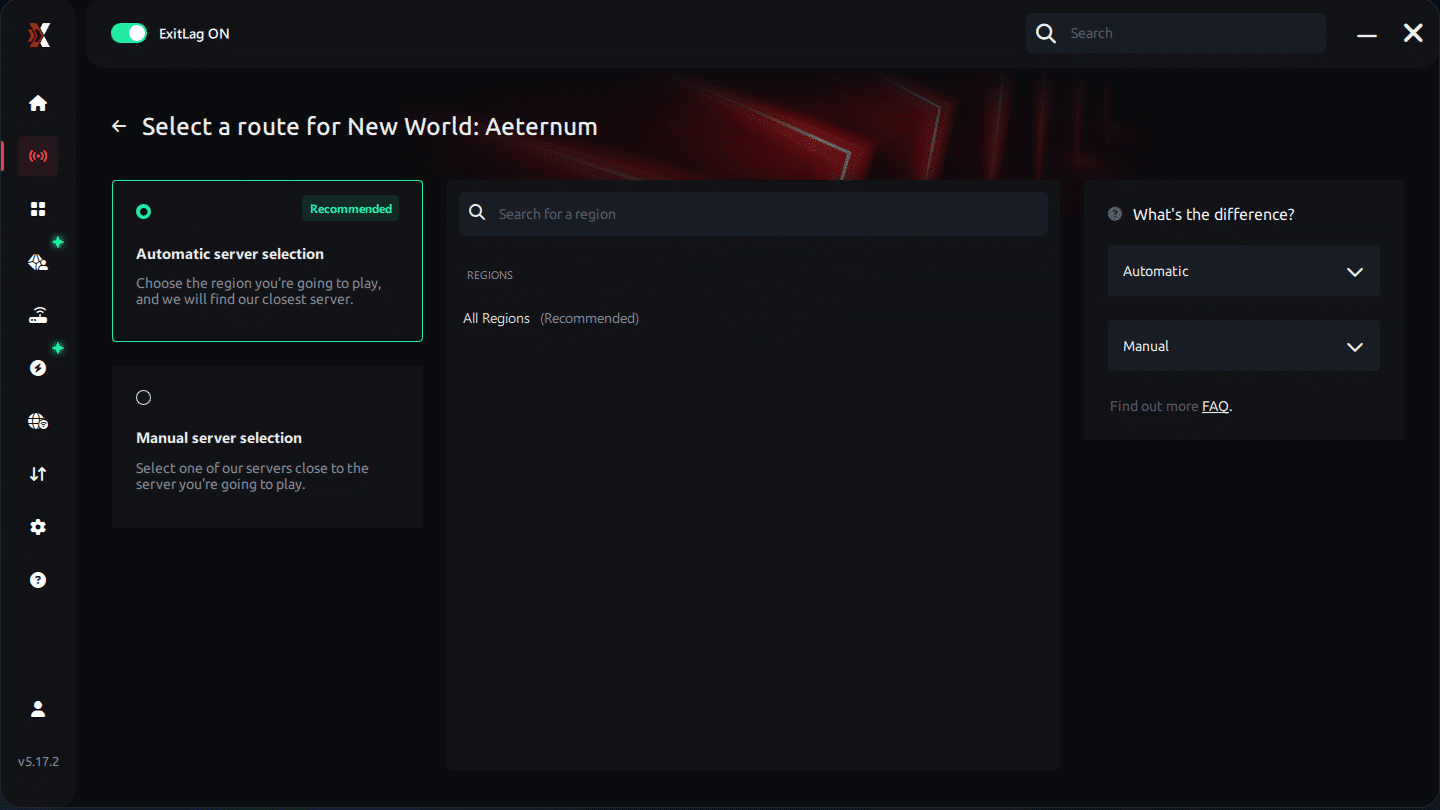
Manual route
If you prefer to have full control over your connection, you can manually choose the server based on the ping test results. Simply select the server that showed the lowest latency or the one that best meets your specific gaming needs, allowing complete customization of your experience.
Step 5 – Click “Apply routes” or the play button. ExitLag will begin optimizing your connection automatically.
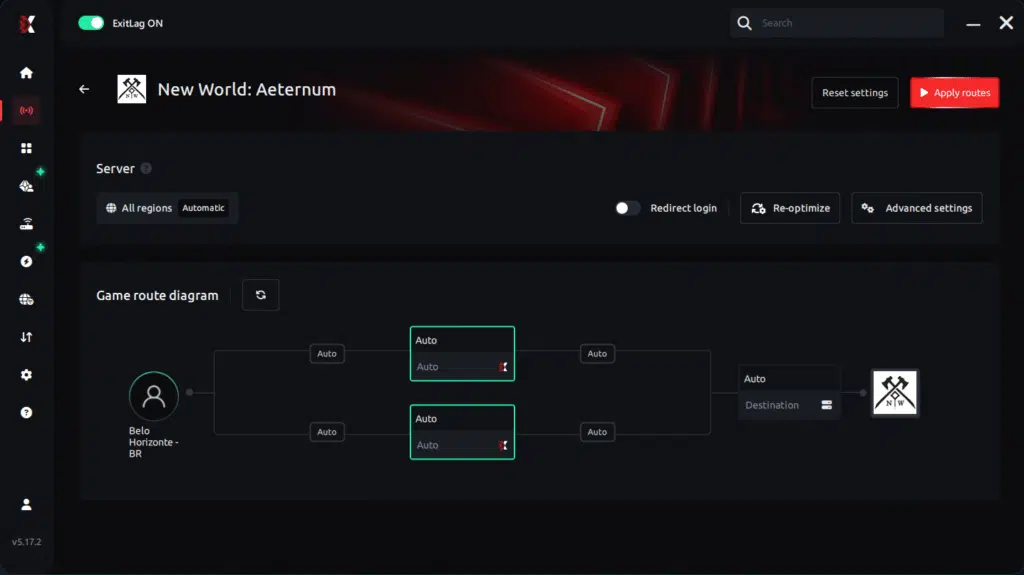
Step 6 – Wait a few seconds until optimization is complete. You’ll see ping indicators in the interface.
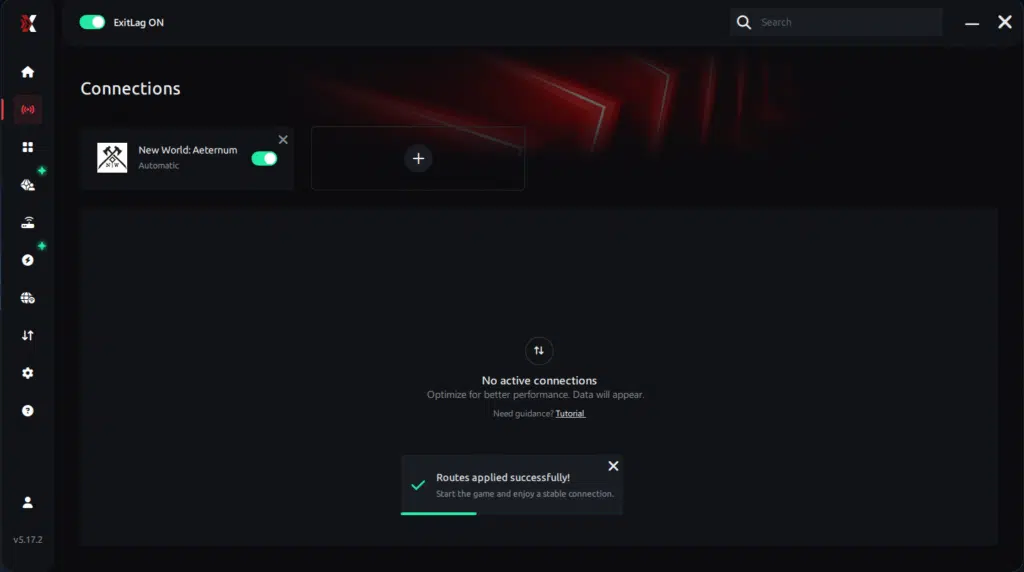
Step 7 – Launch Aeternum normally. The optimization will already be active.
ExitLag runs in the background while you play, constantly adjusting routes to maintain the best possible performance.
FAQ: high ping in New World: Aeternum
What causes high ping in New World: Aeternum? High ping is mainly caused by inefficient routing, distance from servers, ISP congestion, and packet loss. These factors delay communication between your system and the game servers.
How do I check my ping in New World: Aeternum? Ping can be checked directly within the game interface or through external network diagnostic tools.
What is a good ping for New World: Aeternum? Ping below 60 ms is ideal. Values between 60 and 120 ms are playable, while anything above that may negatively affect combat.
Can high ping get you banned? No. High ping does not lead to bans, but it can severely impact your performance and experience.
Does ExitLag work for New World: Aeternum? Yes. ExitLag is designed to optimize routing specifically for online games like New World: Aeternum.
Why does ping fluctuate during wars and peak hours? Large-scale battles and heavy network traffic increase server and routing load, amplifying latency issues.
Conclusion
High ping can completely undermine the New World: Aeternum experience, especially in PvP-heavy content. While basic optimizations help, real stability only comes from fixing routing and packet loss issues.
By optimizing connection paths and stabilizing latency, ExitLag delivers the consistent performance competitive players need. To explore more tips and insights, visit ExitLag blog.



