Every Rainbow Six Siege player eventually asks the same question: how good am I really? Numbers do not lie, and a solid Rainbow Six Siege Tracker gives you the raw truth about your performance.
Whether you play casually or grind Ranked every night, understanding your stats changes how you approach each match. A good Rainbow Six Siege Tracker turns guesswork into strategy.
So what exactly is the best option right now? The short answer is that Tracker Network (R6 Tracker) remains the most complete Rainbow Six Siege Tracker, offering detailed operator stats, live lobby scouting, and Ranked 3.0 MMR visibility, all synced automatically after every match you play.
This guide breaks down everything you need to know about tracking your Rainbow Six Siege performance. We will cover the top apps, how to read your numbers correctly, and how to actually use that data to win more rounds. Furthermore, we will show you a connection trick that many competitive players overlook entirely.
Why A Rainbow Six Siege Tracker Matters For Your Rank
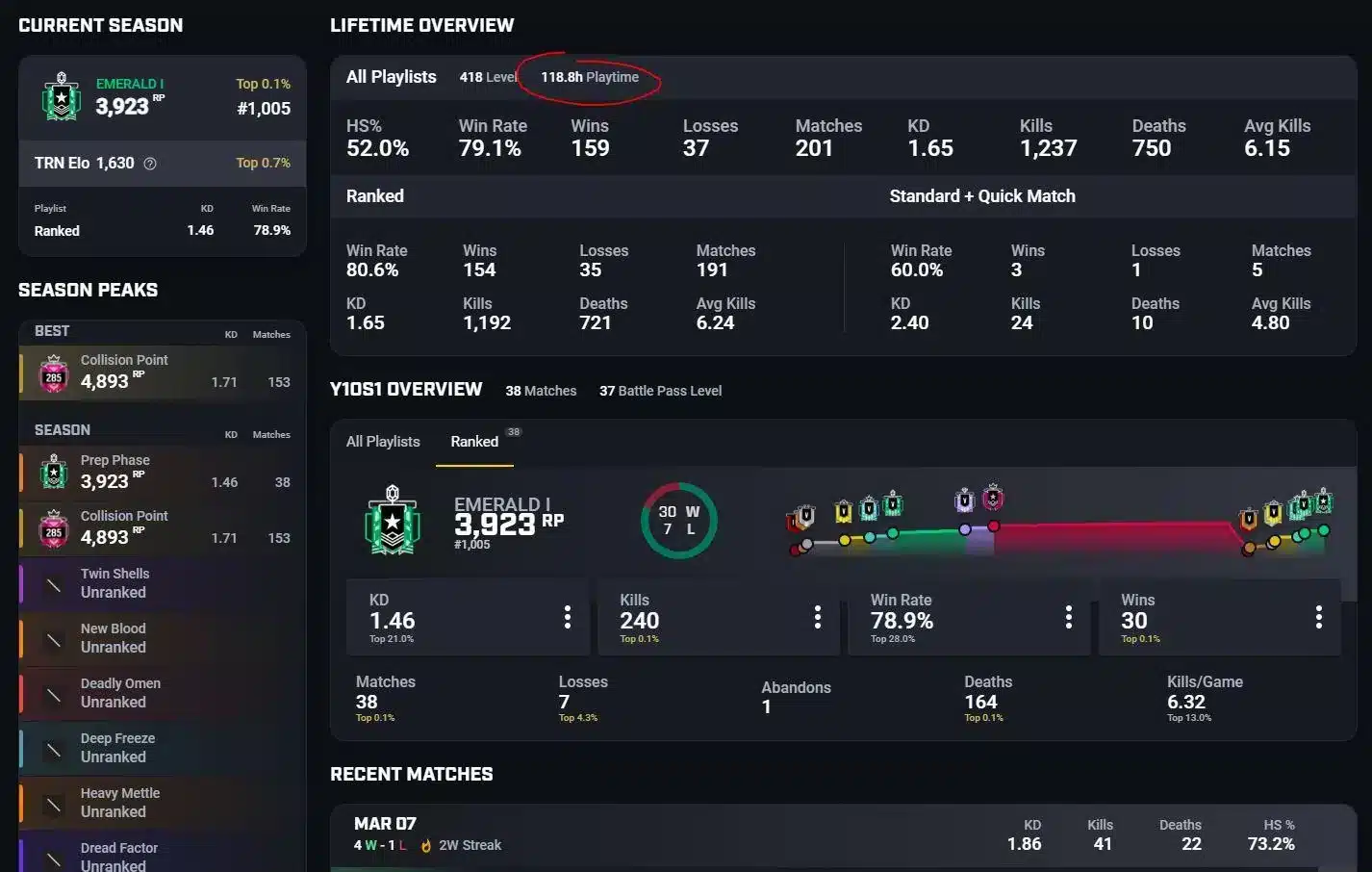
Ranked 3.0 changed how matchmaking works in Rainbow Six Siege. Hidden MMR is gone, so the number on your player card is now the exact score the matchmaker uses.
Therefore, a Rainbow Six Siege Tracker is more valuable today than ever before. It lets you see that same score, match by match, instead of guessing why your rank moved.
What Data A Tracker Actually Shows
A proper Rainbow Six Siege Stats Tracker pulls information directly from Ubisoft Connect and displays it in a readable dashboard. Most tools show:
- Win rate and match history by season
- K/D ratio broken down per operator
- Headshot percentage and entry frags
- Current Rank Points and MMR movement
- Map-specific performance (attack versus defense)
How Rank Points Translate Into Real Skill
Since Ranked 3.0 uses eight tiers split into five divisions each, totaling 40 ranks, small RP swings matter a lot. Consequently, tracking every match helps you spot trends before a losing streak tanks your division.
Notably, most Platinum and Diamond players sit around a 1.0 to 1.3 K/D ratio because they face tougher opponents. Comparing your numbers against these benchmarks tells you exactly where you stand.
Best Rainbow Six Siege Tracker Apps To Use Right Now
Several tools currently dominate the tracking space for this game. Each one takes a slightly different approach, so picking the right one depends on how you play.
Web-Based Rainbow Six Siege Statistics Tracker Options
If you just want quick numbers without installing anything, browser-based tools are the fastest route. These platforms sync your Ubisoft Connect account and generate a profile instantly.
- Tracker Network (r6.tracker.network): the most widely used rainbow six siege statistics tracker, covering operators, weapons, and maps in detail.
- R6 Tracker mobile app: available on Android and iOS for checking stats away from your PC.
- Stats.CC: a lighter alternative focused on quick lookups and simple visual breakdowns.
The Overwolf Rainbow Six Siege Tracker Ecosystem
The overwolf rainbow six siege tracker apps run as an overlay directly inside your match. This is where things get genuinely useful for competitive play.
- Install the Overwolf platform from its official store.
- Search for a Rainbow Six Siege tracker app such as R6 Tracker or R6 Analyst.
- Launch Rainbow Six Siege with Overwolf running in the background.
- Press the assigned hotkey (usually Tab) to open the live scoreboard.
- Review teammate and enemy stats before the round starts.
What Is The Best Rainbow Six Siege Tracker App For Competitive Players?
Players grinding Ranked need more than basic win rate numbers. They need lobby-level intelligence before the round even begins.
For that reason, an overwolf rainbow six siege tracker like R6 Tracker or R6 Analyst tends to outperform simple web dashboards. These apps show enemy MMR, past operator bans, and match history the moment the lobby loads.
However, console players cannot use the desktop overlay. Instead, they rely on searching their gamertag through the web version or the rainbow six siege tracker app on mobile.
PC Versus Console Tracking Differences
| Platform | Tracker Access | Live Overlay | Lobby Scouting |
|---|---|---|---|
| PC (Steam/Ubisoft) | Full desktop app + web | Yes, via Overwolf | Yes, real-time |
| Xbox | Web and mobile only | No | Limited, post-match |
| PlayStation | Web and mobile only | No | Limited, post-match |
Choosing Between Free And Premium Tracking Tools
Most trackers offer a free tier with core stats included. Premium versions typically unlock deeper filters, historical trend graphs, and ad-free browsing.
- Free tier: win rate, K/D, basic match history.
- Premium tier: advanced filters by map, operator synergy data, extended history.
- Overlay-only tools: live lobby scouting, often bundled with Overwolf apps.
Is A Rainbow Six Siege Stat Tracker Accurate After Ranked 3.0?
Since Ranked 3.0 removed hidden MMR, third-party tools are actually more accurate today than before. A rainbow six siege stat tracker now reflects the exact matchmaking number Ubisoft uses internally.
That said, trackers can lag by a few minutes after a match ends. If your latest game is missing, simply refresh your profile or wait for the sync to complete.
Common Sync Issues And Fixes
Sometimes a rainbow six siege stats tracker fails to pull your most recent session. This usually happens for one of a few reasons:
- Your Ubisoft Connect profile privacy settings are restricted.
- The tracker's servers are experiencing high traffic after a new season drop.
- Your account was recently renamed and needs re-indexing.
Reading Your Numbers The Right Way
Do not obsess purely over K/D. Win rate is a stronger signal of your actual contribution to the team, since supportive roles like anchors or drone operators naturally show lower kill counts.
Pro Tips: Rainbow Six Siege Tracker
- Track By Season, Not Lifetime: Lifetime stats get diluted by early games when you were still learning. Filter by current season for an accurate skill snapshot.
- Compare Attack And Defense Separately: Many players are strong on one side and weak on the other. A tracker breaks this down so you know exactly what to practice.
- Watch Your Entry Death Rate: A high number of first deaths, even with a good K/D, signals reckless positioning that a tracker will expose immediately.
- Cross-Check Operator Stats Before Picking: Use your tracked operator win rate to decide your pick, rather than always defaulting to your favorite.
- Review Post-Match Timelines: Advanced trackers replay the round order of kills, which helps you spot decision-making mistakes you missed in the moment.
Common Mistakes Rainbow Six Siege Players Make
- Chasing K/D Over Wins: Players fixate on kill count while ignoring objective play. Fix: prioritize plant execution and site control, then let K/D follow naturally.
- Ignoring Map-Specific Weakness: Many players never check which maps drag their win rate down. Fix: use your Rainbow Six Siege Tracker's map filter and queue practice matches on weak maps.
- Not Checking Connection Before Ranked: Packet loss and unstable ping distort in-game aim and timing, which then shows up as bad stats. Fix: verify your route stability before queuing a competitive match.
- Overreacting To A Single Bad Game: One rough match does not represent your real skill level. Fix: always review trends across ten or more games, not one outlier session.
Improve The Stats Your Rainbow Six Siege Tracker Actually Shows
Tracking your numbers is only half the equation. The other half is making sure your connection is not the reason those numbers look worse than they should.
This is where ExitLag comes in. ExitLag is not a VPN, it is a connection optimizer that scans multiple network routes in real time and automatically picks the fastest, most stable path to Rainbow Six Siege's servers.
In a tactical shooter like this one, every millisecond matters. Lower ping means your peeks, flicks, and gadget commands register faster and more precisely, which directly improves the K/D and win rate your tracker records.
- Real-time Optimization: reduces delay and packet loss so your inputs land exactly when you press them.
- Multipath Technology: routes your traffic through multiple paths at once, so a single failing route does not disconnect you mid-round.
- AI-powered routing: automatically selects the best available path with one click, or you can fine-tune it manually.
- PC Boost: frees up RAM and background processes for smoother frame pacing during intense firefights.
ExitLag currently supports over 4,000 games across PC and Mobile, backed by more than 1,500 servers spread across 190+ countries. It is trusted by over 30 million users and processes roughly 18 million optimizations every week.
Importantly, ExitLag does not modify game files, inject code, or interact with anti-cheat systems in any way, so it is safe to run alongside Rainbow Six Siege's competitive protections. Just avoid running it together with a VPN, since that combination reduces its effectiveness.
If packet loss or rubber-banding has been quietly hurting your stats, grab the ExitLag Download and see the difference in your next ranked session.
Final Thoughts On Choosing A Rainbow Six Siege Tracker
At the end of the day, the best Rainbow Six Siege Tracker is the one that matches how you play. Casual players might only need a quick web lookup, while competitive grinders benefit far more from a full overwolf rainbow six siege tracker overlay.
Either way, consistent tracking turns vague feelings about your performance into clear, actionable data. Combine that data with a stable connection, and climbing the Ranked 3.0 ladder becomes a much more predictable process.
Ultimately, the Rainbow Six Siege Tracker you choose should feel effortless to check after every session, so you actually build the habit of reviewing your own play.
All game images used in this blog post belong to Ubisoft. They are used for informational and educational purposes only and do not imply endorsement or affiliation with the rights holders.