
If you play Where Winds Meet, dealing with Where Winds Meet packet loss can completely break the experience.
Commands fail to register during combat, your character suddenly teleports backward while moving through the world, and unexpected disconnects can interrupt quests or encounters at the worst possible time, affecting many online titles listed among ExitLag’s supported games, especially large-scale open-world RPGs.

What is packet loss in Where Winds Meet?
Packet loss happens when data packets fail to reach their destination during transmission between your device and the game servers. Every action in Where Winds Meet, from movement and combat inputs to world interactions and enemy behavior, relies on a constant exchange of data.
Under normal conditions, these packets travel across the network and arrive correctly. However, with Where Winds Meet packet loss, some packets are dropped before reaching the server. When that happens, the server does not fully receive your actions, and your client receives incomplete updates about the game world.
A simple analogy is sending instructions through messengers. If some never arrive, the message becomes incomplete. In Where Winds Meet, missing packets lead to delayed actions, incorrect positioning, and sudden corrections that disrupt immersion and flow.
How packet loss affects your gameplay in Where Winds Meet
Where Winds Meet packet loss has a direct impact on gameplay, especially in combat, traversal, and story-driven moments.
- Delayed commands, where attacks or abilities trigger late
- Rubberbanding, pulling your character backward during movement or parkour
- Sudden disconnections, interrupting exploration or quest progression
- Lost progress, such as failed encounters or interrupted story sequences
- Enemy teleporting, causing opponents to appear in unexpected positions
- Skills not registering, breaking combat timing and combos
- Hit registration failure, where attacks visually connect but do not apply damage
Because Where Winds Meet emphasizes fluid movement and precise combat, even small amounts of Where Winds Meet packet loss can make the game feel unresponsive and frustrating.
Main causes of packet loss in Where Winds Meet
Inefficient routing
Your connection to Where Winds Meet servers passes through multiple network paths. If routing is inefficient or unstable, packets may be dropped before reaching their destination, causing consistent Where Winds Meet packet loss even on fast internet connections.
Unstable connection
Problems with your ISP, modem, or router can introduce instability. Signal fluctuations, outdated firmware, or wireless interference often lead to packet loss without fully disconnecting you.
Distance to servers
Where Winds Meet uses centralized servers that may be far from your physical location. Greater distance increases the number of network hops, raising the likelihood of packet loss during transmission.
Network congestion
Peak usage hours, shared networks, and multiple devices consuming bandwidth can overload your connection. During congestion, packets are often discarded to manage traffic, worsening packet loss.
Hardware issues
Damaged ethernet cables, failing network cards, or overheating routers can silently cause packet loss while the connection still appears active.
Game-specific factors
Large open-world zones, dense NPC populations, and complex combat interactions increase data exchange, making packet loss more noticeable in Where Winds Meet.
Packet loss level classification in Where Winds Meet
| Packet loss level | Percentage range | Gameplay impact |
| Ideal | 0% | Smooth and fully responsive gameplay |
| Low | 0.1% – 1% | Minor delays, usually unnoticed |
| Moderate | 1% – 3% | Visible lag, delayed actions, rubberbanding |
| High | 3% – 5% | Frequent freezes and disrupted combat |
| Critical | Above 5% | Disconnections and unplayable experience |
What is ExitLag?
ExitLag is a specialized software created specifically to solve network instability in online games. Instead of generic tools, it focuses on connection optimization using advanced technology designed for gaming traffic. By continuously analyzing routes and selecting more stable paths, ExitLag targets Where Winds Meet packet loss at its source, ensuring a smoother and more consistent connection. You can learn more about this approach through ExitLag’s technology page, which explains how optimized routing improves stability in demanding online games.
How to identify packet loss in Where Winds Meet
Identifying Where Winds Meet packet loss starts with observing how the game behaves during normal play. A common sign is unstable responsiveness even when your ping appears low. Attacks trigger late, interactions feel inconsistent, and movement does not match your inputs, which indicates that data is being lost rather than delayed.
Inside the game world, visual symptoms are easy to spot. Rubberbanding during traversal or combat is frequent, especially when chaining movement skills or reacting to enemies. You may also notice NPCs or enemies moving erratically, briefly freezing, or snapping to new positions without warning.
Another strong indicator is lag that appears in bursts. With Where Winds Meet packet loss, gameplay may feel smooth for moments and then suddenly become unresponsive. This differs from high latency, which usually causes constant delay instead of unpredictable spikes.
To confirm the issue, command-line tools like ping or pathping can be used outside the game. These tests show whether packets are being dropped along the route to external servers. When interpreting results, any packet loss above 0% is already harmful for online action RPGs, and consistent loss across multiple hops points to routing or infrastructure problems.
Basic solutions to reduce packet loss in Where Winds Meet
Optimize your local connection
- Use a wired ethernet connection instead of Wi-Fi to reduce interference and instability.
- Close background applications that consume bandwidth, such as downloads or streaming services.
- Update network drivers to ensure compatibility and stable performance.
- Configure Quality of Service (QoS) on your router to prioritize gaming traffic.
- Test different ethernet cables to rule out physical damage or signal degradation.
- Avoid highly populated zones during peak hours, as large open-world areas can amplify Where Winds Meet packet loss.
These steps help remove common local causes of packet loss. However, they cannot fix problems that occur outside your home network.
Contact your ISP
If packet loss continues after local optimization, contact your internet service provider and explain that you are experiencing packet loss, not just slow speed. Ask for a full line verification to check for signal degradation or faulty infrastructure.
You should also request routing and infrastructure checks, especially if you connect to international servers. Many cases of Where Winds Meet packet loss originate from inefficient or congested routes that only the ISP can investigate.
How does ExitLag reduce packet loss in Where Winds Meet?
ExitLag reduces Where Winds Meet packet loss by applying Multi-Internet technology built specifically for online games. Instead of relying on a single route chosen by your ISP, it dynamically manages multiple optimized routes at the same time, as explained in ExitLag’s overview of how it works.
- Real-time route analysis monitors packet delivery quality continuously.
- Multiple simultaneous connections are established across optimized paths.
- Automatic route switching happens instantly when packet loss is detected.
- Hop optimization reduces unnecessary network jumps between you and the servers.
- Connection stabilization keeps gameplay consistent during congestion and peak hours.
This proactive approach prevents packet loss before it impacts combat, movement, or exploration.
Is ExitLag worth using in Where Winds Meet?
ExitLag is worth using if you play Where Winds Meet on international servers, engage in PvP or competitive content, or frequently experience Where Winds Meet packet loss during exploration and combat. It is also ideal for players who want a competitive advantage, play during peak hours, or rely on unstable ISPs with poor routing.
When considering cost, it is important to compare pricing against the time and progress lost due to disconnects, failed encounters, and unstable gameplay. Detailed plan information is available on ExitLag’s pricing page.
For most players, ExitLag pays for itself by eliminating unfair deaths, broken combat flow, and constant frustration, allowing you to experience Where Winds Meet the way it was meant to be played.
How to use ExitLag in Where Winds Meet
The process is extremely simple:
Step 1 – Access the official ExitLag website and download the application. There’s a free trial period for new users.
Step 2 – Install and open the program. Log in with your account.
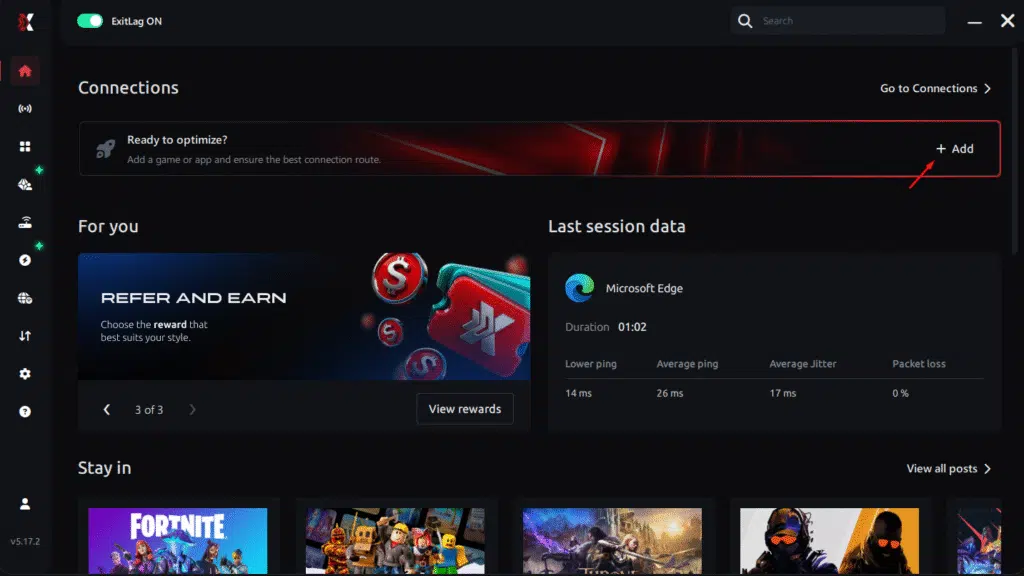
Step 3 – In the search bar, type “Where Winds Meet” and select the game from the list.
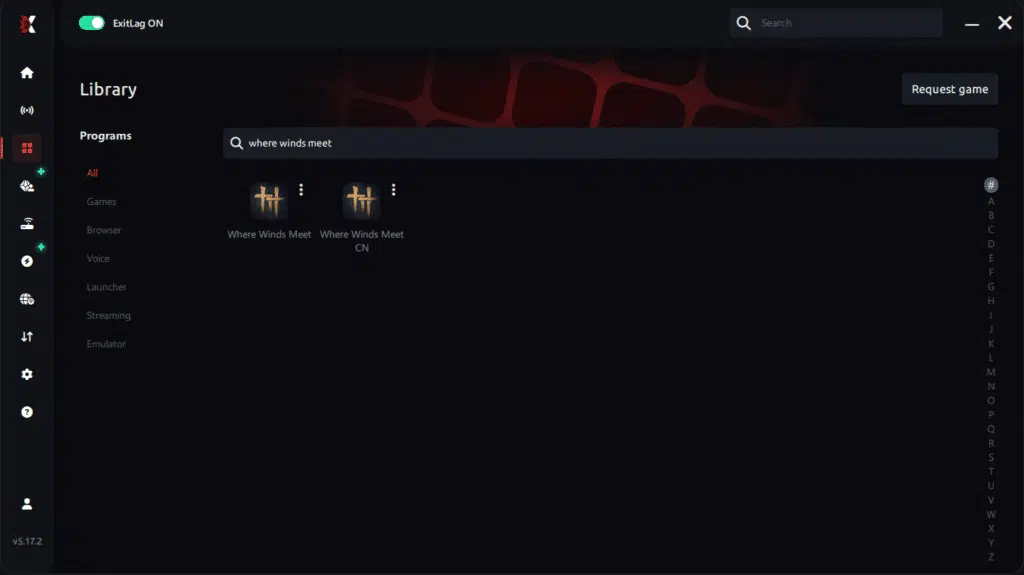
Step 4 – Choose between automated or manual route
Based on the results, you can let ExitLag automatically select the best route or manually choose the server that showed the lowest latency for your connection.
AI-optimized automated route
Based on the results, you can let ExitLag automatically select the best route through AI optimization. The system analyzes multiple connection paths in real time and automatically identifies the most efficient route for your connection, ensuring the lowest possible latency without requiring manual choices.
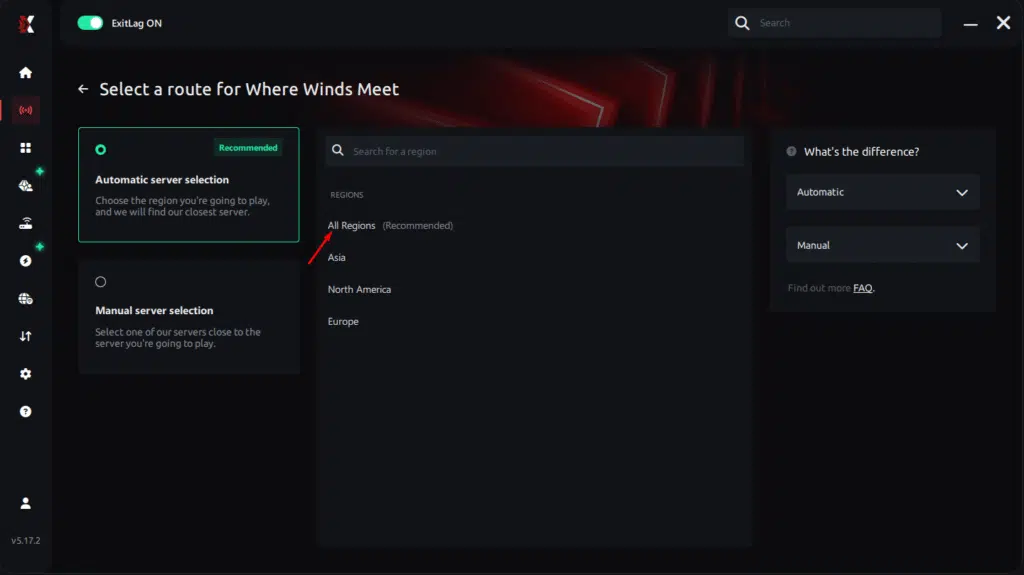
Manual route
If you prefer to have full control over your connection, you can manually choose the server based on the ping test results. Simply select the server that showed the lowest latency or the one that best meets your specific gaming needs, allowing complete customization of your experience.
Step 5 – Click “Where Winds Meet” or the play button. ExitLag will begin optimizing your connection automatically.
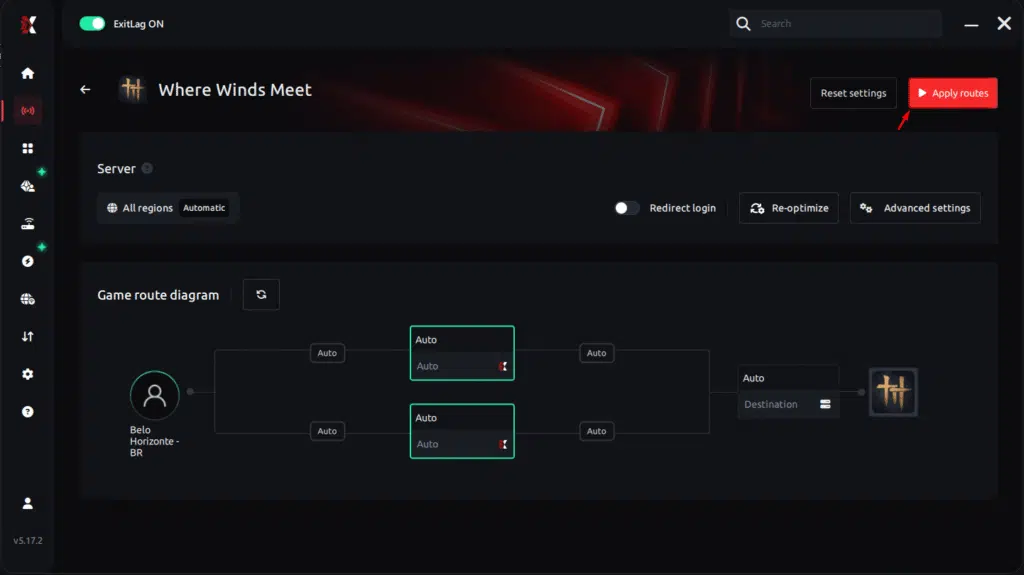
Step 6 – Wait a few seconds until optimization is complete. You’ll see ping indicators in the interface.
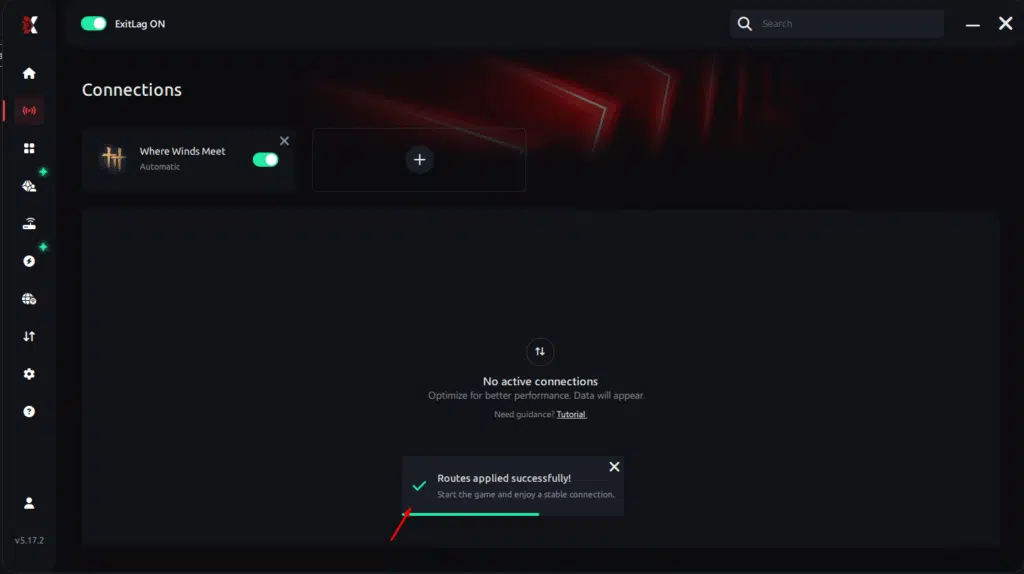
Step 7 – LaunchWhere Winds Meet normally. The optimization will already be active.
ExitLag runs in the background while you play, constantly adjusting routes to maintain the best possible performance.
FAQ: packet loss in Where Winds Meet
Is packet loss the same as lag? No. Lag is usually caused by high latency, while Where Winds Meet packet loss happens when data never reaches the server. You can have low ping and still experience packet loss.
Why do I have packet loss only in Where Winds Meet? Different games use different servers and routing paths. Where Winds Meet may rely on routes that are unstable with your ISP, even if other games work fine.
Can packet loss cause bans? Packet loss itself does not cause bans. However, severe instability can lead to automatic disconnects or removal from sessions to protect game integrity.
How much packet loss is acceptable for competitive play? Ideally, packet loss should be 0%. Even 1% can negatively impact combat timing, reactions, and overall performance.
Can my hardware cause packet loss? Yes. Faulty network cards, damaged ethernet cables, or overheating routers can cause packet loss without fully disconnecting you.
Does ExitLag work on private servers? Yes. ExitLag works on both official and private servers as long as the game traffic can be routed normally.
Do I need to keep ExitLag open while playing? Yes. ExitLag must remain active while you play so it can continuously optimize routes and prevent packet loss.
Is packet loss more noticeable during large-scale encounters? Yes. Open-world zones with many NPCs and players increase data exchange, making Where Winds Meet packet loss more noticeable during combat and exploration.
Eliminate packet loss and play Where Winds Meet without interruptions
Where Winds Meet packet loss does not need to limit your enjoyment or halt your progress. Connection instability is a technical issue, not a player failure, and it can be solved with the right tools. By addressing routing problems directly, you regain control over movement, combat flow, and responsiveness.
ExitLag stands as the definitive solution for players who demand consistency and uninterrupted gameplay. Investing in a stable connection means smoother exploration, reliable combat inputs, and confidence in every encounter. For more performance insights and optimization guides, visit the ExitLag blog and stay ahead of common connection issues.
Stop letting Where Winds Meet packet loss interrupt your sessions and break immersion. Start using ExitLag today with a free trial and feel the improvement immediately in stability, responsiveness, and consistency. Activate your competitive mindset now by starting your ExitLag free trial and transform the way Where Winds Meet feels to play.



