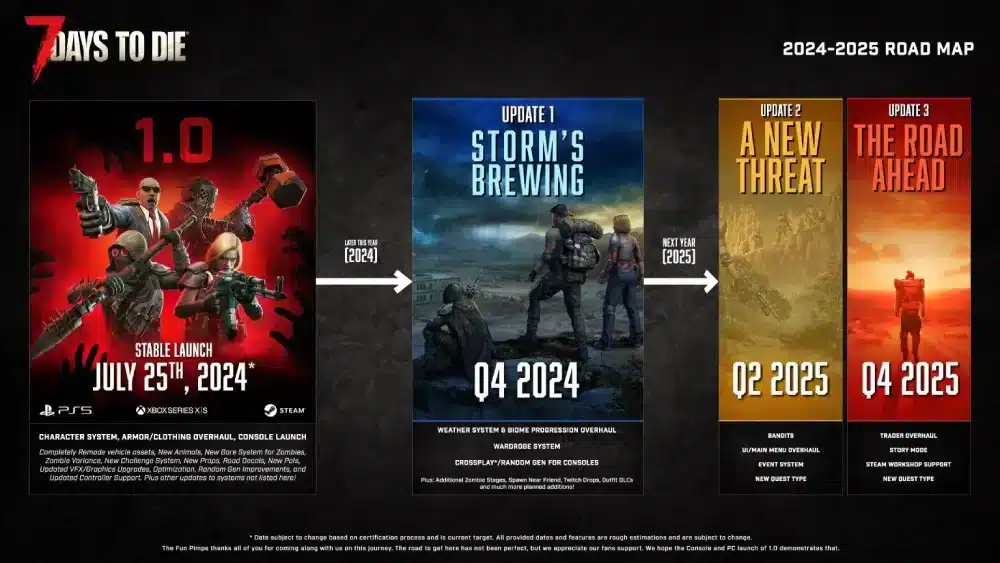
The long‑awaited 1.0 version of 7 Days to Die is finally here, introducing a wave of new survival players. A top question now: is 7 Days to Die cross platform? With players spread across console and PC, knowing exactly which platforms connect matters.
In this full guide, we’ll cover whether 7 Days to Die 1.0 is cross platform, detail platform by platform support, and review official info. We’ll also show how ExitLag can enhance your PC multiplayer experience.
What Is Cross Platform and Why Does It Matter for 7 Days to Die?

Cross platform (or crossplay) means players on different systems (PC, Xbox, PlayStation) can play together online. For 7 Days to Die, crossplay is important because:
- The game supports multiplayer co‑op and PvP.
- Players are split across older and newer consoles.
- Server population (for base building and Horde nights) affects longevity.
Key Reasons Players Want Crossplay in 7 Days to Die
- To play with friends on different platforms
- To keep a unified player base for more active servers
- To extend replayability beyond a single system
- To enable shared progress across platforms (if supported)
- To host dedicated servers with mixed‐platform access
Is 7 Days to Die Cross Platform in Version 1.0?
As of the official 1.0 release in 2025, crossplay is yes – at least partly. Support is active, although some platform‑pairings still have restrictions.
Here’s what works:
- PC (Steam & Microsoft Store): Full crossplay with other supported PC clients.
- Xbox Series X/S and PS5: Crossplay between current‑gen consoles enabled.
- PC ↔ Console: Support exists when using dedicated, certified cross‑platform servers.
So: yes, 7 Days to Die is cross platform, but only under certain ecosystems and server conditions.
What Platforms Can Play Together in 7 Days to Die?
- Steam PC ↔ Microsoft Store PC – Yes
- Xbox Series X/S ↔ PlayStation 5 – Yes
- PC ↔ Xbox Series X/S – Yes (via certified crossplay servers)
- PC ↔ PlayStation 5 – Yes (via certified crossplay servers)
- Old‑Gen (PS4/Xbox One) ↔ Next‑Gen / PC – No (legacy builds unsupported) ExitLag+1
Is 7 Days to Die Cross Platform Xbox and PS5?
Yes. One of the most anticipated features was the ability to play between Xbox Series X/S and PS5. Is 7 Days to Die cross platform Xbox and PS5? Yes. Thanks to updated matchmaking infrastructure, users on these consoles can squad up. ExitLag+1
Crossplay works via certified servers; friends lists and invites span Xbox Live and PSN when the correct version is used.
Cross Platform Support by Platform
| Platform A | Platform B | Crossplay Supported? |
| Xbox Series X | PlayStation 5 | Yes |
| Steam PC | Microsoft PC | Yes |
| Steam PC | Xbox Series X | Yes |
| Steam PC | PlayStation 5 | Yes |
| Xbox One | Xbox Series X | No |
| PS4 | PS5 | No |
Is 7 Days to Die Cross Platform PS5 and PC?
Yes—is 7 Days to Die cross platform PS5 and PC? Yes, when using a certified crossplay server. The infrastructure now allows PS5 and PC players to join the same world.
Why is PS5↔PC Crossplay Available?
- Unified build version across PC, PS5, and Xbox Series from Version 1.0 onward.
- Dedicated server support and crossplay certification added in update 1.2 (December 2024).
- Old‑gen consoles excluded due to legacy build incompatibility.
Crossplay Limitations and Known Issues
Even where crossplay works, players should know:
- Save Data Doesn’t Transfer: Cross‑progression across platforms may not be supported.
- Voice Chat Bugs: Some users report voice chat issues across platforms.
- Performance Gaps: PC may support higher player counts or modded servers; consoles rely on vanilla.
- Server Requirements: Crossplay often requires dedicated, vanilla servers with no mods.
How ExitLag Improves Online Experience in 7 Days to Die
On PC, lag can ruin large‑scale base building or Horde nights in 7 Days to Die. ExitLag helps by optimizing your connection:
- Reduces international server latency
- Minimizes packet loss during heavy traffic
- Cuts input delay during build or combat sequences
- Helps maintain stability on crossplay servers
Especially when playing with friends on Microsoft Store crossplay or mixed platforms, ExitLag is a strong tool for PC users.
Community Reactions to Crossplay in 7 Days to Die
The 1.0 launch has been met with mixed reactions regarding cross-platform functionality. Many console players are pleased with the integration between Xbox Series X and PS5. Meanwhile, PC players—particularly those using mods—are frustrated by the lack of universal crossplay.
Most Common Praise:
- PS5 and Xbox Series X/S players can now play together
- Dedicated servers provide stable multiplayer experiences
- Matchmaking between consoles is easy and smooth
Most Common Criticism:
- Crossplay between PC and consoles is limited
- Progress and saves don’t carry over between platforms
- Legacy console users (PS4/Xbox One) are excluded
Suggestions on forums include:
- A universal friends list across platforms
- Transparent developer roadmap for crossplay progress
- Developer-hosted crossplay servers with optional mod filters
Dedicated Server Insights: Hosting for Mixed Platforms
Currently, dedicated servers in 7 Days to Die support crossplay under strict conditions:
- Xbox Series X/S and PS5 can connect via crossplay servers
- Steam and Microsoft Store (PC) support shared lobbies
However, crossplay only works if:
- No mods are used
- Server has EAC enabled
- Max player count is 8
- Server uses compatible world size (6K recommended)
Server Hosting Tips:
- Use clear platform tags in server name (e.g., [Crossplay Enabled])
- Keep server vanilla to support all platforms
- Verify server settings after each update to prevent desyncs
Why Full Crossplay Isn’t Here Yet
Full crossplay remains limited due to structural differences between platforms. According to The Fun Pimps, core roadblocks include differing build pipelines, certification processes, and multiplayer protocols.
Key Technical Barriers:
- Console certification doesn’t allow community mods
- Patching schedules between PC and console aren’t synced
- Console networks don’t support community server listings natively
The devs have expressed commitment to improving this, but it may involve overhauling backend systems.
How ExitLag Optimizes Crossplay for PC Players
While ExitLag doesn’t enable crossplay, it significantly improves PC performance in shared-server environments—especially for Microsoft Store users.
ExitLag boosts your connection by rerouting traffic through optimized paths, minimizing lag and stutters. For 7 Days to Die players, this provides:
- Smoother terrain loading
- Reduced rubberbanding during Horde Nights
- Better hit registration and syncing
- Less downtime on crossplay-enabled PC servers
Start your Exitlag 3 days Trial!
Mod Support and Its Effect on Cross Platform Access
Mods are a key part of the PC experience in 7 Days to Die, but they block cross-platform compatibility.
Popular mods like Darkness Falls and Undead Legacy introduce scripting changes not allowed on consoles. This forces servers to choose between modded depth or crossplay accessibility.
Mods That Prevent Crossplay:
- Total Conversion Mods (e.g., Darkness Falls, Ravenhearst)
- Custom UI overhauls
- NPC/Quest Addon Packs
Servers with mods must limit their audience to PC players only.
Future of Cross Platform in 7 Days to Die
Based on developer updates, upcoming crossplay improvements could include:
- Account Sync via a Fun Pimps launcher for cosmetic tracking
- Curated Mod Approval for select console-compatible scripts
- Cross-Save Worlds between platforms for solo progression
- Platform-Neutral Lobbies with toggle filters for matchmaking
For now, players should rely on community patch notes and stay updated via official forums.
FAQ – Crossplay in 7 Days to Die 1.0
Can PS5 and Steam players join the same server?
Not directly. Only Microsoft Store PC players can connect to console crossplay servers.
Is full cross-platform play expected soon?
It’s being explored, but no confirmed timeline exists yet.
Can I transfer my progress from Xbox to PC?
No. There’s no cross-progression between systems.
Are modded servers visible to console players?
No. Only vanilla, crossplay-enabled servers appear in console listings.
Is ExitLag compatible with 7 Days to Die?
Yes. It’s safe, effective, and widely used by multiplayer communities.
All game images used in this blog belong to The Fun Pimps. They are used for informational/educational purposes only and do not imply endorsement or affiliation with the rights holders.