Aniimo how to change time is one of the most useful mechanics to understand when exploring Pawprint Studio's creature-collecting adventure. The world of Idyll features a dynamic day and night cycle, and certain Aniimo appear only during specific periods. Learning to control the time of day can make exploration easier and help you discover creatures that might otherwise remain hidden.
Understanding aniimo how to change time is especially valuable for players who want to complete their Aniilog, explore nighttime environments, or finish objectives that depend on the in-game clock. Fortunately, changing time is straightforward once you unlock the feature through the main story.
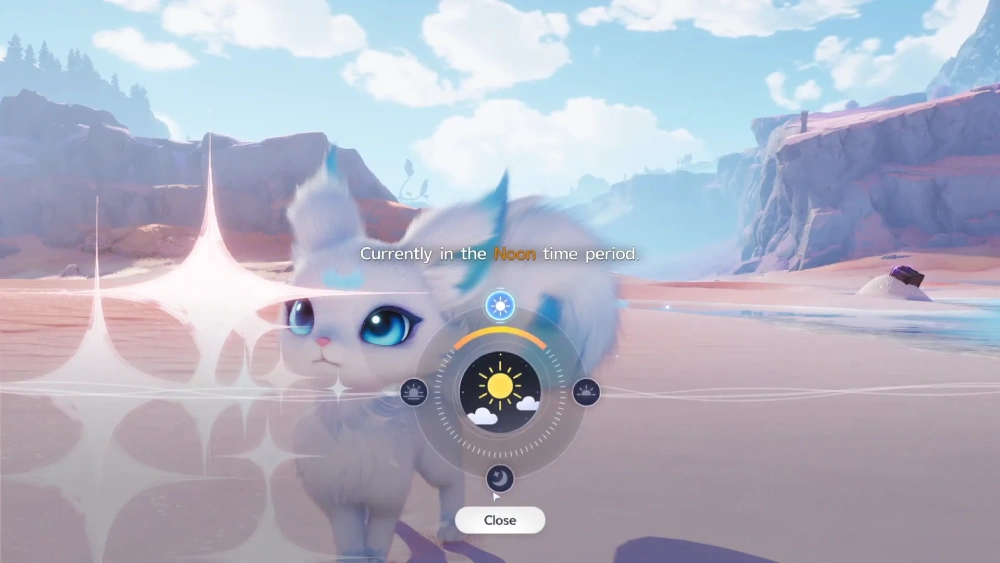
So, aniimo how to change time: what do you need to do? Players must progress through the main story until the Ceremony Preparations quest introduces the Day and Night feature. After unlocking it, they can open the main menu, select the sun-and-moon icon, and choose between Early Morning, Noon, Dusk, and Nighttime.
Unlike weather manipulation, changing the time of day does not require a special consumable resource. Current gameplay documentation also indicates that players can use the feature repeatedly without waiting for a cooldown.
However, changing time does not guarantee that every rare Aniimo will appear immediately. Creature encounters can also depend on location, weather, and other environmental requirements.
In this guide, you'll learn how to unlock the Day and Night feature, change time whenever needed, find nocturnal Aniimo, and troubleshoot common problems with the time controls.
Aniimo How to Change Time: Can You Control Day and Night?
Aniimo features an environmental cycle that changes the appearance of the world and influences creature activity.
Players can explore during different periods of the day, including morning, afternoon, evening, and nighttime.
However, the game also provides a feature that allows players to select a specific time period directly.
This makes it easier to pursue activities that require particular conditions.
How Aniimo's Day and Night Cycle Works
The world of Aniimo changes as time passes.
Lighting, environmental atmosphere, and creature activity can vary depending on the current period.
For example, a location that appears bright and welcoming during the day may feel completely different at night.
These changes are not purely cosmetic.
Some Aniimo are associated with nighttime conditions.
Therefore, players who explore only during daylight may miss certain encounters.
The Day and Night system allows players to adjust the environment without waiting for the natural cycle.
However, this feature must first be unlocked through story progression.
Once available, it becomes an important exploration tool.
Players can use it to prepare for nighttime searches or return to daytime conditions when visibility is more convenient.
The Four Available Time Periods
Players searching for how to change time in aniimo can choose between four predefined periods.
These options provide convenient control over the general time of day.
However, they do not function as a fully customizable clock.
Players cannot necessarily select an exact individual hour or minute.
The available options are:
| Time Period | General Conditions | Recommended Activities |
| Early Morning | Beginning of the day | Morning exploration and collection |
| Noon | Bright daytime conditions | General exploration and navigation |
| Dusk | Transition toward nighttime | Evening encounters and atmosphere |
| Nighttime | Dark environmental conditions | Searching for nocturnal Aniimo |
Each option changes the world's current time period.
However, the specific appearance of a location may also depend on regional environmental conditions.
For example, nighttime during clear weather may look different from nighttime during rainfall.
Therefore, time and weather should be treated as separate systems.
Why Changing Time Matters for Exploration
The ability to change time provides several practical advantages.
First, it reduces the need to wait for naturally occurring nighttime.
This is especially useful when searching for creatures that only appear after dark.
Second, it makes certain exploration objectives more convenient.
For example, a quest may require the player to visit a location during a particular time period.
Instead of waiting, players can adjust the clock and continue progressing.
Third, changing time can help players organize their collection routes.
A practical approach involves grouping targets by their required time period.
For example, you can complete several daytime encounters before switching to Nighttime.
Then, search for nocturnal creatures in the same region.
The main benefits include:
- Finding Aniimo associated with specific time periods.
- Completing time-dependent exploration objectives.
- Reducing unnecessary waiting.
- Organizing efficient collection routes.
- Exploring environments under different lighting conditions.
- Returning to preferred daytime conditions when needed.
However, remember that changing time does not bypass every encounter requirement.
Location and weather may still determine which creatures appear.
How to Change Time in Aniimo: Step-by-Step Instructions
The process for how to change time in aniimo is simple once the Day and Night feature becomes available.
Players can access the relevant controls through the main menu.
Unlike some other environmental systems, the feature does not require visiting a specific Branch every time it is used.
However, the menu option must first be unlocked.
Opening the Day and Night Menu
Begin by opening the main menu.
Look for the sun-and-moon icon on the right side of the interface.
This icon represents the Day and Night feature.
Select it to open the time adjustment menu.
The interface displays the available time periods.
If the icon is missing, you may not have progressed far enough through the main story.
In that situation, continue completing story objectives until the feature is introduced.
However, if the icon appears but cannot be selected, check whether the current activity restricts menu interactions.
Some scripted sequences may temporarily limit player controls.
Choosing Early Morning, Noon, Dusk, or Nighttime
Once the Day and Night menu is open, choose your preferred period.
For example, select Nighttime if you want to search for nocturnal Aniimo.
Alternatively, select Noon if you prefer bright daytime exploration.
The four available choices are:
- Early Morning: Moves the world to the beginning of the day.
- Noon: Changes the environment to daytime conditions.
- Dusk: Moves the world toward the evening period.
- Nighttime: Activates nighttime conditions.
These options are designed for convenience.
However, players should not confuse them with exact clock controls.
Selecting Nighttime changes the general period rather than allowing you to choose any specific minute.
Confirming the Time Change
After selecting your preferred time period, confirm the adjustment.
The game should update the environment to reflect the chosen setting.
For example, switching from Noon to Nighttime should change the lighting and atmosphere.
However, the exact visual transition may depend on the current environment.
Once the change is complete, you can continue exploring.
If you're hunting a specific Aniimo, travel to its known habitat.
Then, check whether the correct encounter conditions are active.
Remember that nighttime alone may not satisfy every requirement.
Some creatures may also depend on weather or regional availability.
Changing Time Again Without a Cooldown
Current gameplay documentation indicates that the Day and Night feature does not require a cooldown.
This means players can switch between time periods repeatedly.
Additionally, changing time does not consume a special item or currency.
This makes the feature useful for collection planning.
For example, you can explore a region during Noon, search for daytime creatures, and then switch to Nighttime.
After completing your nighttime objectives, return to Early Morning or another preferred period.
However, repeated time changes do not guarantee rare encounters.
Players still need to visit appropriate habitats and meet the relevant spawn conditions.
Therefore, use the feature strategically rather than switching periods randomly.
Aniimo How to Change Time of Day: Unlocking the Feature
Understanding aniimo how to change time of day begins with the main story.
The Day and Night controls are not necessarily available from the beginning of the game.
Instead, players unlock them through a quest that introduces time manipulation.
This progression ensures that players understand the mechanic before using it freely.
Progressing Through the Main Story
The first requirement is advancing through the main story.
Current gameplay guides identify Ceremony Preparations as the quest that introduces the Day and Night feature.
This mission is described as the eighth main story quest.
However, quest numbering and progression details may change through updates.
Therefore, players should follow the current objectives displayed in their quest journal.
If the time controls are unavailable, continue completing the main story.
Avoid searching for unrelated upgrades or consumable materials.
The feature is connected to quest progression rather than a currency-based unlock.
Ceremony Preparations and the Elder's House
During Ceremony Preparations, players encounter an objective associated with the Elder's House.
The quest introduces the need to change the time to Nighttime.
This provides a practical tutorial for the Day and Night system.
Players learn how to open the relevant menu and select the required period.
After completing the tutorial, the feature becomes available for general use.
However, players should follow the exact instructions shown in the current quest.
If the objective requires a specific time period, select that period before continuing.
For example, if the mission requests Nighttime, choosing Dusk may not satisfy the requirement.
Therefore, confirm the selected period carefully.
Why the Day and Night Button May Be Locked
If you cannot find the Day and Night icon, the most likely explanation is incomplete story progression.
However, there are other possibilities.
For example, the game may temporarily restrict certain menu features during scripted activities.
Additionally, a temporary interface problem may prevent the menu from responding correctly.
Before assuming the feature is broken, check these possibilities:
- Have you reached Ceremony Preparations?
- Have you completed the relevant tutorial objective?
- Are you currently inside a scripted sequence?
- Is the main menu fully accessible?
- Does the sun-and-moon icon appear?
- Can you select other menu options normally?
If the feature remains unavailable after completing the required quest, try reopening the menu.
You can also restart the game after saving your progress, if appropriate.
However, avoid deleting game data or changing advanced settings without a clear reason.
Once unlocked, the Day and Night feature becomes a convenient tool for exploration, collection, and time-dependent objectives.
Aniimo Day and Night Cycle: All Four Time Periods Explained
Understanding the four time periods is essential for players learning aniimo how to change time effectively.
Although the Day and Night menu is simple, each option serves a different purpose during exploration.
Some players prefer bright conditions for navigating unfamiliar environments. Others need nighttime to find creatures with specific encounter requirements.
Choosing the correct period can make collection routes more efficient and reduce unnecessary waiting.
Early Morning and Daytime Exploration
Early Morning represents the beginning of the day in Aniimo.
This period offers an alternative to the darker nighttime environment.
It can be useful when players want to explore familiar regions under different lighting conditions.
However, Early Morning should not be treated as identical to Noon.
Some creatures or objectives may depend on a particular period.
Therefore, players should check the relevant requirements before selecting a time.
For example, if an Aniimo is specifically associated with morning conditions, choosing Noon may not produce the desired encounter.
Additionally, Early Morning can be useful when transitioning between different exploration objectives.
Players can begin their collection route during this period before moving into later parts of the day.
Noon and Regular Creature Encounters
Noon provides bright daytime conditions.
For many players, this makes it a convenient option for general exploration.
Clear visibility can help when navigating unfamiliar environments, locating landmarks, and searching for creatures.
However, the availability of individual Aniimo still depends on their encounter requirements.
Not every creature appears simply because the world is set to Noon.
Some may require particular habitats, weather conditions, or other environmental factors.
Therefore, check the Aniilog before beginning a targeted search.
Noon is especially useful when you want to explore without the darker atmosphere associated with Nighttime.
Additionally, players can return to Noon after completing nighttime collection objectives.
Dusk and Transitional Conditions
Dusk represents the transition between daytime and nighttime.
This period changes the environment's lighting and creates a different atmosphere.
However, Dusk should not automatically be treated as Nighttime.
Some encounters may distinguish between these periods.
For example, a creature requiring nighttime conditions may not appear during Dusk.
Therefore, players should select the period explicitly required by the encounter.
Dusk can also be useful for exploring the world under softer lighting.
However, visual preferences and gameplay requirements are separate considerations.
If your goal is collecting a specific Aniimo, prioritize its documented spawn conditions.
Nighttime and Nocturnal Aniimo
Nighttime is one of the most important periods for creature collection.
Pawprint Studio has confirmed that certain nocturnal Aniimo emerge after dark.
Therefore, players who explore exclusively during the day may miss important encounters.
The aniimo how to change time of day feature makes nighttime hunting more convenient.
Instead of waiting for the natural cycle, players can select Nighttime directly.
However, choosing Nighttime does not automatically summon every nocturnal creature.
Players still need to visit the correct region and habitat.
Additionally, some creatures may have weather-related requirements.
For example, a nocturnal Aniimo associated with rain may require both Nighttime and rainy conditions.
Therefore, check all relevant requirements before beginning your search.
| Time Period | Main Advantage | Important Consideration |
| Early Morning | Convenient morning exploration | Not necessarily equivalent to Noon |
| Noon | Bright conditions for navigation | Does not unlock nocturnal encounters |
| Dusk | Evening exploration and atmosphere | May not satisfy Nighttime requirements |
| Nighttime | Access to nocturnal encounter conditions | Location and weather can still matter |
Understanding these differences helps players select the most appropriate period for each activity.
How to Find Night-Only Aniimo by Changing Time
The main reason many players search for how to change time in aniimo is to discover creatures that appear after dark.
Nighttime encounters can be an important part of completing the Aniilog.
However, successful hunting requires more than simply changing the clock.
Players should combine time controls with creature information, regional exploration, and efficient preparation.
Checking Spawn Requirements in the Aniilog
The Aniilog is an important resource for understanding creature information.
Before searching for a specific Aniimo, review its available entry.
Look for details about habitat, encounter conditions, and other requirements.
For example, if a creature is associated with nighttime, select Nighttime before traveling to its habitat.
However, some entries may contain information that becomes available only through progression or discovery.
Therefore, explore the relevant region and gather additional information when necessary.
A practical approach involves identifying several creatures with similar requirements.
Then, organize them into one collection route.
This reduces unnecessary travel between locations.
Additionally, keep track of which creatures you have already captured.
This helps you focus on missing entries rather than repeating completed objectives.
Using Nearby Blooms to Identify Nighttime Encounters
Blooms are another useful exploration feature in Aniimo.
They can help players identify nearby creatures and understand the surrounding ecosystem.
However, the information available may depend on the specific Bloom and current game progression.
When searching for nocturnal Aniimo, consider checking nearby Blooms after changing the time.
This can help you determine whether the desired creature is associated with the area.
However, Blooms should not be treated as a guarantee that a particular creature will appear immediately.
Spawn conditions may still need to be satisfied.
Therefore, combine Bloom information with Aniilog entries and regional exploration.
If the target does not appear, verify that the selected time period is correct.
Then, check whether the creature requires a specific weather condition.
Planning Efficient Nocturnal Collection Routes
Efficient collection routes can save time and resources.
Instead of searching randomly, identify the nocturnal Aniimo you want before changing the clock.
Then, group them according to their regions.
For example, several nighttime creatures may appear within the same general area.
If so, you can search for them during one exploration session.
A practical nighttime hunting routine includes:
- Open the Aniilog.
- Identify creatures associated with Nighttime.
- Confirm their habitats and other encounter requirements.
- Prepare suitable capture resources.
- Open the Day and Night menu.
- Select Nighttime and confirm the change.
- Travel to the appropriate region.
- Check nearby exploration information and search the habitat.
- Record completed captures before moving to another location.
This approach provides a clear objective for each session.
Additionally, it reduces unnecessary time changes.
Although the feature does not require consumable resources, efficient planning still improves the overall experience.
Time-Dependent Quests, Puzzles, and Evolution
The Day and Night feature can also support activities beyond creature collection.
Some objectives may require players to interact with locations or characters during specific periods.
For example, Ceremony Preparations introduces the mechanic through a nighttime objective.
Other activities may also involve time-dependent interactions.
However, players should not assume that every quest or puzzle responds to time changes.
Always follow the requirements displayed in the quest journal.
Similarly, creature progression systems may involve environmental conditions.
However, the exact requirements can differ between Aniimo.
Therefore, verify the relevant information before attempting a time-dependent transformation or progression objective.
Changing the clock alone does not guarantee that a creature will evolve or unlock a special form.
Aniimo Time Change Not Working: Common Problems
Even after learning aniimo how to change time, players may occasionally encounter problems.
The Day and Night icon might be missing, the selected time may not produce the expected encounter, or the environment may appear unchanged.
However, these situations can have different explanations.
Understanding the cause is the first step toward finding a solution.
Day and Night Icon Missing or Locked
If the Day and Night icon does not appear, check your main story progression.
Current gameplay guides identify Ceremony Preparations as the quest that unlocks the feature.
Therefore, players who have not reached that objective should continue progressing through the story.
If the feature has already been introduced, confirm that the tutorial was completed.
Additionally, check whether you are currently participating in a scripted activity.
Some gameplay sequences may temporarily restrict menu interactions.
If the icon remains unavailable, try returning to normal exploration.
Then, reopen the main menu.
If necessary, restart the game after confirming that your progress has been saved.
However, avoid assuming that missing controls require additional currency or special materials.
The documented unlock is connected to story progression.
Time Changes but the Target Aniimo Does Not Appear
Changing the time creates the appropriate general conditions for certain encounters.
However, it does not guarantee an immediate spawn.
For example, a nocturnal creature may appear only in a particular habitat.
Another may require a specific weather condition.
Therefore, selecting Nighttime is only one part of the process.
If the target does not appear, check the following:
- Is the correct time period selected?
- Are you exploring the appropriate region?
- Does the creature require a specific habitat?
- Are additional weather conditions necessary?
- Does the encounter depend on other progression requirements?
- Have you checked the available Aniilog information?
Additionally, avoid assuming that every rare creature is nocturnal.
Some appear during other periods or under different environmental conditions.
Confusing Weather With Time-of-Day Conditions
Time and weather are separate systems in Aniimo.
The Day and Night menu controls the general time period.
However, it does not automatically activate rain, snow, or thunderstorms.
For example, selecting Nighttime does not guarantee that a rainy-weather Aniimo will appear.
The relevant region must also have the required weather.
Similarly, changing the time to Noon does not necessarily create clear skies.
Therefore, players should review both systems when searching for creatures with multiple environmental requirements.
| Problem | Possible Cause | Recommended Action |
| Day and Night icon missing | Story feature not unlocked | Progress through Ceremony Preparations |
| Time menu unavailable | Temporary activity restriction | Return to normal exploration |
| Nocturnal Aniimo missing | Incorrect habitat or additional requirements | Check Aniilog information |
| Weather-specific creature missing | Wrong weather condition | Review regional forecast |
| Time appears unchanged | Selection not confirmed or interface issue | Reopen menu and confirm |
| Quest does not progress | Incorrect required period | Check the quest objective |
These checks can help players identify the problem without wasting resources.
How ExitLag Can Improve Aniimo Connection Stability
Aniimo combines exploration, creature collection, and online gameplay features.
Because online interactions depend on stable communication with game services, connection quality can influence the consistency of the experience.
This becomes especially important during cooperative exploration and other activities involving online connectivity.
However, connection optimization and time manipulation are separate mechanics.
Reducing Network-Related Interruptions During Exploration
Network instability can cause frustrating interruptions during online gameplay.
For example, packet loss and latency fluctuations may contribute to delayed responses or connection problems.
These issues can become inconvenient when players are exploring with friends or participating in time-sensitive activities.
However, not every gameplay problem originates from the network.
Frame rate drops, hardware limitations, and server-side issues can produce similar symptoms.
Therefore, players should identify the likely cause before changing their connection settings.
Additionally, network optimization cannot change the game's internal clock.
It also cannot unlock story features or modify creature encounter requirements.
Optimizing PC and Mobile Gameplay
ExitLag uses proprietary connection optimization technology designed to improve routing for supported online games.
Its Real-Time Optimization system helps identify efficient network paths when available.
Meanwhile, Multipath Connection technology can use multiple simultaneous routes to improve stability.
These features may help reduce certain network-related problems.
ExitLag helps optimize supported PC and Mobile gaming connections through intelligent routing, potentially reducing lag, packet loss, and connection instability when better network paths are available. For Aniimo players, this can support more consistent online gameplay during exploration, cooperative activities, and creature hunting. With automatic optimization and advanced configuration options, ExitLag offers a practical way to improve connection stability while players focus on discovering new Aniimo and completing their collection goals.
However, ExitLag cannot guarantee lower latency in every situation.
It also cannot change the in-game time, increase spawn rates, or bypass quest requirements.
ExitLag is available for PC and Mobile, but it does not support consoles.
Players should verify that their specific game and platform are supported before configuring an optimized connection.
FAQ: Nighttime, Unlocks, and Spawns
Players searching for aniimo how to change time often have questions about unlocking the feature, switching periods, and finding rare creatures.
The following answers address the most common situations.
Can You Change Time Whenever You Want?
Yes, after unlocking the Day and Night feature through the main story.
Current gameplay documentation indicates that players can change the time repeatedly without consuming currency.
However, certain scripted activities may temporarily restrict menu access.
During ordinary exploration, the feature provides convenient control over the available time periods.
How Do You Make It Nighttime?
Open the main menu and select the sun-and-moon icon.
Then, choose Nighttime from the available options.
Confirm the selection to change the environment.
If the icon is missing, continue progressing through the main story until the feature becomes available.
Is There a Cooldown for Changing Time?
Current gameplay guides report that changing the time does not require a cooldown.
Players can switch between Early Morning, Noon, Dusk, and Nighttime repeatedly.
Additionally, the feature does not consume a special item.
However, always follow any restrictions displayed in the current game version.
Why Can't I Find the Day and Night Option?
The most likely explanation is incomplete story progression.
The feature is introduced during Ceremony Preparations.
Current guides describe this as the eighth main story quest.
If you have not reached that point, continue completing the main story.
If the feature has already been unlocked, check whether your current activity restricts menu interactions.
Does Changing Time Affect Weather?
No. Changing the time of day does not automatically change the regional weather.
Rain, snow, and thunderstorms follow separate environmental systems.
Therefore, selecting Nighttime does not guarantee a rainy or snowy environment.
Players searching for weather-dependent Aniimo should also review the regional forecast.
Can Changing Time Help With Rare Aniimo?
Yes. Certain Aniimo are associated with specific time periods.
Changing the time can help players meet those encounter requirements without waiting for the natural cycle.
However, rare encounters may also depend on location, weather, or other conditions.
Therefore, check the Aniilog before beginning your search.
Can You Select an Exact Hour in Aniimo?
The documented Day and Night interface provides four predefined periods.
These are Early Morning, Noon, Dusk, and Nighttime.
It does not function as a fully customizable clock that allows players to select any hour or minute.
Therefore, choose the period that matches your objective.
What Is the Best Time for Finding Nocturnal Aniimo?
Nighttime is the appropriate choice for creatures that require nighttime conditions.
However, players must still visit the correct habitat.
Additionally, some encounters may require particular weather conditions.
Therefore, selecting Nighttime should be combined with regional exploration and creature information.
Ultimately, mastering aniimo how to change time makes exploration and collection more convenient. By progressing through Ceremony