Aniimo how to change weather is an important topic for players who want to discover rare creatures, explore different environments, and complete their collection. Weather conditions influence which Aniimo appear in the wild, making rain, snow, thunderstorms, and special environmental events essential parts of the adventure.
Understanding aniimo how to change weather can help you plan your exploration and avoid wasting valuable resources. Although the game includes a Change Weather feature, not every weather condition can be selected freely. Players must unlock specific abilities, collect important materials, and understand how regional forecasts work.
So, aniimo how to change weather: what can players actually control? Aniimo allows players to trigger a special weather event called Prismana Flow through the Breezy Plains Branch after meeting certain requirements. However, ordinary conditions such as rain, snow, and thunderstorms generally follow regional schedules, meaning players must wait for them or explore another player's world.
This distinction is important because weather affects more than the appearance of the environment. Certain Aniimo forms only appear under specific conditions, encouraging players to explore regions at different times.
Additionally, the weather system connects with collection progress, Branch upgrades, and rare Prismana encounters. Unlocking these features can make hunting valuable creatures more efficient.
In this guide, you'll learn how weather works in Aniimo, how to unlock Change Weather, where to find Prismana Crystals, and how to use forecasts to locate rare creatures.
Aniimo How to Change Weather: Can You Control the Climate?
Aniimo features a dynamic weather system that influences exploration and creature encounters.
However, the ability to change weather manually is limited.
Players can unlock special controls through the Breezy Plains Branch, but these controls do not necessarily provide unrestricted access to every weather type.
Understanding this limitation is essential before spending resources.
How the Weather System Works in Aniimo
Weather conditions vary between regions throughout the world of Aniimo.
Different areas can experience sunshine, rainfall, snow, and thunderstorms.
These conditions affect the environment and influence which creatures appear.
For example, some Aniimo forms are associated with rainy weather.
Others may appear during thunderstorms or snowy conditions.
As a result, players searching for a specific creature should pay attention to the weather in its habitat.
The game also provides regional weather forecasts.
These forecasts help players identify upcoming conditions and plan their exploration accordingly.
However, the weather in one region does not necessarily match the weather in another.
Therefore, checking the correct location is important.
Players who understand regional weather patterns can spend less time searching under unsuitable conditions.
Which Weather Types Can Be Changed Manually?
Players researching how to change weather in aniimo may expect a menu that allows them to select rain, snow, or sunshine whenever they want.
However, current gameplay documentation confirms a more limited system.
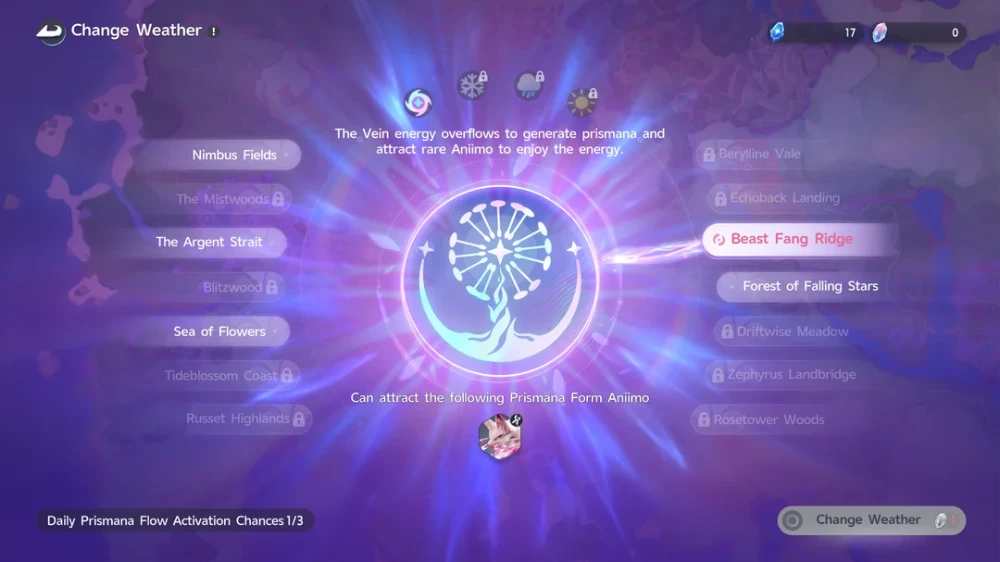
The Change Weather feature primarily allows players to activate Prismana Flow.
This special condition attracts rare Prismana Aniimo associated with the selected region.
Other weather options may appear in the interface, but they can remain unavailable.
For example, the menu may display icons for sunny, rainy, and snowy conditions without allowing players to activate them.
Some guides describe these options as locked or unavailable.
Although future updates may expand weather controls, players should not assume that every visible option is functional.
The current in-game menu should always be treated as the final reference.
| Weather Type | Can Players Activate It Manually? | Main Purpose |
| Sunny | Not reliably available through current controls | Ordinary exploration conditions |
| Rainy | Generally follows regional forecasts | Weather-specific encounters |
| Snowy | Generally follows regional forecasts | Snow-related creature forms |
| Thunderstorm | Generally follows regional forecasts | Special weather-dependent encounters |
| Prismana Flow | Yes, after unlocking the required feature | Attracting rare Prismana Aniimo |
Therefore, unlocking Change Weather does not automatically mean you can control every environmental condition.
Why Weather Matters for Rare Aniimo Encounters
Weather plays an important role in creature collection.
Certain Aniimo appear only when specific environmental requirements are met.
For example, a creature associated with rain may not appear during clear weather.
Similarly, some special forms require thunderstorms or snowy conditions.
This encourages players to explore the same region under different circumstances.
However, weather is only one factor influencing encounters.
Location, time of day, and regional availability may also matter.
Therefore, players should check the requirements for the creature they want before starting a hunting session.
For efficient exploration, remember these priorities:
- Identify the Aniimo you want to find.
- Check its associated region.
- Confirm its weather requirements.
- Review the regional forecast.
- Prepare suitable capture resources.
- Visit the location when the correct conditions are active.
This approach helps reduce unnecessary travel.
Additionally, it allows players to reserve valuable resources for more promising encounters.
How to Change Weather in Aniimo at Breezy Plains Branch
The main method for how to change weather in aniimo involves unlocking the Change Weather feature at the Breezy Plains Branch.
However, players must complete specific progression requirements before activating Prismana Flow.
These requirements involve Branch development and regional collection progress.
Where to Find Breezy Plains Branch
The Breezy Plains Branch is an important progression feature associated with the world's Vein energy system.
Players can interact with the Branch directly or access its location through the world map.
To locate it, open the map and find the relevant Branch marker in the Breezy Plains area.
Then, select the option to travel toward or interact with the Branch.
The interface includes options related to infusing energy and unlocking additional abilities.
However, some features remain unavailable until the required upgrades are completed.
If you cannot access Change Weather immediately, check your Branch progression.
Unlocking Prismana Radiance With 60 Lumin Amber
The first major requirement is upgrading the Breezy Plains Branch.
Current gameplay guides identify a cumulative contribution of 60 Lumin Amber as the milestone needed to unlock Prismana Radiance.
This upgrade is associated with the Change Weather feature.
Lumin Amber can be obtained through exploration and supported world activities.
Players can collect the material and contribute it to the Branch through its infusion interface.
Once the required amount has been contributed, the relevant upgrade becomes available.
However, reaching this milestone does not automatically unlock weather control for every region.
Players must also meet regional collection requirements.
Therefore, consider Branch progression and regional progression as separate objectives.
Getting the Silver Collection Badge
The second major requirement involves obtaining the Silver Collection Badge for the region you want to affect.
Current gameplay documentation associates this badge with reaching approximately 70% collection progress and defeating the local Alpha.
However, players should confirm the exact requirements in their current Collection Badge interface.
The Silver Badge unlocks a regional feature commonly called Ecosystem Intervention.
This feature allows the player to use the relevant weather interaction in that area.
Importantly, earning the badge in one region does not automatically unlock every other region.
For example, completing the requirements for Nimbus Fields does not necessarily provide access to weather controls in another location.
Therefore, prioritize the region containing the Aniimo you want to collect.
To prepare for the Silver Badge:
- Explore the target region thoroughly.
- Capture available Aniimo species.
- Check your regional collection percentage.
- Identify missing creatures.
- Defeat the required local Alpha.
- Claim the badge when the requirements are complete.
Once the necessary progression is finished, return to the Branch.
Step-by-Step Instructions for Activating Prismana Flow
After unlocking Prismana Radiance and obtaining the appropriate regional badge, you can activate Prismana Flow.
The process involves opening the Change Weather interface and selecting an eligible region.
Follow these steps:
- Open the world map.
- Locate the Breezy Plains Branch.
- Select the Branch marker or travel to its location.
- Choose Go to Infuse Energy.
- Open Change Weather from the Branch interface.
- Select the region where you want to activate Prismana Flow.
- Choose Prismana Flow from the available weather options.
- Confirm the use of one Prismana Crystal.
- Travel to the affected area and search for the relevant Prismana encounter.
Current gameplay documentation describes a cost of one Prismana Crystal per activation.
It also reports a limit of three activations per day and a one-minute cooldown between uses.
However, these restrictions may change through updates.
Always check the current counter and cost displayed in the game.
Additionally, remember that Prismana Flow affects the selected region.
It does not guarantee that every Prismana species will appear in the same location.
How to Change the Weather in Aniimo Without Prismana Crystals
Players searching for how to change the weather in aniimo do not always need to spend rare materials.
Although Prismana Crystals are useful for triggering Prismana Flow, ordinary weather conditions follow a different system.
For rain, snow, and thunderstorms, the most practical methods involve checking forecasts and exploring at the right time.
Waiting for Natural Weather Changes
Aniimo features changing regional weather conditions.
This means that players can encounter different environments simply by waiting for the appropriate weather.
For example, if you need a rainy-weather Aniimo, you can return to its habitat when rain appears.
However, waiting without checking the forecast can waste time.
A better approach involves identifying when the desired condition is expected.
Then, you can complete other activities while waiting.
This is particularly useful for players collecting several weather-dependent forms.
Instead of repeatedly searching the same area, plan your exploration around upcoming conditions.
Checking the 24-Hour Regional Forecast
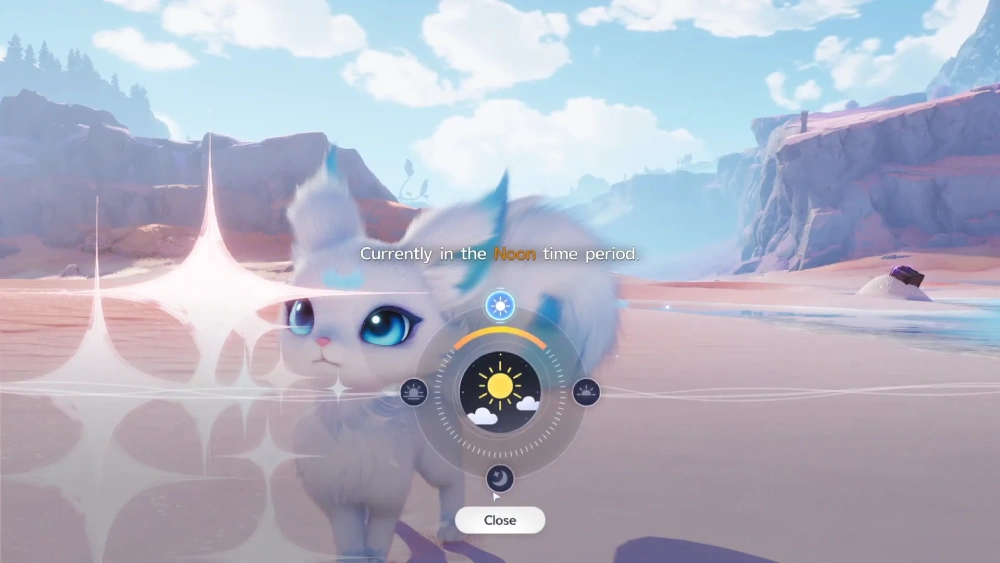
The world map provides a weather forecast feature.
Current gameplay guides describe a forecast covering approximately the next 24 hours.
However, the exact interface and forecast range may vary with updates.
To check the forecast:
- Open the world map.
- Zoom out to the regional view.
- Select the area you want to investigate.
- Find the weather tab marked with a sun icon.
- Review the current condition and upcoming forecast.
- Identify when the required weather is expected.
- Return to the region during that period.
Some versions of the interface also include a Follow Weather option.
This feature helps players track a selected condition.
However, following the weather does not manually change it.
It is a planning tool rather than a weather-control ability.
Visiting Another Player's World
Another useful option involves cooperative exploration.
If a friend has the weather condition you need in their world, visiting that world may help you find the appropriate encounter.
For example, your current region might have clear weather while another player's corresponding area is experiencing rain.
Joining their world can provide an alternative to waiting for your own forecast.
However, this method depends on the game's multiplayer access rules and the conditions active in the destination world.
Additionally, some activities or encounters may have specific eligibility requirements.
Therefore, confirm that the desired creature can appear before beginning your search.
Using Photo Mode for Visual Weather Effects
Photo Mode provides another way to experiment with environmental appearances.
Players can adjust certain visual conditions to create different compositions.
For example, a scene may appear rainy or snowy in a photograph.
However, these changes are visual effects associated with Photo Mode.
They do not necessarily alter the actual weather experienced during gameplay.
Most importantly, Photo Mode weather effects do not activate weather-dependent creature encounters.
Therefore, this feature is useful for photography rather than collection progression.
If your goal is to find a rare Aniimo, use the regional forecast or Prismana Flow system instead.
Aniimo Weather Types: Rain, Snow, Thunderstorms, and Prismana Flow
Understanding weather conditions is essential for players following an aniimo how to change weather guide.
Each weather type can influence exploration, creature availability, and collection opportunities.
However, different conditions serve different purposes.
Ordinary weather affects regional encounters, while Prismana Flow is associated with special Prismana forms.
Rainy Weather and Weather-Dependent Forms
Rainy weather can create opportunities to encounter Aniimo that do not normally appear under clear skies.
Some creatures have special Rainfall or Rainstorm forms associated with these conditions.
For example, current creature guides identify Nimbi and Turbo among the Aniimo associated with rainy environments.
However, these encounters also depend on their specific regions.
Therefore, rain alone does not guarantee that every rain-related creature will appear.
Players should confirm the correct habitat before searching.
Additionally, some rainy-weather encounters may require particular progression or exploration conditions.
The most efficient strategy is to identify the target creature first.
Then, check its region's weather forecast.
Once rain becomes active, explore the appropriate habitat and prepare your capture resources.
Snowy Conditions and Regional Variants
Snowy weather introduces another category of special encounters.
Certain Aniimo have forms associated with cold environments and snowfall.
Current gameplay guides identify creatures such as Pomegg, Baleetle, and Rookey among those with snow-related forms.
However, their availability depends on the correct region and weather conditions.
For example, cold areas such as Russet Highlands may provide opportunities to discover specialized forms.
Players should not assume that every snowy region contains the same creatures.
Instead, review regional collection information.
Additionally, check whether the target form has any other requirements.
A creature may require snow alongside a particular location or time of day.
Therefore, planning becomes especially important when pursuing multiple regional variants.
Thunderstorms and Special Encounters
Thunderstorms are another important weather condition.
These events can support encounters that differ from ordinary rainy-weather spawns.
Current gameplay documentation identifies Scorchhowl and Sherro among creatures associated with thunderstorm conditions.
However, players should verify the exact habitat and form requirements before searching.
Thunderstorms are not simply interchangeable with ordinary rain.
Some creatures may appear during both conditions, while others require a thunderstorm specifically.
Therefore, checking the forecast for the correct weather label is important.
If your target requires a thunderstorm, waiting for ordinary rainfall may not be sufficient.
Additionally, remember that current manual weather controls do not reliably allow players to activate thunderstorms.
Use the forecast or an eligible cooperative world instead.
Prismana Flow and Rare Prismana Aniimo
Prismana Flow is the most important manually triggered weather event currently documented in Aniimo.
Unlike ordinary rain or snow, Prismana Flow is connected to the game's special Prismana creature forms.
Players can activate it through the Breezy Plains Branch after unlocking the required progression.
However, activating the event consumes a valuable resource.
One Prismana Crystal is required for each manual activation.
Current gameplay documentation also describes a limited number of daily activations.
Therefore, players should avoid using crystals without a clear objective.
Before activating Prismana Flow, identify which rare creature is associated with the selected region.
Then, prepare your capture resources and travel route.
This approach helps you take advantage of the event's limited duration.
The following table summarizes the main weather-related strategies.
| Weather | Encounter Focus | Recommended Strategy |
| Rain | Rainfall and Rainstorm forms | Follow regional forecasts |
| Snow | Snowfield forms | Explore eligible cold regions |
| Thunderstorm | Storm-specific forms | Wait for the correct forecast |
| Clear weather | Ordinary regional encounters | Complete general collection goals |
| Prismana Flow | Rare Prismana forms | Activate strategically with a Prismana Crystal |
Understanding these differences can make collection routes considerably more efficient.
Why Can't You Change Weather in Aniimo? Common Problems
Players researching how to change weather in aniimo may encounter several obstacles.
The Change Weather button may remain locked, certain weather options may be unavailable, or the required materials may be missing.
However, these situations do not always indicate a technical problem.
Many restrictions are part of the game's progression system.
The Change Weather Button Is Locked
If Change Weather is unavailable, begin by checking your Breezy Plains Branch progression.
Current gameplay documentation identifies 60 cumulative Lumin Amber as the milestone associated with Prismana Radiance.
Without this upgrade, the relevant feature may remain inaccessible.
Next, check the Silver Collection Badge for your target region.
The badge is associated with Ecosystem Intervention.
If you have unlocked the Branch feature but not the regional requirement, the selected area may remain unavailable.
Therefore, verify both conditions.
A useful troubleshooting checklist includes:
- Confirm that the required Lumin Amber has been contributed.
- Check whether Prismana Radiance is unlocked.
- Review the target region's Collection Badge.
- Confirm that the local Alpha requirement is complete.
- Open the correct Branch interface.
- Check whether the desired region is eligible.
If the feature remains locked, follow the requirements displayed in the current game version.
Rain, Snow, or Thunderstorm Options Are Unavailable
One common source of confusion involves weather icons that appear in the menu but cannot be selected.
Players may unlock Change Weather and expect to activate rain immediately.
However, current gameplay documentation indicates that ordinary weather options can remain unavailable.
The reliably documented manual feature is Prismana Flow.
Therefore, the presence of a rain or snow icon does not necessarily mean that the condition can be activated.
If an option is greyed out, do not spend additional resources assuming that it will automatically become available.
Instead, check the current menu description.
For ordinary weather-dependent encounters, use the regional forecast.
Alternatively, visit another player's world where the required condition is active.
Missing Prismana Crystals or Regional Requirements
Prismana Crystals are required for manual Prismana Flow activation.
However, they are not the same as Lumin Amber.
Lumin Amber supports Branch progression.
Prismana Crystals are consumable resources used to activate the special weather event.
Current gameplay guides identify Branch progression rewards as one source of Prismana Crystals.
Some guides also describe additional limited reward opportunities, but availability can depend on the current game version.
Therefore, check the relevant reward descriptions before planning a farming route.
If the game reports insufficient Prismana Crystals, you cannot complete the manual activation without obtaining another crystal.
Additionally, the target region must be eligible.
Having enough crystals does not bypass the Silver Collection Badge requirement.
Weather Changes That Do Not Affect Creature Spawns
Another common misunderstanding involves Photo Mode.
Players may select a rainy visual effect and expect rain-dependent Aniimo to appear.
However, Photo Mode does not change the actual encounter conditions.
It modifies the appearance of the scene for photography.
Therefore, the game's ordinary weather schedule remains unchanged.
Similarly, selecting Follow Weather does not force a condition to begin.
It helps players track upcoming weather.
If the desired creature is not appearing, verify the actual regional weather rather than relying on visual filters.
Best Strategies for Finding Weather-Specific Aniimo

Learning how to change the weather in aniimo is only one part of efficient creature hunting.
Players also need to understand where creatures appear and how different environmental conditions influence their availability.
A well-planned route can reduce unnecessary travel and help preserve rare resources.
Planning Routes Around Weather Forecasts
Start by identifying the creatures you want to collect.
Then, group them according to their required weather conditions.
For example, several targets may require rain.
Others may depend on snow or thunderstorms.
Once you have identified the relevant regions, check their forecasts.
Prioritize locations where the required conditions will appear soon.
This allows you to complete multiple collection objectives during a single exploration session.
A practical hunting routine involves:
- Choose a target Aniimo.
- Confirm its region and weather requirements.
- Open the regional weather forecast.
- Identify the next suitable weather period.
- Prepare capture items.
- Travel to the appropriate habitat.
- Search during the active weather condition.
- Record your progress before moving to another region.
Additionally, consider keeping a short list of missing creatures.
This makes it easier to adjust your plans when unexpected weather conditions appear.
Combining Region Collection Goals With Weather Hunting
Weather hunting can also support regional collection progression.
For example, capturing new species may contribute toward the Collection Badge required for additional features.
Therefore, exploring during different weather conditions can help players work toward several objectives simultaneously.
Instead of focusing exclusively on one rare creature, collect other missing Aniimo encountered along the route.
Additionally, complete relevant exploration activities while waiting for weather changes.
This approach helps maintain steady progression.
However, avoid spending valuable capture resources on creatures you already own unless there is a specific reason.
Save your strongest capture options for difficult or rare encounters.
Saving Prismana Crystals for Valuable Encounters
Prismana Crystals are valuable because they allow players to activate Prismana Flow manually.
However, current gameplay documentation describes limited activation opportunities.
Therefore, efficient resource management is important.
Before spending a crystal, confirm that the selected region contains the Prismana form you want.
Next, prepare the necessary capture equipment.
Additionally, ensure that you have enough time to explore during the event.
Avoid activating Prismana Flow immediately before leaving the game.
It is also useful to consider whether the desired encounter can be obtained through other progression systems.
Current guides describe Nurture and Prismatic Energy as alternative ways to work toward Prismana encounters.
These systems may reduce the need to spend crystals.
Therefore, reserve manual activations for situations where they provide meaningful value.
How ExitLag Can Improve Aniimo Connection Stability
Aniimo combines exploration, creature collection, and online gameplay features.
Because connection quality can influence the consistency of online interactions, network stability is important for players who want a smooth experience.
This becomes especially relevant during cooperative activities and time-sensitive exploration.
However, network optimization and weather mechanics are separate systems.
Reducing Network-Related Interruptions During Exploration
Unstable connections can create frustrating interruptions during online gameplay.
For example, packet loss or latency fluctuations may contribute to delayed responses or connection problems.
These issues can become inconvenient when players are exploring with friends or attempting limited opportunities.
However, not every gameplay problem originates from the network.
Hardware limitations, frame rate drops, and server-side issues can produce different symptoms.
Therefore, identifying the cause is important.
Additionally, connection optimization does not change the game's weather schedule.
It cannot force rain, snow, or thunderstorms to appear.
Optimizing Online Gameplay on PC and Mobile
ExitLag uses proprietary connection optimization technology designed to improve routing for supported online games.
Its Real-Time Optimization technology helps identify efficient network paths when available.
Meanwhile, Multipath Connection can use multiple simultaneous routes to improve stability.
These features may help reduce certain network-related problems.
ExitLag helps optimize supported PC and Mobile gaming connections through intelligent routing, potentially reducing lag, packet loss, and connection instability when better network paths are available. For Aniimo players, this can support more consistent online gameplay during exploration, cooperative activities, and rare creature hunting. With automatic optimization and advanced configuration options, ExitLag offers a practical way to improve connection stability while players focus on discovering new Aniimo.
However, ExitLag cannot guarantee lower latency in every situation.
It also cannot modify creature spawn rates, activate weather events, or bypass progression requirements.
ExitLag is available for PC and Mobile, but it does not support consoles.
Players should also verify that their specific game and platform are supported before configuring an optimized connection.
FAQ: Unlocks and Rare Forms
Players searching for aniimo how to change weather often have questions about Prismana Crystals, regional forecasts, and locked weather options.
The following answers address the most common situations.
Can You Make It Rain in Aniimo?
Rain occurs naturally through the regional weather system.
However, current gameplay documentation does not reliably confirm that players can manually activate rain through the Change Weather interface.
If the rain option is unavailable, check the regional forecast.
You can also explore another player's world where rain is already active.
How Do You Unlock Change Weather?
Current guides identify two main requirements.
First, contribute a cumulative 60 Lumin Amber to the Breezy Plains Branch to unlock Prismana Radiance.
Second, obtain the Silver Collection Badge for the target region.
After meeting these requirements, open the Branch's Infuse Energy interface and select Change Weather.
How Do You Get Prismana Crystals?
Prismana Crystals are valuable resources associated with Branch progression and special reward opportunities.
Current gameplay guides identify Branch upgrade rewards as one source.
However, acquisition methods may change through updates.
Check the current in-game reward descriptions before planning how to obtain additional crystals.
Does Photo Mode Change Real Weather?
No. Photo Mode can change the visual appearance of weather for a photograph.
However, these effects do not change the actual regional weather.
They also do not activate weather-dependent creature encounters.
Therefore, Photo Mode is not a substitute for the forecast system.
Can You Change the Weather in Every Region?
Not automatically.
The Change Weather system requires regional progression.
Players generally need the Silver Collection Badge for the area they want to affect.
Additionally, the available manual weather options may remain limited to Prismana Flow.
Check the current Branch interface to confirm which regions and conditions are eligible.
How Do You Find the Next Thunderstorm?
Open the world map and select the region you want to investigate.
Then, access the weather forecast through the appropriate weather tab.
Review the upcoming conditions and identify the next thunderstorm period.
If the required weather is not expected soon, consider exploring another region or visiting a cooperative world.
Is Prismana Flow the Same as Rain or Snow?
No. Prismana Flow is a special environmental event associated with rare Prismana Aniimo.
Rain and snow are ordinary weather conditions that influence different encounter categories.
Therefore, activating Prismana Flow does not automatically satisfy the requirements for rain-specific or snow-specific creatures.
What Is the Best Way to Find Rare Weather-Dependent Aniimo?
The best approach is to combine regional forecasts with collection planning.
Identify the creature's habitat, confirm its required weather, and prepare your capture resources.
For Prismana forms, consider whether manual activation is worth spending a Prismana Crystal.
For ordinary weather-dependent forms, follow the regional schedule or visit another player's world.
Ultimately, mastering aniimo how to change weather means understanding the difference between natural forecasts and manually activated Prismana Flow. By upgrading the Breezy Plains Branch, earning regional Collection Badges, and planning exploration around the correct conditions, players can improve their chances of discovering rare Aniimo. Meanwhile, ExitLag can help optimize supported PC and Mobile connections, allowing players to focus on exploration and collection with fewer avoidable network interruptions.
All game images used in this blog belong to Pawprint Studio. They are used for informational/educational purposes only and do not imply endorsement or affiliation with the rights holders.