

The official launch of Aion 2 Korea has been confirmed for November 19, 2025, marking a new era in NCSoft’s MMORPG legacy. This full release will bring back the iconic Elyos versus Asmodians conflict and introduce a brand-new world built from the ground up in Unreal Engine 4. Designed primarily for mobile, with emulator support for PC users, Aion 2 KR represents a major leap forward in the franchise.
This guide is your comprehensive resource on the Aion 2 Korea release, including beta testing background, how to access the Korean client, and the best way to connect from abroad. Whether you’re a returning Aion veteran or a new adventurer, this guide will prepare you for the Korean launch.

What Is Aion 2 Korea?
Aion 2 KR is the Korean-language edition of NCSoft’s ambitious sequel to the original Aion MMORPG. While it retains key lore elements, such as the Elyos vs. Asmodians war, this new installment introduces a fresh take on gameplay.
Preview materials suggest:
- A mobile-styled UI optimized for touch devices
- Real-time combat with active skills and dodge mechanics
- Vertical exploration using gliding in open-world zones (based on dev livestreams)
- Class systems that may evolve based on level progression (as seen in previous Aion titles and preview builds)
Note: Some gameplay features, like gliding and class morphing, are based on preview demonstrations and developer streams. Regional implementations may vary, and these systems are subject to change.
Aion 2 Korea Release Date
After years of anticipation, NCSoft confirmed that Aion 2 Korea will officially launch on November 19, 2025. This launch will be synchronized with the Taiwan version, making it one of the first multi-region MMORPG launches from the studio.
At launch, Aion 2 Korea will be available for:
- Android and iOS devices
- PC via Android emulators (Bluestacks, LDPlayer, etc.)
There is currently no native PC client confirmed. If NCSoft decides to release one, it would likely follow after initial mobile rollout.
Aion 2 Korea Beta Test Overview
Closed Beta Phases
Earlier in 2025, NCSoft held limited closed technical tests for users with verified Korean accounts. These betas were invitation-only, with short signup windows and server stress test goals.
Registration Requirements
To join previous beta tests, players needed:
- A verified NC Korea account (typically linked to a Korean phone number)
- i-PIN verification or local identification
- Registration through NCSoft’s official Korean teaser site
These requirements were reported by participants in past beta phases. Future account restrictions may vary upon launch.
While no new beta events are expected before the full release, players should monitor official NC Korea channels for last-minute onboarding events or technical previews.
How to Play Aion 2 on Korea Servers From Abroad
Although the game is intended for Korean users, international players can access Aion 2 Korea servers with proper setup and routing tools.
Accessing Aion 2 KR Step-by-Step
- Create an NC Korea Account:
- Visit the official NCSoft Korea website
- Use browser translation to assist with registration
- A Korean phone number or ID verification may be required, based on past tests
- Download the Aion 2 Korean Client:
- Officially available via Google Play Korea and App Store KR for mobile
- Possibly also through One Store, Korea’s domestic app platform
- For emulator users: download APK files from trusted sources, but note third-party sources may carry risk
- Set Language Settings:
- The client is fully in Korean with no English support
- Use fan-made guides and overlays to help with UI navigation
- Install and Configure ExitLag:
- Route your connection to Korean servers for reduced latency and improved stability
Important: Full game registration and in-app purchases may require Korean ID verification. This is based on previous test phases and may apply at launch.
ExitLag: Essential for International KR Players
If you’re connecting from outside Korea, ExitLag is the best solution to overcome high ping and packet instability. Aion 2’s faction PvP and real-time combat require low latency.
Key ExitLag Features for Aion 2 KR:
- Multipath Connection: Sends your game data through the best routes, reducing ping
- Traffic Shaper: Prioritizes your Aion 2 data to avoid delays from background traffic
- Worldwide Server Coverage: Ensures stable routing from anywhere
- Real-Time Optimization: Automatically adjusts routes based on server performance
How to Set Up ExitLag for Aion 2 Korea
- Create your ExitLag account
- Download and install ExitLag on your PC or Android device
- Search “Aion 2 KR” and apply the recommended routes
- Launch the game with ExitLag running in the background
ExitLag also supports most Android emulators, making it perfect for desktop players without access to a Korean network.
Inside the Aion 2 Korean Client
The Korean build of Aion 2 is likely to receive early access to features before they’re rolled out in other regions.
Regional Differences to Expect:
- Voice acting and interface in Korean only
- Exclusive events and cosmetic bundles
- Early access to new systems or class reworks
- Region-specific balance patches and feedback cycles
Fan communities often translate patch notes and livestream summaries for non-Korean players.
Interface and Navigation
The UI is mobile-optimized, with an intuitive layout for skill rotation, character movement, and quest tracking. Emulator users can customize hotkeys to replicate mobile controls.
Expect:
- Minimalist interface with expandable menus
- Auto-routing systems for quest tracking
- Easy targeting for PvE and PvP combat
Where to Find Support and Community Resources
For non-Korean players, fan communities are essential. Here’s where to go:
- Reddit: r/AionMMO and r/MMORPG
- Discord: Aion 2 Global, Korean Gaming Hubs
- YouTube: KR player channels with gameplay previews
- Google Docs: Shared guides for translations and walkthroughs
What’s Next: Preparing for Launch Week
As the November 19 launch approaches, here’s how to get ready:
- Create your ExitLag account early and test your routes
- Practice emulator setups if you plan to play on PC
- Follow Korean sources via Twitter or Naver for updates
- Join Discords for real-time news, guides, and translated content
Character Customization in Aion 2 Korea
Preview of Customization Options
Aion has always been known for deep character customization, and Aion 2 Korea continues this tradition. Based on developer livestreams and early footage, players can expect:
- Detailed control over facial structure, makeup, and hairstyles
- Multiple body types and proportions, reportedly shown in previews
- Adjustable skin tone, eye shape, and hair color
- Optional effects like glowing eyes or magical overlays
Some features such as dual-tone hair or heterochromia have been reported by fans and streamers but are not officially confirmed. Availability may vary by region.
Preset Sharing and Uploads
According to community sources and influencer previews, players may be able to:
- Save and reuse custom presets
- Share designs with others
- Import presets across characters
These features are speculative and based on fan reports. There is no official confirmation that preset sharing will be active at launch.
Faction System: Elyos vs Asmodians
A defining feature of the Aion franchise returns in Aion 2 KR: the struggle between Elyos and Asmodians. NCSoft confirms that faction conflict is part of the game, aligning with “classic elements from the original IP.”
It’s been reported by dev streams and early reviews that faction choice may affect:
- Initial zone access
- Questlines
- Participation in PvP content
Exact implementation details are not confirmed. Features like starting zones and faction-restricted areas may be regionally adjusted.
Monetization Model in Korea
Confirmed Monetization Elements
According to NCSoft’s roadmap, Aion 2 Korea will include:
- Membership passes offering convenience perks (e.g., cooldown boosts, expanded storage)
- Cosmetic items such as outfits, wings, pets, and weapon skins
- Timed bundles and seasonal events with aesthetic rewards
Transparency and Market Observations
There is no confirmation of gear-based advantages being sold. Current communication suggests a cosmetic and QoL-focused monetization model.
Observers of the Korean gaming market expect high transparency in gacha odds and monetized systems, especially under local consumer protection rules. However, this is a general trend, not a confirmed policy by NCSoft.
Visual and System Settings Optimization
Emulator Tips (Community Recommendations)
Since Aion 2 KR is mobile-first, emulator use is popular for PC players. Community tips for smooth performance include:
- Enable 60+ FPS modes in Bluestacks or LDPlayer
- Adjust resolution scaling for widescreen
- Customize control schemes for better PvP input
These are suggestions shared by emulator users and not official recommendations.
In-Game System Settings to Tune:
- Lower skill effect details during sieges
- Adjust UI scale for visibility on large screens
- Set power-saving mode to off for max FPS on Android
ExitLag for Aion 2 Korea: Deep Integration
ExitLag is more than a latency tool—it’s an essential upgrade for anyone connecting to KR servers from abroad.
Key Features Recap:
- Real-time rerouting of game traffic
- Multipath protection during large-scale PvP
- Fully supports emulator environments
Onboarding Steps:
- Create your ExitLag account
- Download the client (Windows or Android)
- Search and apply settings for “Aion 2 KR”
- Launch your game and play with optimized performance
ExitLag also ensures stability during region-specific content launches and hotfix patches.
Regional Launch Bonuses and Limited Events
Korea-Specific Perks
NCSoft has teased several Korea-only incentives:
- Unique cosmetic rewards tied to NC account history
- Early login streak rewards
- Currency rebates and founder packs for launch week
Be sure to follow Korean patch notes and livestream recaps to stay informed.
How to use ExitLag in Aion 2
The process is extremely simple:
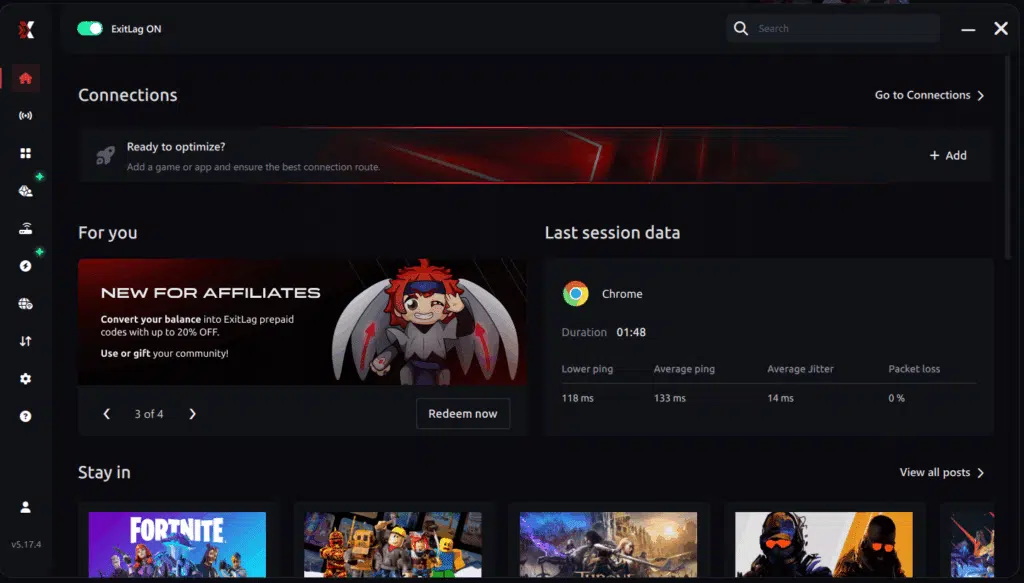
Step 1 – Access the official ExitLag website and download the application. There’s a free trial period for new users.
Step 2 – Install and open the program. Log in with your account.
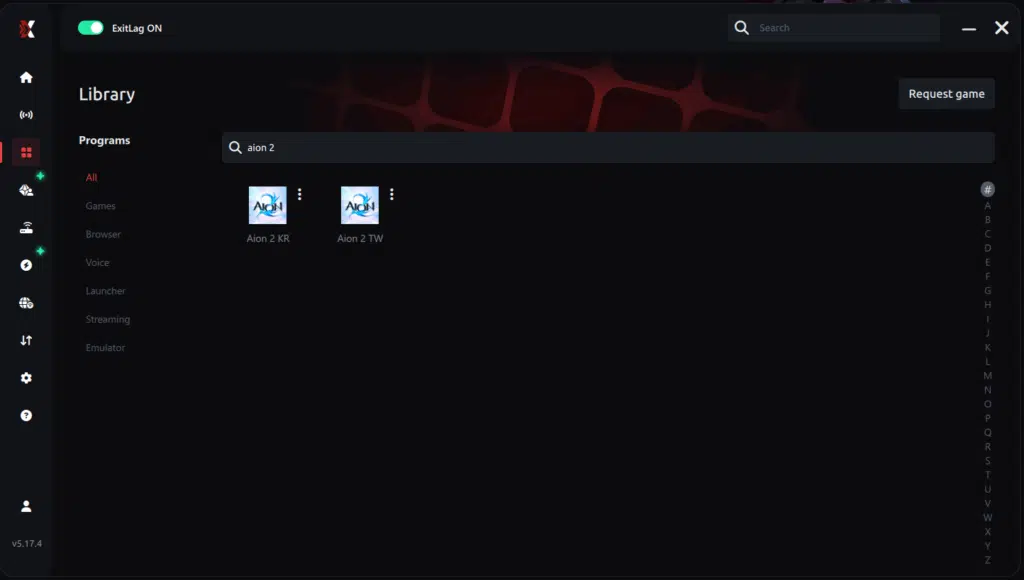
Step 3 – In the search bar, type “Aion 2” and select the game from the list.
Step 4 – Choose between automated or manual route
Based on the results, you can let ExitLag automatically select the best route or manually choose the server that showed the lowest latency for your connection.
AI-optimized automated route
Based on the results, you can let ExitLag automatically select the best route through AI-optimized . The system analyzes multiple connection paths in real-time and automatically identifies the most efficient route for your connection, ensuring the lowest possible latency without requiring manual choices.
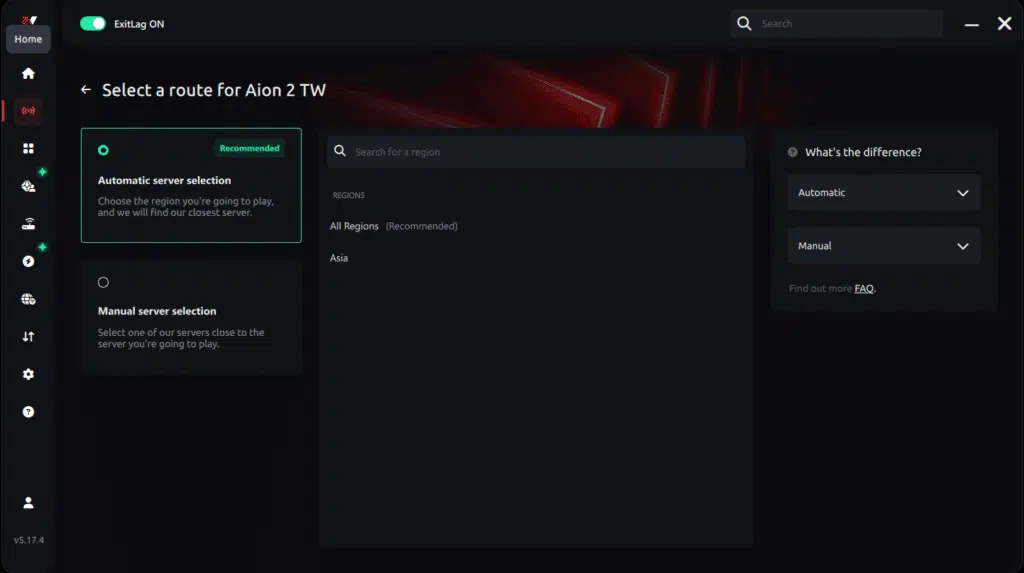
Manual route
If you prefer to have full control over your connection, you can manually choose the server based on the ping test results. Simply select the server that showed the lowest latency or the one that best meets your specific gaming needs, allowing complete customization of your experience.

Step 5 – Click “Apply routes” or the play button. ExitLag will begin optimizing your connection automatically.
AI-optimized automated route:

Manual route:

Step 6 – Wait a few seconds until optimization is complete. You’ll see ping indicators in the interface.
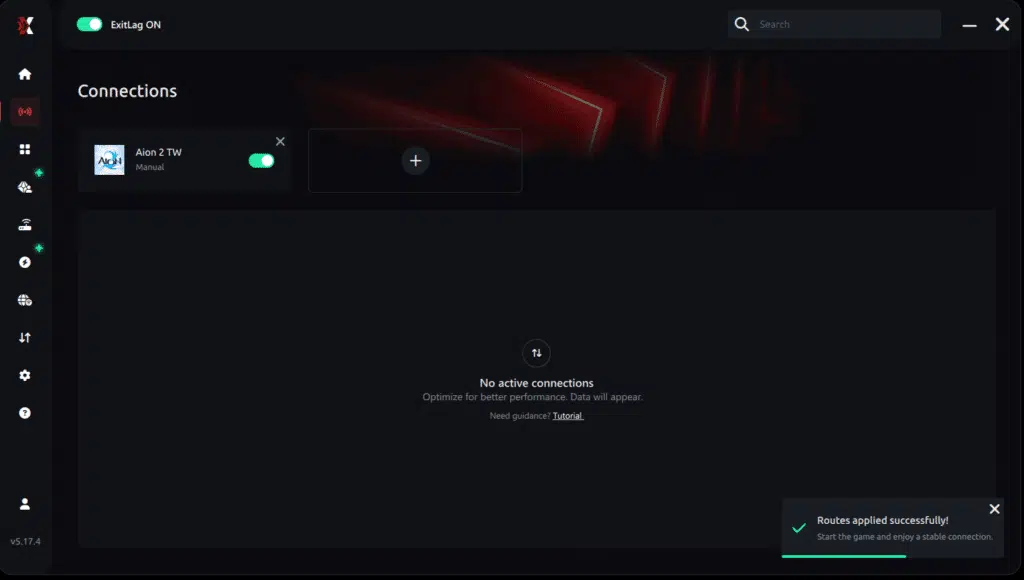
Step 7 – Launch Aion 2 normally. The optimization will already be active.
ExitLag runs in the background while you play, constantly adjusting routes to maintain the best possible performance.
How to use Ping for Games: step-by-step guide
Checking your connection quality before entering a match has never been easier. Here’s how to use Ping for Games in just a few steps:
1. Open the ExitLag software on your PC
Ensure the application is installed and open. The feature is integrated into the platform and available for free to all users.
2. Access the Network Analyzer tool
Locate the Network Analyzer in the software menu. This is where you’ll find Ping for Games along with other connection analysis features.
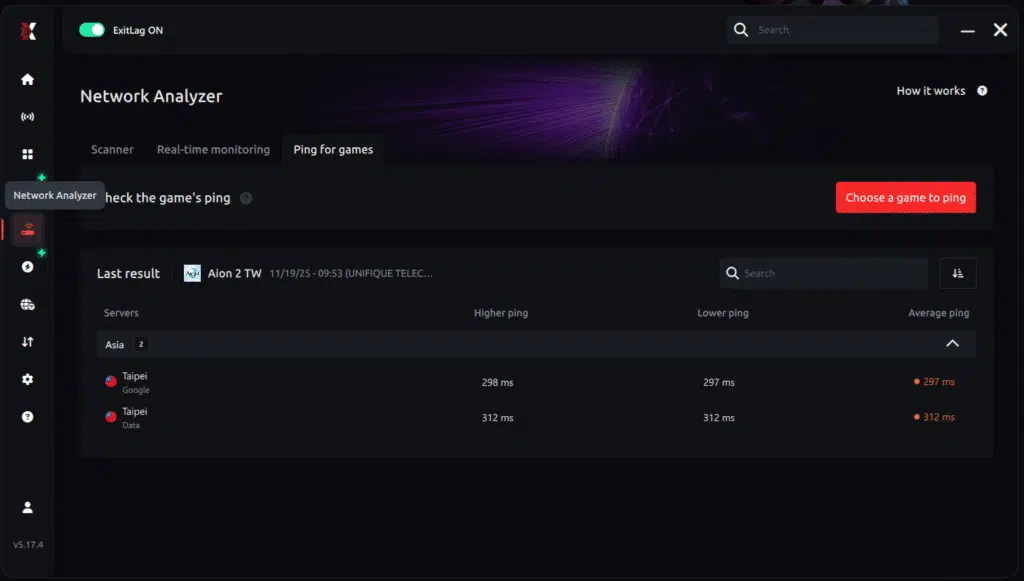
3. Select the game you want to test
Choose from the list the title you plan to play. The tool supports major online multiplayer games, including MOBAs, FPS, Battle Royales, MMORPGs, and more.
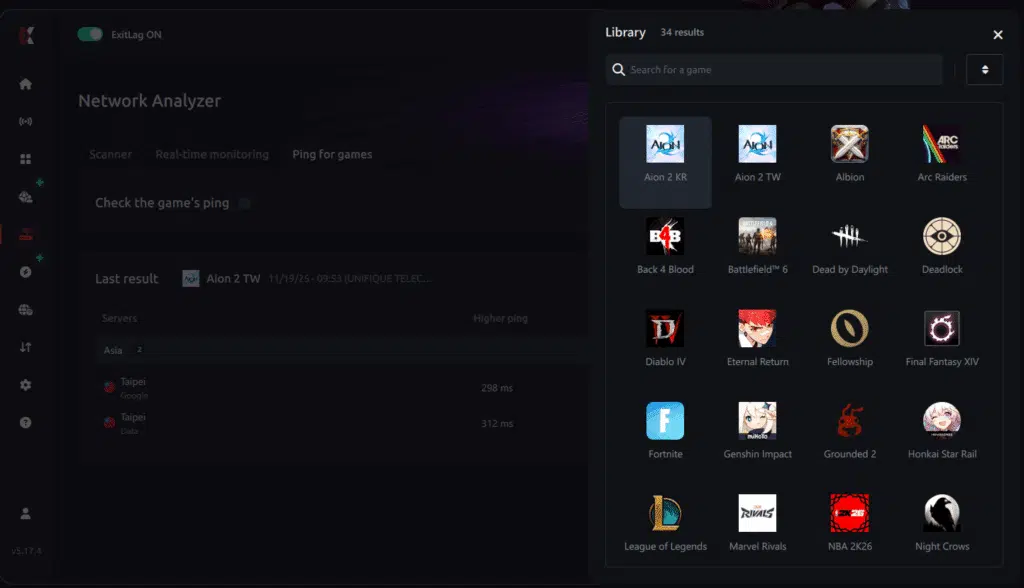
4. Choose the specific server
Now you select directly the server you want to test, instead of just a generic region. This ensures much more accurate results for your choice.
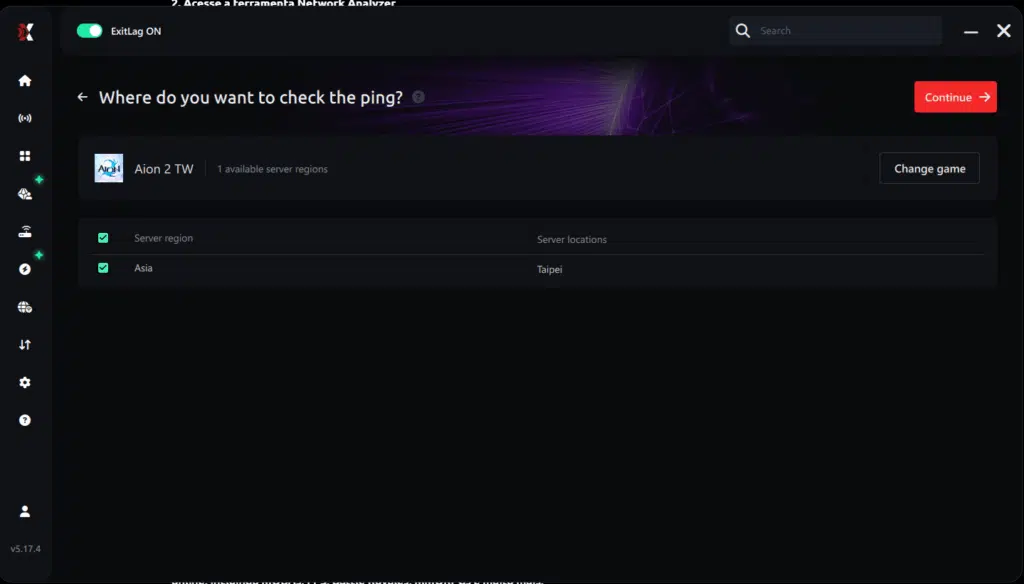
5. Start the ping test
With one click, the measurement is performed in real-time between your device and the chosen server, considering your current connection (cable or Wi-Fi).
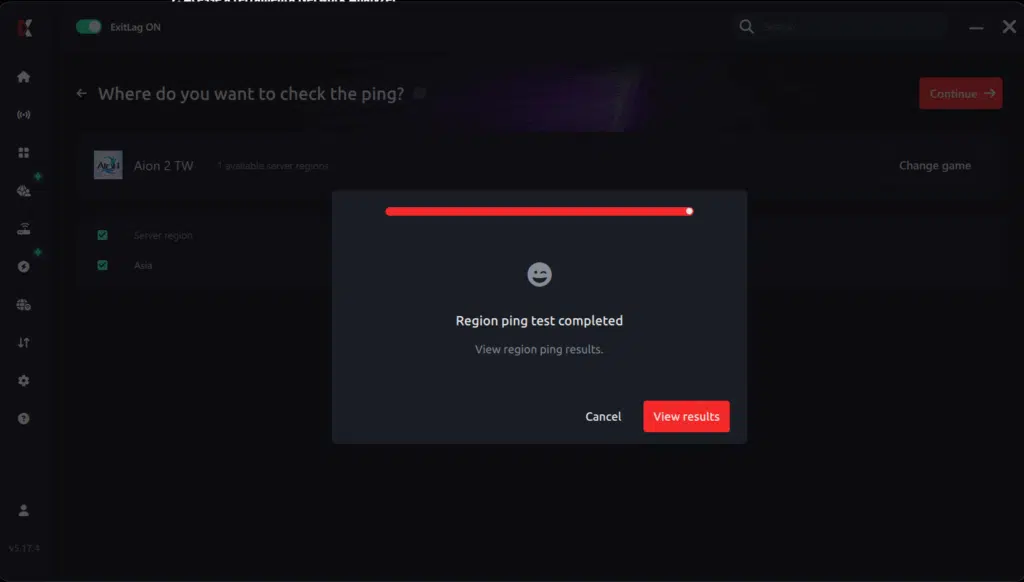
6. Analyze the results
Results appear in milliseconds (ms), automatically sorted from best to worst ping. You can also reorganize the view alphabetically, if you prefer.
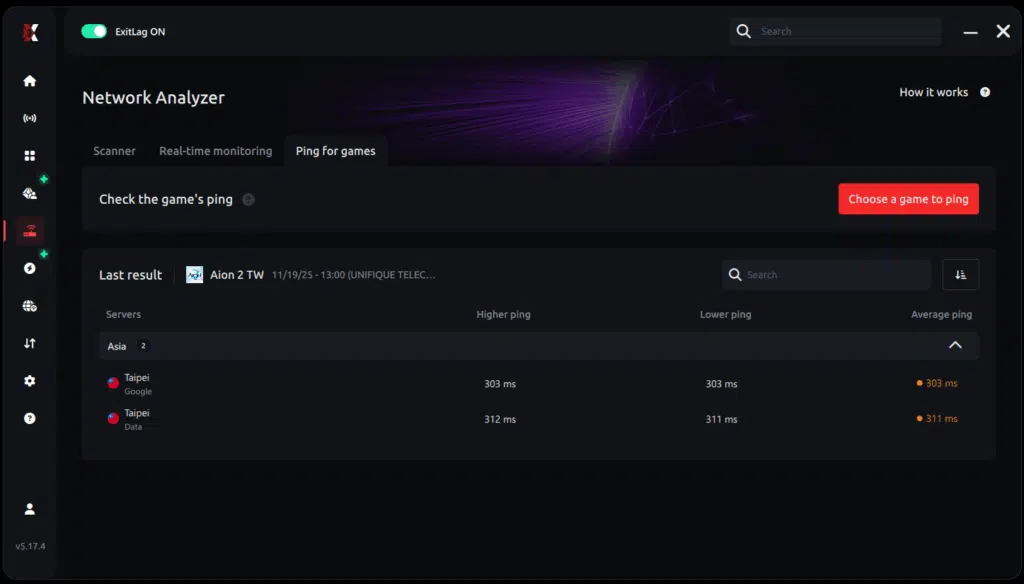
7. Choose the best server and play worry-free
With the information in hand, just select the server with the lowest latency and enter the match knowing your connection is optimized.
All game images used in this blog belong to NCSoft. They are used for informational/educational purposes only and do not imply endorsement or affiliation with the rights holders.
Got questions or want to connect with other players? Join the conversation at the ExitLag Forum!




