

Aion 2 has officially launched in Korea and Taiwan as a cross‑platform/mobile title, with PC access reported through regional PC launchers in KR/TW. A fully native PC client for the global version has not been publicly confirmed at this time; however, Taiwan and Korea already have an officially launched PC-accessible version. Players around the world are gathering information, exploring available setup methods, and researching everything from aion 2 pc requirements to how to install aion 2 on pc, even though a global release date remains unconfirmed.
Here, you will find everything you need to know about aion 2 for windows, including system specs, installation methods, download routes, regional restrictions, performance tests, early benchmarks, and how ExitLag improves your connection stability.
Aion 2 PC Overview
Aion 2, developed using Unreal Engine 5, is the newest evolution of the legendary Aion franchise. Released in 2025 for Korea and Taiwan, it blends modern graphics, seamless open‑world architecture, large‑scale PvP, and an expanded flight system.
What Makes Aion 2 Different From Previous Titles
Aion 2 is not a remaster, nor is it a simple mobile port. Although it has cross‑platform elements, the PC version was designed to support:
- High‑resolution textures
- Dynamic weather and lighting
- Large‑scale faction PvP
- Aerial exploration and diving systems
- Advanced rendering with DLSS/FSR options
- Real‑time volumetric effects
Why Aion 2 Is a Major 2025 MMORPG Release
MMORPGs have been shifting toward mobile‑first design, but Aion 2 stands out with a strong focus on:
- Traditional MMO world-building
- Persistent server economies
- Cross-region social gameplay
- Deep class and weapon loadout systems
- Open‑world PvPvE events
And thanks to Unreal Engine 5’s scalability, the developers state that Unreal Engine 5 supports scalability across a wide range of PCs, although user experiences may vary significantly depending on hardware and optimization patches.
How ExitLag Enhances Aion 2 PC Performance
Because aion 2 pc is currently limited to Korea and Taiwan, international players typically face:
- High latency
- Packet loss
- Unstable routes
- Congestion-related jitter
ExitLag’s technology is purpose‑built to solve these issues.
Why ExitLag Helps Aion 2 PC
ExitLag applies:
- Multipath Connection to ensure stable routing
- Worldwide servers for optimized ping
- Real‑Time Optimization to continuously evaluate route quality
- Traffic Shaper to prioritize game packets and lower jitter
- Multi‑Internet failover to keep you connected even if one network drops
- FPS Boost to increase system responsiveness
How to use ExitLag in Aion 2
The process is extremely simple:
Step 1 – Access the official ExitLag website and download the application. There’s a free trial period for new users.
Step 2 – Install and open the program. Log in with your account.
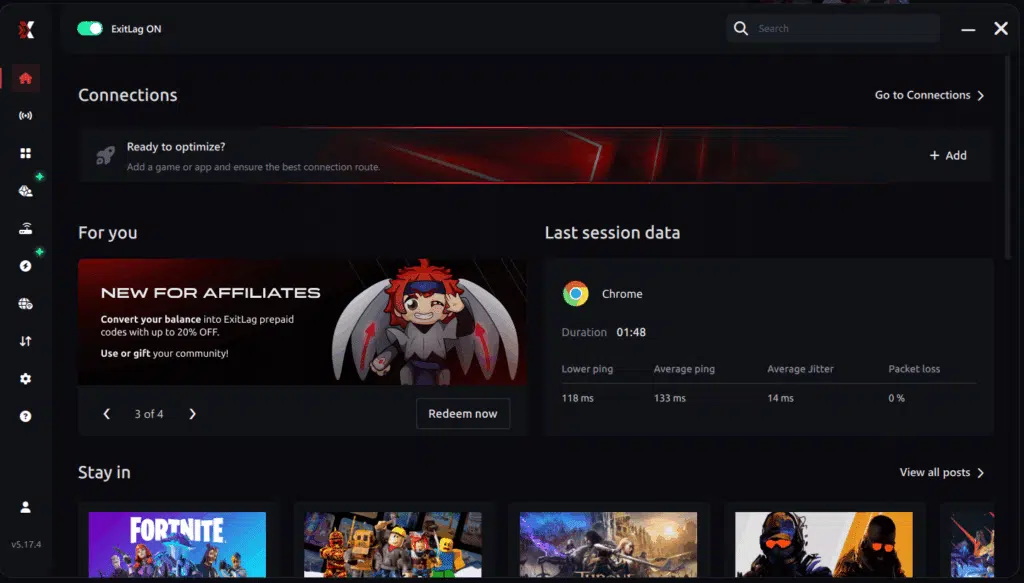
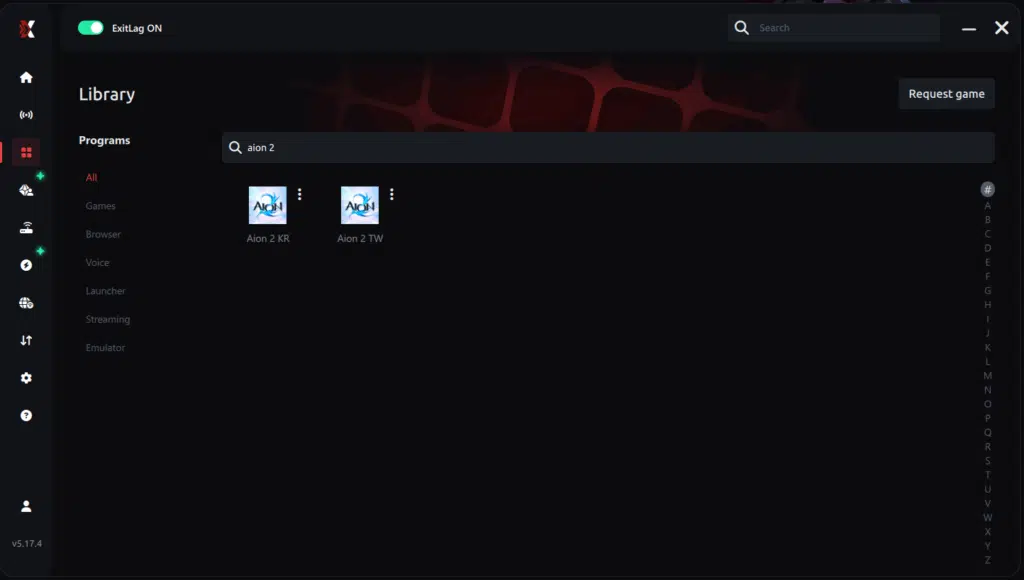
Step 3 – In the search bar, type “Aion 2” and select the game from the list.
Step 4 – Choose between automated or manual route
Based on the results, you can let ExitLag automatically select the best route or manually choose the server that showed the lowest latency for your connection.
AI-optimized automated route
Based on the results, you can let ExitLag automatically select the best route through AI-optimized . The system analyzes multiple connection paths in real-time and automatically identifies the most efficient route for your connection, ensuring the lowest possible latency without requiring manual choices.
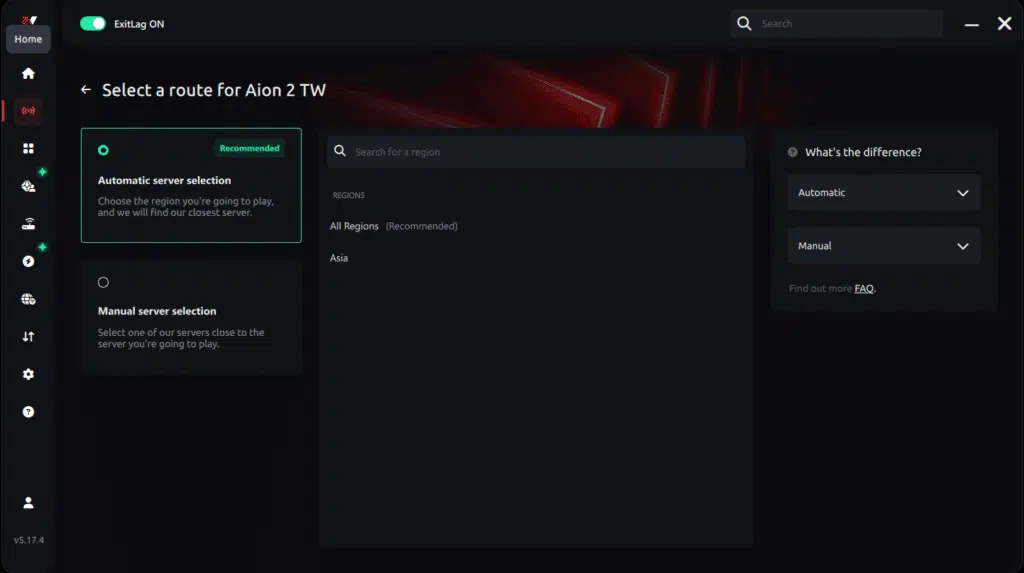
Manual route
If you prefer to have full control over your connection, you can manually choose the server based on the ping test results. Simply select the server that showed the lowest latency or the one that best meets your specific gaming needs, allowing complete customization of your experience.

Step 5 – Click “Apply routes” or the play button. ExitLag will begin optimizing your connection automatically.
AI-optimized automated route:

Manual route:

Step 6 – Wait a few seconds until optimization is complete. You’ll see ping indicators in the interface.
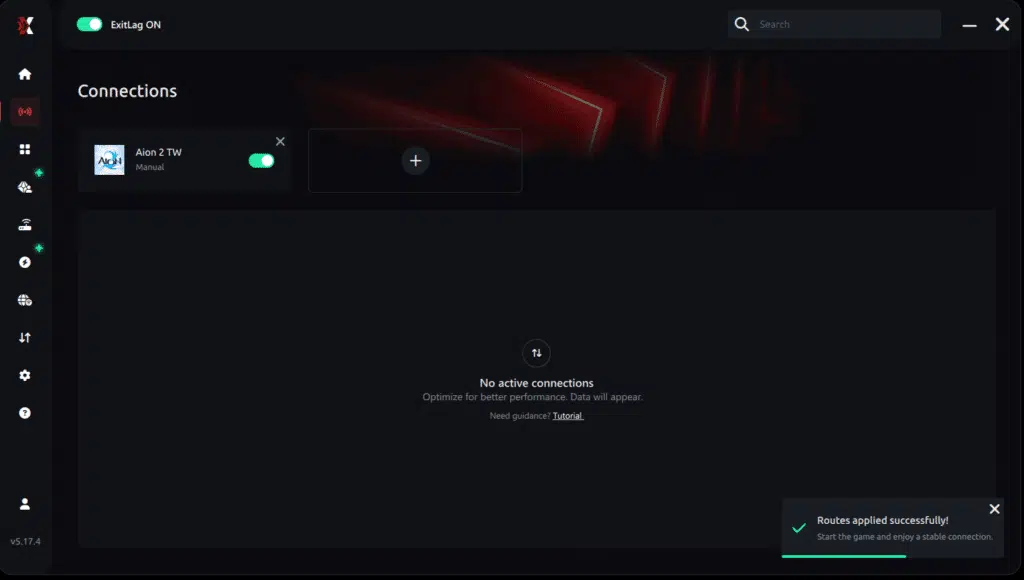
Step 7 – Launch Aion 2 normally. The optimization will already be active.
ExitLag runs in the background while you play, constantly adjusting routes to maintain the best possible performance.
Downloading Aion 2 on PC
Because Aion 2 has not yet released globally and no worldwide release date has been confirmed, downloading it currently requires access to the Korean or Taiwanese region, and players outside Asia may face regional restrictions, IP blocking, higher latency, and Terms of Service limitations.
Where You Can Download Aion 2 PC
- Korea: NCSoft official launcher
- Taiwan: Purple Launcher (PURPLE TW platform)
Both versions require compatible regional accounts.
Aion 2 PC Account Requirements
User reports suggest you may need to create a:
- Korea/Taiwan NCSoft account
- Verified phone or identity ID (varies per region)
- OTP 2‑Factor Authentication
This type of security is common in KR/TW online games, but for Aion 2 it is based on user reports rather than an official NCSoft statement.
Installing Aion 2 on PC (Expanded Step-by-Step)
Step 1: Create a Regional NCSoft Account
Based on user reports, you may need to follow regional registration steps, which can include phone or ID verification.
Step 2: Download the Correct Launcher
- Taiwan players use Purple Launcher
- Korea players use the standard NCSoft client
Step 3: Install the Game Client
The launcher downloads Aion 2 and its dependencies.
Step 4: Complete OTP Verification
You must:
- Install the OTP app on your phone
- Scan the QR code
- Confirm your device
Step 5: Update and Patch the Game
The client applies:
- Language resources
- High-resolution packs
- Early fixes
Step 6: Launch the Game and Configure Aion 2 PC Settings
Once installation completes, open ExitLag, apply the Aion 2 profile, and start the game.
Aion 2 PC Requirements (Fully Expanded)
Early community reports and speculative analyses suggest possible system requirements, but NCSoft has not confirmed any official PC specifications. The following values are unverified estimates based on typical Unreal Engine 5 behavior and user‑reported expectations.
Minimum Requirements (Expected)
- CPU: Intel i5‑12400 or Ryzen 5 7600
- GPU: RTX 2060 / RX 6600
- RAM: 16 GB
- Storage: 80 GB SSD
- OS: Windows 10/11 64‑bit
Recommended Requirements (Expected)
- CPU: Intel i7‑13700K or Ryzen 7 7700X
- GPU: RTX 3070 / RTX 4070 / RX 7800XT
- RAM: 32 GB
- Storage: 100 GB NVMe SSD
- OS: Windows 11 64‑bit
Ultra / 4K Requirements
For players targeting maximum settings:
- GPU: RTX 4080 or 4090
- RAM: 32–64 GB
- CPU: High‑end Ryzen 9 or Intel i9
The game leans heavily on GPU horsepower and SSD streaming speed.
Aion 2 PC Performance Test (Massively Expanded)
Early benchmark results shared by community members provide unverified and unofficial insights into aion 2 pc performance test results. These are anecdotal numbers and should not be considered final or officially representative.
Benchmark 1 – 1440p High Settings
System: RTX 3070, i7‑12700K, 32GB RAM, NVMe SSD
- 60–75 FPS average
- 45–55 FPS in crowded capitals
- 70–90 FPS in solo PvE zones
- Smoothest performance with DLSS Quality
Benchmark 2 – 1440p Ultra Settings
System: RTX 4070, Ryzen 7 5800X3D, 32GB RAM
- 95–120 FPS average
- 80–100 FPS in small‑scale PvP
- Heavy effects in world bosses cause dips to ~70 FPS
Benchmark 3 – 4K Ray Tracing
System: RTX 4090, i9‑13900K, 64GB RAM
- 55–70 FPS with RT enabled
- 80–110 FPS without RT
- VRAM usage peaks above 15GB
Key Performance Observations
- Asset streaming stutter occurs during fast flying transitions
- CPU spikes in large city hubs
- GPU load hits 98–100% on mid‑range cards during big PvP fights
- Combat effects can saturate VRAM on extreme settings
How to Optimize Aion 2 PC for Best Performance
Recommended Settings to Disable
- Motion blur
- Chromatic aberration
- Ray tracing (for mid‑range GPUs)
- Screen-space shadows
Settings to Lower
- Environment quality
- Vegetation density
- Character display counts in crowded regions
Settings to Keep High
- Texture quality (if VRAM allows)
- View distance (important for flight gameplay)
Network Optimization Tips
- Always use ExitLag before entering servers
- Close all background bandwidth‑using apps
- Prioritize wired connection over Wi‑Fi
Deep Dive Into Aion 2’s World Systems
Aion 2 is reported to introduce a large-scale world, though details such as specific biomes have not been officially confirmed. Some community discussions speculate that regions may be influenced by lore elements like the Tower of Aion, but NCSoft has not formally detailed these mechanics. The scale of these environments encourages players to explore unique ecosystems, ancient ruins, and vertical spaces potentially accessible through flight mechanics, though advanced flight systems have not been fully confirmed by NCSoft.
Environmental Diversity
Aion 2’s development team has emphasized large-scale world-building, though specific biome types remain unconfirmed. Community previews highlight:
- Vast plains suitable for mounted traversal
- Reported floating structures or elevated zones (unconfirmed) that some players believe may encourage aerial exploration
- Dense forests hiding elite monsters and rare resource nodes
- Underground caverns with environmental puzzles
These regions are designed to create a seamless gameplay experience, even as server limitations or player congestion may occasionally impact performance.
Possible Ecosystem Behavior (Unconfirmed)
Players have informally reported (unverified):
- Monsters reacting to group presence
- Boss encounters shifting phases based on environmental triggers
- Enemy factions influencing local weather effects
While NCSoft has not fully explained the internal logic behind these interactions, they help create a more immersive and reactive game world.
Combat Mechanics and Class Loadouts
Combat in Aion 2 has been described in previews as fluid, though NCSoft has not officially outlined all combat systems or confirmed hybrid mechanics.
Multi-Weapon Loadouts
Some community speculation suggests Aion 2 may use weapon-based loadouts rather than fixed classes, but this system has not been officially confirmed. Players can customize:
- Primary weapon (defines core abilities)
- Secondary weapon (provides utility and burst damage)
- Passive modifiers enhancing combat flow
Example Weapon Types
- Greatsword: High burst damage, favored for PvP initiations
- Dual Daggers: Fast combos, evasive movement
- Staff: Area control and ranged burst
- Bow: Precision shots and mobility
Ultimate Skills
Each loadout includes an Ultimate Skill with long cooldowns. These skills can determine the outcome of PvP skirmishes or turn the tide in PvE boss fights.
PvP Structures and Faction Systems
Some players assume Aion 2 may continue the Elyos vs Asmodians conflict from the original game, but faction structures for Aion 2 have not been formally confirmed by NCSoft.
Large-Scale Warfields
Players have speculated about PvP modes such as (unverified):
- Castle sieges
- World boss contests
- Aerial PvP skirmishes near floating islands
PvPvE Zones
In these areas, players must:
- Defeat elite monsters
- Avoid ambushes from enemy players
- Secure limited-time objectives
These events reward fragments, crafting materials, and weapon advancement tools.
How to use Ping for Games on Aion 2: step-by-step guide
Checking your connection quality before entering a match has never been easier. Here’s how to use Ping for Games in just a few steps:
1. Open the ExitLag software on your PC
Ensure the application is installed and open. The feature is integrated into the platform and available for free to all users.
2. Access the Network Analyzer tool
Locate the Network Analyzer in the software menu. This is where you’ll find Ping for Games along with other connection analysis features.
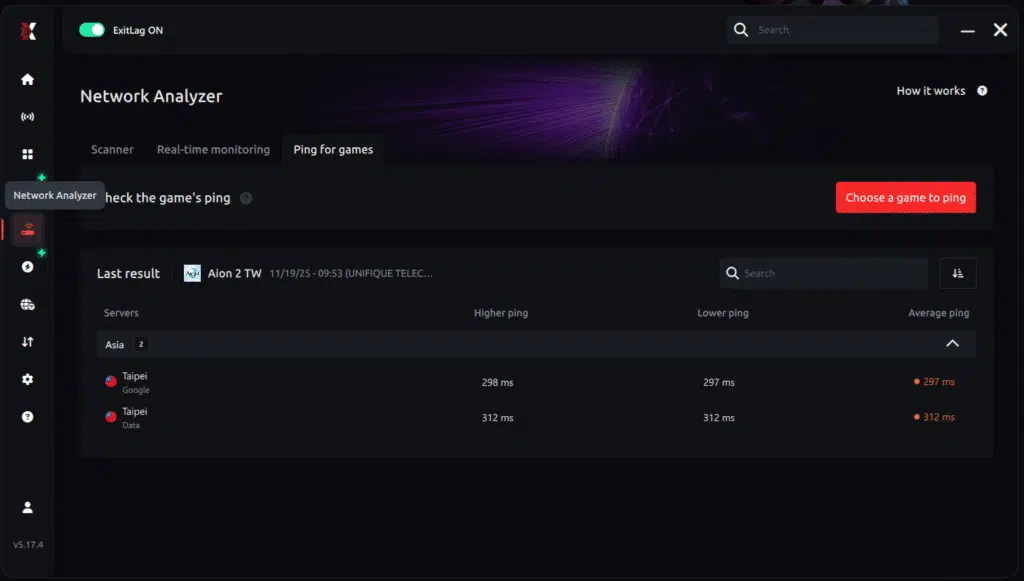
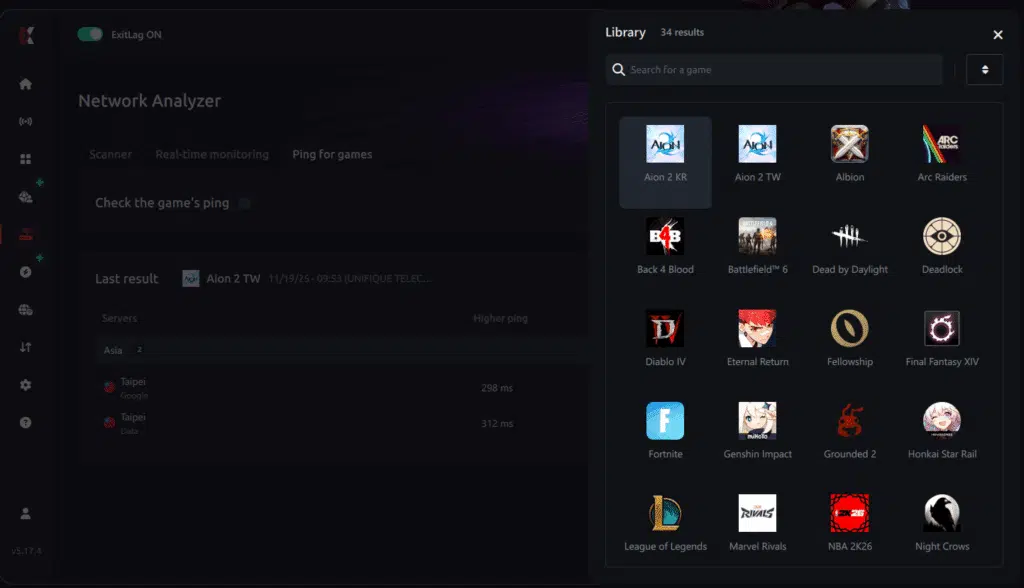
3. Select the game you want to test
Choose from the list the title you plan to play. The tool supports major online multiplayer games, including MOBAs, FPS, Battle Royales, MMORPGs, and more.
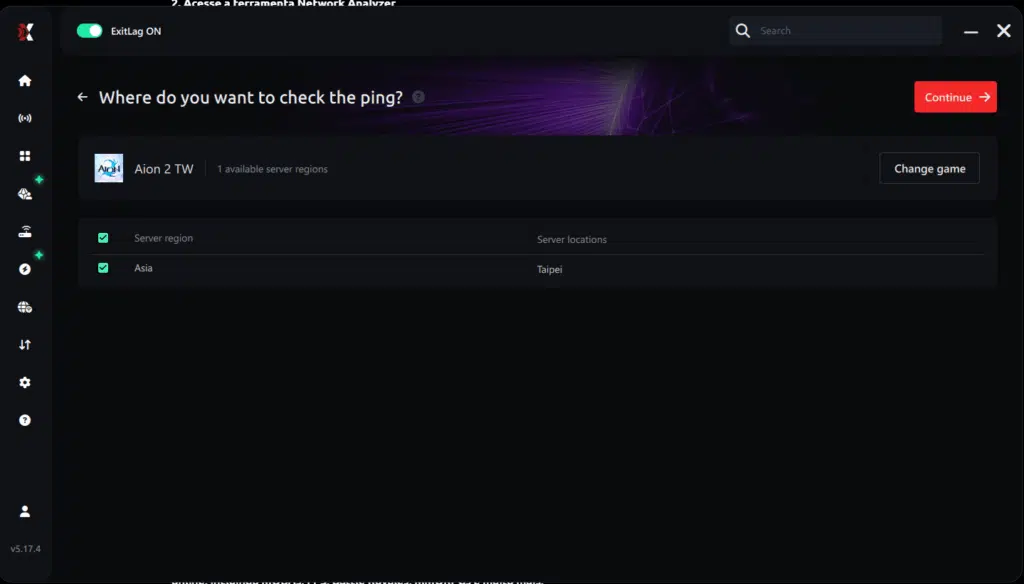
4. Choose the specific server
Now you select directly the server you want to test, instead of just a generic region. This ensures much more accurate results for your choice.
5. Start the ping test
With one click, the measurement is performed in real-time between your device and the chosen server, considering your current connection (cable or Wi-Fi).
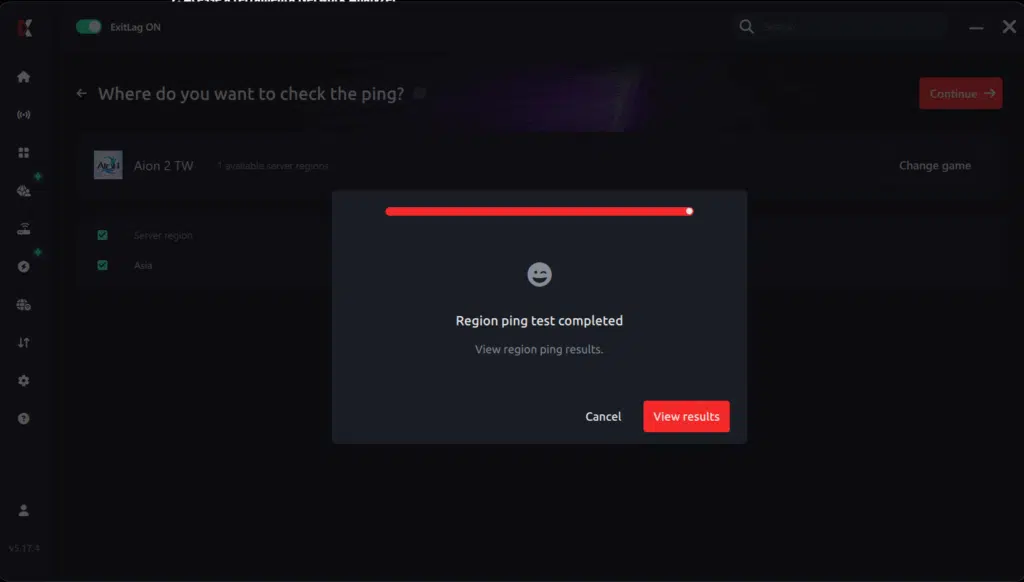
6. Analyze the results
Results appear in milliseconds (ms), automatically sorted from best to worst ping. You can also reorganize the view alphabetically, if you prefer.
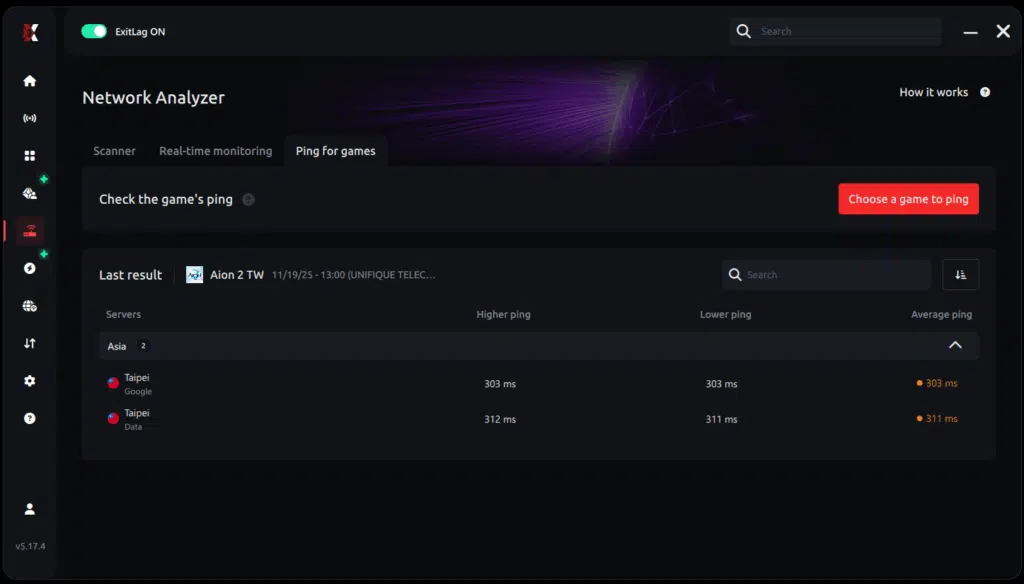
7. Choose the best server and play worry-free
With the information in hand, just select the server with the lowest latency and enter the match knowing your connection is optimized.
Monetization Overview (2025 Launch)
The Korean and Taiwanese launches received mixed community feedback regarding monetization, including reports of heavy monetization and server issues.
Reported Monetization Features
- Cosmetics
- Premium battle pass
- Reported gacha-like enhancement systems (not officially detailed by NCSoft)
- Resource bundles
While some systems appear cosmetic-only, others have raised concerns related to progression speed. Because NCSoft may adjust the model for global release, nothing is confirmed for international audiences; any potential adjustments remain speculative.
Global Release Expectations
What We Know
- NCSoft has not confirmed a global release date.
- No official announcement of an English-language client exists.
- Global PC client status remains unconfirmed.
Speculative Community Expectations
Common assumptions include:
- A global release may come 6–18 months after the KR/TW launch.
- Monetization may be adjusted to Western standards.
- PC access for global may use a launcher similar to PURPLE.
None of these points are confirmed and remain purely speculative.
Final Thoughts
Aion 2’s KR/TW release sets the stage for an ambitious MMO evolution. Despite the lack of global confirmation, international interest remains high. Players continue monitoring updates related to performance patches, PC optimization, global release timing, and monetization adjustments.
When the global version of Aion 2 PC becomes available, ExitLag will be essential for:
- Reducing ping
- Stabilizing routes
- Preventing packet loss
- Improving gameplay responsiveness
Disclaimer
General disclaimer: All game images used in this blog belong to NCSoft. They are used for informational/educational purposes only and do not imply endorsement or affiliation with the rights hol
Got questions or want to connect with other players? Join the conversation at the ExitLag Forum!

