

If you are searching for Arma Reforger Servers Down, you are likely dealing with connection errors, missing servers, or sudden disconnects. These issues can appear without warning and stop matches instantly.
Right now, Arma Reforger Servers Down searches usually spike when players cannot access official servers, community servers, or matchmaking services. That can happen because of maintenance, backend problems, or regional routing issues.
Many players ask what, where, and when to check first if Arma Reforger Servers Down appears online. The fastest answer is to verify official sources, compare community reports, and test whether the problem is global or local.
Arma Reforger depends on stable online services for tactical battles, custom scenarios, and multiplayer progression. Even a short outage can affect squads trying to coordinate matches.
When connection quality is unstable, tools like ExitLag can help by improving route stability, reducing packet loss, and smoothing ping spikes during online sessions.
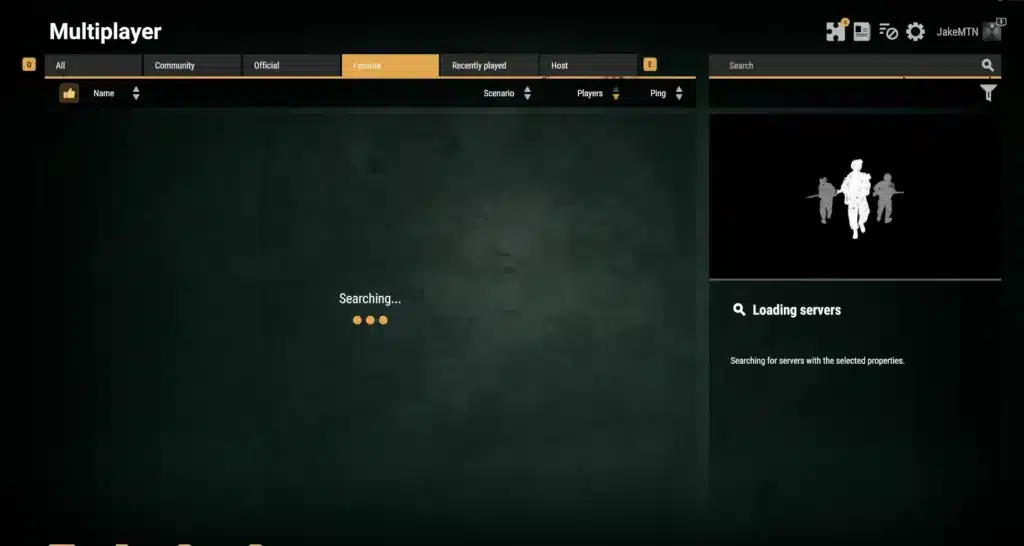
Arma Reforger Servers Down – How To Check If Servers Are Offline
Official Ways To Confirm Server Problems
The first step is checking the in-game server browser. If servers fail to load or show empty lists, there may be a wider issue.
You should also review Bohemia Interactive announcements, support pages, and update channels. Maintenance windows are often announced there first.
Community hubs can also react quickly. If many players report the same issue at the same time, downtime becomes more likely.
Third-Party Live Status Trackers
Independent outage trackers can help confirm if reports are rising. These sites collect user reports and highlight spikes in downtime.
Use more than one source when possible. A single tracker may not always reflect the full picture.
Helpful places to check include:
- Official Arma Reforger news pages
n- Community forums and Reddit threads - Public outage trackers
- Social media posts from players
Are Arma Reforger Servers Down Or Is It Your Internet?
Signs It Is A Global Outage
If every server disappears, login fails, and players from different regions complain at once, the issue may be global.
Other warning signs include:
- Matchmaking unavailable
- Friends cannot connect either
- No region responds
- Social media fills with reports quickly
Signs It Is A Local Problem
Sometimes the servers are fine, but your own network is causing trouble. This is common with Wi-Fi congestion, firewall conflicts, or ISP instability.
You may have a local issue if:
- Only one server fails
- Friends can connect normally
- Restarting router helps temporarily
- Ping jumps only in your matches
Testing another game or another region can reveal whether the issue is local.
Arma Reforger Servers Down Today – Common Reasons
Scheduled Maintenance
Developers sometimes take services offline to deploy updates, hotfixes, or backend improvements. These outages are usually temporary.
Patch days often bring short interruptions while systems restart.
Unexpected Downtime
Unplanned outages can happen because of overload, login failures, cloud hosting problems, or network attacks.
Large updates may also create sudden traffic spikes that stress services.
| Cause | Typical Duration | Impact |
| Scheduled Maintenance | Short | Login delays |
| Patch Deployment | Short to Medium | Server restarts |
| Regional Routing Issue | Variable | High ping |
| Backend Failure | Medium | Full outage |
| Traffic Spike | Short | Queue problems |
Fast Fixes If Arma Reforger Servers Down Appears
PC Fixes
Try these steps first:
- Restart Steam
- Verify game files
- Restart router
- Flush DNS cache
- Disable overlays
Console Fixes
Console players should try:
- Re-login to Xbox or PlayStation account
- Restart console fully
- Clear network cache
- Test NAT status
- Check platform network services
These fixes solve many false outage reports caused by local problems.
How ExitLag Helps During Arma Reforger Connection Problems
Better Route Stability
ExitLag can optimize the route between your device and game servers. That helps reduce unstable hops and packet loss.
Why It Matters In Tactical FPS Games
Arma Reforger rewards fast reactions, accurate movement, and reliable communication. Better stability can improve firefights, movement timing, and squad coordination.

What To Do While Waiting For Servers To Return
Practice Offline And Optimize Settings
Use downtime to test graphics settings, sensitivity, keybinds, and loadouts.
Follow Official News Channels For ETA
Stay updated through official channels so you know when services return.
In the end, if Arma Reforger Servers Down trends again, the best move is to confirm status fast, apply quick fixes, and optimize your connection so you are ready the moment servers come back online.
Are Arma Reforger Servers Down On PC, Xbox, Or PlayStation?
PC Server Connection Problems
PC players often face issues tied to Steam authentication, corrupted files, or outdated mods. When that happens, server lists may stay empty or connection attempts may fail.
Restarting Steam and verifying game files can solve many of these problems quickly.
Console Connection Problems
Console users may be affected by Xbox or PlayStation network interruptions. Account sync delays and NAT restrictions are also common.
If console login works but Arma Reforger does not, test platform network status first.
Arma Reforger Servers Down Today – Regional Server Problems
Why Some Regions Work And Others Fail
Sometimes Europe servers are active while North America or South America faces routing congestion. This creates confusion because some players connect normally.
Peak hours can also increase queue times and cause lag spikes in busy regions.
How To Test Another Region
Use the server browser and compare ping values. Joining a nearby low-population server can reveal whether the issue is regional.
Refresh the list several times before assuming a full outage.
Community Servers Vs Official Servers
Why Community Servers Go Offline
Community servers depend on private hosts. If the owner restarts hardware, updates mods, or changes settings, the server may disappear temporarily.
Why Official Servers Fail
Official servers usually fail because of maintenance, authentication issues, or backend service disruptions.
Knowing the difference saves time when troubleshooting.
| Server Type | Common Issue | Best Action |
| Official | Maintenance | Wait for updates |
| Official | Login Failure | Restart game |
| Community | Host Restart | Retry later |
| Community | Mod Mismatch | Update mods |
| Regional | High Ping | Change region |
Best Fixes If Are Arma Reforger Servers Down Keeps Appearing
Network Fix Checklist
- Restart modem and router
- Use wired cable instead of Wi-Fi
- Flush DNS cache
- Disable background downloads
- Restart PC or console
Game Fix Checklist
- Verify game files
- Update Arma Reforger
- Reinstall broken mods
- Reopen server browser
- Test another region
These steps often resolve false reports of Are Arma Reforger Servers Down when the issue is local.
How ExitLag Improves Arma Reforger Stability
Better Routing For Multiplayer Servers
ExitLag can optimize the route to game servers using smarter paths. That reduces instability and helps keep ping more consistent.
Why It Helps In Tactical Combat
In Arma Reforger, timing matters. Stable latency can improve movement, shots, voice communication, and squad reactions during firefights.
FAQ About Arma Reforger Servers Down
Are Arma Reforger Servers Down Right Now?
Check the in-game browser, official news channels, and player reports. If many users report the same issue, downtime is likely.
Why Can’t I Find Servers?
This can happen because of maintenance, filters, network issues, or temporary browser errors.
Why Do Only Some Servers Work?
Often this means regional routing problems or community hosts restarting services.
How Long Does Maintenance Last?
Most scheduled maintenance lasts from a few minutes to a few hours depending on the update.
Does ExitLag Help Connection Issues?
It can help with routing quality, packet loss, and unstable ping depending on your route conditions.
Final Recovery Steps Before Playing Again
Recheck Official Announcements
Before retrying nonstop, check for updates from official sources.
Join Stable Servers With Better Ping
Choose lower-ping servers with stable player counts for smoother sessions.
Optimize Connection Before Match Start
Close downloads, restart devices, and prepare your route before entering combat.
If Arma Reforger Servers Down trends again, you now know how to identify the real cause, apply fixes fast, and return to battle with the best possible connection.
All game images used in this blog belong to Bohemia Interactive. They are used for informational/educational purposes only and do not imply endorsement or affiliation with the rights holders.
Got questions or want to connect with other players? Join the conversation at the ExitLag Forum!

