

Experiencing Battlefield 2042 Lag is one of the most frustrating things that can happen during an intense match. Even players with strong hardware and fast internet connections often face sudden stutters, delayed inputs, or rubberbanding that ruins the flow of combat. Therefore, it’s important to understand that this issue is more common than it seems and does not necessarily mean something is wrong with your PC.
However, when your bullets take too long to register or your character freezes mid-fight, the game becomes nearly unplayable. Many players believe the cause is always their internet, but in reality, Battlefield 2042 Lag often comes from complex server communication paths that can create instability. Like this, identifying the true source of the lag becomes the first step toward eliminating it permanently.
Finally, after understanding the root of the problem, the next goal is finding a reliable, proven solution to restore stability. This guide explains why lag happens, how it affects your gameplay, and why ExitLag is the definitive fix for eliminating Battlefield 2042 Lag so you can enjoy battles with maximum smoothness.
What is lag in Battlefield 2042?
Lag is the delay between the moment you execute a command such as shooting, moving, or aiming and the moment the game responds. In Battlefield 2042 Lag scenarios, this delay can manifest as stuttering movement, inconsistent hit registration, teleporting enemies, or rubberbanding.
Therefore, even when your PC is performing well, lag can still ruin the entire match because it originates mainly from connection routes, not from hardware limitations.
Causes of lag
Understanding what creates instability helps you take control of your gameplay performance.
Routing problems
Your data travels through different servers before reaching the game server. If your provider chooses inefficient routes, your connection can become slow or unstable.
Packet loss
When internet packets fail to reach the server, parts of your data are lost. This causes teleporting enemies, commands not registering, and general gameplay instability.
Congestion
During peak hours, your provider’s network may be overloaded. Therefore, your game connection becomes inconsistent.
Distance
The farther you are from the server, the longer the communication time. Like this, ping increases naturally.
Lag vs ping vs fps
Before applying a solution, it’s essential to understand the difference between the main performance indicators:
| Term | Meaning | Impact in Battlefield 2042 |
| Lag | Delay between command and action | Causes stutters, rubberbanding, hit registration issues |
| Ping | Time for data to travel to server and return | Higher ping increases delay and disadvantages |
| FPS | Frames per second (rendering speed) | Low FPS causes visual stutter but not network lag |
However, many players confuse FPS drops with lag. This guide clarifies the difference to ensure you focus on the real issue affecting your matches.
Why lag happens even with good internet
Even with a fast connection, your internet provider automatically selects routes to send your data to the game server. These routes are not always optimal.
Think of it as a digital traffic jam: your data tries to take a busy path filled with congestion, detours, or low-quality nodes. Like this, the result is increased ping, packet loss, and inconsistent gameplay—even if your speed test results look perfect.
Therefore, optimizing these routes is the key to stable gameplay.
Exitlag: the ultimate solution
So, what if you could force your data to use the fastest, cleanest, and most stable route? That’s exactly what ExitLag does.
ExitLag is a connection optimization software designed specifically for gamers. It uses multi-routing technology and intelligent tunneling to create stable communication paths between your PC and the Battlefield 2042 servers.
What Exitlag improves
- Lower ping and stable latency, reducing command delay
- Less packet loss, ensuring reliable gameplay and improved hit registration
- Reduced rubberbanding, fixing movement inconsistencies
- Better responsiveness, ideal for competitive players
Therefore, ExitLag becomes a game-changing tool especially for players seeking consistent performance during intense matches.
Benefits of Exitlag for Battlefield 2042
Smoother hit registration
Your shots register faster, giving you a fairer fight.
Stable gameplay
Even during peak hours, the optimized routes maintain fluid gameplay.
Ideal for ranked and competitive play
Reduced delay means faster reaction time and better consistency.
Simple and user-friendly
ExitLag is easy to install and requires no advanced configuration.
How to use ExitLag in Battlefield 2024
The process is extremely simple:
Step 1 – Access the official ExitLag website and download the application. There’s a free trial period for new users.
Step 2 – Install and open the program. Log in with your account.
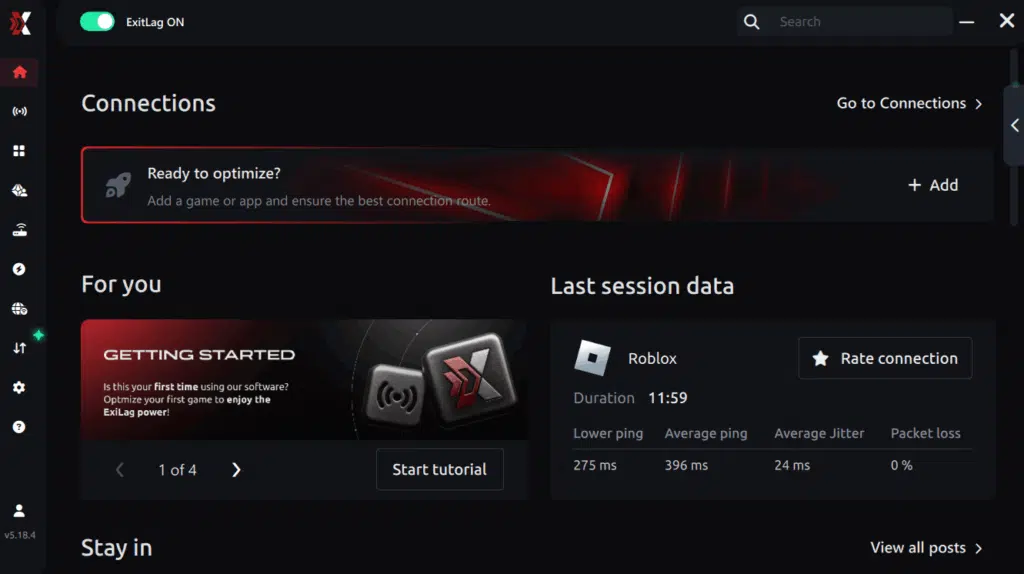
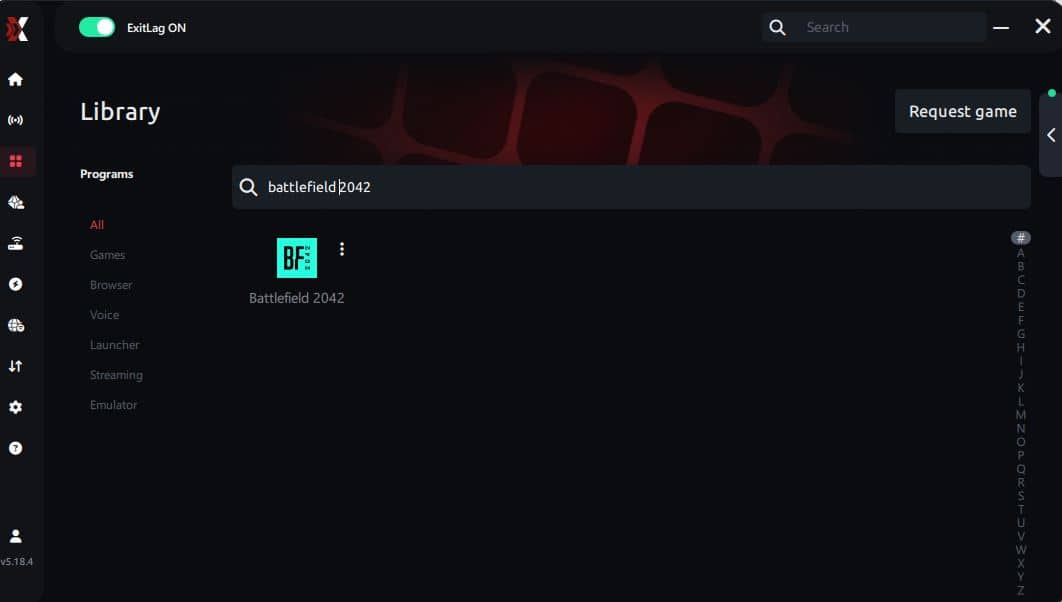
Step 3 – In the search bar, type “Battlefield 2024” and select the game from the list.
Step 4 – Choose between automated or manual route
Based on the results, you can let ExitLag automatically select the best route or manually choose the server that showed the lowest latency for your connection.
AI-optimized automated route
Based on the results, you can let ExitLag automatically select the best route through AI optimization. The system analyzes multiple connection paths in real time and automatically identifies the most efficient route for your connection, ensuring the lowest possible latency without requiring manual choices.
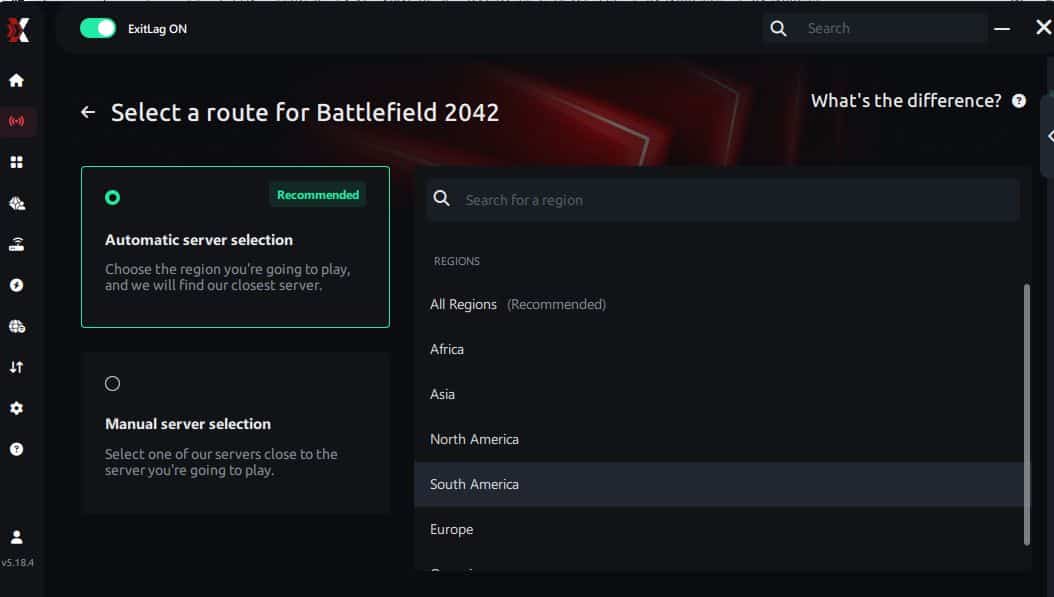
Manual route
If you prefer to have full control over your connection, you can manually choose the server based on the ping test results. Simply select the server that showed the lowest latency or the one that best meets your specific gaming needs, allowing complete customization of your experience.
Step 5 – Click “Apply routes” or the play button. ExitLag will begin optimizing your connection automatically.
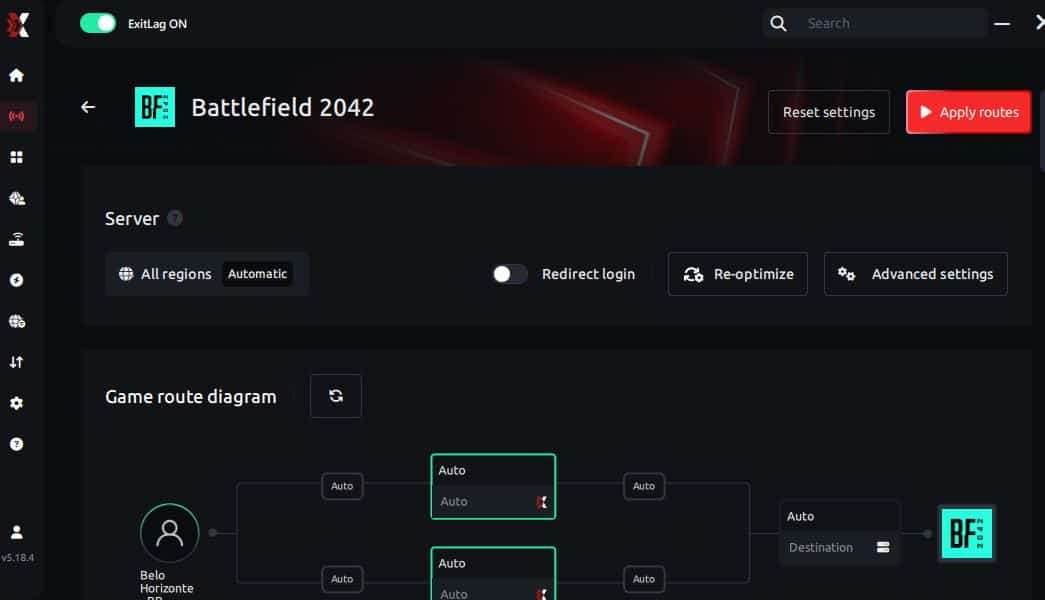
Step 6 – Wait a few seconds until optimization is complete. You’ll see ping indicators in the interface.
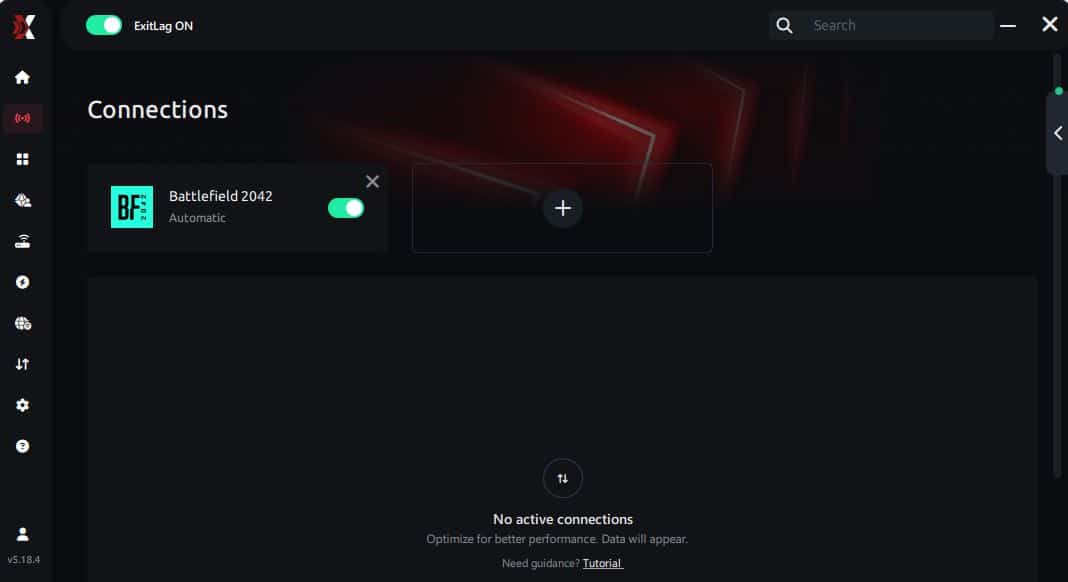
Step 7 – Launch Battlefield 2024 normally. The optimization will already be active.
ExitLag runs in the background while you play, constantly adjusting routes to maintain the best possible performance.
Conclusion
Lag should never decide the outcome of your battles. However, as long as routing problems and packet loss remain, your gameplay will continue to suffer. ExitLag ensures optimized routes, lower ping, and stable performance so you can focus entirely on strategy and combat.
Finally, if you want maximum stability, smoother aim, and better reactions, start your free trial now and eliminate Battlefield 2042 Lag once and for all.



