
Few builds in Minecraft feel as rewarding as finishing your first working beacon minecraft setup. It takes real effort, real resources, and a boss fight just to unlock the recipe.
Once it is running, though, a beacon gives your entire base a permanent edge. Speed, Haste, Resistance, Strength, Jump Boost, and Regeneration all become available depending on how big you build.
So what does a beacon do in Minecraft, exactly, and how do you get one online in survival? This guide walks through the crafting recipe, the pyramid tiers, every status effect, and the mistakes that waste hours of mining.
How To Make A Beacon In Minecraft
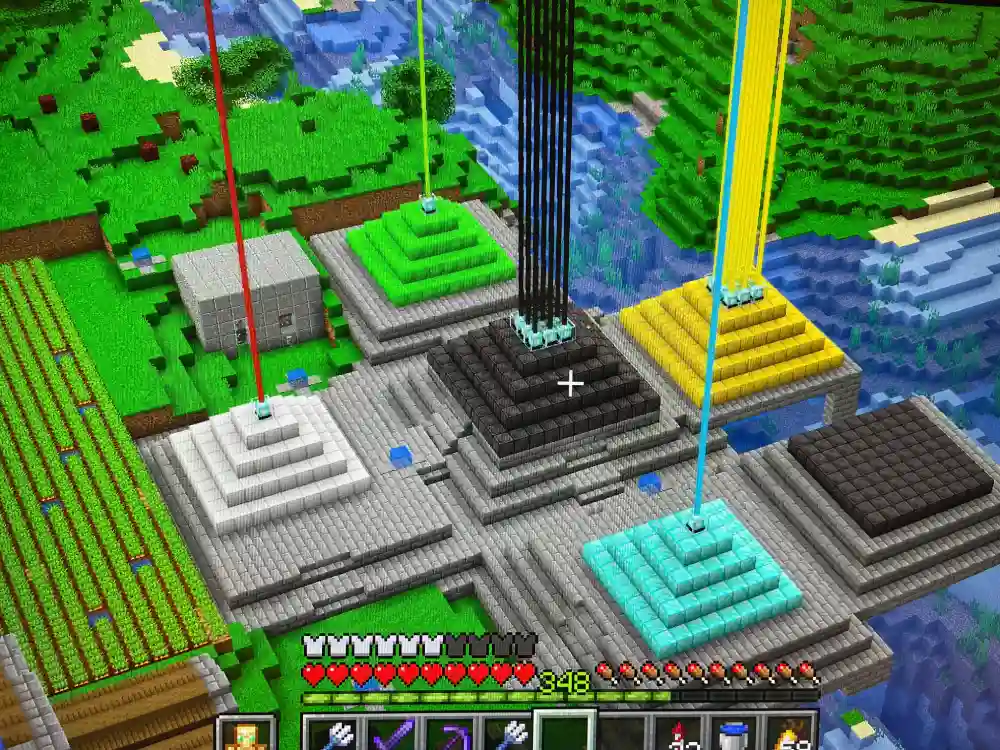
Before touching a crafting table, you need the one ingredient that makes this whole project possible: a Nether Star. Without it, there is no beacon minecraft recipe to complete, since nothing else can substitute for it.
Getting The Nether Star
The Nether Star only drops from the Wither, a boss you summon yourself rather than find naturally. To summon it, you need:
- 4 Soul Sand or Soul Soil blocks arranged in a T shape
- 3 Wither Skeleton Skulls placed on top of the T
- A safe arena away from your base, since the Wither destroys blocks on spawn
Killing the Wither guarantees exactly one Nether Star, every single time. Therefore, you only need to fight it once to unlock beacon crafting for good.
The Beacon Crafting Recipe
Once you have the Nether Star, the recipe for how to make a beacon in Minecraft is fixed and never changes. You need:
- 1 Nether Star (placed in the center slot)
- 3 Obsidian blocks (placed across the bottom row)
- 5 Glass blocks (placed in the remaining slots)
Arrange them like this on a crafting table:
- Top row: Glass, Glass, Glass
- Middle row: Glass, Nether Star, Glass
- Bottom row: Obsidian, Obsidian, Obsidian
This produces exactly one Beacon block. Consequently, if you want a second beacon for a different room, you need a second Wither kill and another full set of materials.
How To Build A Beacon In Minecraft (Pyramid Guide)
A crafted beacon does nothing by itself. To activate any effect, you must place it on top of a pyramid built from specific mineral blocks, and the pyramid size determines everything.
Eligible Pyramid Blocks
The base can be built from any combination of these five blocks:
- Iron Blocks
- Gold Blocks
- Emerald Blocks
- Diamond Blocks
- Netherite Blocks
Notably, the game does not care which one you use for power output. A pyramid made entirely of iron performs identically to one made of diamond, so mixing materials is purely a visual choice.
Pyramid Tier Sizes And Costs
Each pyramid level adds a wider square layer beneath the one above it, with the beacon always sitting on the very top block. Here is how the full structure breaks down:
| Tier | Layer Size | Blocks In This Layer | Total Blocks Needed | Effect Range |
|---|---|---|---|---|
| 1 | 3x3 | 9 | 9 | 20 blocks |
| 2 | 5x5 | 25 | 34 | 30 blocks |
| 3 | 7x7 | 49 | 83 | 40 blocks |
| 4 | 9x9 | 81 | 164 | 50 blocks |
As the table shows, a full four-layer pyramid demands 164 mineral blocks in total. That is a serious investment, but it unlocks every status effect the beacon offers.
Step-By-Step: Building For Beacon For Minecraft Survival
Follow this order to avoid wasted trips back to your storage room:
- Clear a flat area at least 9x9, ideally with open sky above it.
- Place your bottom 9x9 layer first, centered under where the beacon will sit.
- Stack the 7x7 layer directly on top, centered on the 9x9 base.
- Add the 5x5 layer, then the 3x3 layer on top of that.
- Place the Beacon block on the single center block of the top layer.
- Confirm the beam shoots upward with no obstruction.
If the beam does not appear, something is blocking the sky above the beacon or the pyramid is not centered correctly.
What Does A Beacon Do In Minecraft?
This is the question most new players ask before ever crafting one. In short, a beacon projects a light beam into the sky and grants nearby players temporary status effects for free, as long as it stays powered.
The Six Status Effects
A fully upgraded beacon for Minecraft setup can offer these effects, unlocked in stages by pyramid tier:
- Speed: Increases movement speed, available from Tier 1
- Haste: Increases mining and attack speed, available from Tier 1
- Resistance: Reduces most incoming damage, available from Tier 2
- Jump Boost: Increases jump height, available from Tier 2
- Strength: Increases melee damage, available from Tier 3
- Regeneration: Restores health over time, available only as the secondary power at Tier 4
Furthermore, a Tier 4 pyramid lets you choose a secondary power. You can either activate Regeneration alongside your primary effect, or upgrade your chosen primary effect to Level II instead.
How Do You Make A Beacon In Minecraft Give You Effects?
Building the pyramid only unlocks the menu. To actually activate an effect, you still need to feed the beacon a payment item.
- Right-click (or use) the beacon to open its interface
- Place one Iron Ingot, Gold Ingot, Emerald, Diamond, or Netherite Ingot in the payment slot
- Select your desired Primary Power from the unlocked icons
- If on Tier 4, optionally select a Secondary Power as well
- Confirm with the green checkmark to consume the item and activate the effect
After that single payment, the beacon reapplies the effect to every player in range roughly every few seconds, completely free, until you change it again.
How To Use The Beacon Minecraft Effect Range Correctly
Range is where most players get tripped up. The beacon's radius grows with each tier, but it is easy to misjudge how far that circle actually reaches.
Vertical And Horizontal Coverage
The effect radius stretches outward in every horizontal direction based on tier, from 20 blocks at Tier 1 up to 50 blocks at Tier 4. Vertically, however, the range extends far higher, covering multiple floors above the beacon.
As a result, placing a beacon in a basement can still buff players standing several stories above it. This makes multi-level bases much easier to cover with a single beacon.
Is It Worth Upgrading To Tier 4?
For most survival players, yes. A Tier 4 pyramid unlocks Regeneration, doubles your effect strength option, and extends coverage to 50 blocks, which is enough for an entire base or farm.
That said, if you only need Speed for quick travel around a small builds area, a Tier 1 pyramid is far cheaper and still functional. Scale the investment to your actual needs.
Pro Tips: Beacon Minecraft Setups
- Use iron for your base pyramid: Iron ore is common and smelts quickly, so it is by far the cheapest way to reach Tier 4 without draining your diamond or emerald stock.
- Color the beam with stained glass: Place colored glass anywhere in the beam's path, even far above the beacon, to change its color and make your build stand out from a distance.
- Stack multiple beacons for different effects: Running a second beacon nearby lets you combine Speed with Haste, or Strength with Regeneration, since one beacon can only run one primary power at a time.
- Keep the sky clear above the beam: Any solid block placed above the beacon interrupts the beam and disables the effect, so build your ceiling around it rather than over it.
- Feed it before a boss fight: Switch the primary power to Strength or Resistance right before a raid or Wither rematch to squeeze extra value out of your existing pyramid.
Common Mistakes Beacon Minecraft Builders Make
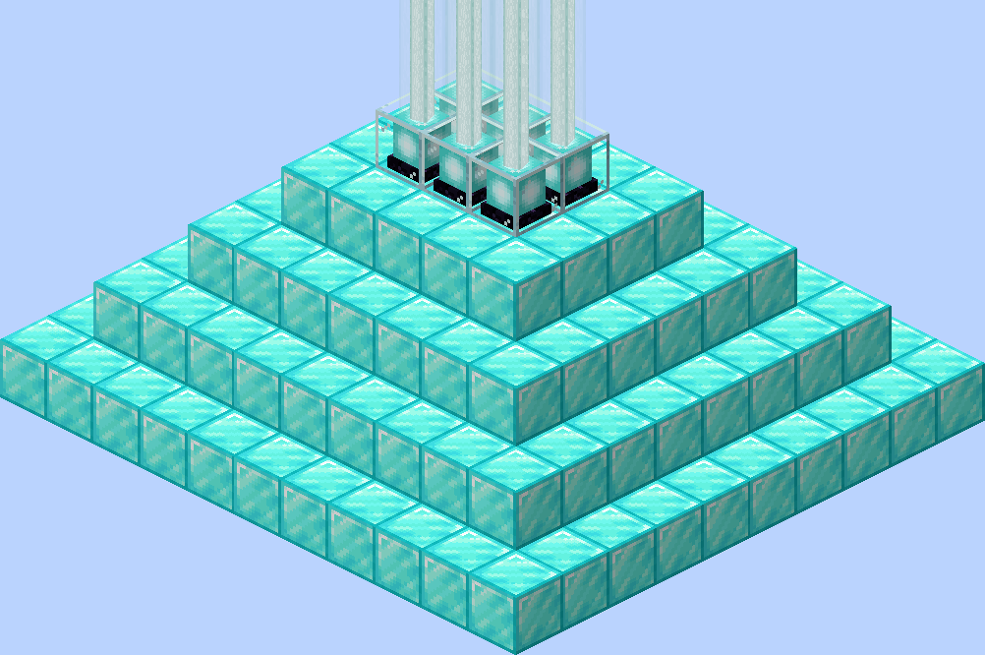
- Building the pyramid off center: If the beacon is not placed on the exact middle block of the top layer, the game will not recognize the structure. Fix: always count to the center block before placing the beacon.
- Mixing up layer order: Some players place the smallest layer at the bottom by accident, which breaks the pyramid shape entirely. Fix: start with the largest 9x9 layer at the bottom and shrink upward.
- Forgetting the payment item: A powered pyramid with no ingot in the slot gives zero effects, which confuses players who assume the structure alone is enough. Fix: always confirm an item is placed and the checkmark is clicked.
- Blocking the sky: Building a roof directly over the beacon stops the beam and the effects instantly. Fix: leave a clear shaft above the beacon all the way to open sky.
- Underestimating the Wither fight: Many players die repeatedly trying to solo the Wither in an open area. Fix: build an enclosed arena with cover before summoning it.
Is ExitLag Useful While Building A Beacon Minecraft Base?
Building a full four-layer pyramid usually means hours spent mining, trading, or grinding a Wither farm on a multiplayer server. Any lag or rubber-banding during that grind can waste a stack of resources or cost you a death near lava.
That is exactly the kind of situation ExitLag was built for. It is not a VPN. Instead, it analyzes multiple network routes in real time and picks the fastest, most stable path between your PC and the Minecraft server you are playing on.
With Multipath Technology, ExitLag keeps your connection alive even if one route degrades, which matters a lot during a Wither fight where a single dropped packet can mean a lost Nether Star. The Traffic Shaper also helps by prioritizing your game traffic over background downloads while you are focused on survival.
ExitLag supports thousands of titles across PC and Mobile, with servers spread across more than 190 countries, and it does not modify game files or interact with anti-cheat systems in any way. If your beacon grind keeps getting interrupted by lag spikes, you can grab the ExitLag Download and test it on your own connection before your next Wither fight.
All game images used in this blog post belong to Mojang Studios and Microsoft. They are used for informational and educational purposes only and do not imply endorsement or affiliation with the rights holders.


