

The Black Desert portrait system plays a major role in how players experience immersion, identity, and roleplay inside Black Desert Online. From character selection screens to in-game UI elements, portraits define how your character is visually represented at all times.
For many players, however, the default portrait setup can feel limiting. Helmets cover faces, expressions disappear, and carefully customized characters lose their visual impact. Because of that, understanding how the Black Desert portrait works is essential for anyone who values personalization and immersion.
What is Black Desert portrait?
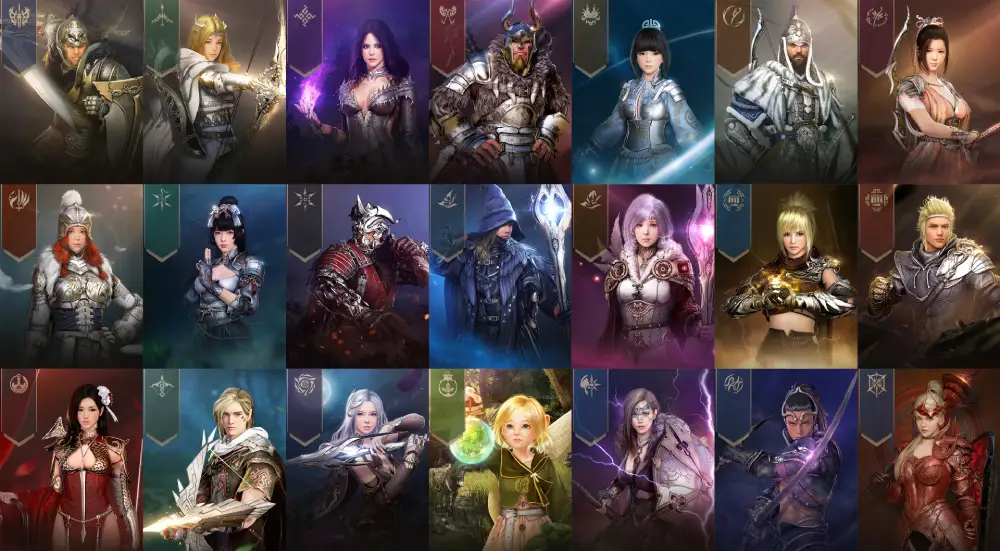
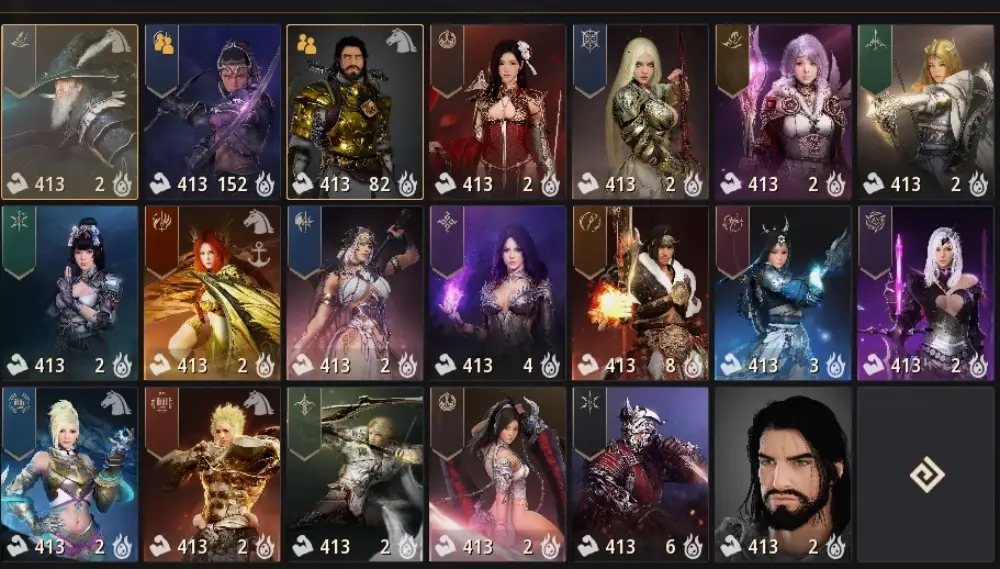
The Black Desert portrait refers to the character image displayed across menus, UI panels, party frames, chat windows, and social interfaces in Black Desert Online. It reflects your current gear, appearance settings, and visibility options, including whether helmets are shown or hidden.
Beyond aesthetics, portrait visibility directly affects roleplay, streaming presentation, screenshots, and even clarity during group content. That is why optimizing these settings is more important than it might initially seem.
Black Desert Portrait Settings Explained
Understanding where portrait behavior is controlled inside Black Desert Online is the first step toward full customization. The game offers multiple overlapping systems that influence how your character portrait appears.
These settings are not always centralized, which leads many players to believe portrait customization is limited or unavailable.
Where Portraits Appear in Black Desert Online
Portraits are used across several UI elements, including:
- Character selection screen
- Party and guild interface
- Chat windows
- Social menus and friend lists
- Life skill and activity panels
Each of these interfaces pulls data from your character’s current appearance configuration, including equipped armor.
Helmet Visibility and Portrait Rendering
The most common issue with the Black Desert portrait is helmet visibility. By default, helmets are rendered both in-game and in portrait images, covering the character’s face.
This behavior is intentional for immersion but becomes problematic for players who invest time in character creation or roleplay.
How to Remove Helmet from Black Desert Portrait
Removing the helmet from your portrait does not require removing the helmet stats. Instead, it relies on cosmetic visibility toggles.
Using Equipment Visibility Options
Black Desert Online allows players to hide certain gear visuals while keeping their bonuses active.
To remove helmets from the Black Desert portrait, follow these steps:
- Open your Equipment window
- Locate the helmet slot
- Toggle the visibility icon to hide the helmet
This change immediately updates your character model and portrait.
Pearl Shop Outfits and Visual Overrides
Some outfits override armor visuals entirely. These costumes automatically hide helmets unless explicitly configured otherwise.
Players focused on portraits often prefer Pearl Shop outfits because they provide consistent visuals across menus and screenshots.
Black Desert Portrait and Character Customization
Character creation depth is one of Black Desert Online’s strongest features. The portrait system reflects this complexity when properly configured.
Facial Expressions and Lighting
Portraits use in-game lighting profiles, which can alter how your character’s face appears.
Adjusting camera angles, expressions, and cosmetic details ensures that the Black Desert portrait accurately represents your character.
Hairstyles, Accessories, and Visibility
Certain accessories may clip or disappear in portraits depending on settings. Testing different configurations helps maintain visual consistency.
Performance Impact of Portrait Rendering
Although portraits are lightweight assets, frequent UI updates can be affected by unstable connections.
UI Sync and Network Stability
Portraits may fail to update correctly during lag spikes or instance transitions.
ExitLag improves network routing, ensuring that UI assets, including portraits, load reliably during gameplay.
Optimizing Settings for Low-End Systems
Players on older hardware can disable unnecessary UI animations to improve portrait loading speed without sacrificing clarity.
Common Issues with Black Desert Portrait
Several issues commonly affect the Black Desert portrait system.
Portrait Not Updating After Gear Change
This usually occurs due to desync or UI cache issues. Relogging or refreshing UI settings resolves the problem.
Helmet Still Appearing After Toggle
In some cases, costume overrides conflict with visibility settings. Re-equipping the item fixes the issue.
Black Desert Portrait vs In-Game Model
While portraits reflect your character model, they are not always identical.
| Aspect | Portrait | In-Game Model |
| Helmet visibility | Toggle-based | Toggle-based |
| Lighting | Static | Dynamic |
| Expressions | Limited | Dynamic |
| Performance impact | Minimal | Moderate |
Roleplay and Social Impact of Black Desert Portrait
For roleplayers, portraits are more than visuals. They define identity.
Guilds and Community Recognition
Visible faces make interactions more personal in guild environments.
Streaming and Content Creation
Streamers rely on clean portraits to maintain visual branding and viewer immersion.
Advanced Tips for Black Desert Portrait Optimization
Experienced players use additional tricks to refine portrait appearance.
- Adjust UI scaling for sharper images
- Use neutral lighting zones for screenshots
- Combine outfits with hidden armor visuals
These small tweaks significantly enhance portrait quality.
Why Black Desert Portrait Matters for Immersion
Immersion in Black Desert Online depends heavily on visual consistency.
The Black Desert portrait acts as a constant reminder of your character’s identity across all activities, from combat to life skills.
When portraits reflect your intended appearance, the game feels more cohesive and personal.
Black Desert Portrait and Long-Term Gameplay
Over time, players form attachments to their characters.
Portrait customization supports that bond, making progression feel meaningful beyond stats and gear.
The Black Desert portrait is not just a UI element. It is a core part of how players connect with their characters.
As Black Desert Online continues to evolve, portrait customization remains an essential feature for immersion-focused players.
Black Desert Portrait Customization for Screenshots and Media
For players who enjoy taking screenshots or creating visual content, portrait settings become even more important. The Black Desert portrait often appears in captured menus, UI overlays, and promotional images.
Fine-tuning portrait visuals ensures consistency across screenshots, videos, and social media posts.
Best Camera Angles for Portrait Clarity
Although portraits are partially automated, camera positioning during idle states can influence how your character is rendered.
Neutral stances and forward-facing angles produce cleaner results, especially when helmets are hidden.
Lighting Zones and Visual Accuracy
Certain in-game regions provide softer lighting that improves facial detail.
Taking portraits or screenshots in these areas helps the Black Desert portrait better reflect skin tones, makeup, and expressions.
Black Desert Portrait in PvE and PvP Environments
While portraits do not affect combat mechanics, they still play a role in player perception.
Party and Raid Awareness
In group content, portraits help players quickly identify party members.
Clear facial visibility improves recognition during intense encounters.
Competitive Play and Identity
In PvP, recognizable portraits help reinforce player identity across repeated matches and guild conflicts.
Black Desert Portrait UI Scaling and Resolution
UI scaling directly impacts portrait sharpness.
Adjusting Resolution for Clearer Portraits
Higher UI resolution settings prevent pixelation and blurry character images.
Balancing resolution with performance ensures portraits load smoothly without impacting FPS.
Portrait Size and Interface Layout
Custom UI layouts allow players to reposition or resize portrait elements for better visibility.
Common Myths About Black Desert Portrait
There are several misconceptions surrounding portrait customization.
Portraits Do Not Affect Stats
Hiding helmets or changing visuals does not reduce defensive values or bonuses.
Portrait Changes Are Client-Side
Other players only see your portrait based on shared UI contexts, not your personal screen settings.
Troubleshooting Persistent Black Desert Portrait Issues
If portrait changes fail to apply, deeper troubleshooting may be required.
Clearing UI Cache
Resetting UI settings forces the game to reload portrait data.
Network Stability and UI Sync
Unstable connections can delay portrait updates.
ExitLag helps maintain consistent network paths, ensuring that UI elements like the Black Desert portrait update reliably during long sessions.
Black Desert Portrait and Long-Term Immersion
Over hundreds of hours, small visual details matter.
A properly configured Black Desert portrait reinforces character identity and enhances emotional investment in progression.
Visual consistency helps transform characters from avatars into long-term personas.
Conclusion About Black Desert Portrait
When players experience lag, delayed UI loading, or visual desyncs that affect Black Desert portrait updates, ExitLag helps stabilize connections, reduce packet loss, and ensure UI elements load smoothly during gameplay sessions.
Black Desert Portrait FAQ
You can hide the helmet by opening the Equipment window and toggling the visibility icon on the helmet slot. This removes it from both the character model and portrait.
No. Visual changes do not impact stats or combat performance in any way.
This usually happens due to UI desync or cache issues. Relogging or resetting UI settings typically resolves the problem.
Only in shared interfaces like parties or guild menus. Personal UI changes remain client-side.
Yes. Poor connections can delay UI updates. Stable routing helps portraits load correctly.
Got questions or want to connect with other players? Join the conversation at the ExitLag Forum!



