Blue Protocol Star Resonance packet loss devastates your anime MMORPG adventures in catastrophic fashion. You’re battling breathtaking bosses in stunning cel-shaded environments, but abruptly your character stutters while devastating attacks obliterate your position mercilessly.
Furthermore, your combo finishers vanish mid-execution during raid encounters. Meanwhile, party members flicker across battlefields erratically. These technical failures ruin dungeon progression, sabotage cooperative gameplay, and trigger unjust defeats in supported games like Blue Protocol Star Resonance repeatedly.
Moreover, unstable data transmission converts strategic victories into maddening catastrophes. Subsequently, perfectly timed dodge rolls disappear before reaching game servers. Additionally, resurrection abilities fail activating when teammates desperately need immediate revival.
Mastering network stability differentiates elite adventurers from struggling players. Whether conquering challenging raids or dominating PvP arenas, reliable connectivity shapes destiny.

What is packet loss in Blue Protocol Star Resonance?
Packet loss happens when critical game data vanishes between your device and remote servers. Imagine sending urgent battlefield instructions through unreliable messengers constantly.
Each message carries essential combat information. Specifically, skill combinations, directional inputs, or item activations.
Missing messages leave the server ignorant about your strategic decisions. Naturally, this disconnection spawns frustrating gaps between screen visuals and actual game reality.
How data transmission works in Blue Protocol Star Resonance
Your device perpetually broadcasts data packets toward Blue Protocol servers across complex digital pathways. These pathways snake through countless routers and switching stations globally.
Technical failures anywhere trigger information abandonment. Essentially, stressed routers jettison excess data during capacity overload situations.
What follows? Specifically, enemies materialize in incorrect coordinates. Then, actions trigger with frustrating hesitation. Ultimately, that fluid anime-style combat crumbles into choppy disappointment.
Why packet loss is devastating in action MMORPG gameplay
Blue Protocol Star Resonance requires flawless synchronization during multi-phase boss encounters and competitive battles. Simultaneously, successful gameplay hinges on microsecond-accurate ability rotations and positioning adjustments.
Vanished packets during intense battles trigger wasted ultimates and party annihilation. Ultimately, challenging progression zones become utterly unbeatable when inputs evaporate mysteriously.
Even minimal 1% packet loss spawns catastrophic inconsistencies during intense encounters. Thus, achieving network perfection becomes absolutely non-negotiable for ambitious players.
How packet loss affects your gameplay in Blue Protocol Star Resonance
Network instability produces consequences far exceeding simple visual stutter. Learning how to play Blue Protocolbecomes impossible with connection issues.
Prevalent issues include:
- Ultimate skill cancellation: Your transformation sequence aborts unexpectedly, wasting crucial cooldowns completely
- Position desynchronization: Your character warps backward through cleared enemy zones dangerously
- Combo chain breaking: Multi-hit sequences interrupt randomly, destroying damage potential entirely
- Boss mechanic failures: Telegraphed attacks hit despite successful dodges visually
- Party coordination breakdown: Team abilities desynchronize catastrophically during cooperative content
- Ranked disconnections: Sudden server expulsion during competitive matches destroys rating progression permanently
Main causes of packet loss in Blue Protocol Star Resonance
Pinpointing network problems enables surgical troubleshooting approaches. Comprehending server architecture reveals optimization opportunities.
Inefficient ISP routing to game servers
Internet providers rarely prioritize optimal gaming pathways. Frequently, your data meanders through geographically nonsensical routing sequences.
Additional routing complexity multiplies failure probabilities exponentially. Similarly, bandwidth throttling during premium hours introduces artificial bottlenecks.
Many ISPs treat gaming identically to casual browsing. Therefore, your raid battle competes for priority against neighbor’s video streams equally.
Unstable local internet connection
Household network hardware commonly introduces mysterious instabilities. Specifically, outdated modems and routersstruggle with sustained gaming loads.
Wireless transmission naturally suffers from environmental interference constantly. Particularly, structural obstacles and electromagnetic radiation degrade signal integrity substantially.
Moreover, deteriorating physical cables represent frequently overlooked culprits. Specifically, connector corrosion and internal wire damage trigger intermittent transmission failures.
Physical distance from game servers
Geographical separation imposes unavoidable physics limitations. Distance forces data through exponentially more intermediate equipment.
Extended pathways accumulate individual failure points catastrophically. Basically, international players traverse 40+ distinct routing nodes regularly.
Compare that against regional players experiencing merely 10-12 intermediate hops. This fundamental inequality creates persistent competitive disadvantages globally.
Network congestion during peak hours
Prime gaming hours coincide with maximum internet utilization periods. When thousands stream simultaneously, available bandwidth evaporates rapidly.
Consumer routers typically lack intelligent traffic prioritization capabilities. Consequently, they process combat commands identically to background downloads indiscriminately.
Additionally, major game events flood servers beyond capacity temporarily. This overload generates widespread server-side packet abandonment affecting entire player populations.
How to identify packet loss in Blue Protocol Star Resonance
Detecting network anomalies facilitates appropriate corrective measures. Visual cues and performance metrics reveal connection quality accurately.
In-game detection methods
Observe connection status icons displayed prominently during gameplay. Specifically, warning colors signal deteriorating network conditions immediately.
Track latency fluctuations using in-game performance monitors continuously. Particularly, erratic ping variations between 50ms and 250ms indicate packet abandonment clearly.
Notice character response delays despite seemingly acceptable latency numbers. This discrepancy strongly suggests data loss rather than pure latency.
Behavioral signs during gameplay
Monitor these telltale warning signals carefully:
- Latency oscillations without environmental changes or pattern
- Input responsiveness problems despite low displayed ping values
- Ally character movements appearing jerky and unpredictable consistently
- Your hero retroactively repositioning to previous coordinates unexpectedly
- Skill activations requiring repeated button presses for execution
Packet loss levels and gameplay impact
| Packet Loss % | Connection Status | Performance Impact | Content Accessibility |
| 0% | Flawless | Imperceptible impact | Perfect for everything |
| 0-1% | Superior | Occasional microstutters | Casual content viable |
| 1-3% | Acceptable | Regular responsiveness gaps | High-level raids problematic |
| 3-5% | Degraded | Frequent severe interruptions | Competitive unviable |
| 5-10% | Critical | Perpetual disconnection threats | Essentially unplayable |
| 10%+ | Catastrophic | Connection maintenance impossible | Complete impossibility |
Basic solutions to reduce packet loss in Blue Protocol Star Resonance
Initial troubleshooting attempts often resolve minor connectivity hiccups. Fundamental adjustments yield surprisingly impactful improvements.
Optimize your local connection
Execute these household network enhancements systematically:
- Implement wired connections: Physical cables eliminate wireless vulnerability entirely when available
- Terminate bandwidth competitors: Shutdown torrents, video streams, cloud synchronization services
- Refresh network adapter firmware: Obtain current drivers from hardware manufacturer websites
- Enable router traffic prioritization: Configure Quality of Service settings favoring gaming packets
- Power cycle networking equipment: Complete modem and router restart clears temporary glitches
Contact your ISP
Following exhaustive local troubleshooting, escalate concerns to internet providers. Quantify packet loss percentages with concrete testing evidence.
Demand comprehensive line quality diagnostics examining signal degradation comprehensively. Importantly, persistent advocacy matters—initial representatives frequently deflect accountability instinctively.
ExitLag: the definitive solution to fix Blue Protocol Star Resonance packet loss
Premium network optimization demands specialized gaming software engineered for action MMORPGs. ExitLag revolutionizes unreliable connections into tournament-grade stability.
What is ExitLag?
ExitLag constitutes the industry’s most advanced packet loss elimination platform available. Utilizing proprietary advanced technology, it constructs reinforced data highways between devices and servers.
Standard network utilities merely camouflage symptoms superficially. Conversely, ExitLag fundamentally reconstructs inefficient internet pathways permanently.
This specialized software transcends typical utility classifications. Rather, it represents mandatory infrastructure serious Blue Protocol competitors depend upon.
How ExitLag works to reduce packet loss
The groundbreaking Multi-Internet methodology completely reimagines data transmission paradigms. Examining how it works exposes remarkable engineering sophistication.
Five integrated technological systems collaborate seamlessly:
- Continuous route evaluation: Perpetual quality assessment across numerous alternate pathways simultaneously
- Parallel transmission architecture: Information broadcasts through multiple independent routes concurrently
- Intelligent failover automation: Instantaneous rerouting when individual pathways exhibit degradation
- Strategic infrastructure positioning: Globally distributed proprietary servers minimize routing complexity
- Persistent stabilization protocols: Jitter elimination and bandwidth consistency maintained continuously
Advantages of ExitLag for Blue Protocol Star Resonance players
Complete packet loss elimination represents ExitLag’s revolutionary primary achievement. Multi-route redundancy architecture virtually eradicates data abandonment.
Raid encounters proceed flawlessly without character freezing catastrophes. Similarly, PvP battles execute with pixel-perfect precision consistently.
Dramatic latency reduction delivers secondary performance breakthroughs simultaneously. Optimized routing frequently slashes ping measurements 40-70% instantly.
Unwavering connection consistency proves indispensable during progression challenges. Essentially, unpredictable network chaos transforms into rock-solid dependability universally.
Advanced security protection safeguards against targeted disruption attempts continuously. Hence, malicious interference becomes ineffective against protected connections.
Intuitive user experience ensures accessibility for non-technical players completely. Additionally, streamlined configuration eliminates complexity entirely.
Is ExitLag worth it for Blue Protocol Star Resonance?
ExitLag becomes indispensable when confronting geographical disadvantages or infrastructure limitations. It metamorphoses frustrating unplayability into buttery-smooth performance.
Elite raiders and competitive arena champions consider ExitLag absolutely essential. Victory margins often depend on split-second execution precision consistently.
For committed Blue Protocol enthusiasts, ExitLag investment generates immediate returns. Explore current pricing options for budget-friendly subscription tiers.
How to use ExitLag in Blue Protocol
The process is extremely simple:
Step 1 – Access the official ExitLag website and download the application. There’s a free trial period for new users.
Step 2 – Install and open the program. Log in with your account.
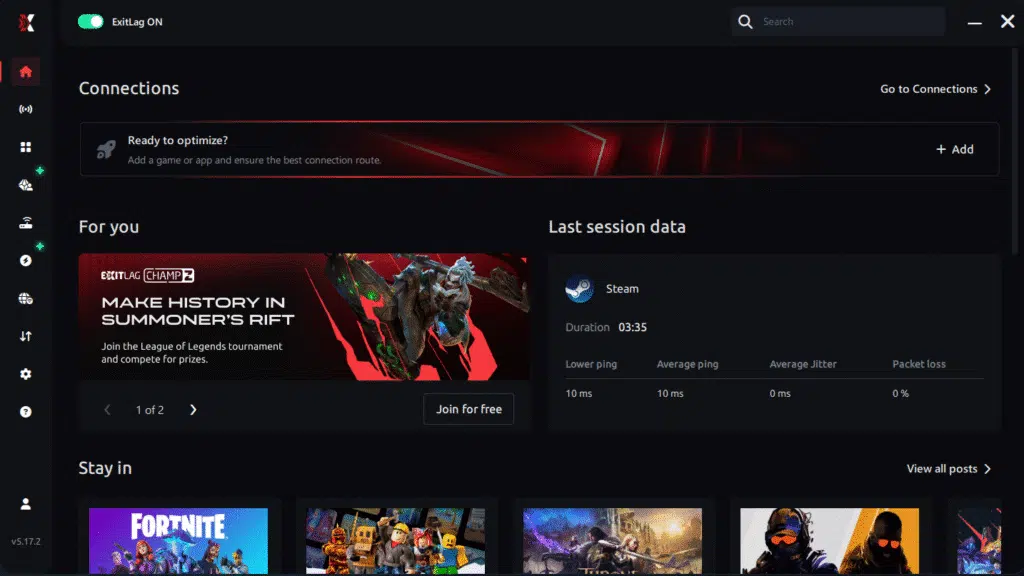
Step 3 – In the search bar, type “Blue Protocol” and select the game from the list.

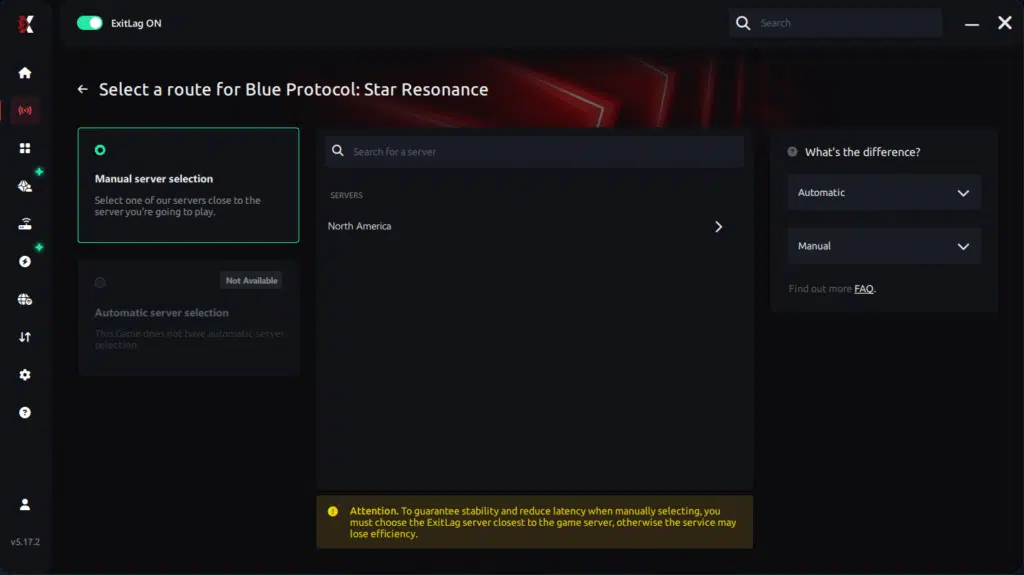
Step 4 – Choose between manual route
Based on the results, you ExitLag the best route manually choose the server that showed the lowest latency for your connection.
Manual route
If you prefer to have full control over your connection, you can manually choose the server based on the ping test results. Simply select the server that showed the lowest latency or the one that best meets your specific gaming needs, allowing complete customization of your experience.
Step 5 – Click “Blue Protocol” or the play button. ExitLag will begin optimizing your connection automatically.
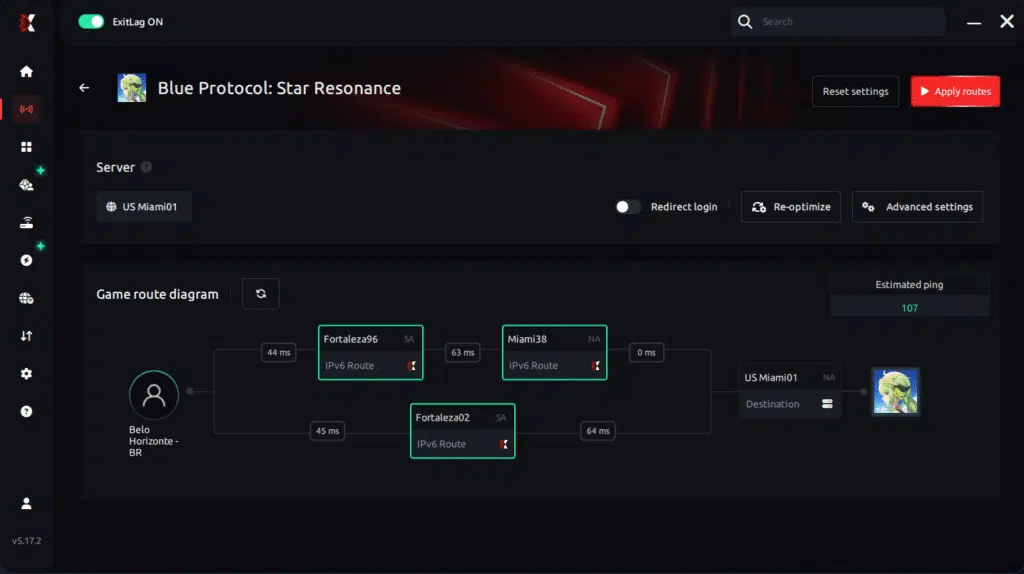
Step 6 – Wait a few seconds until optimization is complete. You’ll see ping indicators in the interface.
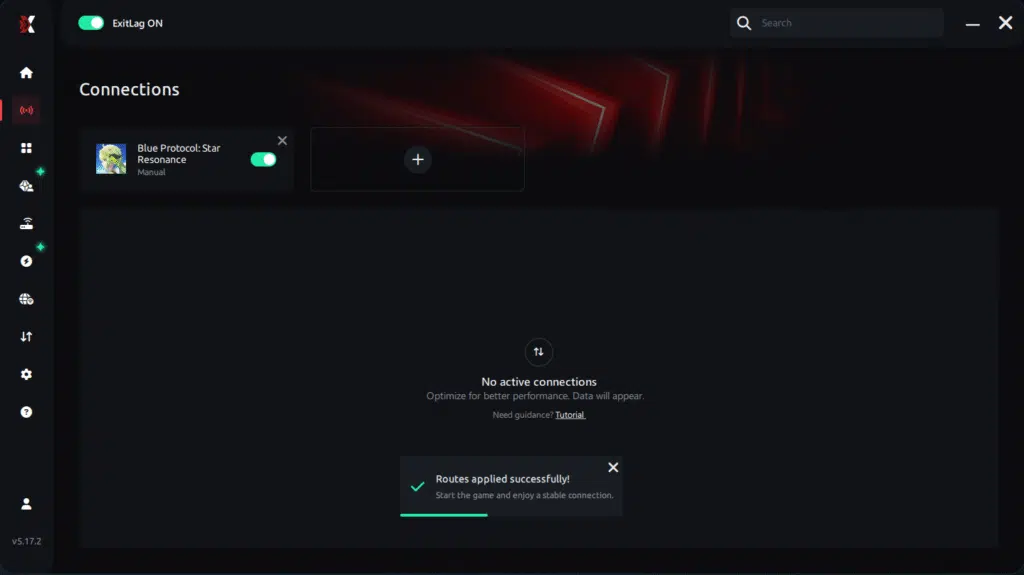
Step 7 – Launch Blue Protocol normally. The optimization will already be active.
ExitLag runs in the background while you play, constantly adjusting routes to maintain the best possible performance.he lowest latency and enter the match knowing your connection is optimized.ter server responses.
FAQ: frequently asked questions about Blue Protocol Star Resonance packet loss
Is packet loss the same as lag?
Absolutely not—these represent fundamentally distinct networking problems. Lag indicates elevated response delays (high ping), whereas packet loss means information disappearance entirely.
You can experience minimal latency alongside severe packet loss simultaneously. Conversely, high ping doesn’t guarantee packet abandonment necessarily.
Why do I have packet loss only in Blue Protocol?
Different applications utilize geographically diverse server infrastructure with unique routing pathways. Your specific route toward Blue Protocol servers might traverse problematic equipment other games bypass.
Visit the Blue Protocol Steam page for infrastructure status updates.
How much packet loss is acceptable for raids?
Ideally absolute zero for challenging difficulty content. Casual exploration might tolerate 1% occasionally without catastrophic consequences.
Nevertheless, high-level raids and ranked arenas become effectively impossible above zero. Single desynchronization incidents frequently trigger irreversible party wipes.
Can my hardware cause packet loss?
Definitely—defective network adapters, degraded cabling, antiquated routers, and thermal throttling commonly generate packet abandonment. Methodical hardware testing isolates specific culprits accurately.
ExitLag’s redundant routing compensates effectively when immediate hardware replacement proves impractical. Software optimization mitigates hardware deficiencies remarkably well.
Does ExitLag work on all platforms?
Absolutely—ExitLag supports comprehensive optimization across PC platforms. Dedicated implementations deliver equivalent performance enhancements.
Configuration adapts automatically for optimal results. Universal optimization benefits apply regardless of preferred gaming setup.
Do I need ExitLag running constantly?
Only during active Blue Protocol gameplay sessions specifically. Activate ExitLag before launching ensures optimized routes establish proactively.
Terminate ExitLag following gameplay concludes to reclaim system resources. Relaunch before subsequent gaming sessions maintains consistent optimization benefits.

Conclusion: eliminate Blue Protocol Star Resonance packet loss permanently
Blue Protocol Star Resonance packet loss shouldn’t sabotage your progression journey or devastate raid achievements. Surrendering victories to technical problems rather than genuine challenges feels utterly preventable.
Every boss failure caused by frozen abilities can be eliminated completely. Additionally, every arena defeat triggered by disconnections becomes ancient history.
ExitLag represents the ultimate solution for ambitious players rejecting mediocre connectivity. Fundamentally addressing packet loss transforms unreliable connections into professional-caliber infrastructure.
Whether pursuing casual enjoyment or competitive excellence, network stability proves absolutely foundational. Explore additional optimization strategies through the ExitLag blog for comprehensive performance enhancements.Ready to eliminate packet loss forever and conquer Blue Protocol? Try ExitLag risk-free and experience tournament-grade connection optimization immediately.
Got questions or want to connect with other players? Join the conversation at the ExitLag Forum!