
Playing Blue Protocol becomes incredibly frustrating when actions don’t register, enemies teleport, or your character rubberbands during combat because of packet loss Blue Protocol. Many players search desperately for ways to fix packet loss Blue Protocol but still face dropped data, unstable fights, and unreliable performance. Therefore, understanding the real cause behind this problem is the first step toward restoring smooth and consistent gameplay.
However, packet loss affects more than simple responsiveness, it disrupts the entire flow of Blue Protocol’s combat system. Skills may activate late, dodges fail, and NPCs appear to move unpredictably, which is especially harmful during dungeons, raids, and time-sensitive boss mechanics. Like this, even players with strong hardware experience Blue Protocol connection issues, because packet loss is a network transmission problem rather than a PC performance issue.
Finally, eliminating packet loss Blue Protocol requires optimizing the route your packets take to the server. The good news is that with the right tools and knowledge, you can drastically reduce interruptions, stabilize combat, and avoid the frustrating micro-delays that ruin PvE and PvP encounters. Understanding the causes and solutions will help you regain control of your gameplay and reduce packet loss effectively.

What is packet loss in Blue Protocol?
Packet loss occurs when data packets sent from your device to the servers of Blue Protocol fail to arrive correctly or are discarded along the way. In MMORPGs, continuous transmission of data is crucial for movement, combat, and interaction. When packet loss happens, these actions never reach the server, creating inconsistencies between what you see and what the server processes.
This means your character may freeze, attacks may vanish, enemies may teleport, and skills may fail entirely. The result is a broken gameplay experience where your inputs are unreliable. In simple terms, packet loss is like sending messages that never reach their destination, and the more this happens, the more unstable the gameplay becomes.
Understanding this is essential for addressing the root cause instead of assuming the issue is graphical or hardware-related.
How packet loss affects gameplay
Packet loss in Blue Protocol can cause:
- Rubberbanding, where your character snaps back to a previous position
- Failed skill activation, even when pressing buttons correctly
- Delayed interaction with chests, NPCs, and items
- Enemy teleporting during fights
- Blue Protocol lag even when ping appears normal
- Movement stutters during dodge or sprint
- Frequent disconnections in dungeons or instanced areas
These symptoms worsen during high-traffic hours or in regions far from the game servers.
Main causes of packet loss in the game
Inefficient routing
Your packets travel through many nodes before reaching the server. If any node is overloaded or unstable, packets get dropped. This is one of the most frequent causes of packet loss Blue Protocol, especially for players connecting to international servers.
Unstable connection
Issues with your ISP, modem, router, or local interference may create micro-disruptions. Therefore, even high-speed plans can suffer from packet loss.
Server distance
The farther you are from the server, the more points your packets must pass through. More hops mean more opportunities for packet drops.
Network congestion
Multiple devices using the same network or peak traffic hours can overload your connection. Like this, Blue Protocol becomes unstable when many players share bandwidth at home or in your region.
Faulty hardware
Damaged cables, aging routers, or outdated network cards can cause transmission inconsistencies that lead to packet loss.
How to identify packet loss in Blue Protocol
Inside the game, you may notice delayed actions, strange movement behavior, or sudden character jumps. These are signs of packet loss, especially if ping remains normal. Rubberbanding is a strong indicator that the game is receiving incomplete data.
You can also run network tests through your operating system’s terminal. A ping test helps reveal transmission stability, even if latency is low, packet drops show up as “request timed out”. Interpreting these results helps determine if the issue is localized or related to routing.
When you experience consistent packet loss Blue Protocol, tests will show irregular spikes, failed responses, or unstable round-trip times, proving the data path is compromised.
Packet loss level table
| Packet Loss % | Gameplay Impact | Severity |
| 0% | Perfect | Low |
| 1–2% | Minor delays | Medium |
| 3–5% | Noticeable lag | High |
| 5%+ | Unplayable | Very High |
Basic solutions to reduce packet loss
Optimize your local connection
- Use a wired ethernet connection
- Close background applications taking bandwidth
- Update your network drivers
- Test using new ethernet cables
- Restart your router and modem
- Reduce device usage on your network
Contact your isp
If you consistently notice packet loss, your ISP may need to reset your line, examine overloaded nodes, or adjust routing. However, this rarely solves the issue fully for players connecting to distant servers.
ExitLag: the definitive solution for packet loss
What is ExitLag?
ExitLag is a software specialized in connection optimization, built to eliminate instability, route inefficiencies, and packet loss in online games. It uses advanced routing intelligence to deliver a stable, consistent connection even for players far from server locations.
How ExitLag reduces packet loss
ExitLag’s multi-route system ensures your packets always travel through the best, most reliable path. It intelligently shifts between routes in real time, preventing interruptions. This drastically improves stability, especially for packet loss Blue Protocol players.
Key features include:
- Real-time route analysis
- Multiple simultaneous routes
- Automatic rerouting if packets drop
- Hop-by-hop optimization
- Connection stabilization
Advantages for Blue Protocol players
- Eliminates packet loss through optimized routing
- Reduces latency and increases responsiveness
- Provides consistent stability during raids and dungeons
- Improves combat accuracy and timing
- Easy to configure
- Supports multiple server regions
These benefits make ExitLag the most reliable solution for Blue Protocol’s unstable network behavior.

Is ExitLag worth it?
ExitLag is highly recommended if you frequently play on foreign servers, suffer unpredictable instability, or want smoother combat and movement. It prevents unfair deaths, restores skill accuracy, and improves the entire gameplay experience.
Eliminate packet loss and play Blue Protocol smoothly
Packet loss does not need to ruin your progress, dungeon runs, or combat precision in Blue Protocol. With the right optimization and understanding of packet transmission issues, you can achieve stable, synchronized, and responsive gameplay. ExitLag offers the definitive solution to eliminate packet loss Blue Protocol, stabilize your connection, and give you the reliable performance Blue Protocol requires.
How to use ExitLag in Blue Protocol
The process is extremely simple:
Step 1 – Access the official ExitLag website and download the application. There’s a free trial period for new users.
Step 2 – Install and open the program. Log in with your account.
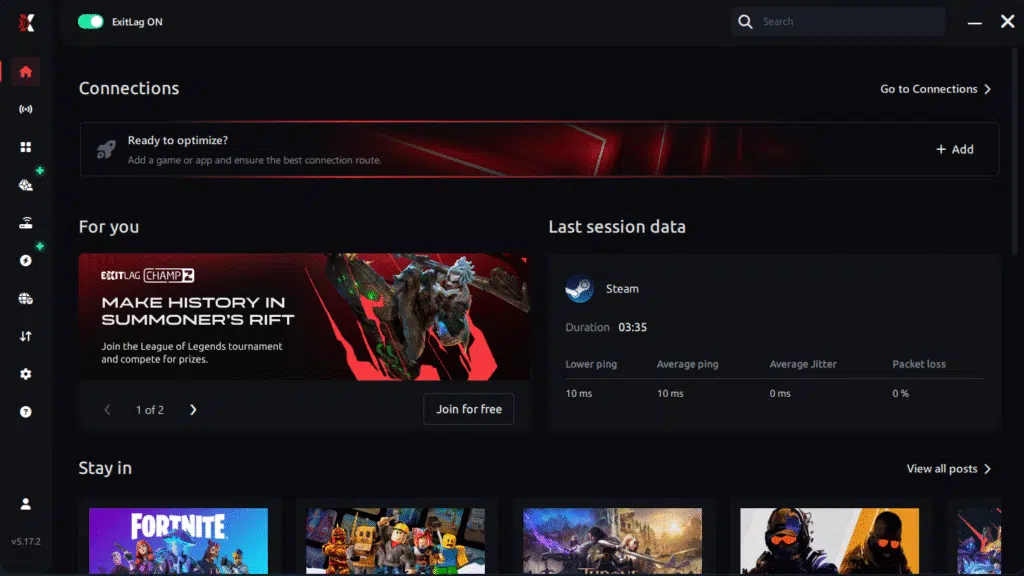
Step 3 – In the search bar, type “Blue Protocol” and select the game from the list.

Step 4 – Choose between manual route
Based on the results, you ExitLag the best route manually choose the server that showed the lowest latency for your connection.
Manual route
If you prefer to have full control over your connection, you can manually choose the server based on the ping test results. Simply select the server that showed the lowest latency or the one that best meets your specific gaming needs, allowing complete customization of your experience.
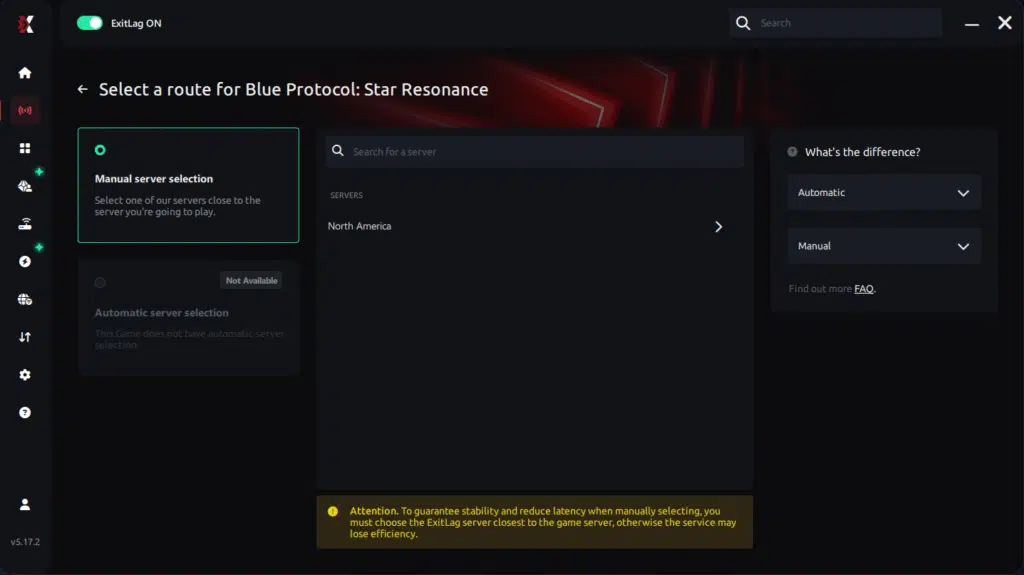
Step 5 – Click “Blue Protocol” or the play button. ExitLag will begin optimizing your connection automatically.
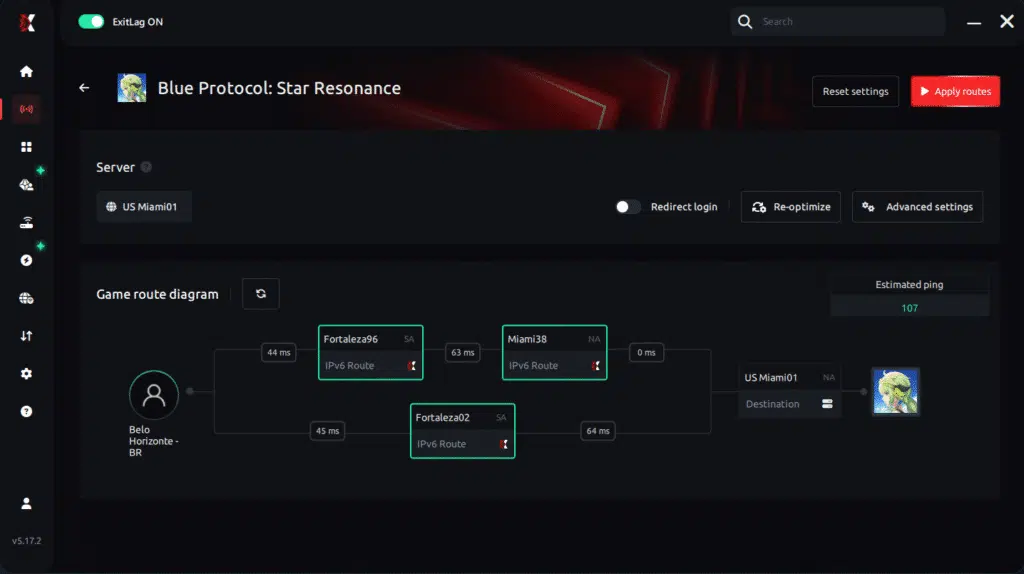
Step 6 – Wait a few seconds until optimization is complete. You’ll see ping indicators in the interface.
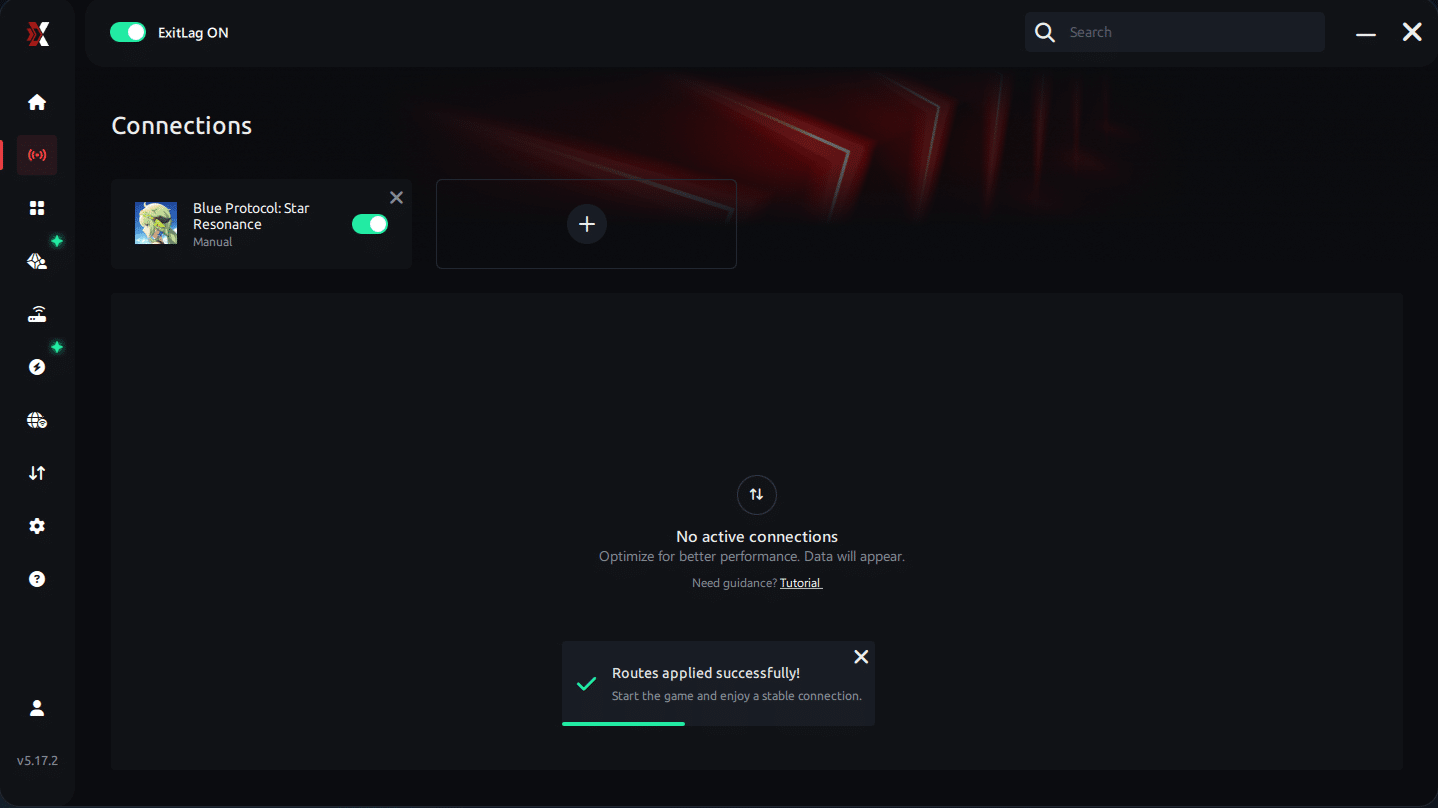
Step 7 – Launch Blue Protocol normally. The optimization will already be active.
ExitLag runs in the background while you play, constantly adjusting routes to maintain the best possible performance.he lowest latency and enter the match knowing your connection is optimized.



