Playing Chaos Zero Nightmare becomes nearly impossible when sudden spikes of Chaos Zero Nightmare High Ping freeze the screen, delay attacks or break your timing during combat. Many players experience severe lag Chaos Zero Nightmare, especially during boss fights or crowded areas, even when using fast internet. Therefore, before searching for drastic solutions, it’s crucial to understand what high ping actually is and why it appears so frequently in this specific game.
However, high ping problems in Chaos Zero Nightmare are not always related to your computer. Most issues stem from unstable routes, server distance, or poorly optimized network paths chosen by your ISP. Like this, even players with fiber connections can suffer from rubberbanding, lock delays, late skill activation and desync. Chaos Zero Nightmare relies heavily on precise timing, so latency issues directly affect competitive performance.
Finally, dealing with Chaos Zero Nightmare High Ping requires both an understanding of its root causes and the use of technology capable of stabilizing the connection. This guide explores why ping increases, how it affects gameplay, what tests you can perform and how to fix it permanently using advanced route optimization.

What is high ping in Chaos Zero Nightmare?
High ping refers to the time it takes for ping signals to travel from your device to the game server and return. This round-trip time is measured in milliseconds (ms), and Chaos Zero Nightmare depends on quick communication to ensure spells, dodges and movements sync correctly with enemies. When your latency increases, every action becomes delayed, creating inconsistencies between what you see and what the server registers.
In Chaos Zero Nightmare, your device continuously exchanges data packets with the servers, updating player movements, damage, and combat effects. When ping remains low, the game runs smoothly. When ping spikes, the server receives your input later, causing noticeable combat delays. Therefore, understanding how high ping behaves is essential to fixing it.
How high ping affects your gameplay
High ping directly harms multiple aspects of Chaos Zero Nightmare:
- Delayed attacks: skills activate seconds after pressing the button.
- Rubberbanding: your character teleports across the map.
- Hit registration issues: the server ignores some attacks.
- Enemy desync: enemies appear in the wrong position.
- Dodging delay: evasive moves fail to trigger in time.
- Frequent disconnects: unstable routing ends sessions abruptly.
Main causes of high ping in Chaos Zero Nightmare
Distance from servers
The farther your location is from Chaos Zero Nightmare servers, the higher your latency. Networks take longer routes, increasing Chaos Zero Nightmare High Ping even on fast connections.
Internet service provider issues
Your ISP may experience congestion, outdated infrastructure or unstable routing. These problems lead to jitter and packet loss.
Inefficient routing
ISPs choose automatic routes that aren’t always the shortest. Therefore, your packets may travel through multiple unnecessary hops.
Network congestion
Peak hours often overload local networks, generating delays, spikes and Chaos Zero Nightmare latency inconsistencies.
Outdated equipment
Old routers, Wi-Fi interference or low-quality cables can degrade your connection speed and stability.
How to identify and test ping
To check your ping inside the game, open the network diagnostics menu and activate real-time latency display. This feature shows your instant ping, packet loss and spikes. However, you can also test via CMD or terminal by pinging your server’s IP, verifying if the delay remains consistent.
Good ping values for Chaos Zero Nightmare stay between 30–70 ms, while anything above 120 ms results in noticeable delay. Checking these values frequently will help you diagnose problems faster.
Ping reference table
| Ping Level | Experience | Recommendation |
| 0–50 ms | Very smooth | Ideal |
| 50–100 ms | Playable | Minor delay |
| 100–150 ms | Unstable | Adjust routing |
| 150+ ms | Poor | Optimize connection immediately |
Basic solutions to reduce ping
Optimize your local connection
- Use an ethernet cable instead of Wi-Fi.
- Close background applications consuming bandwidth.
- Update network drivers.
- Configure QoS to prioritize gaming.
- Select the nearest available server.
- Restart your router to refresh address allocation.
Contact your ISP
If latency persists, ask your provider about routing issues or congestion. Sometimes ISPs must adjust traffic paths or offer better stability plans.
Exitlag: the best solution to reduce high ping in Chaos Zero Nightmare
What is Exitlag?
Exitlag is specialized software developed exclusively for optimizing internet connections in online games. It analyzes your traffic and selects the most stable path to avoid connection problems in Chaos Zero Nightmare. Unlike basic adjustments, Exitlag works at the routing level, providing real improvements.
How Exitlag reduces high ping
Exitlag uses Multi-Internet technology to stabilize your game connection. It sends your data through multiple simultaneous routes and automatically picks the fastest one.
Key mechanics include:
- Real-time path analysis
- Multiple route selection
- Automatic optimization
- Hop reduction
- Stable packet transmission
Advantages of Exitlag for Chaos Zero Nightmare players
- Massive ping reduction: faster skill response.
- Zero packet loss: clean hit registration.
- Stable connection: no spikes or rubberbanding.
- Compatibility with multiple servers: choose the smoothest one.
- Easy to configure: beginner-friendly interface.
Is Exitlag worth using?
For players who want consistent performance, Exitlag is the definitive fix. It bypasses ISP routing problems and guarantees a smoother experience.
How to use ExitLag in Chaos Zero Nightmare
The process is extremely simple:
Step 1 – Access the official ExitLag website and download the application. There’s a free trial period for new users.
Step 2 – Install and open the program. Log in with your account.
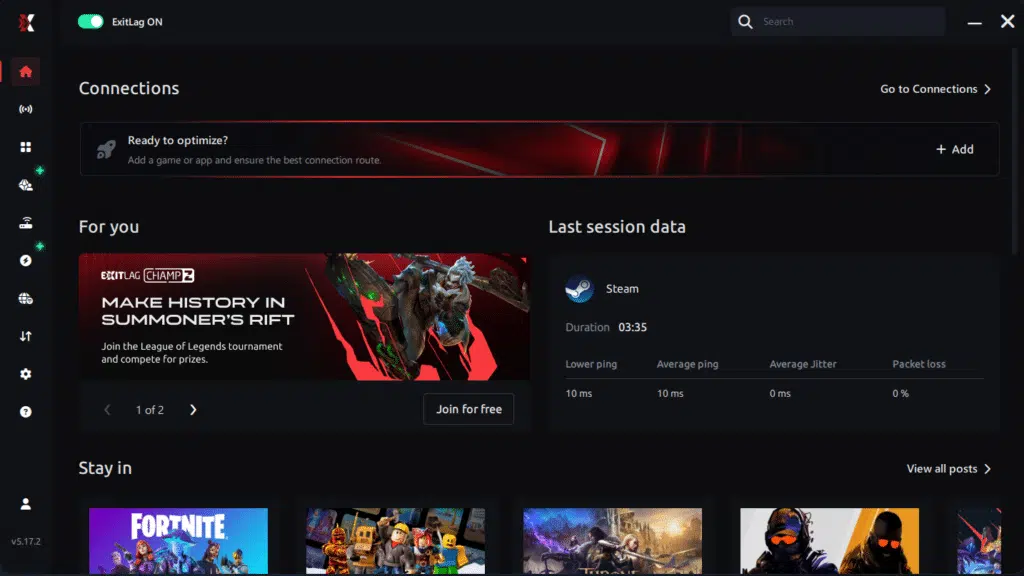
Step 3 – In the search bar, type “Chaos Zero Nightmare” and select the game from the list.
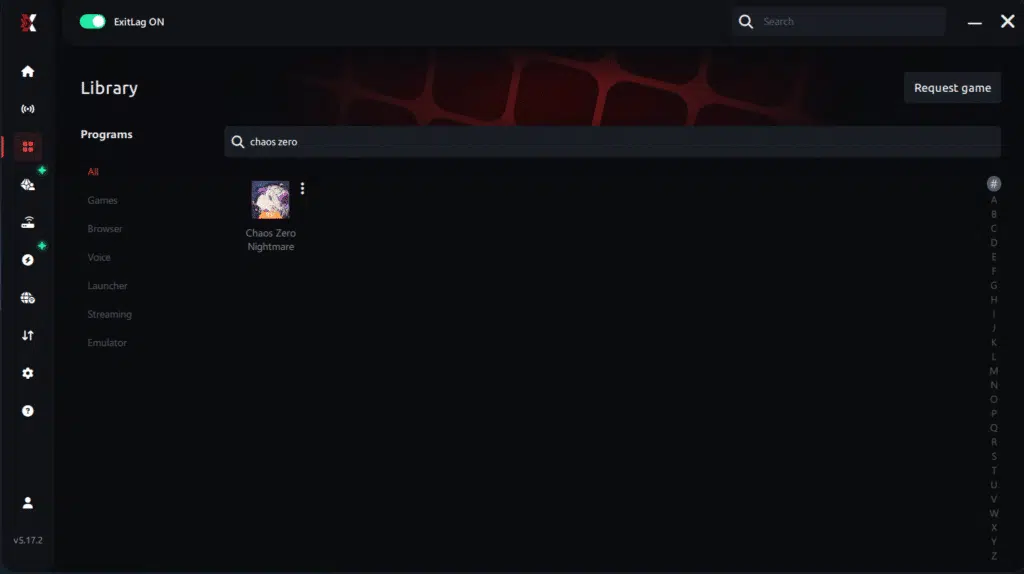
Step 4 – Choose between automated or manual route
Based on the results, you can let ExitLag automatically select the best route or manually choose the server that showed the lowest latency for your connection.
AI-optimized automated route
Based on the results, you can let ExitLag automatically select the best route through AI optimization. The system analyzes multiple connection paths in real time and automatically identifies the most efficient route for your connection, ensuring the lowest possible latency without requiring manual choices.
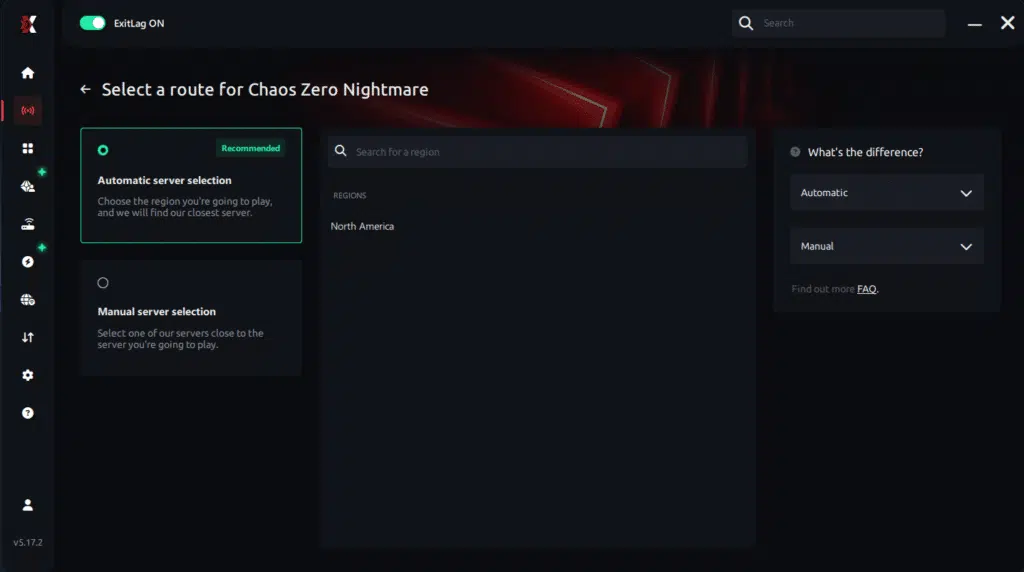
Manual route
If you prefer to have full control over your connection, you can manually choose the server based on the ping test results. Simply select the server that showed the lowest latency or the one that best meets your specific gaming needs, allowing complete customization of your experience.
Step 5 – Click “Chaos Zero Nightmare” or the play button. ExitLag will begin optimizing your connection automatically.

Step 6 – Wait a few seconds until optimization is complete. You’ll see ping indicators in the interface.
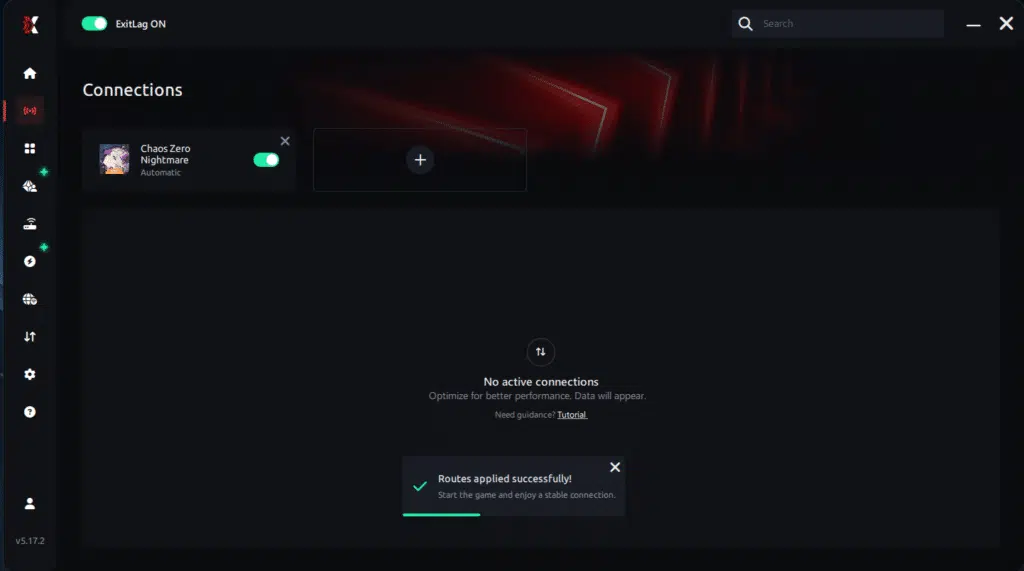
Step 7 – Launch Chaos Zero Nightmare normally. The optimization will already be active.
ExitLag runs in the background while you play, constantly adjusting routes to maintain the best possible performance.
Common questions
What causes high ping in Chaos Zero Nightmare?
High ping typically results from routing inefficiencies, server distance, congestion or hardware issues. Therefore, improving your route is the fastest fix.
How do I check my ping in Chaos Zero Nightmare?
Enable network diagnostics in-game or use terminal commands to test real latency.
What is good ping for Chaos Zero Nightmare?
Ideal values remain under 70 ms. Anything above 120 ms becomes disruptive.
Can high ping get you banned?
No. High ping doesn’t cause bans, but it can result in disconnects or poor gameplay.
Does ExitLag work for Chaos Zero Nightmare?
Yes. ExitLag uses multi-route optimization to reduce latency, spikes and packet loss.
Why does Chaos Zero Nightmare lag at night?
Peak hours lead to congestion, making ISPs route traffic through slower paths.
Conclusion
High ping doesn’t need to ruin your combat, movement or skill timing in Chaos Zero Nightmare. With optimized routing and stable packet delivery, you can eliminate delays, fix attack desync and stop rubberbanding for good. ExitLag offers the most complete and reliable solution to stabilize your gameplay.
Got questions or want to connect with other players? Join the conversation at the ExitLag Forum!