A Clash Royale deck checker helps you understand whether your deck is actually balanced before you take it into ladder, Path of Legends, challenges, clan wars, or friendly battles. Instead of guessing why your deck keeps losing, you can review card roles, average elixir, win conditions, counters, air defense, spell coverage, and overall synergy.
A deck checker gives you the diagnosis, but you still need to understand how a strong list is built from the ground up. This Clash Royale deck guide can help connect tool feedback with practical structure, card roles, and win-condition planning.
Clash Royale deck checker tools are useful because Clash Royale is not just about using strong cards. A deck can have powerful cards and still fail if it has no reliable win condition, no reset, weak anti-air defense, poor cycle, or too many expensive cards. That is why players use a Clash Royale deck analyzer, a Clash Royale deck builder, or a Clash Royale deck validator to find weaknesses before they become match losses.
A Clash Royale deck checker is especially helpful in a game where balance changes, card evolutions, new metas, and popular strategies can quickly change which decks feel strong. Supercell describes Clash Royale as a real-time multiplayer card battle game built around collecting and upgrading dozens of cards, defending towers, and winning trophies in the Arena, which makes deck structure central to progression.
In this guide, you will learn how a Clash Royale deck checker works, which tools are worth using, what each tool is best for, how to read deck analysis correctly, how to improve weak deck structures, and how ExitLag can help keep your matches more stable when you test new decks online.
What is a Clash Royale deck checker?
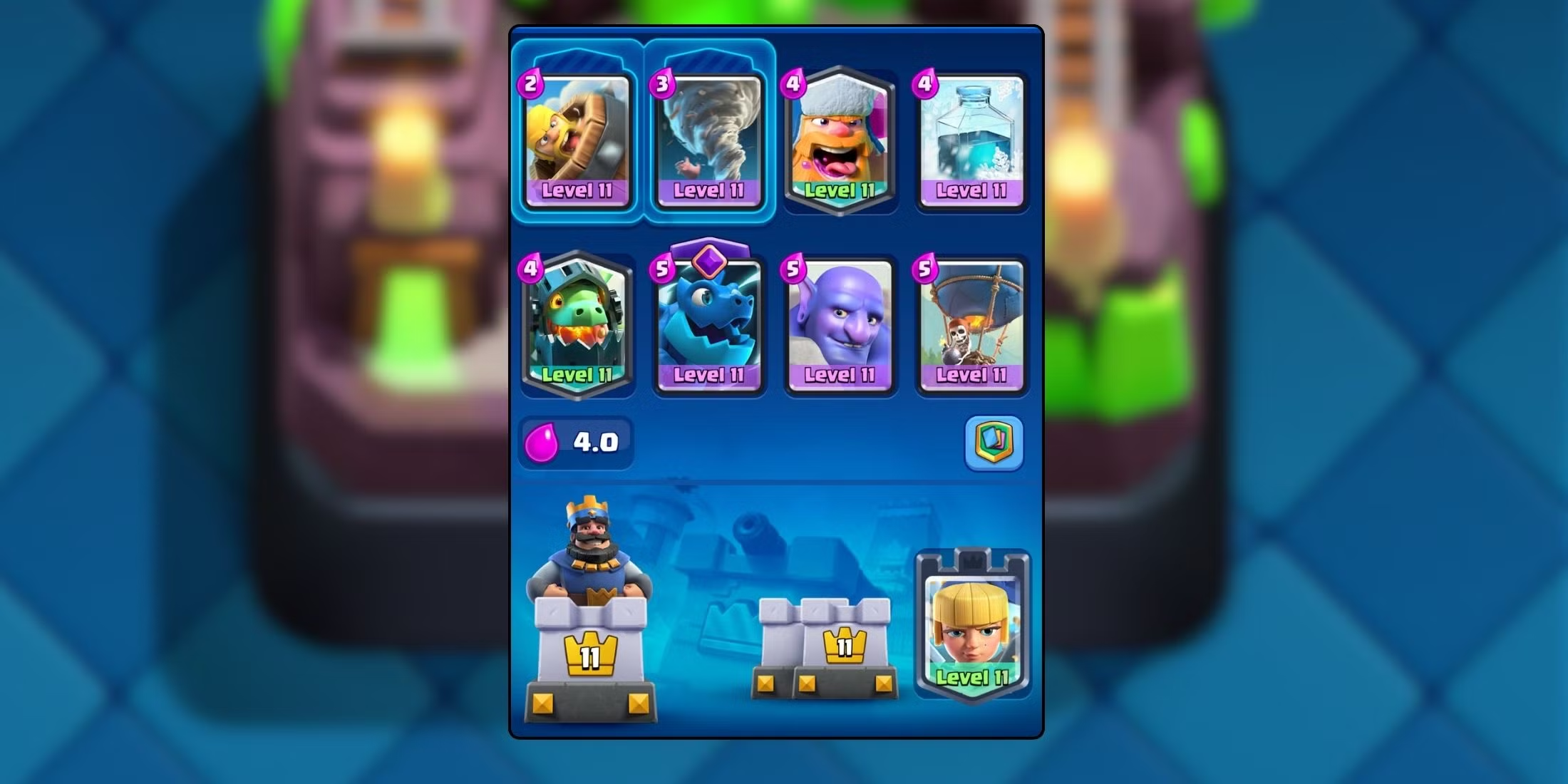
A Clash Royale deck checker is a tool that reviews your eight-card deck and identifies strengths, weaknesses, and structural problems. It can help you understand whether your cards work well together or whether your deck has hidden gaps that make certain matchups harder than they should be.
Most tools evaluate things like average elixir, win condition, support cards, defensive coverage, air counters, spell balance, cycle speed, building presence, and matchup potential. Some tools also compare your deck to popular meta decks or recommend replacement cards.
This matters because Clash Royale decks need balance. A strong deck usually has a clear way to damage towers, reliable defense, flexible support, and enough cycle speed to respond to pressure. If one of those areas is missing, even good players can struggle.
Why deck balance matters in Clash Royale
A deck is more than eight cards placed together. Every card needs a job.
A balanced deck usually includes:
- A win condition.
- Ground defense.
- Air defense.
- A small spell.
- A big spell or strong control option.
- Support troops.
- Cycle cards.
- A way to handle swarm units.
- A way to punish overcommitment.
- A way to reset or stop dangerous pushes.
A Clash Royale deck checker can reveal when your deck is missing one of these essentials. For example, a deck may look strong because it has Mega Knight, P.E.K.K.A, Wizard, and Sparky. However, it may be too expensive, too slow, and too weak against fast cycle decks.
That is why Clash Royale deck optimization is not only about choosing popular cards. It is about creating a complete system.
What a good deck checker should evaluate
A good deck checker should not only say “good” or “bad.” It should explain why your deck works or fails.
Look for tools that evaluate:
| Deck factor | Why it matters |
| Average elixir | Shows whether the deck is too heavy or too fragile |
| Win condition | Confirms how you plan to damage towers |
| Air defense | Helps against Balloon, Lava Hound, Minions, and Dragons |
| Ground defense | Helps against tanks, bridge spam, and swarms |
| Spell coverage | Helps clear troops and finish towers |
| Synergy | Shows whether cards support each other |
| Cycle speed | Helps you return to key cards faster |
| Meta matchups | Shows how your deck performs against popular strategies |
A strong Clash Royale deck analyzer should give you actionable feedback, not just a score.
How does a Clash Royale deck checker work?
A Clash Royale deck checker works by comparing your selected cards against known deck-building principles, card roles, matchup data, and sometimes current meta trends. Some tools rely on fixed rules. Others use statistics from real battles or player data.
For example, a tool may identify that your deck has no building, no cheap cycle card, and no strong answer to air units. Another tool may compare your deck against popular ladder or challenge decks and show how it performs in common matchups.
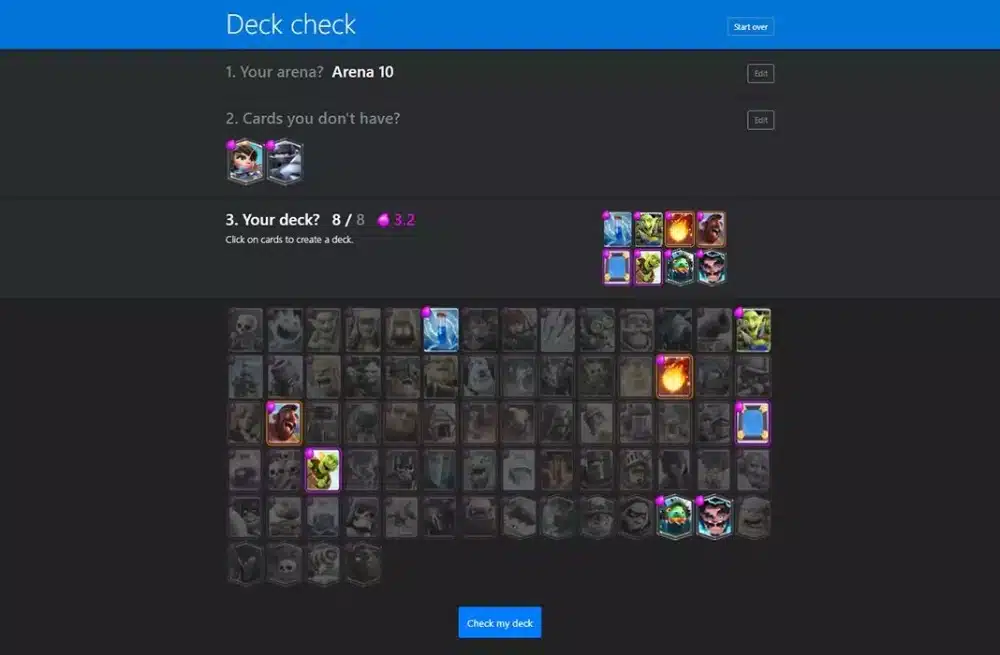
Deck Shop says its Deck Check tool is designed to spot mistakes in your deck and find ways to improve it. Its homepage also includes deck checking, recommendations, deck building, and deck finding features for Clash Royale players.
Deck synergy, elixir cost, and counters
The first thing a Clash Royale deck checker usually reviews is synergy. Synergy means your cards help each other create better results.
For example:
- Hog Rider works well with cheap cycle cards.
- Graveyard works well with tanky units and Poison.
- Lava Hound works well with flying support.
- Royal Giant works well with control tools and spells.
- Miner works well with chip damage and pressure cards.
Then the tool checks elixir cost. A heavy deck can be powerful, but it may lose against fast pressure. A very cheap deck can cycle quickly, but it may lack defensive power.
Finally, a tool checks counters. This is where a check Clash Royale deck feature becomes useful. It can show whether your deck struggles against air, swarm, tanks, buildings, or fast win conditions.
Win conditions, defense, and spell coverage
A Clash Royale deck without a clear win condition is usually unstable. A win condition is the card or strategy you rely on to damage towers consistently.
Common win conditions include:
- Hog Rider.
- Royal Giant.
- Balloon.
- Miner.
- Graveyard.
- X-Bow.
- Mortar.
- Goblin Barrel.
- Lava Hound.
- Giant.
- Golem.
- Ram Rider.
A deck checker can also evaluate defensive coverage. This includes whether you can stop air units, tanks, swarms, bridge spam, and spell bait.
Spell coverage is another major factor. Most strong decks need at least one spell. Many use two. A small spell helps against swarms, while a heavier spell helps against support troops or tower finishing.
A Clash Royale deck validator can flag decks that lack basic defensive tools or rely too heavily on one type of answer.
What are the best Clash Royale deck checker tools?
The best Clash Royale deck checker depends on what you need. Some players want a fast score. Others want advanced stats. Some need a full Clash Royale deck builder, while others want to study pro decks and copy proven strategies.
The most useful tools usually combine deck analysis, player statistics, card information, and meta tracking. For most players, it is better to use more than one tool because each one has a different strength.
Deck Shop, RoyaleAPI, and StatsRoyale
Deck Shop is one of the easiest tools for quick deck checking. It is useful if you want fast feedback on synergy, defense, offense, and card roles. It also helps players find new decks when their current one feels stuck. Deck Shop’s site highlights its deck check, deck builder, deck finder, best decks, and recommendation features.
RoyaleAPI is better for deeper analysis. It describes itself as a source for Clash Royale decks, players, teams, advanced statistics, and insights based on millions of games per week. That makes it useful for players who want to study meta decks, player profiles, card trends, and competitive-level performance.
StatsRoyale is useful for player tracking, popular decks, chests, clan rankings, and tournament-related information. Its homepage describes it as a hub for Clash Royale stats, player profiles, upcoming chests, top clans, popular card decks, and recent tournament winners.
Here is a simple comparison:
| Tool | Best for | Main advantage |
| Deck Shop | Quick deck checks | Easy feedback and recommendations |
| RoyaleAPI | Meta and advanced stats | Deep data for decks, cards, and players |
| StatsRoyale | Player and deck tracking | Simple stats, chests, and deck discovery |
| Deck AI | AI-style suggestions | Matchups, swaps, and deck guidance |
| Noff Deck Checker | Basic validation | Quick recommendations and card suggestions |
Deck AI also presents itself as a deck-building and coaching tool that can analyze decks, show matchups, suggest card swaps, autofill decks, and help with clan wars. Noff’s deck checker says recommended cards are calculated from counters, synergies, deck strategy, and more.
Which deck checker should you use first?
If you are a casual player, start with Deck Shop. It is fast and easy to understand. You can paste or build your deck and quickly see whether your structure has obvious problems.
If you want to understand the meta, use RoyaleAPI. It is better for seeing what strong players are using, how popular certain decks are, and how cards perform in real match data.
If you want to track your own progress, StatsRoyale is useful. It gives a broader look at your profile and deck habits.
For the best results, use this workflow:
- Build or import your deck.
- Run it through a Clash Royale deck checker.
- Review weaknesses.
- Compare similar decks on RoyaleAPI.
- Test one or two changes.
- Play several matches.
- Review your results.
- Adjust again.
This gives you better Clash Royale deck optimization than changing cards randomly after every loss.
Tool feedback gets stronger when you compare it with real match data, card trends, and player performance. A Clash Royale tracker tools guide can help you read those patterns before deciding which deck changes are actually worth testing.
How do you check a Clash Royale deck properly?
To check a Clash Royale deck properly, you need to look beyond the final score. A deck checker can point out issues, but it cannot fully understand your playstyle, card levels, trophy range, or matchup habits.
That is why the best approach is to combine tool feedback with actual match testing. Use the tool to identify possible weaknesses. Then test whether those weaknesses are actually hurting you in battle.
Step-by-step deck checking process
Use this simple process:
- Enter your current eight-card deck into a Clash Royale deck checker.
- Review the average elixir cost.
- Confirm your win condition.
- Check ground defense.
- Check air defense.
- Review swarm control.
- Review spell coverage.
- Look for cycle problems.
- Compare with similar meta decks.
- Replace only one or two cards at a time.
- Test the deck in several matches.
- Track which matchups still feel bad.
The most common mistake is changing too much at once. If you replace four cards after one bad match, you will not know what actually helped.
A better approach is to make small changes and test them carefully.
Common deck problems a checker can find
A Clash Royale deck analyzer can help identify problems like:
- No clear win condition.
- Too many expensive cards.
- No small spell.
- No air defense.
- No swarm control.
- Weak tank killer.
- Weak building pressure.
- Poor cycle speed.
- Too many support troops.
- No reset card.
- No answer to bait decks.
- No way to punish heavy decks.
For example, if your deck has no small spell, Goblin Barrel, Skeleton Army, Bats, and Goblin Gang may cause constant problems. If your deck has no air defense, Balloon or Lava Hound can become almost impossible to stop.
A Clash Royale deck validator helps catch these problems before you lose trophies because of them.
Once a checker finds a weakness, the next step is choosing the right replacement card instead of swapping randomly. This Clash Royale cards guide can help you compare roles, counters, and synergies before changing your deck structure.
How can you improve your deck after using a deck checker?
After using a Clash Royale deck checker, your next step is not to copy every suggestion blindly. Instead, look for the biggest weakness and fix that first.
A deck checker may recommend multiple changes, but not all of them will fit your card levels, playstyle, or arena. A perfect meta deck is not always better if you do not know how to play it.
Adjust one weakness at a time
Start with the most serious problem.
If your deck has no win condition, add one. If your deck is too heavy, lower the average elixir. If your deck loses to air, add better anti-air. If your deck loses to swarms, add a small spell. If your deck has no tank killer, add a high-damage defender.
Here are common fixes:
| Problem | Possible fix |
| Too expensive | Add Skeletons, Ice Spirit, Bats, or cheaper support |
| No win condition | Add Hog Rider, Miner, Balloon, Royal Giant, or Graveyard |
| Weak against air | Add Musketeer, Archers, Phoenix, Minions, or Electro Wizard |
| Weak against swarms | Add Log, Zap, Arrows, Snowball, or Fire Spirit |
| Weak against tanks | Add Inferno Tower, Mini P.E.K.K.A, Hunter, or P.E.K.K.A |
| Too defensive | Add pressure cards or faster cycle |
| Too fragile | Add stronger defensive core |
Do not replace your entire deck unless the structure is completely broken. Small improvements are easier to learn.
Test, track, and refine your deck
After making changes, test your deck in real matches. A check Clash Royale deck tool can predict weaknesses, but only matches show how you actually perform.
Track these details:
- Which decks beat you most often?
- Do you lose because of defense or offense?
- Are you leaking elixir?
- Do you panic against fast pressure?
- Do you struggle to finish towers?
- Are your spells getting value?
- Can you defend and counterpush?
- Are you losing because of deck structure or mistakes?
This is where improvement becomes more strategic. A deck checker helps you build better. Match review helps you play better.
Together, they create a strong feedback loop.
How does ExitLag help when testing Clash Royale decks?
ExitLag does not build Clash Royale decks or replace a Clash Royale deck checker. Instead, it helps with connection stability while you test and play your decks online.
That matters because deck testing depends on consistent gameplay. If your matches lag, freeze, or disconnect, it becomes harder to know whether your deck is bad or your connection is interfering with your decisions.
Clash Royale is a real-time multiplayer game, so timing matters. Supercell’s official description emphasizes real-time card battles where players deploy cards, defend towers, and fight opponents in the Arena. Even small connection instability can affect reactions, placement timing, and defensive choices.
Why connection stability affects deck testing
When you test a new deck, you need clean feedback. You need to know whether a matchup was bad because your deck lacked answers or because lag made you place cards late.
Connection issues can cause:
- Delayed card placement.
- Bad spell timing.
- Missed defensive reactions.
- Late building drops.
- Lost tower trades.
- Disconnects during key moments.
- Inconsistent match results.
That can make a good deck feel bad.
So, while a Clash Royale deck builder helps with composition, ExitLag helps with the online performance side. Together, they support a better testing environment.
When to use ExitLag with Clash Royale
Use ExitLag when you notice:
- Lag during important matches.
- Card placement delay.
- Unstable ping.
- Sudden freezes.
- Disconnects.
- Worse performance at peak hours.
- Inconsistent online gameplay.
ExitLag can help optimize your connection route, reduce instability, and make matches feel smoother. That is especially useful when you are testing new deck checker recommendations, grinding ladder, playing competitive modes, or trying to evaluate whether your deck changes are actually working.
A good deck matters. A stable connection matters too.
For broader context around the game’s systems, history, and competitive structure, a neutral reference can help separate basic game information from tool-specific advice. The Clash Royale encyclopedia page is useful when you want general background before focusing on deck optimization.
FAQ
What is the best Clash Royale deck checker?
Deck Shop is one of the easiest Clash Royale deck checker tools for quick analysis. RoyaleAPI is stronger for advanced stats, meta decks, and competitive research. StatsRoyale is useful for player tracking and deck discovery. The best option depends on whether you want quick feedback, deep data, or player profile tracking.
How do I check my Clash Royale deck?
You can check your Clash Royale deck by entering your eight cards into a tool like Deck Shop, RoyaleAPI, StatsRoyale, Deck AI, or Noff. Then review average elixir, win condition, air defense, ground defense, spells, synergy, and matchup weaknesses. After that, test changes in real matches.
What makes a Clash Royale deck good?
A good Clash Royale deck usually has a clear win condition, balanced elixir cost, strong defense, air coverage, spell support, and synergy between cards. It should also match your playstyle. A meta deck is only strong if you know how to use it.
Is a Clash Royale deck analyzer always accurate?
No. A Clash Royale deck analyzer is helpful, but it is not perfect. It can identify structural problems, but it cannot fully account for your skill, card levels, arena, matchup knowledge, or personal playstyle. Use it as a guide, not as an absolute rule.
Can a Clash Royale deck builder make me win more?
A Clash Royale deck builder can help you create a stronger deck, but it does not guarantee wins. You still need good placement, timing, elixir management, matchup knowledge, and decision-making. The best results come from combining deck tools with practice. Deck advice changes over time, so official information should stay part of your reference set. The official Clash Royale page is the safest place to confirm the game’s core details, current positioning, and Supercell’s own description of the title.
How often should I change my Clash Royale deck?
Do not change your deck after every loss. Instead, test a deck for several matches and look for repeated problems. Change cards when you see a clear pattern, such as constant losses against air decks, bait decks, tanks, or fast cycle pressure.
What is Clash Royale deck optimization?
Clash Royale deck optimization means improving your deck structure so it has better synergy, stronger matchup coverage, better elixir balance, and clearer win conditions. It is not only about using the strongest cards. It is about making your eight cards work together.
Does ExitLag help with Clash Royale deck testing?
Yes, ExitLag can help by improving connection stability while you test decks online. It does not change your deck, but it can reduce lag-related problems that make matches feel inconsistent. That helps you judge your deck more accurately.
Final thoughts
A Clash Royale deck checker is one of the best tools for players who want to stop guessing and start improving with more structure. It helps you identify weak synergy, bad elixir balance, missing counters, poor air defense, and unclear win conditions before those problems cost you matches.
Use tools like Deck Shop for quick checks, RoyaleAPI for deeper meta research, StatsRoyale for player tracking, and other deck tools when you want extra suggestions. Then test small changes in real matches and track your results.
For the best experience, combine Clash Royale deck checker insights with smoother online play. Use a Clash Royale deck analyzer to improve your cards, a Clash Royale deck builder to refine your strategy, and ExitLag to reduce connection instability while you test your deck in real battles. Try ExitLag today and give every match a better chance to reflect your skill, not your lag.