Marvel Rivals College Perks is one of the best-kept secrets in the game. If you are a current college or university student, you can score free trial costumes, exclusive MVPs, and more, just by verifying your student status through the official program.
The College Perks Marvel Rivals program is run by NetEase Games and refreshes every season. That means new rewards keep arriving, and verified students can keep claiming them throughout the year without spending a single credit.
In this guide, you will learn exactly how to apply, what rewards to expect, how to fix issues when the perks are not working, and how to get the most out of Marvel Rivals as a student. The process is straightforward: verify your academic email, activate your perks in-game, and collect your free trial costumes and MVPs.
College Perks Marvel Rivals: What Is This Program?
The College Student Perks program is an official initiative by NetEase Games that rewards verified university students with exclusive in-game content at no cost. It is available in most regions and covers a wide range of academic institutions.
What Do You Get With College Perks?
Each season brings a new wave of free rewards for verified students. Currently, the program offers:
- 10 trial costumes spread across Season content updates
- Exclusive MVPs for top heroes
- Seasonal rotations so rewards stay fresh each patch
- Both Season X.0 and X.5 rewards in a single verification cycle
The trial costumes are full cosmetic skins you can use in matches. They are not permanent unlocks, but they let you rock premium looks without paying anything.
Who Is Eligible for College Student Perks?
Eligibility is based on your academic email domain. To qualify, you need:
- A valid student email from a recognized college or university
- An active Marvel Rivals account linked to the same email region
- A school that appears on the official supported institution list
If your university is not on the list, you can still request to be added by contacting Marvel Rivals support directly.
How To Apply for Marvel Rivals College Perks
The application process is fully in-game and takes under five minutes once you have your student email ready. Here is exactly what to do.
Step-by-Step Verification Process
Follow these steps in order to activate your College Student Perks:
- Launch Marvel Rivals and go to the main menu.
- Open Settings, then navigate to the Community tab.
- Select College Perks from the available options.
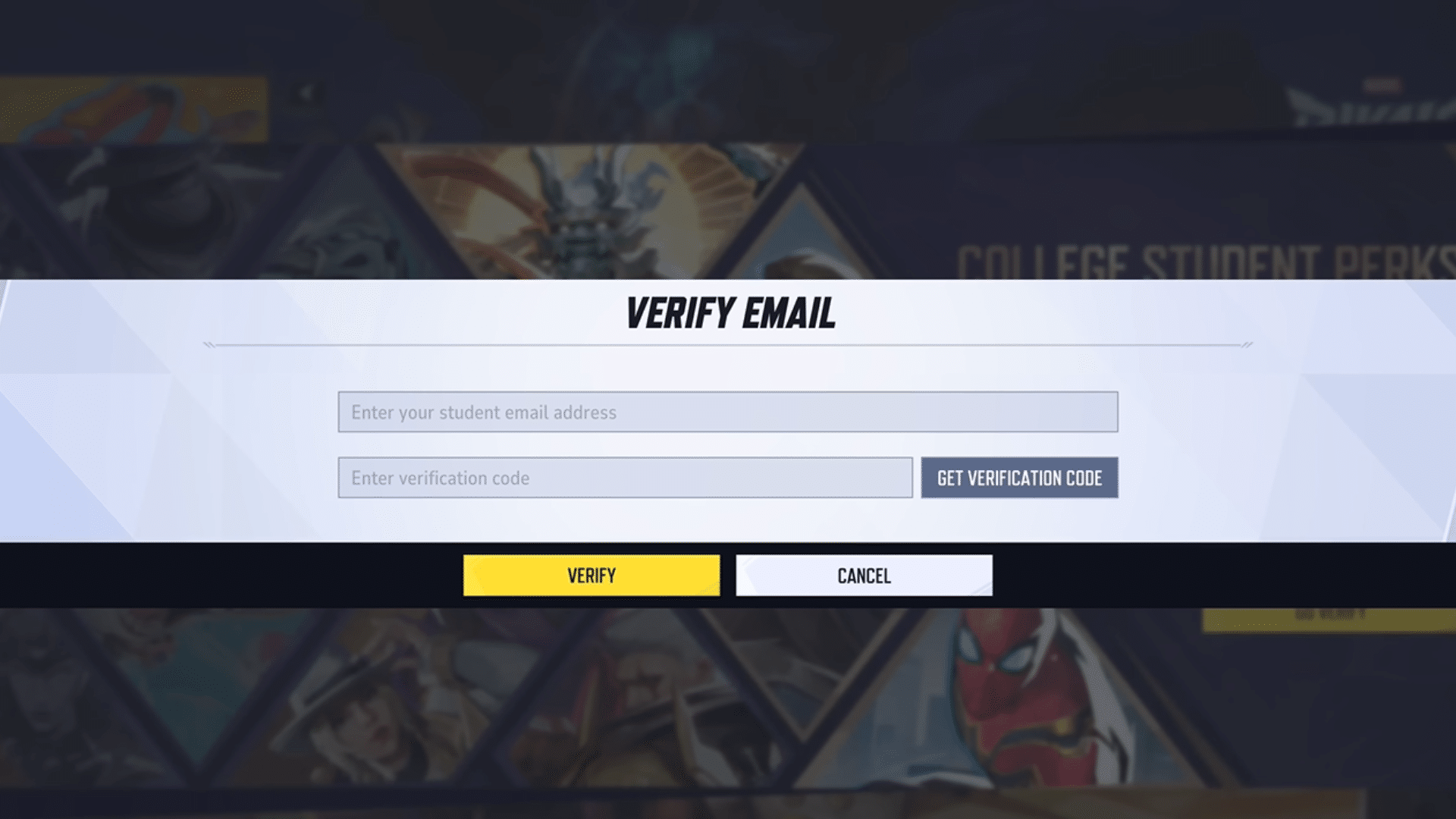
- Enter your official university or college email address in the text box.
- Check your student inbox for a one-time verification password sent by the system.
- Copy and paste that code into the verification field in-game.
- Confirm your submission and wait for the approval notification.
Approval is typically instant, but it can take up to 24 hours in some cases. Once approved, your trial costumes and MVPs will be added to your account automatically.
How To Redeem College Perks in the Game
After verification, your rewards appear directly in your inventory. There is no separate redeem code step needed. However, if you are also claiming College Student Perks Marvel Rivals trial costumes, make sure you equip them before the season ends, because trial skins expire when the season rolls over.
- Open your hero roster and check the costumes tab
- Trial costumes are labeled separately from owned skins
- MVPs unlock in the showcase menu under your profile
Marvel Rivals College Perks Not Working: How To Fix It
This is where many students get stuck. There are several common reasons why your Marvel Rivals College Perks Not Working situation might happen, and most of them are easy to resolve.
Common Reasons Your Perks Are Not Showing Up
- Wrong email used: You signed up with a personal email instead of your academic one. Re-apply with the correct student address.
- Unsupported institution: Your university email domain may not yet be approved. Contact support to add it.
- Account mismatch: Your Marvel Rivals account is linked to a different region than where your university is registered.
- Pending server approval: Sometimes verification takes up to 24 hours due to server-side processing.
- Expired verification: Student status must be re-verified each season. A previous verification does not carry over automatically.
How To Contact Marvel Rivals Support
If none of the above fixes work, you can escalate directly to the support team:
- Go to Settings in the main menu.
- Click the Customer Support button in the upper right corner.
- Submit a ticket with the following details: your country/region, your full university name, and your student email domain.
- The team will review your institution and add it to the supported list if eligible.
Is There a Way To Get College Perks Without a University Email?
The short answer is no. How To Get College Perks Marvel Rivals requires a genuine academic email address from a supported institution. The program uses domain-based verification, so there is no workaround for non-students.
Alternative Ways To Get Free Skins in Marvel Rivals
Fortunately, College Perks is just one of many ways to earn free cosmetics. Even if you are not a student, you have solid options:
- Redeem codes: Official codes distributed during events, on social media, and via partner promotions give free skins and sprays.
- Battle Pass free track: Playing the game and earning XP unlocks free-tier rewards without purchasing the premium pass.
- Competitive rewards: Reaching Gold rank or higher in competitive play earns exclusive skin bonuses.
- Platform exclusives: PlayStation players can claim unique free skins tied to their platform.
- Twitch Drops: Watch approved streams during drop events to collect exclusive items automatically.
Pro Tips: College Perks Marvel Rivals
- Re-verify every season: Your student verification expires with each season update. Set a reminder at the start of each new season to renew your perks before the window closes.
- Check the institution list first: Before applying, confirm your school's email domain is on the supported list to avoid a failed submission.
- Use your student email inbox immediately: The one-time verification code often expires within 30 minutes. Check your email right after submitting to avoid having to restart the process.
- Claim trial costumes early: Trial skins are time-limited. Equip and test them early so you know which permanent unlocks to prioritize with your credits.
Common Mistakes Marvel Rivals College Perks Players Make
- Applying with a personal email: The most frequent mistake is using a Gmail or Outlook address instead of the official university email. The system rejects non-academic domains every time. Fix: check your student portal and use the .edu or official institutional address.
- Skipping re-verification: Many players assume their approval carries over from season to season. It does not. Each new batch of College Perks requires a fresh verification cycle. Fix: re-verify at the start of every season as soon as the new perks are announced.
- Not checking the school list before applying: Students from unsupported institutions go through the entire process only to get stuck at the domain validation step. Fix: visit the official College Perks page and confirm your university is listed before starting the application.

College Perks Marvel Rivals: Make the Most of Every Season 🎓
| Reward Type | Availability | How Long It Lasts |
|---|---|---|
| Trial Costumes | Each Season (X.0 and X.5) | Until season ends |
| Exclusive MVPs | Each Season update | Permanent after claim |
| New wave perks | Season 8 and beyond | Season-based rotation |
| Support-added schools | Rolling additions | Ongoing |
Currently, Marvel Rivals College Perks offers one of the most generous free reward programs in any live-service hero shooter. Ten trial costumes and multiple MVPs per season is a significant value, especially for players who are already grinding ranked.
The key is treating the program as a recurring ritual. Every new season patch is your reminder to open Settings, head to Community, and re-verify your student status. It takes two minutes and pays off in cosmetics that would otherwise cost you real money.
For students who want to take their Marvel Rivals experience further, a stable connection is just as important as a great skin. Lag, packet loss, and unstable routing can cost you team fights in the most critical moments of a ranked match.
How ExitLag Improves Your Marvel Rivals Connection
ExitLag is the tool serious Marvel Rivals players use to fix exactly that. It is not a VPN. ExitLag is a dedicated game connection optimizer that analyzes multiple network paths in real time and automatically routes your traffic through the fastest, most stable one available. The result is lower ping, fewer packet drops, and a much more consistent play experience.
ExitLag supports Marvel Rivals across all supported regions and gives you access to 1,500+ servers in 190+ countries. Whether you are solo queuing or coordinating with your squad, smoother routing means your inputs register faster and your teamfights feel tighter.
You can download ExitLag for PC and try it out alongside your freshly claimed College Perks cosmetics.
All game images used in this blog post belong to NetEase Games and Marvel Entertainment. They are used for informational and educational purposes only and do not imply endorsement or affiliation with the rights holders.