

Counter-Strike 2 players across the Middle East have reported high ping, unstable connections, and difficulties joining nearby matchmaking servers throughout 2026. Some players in the United Arab Emirates, Saudi Arabia, and neighboring countries have also reported being connected to European servers instead of regional alternatives. These problems have raised questions about the availability of CS2 Dubai server high ping, and Middle East.
However, high ping does not necessarily mean that a server is offline. Counter-Strike 2 uses Valve's networking infrastructure, including Steam Datagram Relay, which can influence how traffic reaches a match. Understanding this system is essential for identifying why CS2 Dubai server high ping happens and which troubleshooting methods may help.
 Connection complaints involving Dubai became more visible during 2026.
On May 26, a player posted a Steam Community discussion reporting that Dubai (DXB) had disappeared from their available matchmaking destinations.
The player explained that CS2 was connecting them to European servers despite several troubleshooting attempts.
Another discussion, published on May 27, described a connection that previously delivered approximately 20–40 ms but had started connecting to Europe with higher latency.
The complaints continued later in the year.
On October 8, the original author of the May 26 discussion reported that the problem remained unresolved.
However, these are individual reports. They do not establish that every Dubai server was unavailable.
Several factors can contribute to high latency:
Connection complaints involving Dubai became more visible during 2026.
On May 26, a player posted a Steam Community discussion reporting that Dubai (DXB) had disappeared from their available matchmaking destinations.
The player explained that CS2 was connecting them to European servers despite several troubleshooting attempts.
Another discussion, published on May 27, described a connection that previously delivered approximately 20–40 ms but had started connecting to Europe with higher latency.
The complaints continued later in the year.
On October 8, the original author of the May 26 discussion reported that the problem remained unresolved.
However, these are individual reports. They do not establish that every Dubai server was unavailable.
Several factors can contribute to high latency:
 As of October 20, 2026, there is insufficient official evidence to confirm a complete shutdown of Dubai's CS2 matchmaking infrastructure.
Valve has not publicly established that all Middle Eastern matchmaking servers were permanently removed.
Player reports about CS2 Dubai server not showing should therefore be distinguished from confirmed regional outages.
As of October 20, 2026, there is insufficient official evidence to confirm a complete shutdown of Dubai's CS2 matchmaking infrastructure.
Valve has not publicly established that all Middle Eastern matchmaking servers were permanently removed.
Player reports about CS2 Dubai server not showing should therefore be distinguished from confirmed regional outages.
 Players searching for CS2 matchmaking Europe servers often want to understand why their matches are hosted far from home.
Several circumstances may influence matchmaking, including eligible data centers, latency estimates, and match availability.
CS2 includes a setting called Max Acceptable Matchmaking Ping, designed to limit eligible matchmaking destinations.
In an October 13, 2023 update, Valve added a list of nearby official data centers beneath this setting.
The update also introduced additional information when a proposed match had notably high latency.
However, the ping limit is not a manual server selection tool.
It restricts the destinations considered by matchmaking rather than guaranteeing a specific location.
If nearby servers are unavailable or their estimated latency exceeds the configured limit, finding a suitable match may become more difficult.
For players in the UAE or Kuwait, reducing the limit may help avoid some distant destinations.
Nevertheless, it cannot force matchmaking to use Dubai.
Players searching for CS2 matchmaking Europe servers often want to understand why their matches are hosted far from home.
Several circumstances may influence matchmaking, including eligible data centers, latency estimates, and match availability.
CS2 includes a setting called Max Acceptable Matchmaking Ping, designed to limit eligible matchmaking destinations.
In an October 13, 2023 update, Valve added a list of nearby official data centers beneath this setting.
The update also introduced additional information when a proposed match had notably high latency.
However, the ping limit is not a manual server selection tool.
It restricts the destinations considered by matchmaking rather than guaranteeing a specific location.
If nearby servers are unavailable or their estimated latency exceeds the configured limit, finding a suitable match may become more difficult.
For players in the UAE or Kuwait, reducing the limit may help avoid some distant destinations.
Nevertheless, it cannot force matchmaking to use Dubai.
Valve significantly improved its network measurements on November 12, 2024.
The update changed the Network Problems indicator to focus on network events that actually affect gameplay.
It also introduced a detailed display showing raw packet loss and jitter values.
According to Valve's official Telemetry HUD guide, players can use the detailed view or network graph for further analysis.
 Players experiencing CS2 high ping in the Middle East should begin with basic diagnostics before changing network configurations.
The following steps can help identify the source of the problem.
Players experiencing CS2 high ping in the Middle East should begin with basic diagnostics before changing network configurations.
The following steps can help identify the source of the problem.
Why Is CS2 Dubai Server Ping So High?
Connection complaints involving Dubai became more visible during 2026.
On May 26, a player posted a Steam Community discussion reporting that Dubai (DXB) had disappeared from their available matchmaking destinations.
The player explained that CS2 was connecting them to European servers despite several troubleshooting attempts.
Another discussion, published on May 27, described a connection that previously delivered approximately 20–40 ms but had started connecting to Europe with higher latency.
The complaints continued later in the year.
On October 8, the original author of the May 26 discussion reported that the problem remained unresolved.
However, these are individual reports. They do not establish that every Dubai server was unavailable.
Several factors can contribute to high latency:
- Matchmaking selecting a more distant data center.
- Inefficient routing between the ISP and Valve's network.
- Congestion affecting international connections.
- Packet loss or unstable latency.
- Temporary problems involving matchmaking infrastructure.
Are CS2 Middle East Servers Available?
As of October 20, 2026, there is insufficient official evidence to confirm a complete shutdown of Dubai's CS2 matchmaking infrastructure.
Valve has not publicly established that all Middle Eastern matchmaking servers were permanently removed.
Player reports about CS2 Dubai server not showing should therefore be distinguished from confirmed regional outages.
What does Saudi Arabia's official gaming report show?
Saudi Arabia's Communications, Space and Technology Commission (CST) publishes measurements of gaming connectivity. Its Q2 2026 Game Mode report recorded an average Counter-Strike latency of 22 ms across the country's participating fiber connections. The report classified the measured game server location as GCC countries. Individual ISP results included:- stc: 21 ms.
- Mobily: 22 ms.
- Zain: 25 ms.
- Salam: 26 ms.
Official matchmaking vs. community servers
CS2 has different multiplayer server environments. Official matchmaking uses Valve's systems to organize matches and assign eligible destinations. Community servers operate separately and may have their own locations, rules, and availability. Finding a community server in Dubai does not prove that official Premier matchmaking is operating there. Likewise, problems with official matchmaking do not necessarily mean every privately hosted server is unavailable.How Does Steam Datagram Relay Affect CS2 Connections?
One important difference between CS2 and many other multiplayer games is Valve's networking infrastructure. According to the Steam Datagram Relay documentation, SDR is a private gaming network that carries traffic through Valve's infrastructure. Instead of exposing a game server's address directly, the system can forward traffic through protected relay nodes. This provides several benefits, including connection security, protection against certain attacks, and optimized network paths.A relay is not necessarily the match server
The distinction between a relay and a game server is essential. Game server: The destination responsible for processing the match. Relay: An intermediary that helps transport traffic between the player and the destination. ISP route: The network path used to reach Valve's infrastructure. These elements are connected, but they are not interchangeable. For example, traffic passing through a relay in another country does not automatically mean the match itself is hosted there. Similarly, an inefficient route can increase latency even when the actual game server is geographically nearby. Valve's infrastructure attempts to select efficient paths, but real-world performance still depends on network conditions. This is why identifying a relay address alone cannot confirm that Dubai's matchmaking infrastructure is unavailable.Why Does CS2 Connect Middle East Players to European Servers?
Players searching for CS2 matchmaking Europe servers often want to understand why their matches are hosted far from home.
Several circumstances may influence matchmaking, including eligible data centers, latency estimates, and match availability.
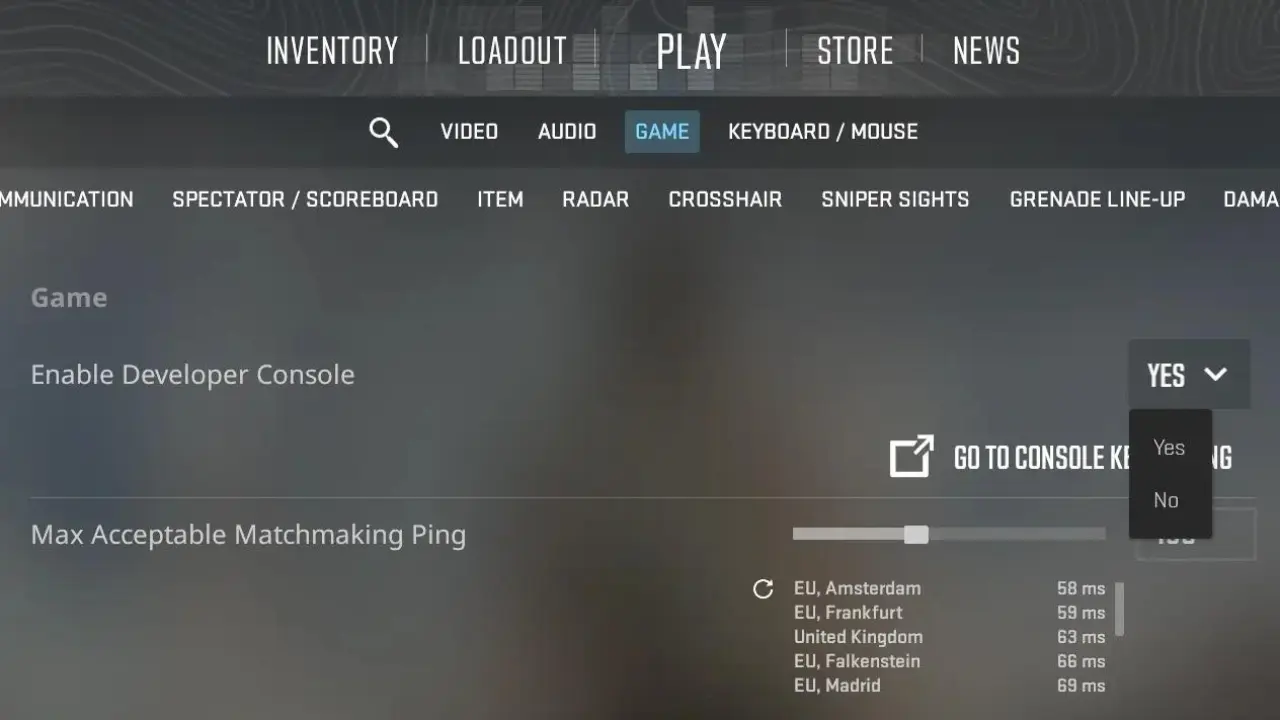
CS2 includes a setting called Max Acceptable Matchmaking Ping, designed to limit eligible matchmaking destinations.
In an October 13, 2023 update, Valve added a list of nearby official data centers beneath this setting.
The update also introduced additional information when a proposed match had notably high latency.
However, the ping limit is not a manual server selection tool.
It restricts the destinations considered by matchmaking rather than guaranteeing a specific location.
If nearby servers are unavailable or their estimated latency exceeds the configured limit, finding a suitable match may become more difficult.
For players in the UAE or Kuwait, reducing the limit may help avoid some distant destinations.
Nevertheless, it cannot force matchmaking to use Dubai.
How to Check CS2 Ping, Packet Loss and Jitter
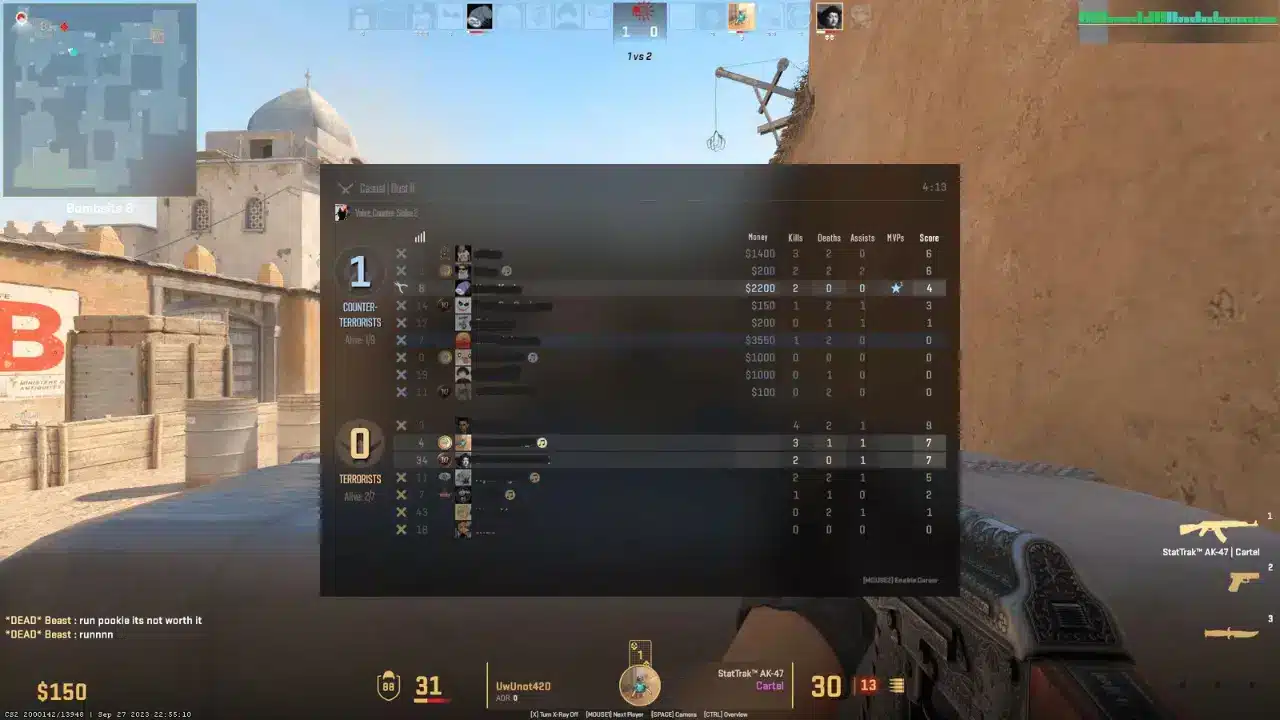
Counter-Strike 2 includes a built-in Telemetry HUD for monitoring network performance. Players can access these options through Settings > Game > Telemetry. The system provides several useful indicators.| Indicator | What it measures |
| Ping | Round-trip connection latency in milliseconds |
| Network problems | Percentage of game ticks affected by network delays or loss |
| Packet loss | Network packets that fail to arrive |
| Jitter | Variations in packet delivery time |
| Frame time / FPS | Local rendering performance, not internet latency |
How to interpret the results
High ping indicates increased travel time between your device and the game server. Packet loss indicates missing network information. Jitter describes inconsistent packet arrival times, potentially causing sudden gameplay interruptions. The Network Problems indicator also measures missed game ticks in upstream and downstream directions. Importantly, a connection can experience jitter without showing significant packet loss. Meanwhile, unstable frame times may create stuttering even when the internet connection performs normally. Distinguishing these symptoms prevents unnecessary network adjustments.How to Fix CS2 High Ping in Dubai and Saudi Arabia
Players experiencing CS2 high ping in the Middle East should begin with basic diagnostics before changing network configurations.
The following steps can help identify the source of the problem.
1. Adjust Max Acceptable Matchmaking Ping
Open Settings > Game and locate Max Acceptable Matchmaking Ping. Check the estimated latency of nearby official data centers. Then select a reasonable maximum slightly above your preferred connection latency. Setting the threshold too low may restrict matchmaking excessively or increase queue times. Remember that this setting cannot guarantee access to a specific Dubai server.2. Test your local connection
Before investigating international routing, eliminate common problems inside your home network.- Use an Ethernet connection instead of Wi-Fi.
- Restart your router and modem.
- Pause downloads and background updates.
- Reduce simultaneous network usage.
- Check whether other online games experience similar instability.
3. Monitor packet loss and jitter
Enable the detailed Telemetry HUD and play several matches. Record your ping, packet loss, jitter, and Network Problems values. Repeat the tests at different times of day. If every destination performs poorly, investigate your local connection and ISP. If problems occur only when connecting to particular destinations, routing or upstream infrastructure may require closer examination. Valve also provides a Buffering to smooth over packet loss / jitter setting. Increasing buffering may reduce interruptions caused by unstable packet delivery. However, it introduces additional latency, so compare gameplay performance before keeping the adjustment.4. Investigate ISP routing
When local tests show stable connectivity, contact your ISP about persistent high latency. Provide your location, connection type, affected matchmaking destinations, and recorded network statistics. Avoid interpreting isolated traceroute timeouts as definitive evidence of network failure. Likewise, changing Steam's download region or DNS settings does not guarantee a different CS2 matchmaking destination. Blocking server IP addresses through unofficial tools may introduce additional connectivity problems and is not recommended as a standard solution.5. Compare alternative routes with ExitLag
When inefficient network routing contributes to high ping, connection optimization software may provide another option. ExitLag analyzes alternative paths for supported games and attempts to improve traffic routing. For CS2 players in Dubai, Saudi Arabia, and neighboring countries, this may help when the default ISP route performs poorly. To evaluate the results:- Launch CS2 without ExitLag and record the Telemetry HUD values.
- Close the game and activate ExitLag for Counter-Strike 2.
- Apply the recommended connection optimization.
- Reopen CS2 and repeat the tests under similar conditions.
- Compare ping, packet loss, jitter, and gameplay stability.


