The Deadlock Split Shot Bug has become one of the most talked about problems inside Valve’s hero shooter right now. Players keep running into strange interactions where the multishot item deals far more damage than it should. Some matches even get decided by it before either team reaches the mid fight.
If you have felt like an enemy hero suddenly deleted your Patron shield or a barrel exploded five times in a row, you are not imagining things.
The Deadlock Split Shot Bug is a real and well documented issue affecting objective damage, barrel explosions, and certain hero abilities. It has shown up across multiple ranks and regions, which means it is not a one off client glitch.
In short, the bug happens because Split Shot’s multishot mechanic sometimes lets every pellet or bullet trigger an effect meant for a single hit. Instead of splitting damage evenly across targets, the game occasionally stacks bonus effects per pellet. That is why a five shot burst can act like five separate triggers against a barrel, a shrine, or the Patron.
This guide breaks down exactly what causes the issue, which heroes are affected, and what you can do about it while Valve continues tuning the item. We will also cover practical workarounds, common mistakes players make when reacting to the bug, and a few tips to keep your own games smoother while this gets sorted out.
What Is The Deadlock Split Shot Bug?
Split Shot is a Tier 2 weapon item that turns your normal attack into a multishot burst. Instead of one bullet, you fire several projectiles spread across a small cone, and hitting multiple heroes grants a stacking damage bonus.
On paper, the item is simple. However, the way that multishot interacts with certain hero abilities and destructible objects has produced consistent, repeatable bugs that the community has documented across dozens of forum threads.
How Split Shot Is Supposed To Work
Under normal conditions, Split Shot behaves like this:
- Each attack splits into multiple projectiles fired in a narrow spread.
- Hitting more than one hero per volley grants a stacking weapon damage bonus.
- The stacking bonus caps after a handful of stacks and decays if you stop landing hits.
- Targets are only supposed to be hit once per multishot volley, not once per individual pellet.
That last rule is exactly where the Deadlock Split Shot Bug tends to break down. Instead of counting as one hit against an objective or a barrel, several pellets can each register their own separate trigger.
Where The Bug First Appeared
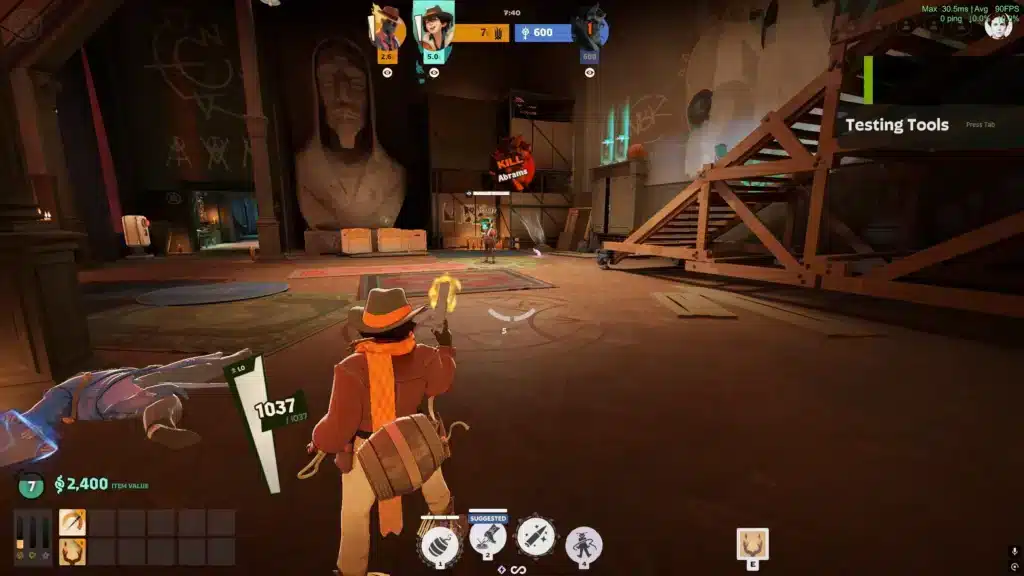
Community reports trace the issue back to Split Shot’s interaction with Holliday’s barrel ability. Firing at a barrel while Split Shot is active can cause the explosion to trigger multiple times instead of once, dealing dramatically inflated damage in a single burst.
From there, players began noticing similar overlap problems against other objectives. Consequently, what started as a single hero interaction turned into a wider pattern affecting several characters and item combinations.
What Causes The Split Shot Bug Deadlock Players Keep Reporting?
At its core, the Split Shot Bug Deadlock community keeps flagging comes down to how the game engine resolves multiple simultaneous projectile hits. Split Shot was designed to avoid double dipping on damage, but the check that prevents that does not always apply consistently to every ability or object.
Therefore, some heroes benefit far more from the item than others simply because of how their kit resolves hits. This creates an uneven playing field rather than the intended balance tradeoff.
The Holliday Barrel Explosion Glitch
The most well known example involves Holliday’s explosive barrels. Shooting a barrel while Split Shot is active can make the explosion proc repeatedly instead of once, sometimes multiplying the base damage several times over.
Because of this, some players intentionally rush the Split Shot build early in a match just to abuse the interaction. This turns a supporting item into a near instant burst combo against unaware opponents.
Objective Damage Interactions
Beyond Holliday, Split Shot has shown inconsistent behavior against mid boss, shrines, and the Patron. Some heroes gain bonus objective damage almost automatically while using the item, while others need a lucky shot proc to see any benefit at all.
Common affected interactions include:
- Multishot pellets from shotgun style heroes each registering separately against objectives.
- Certain hero dash or barrage abilities firing multiple instances that all benefit from the multishot split.
- On hit effects, like slow stacks or ammo based debuffs, building up faster than intended when Split Shot is active.
- Inconsistent behavior between similar heroes, where one gains a clear advantage and another does not.
Split Shot Bug Deadlock: Symptoms vs Workarounds
If you are unsure whether you just witnessed the bug or simply a strong play, it helps to compare the common symptoms against the practical steps you can take right now.
| Symptom | Likely Cause | Workaround |
|---|---|---|
| Barrel explodes multiple times in one hit | Split Shot pellets each triggering the explosion separately | Avoid shooting barrels directly while enemies run Split Shot near you |
| Objective takes unusually high burst damage | Multishot bypassing the single hit rule on structures | Rotate objective defense so no single hero tanks the full burst |
| On hit debuffs stack unusually fast | Each pellet counting as its own proc | Track stack counters and disengage earlier than usual |
| Some heroes feel far stronger with the item | Inconsistent hit resolution across kits | Ban or prioritize contesting Split Shot on heroes known to abuse it |
Common Symptoms To Watch For
Before assuming a fight was simply lost to bad positioning, look for a few telltale signs. A single burst dealing damage that looks closer to five separate hits is the clearest indicator.
Other signs include unusually fast stacking of slows or silences, and objectives dropping in health far quicker than the displayed damage numbers suggest they should.
Workarounds While You Wait For A Fix
Since this is an engine level interaction rather than a simple visual glitch, there is no permanent fix a player can apply on their own. Still, a few practical adjustments reduce how much the bug affects your matches.
- Track which enemy heroes have purchased Split Shot and play around barrels or objectives more cautiously.
- Avoid grouping too tightly near objectives when an enemy with Split Shot is nearby, since clustered targets increase the chance of multi proc effects.
- Report suspicious damage numbers through the official bug reporting channel so the interaction gets logged with match data.
- Adjust your own itemization to counter burst damage, since raw health or damage reduction items reduce the impact of any single inflated hit.
Has The Split Shot Bug Been Fixed?
This is the question most players actually want answered. Right now, the honest answer is that the situation is partially resolved but still evolving.
Some of the more obvious interactions, including certain on hit proc issues, have reportedly been addressed in recent balance passes. However, other objective related interactions and hero specific quirks are still being reported by the community as unresolved.
Current Status Of The Issue
Because Deadlock is still receiving frequent balance and gameplay updates, item interactions like this are expected to keep shifting. Consequently, it is safer to treat the Split Shot Bug as an ongoing area of active tuning rather than a single bug with one clean fix date.
If you want the most accurate picture, keep an eye on official patch notes and community bug tracking threads rather than relying on any single claim that the issue is fully closed.
Is Split Shot Still Worth Buying?
Yes, in most situations. Split Shot remains a strong item for heroes who benefit from hitting multiple targets or stacking weapon damage in extended fights.
That said, be aware that its interaction with certain objectives and hero kits may currently be stronger than intended. Use that knowledge tactically rather than assuming every bonus effect is working as designed.
Practical Advice For Dealing With The Deadlock Split Shot Bug
Understanding the mechanics is only half the battle. The other half is adjusting how you play, itemize, and communicate with your team when this interaction shows up in a live match.
Pro Tips: Split Shot Bug Deadlock
- Track enemy item builds: Knowing when an opponent has Split Shot lets you predict burst potential before it happens, instead of reacting after the damage is already done.
- Rotate objective duty: Spreading damage soak across teammates reduces how badly any single inflated proc can swing a fight around the Patron or a shrine.
- Communicate suspicious damage: Calling out unusually high burst damage helps your team adjust positioning immediately rather than repeating the same mistake next fight.
- Prioritize disruption over trading: Since some interactions favor burst heroes disproportionately, interrupting their attack window is often safer than trading shots directly.
- Keep patch notes bookmarked: Item interactions change frequently, so reviewing update notes regularly helps you avoid planning strategy around outdated assumptions.
Common Mistakes Deadlock Players Make
- Ignoring enemy item builds entirely: Many players only track souls and levels, missing clear warning signs. Fix: glance at enemy inventories before contesting objectives.
- Standing still near barrels during fights: This turns a normal skirmish into a five hit burst opportunity for Holliday players. Fix: treat active barrels as hazards, not cover.
- Assuming every big hit is a skill issue: Blaming positioning alone ignores that some damage spikes come from the bug itself. Fix: log the moment and compare it against known symptoms before tilting.
- Overreacting by avoiding the item entirely: Some players stop buying Split Shot out of caution, losing a genuinely strong item. Fix: use it confidently while staying aware of its quirks.
Why Connection Quality Matters When Bugs Like This Happen
Ability interactions and burst damage windows in Deadlock happen fast, often within a fraction of a second. Furthermore, when your connection is unstable, it becomes even harder to tell whether you reacted too slowly or simply got hit by an inflated proc.
That is exactly the kind of situation where ExitLag becomes useful. ExitLag is not a VPN. It is a game connection optimizer that scans multiple real time network routes and automatically selects the fastest, most stable path between your PC and Deadlock’s servers.
Getting Started With ExitLag For Deadlock
Because Deadlock is a fast paced hero shooter, every millisecond of input delay matters when you are trying to dodge a Split Shot burst or contest an objective. Lower ping and reduced packet loss mean your inputs land closer to when you actually pressed them.
ExitLag supports more than 4,000 titles across PC and mobile, with over 1,500 servers spread across more than 190 countries. It is trusted by more than 30 million users and handles over 18 million optimizations every week.
Key benefits for a game like Deadlock include:
- Real time routing that reduces delay and packet loss during fast fights near objectives.
- Multipath technology that keeps your connection alive even if one network route becomes unstable.
- Traffic shaping that prioritizes game data over background downloads or streaming apps.
- A one click AI powered mode that picks the best route automatically, with manual options for advanced users.
If unstable routing is making chaotic moments, like a barrel explosion during the Deadlock Split Shot Bug, feel even worse, grabbing the ExitLag Download is a simple way to tighten up your connection before your next match. It will not fix the item interaction itself, but it removes network related excuses from the equation entirely.
Ultimately, the Deadlock Split Shot Bug is a good reminder that even carefully designed items can behave unpredictably once they interact with every hero, ability, and objective in the game. Staying informed, adjusting your itemization, and reporting odd behavior all help push toward a cleaner, more balanced experience for everyone.
All game images used in this blog post belong to Valve Corporation. They are used for informational and educational purposes only and do not imply endorsement or affiliation with the rights holders.
Got questions or want to connect with other players? Join the conversation at the ExitLag Forum!