

Nothing ruins a tactical match faster than loading into Delta Force and immediately dealing with high ping, stutters, and desync. At first sight, Delta Force high ping creates delayed shots, broken movement, and unpredictable encounters. Even more, players often experience similar issues across many supported titles listed in the official games catalog, proving that routing—not internet speed—is usually the real problem.

What is high ping in Delta Force?
Firstly, Delta Force high ping happens when your device takes too long to send and receive data packets from the server. Ping measures this process in milliseconds (ms), and the higher the value, the slower your actions feel. Now, this delay usually occurs because packets pass through several unstable servers, increasing travel distance and time.
Above all, it’s not just the number that matters—it’s the stability. When latency constantly fluctuates, combat becomes unpredictable and interactions fail. In advance, tactical shooters like Delta Force depend heavily on real-time precision, so even small spikes can completely change the outcome of a fight.
Finally, understanding how Delta Force high ping forms will help determine whether your issue is local congestion, server distance, poor routing, or a combination of all three.
How high ping affects gameplay in Delta Force
- Delayed hit registration, causing shots to land well after firing.
- Rubberbanding, pushing your character backward mid-sprint.
- Desync, making enemies appear in inaccurate positions.
- Slow weapon swaps, affecting fast-paced engagements.
- Drone and gadget delay, breaking tactical maneuvers.
- Footstep inconsistencies, ruining stealth approaches.
- Sudden disconnections, especially during peak hours.
Impact on tactical combat
In the meantime, combat becomes extremely unreliable. High latency affects bullet trajectories, cover usage, and reaction time. In the same way, enemies may experience different timelines of your actions, giving them a massive advantage.
Impact on gadgets and team coordination
Soon after ping spikes occur, gadgets take longer to deploy, drones react slowly, and teammates receive delayed calls. From the same point of view, coordinated pushes or breaching strategies collapse due to inconsistent timings.
Main causes of high ping in Delta Force
Server distance
Often, servers are located far from your region, forcing packets to travel long routes. At first sight, distance seems minor, but each extra hop increases Delta Force latency.
ISP / routing issues
Your ISP may choose inefficient routes, sending packets through congested or indirect paths. This leads to spikes, high averages, and severe Delta Force connection issues even on stable internet plans.
Network congestion
When multiple devices use bandwidth simultaneously, your connection becomes overloaded. As well as that, peak ISP congestion worsens delays, causing lag Delta Force at predictable times each day.
Outdated hardware
Old routers, weak Wi-Fi, or outdated drivers create bottlenecks. Even more, failing equipment amplifies every spike and increases packet instability.
Game-specific server load
In massive battles or events, servers may struggle to handle large volumes of data. In summary, this affects all players and increases delays during peak times.
How to check and test your ping in Delta Force
Firstly, use the in-game network monitor to view your live ping. This helps you identify spikes, packet loss, and unstable values during matches. Afterwards, perform command-line tests on your PC to measure average latency, jitter, and consistency through extended pings.
In summary, values under 80ms are excellent, while 80–120ms remain playable. Then, anything above 150ms introduces delays that harm tactical gameplay. In the end, the most important factor is stability—steady numbers outperform unstable ones.
Ping levels classification
| Ping range (ms) | Classification | Gameplay experience in Delta Force |
| 0–40 ms | Excellent | Perfect hit registration and smooth combat. |
| 40–80 ms | Very good | Playable with minor delay, great for PvP. |
| 80–120 ms | Playable | Noticeable delay; still manageable. |
| 120–180 ms | High ping | Rubberbanding and inconsistent shots. |
| 180–250 ms | Very high | Severe delay, unstable combat. |
| 250+ ms | Unplayable | Major desync, teleporting players, disconnects. |
Basic fixes to reduce high ping in Delta Force
Optimize local connection
- Use a wired Ethernet cable instead of Wi-Fi.
- Close unnecessary background applications.
- Update network adapter drivers.
- Restart the router/modem to refresh routing.
- Disable auto-updates in launchers and stores.
- Ensure no other devices are consuming heavy bandwidth.
Contact your ISP
On the other hand, if you still experience instability, your ISP may be causing the routing problems. Many players discover that their lines suffer from congestion or outdated configuration.
- Request a full line diagnostic.
- Ask for routing verification to your server region.
- Confirm if your line has intermittent noise or packet loss.
- Check whether your ISP is experiencing maintenance or overloads.
- Provide screenshots of your ping tests so they can identify routing faults efficiently.
ExitLag: the best solution to fix high ping in Delta Force
In the meantime, if you’ve already optimized your home network and contacted your ISP, yet Delta Force high ping persists, the issue is almost certainly routing. Above all, shooters like Delta Force require consistent packet delivery, and when your ISP sends traffic through unstable paths, your gameplay suffers. As well as that, long-distance routes and peak-hour congestion create spikes no local tweak can fix.
What is ExitLag?
ExitLag is specialized software for advanced connection optimization, built to fix routing problems that cause latency spikes. First of all, it analyzes the path between your PC and the game server, correcting unstable segments in real time. Even more, its core technology—found in the official technology section—was designed for online games that demand immediate responsiveness.
At the same time, ExitLag constantly adjusts your route as network conditions change. In advance, this ensures you maintain stable ping even when your ISP struggles with congestion or server distance.

How ExitLag works
ExitLag uses several real-time optimization layers specifically designed to reduce Delta Force high ping and enhance stability.
- Real-time route analysis
ExitLag constantly scans multiple routes to identify congestion and instability instantly. - Multiple routes simultaneously
Your packets travel through parallel routes, preventing delays if one path becomes unstable. - Automatic best route selection
The system automatically chooses the fastest returning packets at every moment. - Hop optimization
ExitLag reduces the number of intermediate stops, shortening the round-trip time. - Connection stabilization
In summary, this eliminates random ping spikes and reduces Delta Force latency.
You can learn more about this multi-route approach inside the how it works page.
Advantages for Delta Force players
ExitLag brings significant benefits for players experiencing Delta Force high ping, especially during intense PvP or tactical team operations.
1. More accurate hit registration
Because packet travel time becomes consistent, shots land exactly when fired. Above all, this improves gunfights where milliseconds matter.
2. Reduced rubberbanding
With stable routing, your movement becomes smooth and predictable. In the same way, enemies no longer appear to teleport or jitter.
3. Instant ability and gadget response
Deployments, drones, grenades, and tactical tools respond faster due to lower Delta Force latency.
4. Better team coordination
ExitLag reduces timing discrepancies, making voice communication, breaching strategies, and synchronized pushes far more reliable.
5. Stable performance on distant servers
Players connecting to international servers benefit from shorter, cleaner routes that normally aren’t available through ISP defaults.
6. Easy setup
Just select Delta Force, apply routes, and play. No networking expertise required.
Is ExitLag worth it for Delta Force?
Definitely. If your biggest issue is Delta Force high ping, unstable routes, or desync during firefights, ExitLag delivers visible improvements immediately. Players who connect to distant servers or experience heavy congestion notice the biggest boost.
Furthermore, ExitLag offers flexible and affordable plans through the official pricing section. In conclusion, the investment is minimal compared to the stability gained in every match.
How to use ExitLag in Delta Force
The process is extremely simple:
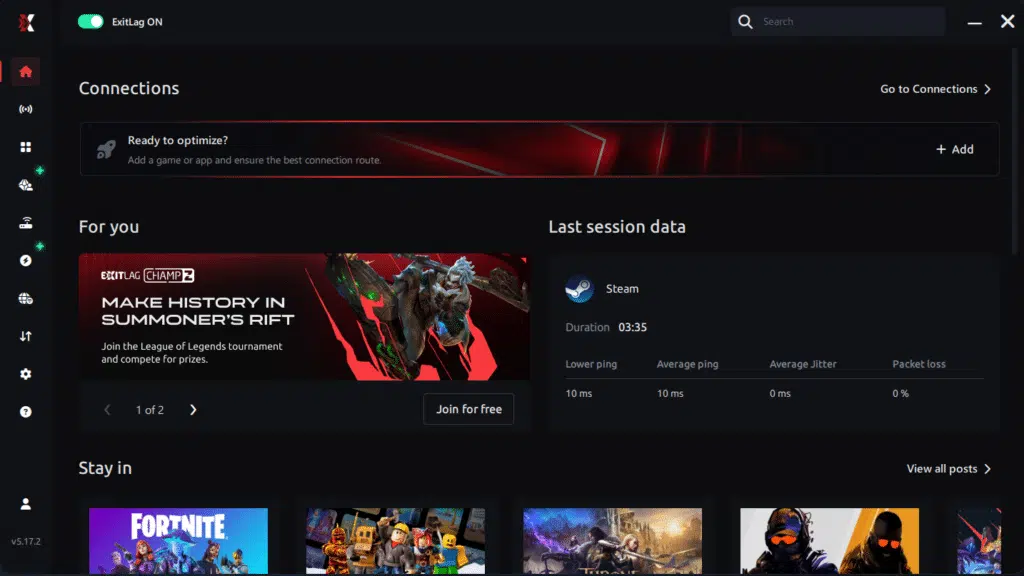
Step 1 – Access the official ExitLag website and download the application. There’s a free trial period for new users.
Step 2 – Install and open the program. Log in with your account.
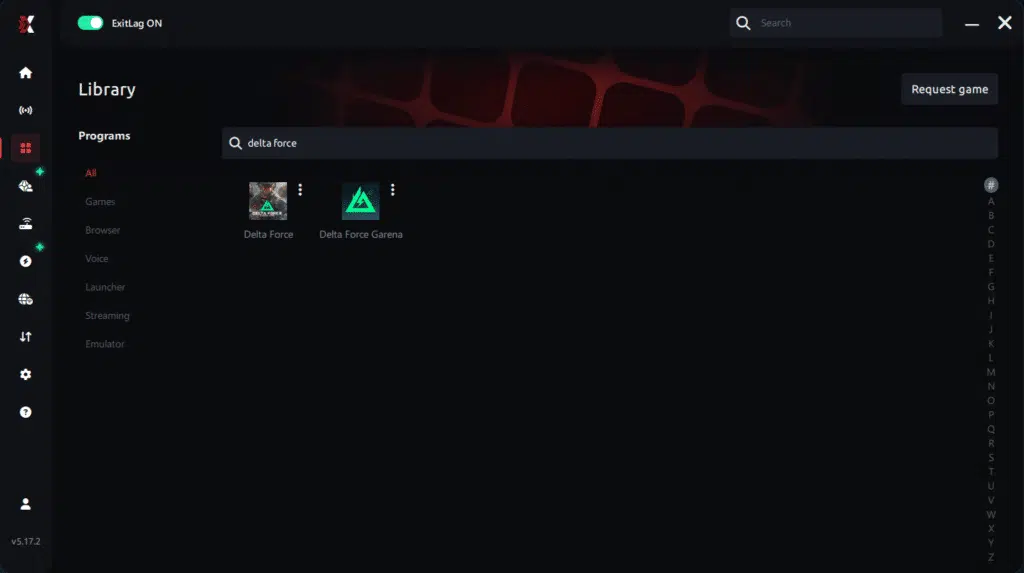
Step 3 – In the search bar, type “Delta Force” and select the game from the list.
Step 4 – Choose between automated or manual route
Based on the results, you can let ExitLag automatically select the best route or manually choose the server that showed the lowest latency for your connection.
AI-optimized automated route
Based on the results, you can let ExitLag automatically select the best route through AI optimization. The system analyzes multiple connection paths in real time and automatically identifies the most efficient route for your connection, ensuring the lowest possible latency without requiring manual choices.
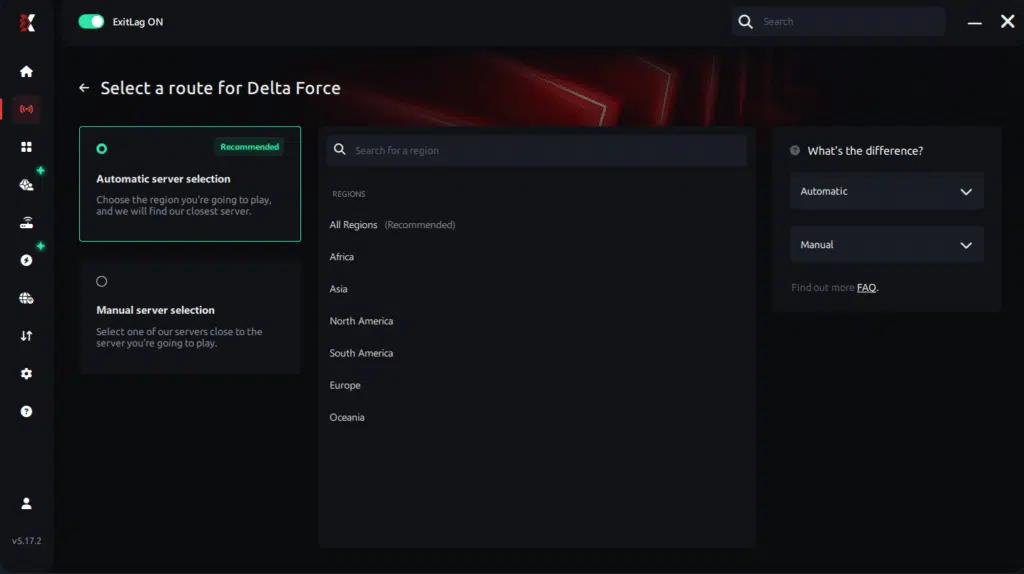
Manual route
If you prefer to have full control over your connection, you can manually choose the server based on the ping test results. Simply select the server that showed the lowest latency or the one that best meets your specific gaming needs, allowing complete customization of your experience.
Step 5 – Click “Delta Force” or the play button. ExitLag will begin optimizing your connection automatically.

Step 6 – Wait a few seconds until optimization is complete. You’ll see ping indicators in the interface.
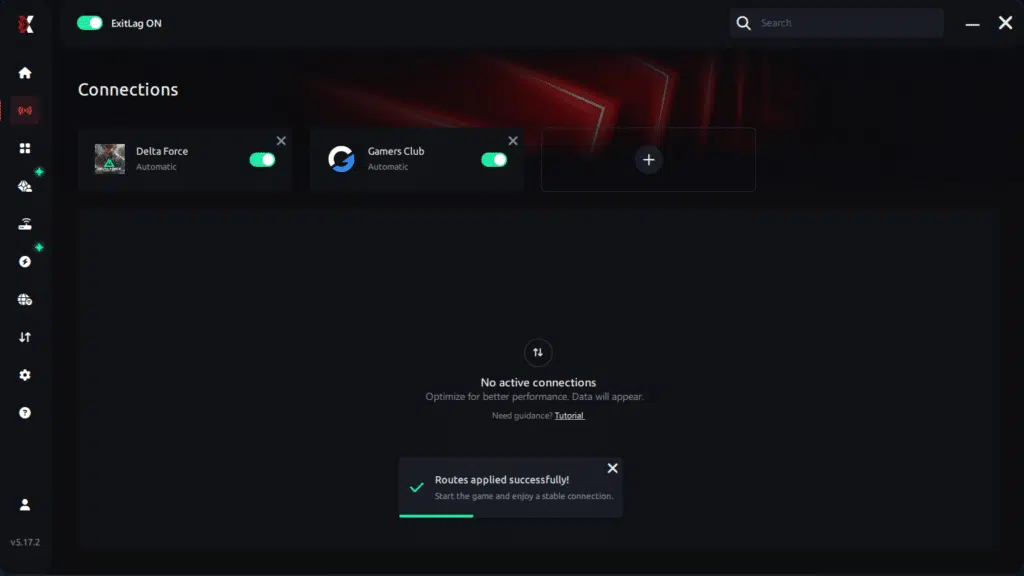
Step 7 – Launch Delta Force normally. The optimization will already be active.
ExitLag runs in the background while you play, constantly adjusting routes to maintain the best possible performance.
FAQ: everything about high ping in Delta Force
What causes high ping in Delta Force?
High ping usually comes from long-distance routing, ISP congestion, server load, or local network interference. In other words, issues like lag Delta Force occur when packets travel through unstable or overly long paths. At the same time, peak-hour usage intensifies the delays.
How do I check my ping in Delta Force?
Most servers or game modes provide a built-in network monitor. Still, you should verify your connection using your operating system’s ping tool. Soon after running a continuous test, you’ll see patterns such as jitter and packet loss that reveal deeper Delta Force connection issues.
What is good ping for Delta Force?
Ideally, you want under 80ms for competitive accuracy. Anything between 80–130ms remains playable but may feel sluggish during close-quarters combat. Even so, consistent numbers are more important than low but unstable values.
Can high ping get you banned in Delta Force?
No. High ping alone does not result in bans. However, unstable connections may cause forced disconnections from servers prioritizing stability. In advance, maintaining clean routing helps prevent unfair removals from matches.
Does ExitLag work for Delta Force?
Yes. ExitLag optimizes routing to reduce Delta Force high ping, packet loss, and instability. Many players see improvements in gunfights, movement consistency, and tactical coordination within minutes of enabling it.
Custom question: Why does my ping spike during big battles?
Large fights generate higher data loads, increasing server demand and packet exchange volume. Similarly, your ISP may struggle to route traffic efficiently during chaotic scenes, causing additional spikes. ExitLag’s optimized routing helps stabilize these moments.
Conclusion
In conclusion, dealing with latency in tactical shooters is frustrating, but the root cause is almost always routing. Fixing Delta Force high ping requires tools that optimize packet travel and reduce instability. Above all, ExitLag stands out as the most effective solution to ensure smoother gameplay and reliable performance.
For more insights, tutorials, and tips, visit the official ExitLag blog.
Delta Force high ping no longer needs to ruin your free time. Now that you understand the causes and how to stabilize your connection, you can finally enjoy your gaming smoothly. Start your free trial and see the difference for yourself.
Got questions or want to connect with other players? Join the conversation at the ExitLag Forum!


