Optimizing your Destiny builds is more important now than ever, and the Destiny 2 Armor Picker has become one of the community’s favorite tools for reaching perfect stat distributions. Whether you're hunting for triple 100 stats, planning end-game Nightfall setups or testing exotic synergies, knowing how to use this tool saves hours of trial and error.
Many players struggle to understand how Armor Picker works, especially when juggling mods, stat tiers, fragments and seasonal bonuses. The Destiny 2 Armor Picker solves that by automatically analyzing every armor piece you own and generating optimized loadouts that match your goals. It’s fast, accurate and directly integrated with DIM, making build crafting smoother for both casual and hardcore players.
What exactly does Destiny 2 Armor Picker do, and why is it essential for build crafting?
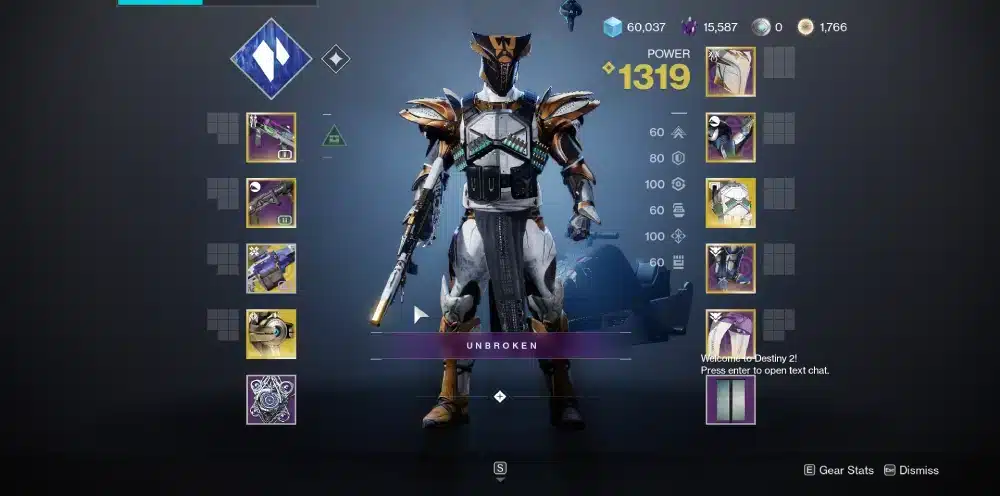
At its core, this tool simplifies what would otherwise take hours of manual testing. By analyzing your inventory through Bungie’s API, Armor Picker Destiny 2 automatically evaluates every armor piece you own and identifies the strongest combinations for your target stat tiers.
This automation ensures cleaner, faster and more accurate build customization than in-game menus alone.
To achieve this, the tool considers several important elements:
- Your current armor stats;
- Masterworked bonuses;
- Artifice armor extra points;
- Chosen exotic and subclass setup;
- Seasonal mods and stat penalties;
- Fragment bonuses that shift base stat values.
With this foundation, you can now explore every major feature that makes the tool so valuable for crafting optimized end-game builds.
What Is Destiny 2 Armor Picker?
Understanding what the tool is, and what it is not, is the first step. The Destiny 2 Armor Picker is a fan-made optimizer designed to help players craft min-maxed builds without manually testing dozens of armor combinations.
It evaluates the pieces stored in your vault, characters and postmaster to create the most efficient stat setup possible.
A Simple Tool Built for Fast Optimization
The goal of the tool is straightforward:
- Analyze every armor piece you own;
- Combine them into the best stat roll possible;
- Respect your chosen exotic;
- Account for masterworked pieces;
- Factor in seasonal mods and stat bonuses.
Because build crafting changes every season, the tool updates frequently, and that’s where Destiny 2 Armor Picker V2 comes in, offering performance improvements and better filtering.
Why Players Use It Every Season
Most players use the tool for:
- Hitting triple 100 stats faster;
- Testing builds around a specific exotic;
- Avoiding wasted armor drops;
- Planning end-game activities with precise distributions;
- Saving time when swapping characters or subclass setups.
For players who don’t want to manually calculate stats or check dozens of armor combinations, the Armor Picker Destiny 2 tool becomes essential.
How Destiny 2 Armor Picker Works
Even though the interface is simple, the calculation happening behind the scenes is powerful. The Destiny 2 Armor Picker uses Bungie’s official API to read your inventory and evaluate your armor stats.
Before showing the results, it cross-checks:
- Base armor stats;
- Masterwork values;
- General armor mods;
- Stat-specific mods;
- Fragment bonuses;
- Exotic requirements;
- Artifice slots;
- Class type of each piece.
This makes the optimizer extremely precise, especially compared to manually building loadouts in-game.
Step-by-Step Process of the Tool
Here’s how the tool works in practice:
- You log in with your Bungie account;
- You choose your class and exotic;
- You set desired stat tiers;
- You apply filters (element type, armor energy, artifice, etc.);
- Armor Picker calculates every possible combination;
- It shows you the exact set of armor to equip;
- You export the build into DIM.
This streamlined flow makes build crafting fast even for new players.
Why DIM Integration Matters
Most players pair Armor Picker with Destiny Item Manager (DIM). The integration allows you to press a single button and automatically load the recommended armor into DIM, making the transfer process instant.
This saves time, especially for players switching loadouts constantly between:
- Raids;
- Grandmaster Nightfalls;
- Trials;
- Dungeons;
- Seasonal activities.
Armor Stats Table Reference
Here is a simple table showing how stat tiers work, which Armor Picker uses when optimizing your build:
| Stat Tier | Required Points | Cooldown/Benefit Impact |
| Tier 1 | 10 points | Very small impact |
| Tier 5 | 50 points | Noticeably stronger |
| Tier 10 | 100 points | Maximum efficiency |
Understanding these tiers helps players choose realistic goals. The Destiny 2 Armor Picker highlights which combinations reach these efficiently.
Integration Between Destiny 2 Armor Picker and DIM
The integration with DIM (Destiny Item Manager) is a major part of why the tool became so popular. The standard workflow many players use is:
- Build optimization in Armor Picker;
- Equipment management in DIM;
- In-activity loadout swapping in DIM.
Together, they form the most complete community build system in Destiny 2.
How Exporting to DIM Works
The built-in export button sends:
- Your armor pieces;
- Stat mods;
- Exotic choice;
- Targeted tiers;
- Seasonal mods (if applicable).
directly into a DIM loadout template.
How DIM Complements Armor Picker
DIM offers tools the Armor Picker does not, such as:
- Searching for armor by stat spikes;
- Tagging or locking individual pieces;
- Comparing rolls;
- Equipping builds instantly;
- Saving loadouts for specific activities.
This is why most hardcore players run both tools side by side.
H3: Fixing DIM and Armor Picker Sync Issues
One of the most searched problems is Destiny 2 Armor Picker not working. Common causes include:
- DIM not updated;
- Bungie API downtime;
- Old cookies cached in your browser;
- Incorrect settings for armor filtering.
Most issues are solved by:
- Refreshing DIM;
- Re-logging into Armor Picker;
- Clearing cache;
- Waiting for API stabilization.
Example Builds Using Destiny 2 Armor Picker
No guide is complete without real-world examples. Below are three optimized setups using the Destiny 2 Armor Picker for Titan, Warlock and Hunter. Each build prioritizes high mobility, resilience or discipline depending on purpose.
Hunter Example: Triple 100 Nightstalker
This setup focuses on:
- 100 Mobility;
- 100 Discipline;
- 100 Recovery;
- Exotic: Orpheus Rig;
- Mods: Reaper + Bomber;
- Great for end-game Void builds.
Armor Picker analyzes artifice armor and fragment bonuses to hit these easily.
Titan Example: Solar Throwing Hammer Build
Goals:
- 100 Resilience;
- 100 Strength;
- 70 Discipline;
- Exotic: Synthoceps;
- Fragments: Ember of Solace / Torches.
Ideal for dungeons and casual end-game.
Warlock Example: Strand Suspend Support
Goals:
- 100 Recovery;
- 100 Discipline;
- 80 Strength;
- Exotic: Swarmers;
- Strong for lost sectors and seasonal content.
These are examples of how the Armor Picker Destiny 2 tool builds around specific exotics.
How Armor Picker Helps Shape Playstyle
Most players optimize for one of these themes:
- Ability spam builds;
- High uptime survivability;
- Fragment-boosted subclass synergies;
- Burst damage setups;
- Crowd control and support builds.
Armor Picker makes these setups achievable even with average armor drops.
Advanced Settings Inside Destiny 2 Armor Picker
For players who want to push optimization further, especially chasing quadruple or quintuple 100 stats, the tool’s advanced filters become essential.
Filtering Artifice Armor
Artifice armor is one of the strongest end-game advantages because each piece adds +3 to a chosen stat. Armor Picker tracks these carefully and often builds triple 100 setups using them.
Exotic Locking and Stat Biasing
You can lock:
- Stat spikes;
- Specific armor archetypes;
- Energy types;
- Masterworked pieces only.
This helps players who want to test niche exotics or subclass combinations.
Subclass Fragment Bonuses
Subclasses affect your build:
- Void fragments add +10 or -10;
- Solar fragments adjust recovery and discipline;
- Strand fragments modify strength;
- Arc fragments influence mobility.
Armor Picker adds these automatically.
Seasonal Mod Interaction
Depending on the season, certain mods boost specific stats, enhance cooldowns or add penalties that shift your overall distribution. Destiny 2 Armor Picker automatically reads these modifiers and incorporates them into your calculations, ensuring your build reflects your actual stat values instead of base numbers only.
These seasonal bonuses are especially important when chasing high-end goals like triple 100 or quadruple 100 distributions, since even a small +10 from a mod can completely change which armor combination is considered optimal.
The tool adjusts these values dynamically, helping players avoid setups that look strong on paper but collapse once seasonal effects are applied in game.
Armor Picker also helps you plan ahead when new seasons arrive. If a seasonal artifact grants additional stat bonuses, or introduces mods that require more energy, the tool recalculates your recommended armor sets accordingly.
This means your builds stay efficient even when subclass tuning, fragments or mod ecosystems shift from one season to the next.
FAQ
1. What is Destiny 2 Armor Picker?
It’s a build-optimization tool that analyzes your armor and creates stat-perfect combinations.
2. Why is my Destiny 2 Armor Picker not working?
Usually due to DIM desync, Bungie API downtime, or cached browser data.
3. Does Destiny 2 Armor Picker work with DIM?
Yes, you can export builds directly into DIM loadout templates.
4. What is Destiny 2 Armor Picker V2?
It’s the updated version of the tool with better performance and more filters.
5. Can Armor Picker help me reach triple 100 stats?
Absolutely. It calculates the most efficient armor combinations using your entire inventory.
Level Up Your Destiny 2 Gameplay with ExitLag
If you care about performance, min-maxing and efficient build crafting, the Destiny 2 Armor Picker is one of the most valuable tools in the community. It helps you reach perfect stat distributions, build around your favorite exotic and unlock end-game setups without spending hours swapping armor manually. The combination of Armor Picker + DIM makes build crafting smooth, precise and enjoyable, even for new players.
But none of your builds matter if your connection isn’t stable. Whether you’re optimizing for raids, Trials or GM Nightfalls, ExitLag reduces lag, stabilizes your route and improves connection quality so you can focus entirely on your gameplay. Keep your builds sharp, and your connection even sharper, with ExitLag.